本文同步自个人博客Flutter Android如何延迟加载代码,转载请注明出处。
Motivation
在 add-to-app 的多引擎场景下,随着业务变多,代码量也会持续增长,首次创建引擎的耗时会越来越明显。我们 APP 的 libapp.so 已经有 90+MB,在低端机上首次加载大约需要 2 秒,并且增加内存占用。
但在 add-to-app 场景里,并不是所有 Flutter 页面都会在启动时立刻展示,通常是进入某个 Flutter 页面时才真正需要加载对应代码。因此,在初始化阶段一次性加载全部代码显然不太合理。
那有没有办法把暂时不需要的代码模块延迟加载呢?答案是肯定的。Flutter 官方支持 Deferred-components,这个能力本质上是基于 Dart 的 deferred import:构建时会把部分 Dart AOT 代码拆分成独立的 loading units(一般后缀为part.so),运行时再按需加载。这样就可以避免在初始化阶段一次性加载全部代码。
不过,官方这套能力默认主要是为 Google Play Dynamic Feature Modules 设计的,并且局限了在Google Play渠道使用。对我们的场景来说,并不一定需要远程下发能力,我们更需要的是"本地代码按需加载",而不是在初始化时一次性把所有代码都加载进来。
开启Deferred-components
Flutter 支持通过 Dart 的 deferred 关键字做延迟加载,但在 Android 上,官方默认方案是基于 Google Play Dynamic Feature Modules,并且完整发布流程主要围绕 AAB(App Bundle)展开。
不过深入代码后可以发现,是否进入 Deferred-components 的构建流程,本质上是通过配置项控制的。只要相关配置生效,Flutter tool 就会进入 Deferred-components 的构建路径,生成 split AOT 产物。
实验下来,开启这个能力的关键点主要有两个:
- 在
android/gradle.properties中添加deferred-components=true - 在
pubspec.yaml中添加deferred-components:
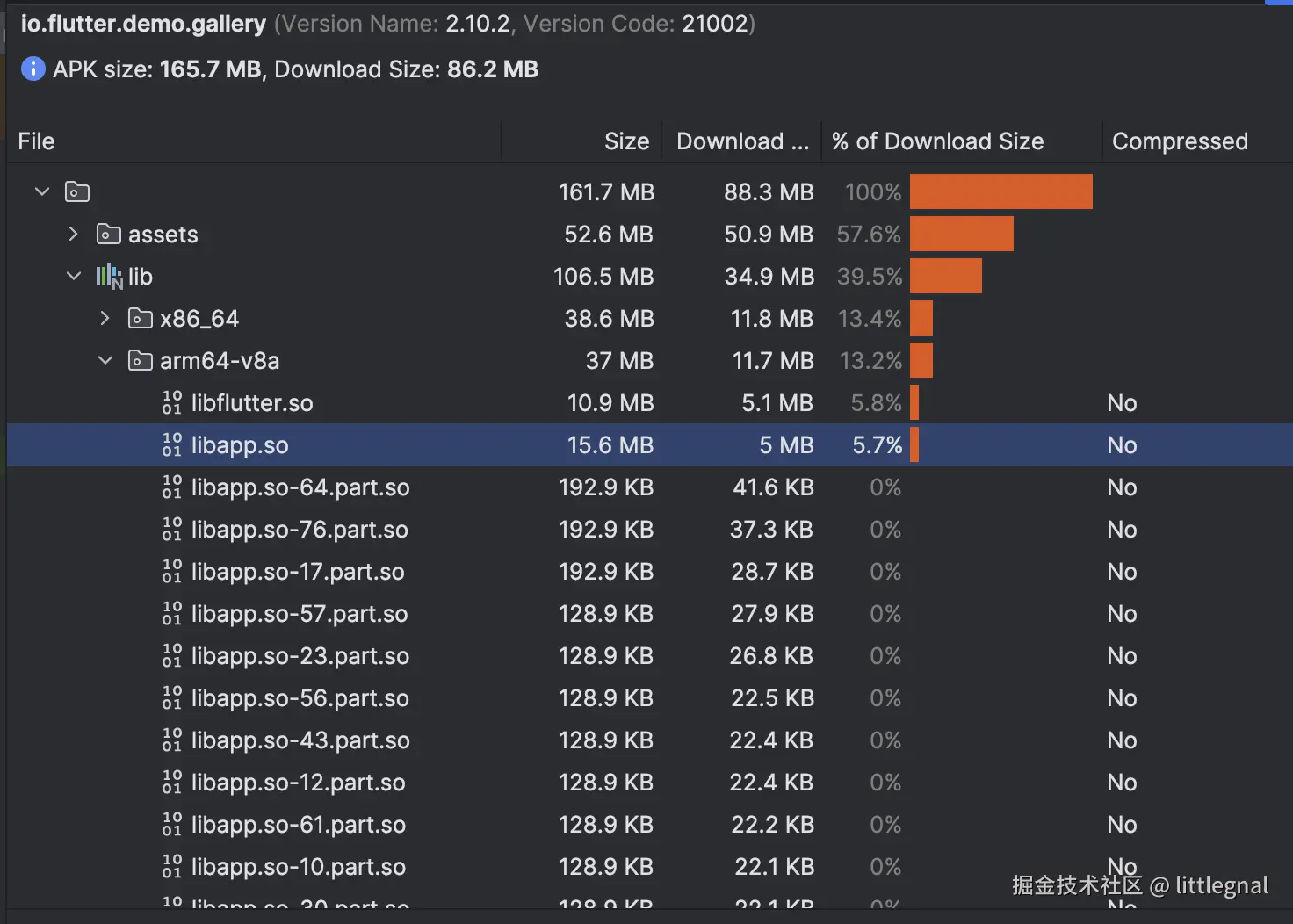
配置完成后,即使构建 APK,也可以开启 Deferred-components 的相关能力。
以下是官方 gallery 构建 APK 的效果
实现DeferredComponentManager
如何实现"本地延迟加载"?可以参考官方 PlayStoreDeferredComponentManager 的实现思路,把 Google Play Core 相关逻辑去掉,仅保留本地查找和加载 .so 的部分。
下面是一个可行的示例:
kt
class LocalDeferredLibraryManager(
    private val context: Context
) : DeferredComponentManager {

    private val flutterApplicationInfo: FlutterApplicationInfo = ApplicationInfoLoader.load(context)

    private var flutterJNI: FlutterJNI? = null

    override fun setJNI(flutterJNI: FlutterJNI?) {
        this.flutterJNI = flutterJNI
    }

    override fun setDeferredComponentChannel(channel: DeferredComponentChannel?) {

    }

    override fun installDeferredComponent(
        loadingUnitId: Int,
        componentName: String?
    ) {
        Log.e("Flutter", "LocalDeferredImportManager, installDeferredComponent, loadingUnitId: $loadingUnitId, componentName: $componentName")

        loadDartLibrary(loadingUnitId, componentName);
    }

    override fun getDeferredComponentInstallState(
        loadingUnitId: Int,
        componentName: String?
    ): String? {
        return ""
    }

    override fun loadAssets(loadingUnitId: Int, componentName: String?) {

    }

    override fun loadDartLibrary(loadingUnitId: Int, componentName: String?) {
        Log.e("Flutter", "LocalDeferredImportManager, loadDartLibrary, loadingUnitId: $loadingUnitId")
        if (loadingUnitId < 0) {
            return;
        }

        val aotSharedLibraryName =
            flutterApplicationInfo.aotSharedLibraryName + "-" + loadingUnitId + ".part.so";

        // Possible values: armeabi, armeabi-v7a, arm64-v8a, x86, x86_64, mips, mips64
        val abi: String = Build.SUPPORTED_ABIS[0]!!
        val pathAbi = abi.replace("-", "_") // abis are represented with underscores in paths.

        // TODO(garyq): Optimize this apk/file discovery process to use less i/o and be more
        // performant and robust.

        // Search directly in APKs first
        val apkPaths: MutableList<String?> = ArrayList<String?>()

        // If not found in APKs, we check in extracted native libs for the lib directly.
        val soPaths: MutableList<String?> = ArrayList<String?>()

        val searchFiles: Queue<File?> = LinkedList<File?>()

        // Downloaded modules are stored here
        searchFiles.add(context.getFilesDir())

        // The initial installed apks are provided by `sourceDirs` in ApplicationInfo.
        // The jniLibs we want are in the splits not the baseDir. These
        // APKs are only searched as a fallback, as base libs generally do not need
        // to be fully path referenced.
        Log.e("Flutter", "context.applicationInfo.splitSourceDirs: ${context.applicationInfo.splitSourceDirs}")
        for (path in context.applicationInfo.splitSourceDirs ?: emptyArray()) {
            searchFiles.add(File(path))
        }

        while (!searchFiles.isEmpty()) {
            val file = searchFiles.remove()
            if (file != null && file.isDirectory() && file.listFiles() != null) {
                for (f in file.listFiles()) {
                    searchFiles.add(f)
                }
                continue
            }
            val name = file!!.getName()
            // Special case for "split_config" since android base module non-master apks are
            // initially installed with the "split_config" prefix/name.
            if (name.endsWith(".apk")
                && (name.startsWith(componentName!!) || name.startsWith("split_config"))
                && name.contains(pathAbi)
            ) {
                apkPaths.add(file.getAbsolutePath())
                continue
            }
            if (name == aotSharedLibraryName) {
                soPaths.add(file.getAbsolutePath())
            }
        }

        val searchPaths: MutableList<String?> = ArrayList<String?>()

        // Add the bare filename as the first search path. In some devices, the so
        // file can be dlopen-ed with just the file name.
        searchPaths.add(aotSharedLibraryName)

        for (path in apkPaths) {
            searchPaths.add(path + "!lib/" + abi + "/" + aotSharedLibraryName)
        }
        for (path in soPaths) {
            searchPaths.add(path)
        }

        for (s in searchPaths) {
            Log.e("Flutter", "searchPath: $s")
        }

        flutterJNI!!.loadDartDeferredLibrary(
            loadingUnitId, searchPaths.toTypedArray<String?>()
        )
    }

    override fun uninstallDeferredComponent(
        loadingUnitId: Int,
        componentName: String?
    ): Boolean {
        return true
    }

    override fun destroy() {

    }
}
结论
这是一个可行方案:复用 Flutter Deferred-components 的整体机制,把 libapp.so 拆分成多个 *.part.so,并通过自定义 DeferredComponentManager 在本地按需加载,从而避免初始化阶段一次性加载全部代码,优化 add-to-app 多引擎场景下的首开耗时及内存占用。
不过,它本质上仍然属于"非官方标准路径"的自定义实现,是否适合落地到项目中,还需要结合自身项目的实现方式以及长期维护成本来评估。