为Zensical添加 GitHub 仓库卡片
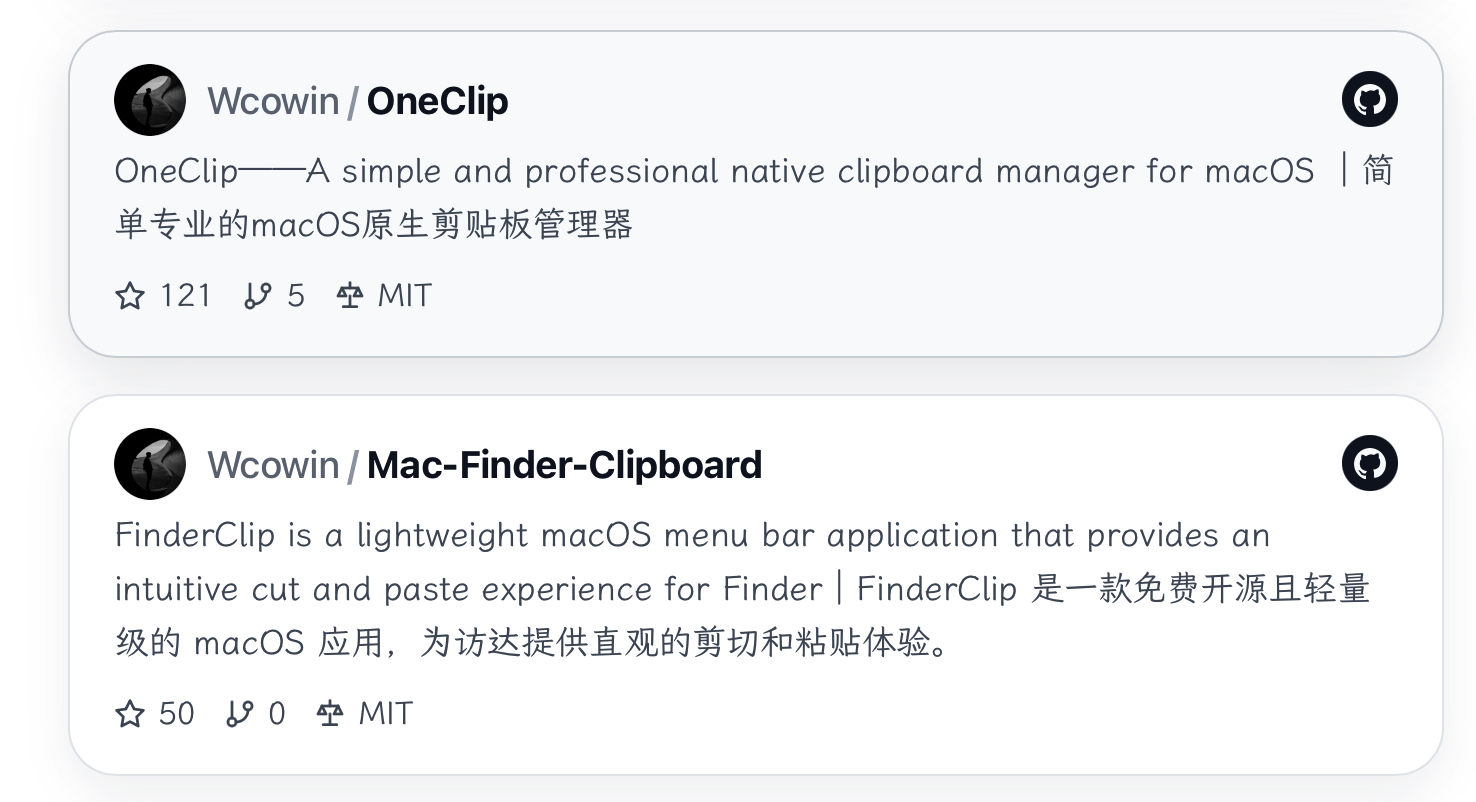
在 Zensical 里,你可以像官方文档那样,为任意 GitHub 仓库生成一张「动态信息卡片」:
- 自动从 GitHub API 获取 Star / Fork / License / 仓库描述 / 头像
- 适配浅色 / 深色模式
- 支持 PC 和移动端自适应布局
- 当 Fork 数为 0 或 没有 License 时,会自动隐藏对应的指标,避免显示一串「0」
1. 在页面中插入 HTML 结构
以首页 index.md 为例,在你希望出现卡片的位置插入下面这一段 HTML:
html
<!-- OneClip GitHub 仓库卡片(仿 GitHub Repo Card 风格) -->
<div class="github-repo-card-wrapper">
  <a
    id="oneclip-github-card"
    class="github-repo-card"
    href="https://github.com/Wcowin/OneClip"
    target="_blank"
    rel="noopener noreferrer"
  >
    <div class="github-repo-card-inner">
      <div class="github-repo-main">
        <div class="github-repo-left">
          <div class="github-repo-avatar-wrapper">
            <div id="oneclip-avatar" class="github-repo-avatar"></div>
          </div>
          <div class="github-repo-title">
            <span class="github-repo-owner">Wcowin</span>
            <span class="github-repo-slash">/</span>
            <span class="github-repo-name">OneClip</span>
          </div>
        </div>
        <div class="github-repo-logo">
          <span class="github-repo-logo-inner">
            <svg viewBox="0 0 24 24" aria-hidden="true">
              <path
                d="M12 0C5.37 0 0 5.37 0 12c0 5.3 3.44 9.8 8.21 11.39.6.11.79-.26.79-.58v-2.23c-3.34.73-4.03-1.42-4.03-1.42-.55-1.39-1.34-1.76-1.34-1.76-1.09-.75.08-.73.08-.73 1.21.08 1.84 1.24 1.84 1.24 1.07 1.84 2.81 1.3 3.49.99.11-.78.42-1.3.76-1.6-2.66-.31-5.47-1.33-5.47-5.93 0-1.31.47-2.38 1.24-3.22-.12-.3-.54-1.52.11-3.17 0 0 1.01-.32 3.31 1.23A11.5 11.5 0 0 1 12 4.8c1.02.01 2.04.14 3 .41 2.3-1.55 3.3-1.23 3.3-1.23.66 1.65.24 2.87.12 3.17.77.84 1.23 1.91 1.23 3.22 0 4.61-2.81 5.62-5.49 5.93.43.37.82 1.1.82 2.23v3.29c0 .32.19.7.8.58C20.57 21.8 24 17.3 24 12 24 5.37 18.63 0 12 0Z"
              />
            </svg>
          </span>
        </div>
      </div>
      <p class="github-repo-description"></p>
      <div class="github-repo-meta">
        <span class="github-repo-meta-item">
          <span class="github-repo-meta-icon">
            <!-- Lucide: star -->
            <svg viewBox="0 0 24 24" aria-hidden="true">
              <polygon
                points="12 2 15.09 8.26 22 9.27 17 14.14 18.18 21.02 12 17.77 5.82 21.02 7 14.14 2 9.27 8.91 8.26 12 2"
              />
            </svg>
          </span>
          <span id="oneclip-stars"></span>
        </span>
        <span class="github-repo-meta-item">
          <span class="github-repo-meta-icon">
            <!-- Lucide: git-branch -->
            <svg viewBox="0 0 24 24" aria-hidden="true">
              <line x1="6" y1="3" x2="6" y2="15"></line>
              <circle cx="6" cy="18" r="3"></circle>
              <circle cx="18" cy="6" r="3"></circle>
              <path d="M18 9a9 9 0 0 1-9 9"></path>
            </svg>
          </span>
          <span id="oneclip-forks"></span>
        </span>
        <span class="github-repo-meta-item">
          <span class="github-repo-meta-icon">
            <!-- Lucide: scale -->
            <svg viewBox="0 0 24 24" aria-hidden="true">
              <path d="M7 20h10" />
              <path d="M6 6h12" />
              <path d="M6 6 3 12h6Z" />
              <path d="m21 12-3-6-3 6Z" />
              <path d="M12 6V2" />
              <path d="M12 12v8" />
            </svg>
          </span>
          <span id="oneclip-license"></span>
        </span>
      </div>
    </div>
  </a>
</div>
如果你想用在别的仓库,只需要把上面
href和id相关的字段换成自己的即可,例如:
href="https://github.com/你的用户名/你的仓库名"const apiUrl = 'https://api.github.com/repos/你的用户名/你的仓库名'
2. 添加卡片样式(CSS)
紧接着在同一页面中加入下面这段 <style>,用于控制卡片的布局、圆角、阴影和暗色模式:
html
<style>
  .github-repo-card {
    display: block;
    text-decoration: none;
    color: inherit;
    margin-top: 18px;
    margin-bottom: 8px;
  }

  .github-repo-card-inner {
    border-radius: 24px;
    padding: 16px 22px;
    background: #ffffff;
    border: 1px solid #e5e7eb;
    box-shadow: 0 8px 24px rgba(15, 23, 42, 0.06);
    transition: transform 0.16s ease-out, box-shadow 0.16s ease-out, border-color 0.16s ease-out,
      background-color 0.16s ease-out;
    width: 100%;
  }

  .github-repo-card:hover .github-repo-card-inner {
    transform: translateY(-1.5px);
    box-shadow: 0 18px 45px rgba(15, 23, 42, 0.16);
    border-color: #d1d5db;
    background-color: #f9fafb;
  }

  .github-repo-main {
    display: flex;
    align-items: center;
    justify-content: space-between;
    gap: 16px;
  }

  .github-repo-left {
    display: flex;
    align-items: center;
    gap: 10px;
    min-width: 0;
  }

  .github-repo-avatar-wrapper {
    flex-shrink: 0;
    width: 36px;
    height: 36px;
    border-radius: 999px;
    overflow: hidden;
    background: #e5e7eb;
  }

  .github-repo-avatar {
    width: 100%;
    height: 100%;
    border-radius: 999px;
    background-color: #e5e7eb;
    background-size: cover;
    background-position: center;
    background-repeat: no-repeat;
  }

  .github-repo-title {
    display: inline-flex;
    align-items: center;
    gap: 4px;
    font-family: system-ui, -apple-system, BlinkMacSystemFont, 'SF Pro Text', 'Segoe UI', sans-serif;
    font-size: 0.95rem;
    font-weight: 600;
    color: #111827;
  }

  .github-repo-owner {
    color: #6b7280;
    font-weight: 500;
  }

  .github-repo-slash {
    color: #9ca3af;
  }

  .github-repo-name {
    color: #111827;
    font-weight: 700;
  }

  .github-repo-description {
    margin: 4px 0 8px 0;
    font-size: 0.86rem;
    line-height: 1.6;
    color: #4b5563;
  }

  .github-repo-meta {
    display: flex;
    align-items: center;
    flex-wrap: wrap;
    gap: 14px;
    font-size: 0.8rem;
    color: #4b5563;
  }

  .github-repo-meta-item {
    display: inline-flex;
    align-items: center;
    gap: 6px;
  }

  /* 无 fork 信息时隐藏 fork 项(例如 fork 数为 0) */
  .github-repo-meta-item:has(#oneclip-forks:empty) {
    display: none;
  }

  /* 无开源许可证时隐藏对应项 */
  .github-repo-meta-item:has(#oneclip-license:empty) {
    display: none;
  }

  .github-repo-meta-icon {
    display: inline-flex;
    align-items: center;
    justify-content: center;
    width: 16px;
    height: 16px;
    color: inherit;
  }

  .github-repo-meta-icon svg {
    width: 100%;
    height: 100%;
    stroke-width: 2;
    stroke: currentColor;
    fill: none;
    stroke-linecap: round;
    stroke-linejoin: round;
  }

  .github-repo-logo {
    flex-shrink: 0;
    margin-left: 12px;
  }

  .github-repo-logo-inner {
    display: inline-flex;
    align-items: center;
    justify-content: center;
    width: 28px;
    height: 28px;
    border-radius: 999px;
    background: #111827;
    color: #f9fafb;
  }

  .github-repo-logo-inner svg {
    width: 16px;
    height: 16px;
    fill: currentColor;
  }

  /* 夜间模式适配 */
  [data-md-color-scheme='slate'] .github-repo-card-inner {
    background: #020617;
    border-color: #1f2937;
    box-shadow: 0 18px 40px rgba(0, 0, 0, 0.75);
  }

  [data-md-color-scheme='slate'] .github-repo-title {
    color: #e5e7eb;
  }

  [data-md-color-scheme='slate'] .github-repo-owner {
    color: #9ca3af;
  }

  [data-md-color-scheme='slate'] .github-repo-name {
    color: #f9fafb;
  }

  [data-md-color-scheme='slate'] .github-repo-description {
    color: #9ca3af;
  }

  [data-md-color-scheme='slate'] .github-repo-meta {
    color: #9ca3af;
  }

  [data-md-color-scheme='slate'] .github-repo-logo-inner {
    background: #f9fafb;
    color: #020617;
  }

  @media (max-width: 768px) {
    .github-repo-card-inner {
      padding: 14px 16px;
      border-radius: 18px;
    }

    .github-repo-description {
      font-size: 0.84rem;
      line-height: 1.5;
      display: -webkit-box;
      -webkit-line-clamp: 2;
      -webkit-box-orient: vertical;
      overflow: hidden;
    }
  }
</style>
这段 CSS 就是当前首页卡片的真实样式,可以直接复用,也可以按自己喜好微调圆角、阴影、颜色等。
3. 通过 GitHub API 获取仓库信息
最后,在同一个页面里加入下面的 <script>,在页面加载时从 GitHub API 拉取仓库信息,并填充到卡片中:
html
<script>
(function () {
  const apiUrl = 'https://api.github.com/repos/Wcowin/OneClip';

  async function initOneClipCard() {
    const card = document.getElementById('oneclip-github-card');
    if (!card) return;

    const starEl = document.getElementById('oneclip-stars');
    const forkEl = document.getElementById('oneclip-forks');
    const licenseEl = document.getElementById('oneclip-license');
    const descEl = card.querySelector('.github-repo-description');
    const avatarEl = document.getElementById('oneclip-avatar');

    try {
      const res = await fetch(apiUrl, { headers: { Accept: 'application/vnd.github+json' } });
      if (!res.ok) throw new Error('GitHub API error: ' + res.status);

      const data = await res.json();
      if (typeof data.stargazers_count === 'number' && starEl) {
        starEl.textContent = data.stargazers_count.toString();
      }
      if (typeof data.forks_count === 'number' && forkEl) {
        // 当 fork 数为 0 时不显示,保持为空并交给 CSS 隐藏整项
        forkEl.textContent = data.forks_count > 0 ? data.forks_count.toString() : '';
      }
      if (data.license && data.license.spdx_id && licenseEl) {
        licenseEl.textContent = data.license.spdx_id;
      }
      if (data.description && descEl) {
        descEl.textContent = data.description;
      }
      if (data.owner && data.owner.avatar_url && avatarEl) {
        avatarEl.style.backgroundImage = `url(${data.owner.avatar_url})`;
        avatarEl.setAttribute('aria-label', data.owner.login || 'Repository owner avatar');
        avatarEl.setAttribute('role', 'img');
      }
    } catch (e) {
      console.warn('加载 OneClip GitHub 信息失败:', e);
    }
  }

  if (document.readyState === 'loading') {
    document.addEventListener('DOMContentLoaded', initOneClipCard);
  } else {
    initOneClipCard();
  }
})();
</script>
关于 GitHub API 额度
- 这个实现使用的是 未认证的公共 API,适合个人博客、小流量站点。
- GitHub 对匿名请求有速率限制(按 IP 计算),如果访问量特别大,建议:
- 配合
fetch带上简单的反向代理或缓存; - 或者使用预构建脚本在构建时把数据写死,而不是运行时请求。
- 配合
4. 复用到其他仓库
如果你想为其它仓库(例如 foo/bar)也生成同样的卡片,推荐做法:
- 复制整段 HTML / CSS / JS;
- 全局搜索替换以下内容:
oneclip-github-card→foo-bar-github-cardoneclip-avatar→foo-bar-avataroneclip-stars/oneclip-forks/oneclip-license→ 对应新 idWcowin/OneClip→ 仓库实际所有者和名称https://api.github.com/repos/Wcowin/OneClip/https://github.com/Wcowin/OneClip→ 你的仓库地址
你也可以把这段实现抽到单独的 partial 或 JS 组件里,但对大多数文档站来说,直接在需要的位置嵌入这一小段就已经足够简洁实用。