一、核心架构:为什么 Nginx 如此高性能?
Nginx 的高性能源于其独特的事件驱动(Event-Driven) 和**异步非阻塞(Asynchronous Non-blocking)**架构,这与 Apache 传统的多进程/多线程模型截然不同。
1.1 进程模型详解
Nginx 采用多进程模式,但每个进程内部通过事件循环处理海量连接:
表格
| 进程类型 | 职责描述 | 数量建议 |
|---|---|---|
| Master 进程 | 管理者。读取配置文件、绑定端口、启动/回收 Worker 进程、平滑重启时不中断服务。 | 1 个 |
| Worker 进程 | 工作者。实际处理网络连接、读写磁盘、转发请求。所有 Worker 平等竞争处理新连接。 | 通常等于 CPU 核心数 (auto) |
- 优势:避免了多线程上下文切换的开销,单个 Worker 即可轻松处理数万并发连接,内存占用极低(通常仅几 MB)。
1.2 配置结构解剖
理解配置块的层级关系是掌握 Nginx 的关键:
# 1. 全局块 (Global Context)
# 影响整体运行的参数
user nginx;                  # 运行用户
worker_processes auto;       # 自动匹配 CPU 核心数
error_log /var/log/nginx/error.log warn;
pid /run/nginx.pid;

# 2. Events 块
# 定义网络连接处理机制
events {
    worker_connections 10240; # 单 Worker 最大连接数 (总并发 = worker_processes * worker_connections)
    use epoll;                # Linux 下高效的事件驱动模型
    multi_accept on;          # 一次性接受尽可能多的连接
}

# 3. HTTP 块
# 定义 Web 服务器核心功能
http {
    include /etc/nginx/mime.types;
    default_type application/octet-stream;

    # 日志格式定义
    log_format main '$remote_addr - $remote_user [$time_local] "$request" '
                    '$status $body_bytes_sent "$http_referer" '
                    '"$http_user_agent" "$http_x_forwarded_for"';

    # 虚拟主机配置 (Server Context)
    server {
        listen 80;
        server_name example.com;

        # 位置匹配 (Location Context)
        location / {
            root /usr/share/nginx/html;
            index index.html;
        }
    }
}
二、核心场景实战
2.1 静态资源服务优化
Nginx 处理静态文件的能力是其最强项。生产环境中需开启缓存与压缩。
配置示例:
server {
    listen 80;
    server_name static.example.com;

    location / {
        root /data/www;

        # 1. 浏览器缓存策略 (减少重复请求)
        expires 30d;
        add_header Cache-Control "public, immutable";

        # 2. 开启 gzip 压缩 (节省带宽)
        gzip on;
        gzip_types text/css application/javascript image/svg+xml;
        gzip_min_length 1k;
    }

    # 禁止访问隐藏文件
    location ~ /\. {
        deny all;
    }
}
2.2 反向代理:隐藏后端与透传信息
反向代理是 Nginx 最常用的功能,用于保护后端服务、统一入口。
关键指令解析
proxy_pass: 转发请求到后端。proxy_set_header: 至关重要。默认情况下,Nginx 会修改部分 Header,导致后端获取不到真实客户端 IP 或 Host。proxy_hide_header/proxy_pass_header: 控制向后端隐藏或透传特定响应头。
生产级反向代理配置:
server {
    listen 80;
    server_name api.example.com;

    location / {
        proxy_pass http://backend_cluster;

        # 1. 透传真实客户端 IP (后端需配置识别 X-Forwarded-For)
        proxy_set_header X-Real-IP $remote_addr;
        proxy_set_header X-Forwarded-For $proxy_add_x_forwarded_for;

        # 2. 透传原始 Host (防止后端重定向错误)
        proxy_set_header Host $host;

        # 3. 透传协议 (HTTP/HTTPS)
        proxy_set_header X-Forwarded-Proto $scheme;

        # 4. 超时设置 (避免长连接占用资源)
        proxy_connect_timeout 60s;
        proxy_send_timeout 60s;
        proxy_read_timeout 60s;
    }
}
注意 :若后端是 Apache,需在 Apache 配置中启用
mod_remoteip或修改日志格式%{X-Forwarded-For}i以记录真实 IP。
2.3 负载均衡:流量分发策略
Nginx 支持多种负载均衡算法,适应不同业务场景。
常见算法对比
| 算法 | 配置指令 | 适用场景 | 缺点 |
|---|---|---|---|
| 轮询 (默认) | (无) | 后端服务器性能相当,无状态服务 | 无法感知服务器负载 |
| 权重 (Weight) | weight=5 |
后端服务器性能不均 | 仍需人工调整权重 |
| IP Hash | ip_hash; |
需要会话保持 (Session Sticky) | 可能导致负载不均 (倾斜) |
| 最少连接 | least_conn; |
长连接服务 (如 WebSocket, DB) | 配置稍复杂 |
| 一致性 Hash | hash $key consistent; |
缓存集群 (减少缓存击穿) | 需指定 hash 键 |
综合配置示例:
upstream backend_pool {
    # 使用最少连接算法
    least_conn;

    # 定义后端服务器
    server 192.168.1.10:80 weight=3 max_fails=3 fail_timeout=30s;
    server 192.168.1.11:80 weight=2 max_fails=3 fail_timeout=30s;
    server 192.168.1.12:80 backup; # 仅当其他节点不可用时启用

    # 保持连接 (可选,提升性能)
    keepalive 32;
}

server {
    location / {
        proxy_pass http://backend_pool;
        # 启用长连接复用
        proxy_http_version 1.1;
        proxy_set_header Connection "";
    }
}
三、生产环境部署指南
3.1 源码编译安装 (推荐)
相比包管理器安装,源码编译可自定义模块(如 HTTP/3, Lua 支持),更适合生产环境。
步骤概览:
- 安装依赖:
dnf install -y gcc openssl-devel pcre2-devel zlib-devel make
2.创建用户:
useradd -s /sbin/nologin -M nginx
3.配置编译选项:
./configure \
--prefix=/usr/local/nginx \
--user=nginx --group=nginx \
--with-http_ssl_module \
--with-http_v2_module \
--with-http_realip_module \
--with-http_stub_status_module \
--with-http_gzip_static_module \
--with-stream \
--with-stream_ssl_module--with-stream: 支持 TCP/UDP 四层代理(常用于 MySQL, Redis 负载均衡)。
4.编译与安装:
make && make install
5.环境变量与服务化:
- 将
/usr/local/nginx/sbin加入PATH。 - 编写 systemd 服务文件 (
/etc/systemd/system/nginx.service) 实现开机自启。
3.2 常用运维命令
表格
| 命令 | 作用 |
|---|---|
nginx -t |
测试配置文件语法 (修改配置后必做) |
nginx -s reload |
平滑重载配置 (不中断服务) |
nginx -s stop |
快速停止 |
nginx -s quit |
优雅停止 (等待当前请求处理完毕) |
nginx -V |
查看版本及编译参数 |
四、进阶技巧与排错
4.1 隐藏后端特征
为了安全,通常需要隐藏后端服务器的真实类型(如 Apache 版本号)。
-
隐藏 ETag:
location / {
proxy_pass http://backend;
proxy_hide_header ETag;
} -
透传/修改 Server 头:
默认 Nginx 会覆盖后端的 Server 头。若想透传后端的 Server 信息:
proxy_pass_header Server;
或者强制修改为统一标识:
more_set_headers "Server: MyGateway"; # 需安装 headers-more 模块
4.2 故障排查思路
- 配置错误 :首先执行
nginx -t检查语法。 - 日志分析 :
- 错误日志 (
error.log):查看权限拒绝、上游连接失败等具体原因。 - 访问日志 (
access.log):分析状态码 (502 Bad Gateway 通常意味着后端挂了,504 Gateway Timeout 意味着后端响应太慢)。
- 错误日志 (
- 网络连通性 :在 Nginx 服务器上
curl或telnet后端 IP,确认网络可达。 - SELinux/Firewall:检查是否拦截了 Nginx 到后端的连接。
五、总结
Nginx 凭借其轻量级、高并发、多功能的特性,已成为云原生时代的基础设施标准。
- 对于开发:理解反向代理和负载均衡有助于设计微服务架构。
- 对于运维:掌握源码编译、调优参数和故障排查是保障系统稳定性的核心技能。
最佳实践建议:
- 始终使用
nginx -t验证配置后再 reload。 - 合理设置
worker_processes和worker_connections以匹配硬件资源。 - 务必配置
X-Forwarded-For以获取真实用户 IP。 - 定期更新 Nginx 版本以修复安全漏洞。
Nginx的四层负载均衡代理
1.实验环境(Mysql)
[root@RS1 ~]# dnf install mariadb-server -y
[root@RS1 ~]# vim /etc/my.cnf.d/mariadb-server.cnf
server_id =10
[root@RS1 ~]# systemctl enable --now mariadb
Created symlink /etc/systemd/system/mysql.service → /usr/lib/systemd/system/mariadb.service.
Created symlink /etc/systemd/system/mysqld.service → /usr/lib/systemd/system/mariadb.service.
Created symlink /etc/systemd/system/multi-user.target.wants/mariadb.service → /usr/lib/systemd/system/mariadb.service.
[root@RS1 ~]# mysql
Welcome to the MariaDB monitor.  Commands end with ; or \g.
Your MariaDB connection id is 3
Server version: 10.5.16-MariaDB MariaDB Server

Copyright (c) 2000, 2018, Oracle, MariaDB Corporation Ab and others.

Type 'help;' or '\h' for help. Type '\c' to clear the current input statement.

MariaDB [(none)]> CREATE USER lee@'%' IDENTIFIED BY 'lee';
Query OK, 0 rows affected (0.002 sec)

MariaDB [(none)]> GRANT ALL ON *.* TO lee@'%';
Query OK, 0 rows affected (0.001 sec)

MariaDB [(none)]> quit
Bye
[root@RS1 ~]# vim /etc/my.cnf.d/mariadb-server.cnf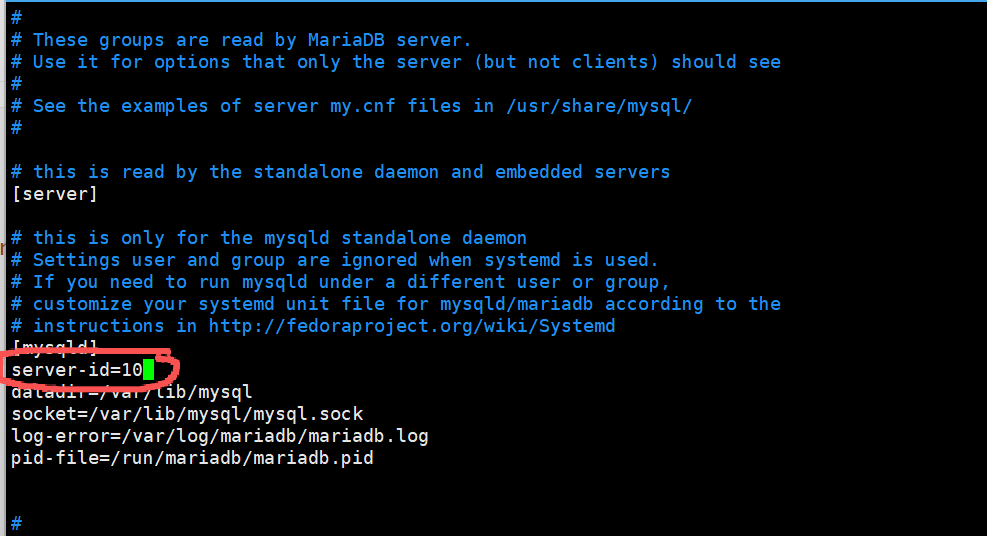
2.实验环境(dns)
#以RS1为列
[root@RS1 ~]# dnf install bind -y
[root@RS1 ~]# vim /etc/named.conf

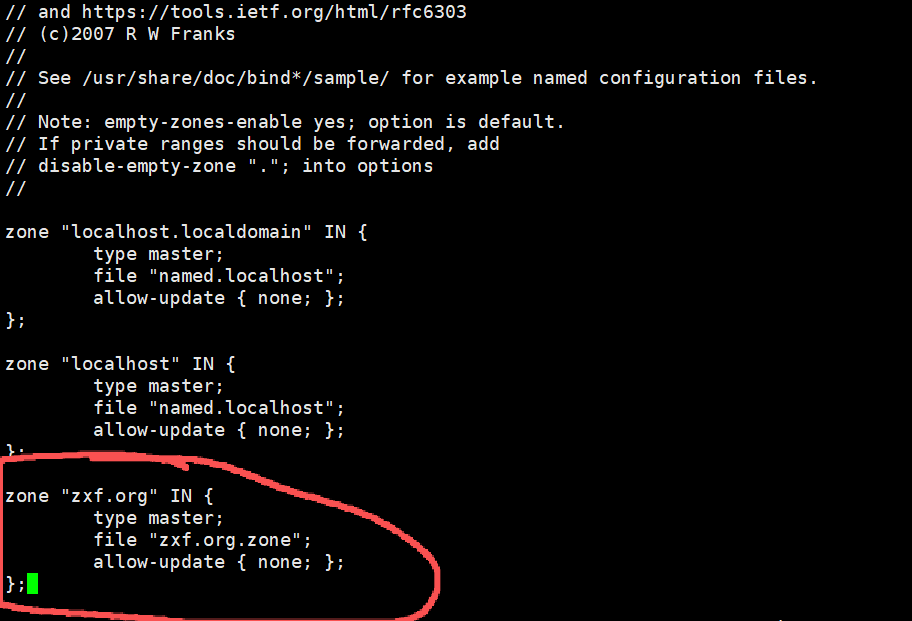
[root@RS1 ~]# vim /etc/named.rfc1912.zones

zone "timinglee.org" IN {
        type master;
        file "timinglee.org.zone";
        allow-update { none; };
};
[root@RS1 ~]# cd /var/named/
[root@RS1 named]# cp -p named.localhost  zxf.org.zone
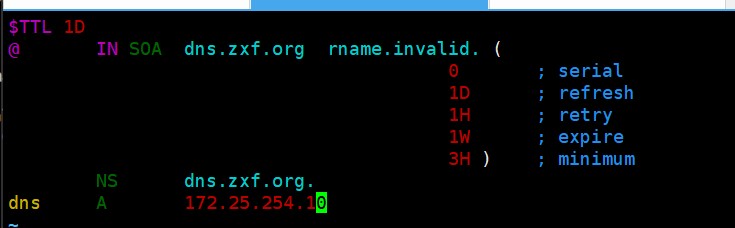
[root@RS1 named]# vim zxf.org.zone
$TTL 1D
@       IN SOA  dns.timingle.org. rname.invalid. (
                                        0       ; serial
                                        1D      ; refresh
                                        1H      ; retry
                                        1W      ; expire
                                        3H )    ; minimum
        NS      dns.timinglee.org.
dns     A       172.25.254.10
测试:
[root@RS1 named]# dig dns.zxf.org @172.25.254.10

; <<>> DiG 9.16.23-RH <<>> dns.zxf.org @172.25.254.10
;; global options: +cmd
;; Got answer:
;; ->>HEADER<<- opcode: QUERY, status: NOERROR, id: 18692
;; flags: qr aa rd ra; QUERY: 1, ANSWER: 1, AUTHORITY: 0, ADDITIONAL: 1
;; OPT PSEUDOSECTION:
; EDNS: version: 0, flags:; udp: 1232
; COOKIE: 95a9017be012dcd601000000699d86bfa36578ffe5288ed0 (good)
;; QUESTION SECTION:
;dns.zxf.org.			IN	A
;; ANSWER SECTION:
dns.zxf.org.		86400	IN	A	172.25.254.100
;; Query time: 0 msec
;; SERVER: 172.25.254.10#53(172.25.254.10)
;; WHEN: Tue Feb 24 19:08:47 CST 2026
;; MSG SIZE  rcvd: 84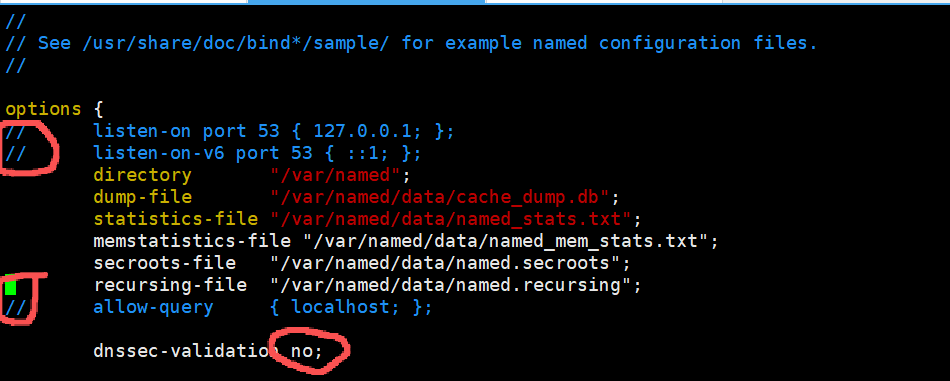
 3.tcp四层负载
[root@Nginx conf]# mkdir  /usr/local/nginx/conf/tcp -p
[root@Nginx conf]# mkdir  /usr/local/nginx/conf/udp -p
[root@Nginx conf]# vim /usr/local/nginx/conf/nginx.conf
include "/usr/local/nginx/conf/tcp/*.conf";
[root@Nginx conf]# vim /usr/local/nginx/conf/tcp/mariadb.conf
stream {
  upstream mysql_server {
    server 172.25.254.10:3306  max_fails=3 fail_timeout=30s;
    server 172.25.254.20:3306  max_fails=3 fail_timeout=30s;
  }

  server {
    listen 172.25.254.100:3306;
    proxy_pass mysql_server;
    proxy_connect_timeout 30s;
    proxy_timeout 300s;
  }

}
[root@Nginx conf]# nginx  -s reload
测试:
#检测
[root@Nginx ~]# mysql -ulee -plee -h172.25.254.100
Welcome to the MariaDB monitor.  Commands end with ; or \g.
Your MariaDB connection id is 4
Server version: 10.5.27-MariaDB MariaDB Server

Copyright (c) 2000, 2018, Oracle, MariaDB Corporation Ab and others.

Type 'help;' or '\h' for help. Type '\c' to clear the current input statement.

MariaDB [(none)]> SELECT @@server_id;
+-------------+
| @@server_id |
+-------------+
|          10 |
+-------------+
1 row in set (0.001 sec)

MariaDB [(none)]> quit
Bye
[root@Nginx ~]# mysql -ulee -plee -h172.25.254.100
Welcome to the MariaDB monitor.  Commands end with ; or \g.
Your MariaDB connection id is 4
Server version: 10.5.27-MariaDB MariaDB Server

Copyright (c) 2000, 2018, Oracle, MariaDB Corporation Ab and others.

Type 'help;' or '\h' for help. Type '\c' to clear the current input statement.

MariaDB [(none)]> SELECT @@server_id;
+-------------+
| @@server_id |
+-------------+
|          20 |
+-------------+
1 row in set (0.001 sec)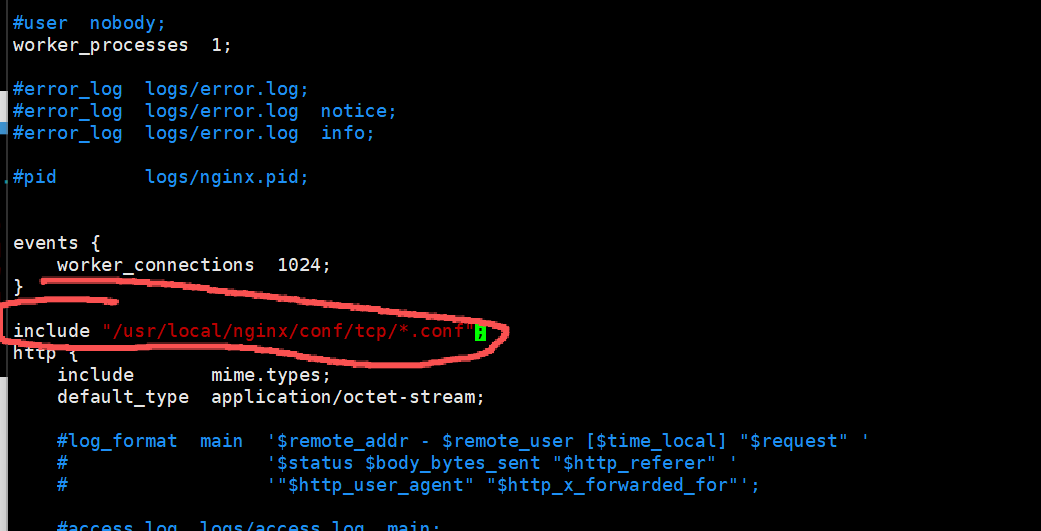
4.udp四层负载
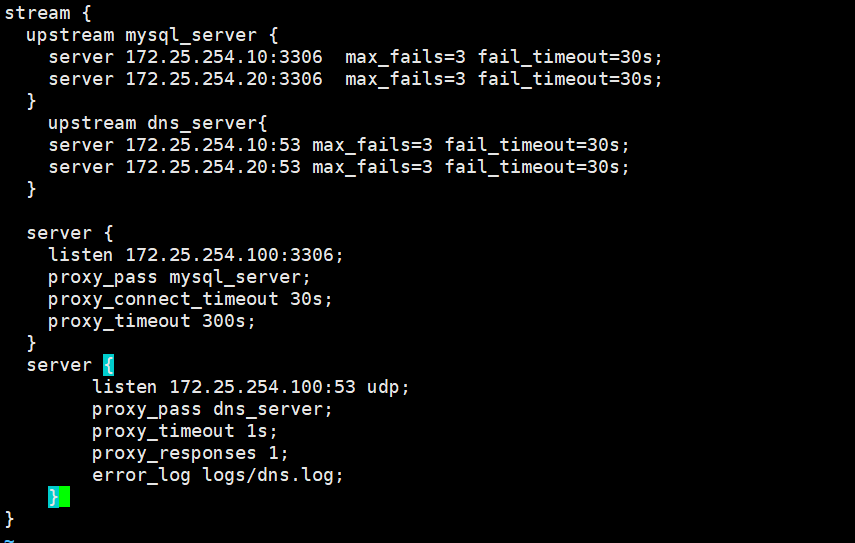
[root@Nginx ~]# vim /usr/local/nginx/conf/tcp/mariadb.conf
stream {
  upstream mysql_server {
    server 172.25.254.10:3306  max_fails=3 fail_timeout=30s;
    server 172.25.254.20:3306  max_fails=3 fail_timeout=30s;
  }

  upstream dns_server{
    server 172.25.254.10:53 max_fails=3 fail_timeout=30s;
    server 172.25.254.20:53 max_fails=3 fail_timeout=30s;
  }

  server {
    listen 172.25.254.100:3306;
    proxy_pass mysql_server;
    proxy_connect_timeout 30s;
    proxy_timeout 300s;
  }

  server {
        listen 172.25.254.100:53 udp;
        proxy_pass dns_server;
        proxy_timeout 1s;
        proxy_responses 1;
        error_log logs/dns.log;
    }
}
[root@Nginx ~]# nginx  -s reload
测试:
[root@Nginx ~]# dig dns.zxf.org @172.25.254.100

; <<>> DiG 9.16.23-RH <<>> dns.timinglee.org @172.25.254.100
;; global options: +cmd
;; Got answer:
;; ->>HEADER<<- opcode: QUERY, status: NOERROR, id: 32224
;; flags: qr aa rd ra; QUERY: 1, ANSWER: 1, AUTHORITY: 0, ADDITIONAL: 1
;; OPT PSEUDOSECTION:
; EDNS: version: 0, flags:; udp: 1232
; COOKIE: 9ac742ccc566d4450100000069830452db8dce1f1b224c9f (good)
;; QUESTION SECTION:
;dns.timinglee.org.             IN      A
;; ANSWER SECTION:
dns.timinglee.org.      86400   IN      A       172.25.254.10
;; Query time: 2 msec
;; SERVER: 172.25.254.100#53(172.25.254.100)
;; WHEN: Wed Feb 04 16:33:22 CST 2026
;; MSG SIZE  rcvd: 90
[root@Nginx ~]# dig dns.zxf.org @172.25.254.100
; <<>> DiG 9.16.23-RH <<>> dns.timinglee.org @172.25.254.100
;; global options: +cmd
;; Got answer:
;; ->>HEADER<<- opcode: QUERY, status: NOERROR, id: 2259
;; flags: qr aa rd ra; QUERY: 1, ANSWER: 1, AUTHORITY: 0, ADDITIONAL: 1

;; OPT PSEUDOSECTION:
; EDNS: version: 0, flags:; udp: 1232
; COOKIE: 7f9ffa4884c0b685010000006983045565fd892fc72c5514 (good)
;; QUESTION SECTION:
;dns.timinglee.org.             IN      A

;; ANSWER SECTION:
dns.timinglee.org.      86400   IN      A       172.25.254.20

;; Query time: 2 msec
;; SERVER: 172.25.254.100#53(172.25.254.100)
;; WHEN: Wed Feb 04 16:33:25 CST 2026
;; MSG SIZE  rcvd: 90