rsbuild没有提供mock方案,要实现类似umi中的mock特性需要自行开发。不管是umi还是rsbuild或其他各种脚手架,mock特性都基于devServer的中间件,因此只要实现mock文件的watch、解析、devServer的拦截就可以实现该特性。
本文就以rsbuild为例,介绍如何开发mock插件。
mock文件格式
假设我们要支持的mock文件格式如下,key定义请求method和url,value为mock返回结果
js
export default {
  "GET /api/user/:id": {
    code: "0",
    message: "success",
    data: { id: 1, name: "小明xxx" },
  },
  "GET /api/users": {
    code: "0",
    message: "success",
    data: [{ id: 1, name: "小明xxx" }],
  },
}
起步
这里首先要将mock文件加入到devServer的watch files,当mock文件更新后重启服务。
js
import type { RsbuildPlugin } from "@rsbuild/core";
import { defineConfig } from "@rsbuild/core";
import { createMockMiddleware } from "./mock";
export const rsbuildMockPlugin = (): RsbuildPlugin => ({
  name: "plugin:mock",
  setup(api) {
    api.modifyRsbuildConfig((defaultConfig, utils) => {
      const config = defineConfig({
        dev: {
          watchFiles: [
            {
              paths: ["mock/**/*.[jt]s"],
              type: "reload-server",
            },
          ],
          setupMiddlewares: (middlewares) => {
            middlewares.unshift(createMockMiddleware());
          },
        },
      });
      return utils.mergeRsbuildConfig(defaultConfig, config);
    });
  },
});
核心:createMockMiddleware
getMockData------获取mock配置
js
export async function getMockData(opts: {
  cwd: string;
  mockConfig: { exclude?: string[]; include?: string[] };
}): Promise<Record<string, IMock>> {
  function normalizeMockFile(file: string) {
    const cwd = opts.cwd.endsWith("/") ? opts.cwd : `${opts.cwd}/`;
    return chalk.yellow(file.replace(cwd, ""));
  }
  const MOCK_FILE_GLOB = "mock/**/*.[jt]s";
  const ret = Promise.all(
    [MOCK_FILE_GLOB, ...(opts.mockConfig.include || [])]
      .reduce<string[]>((memo, pattern) => {
        memo.push(
          ...globSync(pattern, {
            cwd: opts.cwd,
            ignore: ["**/*.d.ts", ...(opts.mockConfig.exclude || [])],
          }),
        );
        return memo;
      }, [])
      .map(async (file) => {
        const mockFile = path.join(opts.cwd, file);
        const m = await loadLatestEsmModule(mockFile).catch((e) => {
          throw new Error(
            `Mock file ${mockFile} parse failed.\n${(e as Error).message}`,
            { cause: e },
          );
        });
        return [m, mockFile];
      }),
  ).then((res) => {
    return res.reduce<Record<string, any>>((memo, [m, mockFile]) => {

      const obj = m?.default || m || {};
      for (const key of Object.keys(obj)) {
        const mock = getMock({ key, obj });
        mock.file = mockFile;
        // check conflict
        const id = `${mock.method} ${mock.path}`;
        assert(
          lodash.isArray(mock.handler) ||
            lodash.isPlainObject(mock.handler) ||
            typeof mock.handler === "function",
          `Mock handler must be function or array or object, but got ${typeof mock.handler} for ${
            mock.method
          } in ${mock.file}`,
        );
        if (memo[id]) {
          console.warn(
            `${id} is duplicated in ${normalizeMockFile(
              mockFile,
            )} and ${normalizeMockFile(memo[id].file)}`,
          );
        }
        memo[id] = mock;
      }
      return memo;
    }, {});
  });

  return ret;
}

function getMock(opts: { key: string; obj: any }): IMock {
  const { method, path } = parseKey(opts.key);
  const handler = opts.obj[opts.key];
  return { method, path, handler };
}

function parseKey(key: string) {
  const spliced = key.split(/\s+/);
  const len = spliced.length;
  if (len === 1) {
    return { method: DEFAULT_METHOD, path: key };
  } else {
    const [method, path] = spliced;
    const upperCaseMethod = method.toUpperCase();
    assert(
      VALID_METHODS.includes(upperCaseMethod),
      `method ${method} is not supported`,
    );
    assert(path, `${key}, path is undefined`);

    return { method: upperCaseMethod, path };
  }
}
匹配mock path并返回mock结果
这里有一点需要注意,rsbuild的devServer是connect,返回json结果无法直接用express的res.json,得先用JSON.stringify包装。res.end(JSON.stringify(mock.handler));
js
const DEFAULT_METHOD = "GET";
const VALID_METHODS = [
  "GET",
  "POST",
  "PUT",
  "DELETE",
  "PATCH",
  "HEAD",
  "OPTIONS",
];
interface IMock {
  method: string;
  path: string;
  handler: Function;
  file?: string;
}
//以下代码参考了umi的源码,对connect服务器做了适配
export function createMockMiddleware(): RequestHandler {
  return async (req: any, res, next) => {
    const mockData = await getMockData({ cwd: process.cwd(), mockConfig: {} });
    const method = req.method.toUpperCase();
    for (const key of Object.keys(mockData)) {
      const mock = mockData[key];

      if (mock.method !== method) continue;
      const { keys, re } = getPathReAndKeys(mock.path);
      const m = re.exec(req.url);
      if (m) {
        if (typeof mock.handler === "function") {
          // 可扩展支持mock返回function
        } else {
          res.statusCode = 200;
          res.end(JSON.stringify(mock.handler));
        }
        return;
      }
    }
    next();
  };
}

function getPathReAndKeys(path: string) {
  const { regexp, keys } = pathToRegexp(path);
  return {
    re: regexp,
    keys,
  };
}
loadLatestEsmModule------esm模块缓存问题
设定的mock文件格式为esm,而esm的模块加载后会缓存。不同于cjs的require,可以通过delete require.cache[xxfile]的方式清除缓存重新加载,esm无法清除模块缓存,只能通过对模块加时间戳的方式解决。
js
export async function loadLatestEsmModule(filePath: string) {
  try {
    // 1. 将文件路径转为 file URL(ESM import 要求 URL 格式)
    const fileUrl = pathToFileURL(filePath);

    // 2. 拼接时间戳参数,绕过 ESM 缓存(核心逻辑)
    const timestamp = Date.now();
    const cacheBustUrl = new URL(fileUrl);
    cacheBustUrl.searchParams.set("t", timestamp.toString());

    // 3. 动态 import 最新模块(无缓存)
    const module = await import(cacheBustUrl.href);

    // 4. 返回模块默认导出/全部导出(适配用户的 mock 文件)
    return {
      default: module.default,
      ...module,
    };
  } catch (error) {
    console.error(`加载模块 ${filePath} 失败:`, error);
    throw error;
  }
}
插件使用
在rsbuild.config.ts中添加插件
js
import { rsbuildMockPlugin } from "./mockplugin";
// Docs: https://rsbuild.rs/config/
export default defineConfig({
  plugins: [pluginReact(), rsbuildMockPlugin()],
});
组件中进行mock请求
scss
  useEffect(() => {
    fetch("/api/user/1")
      .then((res) => res.json())
      .then(console.log);
    fetch("/api/users")
      .then((res) => res.json())
      .then(console.log);
  }, []);
mock返回 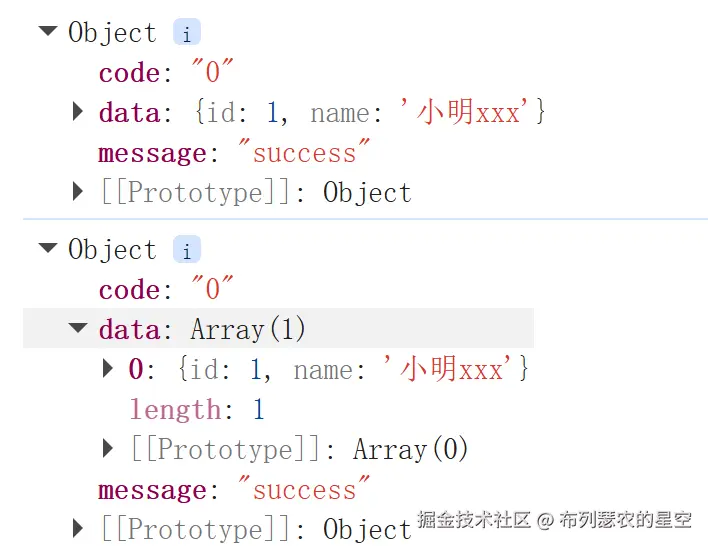
express 与 connect的区别
rsbuild的devServer基于connect,而其他多数脚手架的devServer都基于express,express也是在connect上进行的二次封装,它的req,res api更简单。比如express中可以使用req.path获取到不带search的请求路径,也可以直接用res.json返回json对象。
在上述代码中使用了req.url和mock path进行匹配,无法匹配到带search的请求,如/api/userList?pageSize=10&pageNo=2。因此如果继续使用rsbuild的devServer,需要额外处理req.url。更简单的办法是将express也加入到中间件中。
js
import express from "express";
const app = express();
export const rsbuildMockPlugin = (): RsbuildPlugin => ({
  name: "poisson:mock",
  setup(api) {
    api.modifyRsbuildConfig((defaultConfig, utils) => {
      const config = defineConfig({
        dev: {
          watchFiles: [
            {
              paths: ["mock/**/*.[jt]s"],
              type: "reload-server",
            },
          ],
          setupMiddlewares: (middlewares) => {
            middlewares.unshift(...[app, createMockMiddleware()]);
          },
        },
      });
      return utils.mergeRsbuildConfig(defaultConfig, config);
    });
  },
});