在前面的文章中,我们完整地探索了 Vue3 的运行时系统:响应式、虚拟DOM、渲染器、组件生命周期。但 Vue 还有一个重要的组成部分:编译器。它能将我们写的模板,转换成高效的渲染函数。今天,我们将深入编译器的三个核心阶段:parse、transform、generate。
前言:从模板到 JavaScript
当我们在 Vue 中写出如下代码时:
html
<template>
  <div class="container">
    <h1>{{ title }}</h1>
    <p v-if="show">Hello {{ name }}</p>
    <button @click="increment">点击</button>
  </div>
</template>
Vue 最终会把它编译成 JavaScript 代码:
javascript
import { openBlock, createBlock, createVNode } from 'vue'

export function render() {
  return (openBlock(), createBlock('div', { class: 'container' }, [
    createVNode('h1', null, ctx.title),
    ctx.show ? createVNode('p', null, 'Hello ' + ctx.name) : null,
    createVNode('button', { onClick: ctx.increment }, '点击')
  ]))
}这个转换过程,就是模板编译。
编译器在 Vue3 中的定位
什么是编译器
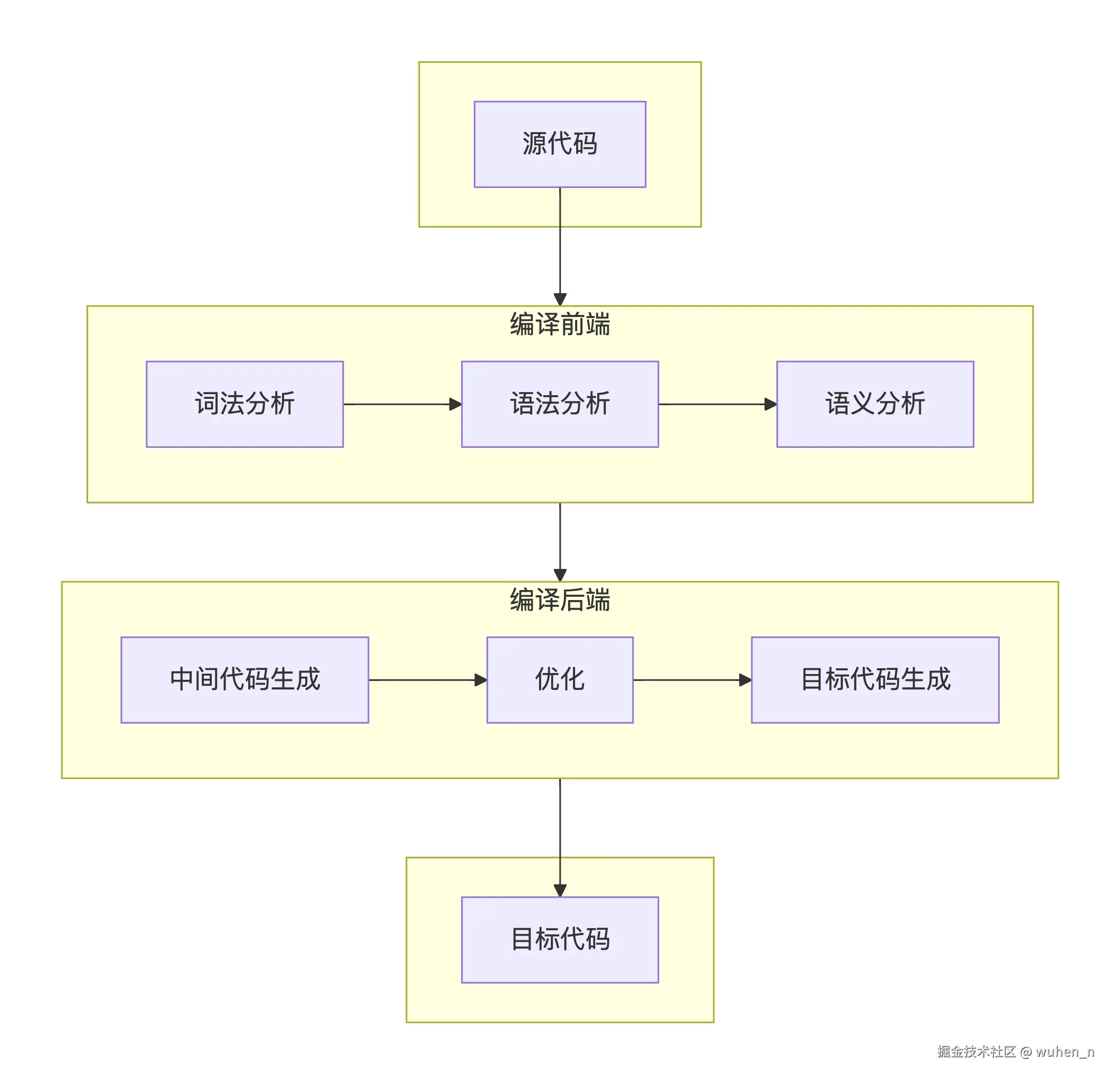
编译器其实只是一段程序,用来将 "语言A" 翻译成 "语言B" 。其中,"语言A" 通常被称为源代码 ,"语言B" 通常被称为目标代码 ,编译器将源代码转换成目标代码的过程叫做编译。
编译过程
完整的编译过程通常包括:
- 词法分析
- 语法分析
- 语义分析
- 中间代码生成
- 优化
- 目标代码生成
其中,前 3 个步骤又被统称为编译前端 ,它们通常与目标平台无关,仅仅负责分析源代码;后 3 个步骤又被称为编译后端,通常与目标平台相关。
注:编译后端的 3 个步骤中,中间代码生成 和 优化 2 个步骤不是必须的,这 2 个步骤也会被统称为中端。
Vue 中的编译器
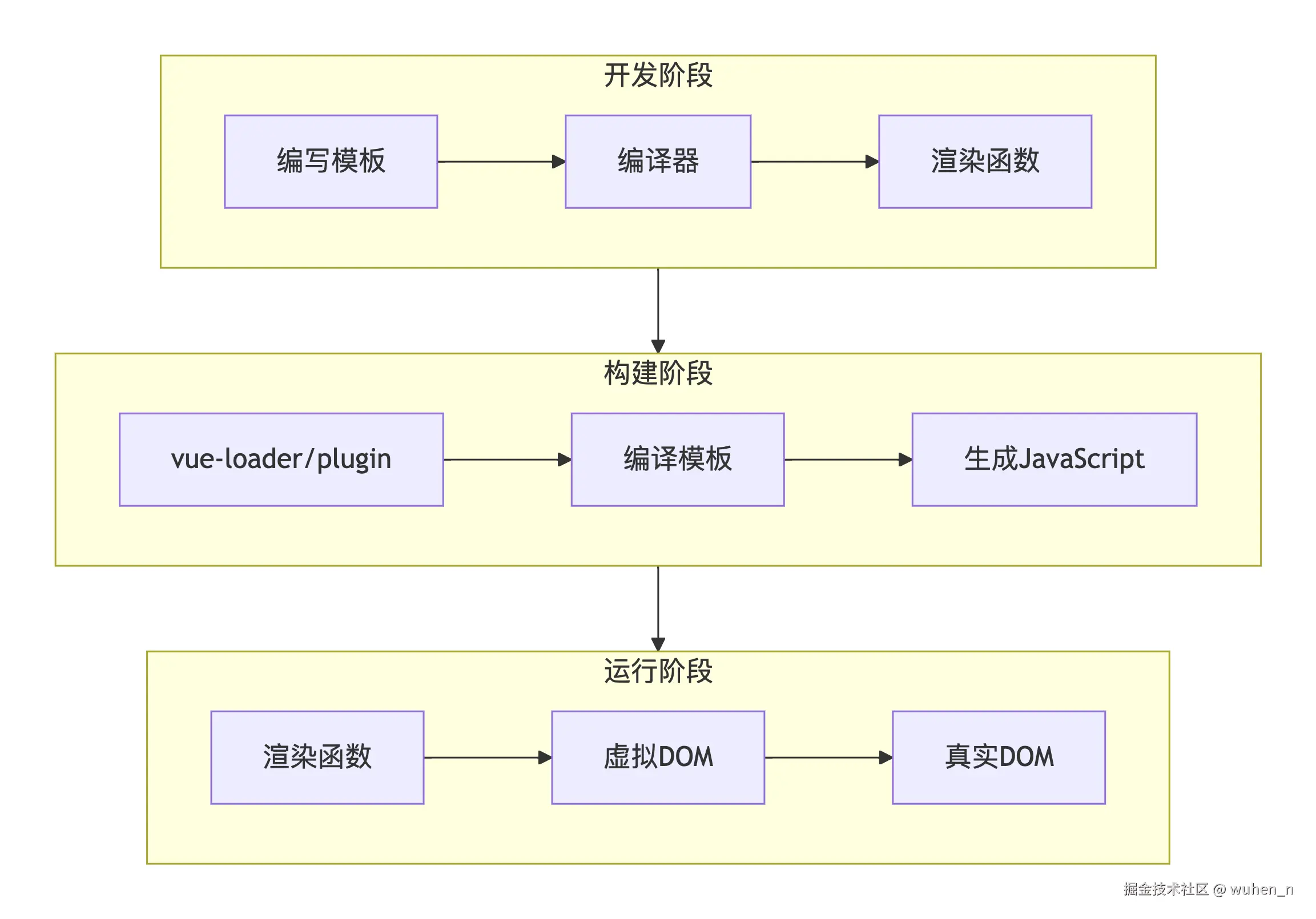
对 Vue 的编译器而言,其源代码就是组件的模板 <template> , 而目标代码其实就是渲染函数 render 。根据开发阶段和运行阶段的不同,Vue 编辑器又体现出了运行时 与 编译时 的分工区别:
- 运行时:处理响应式、虚拟 DOM、渲染,此时项目代码体积较大,但无需编译,直接可用
- 编译时:将模板转换为渲染函数,可以在构建时完成,减小运行时体积
为什么需要编译器?
- 声明式语法:模板比手写渲染函数更直观
- 编译优化:静态提升、patch flags等
- 开发体验:错误提示、语法检查
- 跨平台:可以编译成不同平台的渲染函数
Vue 编译器结构
- Parser解析器:将模板字符串解析成模版 AST
- Transformer转换器:将模板 AST 转换成 JavaScript AST
- Generator生成器:根据 JavaScript AST 生成渲染函数代码
Parse:将模板字符串转为模板 AST
什么是 AST?
AST(abstract syntax tree),即抽象语法树,是用 JavaScript 对象来描述模板的树形数据结构。比如我们有如下的模板示例:
html
<div>
  <h1 v-if="ok">Vue</h1>
</div>
上述模板示例,会被编译成以下的 AST 结构:
javascript
const ast = {
  // 逻辑根节点
  type: 'Root',
  children: [
    // div 标签
    {
    		type: 'Element',
    		tag: 'div',
    		children: [
    		  // h1 标签
    		  {
    		    type: 'Element',
    				tag: 'h1',
    				props: [
    				  // v-if 指令
    				  {
    				    type: 'Directive',
    				    name: 'if',  // 指令的直接名称,不能带 v- 前缀
    				    exp: {
    				      type: 'Expression', // 指令表达式
    				      content: 'ok'
    				    }
    				  }
    				]
    		  }
    		]
    }
  ]
}
Parser 设计
Parser 通常采用状态机 的方式,逐个字符扫描模板: 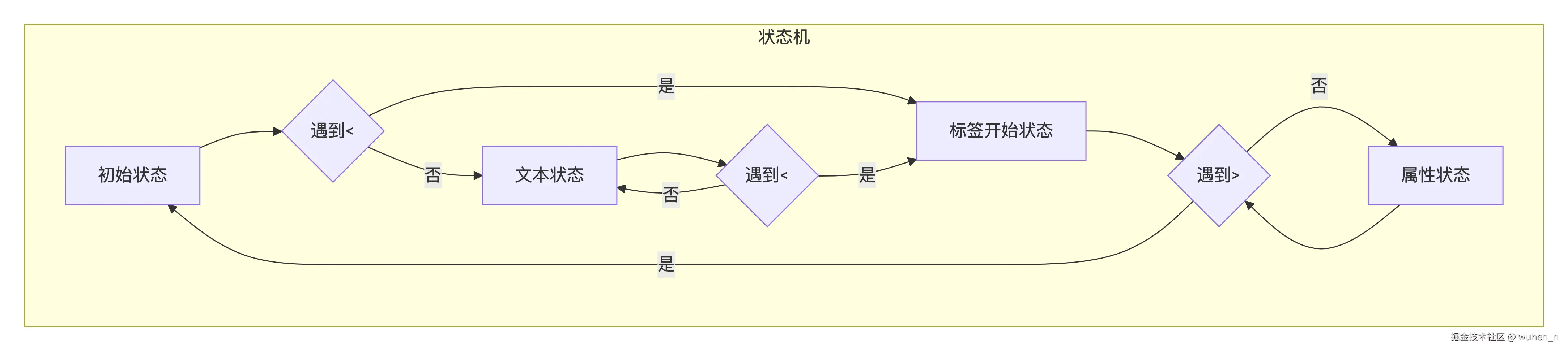
手写实现:简单的模板解析器
javascript
/**
 * 简单的模板解析器
 * 将模板字符串解析为AST
 */
class TemplateParser {
  constructor(template) {
    this.template = template;
    this.index = 0;          // 当前解析位置
    this.length = template.length;
  }

  /**
   * 解析模板
   */
  parse() {
    const ast = {
      type: 'Root',
      children: []
    };

    while (this.index < this.length) {
      const node = this.parseNode();
      if (node) {
        ast.children.push(node);
      }
    }

    return ast;
  }

  /**
   * 解析单个节点
   */
  parseNode() {
    // 跳过空白
    this.skipWhitespace();

    if (this.index >= this.length) return null;

    if (this.template[this.index] === '<') {
      // 解析元素
      return this.parseElement();
    } else {
      // 解析文本
      return this.parseText();
    }
  }

  /**
   * 解析元素
   */
  parseElement() {
    // 跳过 <
    this.index++;

    // 解析标签名
    const tagName = this.parseTagName();

    if (!tagName) {
      throw new Error('解析失败:标签名不能为空');
    }

    // 解析属性
    const props = this.parseAttributes();

    // 检查是否为自闭合标签
    if (this.template[this.index] === '/') {
      this.index += 2; // 跳过 />
      return {
        type: 'Element',
        tag: tagName,
        props,
        isSelfClosing: true,
        children: []
      };
    }

    // 跳过 >
    this.index++;

    // 解析子节点
    const children = [];
    while (this.index < this.length && !this.matchEndTag(tagName)) {
      const child = this.parseNode();
      if (child) {
        children.push(child);
      }
    }

    // 跳过结束标签
    this.parseEndTag(tagName);

    return {
      type: 'Element',
      tag: tagName,
      props,
      isSelfClosing: false,
      children
    };
  }

  /**
   * 解析标签名
   */
  parseTagName() {
    const start = this.index;
    while (this.index < this.length && /[a-zA-Z0-9\-]/.test(this.template[this.index])) {
      this.index++;
    }
    return this.template.slice(start, this.index);
  }

  /**
   * 解析属性
   */
  parseAttributes() {
    const props = [];

    while (this.index < this.length) {
      this.skipWhitespace();

      // 遇到 > 或 /> 说明属性解析完毕
      if (this.template[this.index] === '>' ||
          (this.template[this.index] === '/' && this.template[this.index + 1] === '>')) {
        break;
      }

      // 解析属性名
      const nameStart = this.index;
      while (this.index < this.length &&
             /[a-zA-Z0-9\-:@]/.test(this.template[this.index])) {
        this.index++;
      }
      const name = this.template.slice(nameStart, this.index);

      // 解析属性值
      let value = null;
      if (this.template[this.index] === '=') {
        this.index++; // 跳过 =

        const quote = this.template[this.index];
        if (quote === '"' || quote === "'") {
          this.index++; // 跳过引号
          const valueStart = this.index;
          while (this.index < this.length && this.template[this.index] !== quote) {
            this.index++;
          }
          value = this.template.slice(valueStart, this.index);
          this.index++; // 跳过结束引号
        }
      }

      props.push({
        type: 'Attribute',
        name,
        value
      });
    }

    return props;
  }

  /**
   * 解析文本
   */
  parseText() {
    const start = this.index;

    while (this.index < this.length && this.template[this.index] !== '<') {
      // 检查插值表达式
      if (this.template[this.index] === '{' &&
          this.template[this.index + 1] === '{') {
        break;
      }
      this.index++;
    }

    const content = this.template.slice(start, this.index);

    if (content.trim()) {
      return {
        type: 'Text',
        content
      };
    }

    return null;
  }

  /**
   * 检查是否为结束标签
   */
  matchEndTag(tagName) {
    if (this.template[this.index] !== '<') return false;
    if (this.template[this.index + 1] !== '/') return false;

    const start = this.index + 2;
    const end = start + tagName.length;

    return this.template.slice(start, end) === tagName;
  }

  /**
   * 解析结束标签
   */
  parseEndTag(tagName) {
    this.index += 2 + tagName.length; // 跳过 </标签名
    this.skipWhitespace();
    this.index++; // 跳过 >
  }

  /**
   * 跳过空白字符
   */
  skipWhitespace() {
    while (this.index < this.length && /\s/.test(this.template[this.index])) {
      this.index++;
    }
  }
}
Vue3 的 AST 结构
Vue3 的 AST 结构实际上要复杂很多,包含了很多信息:
javascript
const NodeTypes = {
  ROOT: 0,          // 根节点
  ELEMENT: 1,       // 元素节点
  TEXT: 2,          // 文本节点
  COMMENT: 3,       // 注释节点
  SIMPLE_EXPRESSION: 4,  // 简单表达式
  INTERPOLATION: 5,      // 插值表达式
  ATTRIBUTE: 6,          // 属性
  DIRECTIVE: 7,          // 指令
  // ... 更多类型
};
Transform:转换 AST
Transform 的目的
通过 parser 解析得到的模板 AST 并不能直接用于代码生成,需要转换成 JavaScript AST 之后才能用来生成代码。Transform 过程中,我们需要一些处理:
- 指令处理:
v-if、v-for等转换为条件表达式 - 静态提升:标记静态节点
- 补丁标记:添加
PatchFlags - 优化:预计算结果表达式
Transform 设计
Vue3 的 Transform 转换器采用插件化设计:
javascript
/**
 * 简单的转换器
 */
class Transformer {
  constructor(ast) {
    this.ast = ast;
    this.plugins = [];
    this.context = {
      currentNode: null,
      parent: null,
      replaceNode: (node) => {
        // 替换节点逻辑
      }
    };
  }

  /**
   * 注册插件
   */
  use(plugin) {
    this.plugins.push(plugin);
    return this;
  }

  /**
   * 执行转换
   */
  transform() {
    this.traverseNode(this.ast);
    return this.ast;
  }

  /**
   * 遍历节点
   */
  traverseNode(node, parent = null) {
    if (!node) return;

    // 设置上下文
    this.context.currentNode = node;
    this.context.parent = parent;

    // 执行所有插件
    for (const plugin of this.plugins) {
      plugin(node, this.context);
    }

    // 递归处理子节点
    if (node.children) {
      for (let i = 0; i < node.children.length; i++) {
        this.traverseNode(node.children[i], node);
      }
    }

    // 处理其他属性...
  }
}

// 插件示例:转换插值表达式
const transformInterpolation = (node, context) => {
  if (node.type === 'Text' && node.content.includes('{{')) {
    // 解析插值表达式
    const matches = node.content.match(/\{\{(.*?)\}\}/g);

    if (matches) {
      // 将文本节点转换为表达式节点
      const newChildren = [];
      let lastIndex = 0;

      for (const match of matches) {
        const start = node.content.indexOf(match, lastIndex);
        const end = start + match.length;

        // 添加前面的文本
        if (start > lastIndex) {
          newChildren.push({
            type: 'Text',
            content: node.content.slice(lastIndex, start)
          });
        }

        // 添加表达式
        const expr = match.slice(2, -2).trim();
        newChildren.push({
          type: 'Interpolation',
          content: expr
        });

        lastIndex = end;
      }

      // 添加剩余的文本
      if (lastIndex < node.content.length) {
        newChildren.push({
          type: 'Text',
          content: node.content.slice(lastIndex)
        });
      }

      // 替换当前节点
      context.replaceNode(newChildren);
    }
  }
};

// 插件示例:处理v-if指令
const transformVIf = (node, context) => {
  if (node.type === 'Element' && node.props) {
    const vIfProp = node.props.find(p => p.name === 'v-if');

    if (vIfProp) {
      // 转换为条件节点
      node.type = 'Conditional';
      node.condition = vIfProp.value;
      node.consequent = node.children;
      node.alternate = null;

      // 移除v-if属性
      node.props = node.props.filter(p => p.name !== 'v-if');
    }
  }
};

// 插件示例:静态节点标记
const transformStatic = (node, context) => {
  if (node.type === 'Element') {
    // 检查是否为静态节点
    const hasDynamic = this.checkDynamic(node);
    node.isStatic = !hasDynamic;

    if (node.isStatic) {
      node.patchFlag = -1; // HOISTED
    }
  }
};
Vue3 内置的转换插件
javascript
const transformPlugins = [
  transformText,           // 文本转换
  transformElement,        // 元素转换
  transformSlotOutlet,     // 插槽转换
  transformIf,            // v-if转换
  transformFor,           // v-for转换
  transformOnce,          // v-once转换
  transformOn,            // v-on转换
  transformBind,          // v-bind转换
  transformModel,         // v-model转换
  transformFilter,        // 过滤器转换
  transformExpression,    // 表达式转换
  transformStatic,        // 静态节点转换
  transformCloak,         // v-cloak转换
  transformPre,           // v-pre转换
  transformMemo,          // v-memo转换
  transformScopeId,       // scopeId转换
  transformFragment,      // Fragment转换
  transformComponent,     // 组件转换
  transformDirective,     // 自定义指令转换
];
Generate:生成 render 函数
从 AST 到代码
Generate 阶段将转换后的 JavaScript AST 生成可执行的 JavaScript 代码,即代码生成:
javascript
/**
 * 简单的代码生成器
 */
class CodeGenerator {
  constructor(ast) {
    this.ast = ast;
    this.code = '';
    this.indentLevel = 0;
  }

  /**
   * 生成代码
   */
  generate() {
    this.code = `
import { openBlock, createBlock, createVNode } from 'vue'

export function render() {
  return ${this.genNode(this.ast)}
}
    `;
    return this.code;
  }

  /**
   * 生成节点代码
   */
  genNode(node) {
    if (!node) return 'null';

    switch (node.type) {
      case 'Root':
        return this.genRoot(node);
      case 'Element':
        return this.genElement(node);
      case 'Text':
        return this.genText(node);
      case 'Interpolation':
        return this.genInterpolation(node);
      case 'Conditional':
        return this.genConditional(node);
      default:
        return 'null';
    }
  }

  /**
   * 生成根节点
   */
  genRoot(node) {
    if (node.children.length === 1) {
      return this.genNode(node.children[0]);
    } else {
      // 多个根节点,用Fragment包裹
      return `createBlock(Fragment, null, [
        ${node.children.map(child => this.genNode(child)).join(',\n        ')}
      ])`;
    }
  }

  /**
   * 生成元素节点
   */
  genElement(node) {
    const tag = JSON.stringify(node.tag);
    const props = this.genProps(node.props);
    const children = this.genChildren(node.children);

    if (node.isStatic) {
      // 静态节点提升
      return `createVNode(${tag}, ${props}, ${children}, -1)`;
    } else {
      return `createVNode(${tag}, ${props}, ${children})`;
    }
  }

  /**
   * 生成属性
   */
  genProps(props) {
    if (!props || props.length === 0) return 'null';

    const propObj = {};
    for (const prop of props) {
      if (prop.name === 'class') {
        propObj.class = prop.value;
      } else if (prop.name.startsWith('@')) {
        propObj['on' + prop.name.slice(1)] = `ctx.${prop.value}`;
      } else {
        propObj[prop.name] = prop.value;
      }
    }

    return JSON.stringify(propObj);
  }

  /**
   * 生成子节点
   */
  genChildren(children) {
    if (!children || children.length === 0) return 'null';

    if (children.length === 1) {
      return this.genNode(children[0]);
    }

    return `[
      ${children.map(child => this.genNode(child)).join(',\n      ')}
    ]`;
  }

  /**
   * 生成文本节点
   */
  genText(node) {
    return JSON.stringify(node.content);
  }

  /**
   * 生成插值表达式
   */
  genInterpolation(node) {
    return `ctx.${node.content}`;
  }

  /**
   * 生成条件节点
   */
  genConditional(node) {
    return `${node.condition} ? ${this.genNode(node.consequent)} : null`;
  }

  /**
   * 添加缩进
   */
  indent() {
    this.indentLevel++;
  }

  /**
   * 减少缩进
   */
  dedent() {
    this.indentLevel--;
  }

  /**
   * 写入代码
   */
  write(str) {
    this.code += '  '.repeat(this.indentLevel) + str;
  }
}
完整的编译流程
javascript
/**
 * 完整的编译器
 */
class VueCompiler {
  compile(template) {
    // 1. Parse阶段
    const parser = new TemplateParser(template);
    const ast = parser.parse();
    console.log('AST:', JSON.stringify(ast, null, 2));

    // 2. Transform阶段
    const transformer = new Transformer(ast);
    transformer
      .use(transformInterpolation)
      .use(transformVIf)
      .use(transformStatic);
    const transformedAst = transformer.transform();

    // 3. Generate阶段
    const generator = new CodeGenerator(transformedAst);
    const code = generator.generate();

    return code;
  }
}
编译优化详解
静态提升
静态提升是 Vue3 最重要的优化之一,这在我之前的多篇文章中都有提及,本文不再赘述。
Patch Flags
通过标记动态内容,减少比较范围:
javascript
// 编译前
<div :class="cls" :id="id">内容</div>

// 编译后
createVNode('div', {
  class: ctx.cls,
  id: ctx.id
}, '内容', 8 /* PROPS */, ['class', 'id'])
Block Tree
收集动态节点,跳过静态子树:
javascript
// 编译前
<div>
  <span>静态</span>
  <p :class="dynamic">动态</p>
  <div>
    <span>静态</span>
    <span>{{ text }}</span>
  </div>
</div>

// 编译后
const _hoisted_1 = createVNode('span', null, '静态', -1)
const _hoisted_2 = createVNode('span', null, '静态', -1)

export function render(ctx) {
  return (openBlock(), createBlock('div', null, [
    _hoisted_1,
    createVNode('p', { class: ctx.dynamic }, null, 2 /* CLASS */),
    createVNode('div', null, [
      _hoisted_2,
      createVNode('span', null, ctx.text, 1 /* TEXT */)
    ])
  ]))
}
结语
理解编译三阶段,就像掌握了 Vue 的"翻译官",它把人类友好的模板,翻译成机器高效的代码。这不仅帮助我们写出更高效的 Vue 应用,也为深入理解 Vue 的优化策略打下基础。
对于文章中错误的地方或有任何疑问,欢迎在评论区留言讨论!