一个尴尬的下午
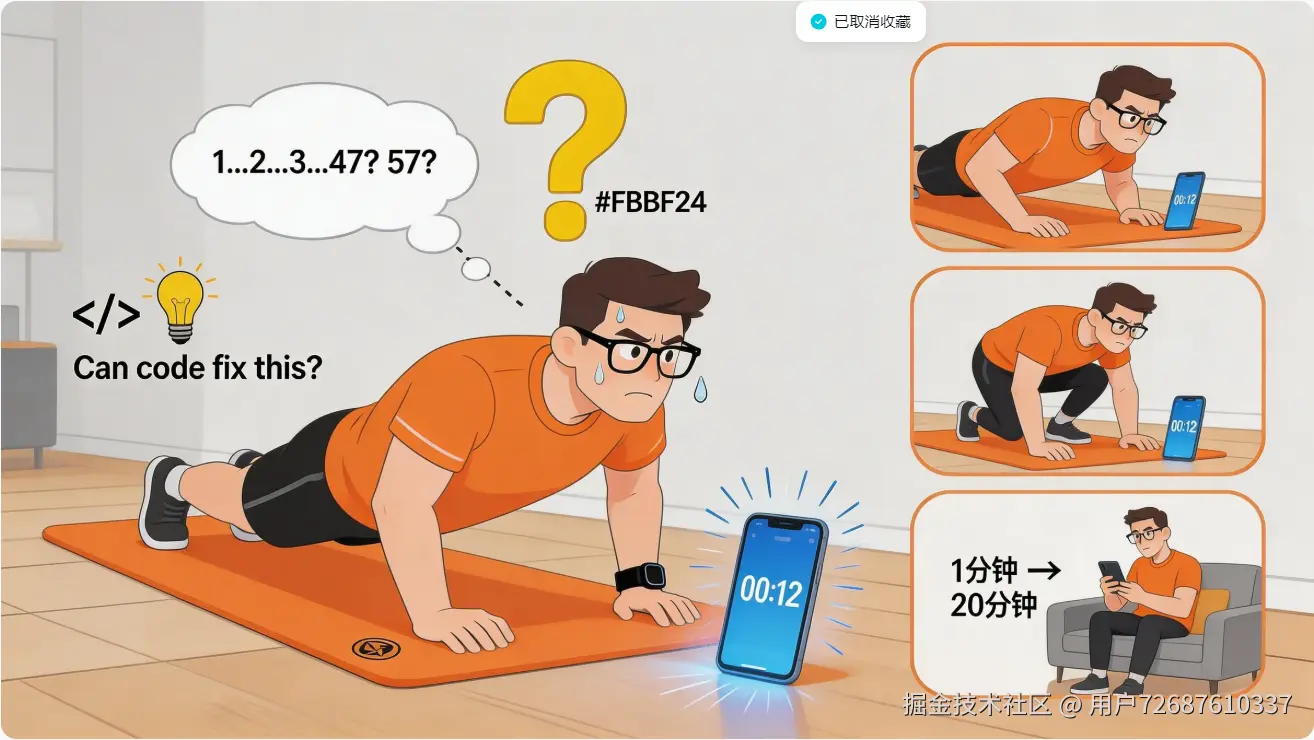
上周六下午,我在家做平板支撑。教练说要保持60秒。
我在心里默数:1、2、3...数到40多的时候,脑子开始走神,想着晚上吃什么。回过神来,不确定是数到47还是57了。
偷偷低头瞄一眼手机。
12秒。
心态崩了。
这已经不是第一次了。做俯卧撑的时候,低头看时间脖子疼;做深蹲的时候,扭头看手机重心不稳;组间休息的时候,说好歇60秒,一刷短视频20分钟就过去了。
作为一个程序员,我的第一反应是:能不能用代码解决这个问题?
从问题到方案
冷静分析一下,健身时的核心矛盾是:
双手被占用,眼睛需要看时间,但手机不方便看。
市面上的解决方案:
- 智能手表:需要抬手,做平板支撑时根本没法看
- 智能音箱:只能听,看不到进度条
- 墙上挂钟:得仰着头,颈椎更累
然后我想到了那副吃灰已久的 Rokid AR 眼镜。
眼镜的好处是:戴在头上,平视可见,完全不占用双手。做任何动作的时候,只要眼珠子动一下就能看到计时信息。
问题是:没有现成的健身计时 App。
那就自己写一个。
技术决策
既然用 Rokid 眼镜,自然要用官方的 CXR-M SDK。
这个 SDK 有几个关键点:
- 支持手机端通过蓝牙控制眼镜
- 内置「提词器」场景,正好用来显示文字
- 纯 Android 开发,不需要学新技术栈
开发环境:
- Android Studio
- Kotlin
- MinSDK 28(CXR-M 的硬性要求)
第一步:让项目跑起来
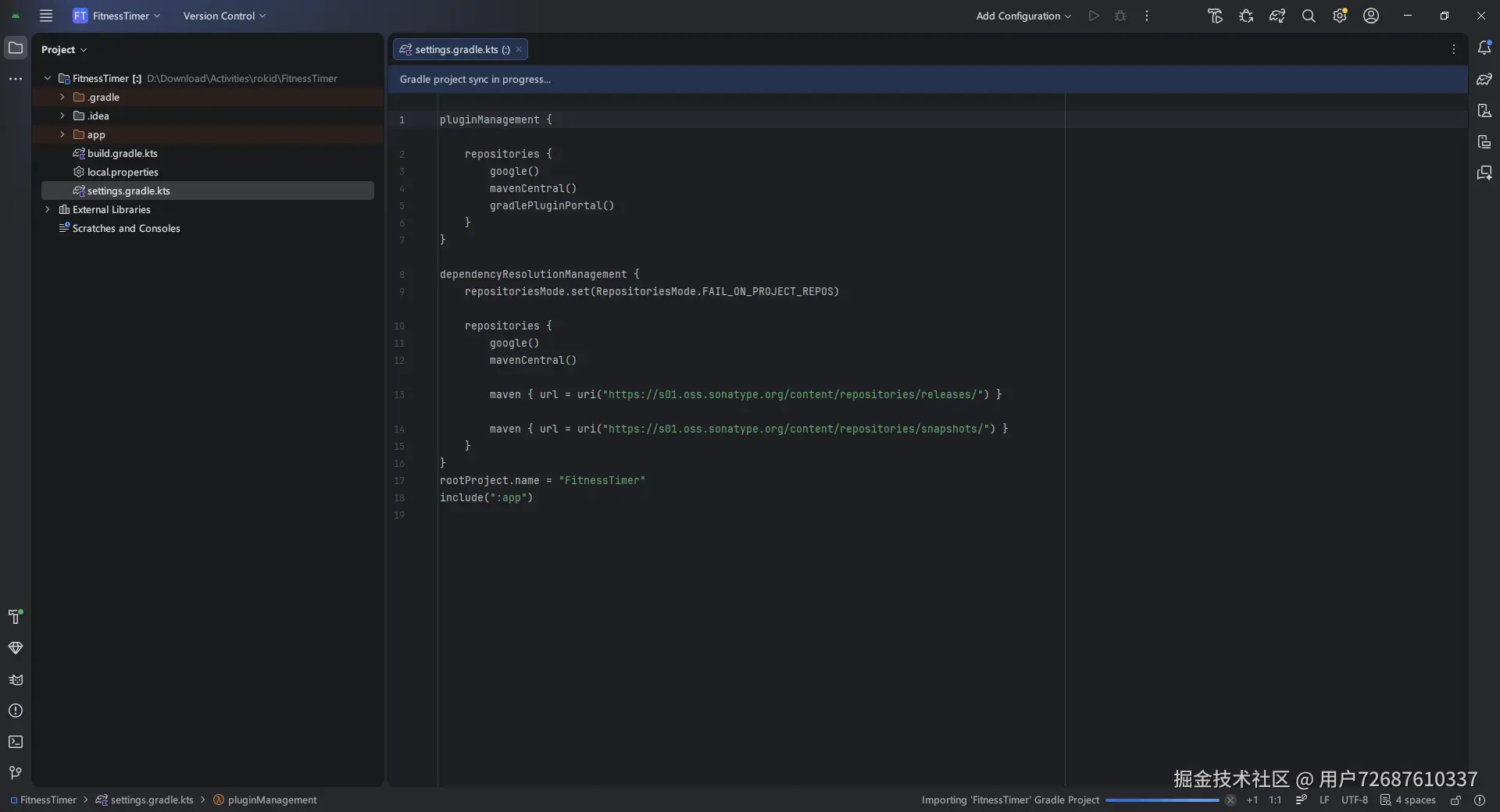
创建项目后,首先配置 Maven 仓库。在 settings.gradle.kts 中:
scss
dependencyResolutionManagement {
    repositories {
        maven { url = uri("https://maven.rokid.com/repository/maven-public/") }
        google()
        mavenCentral()
    }
}
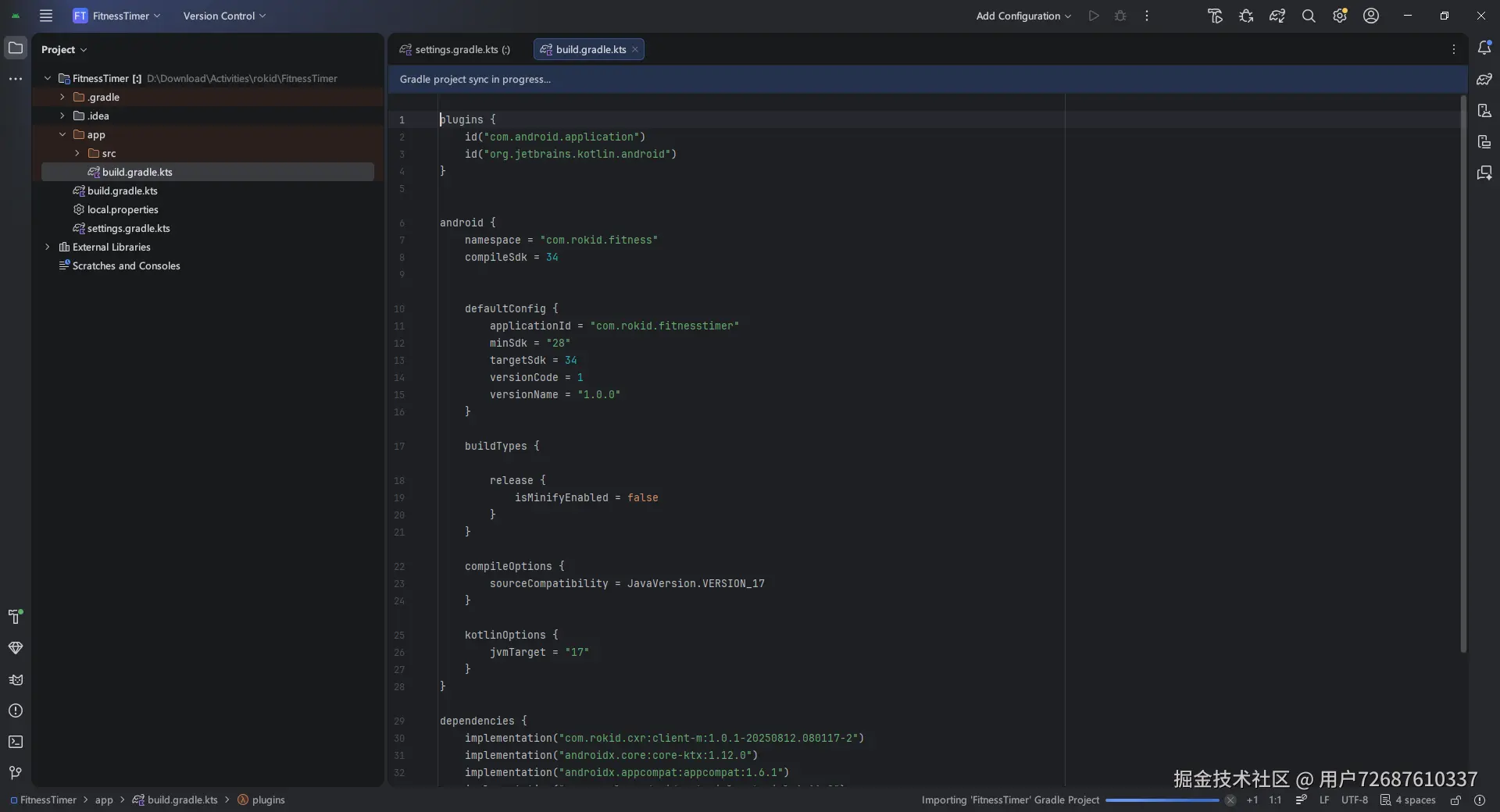
然后在 app/build.gradle.kts 中添加依赖:
scss
android {
    defaultConfig {
        minSdk = 28
    }
}

dependencies {
    implementation("com.rokid.cxr:client-m:1.0.1-20250812.080117-2")
    implementation("androidx.core:core-ktx:1.12.0")
    implementation("com.google.android.material:material:1.11.0")
}
权限声明,AndroidManifest.xml:
ini
<uses-permission android:name="android.permission.BLUETOOTH" />
<uses-permission android:name="android.permission.BLUETOOTH_CONNECT" />
<uses-permission android:name="android.permission.BLUETOOTH_SCAN" />
注意:Android 12(API 31)以上,蓝牙权限需要动态申请。
第二步:连接眼镜
这是整个项目最关键的部分。我花了大半天时间才搞清楚 CXR-M SDK 的连接流程。
SDK 连接机制
CXR-M 的蓝牙连接分两步:
- 调用
initBluetooth()获取连接信息(UUID 和 MAC 地址)
- 在回调中拿到信息后,调用
connectBluetooth()建立真正的连接
很多开发者(包括我)第一次都会漏掉第二步,导致连接失败。
封装 SDK
我把 SDK 封装成单例类 RokidGlassesManager,方便全局调用:
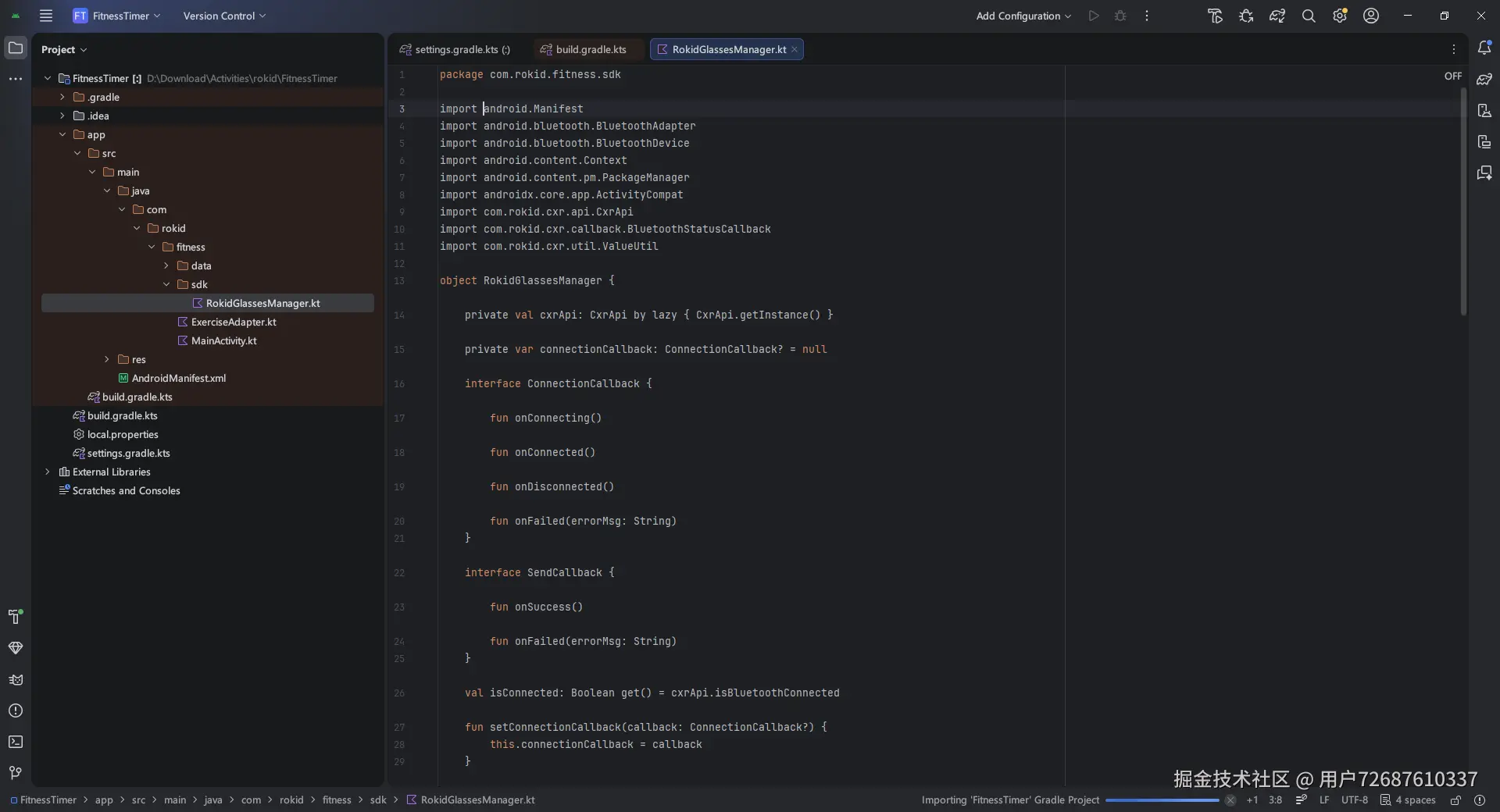
kotlin
package com.rokid.fitness.sdk

import android.Manifest
import android.bluetooth.BluetoothAdapter
import android.bluetooth.BluetoothDevice
import android.content.Context
import android.content.pm.PackageManager
import androidx.core.app.ActivityCompat
import com.rokid.cxr.api.CxrApi
import com.rokid.cxr.callback.BluetoothStatusCallback
import com.rokid.cxr.util.ValueUtil

object RokidGlassesManager {
    private val cxrApi: CxrApi by lazy { CxrApi.getInstance() }
    private var connectionCallback: ConnectionCallback? = null
    interface ConnectionCallback {
        fun onConnecting()
        fun onConnected()
        fun onDisconnected()
        fun onFailed(errorMsg: String)
    }
    interface SendCallback {
        fun onSuccess()
        fun onFailed(errorMsg: String)
    }
    val isConnected: Boolean get() = cxrApi.isBluetoothConnected
    fun setConnectionCallback(callback: ConnectionCallback?) {
        this.connectionCallback = callback
    }
    fun findRokidGlasses(bluetoothAdapter: BluetoothAdapter): BluetoothDevice? {
        if (ActivityCompat.checkSelfPermission(bluetoothAdapter.javaClass, Manifest.permission.BLUETOOTH_CONNECT)
            != PackageManager.PERMISSION_GRANTED
        ) return null
        return bluetoothAdapter.bondedDevices.find {
            it.name?.contains("Rokid", ignoreCase = true) ||
                    it.name?.contains("Glasses", ignoreCase = true)
        } ?: null
    }
    fun connectGlasses(context: Context, device: BluetoothDevice) {
        connectionCallback?.onConnecting()
        cxrApi.initBluetooth(context, device, object : BluetoothStatusCallback() {
            override fun onConnectionInfo(socketUuid: String?, macAddress: String?, rokidAccount: String?, glassesType: Int) {
                if (!socketUuid.isNullOrEmpty() && !macAddress.isNullOrEmpty()) {
                    connectBluetooth(context, socketUuid, macAddress)
                } else {
                    connectionCallback?.onFailed("获取连接信息失败")
                }
            }
            override fun onConnected() {
                connectionCallback?.onConnected()
            }
            override fun onDisconnected() {
                connectionCallback?.onDisconnected()
            }
            override fun onFailed(errorCode: ValueUtil.CxrBluetoothErrorCode?) {
                connectionCallback?.onFailed(errorCode?.name ?: "连接失败")
            }
        })
    }
    private fun connectBluetooth(context: Context, socketUuid: String, macAddress: String) {
        cxrApi.connectBluetooth(context, socketUuid, macAddress, object : BluetoothStatusCallback() {
            override fun onConnected() {}
            override fun onDisconnected() { connectionCallback?.onDisconnected() }
            override fun onFailed(errorCode: ValueUtil.CxrBluetoothErrorCode?) {
                connectionCallback?.onFailed(errorCode?.name ?: "连接失败")
            }
            override fun onConnectionInfo(socketUuid: String?, macAddress: String?, rokidAccount: String?, glassesType: Int) {}
        })
    }
    fun sendToGlasses(text: String, callback: SendCallback? = null): Boolean {
        if (!isConnected) {
            callback?.onFailed("眼镜未连接")
            return false
        }
        cxrApi.controlScene(ValueUtil.CxrSceneType.WORD_TIPS, true, null)
        val status = cxrApi.sendStream(
            type = ValueUtil.CxrStreamType.WORD_TIPS,
            stream = text.toByteArray(Charsets.UTF_8),
            fileName = "fitness.txt",
            cb = object : com.rokid.cxr.callback.SendStatusCallback() {
                override fun onSendSucceed() { callback?.onSuccess() }
                override fun onSendFailed(errorCode: ValueUtil.CxrSendErrorCode?) {
                    callback?.onFailed(errorCode?.name ?: "发送失败")
                }
            }
        )
        return status == ValueUtil.CxrStatus.REQUEST_SUCCEED
    }
    fun disconnect() {
        cxrApi.deinitBluetooth()
    }
}
查找设备
先从已配对的设备中找 Rokid 眼镜:
kotlin
fun findRokidGlasses(bluetoothAdapter: BluetoothAdapter): BluetoothDevice? {
    if (ActivityCompat.checkSelfPermission(
            bluetoothAdapter.javaClass,
            Manifest.permission.BLUETOOTH_CONNECT
        ) != PackageManager.PERMISSION_GRANTED
    ) return null

    return bluetoothAdapter.bondedDevices.find {
        it.name?.contains("Rokid", ignoreCase = true) ||
        it.name?.contains("Glasses", ignoreCase = true)
    }
}
这里有个坑:必须先在系统设置里配对眼镜,App 才能找到设备。
建立连接
kotlin
fun connectGlasses(context: Context, device: BluetoothDevice) {
    connectionCallback?.onConnecting()

    cxrApi.initBluetooth(context, device, object : BluetoothStatusCallback() {
        override fun onConnectionInfo(
            socketUuid: String?,
            macAddress: String?,
            rokidAccount: String?,
            glassesType: Int
        ) {
            // 关键:拿到 UUID 和 MAC 后调用 connectBluetooth
            if (!socketUuid.isNullOrEmpty() && !macAddress.isNullOrEmpty()) {
                connectBluetooth(context, socketUuid, macAddress)
            } else {
                connectionCallback?.onFailed("获取连接信息失败")
            }
        }

        override fun onConnected() {
            connectionCallback?.onConnected()
        }

        override fun onDisconnected() {
            connectionCallback?.onDisconnected()
        }

        override fun onFailed(errorCode: ValueUtil.CxrBluetoothErrorCode?) {
            connectionCallback?.onFailed(errorCode?.name ?: "连接失败")
        }
    })
}
connectBluetooth() 的实现:
kotlin
private fun connectBluetooth(context: Context, socketUuid: String, macAddress: String) {
    cxrApi.connectBluetooth(context, socketUuid, macAddress, object : BluetoothStatusCallback() {
        override fun onConnected() {}
        override fun onDisconnected() { connectionCallback?.onDisconnected() }
        override fun onFailed(errorCode: ValueUtil.CxrBluetoothErrorCode?) {
            connectionCallback?.onFailed(errorCode?.name ?: "连接失败")
        }
        override fun onConnectionInfo(
            socketUuid: String?,
            macAddress: String?,
            rokidAccount: String?,
            glassesType: Int
        ) {}
    })
}当手机和眼镜成功连接后,isConnected 就会返回 true。
第三步:发送内容到眼镜
连接成功后,接下来是把文字发送到眼镜显示。
关键方法
kotlin
fun sendToGlasses(text: String, callback: SendCallback? = null): Boolean {
    if (!isConnected) {
        callback?.onFailed("眼镜未连接")
        return false
    }

    // 先打开提词器场景
    cxrApi.controlScene(ValueUtil.CxrSceneType.WORD_TIPS, true, null)

    // 发送文字内容
    val status = cxrApi.sendStream(
        type = ValueUtil.CxrStreamType.WORD_TIPS,
        stream = text.toByteArray(Charsets.UTF_8),
        fileName = "fitness.txt",
        cb = object : SendStatusCallback() {
            override fun onSendSucceed() = callback?.onSuccess()
            override fun onSendFailed(errorCode: ValueUtil.CxrSendErrorCode?) {
                callback?.onFailed(errorCode?.name ?: "发送失败")
            }
        }
    )

    return status == ValueUtil.CxrStatus.REQUEST_SUCCEED
}
两个要点:
- 发送前必须调用
controlScene()打开提词器场景
- 文字必须用 UTF-8 编码,否则中文会乱码
断开连接
kotlin
fun disconnect() {
    cxrApi.deinitBluetooth()
}
第四步:设计数据模型
运动数据用两个类来表示:
运动类型枚举
scss
enum class ExerciseType {
    WARM_UP("热身"),
    STRENGTH("力量"),
    CARDIO("有氧"),
    HIIT("HIIT")
}
运动实体类
kotlin
data class Exercise(
    val id: Int,
    val name: String,           // 运动名称
    val type: ExerciseType,     // 类型
    val description: String,    // 动作说明
    val duration: Int,          // 持续时间(秒)
    val restTime: Int,          // 组间休息(秒)
    val caloriesPerMin: Int = 0 // 每分钟消耗卡路里
)
预设运动数据
内置 10 种常见运动:
less
object ExerciseData {
    val exercises = listOf(
        Exercise(1, "热身", ExerciseType.WARM_UP, "原地踏步,双手叉腰站立", 60, 30),
        Exercise(2, "高抬腿", ExerciseType.WARM_UP, "原地踏步,双手叉腰站立,抬起左腿", 60, 30),
        Exercise(3, "开合跳", ExerciseType.CARDIO, "原地站立,双脚并拢跳跃", 60, 30),
        Exercise(4, "深蹲", ExerciseType.STRENGTH, "原地站立,双脚与肩同宽,慢慢下蹲", 30, 30),
        Exercise(5, "俯卧撑", ExerciseType.STRENGTH, "俯卧姿势,双手撑地", 30, 20),
        Exercise(6, "平板支撑", ExerciseType.CORE, "平板姿势,保持30秒", 60, 30),
        Exercise(7, "登山者", ExerciseType.CARDIO, "原地踏步,模拟登山动作", 60, 30),
        Exercise(8, "跳绳", ExerciseType.CARDIO, "原地跳跃", 100, 30),
        Exercise(9, "波比跳", ExerciseType.CARDIO, "原地跳跃,双脚并拢", 100, 30),
        Exercise(10, "休息", ExerciseType.REST, "原地踏步,放松呼吸", 60, 30)
    )
}
第五步:训练会话管理
WorkoutSession 负责管理一次完整的训练:
kotlin
data class WorkoutSession(
    val exercise: Exercise,
    var currentSet: Int = 1,
    var isResting: Boolean = false
) {
    var timer: CountDownTimer? = null
    var startTime: Long = 0
    val elapsed: Long = 0

    var onExerciseListener: ((Exercise) -> Unit)? = null
    var onRestListener: ((Int) -> Unit)? = null
    var onCompleteListener: (() -> Unit)? = null
开始训练
kotlin
fun startWorkout() {
    currentSet = 1
    isResting = false
    startTime = System.currentTimeMillis()
    timer = object : CountDownTimer(exercise.duration * 1000L, 1000) {
        override fun onTick(millisUntilFinished: Long) {
            elapsed = millisUntilFinished
            onExerciseListener?.invoke(exercise)
        }
        override fun onFinish() {
            isResting = true
            onRestListener?.invoke(exercise.duration)
            onExerciseListener?.invoke(exercise)
        }
    }.start()
}
组间切换
kotlin
fun nextExercise(): Boolean {
    val currentIndex = exercises.indexOf(exercise)
    if (currentIndex < exercises.size - 1) {
        currentSet++
        val nextEx = exercises[currentIndex]
        onExerciseListener?.invoke(nextEx)
        return true
    }
    onComplete()
    onCompleteListener?.invoke()
    return false
}

fun previousExercise(): Boolean {
    val currentIndex = exercises.indexOf(exercise)
    if (currentIndex > 0) {
        currentSet--
        val prevEx = exercises[currentIndex - 1]
        onExerciseListener?.invoke(prevEx)
        return true
    }
    return false
}
生成眼镜显示文本
这是发送到眼镜上的内容格式:
scss
fun getDisplayText(): String {
    val ex = exercise ?: return ""
    return buildString {
        appendLine("💪 ${ex.name}")
        if (isResting) {
            appendLine()
            appendLine("────── 休息 ──────")
            appendLine()
            appendLine("下一组: ${ex.name}")
            appendLine()
            appendLine("💧 补充水分")
        } else {
            appendLine()
            appendLine("第 $currentSet/${ex.totalSets} 组")
            appendLine("⏱ ${formatTime(timeLeft / 1000)}")
            appendLine()
            val progressBars = "█".repeat((progress / 10).toInt()) +
                               "░".repeat(10 - (progress / 10).toInt())
            appendLine("$progressBars ${progress.toInt()}%")
        }
    }
}
第六步:主界面实现
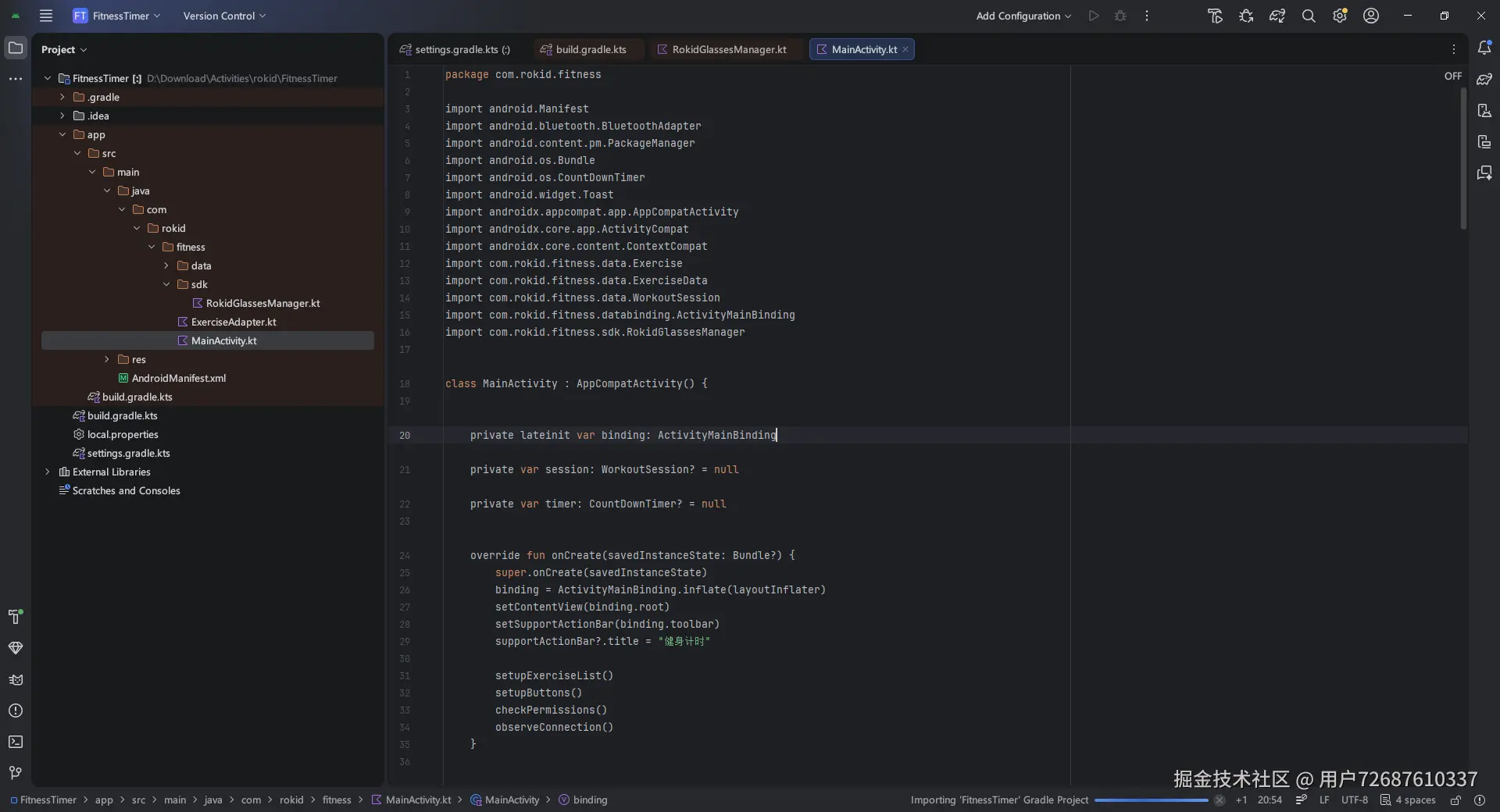
MainActivity 是整个应用的控制中心:
kotlin
package com.rokid.fitness

import android.Manifest
import android.bluetooth.BluetoothAdapter
import android.content.pm.PackageManager
import android.os.Bundle
import android.os.CountDownTimer
import android.widget.Toast
import androidx.appcompat.app.AppCompatActivity
import androidx.core.app.ActivityCompat
import androidx.core.content.ContextCompat
import com.rokid.fitness.data.Exercise
import com.rokid.fitness.data.ExerciseData
import com.rokid.fitness.data.WorkoutSession
import com.rokid.fitness.databinding.ActivityMainBinding
import com.rokid.fitness.sdk.RokidGlassesManager

class MainActivity : AppCompatActivity() {

    private lateinit var binding: ActivityMainBinding
    private var session: WorkoutSession? = null
    private var timer: CountDownTimer? = null

    override fun onCreate(savedInstanceState: Bundle?) {
        super.onCreate(savedInstanceState)
        binding = ActivityMainBinding.inflate(layoutInflater)
        setContentView(binding.root)
        setSupportActionBar(binding.toolbar)
        supportActionBar?.title = "健身计时"

        setupExerciseList()
        setupButtons()
        checkPermissions()
        observeConnection()
    }

    private fun setupExerciseList() {
        val adapter = ExerciseAdapter()
        binding.rvExercises.adapter = adapter
        adapter.setOnItemClickListener { exercise ->
            startWorkout(exercise)
        }
    }
    private fun setupButtons() {
        binding.btnConnect.setOnClickListener {
            if (RokidGlassesManager.isConnected) {
                RokidGlassesManager.disconnect()
                updateConnectionStatus()
            } else {
                connectGlasses()
            }
        }
        binding.btnStart.setOnClickListener { startOrStartWorkout() }
        binding.btnPause.setOnClickListener {
            session?.let { it.pause() }
        binding.btnPrev.setOnClickListener { session?.previousExercise() }
        binding.btnNext.setOnClickListener { session?.nextExercise() }
        binding.btnSkip.setOnClickListener { session?.skipExercise() }
    }
    private fun startWorkout(exercise: Exercise) {
        session = WorkoutSession(exercise)
        session?.onExerciseListener = { ex ->
            binding.tvCurrentExercise.text = "💪 ${ex.name}"
            timer?.cancel()
            timer = object : CountDownTimer(exercise.duration * 1000L, 1000) {
                override fun onTick(millisUntilFinished: Long) {
                    updateDisplay()
                }
                override fun onFinish() {
                    session?.onRestFinished()
                    runOnUiThread { updateDisplay() }
                }
            }.start()
            updateDisplay()
        }
        updateConnectionStatus()
    }
    private fun updateDisplay() {
        val s = session ?: return
        val ex = s.exercise ?: return
        binding.apply {
            tvCurrentExercise.text = if (s.isResting) "😤 休息 ${s.exercise.name}" else "💪 ${ex.name}"
            tvSets.text = "第 ${s.currentSet}/${ex.totalSets} 组"
            tvTimer.text = s.getDisplayText()
            btnPrev.text = if (s.currentSet > 1) "上一组" else ""
            btnNext.text = if (s.currentSet < ex.totalSets) "下一组" else ""
            btnPause.text = if (s.isResting) "继续" else "开始"
        }
    }
    private fun connectGlasses() {
        val adapter = BluetoothAdapter.getDefaultAdapter
        if (adapter == null || !adapter.isEnabled) {
            Toast.makeText(this, "请开启蓝牙", Toast.LENGTH_SHORT).show()
            return
        }
        val device = RokidGlassesManager.findRokidGlasses(adapter)
        if (device == null) {
            Toast.makeText(this, "未找到眼镜", Toast.LENGTH_SHORT).show()
            return
        }
        RokidGlassesManager.connectGlasses(this, device)
    }
    private fun observeConnection() {
        RokidGlassesManager.setConnectionCallback(object : RokidGlassesManager.ConnectionCallback {
            override fun onConnecting() {
                runOnUiThread { binding.btnConnect.text = "连接中..." }
            }
            override fun onConnected() {
                runOnUiThread {
                    binding.btnConnect.text = "断开连接"
                    Toast.makeText(this@MainActivity, "眼镜已连接", Toast.LENGTH_SHORT).show()
                    updateDisplay()
                }
            }
            override fun onDisconnected() {
                runOnUiThread {
                    binding.btnConnect.text = "连接眼镜"
                    session = null
                    updateDisplay()
                }
            }
            override fun onFailed(errorMsg: String) {
                runOnUiThread {
                    binding.btnConnect.text = "连接眼镜"
                    Toast.makeText(this@MainActivity, errorMsg, Toast.LENGTH_SHORT).show()
                }
            }
        })
    }
    private fun updateConnectionStatus() {
        if (RokidGlassesManager.isConnected) {
            binding.btnConnect.text = "断开连接"
            if (session != null && RokidGlassesManager.isConnected) {
                val text = session!!.getDisplayText()
                RokidGlassesManager.sendToGlasses(text)
            }
        } else {
            binding.btnConnect.text = "连接眼镜"
        }
    }
    private fun checkPermissions() {
        val permissions = mutableListOf<String>()
        if (android.os.Build.VERSION.SDK_INT >= android.os.Build.VERSION_CODES.S) {
            permissions.add(Manifest.permission.BLUETOOTH_SCAN)
            permissions.add(Manifest.permission.BLUETOOTH_CONNECT)
        }
        val notGranted = permissions.filter {
            ContextCompat.checkSelfPermission(this, it) != PackageManager.PERMISSION_GRANTED
        }
        if (notGranted.isNotEmpty()) {
            ActivityCompat.requestPermissions(this, notGranted.toTypedArray(), 100)
        }
    }
}
初始化运动列表
kotlin
private fun setupExerciseList() {
    val adapter = ExerciseAdapter()
    binding.rvExercises.adapter = adapter
    adapter.setOnItemClickListener { exercise ->
        startWorkout(exercise)
    }
}
按钮事件
scss
private fun setupButtons() {
    binding.btnConnect.setOnClickListener {
        if (RokidGlassesManager.isConnected) {
            RokidGlassesManager.disconnect()
            updateConnectionStatus()
        } else {
            connectGlasses()
        }
    }
    binding.btnStart.setOnClickListener { startOrStartWorkout() }
    binding.btnPause.setOnClickListener { session?.pause() }
    binding.btnPrev.setOnClickListener { session?.previousExercise() }
    binding.btnNext.setOnClickListener { session?.nextExercise() }
    binding.btnSkip.setOnClickListener { session?.skipExercise() }
}
开始训练
kotlin
private fun startWorkout(exercise: Exercise) {
    session = WorkoutSession(exercise)
    session?.onExerciseListener = { ex ->
        binding.tvCurrentExercise.text = "💪 ${ex.name}"
        timer?.cancel()
        timer = object : CountDownTimer(exercise.duration * 1000L, 1000) {
            override fun onTick(millisUntilFinished: Long) {
                updateDisplay()
            }
            override fun onFinish() {
                session?.onRestFinished()
                runOnUiThread { updateDisplay() }
            }
        }.start()
        updateDisplay()
    }
}
连接眼镜
kotlin
private fun connectGlasses() {
    val adapter = BluetoothAdapter.getDefaultAdapter
    if (adapter == null || !adapter.isEnabled) {
        Toast.makeText(this, "请开启蓝牙", Toast.LENGTH_SHORT).show()
        return
    }
    val device = RokidGlassesManager.findRokidGlasses(adapter)
    if (device == null) {
        Toast.makeText(this, "未找到眼镜", Toast.LENGTH_SHORT).show()
        return
    }
    RokidGlassesManager.connectGlasses(this, device)
}
监听连接状态
kotlin
private fun observeConnection() {
    RokidGlassesManager.setConnectionCallback(object : RokidGlassesManager.ConnectionCallback {
        override fun onConnecting() {
            runOnUiThread { binding.btnConnect.text = "连接中..." }
        }
        override fun onConnected() {
            runOnUiThread {
                binding.btnConnect.text = "断开连接"
                Toast.makeText(this@MainActivity, "眼镜已连接", Toast.LENGTH_SHORT).show()
                updateDisplay()
            }
        }
        override fun onDisconnected() {
            runOnUiThread {
                binding.btnConnect.text = "连接眼镜"
                session = null
                updateDisplay()
            }
        }
        override fun onFailed(errorMsg: String) {
            runOnUiThread {
                binding.btnConnect.text = "连接眼镜"
                Toast.makeText(this@MainActivity, errorMsg, Toast.LENGTH_SHORT).show()
            }
        }
    })
}
同步到眼镜
kotlin
private fun updateConnectionStatus() {
    if (RokidGlassesManager.isConnected) {
        binding.btnConnect.text = "断开连接"
        if (session != null) {
            val text = session!!.getDisplayText()
            RokidGlassesManager.sendToGlasses(text)
        }
    } else {
        binding.btnConnect.text = "连接眼镜"
    }
}
权限检查
kotlin
private fun checkPermissions() {
    val permissions = mutableListOf<String>()
    if (android.os.Build.VERSION.SDK_INT >= android.os.Build.VERSION_CODES.S) {
        permissions.add(Manifest.permission.BLUETOOTH_SCAN)
        permissions.add(Manifest.permission.BLUETOOTH_CONNECT)
    }
    val notGranted = permissions.filter {
        ContextCompat.checkSelfPermission(this, it) != PackageManager.PERMISSION_GRANTED
    }
    if (notGranted.isNotEmpty()) {
        ActivityCompat.requestPermissions(this, notGranted.toTypedArray(), 100)
    }
}
踩坑记录
坑一:连接流程不完整
现象 :调用 initBluetooth() 后,连接状态一直是 "连接中"。
原因 :SDK 的连接分两步,必须在 onConnectionInfo 回调中调用 connectBluetooth()。
解决:完整实现连接流程。
坑二:中文乱码
现象:眼镜上显示的中文变成乱码。
原因:发送时没有指定编码。
解决:
ini
stream = text.toByteArray(Charsets.UTF_8)坑三:屏幕息屏
现象:训练过程中手机息屏,再唤醒时计时器状态异常。
解决 :在 onCreate() 中保持屏幕常亮:
javascript
window.addFlags(WindowManager.LayoutParams.FLAG_KEEP_SCREEN_ON)坑四:蓝牙权限
现象:Android 12 以上设备崩溃。
原因:Android 12 新增了蓝牙权限,必须动态申请。
解决:在 Activity 启动时检查并申请权限。
使用流程
- 打开 App,选择运动项目
- 点击「连接眼镜」,建立蓝牙连接
- 点击「开始」,倒计时启动
- 做动作时,眼珠转一下就能在眼镜上看到剩余时间
- 休息时,眼镜显示休息倒计时
- 完成所有组数,训练结束
复盘与思考
做对了什么
- 从真实痛点出发:不是为了玩技术而做,而是真的解决自己的问题
- 最小可行产品:只做核心功能,不过度设计
- 代码结构清晰:SDK 封装、数据模型、UI 分离
可以改进的地方
- 运动自定义:目前只能用预设的 10 种运动
- 训练历史:没有保存历史记录
- 语音控制:说"下一组"自动切换,解放双手
- 多设备支持:目前只测试过 Rokid
关于 AR 健身的思考
健身场景非常适合 AR 眼镜:
- 双手被占用
- 需要频繁查看信息
- 环境相对简单(不像户外导航那么复杂)
但目前 AR 眼镜的普及还面临挑战:价格、续航、佩戴舒适度。作为开发者,我们能做的就是提前探索场景,积累经验。
结语
这个项目用了一个周末的时间,大约 800 行代码。功能简单,但确实解决了我的问题。
做平板支撑的时候,不用再纠结"到底做了多久",眼镜上的倒计时会告诉我。做俯卧撑的时候,不用低头看手机,眼珠动一下就行。
技术不需要多复杂,能解决问题的就是好技术。
项目结构:
bash
FitnessTimer/
├── app/src/main/java/com/rokid/fitness/
│   ├── MainActivity.kt           # 主界面
│   ├── ExerciseAdapter.kt        # 运动列表适配器
│   ├── data/
│   │   ├── Exercise.kt           # 运动数据模型
│   │   └── WorkoutSession.kt     # 训练会话管理
│   └── sdk/
│ └── RokidGlassesManager.kt # SDK 封装相关资源: