1.基础简介
1.1Keepalived简介

1.2 VRRP协议原理
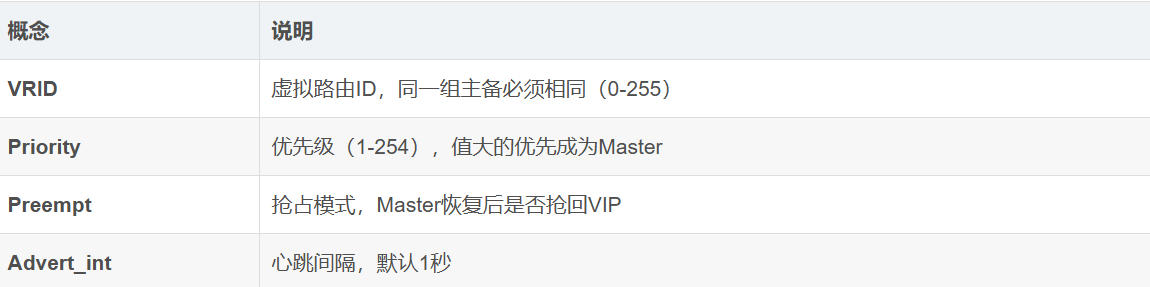
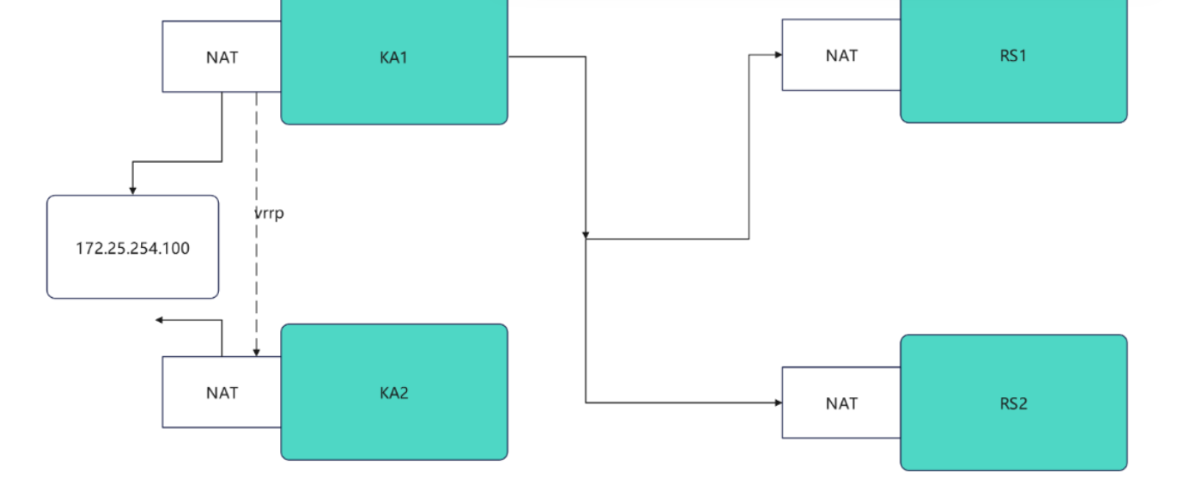
VRRP 是一种网络协议,允许多台路由器共享一个虚拟IP地址,实现路由器的高可用
工作模式:
Master(主设备):实际持有虚拟IP,处理所有发往该IP的请求
Backup(备用设备):监控Master状态,当Master故障时接管VIP
虚拟路由器:由一组路由器组成的逻辑实体,对外表现为一个具有固定IP的路由器
2.安装keepalived
root@KA1 \~# dnf install keepalived.x86_64 -y
root@KA2 \~# dnf install keepalived.x86_64 -y
3.配置虚拟路由
KA1为master
#root@KA1 \~# vim /etc/keepalived/keepalived.conf
global_defs {
  notification_email {
    timinglee_zln@163.com
  }
  notification_email_from timinglee_zln@163.com
  smtp_server 127.0.0.1
  smtp_connect_timeout 30
  router_id KA1
  vrrp_skip_check_adv_addr
  #vrrp_strict
  vrrp_garp_interval 1
  vrrp_gna_interval 1
  vrrp_mcast_group4 224.0.0.44
}
vrrp_instance WEB_VIP {
   state MASTER
   interface eth0
   virtual_router_id 51
   priority 100
   advert_int 1
   authentication {
       auth_type PASS
       auth_pass 1111
   }
   virtual_ipaddress {
       172.25.254.100/24 dev eth0 label eth0:0
   }
}#root@KA1 \~# systemctl enable --now keepalived.service
Created symlink /etc/systemd/system/multi-user.target.wants/keepalived.service → /usr/lib/systemd/system/keepalived.service.
#KA2同上
4.验证
root@KA1 \~# tcpdump -i eth0 -nn host 224.0.0.44
11:38:46.183386 IP 172.25.254.50 > 224.0.0.44: VRRPv2, Advertisement, vrid 51, prio 100, authtype simple, intvl 1s, length 20
11:38:47.184051 IP 172.25.254.50 > 224.0.0.44: VRRPv2, Advertisement, vrid 51, prio 100, authtype simple, intvl 1s, length 20
11:38:48.184610 IP 172.25.254.50 > 224.0.0.44: VRRPv2, Advertisement, vrid 51, prio 100, authtype simple, intvl 1s, length 20
11:38:49.185084 IP 172.25.254.50 > 224.0.0.44: VRRPv2, Advertisement, vrid 51, prio 100, authtype simple, intvl 1s, length 20
5.日志分离
默认情况下。keepalived的日志会被保存在/var/log/messages文件中,这个文件中除了含有keepalived的日志外,还有其他服务的日志信息,这样不利于对于keepalived的日志进行查看
root@KA1 \~# vim /etc/sysconfig/keepalived
KEEPALIVED_OPTIONS="-D -S 6"
root@KA1 \~# systemctl restart keepalived.service
root@KA1 \~# vim /etc/rsyslog.conf
local6.* /var/log/keepalived.log
root@KA1 \~# systemctl restart rsyslog.service
#测试
root@KA1 log# ls -l /var/log/keepalived.log
ls: 无法访问 'keepalived.log': 没有那个文件或目录
root@KA1 log# ls keepalived.log
keepalived.log
6.keepalivd业务vip迁移警告
6.1.邮件告警环境构建
#安装邮件软件
root@KA1 \~# dnf install s-nail postfix -y
root@KA2 \~# dnf install s-nail postfix -y
#启动邮件代理
root@KA1 \~# systemctl start postfix.service
root@KA2 \~# systemctl start postfix.service
#设定sendmail可以通过公网邮箱发送邮件下面方式人选其一
#在Linux主机中配置mailrc(KA1+KA2)
root@KA1+KA2 \~# vim /etc/mail.rc
set smtp-auth=login
set smtp-auth-user=timinglee_zln@163.com
set smtp-auth-password=TGfdKaJT7EB
set from=timinglee_zln@163.com
set ssl-verify=ignore
#测试邮件
root@KA1 mail# echo hello | mailx -s test 1122334455@qq.com
root@KA1 mail# mailq #查看邮件队列
Mail queue is empty
root@KA1 mail# mail #查看是否又退信
s-nail version v14.9.22. Type `?' for help
/var/spool/mail/root: 1 message
▸ 1 Mail Delivery Subsys 2026-01-28 16:26 69/2210 "Returned mail: see transcript for details "
&q 退出
#查看对应邮箱是否有邮件收到
6.2.设定keepalived告警脚本
root@KA1 \~# mkdir -p /etc/keepalived/scripts
root@KA2 \~# mkdir -p /etc/keepalived/scripts
#编写告警脚本
root@KA1+2 \~# vim /etc/keepalived/scripts/waring.sh
#!/bin/bash
mail_dest='594233887@qq.com'
mail_send()
{
mail_subj="HOSTNAME to be 1 vip 转移"
mail_mess="`date +%F\ %T`: vrrp 转移,HOSTNAME 变为 1"
echo "mail_mess" \| mail -s "mail_subj" $mail_dest
}
case $1 in
master)
mail_send master
;;
backup)
mail_send backup
;;
fault)
mail_send fault
;;
*)
exit 1
;;
esac
root@KA1+2 \~# chmod +x /etc/keepalived/scripts/waring.sh
root@KA1 \~# /etc/keepalived/scripts/waring.sh master
#对应邮箱中会出现邮件
6.3.配置keepalived告警
#在KA1和KA2中设定配置文件
! Configuration File for keepalived
global_defs {
notification_email {
}
notification_email_from timinglee_zln@163.com
smtp_server 127.0.0.1
smtp_connect_timeout 30
router_id KA1
vrrp_skip_check_adv_addr
#vrrp_strict
vrrp_garp_interval 1
vrrp_gna_interval 1
vrrp_mcast_group4 224.0.0.44
enable_script_security
script_user root
}
vrrp_instance WEB_VIP {
state MASTER
interface eth0
virtual_router_id 51
priority 100
advert_int 1
unicast_src_ip 172.25.254.50
unicast_peer {
172.25.254.60
}
authentication {
auth_type PASS
auth_pass 1111
}
virtual_ipaddress {
172.25.254.100/24 dev eth0 label eth0:0
}
notify_master "/etc/keepalived/scripts/waring.sh master"
notify_backup "/etc/keepalived/scripts/waring.sh backup"
notify_fault "/etc/keepalived/scripts/waring.sh fault"
}
root@KA1+2 \~# systemctl restart keepalived.service
#测试
root@KA1 \~# systemctl stop keepalived.service #停止服务后查看邮件
root@KA1 \~# systemctl start keepalived.service #开启服务后查看邮件
7.KeepAlived长链接优化
7.1.设定长链接时间
root@Nginx \~# vim /usr/local/nginx/conf/nginx.conf
keepalive_timeout 5;
root@Nginx \~# nginx -s reload
#测试
root@Nginx \~# dnf install telnet -y
root@Nginx \~# telnet www.timinglee.org 80
Trying 172.25.254.100...
Connected to www.timinglee.org.
Escape character is '^]'.
GET / HTTP/1.1 <<<<
Host: www.timinglee.org <<<<
<<<
HTTP/1.1 200 OK
Server: nginx/1.28.1
Date: Sat, 31 Jan 2026 08:27:02 GMT
Content-Type: text/html
Content-Length: 10
Last-Modified: Thu, 29 Jan 2026 09:02:15 GMT
Connection: keep-alive
ETag: "697b2217-a"
Accept-Ranges: bytes
timinglee 显示的页面出现后根据设定的长链接时间会等待,超过时间后会自动退出
Connection closed by foreign host.
7.2.设定长链接次数
root@Nginx \~# vim /usr/local/nginx/conf/nginx.conf
keepalive_requests 3;
root@Nginx \~# nginx -s reload
#测试
root@Nginx \~# telnet www.timinglee.org 80
Trying 172.25.254.100...
Connected to www.timinglee.org.
Escape character is '^]'.
GET / HTTP/1.1
Host: www.timinglee.org
HTTP/1.1 200 OK #第一次
Server: nginx/1.28.1
Date: Sat, 31 Jan 2026 08:32:14 GMT
Content-Type: text/html
Content-Length: 10
Last-Modified: Thu, 29 Jan 2026 09:02:15 GMT
Connection: keep-alive
Keep-Alive: timeout=100
ETag: "697b2217-a"
Accept-Ranges: bytes
timinglee
GET / HTTP/1.1
Host: www.timinglee.org
HTTP/1.1 200 OK #第二次
Server: nginx/1.28.1
Date: Sat, 31 Jan 2026 08:32:24 GMT
Content-Type: text/html
Content-Length: 10
Last-Modified: Thu, 29 Jan 2026 09:02:15 GMT
Connection: keep-alive
Keep-Alive: timeout=100
ETag: "697b2217-a"
Accept-Ranges: bytes
timinglee
GET / HTTP/1.1
Host: www.timinglee.org
HTTP/1.1 200 OK #第三次
Server: nginx/1.28.1
Date: Sat, 31 Jan 2026 08:32:35 GMT
Content-Type: text/html
Content-Length: 10
Last-Modified: Thu, 29 Jan 2026 09:02:15 GMT
Connection: close
ETag: "697b2217-a"
Accept-Ranges: bytes
timinglee
Connection closed by foreign host.