1 核心定义
抽象工厂模式是一种创建型设计模式,它提供一个创建一系列相关或相互依赖对象的接口,而无需指定它们具体的类。抽象工厂通常通过组合多个工厂方法来实现,用于创建产品族。
2 核心思想
创建一组相关的产品对象(产品族)
客户端通过抽象接口操作,不关心具体产品类的实例化过程
每个具体工厂负责创建一个完整的产品族
产品族之间具有内在的关联或约束关系
3 结构组成
AbstractFactory(抽象工厂):声明创建一系列产品对象的操作接口
ConcreteFactory(具体工厂):实现抽象工厂接口,创建具体产品对象
AbstractProduct(抽象产品):为产品声明接口
ConcreteProduct(具体产品):定义具体产品对象,实现抽象产品接口
Client(客户端):仅使用抽象工厂和抽象产品声明的接口
4 应用场景举例
以跨平台GUI组件库为例:
1 不同操作系统(Windows、Mac、Linux)有不同的界面风格
2 每个操作系统都需要提供一套完整的UI组件:按钮、文本框、复选框等
3 这些组件在同一操作系统下风格统一,但不同操作系统间差异较大
4 应用程序需要能够无缝切换不同的界面风格
5 UML
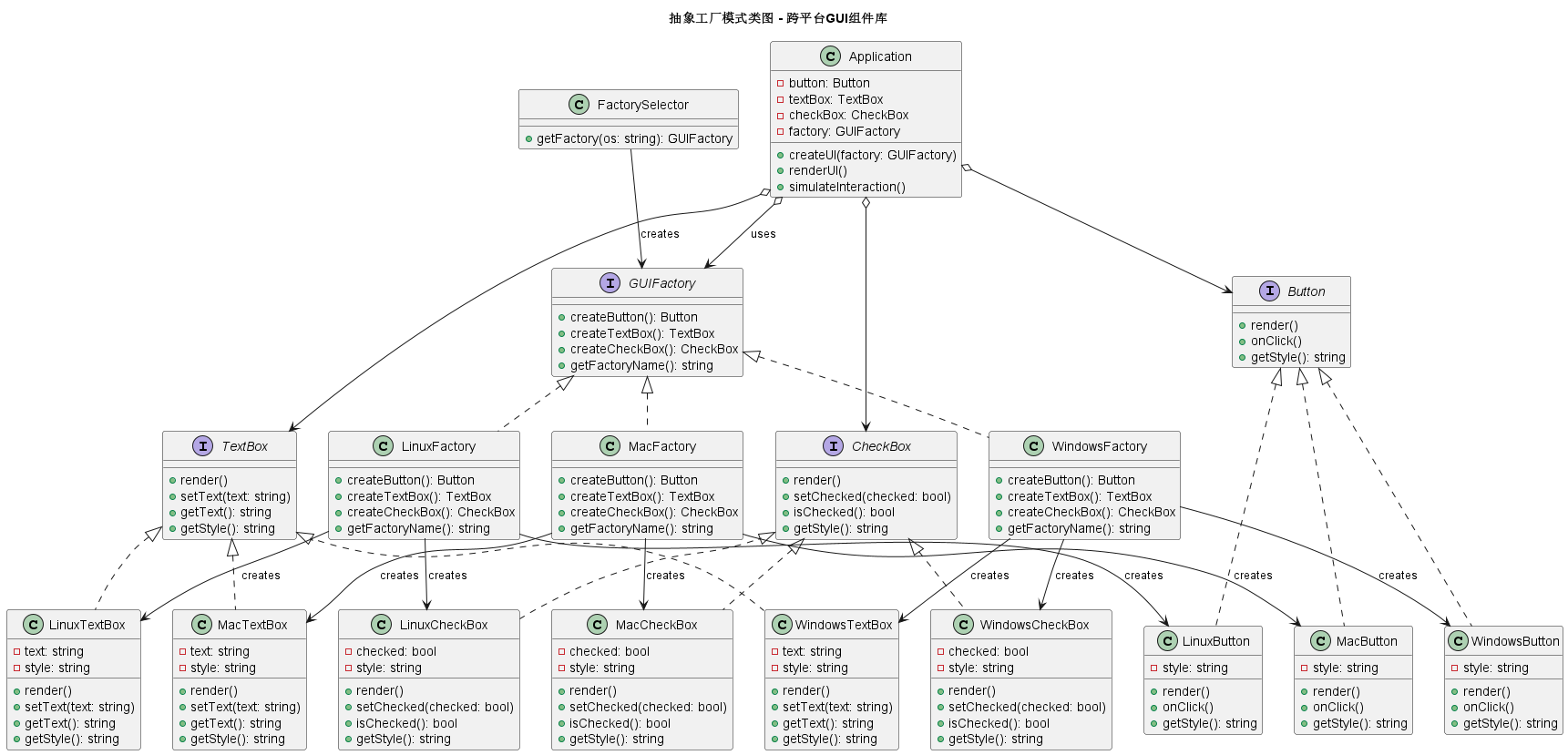
6 c++ 代码实现
cpp
#include <iostream>
#include <string>
#include <memory>
using namespace std;

// ========== 抽象产品:按钮 ==========
class Button {
public:
    virtual ~Button() = default;
    virtual void render() = 0;
    virtual void onClick() = 0;
    virtual string getStyle() = 0;
};

// ========== 抽象产品:文本框 ==========
class TextBox {
public:
    virtual ~TextBox() = default;
    virtual void render() = 0;
    virtual void setText(const string& text) = 0;
    virtual string getText() = 0;
    virtual string getStyle() = 0;
};

// ========== 抽象产品:复选框 ==========
class CheckBox {
public:
    virtual ~CheckBox() = default;
    virtual void render() = 0;
    virtual void setChecked(bool checked) = 0;
    virtual bool isChecked() = 0;
    virtual string getStyle() = 0;
};

// ========== Windows风格具体产品 ==========
class WindowsButton : public Button {
private:
    string style = "Windows 11 现代风格";

public:
    void render() override {
        cout << "渲染Windows风格按钮: [圆角矩形, 半透明效果, 微光动效]" << endl;
    }

    void onClick() override {
        cout << "Windows按钮点击: 产生涟漪波纹效果" << endl;
    }

    string getStyle() override {
        return style;
    }
};

class WindowsTextBox : public TextBox {
private:
    string text;
    string style = "Windows 11 现代风格";

public:
    void render() override {
        cout << "渲染Windows风格文本框: [圆角边框, 半透明背景, 阴影效果]" << endl;
        if (!text.empty()) {
            cout << "  当前文本: " << text << endl;
        }
    }

    void setText(const string& newText) override {
        text = newText;
    }

    string getText() override {
        return text;
    }

    string getStyle() override {
        return style;
    }
};

class WindowsCheckBox : public CheckBox {
private:
    bool checked = false;
    string style = "Windows 11 现代风格";

public:
    void render() override {
        cout << "渲染Windows风格复选框: [圆角方形, 选中时显示对勾, 动画过渡]" << endl;
        cout << "  当前状态: " << (checked ? "已选中" : "未选中") << endl;
    }

    void setChecked(bool state) override {
        checked = state;
    }

    bool isChecked() override {
        return checked;
    }

    string getStyle() override {
        return style;
    }
};

// ========== Mac风格具体产品 ==========
class MacButton : public Button {
private:
    string style = "macOS Ventura 风格";

public:
    void render() override {
        cout << "渲染Mac风格按钮: [胶囊形状, 简洁设计, 磨砂玻璃效果]" << endl;
    }

    void onClick() override {
        cout << "Mac按钮点击: 弹性动画效果" << endl;
    }

    string getStyle() override {
        return style;
    }
};

class MacTextBox : public TextBox {
private:
    string text;
    string style = "macOS Ventura 风格";

public:
    void render() override {
        cout << "渲染Mac风格文本框: [无边框设计, 圆角, 发光效果]" << endl;
        if (!text.empty()) {
            cout << "  当前文本: " << text << endl;
        }
    }

    void setText(const string& newText) override {
        text = newText;
    }

    string getText() override {
        return text;
    }

    string getStyle() override {
        return style;
    }
};

class MacCheckBox : public CheckBox {
private:
    bool checked = false;
    string style = "macOS Ventura 风格";

public:
    void render() override {
        cout << "渲染Mac风格复选框: [圆形选框, 选中时填充, 动画效果]" << endl;
        cout << "  当前状态: " << (checked ? "已选中" : "未选中") << endl;
    }

    void setChecked(bool state) override {
        checked = state;
    }

    bool isChecked() override {
        return checked;
    }

    string getStyle() override {
        return style;
    }
};

// ========== Linux风格具体产品 ==========
class LinuxButton : public Button {
private:
    string style = "Linux GNOME 风格";

public:
    void render() override {
        cout << "渲染Linux风格按钮: [直角矩形, 简洁实用, 可定制主题]" << endl;
    }

    void onClick() override {
        cout << "Linux按钮点击: 无动画效果, 即时响应" << endl;
    }

    string getStyle() override {
        return style;
    }
};

class LinuxTextBox : public TextBox {
private:
    string text;
    string style = "Linux GNOME 风格";

public:
    void render() override {
        cout << "渲染Linux风格文本框: [直角边框, 简洁设计, 主题可定制]" << endl;
        if (!text.empty()) {
            cout << "  当前文本: " << text << endl;
        }
    }

    void setText(const string& newText) override {
        text = newText;
    }

    string getText() override {
        return text;
    }

    string getStyle() override {
        return style;
    }
};

class LinuxCheckBox : public CheckBox {
private:
    bool checked = false;
    string style = "Linux GNOME 风格";

public:
    void render() override {
        cout << "渲染Linux风格复选框: [方形选框, 选中时显示X, 主题跟随系统]" << endl;
        cout << "  当前状态: " << (checked ? "已选中" : "未选中") << endl;
    }

    void setChecked(bool state) override {
        checked = state;
    }

    bool isChecked() override {
        return checked;
    }

    string getStyle() override {
        return style;
    }
};

// ========== 抽象工厂:GUI组件工厂 ==========
class GUIFactory {
public:
    virtual ~GUIFactory() = default;
    virtual Button* createButton() = 0;
    virtual TextBox* createTextBox() = 0;
    virtual CheckBox* createCheckBox() = 0;

    // 可以添加一些公共方法
    virtual string getFactoryName() = 0;
};

// ========== Windows风格具体工厂 ==========
class WindowsFactory : public GUIFactory {
public:
    Button* createButton() override {
        return new WindowsButton();
    }

    TextBox* createTextBox() override {
        return new WindowsTextBox();
    }

    CheckBox* createCheckBox() override {
        return new WindowsCheckBox();
    }

    string getFactoryName() override {
        return "Windows风格工厂";
    }
};

// ========== Mac风格具体工厂 ==========
class MacFactory : public GUIFactory {
public:
    Button* createButton() override {
        return new MacButton();
    }

    TextBox* createTextBox() override {
        return new MacTextBox();
    }

    CheckBox* createCheckBox() override {
        return new MacCheckBox();
    }

    string getFactoryName() override {
        return "Mac风格工厂";
    }
};

// ========== Linux风格具体工厂 ==========
class LinuxFactory : public GUIFactory {
public:
    Button* createButton() override {
        return new LinuxButton();
    }

    TextBox* createTextBox() override {
        return new LinuxTextBox();
    }

    CheckBox* createCheckBox() override {
        return new LinuxCheckBox();
    }

    string getFactoryName() override {
        return "Linux风格工厂";
    }
};

// ========== 客户端:应用程序 ==========
class Application {
private:
    unique_ptr<Button> button;
    unique_ptr<TextBox> textBox;
    unique_ptr<CheckBox> checkBox;
    GUIFactory* factory;

public:
    // 通过抽象工厂创建整个UI组件族
    void createUI(GUIFactory* f) {
        factory = f;
        button.reset(f->createButton());
        textBox.reset(f->createTextBox());
        checkBox.reset(f->createCheckBox());
    }

    void renderUI() {
        cout << "\n=== 使用 " << factory->getFactoryName() << " 渲染界面 ===" << endl;

        cout << "按钮: ";
        button->render();

        cout << "文本框: ";
        textBox->setText("Hello World");
        textBox->render();

        cout << "复选框: ";
        checkBox->setChecked(true);
        checkBox->render();
    }

    void simulateInteraction() {
        cout << "\n模拟用户交互:" << endl;
        button->onClick();
        cout << "文本框内容: " << textBox->getText() << endl;
        cout << "复选框状态: " << (checkBox->isChecked() ? "选中" : "未选中") << endl;
    }
};

// ========== 工厂选择器 ==========
class FactorySelector {
public:
    static GUIFactory* getFactory(const string& os) {
        if (os == "windows") {
            return new WindowsFactory();
        } else if (os == "mac") {
            return new MacFactory();
        } else if (os == "linux") {
            return new LinuxFactory();
        }
        return nullptr;
    }
};

// ========== 主函数 ==========
int main() {
    // 模拟在不同操作系统上运行
    vector<string> operatingSystems = {"windows", "mac", "linux"};

    for (const auto& os : operatingSystems) {
        // 获取对应的工厂
        GUIFactory* factory = FactorySelector::getFactory(os);
        if (!factory) {
            cerr << "不支持的操作系统: " << os << endl;
            continue;
        }

        // 创建并渲染应用界面
        Application app;
        app.createUI(factory);
        app.renderUI();
        app.simulateInteraction();

        cout << "\n" << string(50, '-') << endl;

        delete factory;
    }

    return 0;
}
7 总结
不使用抽象工厂模式的坏处
如果不使用抽象工厂模式,可能会采用以下几种实现方式:
方式1:使用多个独立工厂
cpp
class WindowsButtonFactory {
public:
    Button* createButton() { return new WindowsButton(); }
};

class WindowsTextBoxFactory {
public:
    TextBox* createTextBox() { return new WindowsTextBox(); }
};

// 每个组件都有自己的工厂,客户端需要管理多个工厂
class Application {
private:
    WindowsButtonFactory* btnFactory;
    WindowsTextBoxFactory* txtFactory;
    WindowsCheckBoxFactory* chkFactory;
    // ... 为每个组件维护一个工厂
};
问题:
工厂数量爆炸(组件数 × 平台数)
难以保证产品之间风格一致
客户端需要了解并管理多个工厂
添加新平台需要修改多处代码
方式2:使用条件判断创建
cpp
class Application {
private:
    string platform;

public:
    void createUI() {
        Button* button;
        TextBox* textBox;
        CheckBox* checkBox;

        // 到处都是条件判断
        if (platform == "windows") {
            button = new WindowsButton();
            textBox = new WindowsTextBox();
            checkBox = new WindowsCheckBox();
        } else if (platform == "mac") {
            button = new MacButton();
            textBox = new MacTextBox();
            checkBox = new MacCheckBox();
        } else if (platform == "linux") {
            button = new LinuxButton();
            textBox = new LinuxTextBox();
            checkBox = new LinuxCheckBox();
        }

        // 使用这些组件...
    }
};
问题:
违反开闭原则,添加新平台需要修改所有创建代码
代码重复,每个创建组件的地方都需要条件判断
难以保证整个界面的风格一致性
测试困难,无法轻松切换不同平台
方式3:使用简单工厂创建所有组件
cpp
class GUISimpleFactory {
public:
    static Button* createButton(const string& platform) {
        if (platform == "windows") return new WindowsButton();
        if (platform == "mac") return new MacButton();
        return new LinuxButton();
    }

    static TextBox* createTextBox(const string& platform) {
        if (platform == "windows") return new WindowsTextBox();
        if (platform == "mac") return new MacTextBox();
        return new LinuxTextBox();
    }

    static CheckBox* createCheckBox(const string& platform) {
        if (platform == "windows") return new WindowsCheckBox();
        if (platform == "mac") return new MacCheckBox();
        return new LinuxCheckBox();
    }
};
问题:
工厂类职责过重,包含所有产品的创建逻辑
仍然需要传递平台参数,容易出错
添加新产品需要修改工厂类
产品族的概念不明显,可能混用不同平台组件
抽象工厂模式通过以下方式提供价值:
隔离具体类:客户端只与抽象接口交互
产品族一致性:确保创建的产品相互兼容
易于交换产品族:只需更换具体工厂
促进一致性:一个工厂的产品一起工作
支持开闭原则:易于扩展新产品族
关键区别:
工厂方法模式:一个工厂创建一个产品
抽象工厂模式:一个工厂创建一系列相关产品(产品族)
通过使用抽象工厂模式,我们可以创建灵活、可维护、可扩展的系统架构,特别是在需要支持多个相关产品族的场景中。
8 适用场景
系统需要独立于产品的创建、组合和表示
系统需要配置多个产品族中的一个
需要强调一系列相关产品的接口,以便联合使用
需要提供产品类库,只想暴露接口而不是实现
产品的约束需要在内部保持一致