本文是【GoF设计模式】系列第11篇
前言
为什么需要组合模式?
假设在做一个文件管理系统,需要统计某个文件夹的总大小。文件夹里有文件,也有子文件夹,子文件夹里还有文件和文件夹------这是一棵递归的树。
如果文件和文件夹是两个完全不同的类,代码会变成这样:
java
if (node instanceof File) {
    total += ((File) node).getSize();
} else if (node instanceof Folder) {
    for (Object child : ((Folder) node).getChildren()) {
        // 又要判断 child 是文件还是文件夹......
    }
}
每多一层嵌套,就多一层 instanceof。更麻烦的是,如果将来新增一种"快捷方式"节点,所有遍历逻辑都要改。
组合模式的核心思路:让文件和文件夹实现同一个接口,不管是文件还是文件夹,都用 getSize() 一行调用搞定。文件返回自身大小,文件夹递归汇总子节点大小------调用者完全不需要区分。
概念
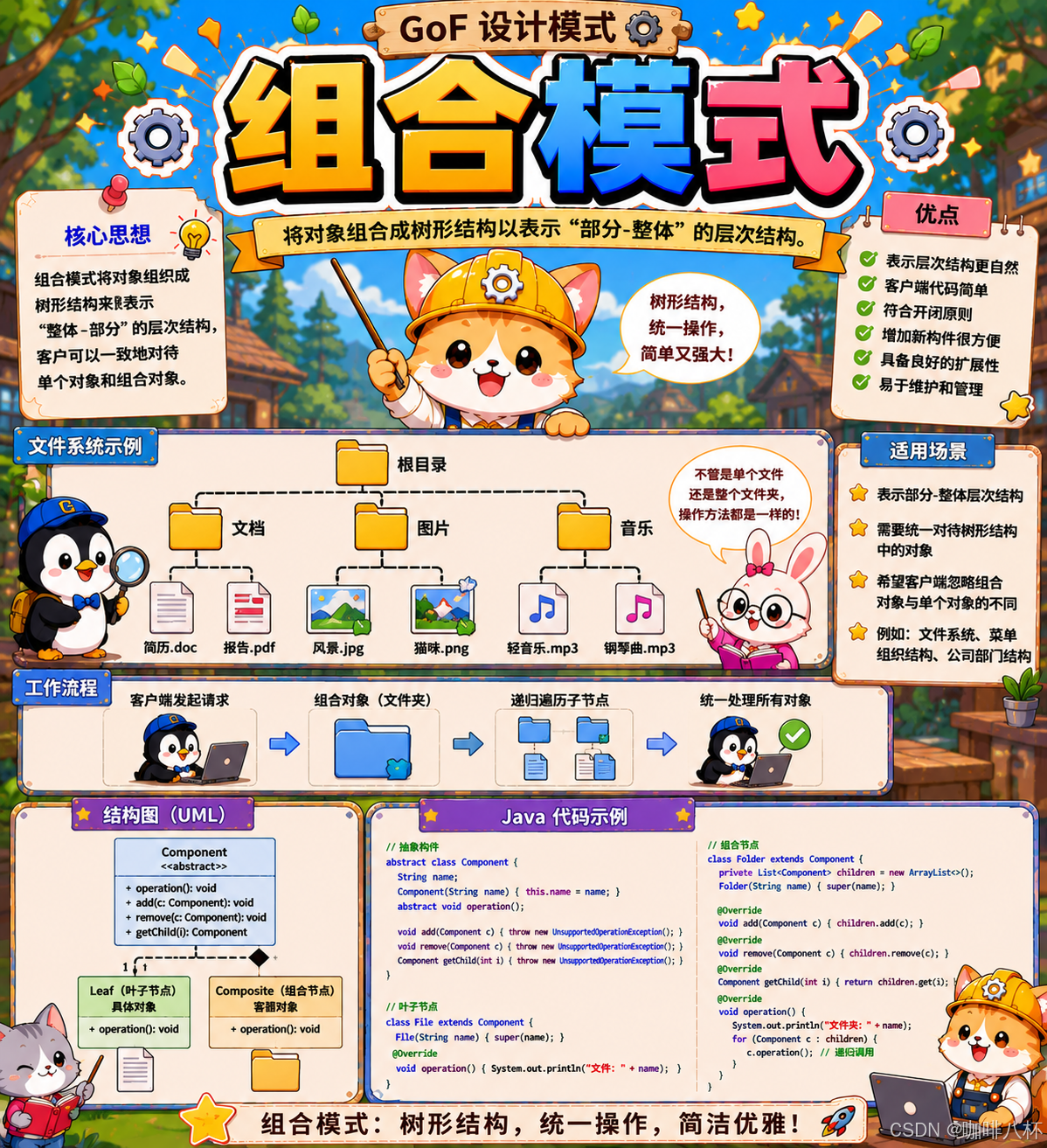
组合模式(Composite Pattern)是一种结构型设计模式 ,核心思想是将对象组织成树状结构,让单个对象和组合对象实现相同的接口,客户端无需区分就能统一处理。
拆解三个关键点:
- 树状结构:对象之间是"部分-整体"的层次关系,比如文件夹包含文件、部门包含员工
- 统一接口:叶子节点和组合节点实现同一套接口,调用方式完全一致
- 递归处理:组合节点的操作会递归委托给子节点,最终汇聚结果
组合模式涉及三个角色:
- 组件(Component):定义所有节点的公共接口,是叶子和组合的统一抽象
- 叶子(Leaf):树的末端节点,不再包含子节点,直接实现业务逻辑
- 组合(Composite):容器节点,持有子节点列表,操作时递归委托给子节点
#mermaid-svg-ueWIqY1ZGtm5TMtp{font-family:"trebuchet ms",verdana,arial,sans-serif;font-size:16px;fill:#333;}@keyframes edge-animation-frame{from{stroke-dashoffset:0;}}@keyframes dash{to{stroke-dashoffset:0;}}#mermaid-svg-ueWIqY1ZGtm5TMtp .edge-animation-slow{stroke-dasharray:9,5!important;stroke-dashoffset:900;animation:dash 50s linear infinite;stroke-linecap:round;}#mermaid-svg-ueWIqY1ZGtm5TMtp .edge-animation-fast{stroke-dasharray:9,5!important;stroke-dashoffset:900;animation:dash 20s linear infinite;stroke-linecap:round;}#mermaid-svg-ueWIqY1ZGtm5TMtp .error-icon{fill:#552222;}#mermaid-svg-ueWIqY1ZGtm5TMtp .error-text{fill:#552222;stroke:#552222;}#mermaid-svg-ueWIqY1ZGtm5TMtp .edge-thickness-normal{stroke-width:1px;}#mermaid-svg-ueWIqY1ZGtm5TMtp .edge-thickness-thick{stroke-width:3.5px;}#mermaid-svg-ueWIqY1ZGtm5TMtp .edge-pattern-solid{stroke-dasharray:0;}#mermaid-svg-ueWIqY1ZGtm5TMtp .edge-thickness-invisible{stroke-width:0;fill:none;}#mermaid-svg-ueWIqY1ZGtm5TMtp .edge-pattern-dashed{stroke-dasharray:3;}#mermaid-svg-ueWIqY1ZGtm5TMtp .edge-pattern-dotted{stroke-dasharray:2;}#mermaid-svg-ueWIqY1ZGtm5TMtp .marker{fill:#333333;stroke:#333333;}#mermaid-svg-ueWIqY1ZGtm5TMtp .marker.cross{stroke:#333333;}#mermaid-svg-ueWIqY1ZGtm5TMtp svg{font-family:"trebuchet ms",verdana,arial,sans-serif;font-size:16px;}#mermaid-svg-ueWIqY1ZGtm5TMtp p{margin:0;}#mermaid-svg-ueWIqY1ZGtm5TMtp g.classGroup text{fill:#9370DB;stroke:none;font-family:"trebuchet ms",verdana,arial,sans-serif;font-size:10px;}#mermaid-svg-ueWIqY1ZGtm5TMtp g.classGroup text .title{font-weight:bolder;}#mermaid-svg-ueWIqY1ZGtm5TMtp .cluster-label text{fill:#333;}#mermaid-svg-ueWIqY1ZGtm5TMtp .cluster-label span{color:#333;}#mermaid-svg-ueWIqY1ZGtm5TMtp .cluster-label span p{background-color:transparent;}#mermaid-svg-ueWIqY1ZGtm5TMtp .cluster rect{fill:#ffffde;stroke:#aaaa33;stroke-width:1px;}#mermaid-svg-ueWIqY1ZGtm5TMtp .cluster text{fill:#333;}#mermaid-svg-ueWIqY1ZGtm5TMtp .cluster span{color:#333;}#mermaid-svg-ueWIqY1ZGtm5TMtp .nodeLabel,#mermaid-svg-ueWIqY1ZGtm5TMtp .edgeLabel{color:#131300;}#mermaid-svg-ueWIqY1ZGtm5TMtp .edgeLabel .label rect{fill:#ECECFF;}#mermaid-svg-ueWIqY1ZGtm5TMtp .label text{fill:#131300;}#mermaid-svg-ueWIqY1ZGtm5TMtp .labelBkg{background:#ECECFF;}#mermaid-svg-ueWIqY1ZGtm5TMtp .edgeLabel .label span{background:#ECECFF;}#mermaid-svg-ueWIqY1ZGtm5TMtp .classTitle{font-weight:bolder;}#mermaid-svg-ueWIqY1ZGtm5TMtp .node rect,#mermaid-svg-ueWIqY1ZGtm5TMtp .node circle,#mermaid-svg-ueWIqY1ZGtm5TMtp .node ellipse,#mermaid-svg-ueWIqY1ZGtm5TMtp .node polygon,#mermaid-svg-ueWIqY1ZGtm5TMtp .node path{fill:#ECECFF;stroke:#9370DB;stroke-width:1px;}#mermaid-svg-ueWIqY1ZGtm5TMtp .divider{stroke:#9370DB;stroke-width:1;}#mermaid-svg-ueWIqY1ZGtm5TMtp g.clickable{cursor:pointer;}#mermaid-svg-ueWIqY1ZGtm5TMtp g.classGroup rect{fill:#ECECFF;stroke:#9370DB;}#mermaid-svg-ueWIqY1ZGtm5TMtp g.classGroup line{stroke:#9370DB;stroke-width:1;}#mermaid-svg-ueWIqY1ZGtm5TMtp .classLabel .box{stroke:none;stroke-width:0;fill:#ECECFF;opacity:0.5;}#mermaid-svg-ueWIqY1ZGtm5TMtp .classLabel .label{fill:#9370DB;font-size:10px;}#mermaid-svg-ueWIqY1ZGtm5TMtp .relation{stroke:#333333;stroke-width:1;fill:none;}#mermaid-svg-ueWIqY1ZGtm5TMtp .dashed-line{stroke-dasharray:3;}#mermaid-svg-ueWIqY1ZGtm5TMtp .dotted-line{stroke-dasharray:1 2;}#mermaid-svg-ueWIqY1ZGtm5TMtp #compositionStart,#mermaid-svg-ueWIqY1ZGtm5TMtp .composition{fill:#333333!important;stroke:#333333!important;stroke-width:1;}#mermaid-svg-ueWIqY1ZGtm5TMtp #compositionEnd,#mermaid-svg-ueWIqY1ZGtm5TMtp .composition{fill:#333333!important;stroke:#333333!important;stroke-width:1;}#mermaid-svg-ueWIqY1ZGtm5TMtp #dependencyStart,#mermaid-svg-ueWIqY1ZGtm5TMtp .dependency{fill:#333333!important;stroke:#333333!important;stroke-width:1;}#mermaid-svg-ueWIqY1ZGtm5TMtp #dependencyStart,#mermaid-svg-ueWIqY1ZGtm5TMtp .dependency{fill:#333333!important;stroke:#333333!important;stroke-width:1;}#mermaid-svg-ueWIqY1ZGtm5TMtp #extensionStart,#mermaid-svg-ueWIqY1ZGtm5TMtp .extension{fill:transparent!important;stroke:#333333!important;stroke-width:1;}#mermaid-svg-ueWIqY1ZGtm5TMtp #extensionEnd,#mermaid-svg-ueWIqY1ZGtm5TMtp .extension{fill:transparent!important;stroke:#333333!important;stroke-width:1;}#mermaid-svg-ueWIqY1ZGtm5TMtp #aggregationStart,#mermaid-svg-ueWIqY1ZGtm5TMtp .aggregation{fill:transparent!important;stroke:#333333!important;stroke-width:1;}#mermaid-svg-ueWIqY1ZGtm5TMtp #aggregationEnd,#mermaid-svg-ueWIqY1ZGtm5TMtp .aggregation{fill:transparent!important;stroke:#333333!important;stroke-width:1;}#mermaid-svg-ueWIqY1ZGtm5TMtp #lollipopStart,#mermaid-svg-ueWIqY1ZGtm5TMtp .lollipop{fill:#ECECFF!important;stroke:#333333!important;stroke-width:1;}#mermaid-svg-ueWIqY1ZGtm5TMtp #lollipopEnd,#mermaid-svg-ueWIqY1ZGtm5TMtp .lollipop{fill:#ECECFF!important;stroke:#333333!important;stroke-width:1;}#mermaid-svg-ueWIqY1ZGtm5TMtp .edgeTerminals{font-size:11px;line-height:initial;}#mermaid-svg-ueWIqY1ZGtm5TMtp .classTitleText{text-anchor:middle;font-size:18px;fill:#333;}#mermaid-svg-ueWIqY1ZGtm5TMtp .label-icon{display:inline-block;height:1em;overflow:visible;vertical-align:-0.125em;}#mermaid-svg-ueWIqY1ZGtm5TMtp .node .label-icon path{fill:currentColor;stroke:revert;stroke-width:revert;}#mermaid-svg-ueWIqY1ZGtm5TMtp :root{--mermaid-font-family:"trebuchet ms",verdana,arial,sans-serif;} 实现
实现
聚合
<<interface>>
Component
+operation()
Leaf
+operation()
Composite
-children: List<Component>
+operation()
+add(Component)
+remove(Component)
Component 定义统一接口,Leaf 和 Composite 都实现它。Composite 内部持有一个 List<Component>,可以存放 Leaf 也可以嵌套其他 Composite。调用 Composite 的操作时,它会遍历子节点逐个调用------这就是递归的核心。
实现
透明方式(GoF 原版基础实现)
组合模式的实现分为以下几个步骤:
- 定义
Component接口,声明公共操作及子节点管理方法 - 定义
Leaf实现Component,叶子节点不支持子节点管理,调用时抛出异常 - 定义
Composite实现Component,持有子节点列表,操作时递归遍历子节点
java
// Component:统一接口,包含子节点管理方法
interface Component {
    public void operation();
    public void add(Component component);
    public void remove(Component component);
    public Component getChild(int index);
}

// Leaf:叶子节点,不支持子节点管理
class Leaf implements Component {
    public void operation() {
        System.out.println("叶子节点的操作");
    }
    public void add(Component component) {
        throw new UnsupportedOperationException("叶子节点不支持添加子节点");
    }
    public void remove(Component component) {
        throw new UnsupportedOperationException("叶子节点不支持移除子节点");
    }
    public Component getChild(int index) {
        throw new UnsupportedOperationException("叶子节点不支持获取子节点");
    }
}

// Composite:组合节点,递归处理子节点
class Composite implements Component {
    private List<Component> children = new ArrayList<>();

    public void operation() {
        System.out.println("组合节点的操作");
        for (Component child : children) {
            child.operation();  // 递归调用
        }
    }
    public void add(Component component) {
        children.add(component);
    }
    public void remove(Component component) {
        children.remove(component);
    }
    public Component getChild(int index) {
        return children.get(index);
    }
}
引入一个例子:「公司组织架构,员工和部门都有"获取薪资"的操作。员工返回自己的工资,部门返回所有下属的薪资之和------不管是员工还是部门,调用 getSalary() 的方式完全一样,调用者不需要区分拿到的是哪种」。
核心思路:把子节点管理方法放在 Component 接口中,客户端完全不需要区分叶子和组合,接口完全统一。
java
// Component:组织架构统一接口(透明方式:管理方法在接口中)
interface OrganizationComponent {
    public String getName();
    public double getSalary();
    public void printStructure(int depth);
    public void add(OrganizationComponent component);
    public void remove(OrganizationComponent component);
    public OrganizationComponent getChild(int index);
}

// Leaf:员工(被迫实现管理方法,调用时抛异常)
class Employee implements OrganizationComponent {
    private String name;
    private double salary;

    public Employee(String name, double salary) {
        this.name = name;
        this.salary = salary;
    }
    public String getName() {
        return name;
    }
    public double getSalary() {
        return salary;  // 员工返回自身薪资
    }
    public void printStructure(int depth) {
        System.out.println("  ".repeat(depth) + "- " + name + " (¥" + salary + ")");
    }
    public void add(OrganizationComponent component) {
        throw new UnsupportedOperationException("员工节点不支持添加子节点");
    }
    public void remove(OrganizationComponent component) {
        throw new UnsupportedOperationException("员工节点不支持移除子节点");
    }
    public OrganizationComponent getChild(int index) {
        throw new UnsupportedOperationException("员工节点不支持获取子节点");
    }
}

// Composite:部门(真正实现管理方法)
class Department implements OrganizationComponent {
    private String name;
    private List<OrganizationComponent> members = new ArrayList<>();

    public Department(String name) {
        this.name = name;
    }
    public void add(OrganizationComponent component) {
        members.add(component);
    }
    public void remove(OrganizationComponent component) {
        members.remove(component);
    }
    public OrganizationComponent getChild(int index) {
        return members.get(index);
    }
    public String getName() {
        return name;
    }
    public double getSalary() {
        double total = 0;
        for (OrganizationComponent member : members) {
            total += member.getSalary();  // 递归汇总
        }
        return total;
    }
    public void printStructure(int depth) {
        System.out.println("  ".repeat(depth) + "+ " + name);
        for (OrganizationComponent member : members) {
            member.printStructure(depth + 1);  // 统一调用
        }
    }
}
安全方式
安全方式的实现步骤与透明方式类似,区别在于子节点管理方法只放在 Composite 中:
- 定义
Component接口,只声明公共操作 - 定义
Leaf实现Component,只关注自身业务逻辑 - 定义
Composite实现Component,额外提供子节点管理方法
java
// Component:只定义公共行为
interface Component {
    public void operation();
}

// Leaf:只实现公共行为
class Leaf implements Component {
    public void operation() {
        System.out.println("叶子节点的操作");
    }
}

// Composite:额外提供子节点管理方法
class Composite implements Component {
    private List<Component> children = new ArrayList<>();

    public void add(Component component) {
        children.add(component);
    }
    public void remove(Component component) {
        children.remove(component);
    }
    public void operation() {
        System.out.println("组合节点的操作");
        for (Component child : children) {
            child.operation();  // 递归调用
        }
    }
}
引入一个例子:「画布上的图形编辑器。矩形、圆形等基本图形只需要 draw() 方法,而"组合图形"还需要 addShape()、removeShape() 来管理子图形。把 addShape() 塞给矩形没有意义------只有"组合图形"才需要管理子节点」。
核心思路:子节点管理方法只放在 Composite 中,Component 接口保持干净,编译期就能防止对叶子节点的误操作。
java
// Component:图形统一接口
interface Shape {
    public void draw();
    public double getArea();
}

// Leaf:基本图形
class Circle implements Shape {
    private double radius;
    public Circle(double radius) {
        this.radius = radius;
    }
    public void draw() {
        System.out.println("绘制圆形,半径: " + radius);
    }
    public double getArea() {
        return Math.PI * radius * radius;
    }
}

class Rectangle implements Shape {
    private double width;
    private double height;
    public Rectangle(double width, double height) {
        this.width = width;
        this.height = height;
    }
    public void draw() {
        System.out.println("绘制矩形: " + width + " x " + height);
    }
    public double getArea() {
        return width * height;
    }
}

// Composite:组合图形,只有它才有 add/remove
class CompositeShape implements Shape {
    private List<Shape> shapes = new ArrayList<>();

    public void add(Shape shape) {
        shapes.add(shape);
    }
    public void remove(Shape shape) {
        shapes.remove(shape);
    }
    public void draw() {
        System.out.println("绘制组合图形:");
        for (Shape shape : shapes) {
            shape.draw();  // 递归调用
        }
    }
    public double getArea() {
        double total = 0;
        for (Shape shape : shapes) {
            total += shape.getArea();  // 递归汇总
        }
        return total;
    }
}
如何选择
| 维度 | 透明方式 | 安全方式 |
|---|---|---|
| 接口统一性 | 完全统一,客户端无需区分类型 | 需要区分类型才能调用管理方法 |
| 安全性 | 叶子可能被误调管理方法 | 编译期就能防止误调 |
| 代码简洁度 | 叶子需要空实现或抛异常 | 叶子只实现自己需要的方法 |
| 推荐场景 | 树结构构建完成后统一遍历 | 构建和遍历阶段需要区分节点 |
简单记忆 :大多数场景用安全方式,只在需要完全透明的统一接口时用透明方式。
总结
组合模式的本质是用统一接口抹平叶子和组合的差异,让递归处理只写一份代码。
什么时候用:
- 对象结构是树形的,存在"部分-整体"的层次关系
- 希望客户端统一处理叶子和组合,不想写
instanceof判断 - 需要递归遍历或汇总整棵树的数据
什么时候不用:
- 对象结构不是树形,或者叶子和组合的操作差异很大
- 需要严格限制"哪些节点能包含哪些子节点",组合模式本身不支持这种约束
- 业务结构简单,统一接口反而增加了不必要的抽象层
缺点:
- 透明方式破坏类型安全 :叶子节点被迫实现
add()、remove()等管理方法(通常抛异常),编译期无法阻止误调,违反接口隔离原则 - 难以约束节点组合关系 :
Composite的子节点列表是Component类型,无法限制"只能添加某种叶子",比如菜单系统中无法禁止在子菜单下放按钮
简单记忆:
组合模式让"容器"和"物品"共享同一接口,递归处理只写一份。看到树形结构需要统一操作时,就是组合模式的信号。
相似模式区分
组合模式最容易与装饰器模式 混淆------两者结构几乎一样,都是递归组合、共享同一接口。其次与迭代器模式 、访问者模式在树结构场景下也常被提及。
| 模式 | 接口关系 | 核心意图 | 典型场景 |
|---|---|---|---|
| 组合 | Component = Leaf = Composite | 统一处理树中的叶子和组合 | 文件系统、组织架构、UI组件树 |
| 装饰器 | Component = Decorator = ConcreteComponent | 动态给对象叠加功能 | Java I/O流、日志增强 |
| 迭代器 | Iterator 独立于集合 | 顺序遍历,不暴露内部结构 | 集合遍历、数据库结果集 |
| 访问者 | Element.accept(Visitor) | 不改类的前提下添加新操作 | 编译器AST、文档多格式导出 |
简单记忆:组合管"树",装饰管"包",迭代管"遍历",访问管"扩展"。
组合 vs 装饰器
| 维度 | 组合模式 | 装饰器模式 |
|---|---|---|
| 核心意图 | 统一处理树中的单个对象和组合对象 | 动态地给对象添加新职责 |
| 结构差异 | Composite 持有 List<Component>,递归调用多个子节点 |
Decorator 持有单个 Component 引用,增强后委托 |
| 关注点 | 部分-整体的层次关系 | 功能的动态增强 |
| 典型场景 | 文件系统、组织架构、UI组件树 | Java I/O流包装、日志增强、权限校验 |
逐步区分法:
- 对象结构是树形 的,且需要统一处理叶子和组合 → 组合模式
- 需要给单个对象 动态叠加功能(增强、装饰) → 装饰器模式
- 关键看"递归多个子节点 "还是"增强单个对象"
组合 vs 迭代器
| 维度 | 组合模式 | 迭代器模式 |
|---|---|---|
| 核心意图 | 统一处理树中各节点,递归汇总结果 | 顺序遍历集合元素,不暴露内部结构 |
| 结构差异 | 节点自身包含递归逻辑 | 遍历逻辑独立于数据结构 |
| 关注点 | 部分-整体的层次关系 | 遍历的统一方式 |
| 典型场景 | 递归统计、递归渲染 | for-each遍历、数据库结果集 |
逐步区分法:
- 需要递归处理 树形结构的每个节点 → 组合模式
- 只需要线性遍历 一个集合 → 迭代器模式
组合 vs 访问者
| 维度 | 组合模式 | 访问者模式 |
|---|---|---|
| 核心意图 | 统一处理树中各节点 | 在不修改类的前提下为类族添加新操作 |
| 结构差异 | 节点自身实现操作逻辑 | 操作逻辑外置到 Visitor 中,通过双分派调用 |
| 关注点 | 部分-整体的层次关系 | 操作的开放扩展 |
| 典型场景 | 递归统计、递归渲染 | 编译器AST处理、文档导出多格式 |
逐步区分法:
- 需要统一处理 树中各节点的相同操作 → 组合模式
- 需要为同一棵树添加多种不同操作 ,且不想改节点类 → 访问者模式
- 两者经常配合使用:组合模式构建树结构,访问者模式在树上执行不同操作
练习题目
简易文件系统
题目描述 :使用组合模式实现一个简易文件系统。系统中有两种节点:文件夹(Folder) 和 文件(File)。文件夹可以包含子节点,文件是叶子节点。两者共享统一接口,支持展示目录树和统计大小。
输入描述:第一行是整数 N(1 ≤ N ≤ 100),表示后续 N 行操作。接下来 N 行,每行格式为:
| 操作 | 格式 | 说明 |
|---|---|---|
| 创建文件夹 | MF 文件夹名 父节点名 |
在指定父节点下创建文件夹 |
| 创建文件 | MK 文件名 大小 父节点名 |
在指定父节点下创建文件,大小为正整数(KB) |
| 展示结构 | LS 节点名 |
展示该节点下的目录树 |
| 查询大小 | SZ 节点名 |
查询该节点的大小(文件返回自身,文件夹返回所有子项之和) |
根目录名称为 root,程序启动时自动创建。
输出描述:
LS操作:输出目录树,每个层级缩进 2 个空格,文件夹后标注(DIR),文件后标注大小(XKB)SZ操作:输出该节点的大小节点名: XKB
输入示例:
10
MF src root
MF doc root
MK Main.java 5 src
MK Utils.java 3 src
MK README.md 2 doc
MF test src
MK Test.java 4 test
MK config.xml 1 root
SZ src
LS root输出示例:
src: 12KB
root (DIR)
  src (DIR)
    Main.java (5KB)
    Utils.java (3KB)
    test (DIR)
      Test.java (4KB)
  doc (DIR)
    README.md (2KB)
  config.xml (1KB)
解题思路 :文件和文件夹是典型的"部分-整体"结构,天然适合组合模式。定义抽象类 FileNode 作为统一组件,包含获取大小、展示结构等公共方法。File 是叶子节点,直接返回自身大小;Folder 是组合节点,递归汇总子节点大小、递归展示子节点结构。使用安全方式,addChild() 只在 Folder 中提供。
java
import java.util.*;

public class Main {
    public static void main(String[] args) {
        Scanner sc = new Scanner(System.in);
        Map<String, FileNode> map = new HashMap<>();
        Folder root = new Folder("root");
        map.put("root", root);

        int n = sc.nextInt();
        while (n-- > 0) {
            String op = sc.next();
            String name = sc.next();

            if ("MF".equals(op)) {
                String parentName = sc.next();
                Folder folder = new Folder(name);
                map.get(parentName).addChild(folder);
                map.put(name, folder);
            } else if ("MK".equals(op)) {
                int size = sc.nextInt();
                String parentName = sc.next();
                MyFile file = new MyFile(name, size);
                map.get(parentName).addChild(file);
            } else if ("LS".equals(op)) {
                map.get(name).display(0);
            } else if ("SZ".equals(op)) {
                System.out.println(name + ": " + map.get(name).getSize() + "KB");
            }
        }
    }
}

// Component:统一抽象
abstract class FileNode {
    protected String name;

    public FileNode(String name) {
        this.name = name;
    }

    public String getName() {
        return name;
    }

    // 默认不支持添加子节点,Leaf 不用管
    public void addChild(FileNode node) {
        throw new UnsupportedOperationException("叶子节点不支持添加子节点");
    }

    // 子类必须实现
    public abstract void display(int depth);
    public abstract int getSize();
}

// Leaf:文件
class MyFile extends FileNode {
    private int size;

    public MyFile(String name, int size) {
        super(name);
        this.size = size;
    }

    public void display(int depth) {
        System.out.println("  ".repeat(depth) + name + " (" + size + "KB)");
    }

    public int getSize() {
        return size;
    }
}

// Composite:文件夹
class Folder extends FileNode {
    private List<FileNode> children = new ArrayList<>();

    public Folder(String name) {
        super(name);
    }

    public void addChild(FileNode node) {
        children.add(node);
    }

    public void display(int depth) {
        System.out.println("  ".repeat(depth) + name + " (DIR)");
        for (FileNode child : children) {
            child.display(depth + 1);  // 递归调用,不管子节点是文件还是文件夹
        }
    }

    public int getSize() {
        int total = 0;
        for (FileNode child : children) {
            total += child.getSize();  // 递归汇总
        }
        return total;
    }
}
扩展:实际项目中的组合模式
JDK 的 java.awt.Component
Java AWT/Swing 是组合模式的经典应用。Component(抽象类,等价于组合模式中的 Component 角色)是所有 UI 组件的基类,Container 是组合节点(可以包含子组件),Button、Label 等是叶子节点。调用 Container.repaint() 时会递归重绘所有子组件------客户端不需要知道哪些是容器、哪些是叶子。
java
JPanel panel = new JPanel();           // 组合节点
panel.add(new JButton("点击我"));       // 叶子节点
panel.add(new JLabel("Hello"));        // 叶子节点
panel.repaint();                       // 递归重绘整棵组件树
MyBatis 动态 SQL 的 SqlNode
MyBatis 的动态 SQL 构建使用了组合模式。SqlNode 是组件接口,TextSqlNode(纯文本 SQL)是叶子,MixedSqlNode(混合 SQL 片段列表)是组合,IfSqlNode、WhereSqlNode 等是带条件的组合。执行时从根节点递归 apply(),最终拼出完整 SQL------不需要区分哪些是纯文本、哪些是动态片段。
组织架构薪资计算
公司→部门→小组→员工,天然的树形结构。员工返回自身薪资,部门递归汇总所有下属薪资。调用 company.getSalary() 一行代码就能得到整个公司的薪资总额,完全不需要写 instanceof 判断。
JUnit 测试套件
JUnit 的 @Suite 允许将多个测试类组合成一个测试套件,套件还可以嵌套套件,运行时统一执行。@Suite 就是组合节点,测试类就是叶子。CI 系统只需要运行顶层套件,JUnit 会递归执行所有子测试。
Spring Security 的权限体系
GrantedAuthority 可以组合成层次化权限。SimpleGrantedAuthority 是 Spring Security 标准的单个权限实现;聚合多个权限的容器(类似 CompositeGrantedAuthority)可以自行实现,用 contains() 方法递归查找子权限------客户端不需要知道权限树的结构。
现在可能还用不到这些,但等到需要处理树形结构、递归汇总数据的时候,会突然发现:"这不就是组合模式吗?"------那时候就真的懂了。