目录
[4.1 单行子查询](#4.1 单行子查询)
[4.2 多行子查询](#4.2 多行子查询)
[4.3 多列子查询](#4.3 多列子查询)
[4.4 在from子句中使用子查询](#4.4 在from子句中使用子查询)
[4.5 合并查询](#4.5 合并查询)
在阅读本章之前,推荐先观看MySQL表的增删改查
前置工作:
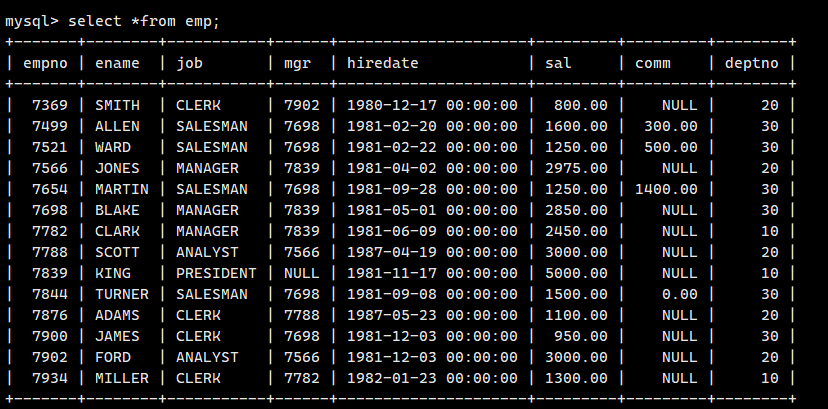
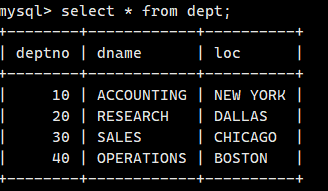
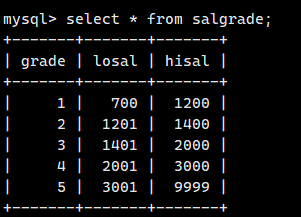
创建一个雇员信息表(来自 oracle 9i 的经典测试表)
EMP 员工表
DEPT 部门表
SALGRADE 工资等级表
emp表:
dept表:
SALGRADE工资等级表:
1.基本查询回顾
对于基本查询的相关内容,这里在MySQL表的增删改查已经叙述过,这里就回顾一遍
eg1:查询工资高于500或岗位为MANAGER的雇员,同时还要满足他们的姓名首字母为大写的****J
cpp
mysql> select * from emp where (sal>500 or job='MANAGER') and ename like 'J%';
+-------+-------+---------+------+---------------------+---------+------+--------+
| empno | ename | job     | mgr  | hiredate            | sal     | comm | deptno |
+-------+-------+---------+------+---------------------+---------+------+--------+
|  7566 | JONES | MANAGER | 7839 | 1981-04-02 00:00:00 | 2975.00 | NULL |     20 |
|  7900 | JAMES | CLERK   | 7698 | 1981-12-03 00:00:00 |  950.00 | NULL |     30 |
+-------+-------+---------+------+---------------------+---------+------+--------+eg2:按照部门号升序而雇员的工资降序排序
cpp
mysql> select * from emp order by deptno, sal desc;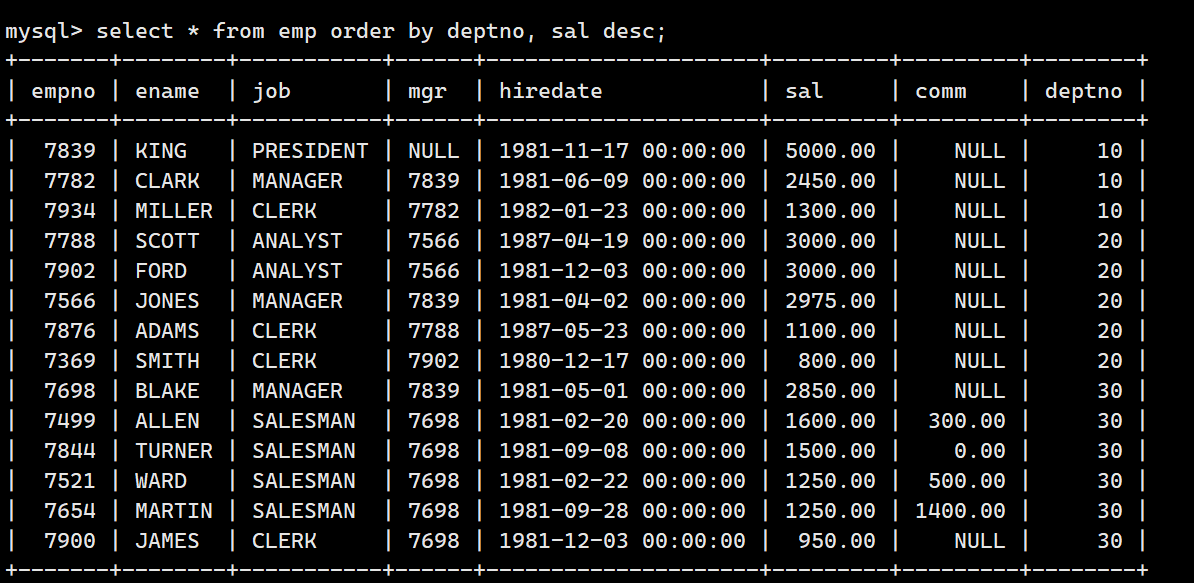
eg3:使用年薪进行降序排序
cpp
mysql> select ename, sal*12+ifnull(comm,0) as '年薪' from emp order by 年薪 desc;eg4:显示工资最高的员工的名字和工作岗位
cpp
mysql> select ename, job from emp where sal = (select max(sal) from emp);
+-------+-----------+
| ename | job       |
+-------+-----------+
| KING  | PRESIDENT |
+-------+-----------+
像这种select内嵌select就是子查询
eg5:显示工资高于平均工资的员工信息
cpp
mysql> select ename ,sal from emp where sal=(select avg(sal) from emp);eg6:显示每个部门的平均工资和最高工资
cpp
mysql> select deptno,format(avg(sal),2),max(sal) from emp group by deptno;eg7:显示平均工资低于2000的部门号和它的平均工资
cpp
mysql> select deptno,avg(sal) as avg_sal from emp group by deptno having avg_sal<2000;eg8:显示每种岗位的雇员总数,平均工资
cpp
mysql> select job,count(*), format(avg(sal),2) from emp group by job;2.多表查询
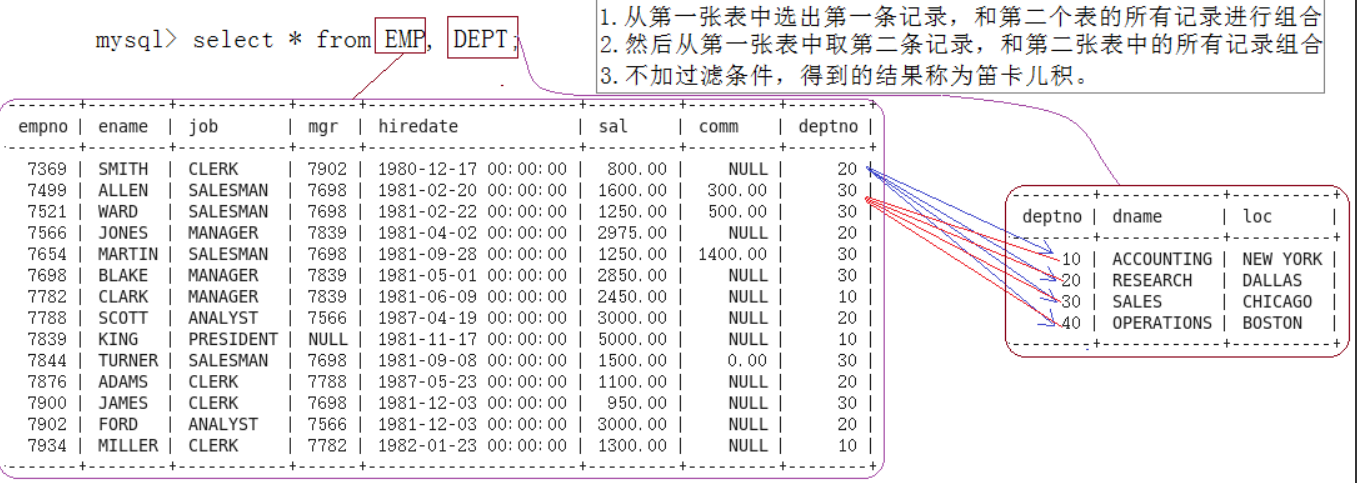
用一个简单的公司管理系统,有三张表EMP,DEPT,SALGRADE 来演示如何进行多表查询。
显示雇员名、雇员工资以及所在部门的名字因为上面的数据来自 EMP 和 DEPT 表,因此要联合查询
eg1:显示部门号为10的部门名,员工名和工资
cpp
mysql> select dname,ename,sal from emp,dept where emp.deptno=dept.deptno and dept.deptno=10;eg2:显示各个员工的姓名,工资,及工资级别
cpp
mysql> select ename, sal, grade from emp, salgrade where emp.sal between losal and hisal;3.自连接
自连接是指在同一张表连接查询
eg1: 显示员工 FORD 的上级领导的编号和姓名( mgr 是员工领导的编号 --empno )
cpp
select empno,ename from emp where emp.empno=(select mgr from emp where
ename='FORD');
eg2: 使用多表查询(自查询)
cpp
-- 使用到表的别名
--from emp leader, emp worker,给自己的表起别名,因为要先做笛卡尔积,所以别名可以先识
别
select leader.empno,leader.ename from emp leader, emp worker where
leader.empno = worker.mgr and worker.ename='FORD';
4.子查询
子查询是指嵌入在其他sql语句中的select语句,也叫嵌套查询
4.1 单行子查询
eg:显示SMITH同一部门的员工
cpp
mysql> select * from emp WHERE deptno = (select deptno from emp where ename='smith');4.2 多行子查询
返回多行记录的子查询
eg1:查询和 10 号部门的工作岗位相同的雇员的名字,岗位,工资,部门号,但是不包含 10 自
己的
cpp
select ename,job,sal,deptno from emp where job in (select distinct job from
emp where deptno=10) and deptno<>10;in关键字:表示这个字段是否在这个集合当中
eg2:显示工资比部门 30 的所有员工的工资高的员工的姓名、工资和部门号
cpp
select ename, sal, deptno from EMP where sal > all(select sal from EMP where
deptno=30);all关键字:表示集合内的所有人
eg3: 显示工资比部门 30 的任意员工的工资高的员工的姓名、工资和部门号(包含自己部门
的员工)
cpp
select ename, sal, deptno from EMP where sal > any(select sal from EMP where
deptno=30);any关键字:表示集合内任意人
4.3 多列子查询
单行子查询是指子查询只返回单列,单行数据;多行子查询是指返回单列多行数据,都是针对单列而言的,而多列子查询则是指查询返回多个列数据的子查询语句
eg:查询和SMITH的部门和岗位完全相同的所有雇员,不含SMITH本人
cpp
mysql> select ename from EMP where (deptno, job)=(select deptno, job from EMP
where ename='SMITH') and ename <> 'SMITH';
4.4 在from子句中使用子查询
子查询语句出现在from子句中。这里要用到数据查询的技巧,把一个子查询当做一个临时表使用。
eg1:显示每个高于自己部门平均工资的员工的姓名、部门、工资、平均工资
cpp
//获取各个部门的平均工资,将其看作临时表
select ename, deptno, sal, format(asal,2) from EMP,
(select avg(sal) asal, deptno dt from EMP group by deptno) tmp
where EMP.sal > tmp.asal and EMP.deptno=tmp.dt;eg2:查找每个部门工资最高的人的姓名、工资、部门、最高工资
cpp
select EMP.ename, EMP.sal, EMP.deptno, ms from EMP,
(select max(sal) ms, deptno from EMP group by deptno) tmp
where EMP.deptno=tmp.deptno and EMP.sal=tmp.ms;
select DEPT.dname, DEPT.deptno, DEPT.loc,coueg3:显示每个部门的信息(部门名,编号,地址)和人员数量
1.使用多表
cpp
select DEPT.dname, DEPT.deptno, DEPT.loc,count(*) '部门人数' from EMP,DEPT
where EMP.deptno=DEPT.deptno
group by DEPT.deptno,DEPT.dname,DEPT.loc
2.使用子查询
cpp
-- 1. 对EMP表进行人员统计
select count(*), deptno from EMP group by deptno;
-- 2. 将上面的表看作临时表
select DEPT.deptno, dname, mycnt, loc from DEPT,
(select count(*) mycnt, deptno from EMP group by deptno) tmp
where DEPT.deptno=tmp.deptno;
4.5 合并查询
在实际应用中,为了合并多个select的执行结果,可以使用集合操作符 union,union all
4.5.1 union
该操作符用于取得两个结果集的并集。当使用该操作符时,会自动去掉结果集中的重复行。
eg:将工资大于2500或职位是MANAGER的人找出来
cpp
mysql> select ename, sal, job from emp where sal>2500 union
    -> select ename, sal, job from emp where job='MANAGER';
+-------+---------+-----------+
| ename | sal     | job       |
+-------+---------+-----------+
| JONES | 2975.00 | MANAGER   |
| BLAKE | 2850.00 | MANAGER   |
| SCOTT | 3000.00 | ANALYST   |
| KING  | 5000.00 | PRESIDENT |
| FORD  | 3000.00 | ANALYST   |
| CLARK | 2450.00 | MANAGER   |
+-------+---------+-----------+
4.5.2 union all
该操作符用于取得两个结果集的并集。当使用该操作符时,不会去掉结果集中的重复行
eg:将工资大于25000或职位是MANAGER的人找出来
cpp
mysql> select ename, sal, job from emp where sal>2500 union all
    -> select ename, sal, job from emp where job='MANAGER';
+-------+---------+-----------+
| ename | sal     | job       |
+-------+---------+-----------+
| JONES | 2975.00 | MANAGER   |
| BLAKE | 2850.00 | MANAGER   |
| SCOTT | 3000.00 | ANALYST   |
| KING  | 5000.00 | PRESIDENT |
| FORD  | 3000.00 | ANALYST   |
| JONES | 2975.00 | MANAGER   |
| BLAKE | 2850.00 | MANAGER   |
| CLARK | 2450.00 | MANAGER   |
+-------+---------+-----------+