python-docx 报错 KeyError: "There is no item named 'NULL' in the archive"
python
import docx

doc = docx.Document('DE862197-1772524393022.docx')
在使用 python-docx 解析 .docx 文件时遇到以下的报错:
shell
Traceback (most recent call last):
  File "D:\project\python\p1\t1.py", line 3, in <module>
    doc = docx.Document('DE862197-1772524393022.docx')
          ^^^^^^^^^^^^^^^^^^^^^^^^^^^^^^^^^^^^^^^^^^^^
  File "D:\project\python\p1\.venv\Lib\site-packages\docx\api.py", line 27, in Document
    document_part = cast("DocumentPart", Package.open(docx).main_document_part)
                                         ^^^^^^^^^^^^^^^^^^
  File "D:\project\python\p1\.venv\Lib\site-packages\docx\opc\package.py", line 126, in open
    pkg_reader = PackageReader.from_file(pkg_file)
                 ^^^^^^^^^^^^^^^^^^^^^^^^^^^^^^^^^
  File "D:\project\python\p1\.venv\Lib\site-packages\docx\opc\pkgreader.py", line 25, in from_file
    sparts = PackageReader._load_serialized_parts(phys_reader, pkg_srels, content_types)
             ^^^^^^^^^^^^^^^^^^^^^^^^^^^^^^^^^^^^^^^^^^^^^^^^^^^^^^^^^^^^^^^^^^^^^^^^^^^
  File "D:\project\python\p1\.venv\Lib\site-packages\docx\opc\pkgreader.py", line 51, in _load_serialized_parts
    for partname, blob, reltype, srels in part_walker:
                                          ^^^^^^^^^^^
  File "D:\project\python\p1\.venv\Lib\site-packages\docx\opc\pkgreader.py", line 82, in _walk_phys_parts
    for partname, blob, reltype, srels in next_walker:
                                          ^^^^^^^^^^^
  File "D:\project\python\p1\.venv\Lib\site-packages\docx\opc\pkgreader.py", line 79, in _walk_phys_parts
    blob = phys_reader.blob_for(partname)
           ^^^^^^^^^^^^^^^^^^^^^^^^^^^^^^
  File "D:\project\python\p1\.venv\Lib\site-packages\docx\opc\phys_pkg.py", line 83, in blob_for
    return self._zipf.read(pack_uri.membername)
           ^^^^^^^^^^^^^^^^^^^^^^^^^^^^^^^^^^^^
  File "D:\software\uv\python\cpython-3.12.12-windows-x86_64-none\Lib\zipfile\__init__.py", line 1584, in read
    with self.open(name, "r", pwd) as fp:
         ^^^^^^^^^^^^^^^^^^^^^^^^^
  File "D:\software\uv\python\cpython-3.12.12-windows-x86_64-none\Lib\zipfile\__init__.py", line 1621, in open
    zinfo = self.getinfo(name)
            ^^^^^^^^^^^^^^^^^^
  File "D:\software\uv\python\cpython-3.12.12-windows-x86_64-none\Lib\zipfile\__init__.py", line 1549, in getinfo
    raise KeyError(
KeyError: "There is no item named 'NULL' in the archive"
原因
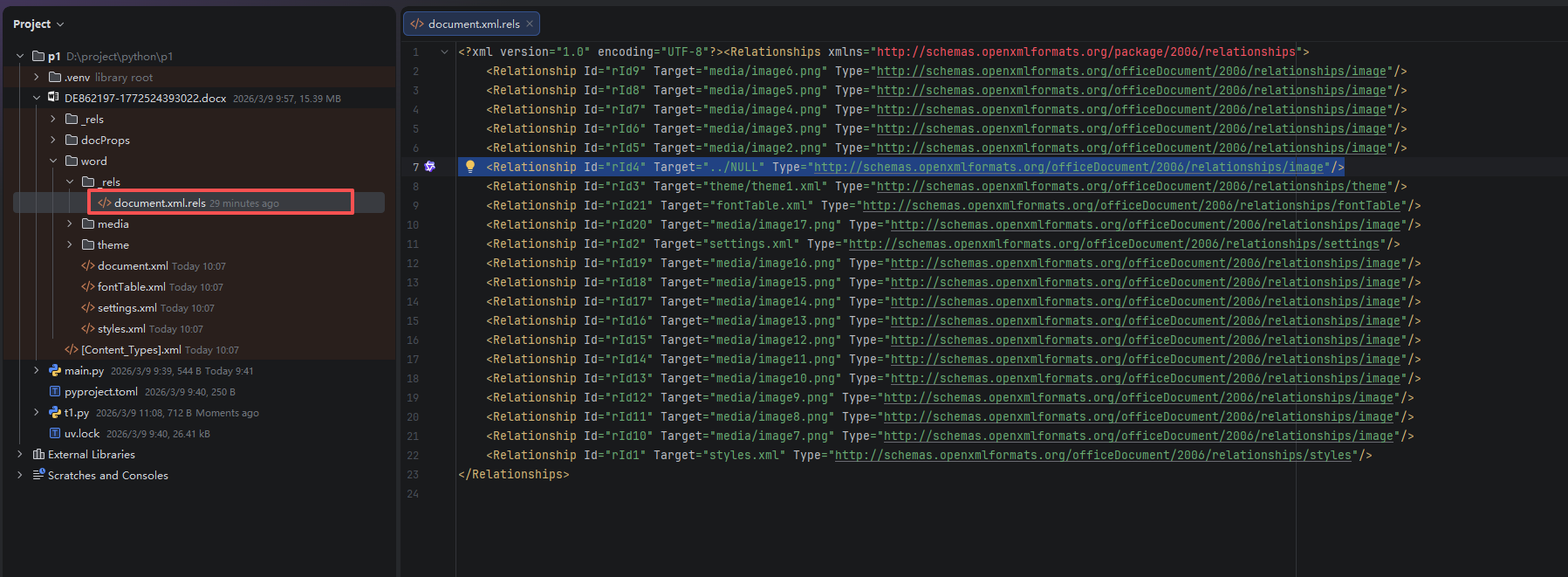
将 docx 文件解压后,发现 DE862197-1772524393022.docx!\word\_rels\document.xml.rels 文件中的 Id="rId4" 的 Relationship 的 Target="../NULL" 。
解决办法
手动删除 docx 文件中的无效引用
-
打开文件 a.docx
-
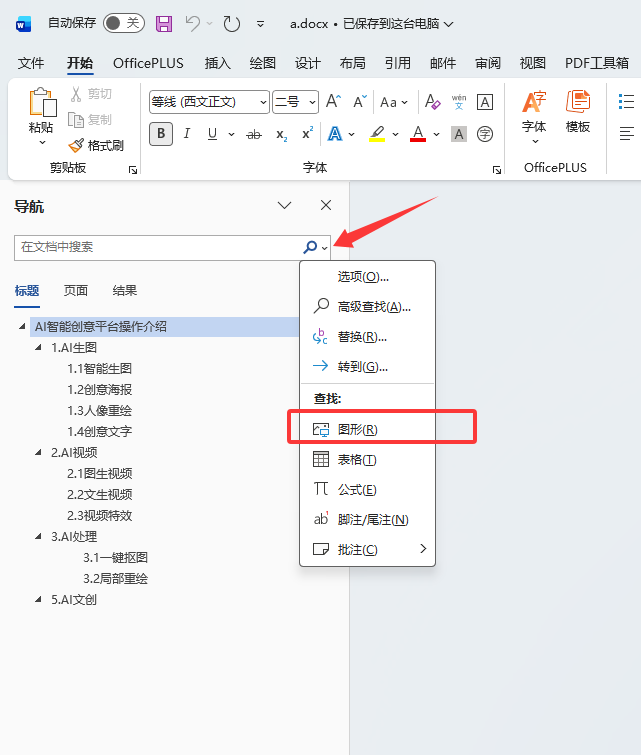
ctrl + f打开左侧导航 -
点击搜索框右边的放大镜后,选择图形
-
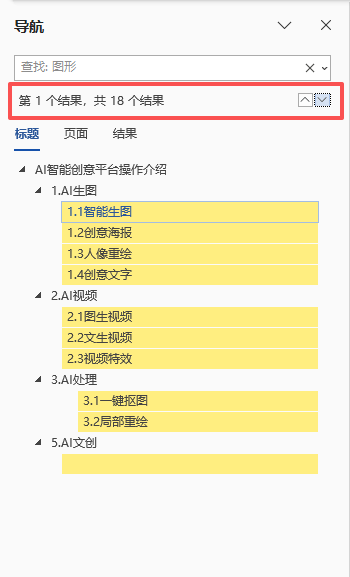
使用红框右边的上下箭头逐个查看图片
-
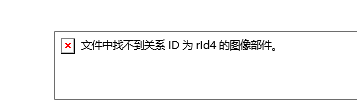
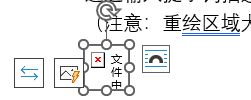
删除或替换类似下图的图片
-
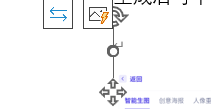
如下两个截图,有的图片很小,只显示一个红叉(下图 1),甚至有的图片就什么都不显示(下图 2),需要手动将图片尺寸放大后确认
-
必须使用"图形查找"逐个确认图片是否正常,否则会遗漏小图片或尺寸为 0 的图片
删除 Target="../NULL" 的 Relationship 并重新打包为 docx
The image part with relationship rID8 was not found in Microsoft Word 中描述了大概的操作,但我试过不太好使,以下是我的操作:
- 先将文件 a.docx 重命名为 a.zip
- 将 a.zip 解药到 a 文件夹
- 使用记事本打开
a/word/_rels/document.xml.rels,查找 "null",并删除<Relationship Id="rId4" Type="http://schemas.openxmlformats.org/officeDocument/2006/relationships/image" Target="../NULL"/> - 重新将
a/文件夹下的所有文件压缩为 a-new.zip (不要包含 a 文件夹本身) - 将 a-new.zip 重命名为 a-new.docx
解析 docx 时忽略 Target="../NULL" 的 Relationship
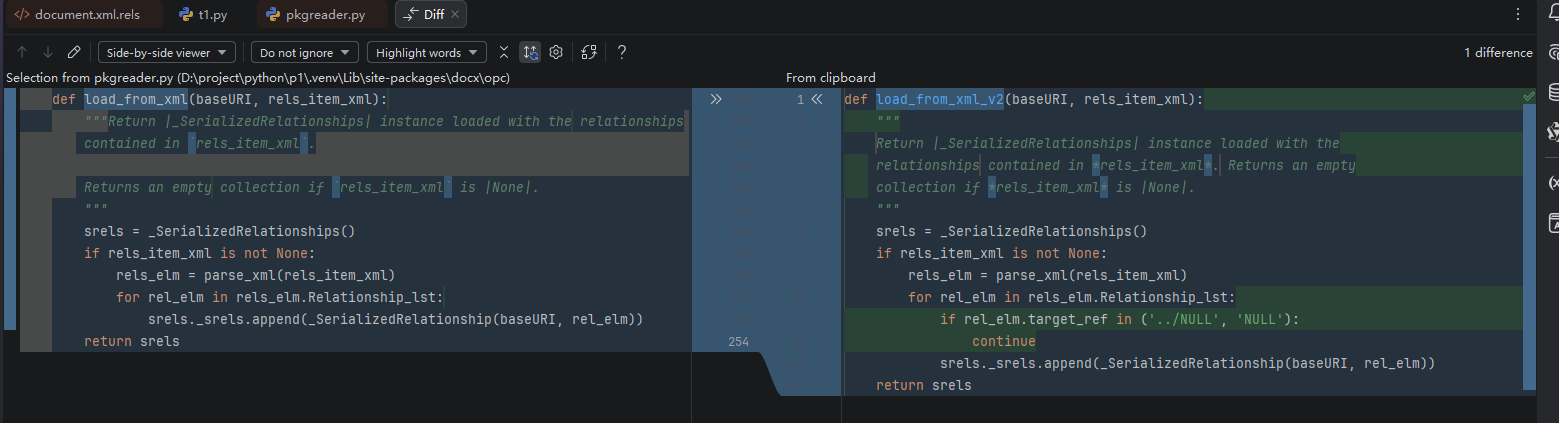
此解决方案来自 Open Word docx file with "The image part with relationship rID8 was not found" error, it always fails · Issue #1105 · python-openxml/python-docx 的评论,替换 _SerializedRelationships.load_from_xml 方法的实现:
python
import docx

from docx.opc.pkgreader import _SerializedRelationships, _SerializedRelationship
from docx.opc.oxml import parse_xml


def load_from_xml_v2(baseURI, rels_item_xml):
    """
    Return |_SerializedRelationships| instance loaded with the
    relationships contained in *rels_item_xml*. Returns an empty
    collection if *rels_item_xml* is |None|.
    """
    srels = _SerializedRelationships()
    if rels_item_xml is not None:
        rels_elm = parse_xml(rels_item_xml)
        for rel_elm in rels_elm.Relationship_lst:
            if rel_elm.target_ref in ('../NULL', 'NULL'):
                continue
            srels._srels.append(_SerializedRelationship(baseURI, rel_elm))
    return srels


_SerializedRelationships.load_from_xml = load_from_xml_v2

doc = docx.Document('a.docx')
下图中左边是原实现,右侧是新的实现 v2,添加了一个判断跳过了 Target="../NULL" 或 Target="NULL" 的 Relationship:
参考
- KeyError: "There is no item named 'word/NULL' in the archive" · Issue #797 · python-openxml/python-docx
- fix: accommodate NULL relationship (by skipping) · Issue #678 · python-openxml/python-docx
- KeyError: "There is no item named 'word/NULL' in the archive" · Issue #797 · python-openxml/python-docx
- KeyError: "There is no item named 'word/NULL' in the archive" | YG 的零碎笔记
- The image part with relationship rID8 was not found in Microsoft Word - Microsoft 365 Apps | Microsoft Learn