文章目录
-
- 需求
- 分析
-
- [1. 添加插件](#1. 添加插件)
- [2. 实现](#2. 实现)
-
- [1. `app.json`](#1.
app.json) - [2. `pages/voiceToText/voiceToText.json`](#2.
pages/voiceToText/voiceToText.json) - [3. `pages/voiceToText/voiceToText.ts`](#3.
pages/voiceToText/voiceToText.ts) - [4. `pages/voiceToText/voiceToText.wxml`](#4.
pages/voiceToText/voiceToText.wxml) - [5. `pages/voiceToText/voiceToText.wxss`](#5.
pages/voiceToText/voiceToText.wxss)
- [1. `app.json`](#1.
- [3. 隐私说明](#3. 隐私说明)
需求
如下所示,需要实现在微信小程序中语音转文字功能:
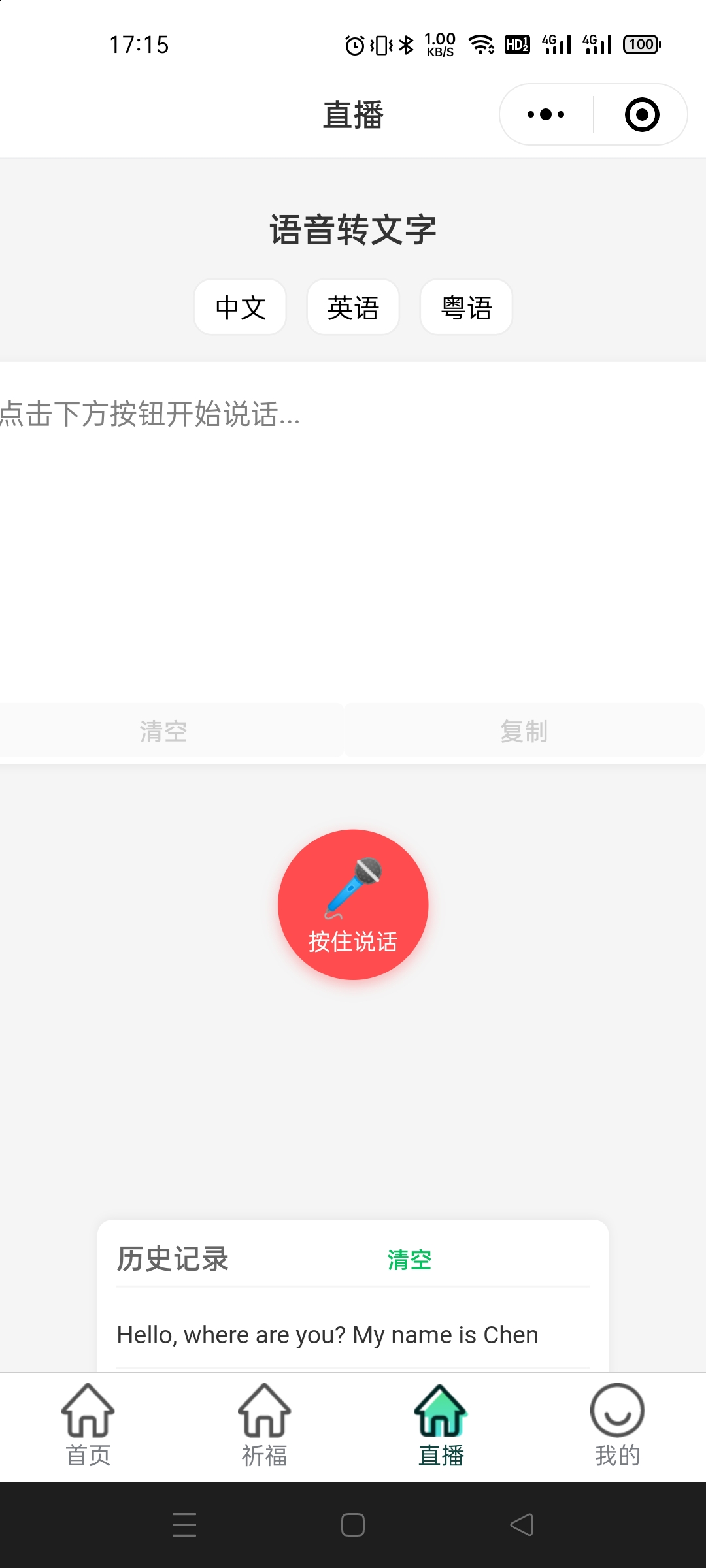
分析
1. 添加插件
登录微信公众平台(https://mp.weixin.qq.com),进入「设置 → 第三方服务 → 插件管理」,搜索「微信同声传译」并添加,获取其 AppID(如wx069ba97219f66d99)和最新版本号
配置小程序:在app.json中配置插件信息,示例代码如下需确保版本号与插件详情页一致,否则可能导致功能异常
javascript
    {
      "plugins": {
        "WechatSI": {
          "version": "0.3.4", // 填写实际版本号
          "provider": "wx069ba97219f66d99"
        }
      }
    }
2. 实现
1. app.json
javascript
  {
    "pages": [
      "pages/voiceToText/voiceToText"
    ],
    "window": {
      "backgroundTextStyle": "light",
      "navigationBarBackgroundColor": "#fff",
      "navigationBarTitleText": "微信同声转文字功能",
      "navigationBarTextStyle": "black"
    },
    "plugins": {
      "WechatSI": {
        "version": "0.3.4",
        "provider": "wx069ba97219f66d99"
      }
    },
    "sitemapLocation": "sitemap.json"
  }
2. pages/voiceToText/voiceToText.json
javascript
  {
    "navigationBarTitleText": "语音转文字",
    "usingComponents": {}
  }
3. pages/voiceToText/voiceToText.ts
js
  // 引入微信同声传译插件
  const plugin = requirePlugin('WechatSI')
  // 获取全局唯一的语音识别管理器
  const manager = plugin.getRecordRecognitionManager()

  Page({
    /**
    * 页面的初始数据
    */
    data: {
      // 录音状态:false-未录音,true-正在录音
      isRecording: false,
      // 识别结果文本
      resultText: '',
      // 历史记录列表
      historyList: [] as string[],
      // 录音时长(秒)
      recordDuration: 0,
      // 定时器ID
      timer: 0 as number,
      // 支持的语言列表
      languages: [
        { code: 'zh_CN', name: '中文' },
        { code: 'en_US', name: '英语' },
        { code: 'zh_HK', name: '粤语' }
      ],
      // 当前选中的语言
      currentLang: 'zh_CN'
    },

    /**
    * 生命周期函数--监听页面加载
    */
    onLoad() {
      this.initRecordManager()
      // 从本地存储加载历史记录
      const history = wx.getStorageSync('voiceToTextHistory')
      if (history && Array.isArray(history)) {
        this.setData({ historyList: history })
      }
    },

    /**
    * 初始化录音管理器
    */
    initRecordManager() {
      // 识别中事件
      manager.onRecognize = (res: { result: string }) => {
        console.log('实时识别结果:', res.result)
        this.setData({
          resultText: res.result
        })
      }

      // 识别结束事件
      manager.onStop = (res: { result: string }) => {
        console.log('识别结束:', res)
        let text = res.result

        // 处理可能的空结果
        if (!text) {
          wx.showToast({
            title: '未识别到内容',
            icon: 'none',
            duration: 2000
          })
          text = ''
        } else {
          // 保存到历史记录
          this.addToHistory(text)
        }

        this.setData({
          resultText: text,
          isRecording: false,
          recordDuration: 0
        })

        // 清除定时器
        if (this.data.timer) {
          clearInterval(this.data.timer)
        }
      }

      // 识别错误事件
      manager.onError = (err: { errMsg: string }) => {
        console.error('识别错误:', err)
        wx.showToast({
          title: '识别失败: ' + err.errMsg,
          icon: 'none',
          duration: 3000
        })
        this.setData({
          isRecording: false,
          recordDuration: 0
        })

        if (this.data.timer) {
          clearInterval(this.data.timer)
        }
      }
    },

    /**
    * 开始录音
    */
    startRecord() {
      // 检查录音权限
      wx.getSetting({
        success: (res) => {
          if (!res.authSetting['scope.record']) {
            // 申请录音权限
            wx.authorize({
              scope: 'scope.record',
              success: () => {
                this.startRecording()
              },
              fail: () => {
                wx.showModal({
                  title: '权限不足',
                  content: '需要录音权限才能使用语音识别功能,请在设置中开启',
                  confirmText: '去设置',
                  success: (modalRes) => {
                    if (modalRes.confirm) {
                      wx.openSetting()
                    }
                  }
                })
              }
            })
          } else {
            this.startRecording()
          }
        }
      })
    },

    /**
    * 实际开始录音的逻辑
    */
    startRecording() {
      // 重置结果
      this.setData({
        resultText: '',
        isRecording: true,
        recordDuration: 0
      })

      // 开始录音
      manager.start({
        lang: this.data.currentLang,
        duration: 60000 // 最长录音时间,单位ms
      })

      // 开始计时
      const timer = setInterval(() => {
        this.setData({
          recordDuration: this.data.recordDuration + 1
        })
      }, 1000)

      this.setData({ timer })
    },

    /**
    * 停止录音
    */
    stopRecord() {
      if (this.data.isRecording) {
        manager.stop()
      }
    },

    /**
    * 添加到历史记录
    */
    addToHistory(text: string) {
      const newHistory = [text, ...this.data.historyList]
      // 限制历史记录数量为20条
      if (newHistory.length > 20) {
        newHistory.pop()
      }

      this.setData({ historyList: newHistory })
      // 保存到本地存储
      wx.setStorageSync('voiceToTextHistory', newHistory)
    },

    /**
    * 清空当前结果
    */
    clearResult() {
      this.setData({ resultText: '' })
    },

    /**
    * 复制结果到剪贴板
    */
    copyResult() {
      if (!this.data.resultText) {
        wx.showToast({
          title: '没有可复制的内容',
          icon: 'none'
        })
        return
      }

      wx.setClipboardData({
        data: this.data.resultText,
        success: () => {
          wx.showToast({
            title: '复制成功',
            icon: 'success'
          })
        }
      })
    },

    /**
    * 清空历史记录
    */
    clearHistory() {
      if (this.data.historyList.length === 0) return

      wx.showModal({
        title: '确认',
        content: '确定要清空所有历史记录吗?',
        success: (res) => {
          if (res.confirm) {
            this.setData({ historyList: [] })
            wx.removeStorageSync('voiceToTextHistory')
          }
        }
      })
    },

    /**
    * 选择语言
    */
    selectLanguage(e: { currentTarget: { dataset: { code: string } } }) {
      const langCode = e.currentTarget.dataset.code
      this.setData({ currentLang: langCode })
    },

    /**
    * 生命周期函数--监听页面卸载
    */
    onUnload() {
      // 页面卸载时停止录音并清除定时器
      if (this.data.isRecording) {
        manager.stop()
      }
      if (this.data.timer) {
        clearInterval(this.data.timer)
      }
    }
  })
4. pages/voiceToText/voiceToText.wxml
javascript
    <view class="container">
      <view class="title">语音转文字</view>

      <!-- 语言选择 -->
      <view class="language-selector">
        <view class="lang-item"
              wx:for="{{languages}}"
              wx:key="code"
              data-code="{{item.code}}"
              bindtap="selectLanguage"
              class="{{currentLang === item.code ? 'lang-selected' : ''}}">
          {{item.name}}
        </view>
      </view>

      <!-- 结果显示区域 -->
      <view class="result-container">
        <textarea
          class="result-text"
          value="{{resultText}}"
          placeholder="点击下方按钮开始说话..."
          disabled
        ></textarea>

        <!-- 操作按钮 -->
        <view class="action-buttons">
          <button
            class="btn clear-btn"
            bindtap="clearResult"
            disabled="{{!resultText}}"
          >
            清空
          </button>
          <button
            class="btn copy-btn"
            bindtap="copyResult"
            disabled="{{!resultText}}"
          >
            复制
          </button>
        </view>
      </view>

      <!-- 录音控制 -->
      <view class="record-control">
        <view
          class="record-button"
          bindtouchstart="startRecord"
          bindtouchend="stopRecord"
          class="{{isRecording ? 'recording' : ''}}"
        >
          <text class="record-icon">{{isRecording ? '⏹️' : '🎤'}}</text>
          <text class="record-text">{{isRecording ? '松开停止' : '按住说话'}}</text>
          <text class="record-time" wx:if="{{isRecording}}">{{recordDuration}}s</text>
        </view>
      </view>

      <!-- 历史记录 -->
      <view class="history-section" wx:if="{{historyList.length > 0}}">
        <view class="history-header">
          <text>历史记录</text>
          <button class="clear-history-btn" bindtap="clearHistory">清空</button>
        </view>

        <view class="history-list">
          <view class="history-item" wx:for="{{historyList}}" wx:key="index">
            <text>{{item}}</text>
          </view>
        </view>
      </view>
    </view>
5. pages/voiceToText/voiceToText.wxss
javascript
  .container {
    display: flex;
    flex-direction: column;
    min-height: 100vh;
    background-color: #f5f5f5;
    padding: 20rpx;
  }

  .title {
    font-size: 36rpx;
    font-weight: bold;
    text-align: center;
    margin: 30rpx 0;
    color: #333;
  }

  .language-selector {
    display: flex;
    justify-content: center;
    margin-bottom: 20rpx;
    flex-wrap: wrap;
  }

  .lang-item {
    padding: 10rpx 20rpx;
    margin: 0 10rpx 10rpx;
    background-color: #fff;
    border-radius: 20rpx;
    font-size: 28rpx;
    border: 1px solid #eee;
  }

  .lang-selected {
    background-color: #07c160;
    color: white;
    border-color: #07c160;
  }

  .result-container {
    background-color: #fff;
    border-radius: 16rpx;
    padding: 20rpx;
    margin-bottom: 30rpx;
    box-shadow: 0 2rpx 10rpx rgba(0,0,0,0.05);
  }

  .result-text {
    width: 100%;
    min-height: 200rpx;
    font-size: 30rpx;
    line-height: 1.6;
    padding: 10rpx;
    border: none;
    resize: none;
    color: #333;
  }

  .result-text::placeholder {
    color: #ccc;
  }

  .action-buttons {
    display: flex;
    justify-content: flex-end;
    margin-top: 10rpx;
  }

  .btn {
    padding: 10rpx 20rpx;
    margin-left: 15rpx;
    font-size: 26rpx;
    border-radius: 8rpx;
  }

  .clear-btn {
    background-color: #f5f5f5;
    color: #666;
  }

  .copy-btn {
    background-color: #07c160;
    color: white;
  }

  .record-control {
    display: flex;
    justify-content: center;
    margin: 40rpx 0 60rpx;
  }

  .record-button {
    width: 160rpx;
    height: 160rpx;
    border-radius: 50%;
    background-color: #ff4d4f;
    display: flex;
    flex-direction: column;
    justify-content: center;
    align-items: center;
    color: white;
    box-shadow: 0 5rpx 15rpx rgba(255,77,79,0.4);
    touch-action: manipulation;
  }

  .record-button.recording {
    background-color: #faad14;
    box-shadow: 0 5rpx 15rpx rgba(250,173,20,0.4);
  }

  .record-icon {
    font-size: 60rpx;
    margin-bottom: 5rpx;
  }

  .record-text {
    font-size: 24rpx;
  }

  .record-time {
    font-size: 22rpx;
    margin-top: 5rpx;
  }

  .history-section {
    margin-top: auto;
    background-color: #fff;
    border-radius: 16rpx;
    padding: 20rpx;
    box-shadow: 0 -2rpx 10rpx rgba(0,0,0,0.05);
  }

  .history-header {
    display: flex;
    justify-content: space-between;
    align-items: center;
    margin-bottom: 15rpx;
    padding-bottom: 10rpx;
    border-bottom: 1px solid #f5f5f5;
  }

  .history-header text {
    font-size: 30rpx;
    font-weight: 500;
    color: #666;
  }

  .clear-history-btn {
    font-size: 24rpx;
    color: #07c160;
    background: none;
    padding: 0;
  }

  .history-list {
    max-height: 300rpx;
    overflow-y: auto;
  }

  .history-item {
    padding: 15rpx 0;
    border-bottom: 1px solid #f5f5f5;
    font-size: 26rpx;
    color: #333;
    line-height: 1.5;
  }

  .history-item:last-child {
    border-bottom: none;
  }
3. 隐私说明
权限申请:需在小程序后台的「用户隐私保护指引」中声明使用录音功能,否则无法获取麦克风权限