文章目录
-
- [一、onChildTouchTest 核心概念](#一、onChildTouchTest 核心概念)
-
- [1.1 触摸测试流程与干预时机](#1.1 触摸测试流程与干预时机)
- [1.2 API 定义](#1.2 API 定义)
- [1.3 TouchTestInfo 接口详解](#1.3 TouchTestInfo 接口详解)
- [1.4 TouchResult 接口详解](#1.4 TouchResult 接口详解)
- [1.5 TouchTestStrategy 枚举详解](#1.5 TouchTestStrategy 枚举详解)
- 二、基础用法:三种策略演示
-
- [2.1 DEFAULT ------ 系统默认行为](#2.1 DEFAULT —— 系统默认行为)
- [2.2 FORWARD_COMPETITION ------ 竞争转发](#2.2 FORWARD_COMPETITION —— 竞争转发)
- [2.3 FORWARD ------ 独占转发](#2.3 FORWARD —— 独占转发)
- 三、可运行完整示例:策略交互对比
-
- [3.1 功能说明](#3.1 功能说明)
- [四、进阶场景:List 滚动与 Button 点击竞争](#四、进阶场景:List 滚动与 Button 点击竞争)
-
- [4.1 场景说明](#4.1 场景说明)
- [4.2 策略选型对比](#4.2 策略选型对比)
- 五、实战场景:基于坐标的自定义分区控制
-
- [5.1 场景说明](#5.1 场景说明)
- 六、综合实战:四场景触摸测试演示页面
-
- [6.1 功能说明](#6.1 功能说明)
- [6.2 完整可运行代码](#6.2 完整可运行代码)
- 总结
一、onChildTouchTest 核心概念
1.1 触摸测试流程与干预时机
ArkUI 的触摸事件处理流程分为两个阶段:
用户手指触碰屏幕
       ↓
  【阶段一:触摸测试 Touch HitTest】
  从根节点向叶节点遍历,找出所有命中组件
       ↓
  ← 此处 onChildTouchTest 触发 →
  父容器拿到子组件信息,返回 TouchResult
  告知框架:哪个子组件参与 + 采用什么策略
       ↓
  【阶段二:事件分发 Event Dispatch】
  确定事件消费者,触发 onTouch/onClick/手势回调
onChildTouchTest 在阶段一 结束前插入,回调时框架已知道哪些子组件在触点范围内(放入 TouchTestInfo[] 数组),开发者在回调中返回 TouchResult 指导后续分发策略。
1.2 API 定义
onChildTouchTest 是 ArkUI 容器类组件通用属性,可链式调用:
typescript
// 接口签名(API 10+)
onChildTouchTest(event: (value: TouchTestInfo[]) => TouchResult): T| 参数 | 类型 | 说明 |
|---|---|---|
event |
(value: TouchTestInfo[]) => TouchResult |
触摸测试回调,必须同步返回 TouchResult |
value |
TouchTestInfo[] |
当前触点范围内所有设置了 id 的子组件信息数组 |
| 返回值 | 当前组件实例 T |
支持链式调用 |
关键点 :只有子组件设置了
.id('xxx')属性 ,才会出现在value数组中;未设置id的子组件不参与回调。
版本说明 :onChildTouchTest从 API version 10 开始支持;在attributeModifier中使用需 API version 20 ;原子化服务支持从 API 12 起。
1.3 TouchTestInfo 接口详解
TouchTestInfo 描述每个子组件在本次触摸测试中的上下文信息:
| 字段 | 类型 | 说明 |
|---|---|---|
windowX |
number(vp) |
触点相对于窗口左上角的 X 坐标 |
windowY |
number(vp) |
触点相对于窗口左上角的 Y 坐标 |
parentX |
number(vp) |
触点相对于父组件左上角的 X 坐标 |
parentY |
number(vp) |
触点相对于父组件左上角的 Y 坐标 |
x |
number(vp) |
触点相对于子组件自身左上角的 X 坐标 |
y |
number(vp) |
触点相对于子组件自身左上角的 Y 坐标 |
rect |
RectResult |
子组件的位置和尺寸信息 |
id |
string |
子组件的唯一标识(对应 .id('xxx') 设置的值) |
RectResult 字段:
| 字段 | 类型 | 说明 |
|---|---|---|
x |
number(vp) |
子组件左上角相对于父组件的 X 坐标 |
y |
number(vp) |
子组件左上角相对于父组件的 Y 坐标 |
width |
number(vp) |
子组件宽度 |
height |
number(vp) |
子组件高度 |
1.4 TouchResult 接口详解
TouchResult 是回调函数的返回值,用于指导框架后续事件分发:
| 字段 | 类型 | 是否必填 | 说明 |
|---|---|---|---|
strategy |
TouchTestStrategy |
必填 | 后续触摸测试与事件分发策略 |
id |
string |
条件必填 | 目标子组件 id;strategy 为 FORWARD_COMPETITION 或 FORWARD 时必须指定 |
1.5 TouchTestStrategy 枚举详解
TouchTestStrategy 是 onChildTouchTest 的核心决策枚举,共三种策略:
| 枚举值 | 数值 | 含义 | 适用场景 |
|---|---|---|---|
TouchTestStrategy.DEFAULT |
0 | 默认行为:按系统原始命中状态分发,不干预子组件竞争 | 无需干预时的兜底返回 |
TouchTestStrategy.FORWARD_COMPETITION |
1 | 竞争转发 :强制将事件转发给指定子组件(id),同时兄弟节点是否也能接收由系统继续决定 |
List 滚动与 Button 点击共存 |
TouchTestStrategy.FORWARD |
2 | 独占转发 :仅将事件转发给指定子组件,阻止所有兄弟节点接收 | 精确指定唯一响应者 |
三策略核心区别 :
DEFAULT不干预;FORWARD_COMPETITION加入竞争;FORWARD独占事件。
二、基础用法:三种策略演示
2.1 DEFAULT ------ 系统默认行为
typescript
// 子组件必须设置 id 才能出现在 value 数组中
Column() {
  Button('按钮 A').height(44).id('btnA')
  Button('按钮 B').height(44).id('btnB')
}
.onChildTouchTest((infos: TouchTestInfo[]) => {
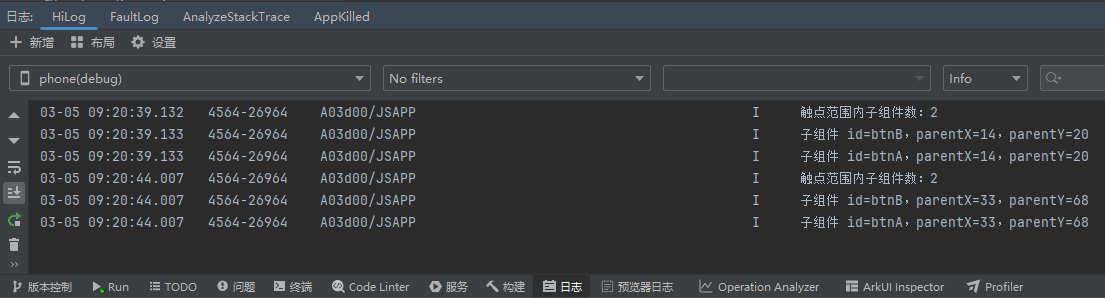
  console.info(`触点范围内子组件数:${infos.length}`)
  infos.forEach(info => {
    console.info(`  子组件 id=${info.id},parentX=${info.parentX.toFixed(0)},parentY=${info.parentY.toFixed(0)}`)
  })
  // 返回 DEFAULT:不干预,系统按原始逻辑分发
  return { strategy: TouchTestStrategy.DEFAULT }
})
运行结果如图:
2.2 FORWARD_COMPETITION ------ 竞争转发
typescript
// 场景:List 与 Button 同处一个容器
// 希望 List 也能收到触摸事件参与滚动,同时 Button 正常响应 onClick
Stack() {
  List() {
    // 列表项...
  }.id('myList')
  Button('操作按钮').id('myBtn')
}
.onChildTouchTest((infos: TouchTestInfo[]) => {
  // 检查触点是否命中 List
  const listInfo = infos.find(info => info.id === 'myList')
  if (listInfo) {
    // FORWARD_COMPETITION:让 List 参与竞争,但不阻止 Button 正常响应
    return { strategy: TouchTestStrategy.FORWARD_COMPETITION, id: 'myList' }
  }
  return { strategy: TouchTestStrategy.DEFAULT }
})
2.3 FORWARD ------ 独占转发
typescript
// 场景:需要强制让某个子组件独占所有触摸事件
Column() {
  Text('被独占的组件').id('exclusive').onTouch((e: TouchEvent) => {
    console.info('独占收到触摸事件')
  })
  Button('这个不会收到').id('ignored').onClick(() => {
    console.info('此回调不会触发')
  })
}
.onChildTouchTest((infos: TouchTestInfo[]) => {
  const hasExclusive = infos.some(info => info.id === 'exclusive')
  if (hasExclusive) {
    // FORWARD:独占,只有 'exclusive' 组件收到事件
    return { strategy: TouchTestStrategy.FORWARD, id: 'exclusive' }
  }
  return { strategy: TouchTestStrategy.DEFAULT }
})
三、可运行完整示例:策略交互对比
3.1 功能说明
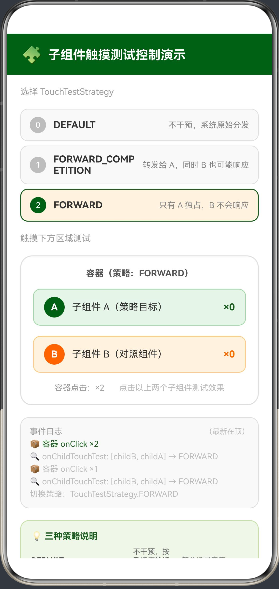
以下示例提供三个可切换的策略演示卡片,分别展示 TouchTestStrategy 三种策略的实际效果,并实时记录事件触发日志:
typescript
// entry/src/main/ets/pages/Index.ets
@Entry
@Component
struct ChildTouchTestDemo {
  @State selectedStrategy: number = 0  // 0=DEFAULT, 1=FORWARD_COMPETITION, 2=FORWARD
  @State eventLog: string[] = ['等待触摸事件...']
  @State btnACount: number = 0
  @State btnBCount: number = 0
  @State containerCount: number = 0

  private strategyNames: string[] = ['DEFAULT', 'FORWARD_COMPETITION', 'FORWARD']
  private strategyColors: string[] = ['#E3F2FD', '#E8F5E9', '#FFF3E0']
  private strategyDesc: string[] = [
    '不干预,系统原始分发',
    '转发给 A,同时 B 也可能响应',
    '只有 A 独占,B 不会响应'
  ]

  private appendLog(msg: string): void {
    this.eventLog = [msg, ...this.eventLog.slice(0, 9)]
  }

  private getStrategy(): TouchResult {
    switch (this.selectedStrategy) {
      case 1:
        return { strategy: TouchTestStrategy.FORWARD_COMPETITION, id: 'childA' }
      case 2:
        return { strategy: TouchTestStrategy.FORWARD, id: 'childA' }
      default:
        return { strategy: TouchTestStrategy.DEFAULT }
    }
  }

  build() {
    Column({ space: 0 }) {
      // 标题栏
      Row({ space: 8 }) {
        Text('🧩').fontSize(22)
        Text('子组件触摸测试控制演示').fontSize(17).fontWeight(FontWeight.Bold).fontColor(Color.White)
      }
      .width('100%').padding({ left: 20, right: 20, top: 16, bottom: 14 })
      .backgroundColor('#1B5E20').justifyContent(FlexAlign.Start)

      Scroll() {
        Column({ space: 16 }) {
          // 策略选择器
          Text('选择 TouchTestStrategy').fontSize(12).fontColor('#9E9E9E').width('90%').margin({ top: 16 })
          Column({ space: 6 }) {
            ForEach(this.strategyNames, (name: string, idx: number) => {
              Row({ space: 10 }) {
                Text(idx.toString())
                  .width(22).height(22).textAlign(TextAlign.Center).borderRadius(11)
                  .fontSize(11).fontColor(Color.White)
                  .backgroundColor(this.selectedStrategy === idx ? '#1B5E20' : '#BDBDBD')
                Text(name).fontSize(13).fontWeight(FontWeight.Bold).fontColor('#333333').layoutWeight(1)
                Text(this.strategyDesc[idx]).fontSize(11).fontColor('#888888')
              }
              .width('90%').padding({ left: 12, right: 12, top: 10, bottom: 10 })
              .backgroundColor(this.selectedStrategy === idx ? this.strategyColors[idx] : '#F9F9F9')
              .borderRadius(10)
              .border({ width: this.selectedStrategy === idx ? 1.5 : 1,
                color: this.selectedStrategy === idx ? '#1B5E20' : '#E0E0E0',
                style: BorderStyle.Solid })
              .animation({ duration: 150, curve: Curve.EaseOut })
              .onClick(() => {
                this.selectedStrategy = idx
                this.btnACount = 0
                this.btnBCount = 0
                this.containerCount = 0
                this.eventLog = [`切换策略:TouchTestStrategy.${name}`]
              })
            })
          }

          // 演示区
          Text('触摸下方区域测试').fontSize(12).fontColor('#9E9E9E').width('90%')

          // 容器(绑定 onChildTouchTest)
          Column({ space: 14 }) {
            Text(`容器(策略:${this.strategyNames[this.selectedStrategy]})`)
              .fontSize(12).fontColor('#555555').fontWeight(FontWeight.Bold)

            // 子组件 A(被策略指向的组件)
            Row({ space: 10 }) {
              Text('A').width(28).height(28).textAlign(TextAlign.Center).borderRadius(14)
                .fontSize(13).fontWeight(FontWeight.Bold).fontColor(Color.White).backgroundColor('#1B5E20')
              Text('子组件 A(策略目标)').fontSize(13).fontColor('#333333').layoutWeight(1)
              Text(`×${this.btnACount}`).fontSize(13).fontColor('#1B5E20').fontWeight(FontWeight.Bold)
            }
            .width('100%').height(50).padding({ left: 14, right: 14 })
            .backgroundColor('#E8F5E9').borderRadius(10)
            .border({ width: 1, color: '#A5D6A7', style: BorderStyle.Solid })
            .id('childA')
            .onClick(() => {
              this.btnACount++
              this.appendLog(`✅ 子组件 A 点击 ×${this.btnACount}`)
            })

            // 子组件 B(对照组件)
            Row({ space: 10 }) {
              Text('B').width(28).height(28).textAlign(TextAlign.Center).borderRadius(14)
                .fontSize(13).fontWeight(FontWeight.Bold).fontColor(Color.White).backgroundColor('#FF6F00')
              Text('子组件 B(对照组件)').fontSize(13).fontColor('#333333').layoutWeight(1)
              Text(`×${this.btnBCount}`).fontSize(13).fontColor('#FF6F00').fontWeight(FontWeight.Bold)
            }
            .width('100%').height(50).padding({ left: 14, right: 14 })
            .backgroundColor('#FFF3E0').borderRadius(10)
            .border({ width: 1, color: '#FFCC80', style: BorderStyle.Solid })
            .id('childB')
            .onClick(() => {
              this.btnBCount++
              this.appendLog(`🟠 子组件 B 点击 ×${this.btnBCount}`)
            })

            Row({ space: 20 }) {
              Text(`容器点击:×${this.containerCount}`).fontSize(11).fontColor('#9E9E9E')
              Text('点击以上两个子组件测试效果').fontSize(11).fontColor('#BDBDBD')
            }
          }
          .width('90%').padding(16)
          .backgroundColor(Color.White).borderRadius(16)
          .border({ width: 1.5, color: '#E0E0E0', style: BorderStyle.Solid })
          .onChildTouchTest((infos: TouchTestInfo[]) => {
            const ids = infos.map(i => i.id).join(', ')
            this.appendLog(`🔍 onChildTouchTest: [${ids || '无id子组件'}] → ${this.strategyNames[this.selectedStrategy]}`)
            return this.getStrategy()
          })
          .onClick(() => {
            this.containerCount++
            this.appendLog(`📦 容器 onClick ×${this.containerCount}`)
          })

          // 事件日志
          Column({ space: 4 }) {
            Row() {
              Text('事件日志').fontSize(11).fontColor('#9E9E9E').layoutWeight(1)
              Text('(最新在顶)').fontSize(10).fontColor('#BDBDBD')
            }.width('100%')
            ForEach(this.eventLog, (item: string, idx: number) => {
              Text(item)
                .fontSize(11).fontColor(idx === 0 ? '#1B5E20' : '#BDBDBD').width('100%')
            })
          }
          .width('90%').padding(12).backgroundColor('#F9F9F9').borderRadius(12)
          .border({ width: 1, color: '#E0E0E0', style: BorderStyle.Solid })
          .alignItems(HorizontalAlign.Start)

          // 策略说明卡片
          Column({ space: 8 }) {
            Text('💡 三种策略说明').fontSize(12).fontWeight(FontWeight.Bold).fontColor('#1B5E20')
            ForEach([
              ['DEFAULT', '不干预,按系统原始逻辑', '简单场景兜底'],
              ['FORWARD_COMPETITION', '加入竞争,id 子组件优先参与', 'List+Button 共存'],
              ['FORWARD', '独占转发给 id 子组件', '精确唯一响应者'],
            ], (row: string[]) => {
              Row({ space: 8 }) {
                Text(row[0]).fontSize(10).fontWeight(FontWeight.Bold).fontColor('#333333').width(130)
                Text(row[1]).fontSize(10).fontColor('#666666').layoutWeight(1)
                Text(row[2]).fontSize(10).fontColor('#888888').width(90)
              }.width('100%')
            })
          }
          .width('90%').padding(14).backgroundColor('#F1F8E9').borderRadius(12)
          .border({ width: 1, color: '#C5E1A5', style: BorderStyle.Solid })
          .alignItems(HorizontalAlign.Start)
        }
        .width('100%').alignItems(HorizontalAlign.Center).padding({ bottom: 24 })
      }
      .layoutWeight(1).width('100%')
    }
    .width('100%').height('100%').backgroundColor(Color.White)
  }
}
运行效果如图:
四、进阶场景:List 滚动与 Button 点击竞争
4.1 场景说明
这是 onChildTouchTest 最典型的应用场景:页面中有一个可滚动的 List 和多个 Button,默认情况下拖动 List 区域可能因为事件被 Button 消费而无法滚动,使用 FORWARD_COMPETITION 可完美解决此问题:
typescript
// entry/src/main/ets/pages/Index.ets
@Entry
@Component
struct ListButtonCompetitionDemo {
  @State log: string[] = ['等待操作...']
  @State scrollCount: number = 0
  @State btnClickCount: number = 0

  private appendLog(msg: string): void {
    this.log = [msg, ...this.log.slice(0, 9)]
  }

  build() {
    Column({ space: 0 }) {
      Text('List 滚动 vs Button 点击').fontSize(18).fontWeight(FontWeight.Bold)
        .width('100%').textAlign(TextAlign.Center).padding(16)
        .backgroundColor('#1B5E20').fontColor(Color.White)

      Column({ space: 0 }) {
        // 统计信息
        Row({ space: 20 }) {
          Column({ space: 4 }) {
            Text(`${this.scrollCount}`).fontSize(22).fontWeight(FontWeight.Bold).fontColor('#1B5E20')
            Text('滚动次数').fontSize(11).fontColor('#9E9E9E')
          }
          Column().width(1).height(40).backgroundColor('#E0E0E0')
          Column({ space: 4 }) {
            Text(`${this.btnClickCount}`).fontSize(22).fontWeight(FontWeight.Bold).fontColor('#FF6F00')
            Text('按钮点击').fontSize(11).fontColor('#9E9E9E')
          }
        }
        .width('100%').padding({ top: 12, bottom: 12 }).justifyContent(FlexAlign.SpaceEvenly)
        .backgroundColor(Color.White).border({ width: { bottom: 1 }, color: '#F0F0F0', style: BorderStyle.Solid })

        // 核心区域:List + 悬浮 Button
        Stack({ alignContent: Alignment.BottomEnd }) {
          // 可滚动 List
          List({ space: 0 }) {
            ForEach(Array.from({ length: 20 }, (_, i) => i), (idx: number) => {
              ListItem() {
                Row({ space: 12 }) {
                  Text(`${idx + 1}`).fontSize(13).fontColor('#BDBDBD').width(32).textAlign(TextAlign.Center)
                  Text(`列表项 ${idx + 1} --- 向上滑动可滚动,点击右侧按钮测试`).fontSize(13).fontColor('#333333').layoutWeight(1)
                }
                .width('100%').height(56).padding({ left: 12, right: 12 })
                .backgroundColor(idx % 2 === 0 ? Color.White : '#FAFAFA')
                .border({ width: { bottom: 1 }, color: '#F5F5F5', style: BorderStyle.Solid })
                .onClick(() => {
                  this.appendLog(`📄 列表项 ${idx + 1} 点击`)
                })
              }
            })
          }
          .width('100%').height(320)
          .id('scrollList')
          .onScrollIndex((start: number) => {
            this.scrollCount++
            this.appendLog(`📜 List 滚动,首项 index=${start},次数 ×${this.scrollCount}`)
          })

          // 悬浮操作按钮(右下角)
          Column({ space: 8 }) {
            Button('➕ 新增').height(40).width(80).fontSize(12).borderRadius(20)
              .backgroundColor('#1B5E20').fontColor(Color.White)
              .id('fabAdd')
              .onClick(() => {
                this.btnClickCount++
                this.appendLog(`➕ 新增按钮点击 ×${this.btnClickCount}`)
              })
            Button('🔍 搜索').height(40).width(80).fontSize(12).borderRadius(20)
              .backgroundColor('#FF6F00').fontColor(Color.White)
              .id('fabSearch')
              .onClick(() => {
                this.btnClickCount++
                this.appendLog(`🔍 搜索按钮点击 ×${this.btnClickCount}`)
              })
          }
          .padding({ right: 16, bottom: 16 })
        }
        // 关键:在 Stack 上设置 onChildTouchTest
        .width('100%').height(320)
        .onChildTouchTest((infos: TouchTestInfo[]) => {
          this.appendLog(`触摸测试:命中子组件 [${infos.map(i => i.id).join(', ')}]`)
          // 只要 List 在触点范围内,就给它竞争权,让滑动手势能被 List 捕获
          const listHit = infos.find(info => info.id === 'scrollList')
          if (listHit) {
            return { strategy: TouchTestStrategy.FORWARD_COMPETITION, id: 'scrollList' }
          }
          return { strategy: TouchTestStrategy.DEFAULT }
        })
      }
      .layoutWeight(1).width('100%')

      // 事件日志
      Column({ space: 3 }) {
        Text('事件日志(最新在顶)').fontSize(11).fontColor('#9E9E9E').width('100%')
        ForEach(this.log.slice(0, 6), (item: string, idx: number) => {
          Text(item).fontSize(10).fontColor(idx === 0 ? '#1B5E20' : '#BDBDBD').width('100%')
        })
      }
      .width('100%').padding(12).backgroundColor('#F9F9F9')
      .border({ width: { top: 1 }, color: '#E0E0E0', style: BorderStyle.Solid })
      .alignItems(HorizontalAlign.Start)
    }
    .width('100%').height('100%').backgroundColor(Color.White)
  }
}
4.2 策略选型对比
以下三种策略在"List + Button"场景中的差异:
| 策略 | 拖动 List | 点击 Button | 适用 |
|---|---|---|---|
DEFAULT |
❌ 可能无法滚动 | ✅ 正常响应 | 无 List 嵌套时 |
FORWARD_COMPETITION |
✅ 正常滚动 | ✅ 正常响应 | List + Button 共存(推荐) |
FORWARD |
✅ 正常滚动 | ❌ 被阻止响应 | 仅需滚动,不要按钮 |
五、实战场景:基于坐标的自定义分区控制
5.1 场景说明
结合 TouchTestInfo 中的坐标信息,可以实现按触点位置决定分发策略,例如将容器分为上下两区:
typescript
// entry/src/main/ets/pages/Index.ets
@Entry
@Component
struct ZonedChildTouchDemo {
  @State log: string[] = ['等待触摸...']
  @State zone: string = '---'
  @State topCount: number = 0
  @State bottomCount: number = 0

  private appendLog(msg: string): void {
    this.log = [msg, ...this.log.slice(0, 9)]
  }

  build() {
    Column({ space: 16 }) {
      Text('分区子组件触摸控制').fontSize(20).fontWeight(FontWeight.Bold).margin({ top: 24 })
      Text('上半区:FORWARD 独占子组件 A  |  下半区:DEFAULT 正常分发').fontSize(11).fontColor('#888888')

      Text(`当前触摸区:${this.zone}`).fontSize(13).fontColor('#1B5E20').fontWeight(FontWeight.Bold)
        .padding({ left: 12, right: 12, top: 6, bottom: 6 })
        .backgroundColor('#E8F5E9').borderRadius(8)

      // 容器高度 280vp,上半区 y<140,下半区 y>=140
      Column({ space: 0 }) {
        // 上半区(蓝色背景)
        Column({ space: 10 }) {
          Text('上半区(FORWARD 独占 A)').fontSize(12).fontColor('#1565C0').fontWeight(FontWeight.Bold)
          Row({ space: 14 }) {
            // 子组件 A(被 FORWARD 指向)
            Column({ space: 4 }) {
              Text('A').fontSize(18).fontWeight(FontWeight.Bold).fontColor(Color.White)
              Text(`×${this.topCount}`).fontSize(12).fontColor('#90CAF9')
            }
            .width(70).height(56).justifyContent(FlexAlign.Center)
            .backgroundColor('#1565C0').borderRadius(12)
            .id('zoneA')
            .onClick(() => { this.topCount++; this.appendLog(`✅ 子组件 A 点击 ×${this.topCount}`) })

            // 子组件 B(上半区被阻止)
            Column({ space: 4 }) {
              Text('B').fontSize(18).fontWeight(FontWeight.Bold).fontColor('#BDBDBD')
              Text('被阻止').fontSize(10).fontColor('#E0E0E0')
            }
            .width(70).height(56).justifyContent(FlexAlign.Center)
            .backgroundColor('#E3F2FD').borderRadius(12)
            .border({ width: 1, color: '#BBDEFB', style: BorderStyle.Dashed })
            .id('zoneB')
            .onClick(() => { this.appendLog('⚠️ 子组件 B(上半区)被 FORWARD 阻止,此行不触发') })
          }
        }
        .width('100%').height(140).justifyContent(FlexAlign.Center).alignItems(HorizontalAlign.Center)
        .backgroundColor('#E3F2FD')

        // 下半区(绿色背景)
        Column({ space: 10 }) {
          Text('下半区(DEFAULT 正常分发)').fontSize(12).fontColor('#2E7D32').fontWeight(FontWeight.Bold)
          Row({ space: 14 }) {
            // 子组件 A(下半区正常)
            Column({ space: 4 }) {
              Text('A').fontSize(18).fontWeight(FontWeight.Bold).fontColor(Color.White)
              Text(`×${this.topCount}`).fontSize(12).fontColor('#A5D6A7')
            }
            .width(70).height(56).justifyContent(FlexAlign.Center)
            .backgroundColor('#2E7D32').borderRadius(12)
            .id('zoneA2')
            .onClick(() => { this.topCount++; this.appendLog(`✅ 子组件 A 下半区点击 ×${this.topCount}`) })

            // 子组件 B(下半区正常)
            Column({ space: 4 }) {
              Text('B').fontSize(18).fontWeight(FontWeight.Bold).fontColor(Color.White)
              Text(`×${this.bottomCount}`).fontSize(12).fontColor('#A5D6A7')
            }
            .width(70).height(56).justifyContent(FlexAlign.Center)
            .backgroundColor('#43A047').borderRadius(12)
            .id('zoneB2')
            .onClick(() => { this.bottomCount++; this.appendLog(`🟢 子组件 B 下半区点击 ×${this.bottomCount}`) })
          }
        }
        .width('100%').height(140).justifyContent(FlexAlign.Center).alignItems(HorizontalAlign.Center)
        .backgroundColor('#E8F5E9')
      }
      .width('90%').borderRadius(16)
      .border({ width: 1.5, color: '#E0E0E0', style: BorderStyle.Solid })
      .clip(true)
      // 关键:按 parentY 坐标分区返回不同策略
      .onChildTouchTest((infos: TouchTestInfo[]) => {
        const y = infos[0]?.parentY ?? 0
        if (y < 140) {
          // 上半区:FORWARD 独占 zoneA
          this.zone = `上半区 (y=${y.toFixed(0)}) → FORWARD → A`
          this.appendLog(`⬆ 上半区 y=${y.toFixed(0)},FORWARD 独占 zoneA`)
          return { strategy: TouchTestStrategy.FORWARD, id: 'zoneA' }
        } else {
          // 下半区:DEFAULT 正常分发
          this.zone = `下半区 (y=${y.toFixed(0)}) → DEFAULT`
          this.appendLog(`⬇ 下半区 y=${y.toFixed(0)},DEFAULT 正常分发`)
          return { strategy: TouchTestStrategy.DEFAULT }
        }
      })

      // 事件日志
      Column({ space: 4 }) {
        Text('事件日志').fontSize(11).fontColor('#9E9E9E').width('100%')
        ForEach(this.log, (item: string, idx: number) => {
          Text(item).fontSize(11).fontColor(idx === 0 ? '#1B5E20' : '#BDBDBD').width('100%')
        })
      }
      .width('90%').padding(12).backgroundColor('#F9F9F9').borderRadius(12)
      .border({ width: 1, color: '#E0E0E0', style: BorderStyle.Solid })
      .alignItems(HorizontalAlign.Start)
    }
    .width('100%').height('100%').alignItems(HorizontalAlign.Center).backgroundColor(Color.White)
  }
}
六、综合实战:四场景触摸测试演示页面
6.1 功能说明
以下综合示例整合本文所有核心知识点,通过 Tab 切换展示四个场景:
- 策略对比 :三种
TouchTestStrategy实时切换,查看子组件 A/B 响应差异 - List 竞争 :
FORWARD_COMPETITION解决 List 滚动与 Button 点击共存问题 - 分区控制 :
parentY坐标驱动上下分区返回不同策略 - TouchTestInfo 探针 :实时打印
TouchTestInfo数组所有字段,帮助理解接口数据结构
6.2 完整可运行代码
typescript
// entry/src/main/ets/pages/Index.ets
@Entry
@Component
struct ChildTouchAllDemo {
  // ── Tab 控制 ──────────────────────────────────────
  @State activeTab: number = 0
  private tabs: string[] = ['🔀 策略', '📜 List', '↕ 分区', '🔬 探针']

  // ── Tab0:策略对比 ────────────────────────────────
  @State t0Strategy: number = 0
  @State t0Log: string[] = ['等待触摸...']
  @State t0ACount: number = 0
  @State t0BCount: number = 0
  private strategyNames: string[] = ['DEFAULT', 'FORWARD_COMPETITION', 'FORWARD']
  private strategyBg: string[] = ['#E3F2FD', '#E8F5E9', '#FFF3E0']

  // ── Tab1:List 竞争 ────────────────────────────────
  @State t1Log: string[] = ['等待操作...']
  @State t1Scroll: number = 0
  @State t1Btn: number = 0

  // ── Tab2:分区控制 ────────────────────────────────
  @State t2Log: string[] = ['等待触摸...']
  @State t2Zone: string = '---'
  @State t2ACount: number = 0
  @State t2BCount: number = 0

  // ── Tab3:探针 ────────────────────────────────────
  @State t3Log: string[] = ['等待触摸...']
  @State t3InfoDisplay: string = '暂无数据'

  private appendLog(arr: string[], msg: string): string[] {
    return [msg, ...arr.slice(0, 7)]
  }

  private getT0Strategy(): TouchResult {
    if (this.t0Strategy === 1) return { strategy: TouchTestStrategy.FORWARD_COMPETITION, id: 'tab0A' }
    if (this.t0Strategy === 2) return { strategy: TouchTestStrategy.FORWARD, id: 'tab0A' }
    return { strategy: TouchTestStrategy.DEFAULT }
  }

  @Builder
  Tab0() {
    Column({ space: 12 }) {
      // 策略选择
      Column({ space: 5 }) {
        ForEach(this.strategyNames, (name: string, idx: number) => {
          Text(name).fontSize(11).width('92%').textAlign(TextAlign.Center)
            .padding({ top: 8, bottom: 8 })
            .backgroundColor(this.t0Strategy === idx ? this.strategyBg[idx] : '#F5F5F5')
            .fontColor(this.t0Strategy === idx ? '#1B5E20' : '#888888')
            .fontWeight(this.t0Strategy === idx ? FontWeight.Bold : FontWeight.Normal)
            .borderRadius(8)
            .border({ width: this.t0Strategy === idx ? 1.5 : 0.5,
              color: this.t0Strategy === idx ? '#2E7D32' : '#E0E0E0',
              style: BorderStyle.Solid })
            .animation({ duration: 120, curve: Curve.EaseOut })
            .onClick(() => {
              this.t0Strategy = idx
              this.t0ACount = 0; this.t0BCount = 0
              this.t0Log = [`切换:TouchTestStrategy.${name}`]
            })
        })
      }.margin({ top: 12 })

      // 演示区
      Column({ space: 10 }) {
        Text(`策略:${this.strategyNames[this.t0Strategy]}`).fontSize(11).fontColor('#555555')
        Row({ space: 14 }) {
          Column({ space: 4 }) {
            Text('A(目标)').fontSize(11).fontColor(Color.White).fontWeight(FontWeight.Bold)
            Text(`×${this.t0ACount}`).fontSize(13).fontColor('#A5D6A7').fontWeight(FontWeight.Bold)
          }
          .width(100).height(56).justifyContent(FlexAlign.Center)
          .backgroundColor('#1B5E20').borderRadius(12)
          .id('tab0A')
          .onClick(() => { this.t0ACount++; this.t0Log = this.appendLog(this.t0Log, `✅ A 点击 ×${this.t0ACount}`) })

          Column({ space: 4 }) {
            Text('B(对照)').fontSize(11).fontColor('#FF6F00').fontWeight(FontWeight.Bold)
            Text(`×${this.t0BCount}`).fontSize(13).fontColor('#FF6F00').fontWeight(FontWeight.Bold)
          }
          .width(100).height(56).justifyContent(FlexAlign.Center)
          .backgroundColor('#FFF3E0').borderRadius(12)
          .border({ width: 1, color: '#FFCC80', style: BorderStyle.Solid })
          .id('tab0B')
          .onClick(() => { this.t0BCount++; this.t0Log = this.appendLog(this.t0Log, `🟠 B 点击 ×${this.t0BCount}`) })
        }
      }
      .width('92%').padding(14)
      .backgroundColor(Color.White).borderRadius(14)
      .border({ width: 1.5, color: '#E0E0E0', style: BorderStyle.Solid })
      .onChildTouchTest((infos: TouchTestInfo[]) => {
        this.t0Log = this.appendLog(this.t0Log,
          `onChildTouchTest: [${infos.map(i => i.id).join(', ')}]`)
        return this.getT0Strategy()
      })

      Column({ space: 3 }) {
        ForEach(this.t0Log, (item: string, idx: number) => {
          Text(item).fontSize(10).fontColor(idx === 0 ? '#1B5E20' : '#BDBDBD').width('100%')
        })
      }
      .width('92%').padding(10).backgroundColor('#F9F9F9').borderRadius(10)
      .border({ width: 1, color: '#E0E0E0', style: BorderStyle.Solid })
      .alignItems(HorizontalAlign.Start)
    }
    .width('100%').alignItems(HorizontalAlign.Center)
  }

  @Builder
  Tab1() {
    Column({ space: 10 }) {
      Row({ space: 24 }) {
        Column({ space: 3 }) {
          Text(`${this.t1Scroll}`).fontSize(20).fontWeight(FontWeight.Bold).fontColor('#1B5E20')
          Text('滚动次数').fontSize(10).fontColor('#9E9E9E')
        }
        Column({ space: 3 }) {
          Text(`${this.t1Btn}`).fontSize(20).fontWeight(FontWeight.Bold).fontColor('#FF6F00')
          Text('按钮点击').fontSize(10).fontColor('#9E9E9E')
        }
      }
      .margin({ top: 12 }).justifyContent(FlexAlign.SpaceEvenly).width('92%')
      .padding({ top: 10, bottom: 10 })
      .backgroundColor('#F9F9F9').borderRadius(10)

      Stack({ alignContent: Alignment.BottomEnd }) {
        List({ space: 0 }) {
          ForEach(Array.from({ length: 15 }, (_, i) => i), (idx: number) => {
            ListItem() {
              Row({ space: 10 }) {
                Text(`${idx + 1}`).fontSize(12).fontColor('#BDBDBD').width(28)
                Text(`列表项 ${idx + 1},向上滑动以滚动`).fontSize(12).fontColor('#333333').layoutWeight(1)
              }
              .width('100%').height(52).padding({ left: 14, right: 14 })
              .backgroundColor(idx % 2 === 0 ? Color.White : '#FAFAFA')
              .border({ width: { bottom: 1 }, color: '#F5F5F5', style: BorderStyle.Solid })
            }
          })
        }
        .width('100%').height(260)
        .id('tab1List')
        .onScrollIndex((start: number) => {
          this.t1Scroll++
          this.t1Log = this.appendLog(this.t1Log, `📜 List 滚动,顶部 index=${start},×${this.t1Scroll}`)
        })

        Column({ space: 8 }) {
          Button('➕').height(44).width(44).borderRadius(22)
            .backgroundColor('#1B5E20').fontColor(Color.White).fontSize(18)
            .id('tab1FabA')
            .onClick(() => { this.t1Btn++; this.t1Log = this.appendLog(this.t1Log, `➕ 新增按钮 ×${this.t1Btn}`) })
          Button('🔍').height(44).width(44).borderRadius(22)
            .backgroundColor('#FF6F00').fontColor(Color.White).fontSize(18)
            .id('tab1FabB')
            .onClick(() => { this.t1Btn++; this.t1Log = this.appendLog(this.t1Log, `🔍 搜索按钮 ×${this.t1Btn}`) })
        }
        .padding({ right: 12, bottom: 12 })
      }
      .width('92%').height(260).borderRadius(14)
      .border({ width: 1.5, color: '#E0E0E0', style: BorderStyle.Solid })
      .onChildTouchTest((infos: TouchTestInfo[]) => {
        const listHit = infos.find(i => i.id === 'tab1List')
        if (listHit) {
          this.t1Log = this.appendLog(this.t1Log, `触摸测试:List 命中 → FORWARD_COMPETITION`)
          return { strategy: TouchTestStrategy.FORWARD_COMPETITION, id: 'tab1List' }
        }
        return { strategy: TouchTestStrategy.DEFAULT }
      })

      Column({ space: 3 }) {
        ForEach(this.t1Log, (item: string, idx: number) => {
          Text(item).fontSize(10).fontColor(idx === 0 ? '#1B5E20' : '#BDBDBD').width('100%')
        })
      }
      .width('92%').padding(10).backgroundColor('#F9F9F9').borderRadius(10)
      .border({ width: 1, color: '#E0E0E0', style: BorderStyle.Solid })
      .alignItems(HorizontalAlign.Start)
    }
    .width('100%').alignItems(HorizontalAlign.Center)
  }

  @Builder
  Tab2() {
    Column({ space: 10 }) {
      Text(`当前区域:${this.t2Zone}`).fontSize(12).fontColor('#1B5E20').fontWeight(FontWeight.Bold)
        .margin({ top: 12 }).padding({ left: 12, right: 12, top: 6, bottom: 6 })
        .backgroundColor('#E8F5E9').borderRadius(8)

      Column({ space: 0 }) {
        Column({ space: 8 }) {
          Text('上半区(FORWARD → A)').fontSize(11).fontColor('#1565C0').fontWeight(FontWeight.Bold)
          Row({ space: 12 }) {
            Column({ space: 3 }) {
              Text('A').fontSize(16).fontWeight(FontWeight.Bold).fontColor(Color.White)
              Text(`×${this.t2ACount}`).fontSize(11).fontColor('#90CAF9')
            }
            .width(64).height(48).justifyContent(FlexAlign.Center)
            .backgroundColor('#1565C0').borderRadius(10)
            .id('tab2A').onClick(() => { this.t2ACount++; this.t2Log = this.appendLog(this.t2Log, `✅ A ×${this.t2ACount}`) })

            Column({ space: 3 }) {
              Text('B').fontSize(16).fontWeight(FontWeight.Bold).fontColor('#BDBDBD')
              Text('被阻止').fontSize(10).fontColor('#E0E0E0')
            }
            .width(64).height(48).justifyContent(FlexAlign.Center)
            .backgroundColor('#E3F2FD').borderRadius(10)
            .border({ width: 1, color: '#BBDEFB', style: BorderStyle.Dashed })
            .id('tab2B').onClick(() => { this.t2Log = this.appendLog(this.t2Log, '⚠️ B 上半区被 FORWARD 阻止') })
          }
        }
        .width('100%').height(120).justifyContent(FlexAlign.Center).alignItems(HorizontalAlign.Center)
        .backgroundColor('#E3F2FD')

        Column({ space: 8 }) {
          Text('下半区(DEFAULT 正常)').fontSize(11).fontColor('#2E7D32').fontWeight(FontWeight.Bold)
          Row({ space: 12 }) {
            Column({ space: 3 }) {
              Text('A').fontSize(16).fontWeight(FontWeight.Bold).fontColor(Color.White)
              Text(`×${this.t2ACount}`).fontSize(11).fontColor('#A5D6A7')
            }
            .width(64).height(48).justifyContent(FlexAlign.Center)
            .backgroundColor('#2E7D32').borderRadius(10)
            .id('tab2A2').onClick(() => { this.t2ACount++; this.t2Log = this.appendLog(this.t2Log, `✅ A 下半区 ×${this.t2ACount}`) })

            Column({ space: 3 }) {
              Text('B').fontSize(16).fontWeight(FontWeight.Bold).fontColor(Color.White)
              Text(`×${this.t2BCount}`).fontSize(11).fontColor('#A5D6A7')
            }
            .width(64).height(48).justifyContent(FlexAlign.Center)
            .backgroundColor('#43A047').borderRadius(10)
            .id('tab2B2').onClick(() => { this.t2BCount++; this.t2Log = this.appendLog(this.t2Log, `🟢 B 下半区 ×${this.t2BCount}`) })
          }
        }
        .width('100%').height(120).justifyContent(FlexAlign.Center).alignItems(HorizontalAlign.Center)
        .backgroundColor('#E8F5E9')
      }
      .width('92%').borderRadius(14)
      .border({ width: 1.5, color: '#E0E0E0', style: BorderStyle.Solid })
      .clip(true)
      .onChildTouchTest((infos: TouchTestInfo[]) => {
        const y = infos[0]?.parentY ?? 0
        if (y < 120) {
          this.t2Zone = `上半区 y=${y.toFixed(0)} → FORWARD A`
          this.t2Log = this.appendLog(this.t2Log, `⬆ y=${y.toFixed(0)} → FORWARD tab2A`)
          return { strategy: TouchTestStrategy.FORWARD, id: 'tab2A' }
        }
        this.t2Zone = `下半区 y=${y.toFixed(0)} → DEFAULT`
        this.t2Log = this.appendLog(this.t2Log, `⬇ y=${y.toFixed(0)} → DEFAULT`)
        return { strategy: TouchTestStrategy.DEFAULT }
      })

      Column({ space: 3 }) {
        ForEach(this.t2Log, (item: string, idx: number) => {
          Text(item).fontSize(10).fontColor(idx === 0 ? '#1B5E20' : '#BDBDBD').width('100%')
        })
      }
      .width('92%').padding(10).backgroundColor('#F9F9F9').borderRadius(10)
      .border({ width: 1, color: '#E0E0E0', style: BorderStyle.Solid })
      .alignItems(HorizontalAlign.Start)
    }
    .width('100%').alignItems(HorizontalAlign.Center)
  }

  @Builder
  Tab3() {
    Column({ space: 10 }) {
      Text('触摸以下区域,查看 TouchTestInfo 字段').fontSize(11).fontColor('#888888').margin({ top: 12 })

      // 探针区域
      Column({ space: 10 }) {
        Row({ space: 12 }) {
          Column({ space: 4 }) {
            Text('子组件 P').fontSize(11).fontWeight(FontWeight.Bold).fontColor(Color.White)
            Text('id = probeP').fontSize(9).fontColor('#90CAF9')
          }
          .width(100).height(56).justifyContent(FlexAlign.Center)
          .backgroundColor('#7B1FA2').borderRadius(12)
          .id('probeP')
          .onClick(() => { this.t3Log = this.appendLog(this.t3Log, '✅ probeP onClick 触发') })

          Column({ space: 4 }) {
            Text('子组件 Q').fontSize(11).fontWeight(FontWeight.Bold).fontColor(Color.White)
            Text('id = probeQ').fontSize(9).fontColor('#CE93D8')
          }
          .width(100).height(56).justifyContent(FlexAlign.Center)
          .backgroundColor('#AB47BC').borderRadius(12)
          .id('probeQ')
          .onClick(() => { this.t3Log = this.appendLog(this.t3Log, '✅ probeQ onClick 触发') })
        }
      }
      .width('92%').padding(16)
      .backgroundColor(Color.White).borderRadius(14)
      .border({ width: 1.5, color: '#CE93D8', style: BorderStyle.Solid })
      .onChildTouchTest((infos: TouchTestInfo[]) => {
        // 打印所有 TouchTestInfo 字段
        let display = `命中 ${infos.length} 个子组件\n`
        infos.forEach((info, i) => {
          display += `[${i}] id=${info.id}\n`
          display += `  parentX/Y: (${info.parentX.toFixed(1)}, ${info.parentY.toFixed(1)})\n`
          display += `  windowX/Y: (${info.windowX.toFixed(1)}, ${info.windowY.toFixed(1)})\n`
          display += `  x/y(子组件): (${info.x.toFixed(1)}, ${info.y.toFixed(1)})\n`
          display += `  rect: x=${info.rect.x.toFixed(0)},y=${info.rect.y.toFixed(0)} ${info.rect.width.toFixed(0)}×${info.rect.height.toFixed(0)}\n`
        })
        this.t3InfoDisplay = display
        this.t3Log = this.appendLog(this.t3Log, `触摸测试:[${infos.map(i => i.id).join(', ')}]`)
        return { strategy: TouchTestStrategy.DEFAULT }
      })

      // TouchTestInfo 详情展示
      Column({ space: 4 }) {
        Text('TouchTestInfo 字段详情').fontSize(11).fontColor('#7B1FA2').fontWeight(FontWeight.Bold).width('100%')
        Text(this.t3InfoDisplay)
          .fontSize(10).fontColor('#4A148C').width('100%')
          .fontFamily('monospace')
      }
      .width('92%').padding(12).backgroundColor('#F3E5F5').borderRadius(12)
      .border({ width: 1, color: '#CE93D8', style: BorderStyle.Solid })
      .alignItems(HorizontalAlign.Start)

      Column({ space: 3 }) {
        ForEach(this.t3Log, (item: string, idx: number) => {
          Text(item).fontSize(10).fontColor(idx === 0 ? '#7B1FA2' : '#BDBDBD').width('100%')
        })
      }
      .width('92%').padding(10).backgroundColor('#F9F9F9').borderRadius(10)
      .border({ width: 1, color: '#E0E0E0', style: BorderStyle.Solid })
      .alignItems(HorizontalAlign.Start)
    }
    .width('100%').alignItems(HorizontalAlign.Center)
  }

  build() {
    Column({ space: 0 }) {
      Text('ArkUI 子组件触摸测试控制综合演示')
        .fontSize(16).fontWeight(FontWeight.Bold).fontColor(Color.White)
        .width('100%').textAlign(TextAlign.Center)
        .padding({ top: 16, bottom: 12 })
        .backgroundColor('#1B5E20')

      Row() {
        ForEach(this.tabs, (tab: string, index: number) => {
          Text(tab)
            .fontSize(12).layoutWeight(1).textAlign(TextAlign.Center)
            .fontColor(this.activeTab === index ? '#1B5E20' : '#9E9E9E')
            .fontWeight(this.activeTab === index ? FontWeight.Bold : FontWeight.Normal)
            .padding({ top: 10, bottom: 10 })
            .border({ width: { bottom: this.activeTab === index ? 2 : 0 },
              color: '#1B5E20', style: BorderStyle.Solid })
            .onClick(() => { this.activeTab = index })
        })
      }
      .width('100%').backgroundColor(Color.White)
      .border({ width: { bottom: 1 }, color: '#E0E0E0', style: BorderStyle.Solid })

      Scroll() {
        Column() {
          if (this.activeTab === 0) {
            this.Tab0()
          } else if (this.activeTab === 1) {
            this.Tab1()
          } else if (this.activeTab === 2) {
            this.Tab2()
          } else {
            this.Tab3()
          }
        }
        .width('100%').padding({ bottom: 24 })
      }
      .layoutWeight(1).width('100%')
    }
    .width('100%').height('100%').backgroundColor(Color.White)
  }
}
总结
- id 是前提 :只有设置了
.id()的子组件才会出现在TouchTestInfo[]数组中,使用前必须为子组件添加唯一标识 - 三种策略 :
DEFAULT(不干预)、FORWARD_COMPETITION(竞争参与,解决 List 滚动与 Button 共存经典问题)、FORWARD(独占事件,精确路由到指定子组件) - id 必须配套 :
FORWARD和FORWARD_COMPETITION策略必须同时提供id字段,否则自动降级为DEFAULT - 容器专属 :
onChildTouchTest只能用于Column、Row、Stack、List等容器组件,叶子组件不支持 - 坐标驱动 :借助
TouchTestInfo的parentX/Y字段,可实现基于触点位置的分区策略控制 - 与 onTouchIntercept 互补 :
onTouchIntercept控制自身,onChildTouchTest控制子组件;复杂场景可组合使用
如果这篇文章对你有帮助,欢迎点赞👍、收藏⭐、关注🔔,你的支持是我持续创作的动力!