一、 系统概述与设计目标
1.1 系统定位
构建一个基于osgEarth的三维地理信息平台,实现多源异构态势数据 的一体化融合、三维可视化、实时动态推演与智能分析,服务于指挥控制、战场监视、应急响应、智慧城市等应用场景。
1.2 设计目标
- 全维度态势融合:支持陆、海、空、天、电、网多维态势一体化显示
- 实时动态推演:支持大规模实体(≥10万个)的实时运动仿真与轨迹预测
- 高保真可视化:实现地表、地貌、地物、气象、电磁环境的逼真渲染
- 智能分析决策:集成空间分析、威胁评估、路径规划等辅助决策功能
- 跨平台协同:支持C/S、B/S架构,实现多终端协同标绘与信息共享
- 高效稳定运行:支持大规模地理数据流畅渲染,帧率≥30FPS
二、 系统总体架构
┌─────────────────────────────────────────────────────────────┐
│                   应用层 - 综合态势应用                     │
├─────────────────────────────────────────────────────────────┤
│ 指挥控制│战场监视│应急指挥│智慧城市│模拟训练│...           │
├─────────────────────────────────────────────────────────────┤
│                   服务层 - 态势服务中间件                   │
├──────────┬──────────┬──────────┬──────────┬──────────┤
│ 数据服务 │ 分析服务 │ 推演服务 │ 通信服务 │ 存储服务 │
├──────────┴──────────┴──────────┴──────────┴──────────┤
│                   核心层 - osgEarth引擎平台           │
├─────────────────────────────────────────────────────────────┤
│ 三维渲染│地形调度│数据驱动│特效系统│交互系统│插件框架│
├─────────────────────────────────────────────────────────────┤
│                   数据层 - 多源数据融合                  │
├──────────┬──────────┬──────────┬──────────┬──────────┤
│ 基础地理│实时传感│情报信息│模型库│专题数据│         │
└──────────┴──────────┴──────────┴──────────┴──────────┘
三、 核心模块详细设计
3.1 数据加载与预处理模块
3.1.1 地理数据加载引擎
c
class GeodataLoader {
public:
    // 多源数据统一接口
    bool loadTerrain(const std::string& source);       // 地形数据
    bool loadImagery(const std::string& source);       // 影像数据
    bool loadVector(const std::string& source);        // 矢量数据
    bool loadElevation(const std::string& source);     // 高程数据

    // 数据缓存与调度
    void setupPagingLOD();                            // 分页LOD调度
    void setupCacheStrategy(size_t cacheSize);        // 缓存策略

private:
    // 支持的数据格式
    enum DataFormat {
        GDAL_TIFF, GDAL_IMG, WMS, TMS, WMTS,
        OSGB, 3DTiles, SHP, KML, GeoJSON
    };

    // 数据预处理流水线
    void preprocessPipeline(osg::Node* data);
};
3.1.2 实时数据接入器
arduino
class RealTimeDataAdapter {
public:
    // 多协议数据接入
    bool connectSocket(const SocketConfig& config);   // 网络Socket
    bool connectDB(const DBConfig& config);           // 数据库
    bool parseMessage(const Message& msg);            // 消息解析

    // 数据格式转换
    SituationEntity convertToEntity(const RawData& raw);

    // 数据缓冲区
    class DataBuffer {
        CircularBuffer<SituationUpdate> buffer_;
        std::mutex mutex_;
        size_t maxSize_ = 10000;
    };
};
3.2 三维场景管理模块
3.2.1 场景图组织架构
scss
Root
├── EarthNode (osgEarth::MapNode)
│   ├── TerrainLayer
│   ├── ImageryLayer[0..N]
│   ├── ElevationLayer
│   └── ModelLayer
├── SituationNode
│   ├── EntityGroup (按类型/所属分组)
│   │   ├── AircraftGroup
│   │   ├── VehicleGroup
│   │   ├── ShipGroup
│   │   └── FacilityGroup
│   ├── OverlayGroup (叠加层)
│   │   ├── TrackLayer
│   │   ├── CoverageLayer
│   │   └── AnnotationLayer
│   └── EffectGroup (特效)
│       ├── ParticleSystem
│       └── LineEffects
├── SkyNode (天空、大气、光照)
└── UICamera (UI摄像机)
3.2.2 实体管理系统
arduino
class EntityManager {
public:
    // 实体生命周期管理
    EntityID createEntity(const EntityTemplate& tpl);
    bool updateEntity(EntityID id, const EntityState& state);
    bool removeEntity(EntityID id);

    // 空间索引加速查询
    std::vector<EntityID> queryByRange(const osg::Vec3d& center,
                                       double radius);
    std::vector<EntityID> queryByFrustum(const osg::Camera* camera);

    // 实体状态插值与预测
    void predictStates(double deltaTime);

private:
    // 四叉树空间索引
    class QuadTreeIndex {
        struct Node {
            osg::BoundingBox bounds;
            std::vector<EntityID> entities;
            Node* children[4];
        };
        Node* root_;
        int maxDepth_ = 8;
        int maxEntitiesPerNode_ = 100;
    };

    // 实体池(对象池模式)
    class EntityPool {
        std::vector<Entity> pool_;
        std::queue<size_t> freeList_;
        Entity* allocate();
        void deallocate(Entity* entity);
    };
};
3.3 渲染与特效模块
3.3.1 多级LOD渲染策略
arduino
class LODStrategy {
public:
    // 距离LOD
    struct DistanceLOD {
        double nearDistance;    // 切换到高模
        double midDistance;     // 中模
        double farDistance;     // 低模
        double cullDistance;    // 裁剪距离
    };

    // 屏幕空间LOD
    struct ScreenSpaceLOD {
        double pixelThreshold;  // 像素阈值
        double sizeRatio;       // 屏幕占比
    };

    // 自适应LOD
    void adaptiveLOD(double frameTime,
                     double gpuLoad,
                     double cpuLoad);

private:
    // 基于视点的LOD计算
    float computeLODLevel(const osg::Vec3d& position,
                          const osg::Camera* camera);
};
3.3.2 高级特效系统
arduino
class EffectSystem {
public:
    // 粒子特效
    class ParticleEffect {
        // 爆炸、烟雾、火焰、尾迹
        void createExplosion(const osg::Vec3d& pos, float scale);
        void createSmokeTrail(EntityID entity, float duration);
        void createWaterWake(EntityID ship, float intensity);
    };

    // 着色器特效
    class ShaderEffect {
        // 高亮、描边、热力图、夜视
        void applyHighlight(EntityID id, const osg::Vec4& color);
        void applyOutline(osg::Node* node, float width);
        void applyThermalMap(osg::Image* elevation);
    };

    // 几何特效
    class GeometryEffect {
        // 扫描线、雷达扇面、电子围栏
        void createScanLine(const osg::Vec3d& center,
                            double radius,
                            double angle);
        void createRadarCone(EntityID radar,
                             double range,
                             double azimuth,
                             double elevation);
    };
};
3.4 交互与标绘模块
3.4.1 交互处理器
arduino
class InteractionHandler : public osgGA::GUIEventHandler {
public:
    bool handle(const osgGA::GUIEventAdapter& ea,
                osgGA::GUIActionAdapter& aa) override;

    // 鼠标交互
    virtual void onLeftClick(const osg::Vec3d& worldPos);
    virtual void onRightClick(const osg::Vec3d& worldPos);
    virtual void onDrag(const osg::Vec3d& start,
                        const osg::Vec3d& end);

    // 键盘控制
    virtual void onKeyPress(int key);

    // 多点触控
    virtual void onPinchGesture(double scale,
                                const osg::Vec2d& center);

private:
    // 拾取器
    class Picker {
        osgUtil::LineSegmentIntersector* createIntersector(
            const osg::Vec2d& screenPos);
        PickResult pick(const osgGA::GUIEventAdapter& ea);
    };
};
3.4.2 标绘系统
c
class AnnotationSystem {
public:
    // 基本标绘元素
    enum AnnotationType {
        POINT,      // 点
        POLYLINE,   // 折线
        POLYGON,    // 多边形
        CIRCLE,     // 圆
        ELLIPSE,    // 椭圆
        RECTANGLE,  // 矩形
        ARROW,      // 箭头
        TEXT,       // 文本
        MEASURE     // 测量
    };

    // 创建标绘
    AnnotationID createAnnotation(AnnotationType type,
                                  const std::vector<osg::Vec3d>& points,
                                  const Style& style);

    // 协同标绘
    void syncAnnotation(AnnotationID id,
                        const std::string& userId);

private:
    // 标绘渲染器
    class AnnotationRenderer {
        osg::Node* createPointNode(const osg::Vec3d& pos,
                                   const PointStyle& style);
        osg::Node* createLineNode(const std::vector<osg::Vec3d>& points,
                                  const LineStyle& style);
        osg::Node* createPolygonNode(const std::vector<osg::Vec3d>& points,
                                     const PolygonStyle& style);
    };
};
3.5 态势分析与推演模块
3.5.1 空间分析引擎
php
class SpatialAnalyzer {
public:
    // 通视分析
    bool isLineOfSight(const osg::Vec3d& from,
                       const osg::Vec3d& to,
                       double earthRadius = 6371000.0);

    // 地形剖面
    std::vector<osg::Vec3d> getTerrainProfile(
        const osg::Vec3d& start,
        const osg::Vec3d& end,
        int samples = 100);

    // 可视域分析
    osg::Image* calculateViewshed(
        const osg::Vec3d& viewpoint,
        double maxDistance,
        double horizontalFOV,
        double verticalFOV);

    // 最佳路径规划
    std::vector<osg::Vec3d> findOptimalPath(
        const osg::Vec3d& start,
        const osg::Vec3d& end,
        const TerrainCostMap& costMap);
};
3.5.2 推演引擎
arduino
class SimulationEngine {
public:
    // 初始化推演
    bool initialize(const Scenario& scenario);

    // 运行控制
    void start();
    void pause();
    void stop();
    void stepForward(double deltaTime);

    // 时间管理
    class TimeManager {
        enum TimeMode {
            REAL_TIME,      // 实时
            SCALED_TIME,    // 比例时间
            FAST_FORWARD,   // 快进
            STEP_BY_STEP    // 步进
        };

        double timeScale_ = 1.0;
        TimeMode mode_ = REAL_TIME;
        osg::Timer_t startTick_;
    };

    // 实体行为模型
    class BehaviorModel {
        virtual void update(Entity& entity, double deltaTime) = 0;
    };

    class AircraftBehavior : public BehaviorModel {
        // 飞行力学模型
        void update(Entity& entity, double deltaTime) override;
    };

    class CombatBehavior : public BehaviorModel {
        // 交战规则
        void update(Entity& entity, double deltaTime) override;
    };
};
四、 综合显示方案
4.1 多视图协同显示
4.1.1 视图布局配置
yaml
display_config:
  layout_mode: "single|split|multi_monitor"
  views:
    - id: "3d_main"
      type: "3d_perspective"
      viewport: [0.0, 0.0, 0.7, 1.0]
      camera:
        position: [116.3, 39.9, 10000]
        heading: 0.0
        pitch: -60.0

    - id: "2d_map"
      type: "2d_orthographic"
      viewport: [0.7, 0.5, 0.3, 0.5]
      projection: "mercator"

    - id: "sensor_view"
      type: "first_person"
      viewport: [0.7, 0.0, 0.3, 0.5]
      attach_to: "selected_entity"
4.1.2 主题与样式系统
c
class ThemeManager {
public:
    // 加载主题配置
    bool loadTheme(const std::string& themeFile);

    // 获取样式
    const EntityStyle& getEntityStyle(EntityType type,
                                      ForceType force);

    // 符号系统
    class SymbolSystem {
        // MIL-STD-2525/APP-6 标准符号
        osg::Node* createTacticalSymbol(
            const std::string& sidc,
            const osg::Vec3d& position);

        // 自定义符号
        osg::Node* createCustomSymbol(
            const SymbolTemplate& tpl);
    };
};
4.2 信息面板与HUD
c
class InformationDisplay {
public:
    // 实体信息面板
    class EntityInfoPanel {
        void update(const Entity& entity);
        void show();
        void hide();

        // 显示内容
        struct Content {
            std::string name;
            std::string type;
            GeoCoordinate position;
            double speed;
            double heading;
            double altitude;
            std::string status;
            // ... 其他属性
        };
    };

    // 态势概要面板
    class SituationSummary {
        void updateStatistics(const Statistics& stats);

        struct Statistics {
            int totalEntities;
            int aircraftCount;
            int shipCount;
            int vehicleCount;
            int activeSensors;
            int engagements;
        };
    };

    // 平视显示器 (HUD)
    class HeadUpDisplay {
        void drawCompass(double heading);
        void drawAltimeter(double altitude);
        void drawVelocityVector(double speed, double course);
        void drawTargetReticle(const osg::Vec3d& targetPos);
    };
};
五、 系统工作流程
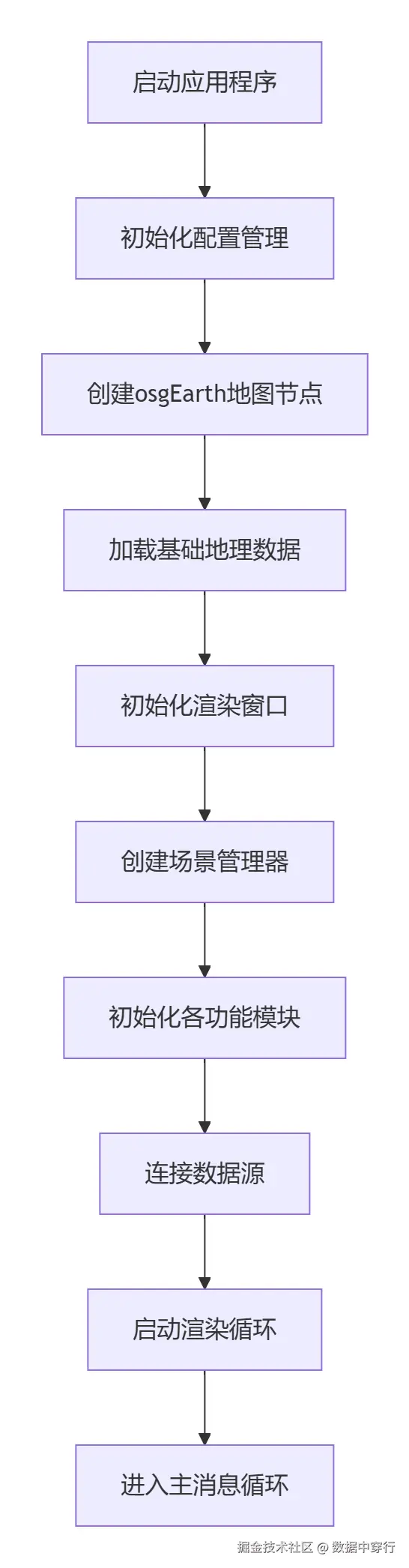
5.1 系统启动与初始化流程
5.2 实时数据更新流程
markdown
1. 数据接收线程
   ↓
2. 原始数据解析与坐标转换
   ↓
3. 数据有效性校验与过滤
   ↓
4. 更新实体状态缓冲区
   ↓
5. 主线程同步(通过回调/消息队列)
   ↓
6. 应用状态插值/预测
   ↓
7. 更新场景图节点状态
   ↓
8. 触发相关事件(如:碰撞检测、规则触发)
5.3 渲染帧循环优化流程
scss
// 主渲染循环优化结构
void RenderingThread::runFrame() {
    // 阶段1:数据准备(并行)
    parallel_for(entities, [&](Entity& e) {
        e.predictState(frameInterval);
    });

    // 阶段2:可见性裁剪
    cullTraversal();

    // 阶段3:状态排序与批处理
    stateSortAndBatching();

    // 阶段4:GPU提交
    drawImplementation();

    // 阶段5:后处理特效
    applyPostEffects();
}
六、 性能优化方案
6.1 渲染优化技术
6.1.1 多层次细节优化
arduino
class OptimizationManager {
public:
    // 1. 基于距离的LOD
    void setupDistanceLOD(osg::Node* node,
                          const LODConfig& config);

    // 2. 实例化渲染
    void setupInstancing(const std::vector<osg::Matrix>& transforms,
                         osg::Node* prototype);

    // 3. 遮挡裁剪
    void enableOcclusionCulling(bool enable);

    // 4. 层次Z缓冲
    void enableHierarchicalZBuffer(bool enable);

    // 5. 延迟着色
    void setupDeferredShading(int gBufferWidth,
                              int gBufferHeight);

    // 6. 帧率自适应
    void adaptiveQualityControl(double targetFPS);

private:
    // 性能监控
    struct PerformanceMetrics {
        double frameTime;
        double cpuTime;
        double gpuTime;
        int triangleCount;
        int drawCalls;
        int textureMemory;
    };

    PerformanceMetrics metrics_;
};
6.1.2 数据调度优化
c
class DataScheduler {
public:
    // 异步数据加载
    void asyncLoadData(const DataRequest& request,
                       DataCallback callback);

    // 预测性预加载
    void predictivePreload(const osg::Camera* camera);

    // 智能缓存管理
    class SmartCache {
        LRUCache<std::string, osg::ref_ptr<osg::Node>> terrainCache_;
        LFUCache<std::string, osg::ref_ptr<osg::Image>> textureCache_;

        void cleanupUnused();
        size_t calculateOptimalCacheSize();
    };

private:
    // 加载优先级队列
    class PriorityQueue {
        struct Task {
            DataRequest request;
            int priority;  // 0-100, 越高越优先
            osg::Timer_t submitTime;
        };
        std::priority_queue<Task> queue_;
    };
};
6.2 内存与计算优化
arduino
class MemoryOptimizer {
public:
    // 1. 纹理压缩
    void compressTextures(CompressionFormat format = DXT5);

    // 2. 几何压缩
    void compressGeometry(osg::Geometry* geom);

    // 3. 顶点缓存对象优化
    void optimizeVBO(osg::Geometry* geom);

    // 4. 共享状态集
    void shareStateSets(osg::Group* scene);

    // 5. 内存池管理
    template<typename T>
    class MemoryPool {
        std::vector<T*> pool_;
        std::queue<T*> freeList_;
        std::mutex mutex_;

        T* allocate();
        void deallocate(T* obj);
    };

    // 6. GPU内存管理
    class GPUMemoryManager {
        size_t usedVRAM_;
        size_t totalVRAM_;
        std::map<std::string, size_t> resourceSizes_;

        bool canAllocate(size_t size);
        void defragment();
    };
};
七、 系统改进与扩展
7.1 可扩展架构设计
7.1.1 插件框架
c
class PluginFramework {
public:
    // 插件接口
    class IPlugin {
    public:
        virtual std::string getName() = 0;
        virtual bool initialize(PluginContext& ctx) = 0;
        virtual void update(double deltaTime) = 0;
        virtual void shutdown() = 0;
    };

    // 插件管理器
    class PluginManager {
        bool loadPlugin(const std::string& path);
        bool unloadPlugin(const std::string& name);

        // 插件热插拔支持
        void enableHotSwap(bool enable);

    private:
        std::map<std::string, std::shared_ptr<IPlugin>> plugins_;
        std::vector<std::string> searchPaths_;
    };
};
7.1.2 服务化架构
csharp
class ServiceArchitecture {
public:
    // 微服务定义
    class MicroService {
    public:
        virtual void start() = 0;
        virtual void stop() = 0;
        virtual Json::Value handleRequest(const Json::Value& req) = 0;
    };

    // 服务发现与注册
    class ServiceRegistry {
        void registerService(const std::string& name,
                             const ServiceInfo& info);
        ServiceInfo discoverService(const std::string& name);

    private:
        // 基于gRPC/REST的服务通信
        class ServiceClient {
            bool connect(const std::string& endpoint);
            Json::Value call(const std::string& method,
                             const Json::Value& params);
        };
    };
};
7.2 AI与智能化增强
c
class AIEnhancement {
public:
    // 1. 智能目标识别
    class TargetRecognition {
        bool identifyTarget(const osg::Image& sensorImage,
                            std::vector<Detection>& detections);
    };

    // 2. 行为预测
    class BehaviorPrediction {
        Trajectory predictTrajectory(const Entity& entity,
                                     double timeHorizon);
    };

    // 3. 威胁评估
    class ThreatAssessment {
        ThreatLevel assessThreat(const Entity& target,
                                 const std::vector<Entity>& friends);
    };

    // 4. 路径规划优化
    class PathPlanner {
        std::vector<osg::Vec3d> findOptimalPath(
            const osg::Vec3d& start,
            const osg::Vec3d& end,
            const CostMap& costMap,
            const Constraints& constraints);
    };

    // 5. 自然语言交互
    class NLUInterface {
        Command parseCommand(const std::string& text);
        std::string generateReport(const Situation& situation);
    };
};
7.3 云渲染与分布式架构
c
class CloudRenderingSystem {
public:
    // 云端渲染服务
    class CloudRenderService {
        ImageTile renderView(const ViewRequest& request);
        VideoStream startStreaming(const StreamConfig& config);
    };

    // 边缘计算节点
    class EdgeNode {
        void processSensorData(const SensorData& data);
        void preprocessTerrain(const GeoArea& area);
    };

    // 分布式同步
    class DistributedSync {
        void synchronizeState(const std::string& sessionId,
                              const SystemState& state);

        // CRDT (无冲突复制数据类型) 用于协同标绘
        class CRDTAnnotation {
            void applyOperation(const Operation& op);
            std::vector<Operation> getPendingOperations();
        };
    };
};
八、 部署与运维方案
8.1 系统部署架构
scss
生产环境部署方案:
├── 前端显示层
│   ├── 指挥中心大屏 (多屏拼接)
│   ├── 操作员工作站 (Windows/Linux)
│   ├── 移动终端 (Android/iOS)
│   └── Web客户端 (WebGL)
│
├── 应用服务层
│   ├── 态势服务器 (主备)
│   ├── 数据服务器
│   ├── 推演服务器
│   └── 网关服务器
│
├── 数据存储层
│   ├── 地理数据库 (PostGIS)
│   ├── 实时数据库 (Redis/TDengine)
│   ├── 文件存储 (NAS/S3)
│   └── 备份系统
│
└── 网络基础设施
    ├── 内部高速网络 (10G/40G)
    ├── 安全隔离网闸
    ├── 负载均衡器
    └── 防火墙/VPN
8.2 监控与维护
yaml
monitoring_config:
  metrics:
    - name: "frame_rate"
      threshold: 25.0
      action: "reduce_quality"

    - name: "memory_usage"
      threshold: 80%
      action: "cleanup_cache"

    - name: "network_latency"
      threshold: 100ms
      action: "switch_source"

  logging:
    level: "INFO"
    rotation: "daily"
    retention: "30days"

  alerting:
    email: ["admin@example.com"]
    sms: ["+8613800138000"]
    webhook: "https://hook.example.com/alert"
九、 关键技术指标
| 指标项 | 目标值 | 测量方法 |
|---|---|---|
| 最大实体数量 | ≥100,000 | 压力测试 |
| 帧率(FPS) | ≥30 | Fraps/内置计数器 |
| 首帧时间 | <3秒 | 秒表测量 |
| 数据更新延迟 | <100ms | 网络抓包 |
| 内存占用 | <4GB | 任务管理器 |
| CPU占用率 | <70% | 性能监视器 |
| 网络带宽 | <10Mbps | 流量监控 |
| 启动时间 | <15秒 | 秒表测量 |
十、 开发路线图
阶段一:基础平台 (3个月)
- osgEarth引擎集成与定制
- 基础地理数据加载
- 简单实体显示
- 基本交互功能
阶段二:核心功能 (6个月)
- 大规模实体管理
- 实时数据接入
- 高级标绘系统
- 基本空间分析
阶段三:高级特性 (6个月)
- 智能推演引擎
- 分布式协同
- AI增强功能
- 云渲染支持
阶段四:优化完善 (3个月)
- 性能深度优化
- 用户体验改进
- 系统稳定加固
- 文档与培训
总结
本方案设计了一个高性能、可扩展、智能化 的基于osgEarth的综合态势显示系统。通过模块化架构 实现功能解耦,多层次优化 保证性能表现,服务化设计 支持灵活部署。系统不仅满足当前态势显示需求,更为未来的AI集成、云边协同、元宇宙融合等发展方向预留了扩展接口。
成功实施本方案的关键在于:
- 性能优先:始终将渲染性能作为核心指标
- 数据驱动:构建统一的数据模型和接口标准
- 用户体验:注重交互设计和操作效率
- 可维护性:完善的文档、测试和监控体系
- 生态建设:建立插件开发生态,支持第三方扩展
本系统将为指挥决策、应急响应、城市管理等领域提供强大的三维可视化支撑平台。