目录
[1. linux ubuntu安装命令](#1. linux ubuntu安装命令)
[2 . 报错如下:](#2 . 报错如下:)
[5.安装 编译和构建软件所需的基础工具包](#5.安装 编译和构建软件所需的基础工具包)
[6.一次执行下面三条命令,注意我的系统是Ubuntu 20.04](#6.一次执行下面三条命令,注意我的系统是Ubuntu 20.04)
[三 如果对话时报错](#三 如果对话时报错)
[四 终端输入Openclaw命令没有反应](#四 终端输入Openclaw命令没有反应)
一.安装Openclaw
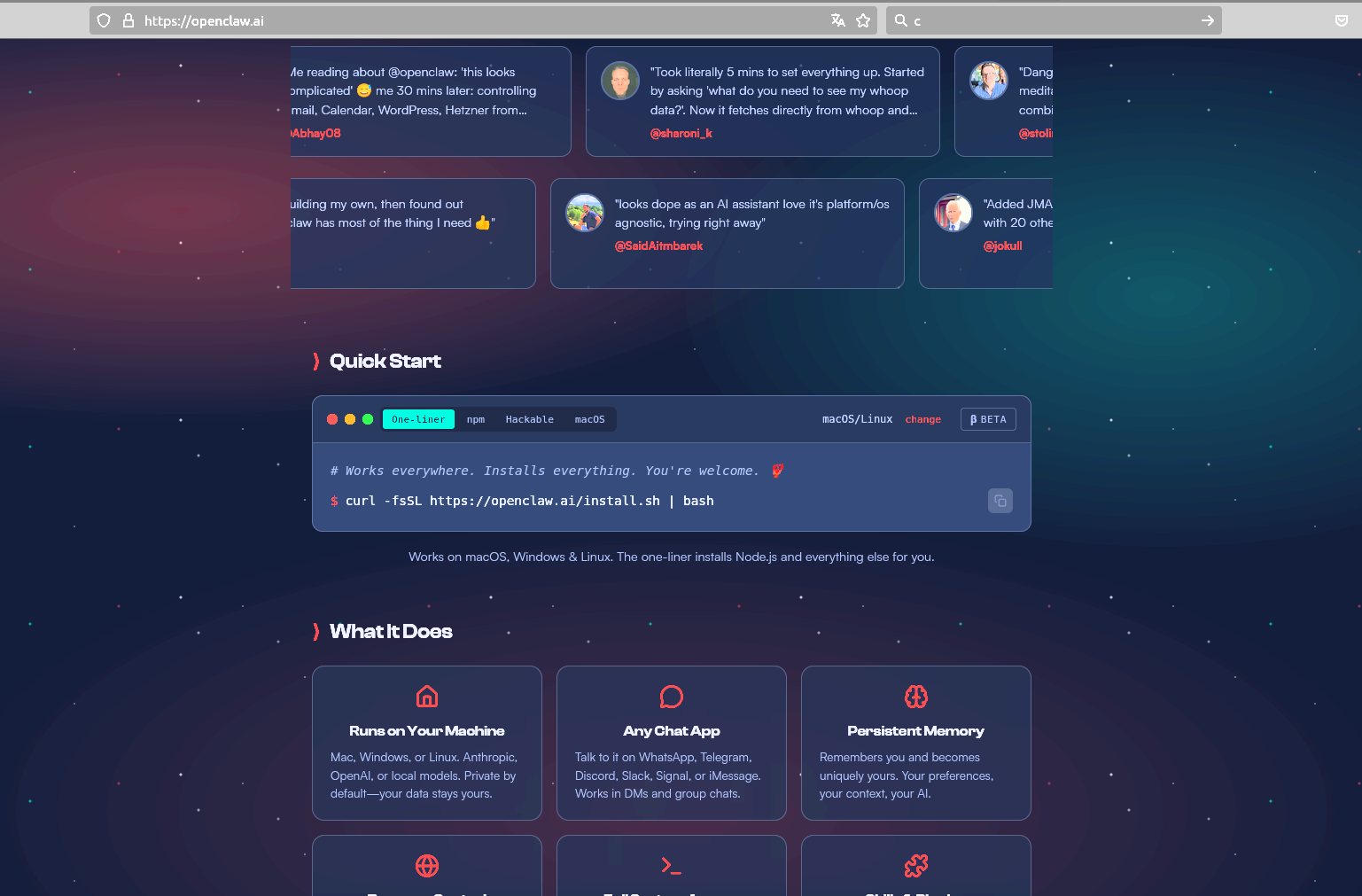
1. linux ubuntu安装命令
如下,输入命令(前提是先安装**Node.js和npm,**我的环境已经有了):
curl -fsSL https://openclaw.ai/install.sh | bash2 . 报错如下:
~$ curl -fsSL https://openclaw.ai/install.sh | bash
🦞 OpenClaw Installer
If you're lost, run doctor; if you're brave, run prod; if you're wise, run tests.
✓ Detected: linux
Install plan
OS: linux
Install method: npm
Requested version: latest
1/3 Preparing environment
✓ Node.js v24.14.0 found
· Active Node.js: v24.14.0 (/usr/bin/node)
· Active npm: 11.9.0 (/usr/bin/npm)
2/3 Installing OpenClaw
✓ Git already installed
· Configuring npm for user-local installs
✓ npm configured for user installs
· Installing OpenClaw v2026.3.8
! npm install failed for openclaw@latest
Command: env SHARP_IGNORE_GLOBAL_LIBVIPS=1 npm --loglevel error --silent --no-fund --no-audit install -g openclaw@latest
Installer log: /tmp/tmp.K2MRZcLqfE
! npm install failed; showing last log lines
! npm install failed; retrying
! npm install failed for openclaw@latest
Command: env SHARP_IGNORE_GLOBAL_LIBVIPS=1 npm --loglevel error --silent --no-fund --no-audit install -g openclaw@latest
Installer log: /tmp/tmp.qHqqqYbHws
! npm install failed; showing last log lines
3.解决方案(升级cmake)
调整使用命令安装Openclaw:
sudo npm i -g openclaw其中有详细报错如下:
npm error CMake 3.19 or higher is required. You are running version 3.16.3
npm error
npm error
npm error CMake Error at CMakeLists.txt:1 (cmake_minimum_required):
npm error CMake 3.19 or higher is required. You are running version 3.16.3
npm error
npm error
npm error ERROR OMG Process terminated: 1
应该是cmake版本太低,使用下面命令升级cmake,
sudo apt install cmake继续报错:
正在读取软件包列表... 完成
正在分析软件包的依赖关系树
正在读取状态信息... 完成
您也许需要运行"apt --fix-broken install"来修正上面的错误。
下列软件包有未满足的依赖关系:
cc-switch : 依赖: libayatana-appindicator3-1 但是它将不会被安装
依赖: libwebkit2gtk-4.1-0 但无法安装它
cmake : 依赖: cmake-data (= 3.16.3-1ubuntu1.20.04.1) 但是 3.16.3-1ubuntu1 正要被安装
E: 有未能满足的依赖关系。请尝试不指明软件包的名字来运行"apt --fix-broken install"(也可以指定一个解决办法)。
修复错误:
sudo apt --fix-broken install正在读取软件包列表... 完成
正在分析软件包的依赖关系树
正在读取状态信息... 完成
正在修复依赖关系... 完成
下列软件包将被【卸载】:
cc-switch
升级了 0 个软件包,新安装了 0 个软件包,要卸载 1 个软件包,有 210 个软件包未被升级。
有 1 个软件包没有被完全安装或卸载。
解压缩后将会空出 22.5 MB 的空间。
您希望继续执行吗? Y/n Y
(正在读取数据库 ... 系统当前共安装有 241718 个文件和目录。)
正在卸载 cc-switch (3.11.1) ...
正在处理用于 mime-support (3.64ubuntu1) 的触发器 ...
正在处理用于 hicolor-icon-theme (0.17-2) 的触发器 ...
正在处理用于 gnome-menus (3.36.0-1ubuntu1) 的触发器 ...
正在处理用于 desktop-file-utils (0.24-1ubuntu3) 的触发器 ...
4.升级
sudo apt update获取:1 file:/var/cuda-repo-ubuntu2004-12-4-local InRelease 1,572 B
获取:1 file:/var/cuda-repo-ubuntu2004-12-4-local InRelease 1,572 B
获取:2 https://dl.google.com/linux/chrome/deb stable InRelease 1,825 B
获取:4 https://dl.google.com/linux/chrome/deb stable/main amd64 Packages 1,217 B
命中:5 https://mirrors.tuna.tsinghua.edu.cn/ubuntu bionic InRelease
命中:3 http://mirrors.tuna.tsinghua.edu.cn/ubuntu focal InRelease
获取:6 https://mirrors.tuna.tsinghua.edu.cn/ubuntu bionic-updates InRelease 102 kB
命中:7 https://deb.nodesource.com/node_24.x nodistro InRelease
获取:8 http://archive.ubuntu.com/ubuntu focal-updates InRelease 128 kB
获取:9 https://downloads.cursor.com/aptrepo stable InRelease 2,672 B
获取:10 https://mirrors.tuna.tsinghua.edu.cn/ubuntu bionic-backports InRelease 102 kB
获取:11 https://downloads.cursor.com/aptrepo stable/main arm64 Packages 1,458 B
获取:12 https://mirrors.tuna.tsinghua.edu.cn/ubuntu bionic-updates/main amd64 DEP-11 Metadata 297 kB
获取:13 https://downloads.cursor.com/aptrepo stable/main amd64 Packages 1,441 B
获取:14 https://mirrors.tuna.tsinghua.edu.cn/ubuntu bionic-updates/restricted amd64 DEP-11 Metadata 212 B
获取:15 https://mirrors.tuna.tsinghua.edu.cn/ubuntu bionic-updates/universe amd64 DEP-11 Metadata 303 kB
获取:16 https://mirrors.tuna.tsinghua.edu.cn/ubuntu bionic-updates/multiverse amd64 DEP-11 Metadata 2,468 B
获取:17 http://archive.ubuntu.com/ubuntu focal-updates/main amd64 DEP-11 Metadata 276 kB
获取:18 https://mirrors.tuna.tsinghua.edu.cn/ubuntu bionic-backports/main amd64 DEP-11 Metadata 8,120 B
获取:19 https://mirrors.tuna.tsinghua.edu.cn/ubuntu bionic-backports/restricted amd64 DEP-11 Metadata 216 B
获取:20 https://mirrors.tuna.tsinghua.edu.cn/ubuntu bionic-backports/universe amd64 DEP-11 Metadata 10.0 kB
获取:21 https://mirrors.tuna.tsinghua.edu.cn/ubuntu bionic-backports/multiverse amd64 DEP-11 Metadata 216 B
获取:22 http://archive.ubuntu.com/ubuntu focal-updates/restricted amd64 DEP-11 Metadata 212 B
获取:23 http://archive.ubuntu.com/ubuntu focal-updates/universe amd64 DEP-11 Metadata 446 kB
获取:24 http://archive.ubuntu.com/ubuntu focal-updates/multiverse amd64 DEP-11 Metadata 940 B
已下载 1,684 kB,耗时 3秒 (506 kB/s)
正在读取软件包列表... 完成
正在分析软件包的依赖关系树
正在读取状态信息... 完成
有 210 个软件包可以升级。请执行 'apt list --upgradable' 来查看它们。
5.安装 编译和构建软件所需的基础工具包
sudo apt install build-essential正在读取软件包列表... 完成
正在分析软件包的依赖关系树
正在读取状态信息... 完成
下列软件包将被升级:
build-essential
升级了 1 个软件包,新安装了 0 个软件包,要卸载 0 个软件包,有 209 个软件包未被升级。
需要下载 4,664 B 的归档。
解压缩后会消耗 1,024 B 的额外空间。
获取:1 http://archive.ubuntu.com/ubuntu focal-updates/main amd64 build-essential amd64 12.8ubuntu1.1 4,664 B
已下载 4,664 B,耗时 1秒 (7,074 B/s)
(正在读取数据库 ... 系统当前共安装有 241711 个文件和目录。)
准备解压 .../build-essential_12.8ubuntu1.1_amd64.deb ...
正在解压 build-essential (12.8ubuntu1.1) 并覆盖 (12.8ubuntu1) ...
正在设置 build-essential (12.8ubuntu1.1) ...
6.一次执行下面三条命令,注意我的系统是Ubuntu 20.04
用于在 Ubuntu 20.04 (Focal Fossa) 系统上,正式添加第三方软件源 Kitware 的 APT 仓库,以便通过 apt 命令安装最新版本的 CMake 等工具。
下载并安装官方 GPG 密钥
wget -O - https://apt.kitware.com/keys/kitware-archive-latest.asc 2>/dev/null | gpg --dearmor - | sudo tee /usr/share/keyrings/kitware-archive-keyring.gpg >/dev/null添加 Kitware 软件源列表
echo 'deb [signed-by=/usr/share/keyrings/kitware-archive-keyring.gpg] https://apt.kitware.com/ubuntu/ focal main' | sudo tee /etc/apt/sources.list.d/kitware.list更新软件包列表
sudo apt update7.执行安装cmake
sudo apt install cmake正在读取软件包列表... 完成
正在分析软件包的依赖关系树
正在读取状态信息... 完成
下列软件包是自动安装的并且现在不需要了:
libjsoncpp1 librhash0
使用'sudo apt autoremove'来卸载它(它们)。
将会同时安装下列软件:
cmake-data
建议安装:
cmake-doc ninja-build
下列软件包将被升级:
cmake cmake-data
升级了 2 个软件包,新安装了 0 个软件包,要卸载 0 个软件包,有 207 个软件包未被升级。
需要下载 17.9 MB 的归档。
解压缩后会消耗 36.4 MB 的额外空间。
您希望继续执行吗? Y/n Y
获取:1 https://apt.kitware.com/ubuntu focal/main amd64 cmake amd64 4.2.3-0kitware1ubuntu20.04.1 15.4 MB
获取:2 https://apt.kitware.com/ubuntu focal/main amd64 cmake-data all 4.2.3-0kitware1ubuntu20.04.1 2,494 kB
已下载 17.9 MB,耗时 11秒 (1,687 kB/s)
(正在读取数据库 ... 系统当前共安装有 241711 个文件和目录。)
准备解压 .../cmake_4.2.3-0kitware1ubuntu20.04.1_amd64.deb ...
正在解压 cmake (4.2.3-0kitware1ubuntu20.04.1) 并覆盖 (3.16.3-1ubuntu1) ...
准备解压 .../cmake-data_4.2.3-0kitware1ubuntu20.04.1_all.deb ...
正在解压 cmake-data (4.2.3-0kitware1ubuntu20.04.1) 并覆盖 (3.16.3-1ubuntu1) ...
正在设置 cmake-data (4.2.3-0kitware1ubuntu20.04.1) ...
正在设置 cmake (4.2.3-0kitware1ubuntu20.04.1) ...
正在处理用于 man-db (2.9.1-1) 的触发器 ...
9.查询cmake版本
cmake --versioncmake version 4.2.3
CMake suite maintained and supported by Kitware (kitware.com/cmake).
这样就符合Openclaw的要求了
10.重新安装Openclaw
curl -fsSL https://openclaw.ai/install.sh | bash🦞 OpenClaw Installer
If something's on fire, I can't extinguish it---but I can write a beautiful postmortem.
✓ Detected: linux
Install plan
OS: linux
Install method: npm
Requested version: latest
1/3 Preparing environment
✓ Node.js v24.14.0 found
· Active Node.js: v24.14.0 (/usr/bin/node)
· Active npm: 11.9.0 (/usr/bin/npm)
2/3 Installing OpenClaw
✓ Git already installed
· Installing OpenClaw v2026.3.8
✓ OpenClaw npm package installed
✓ OpenClaw installed
3/3 Finalizing setup
! PATH missing npm global bin dir: /home/alocus/.npm-global/bin
This can make openclaw show as "command not found" in new terminals.
Fix (zsh: ~/.zshrc, bash: ~/.bashrc):
export PATH="/home/alocus/.npm-global/bin:$PATH"
🦞 OpenClaw installed successfully (OpenClaw 2026.3.8 (3caab92))!
Ahh nice, I like it here. Got any snacks?
· Starting setup
🦞 OpenClaw 2026.3.8 (3caab92) --- No $999 stand required.
▄▄▄▄▄▄▄▄▄▄▄▄▄▄▄▄▄▄▄▄▄▄▄▄▄▄▄▄▄▄▄▄▄▄▄▄▄▄▄▄▄▄▄▄▄▄▄▄▄▄▄▄
██░▄▄▄░██░▄▄░██░▄▄▄██░▀██░██░▄▄▀██░████░▄▄▀██░███░██
██░███░██░▀▀░██░▄▄▄██░█░█░██░█████░████░▀▀░██░█░█░██
██░▀▀▀░██░█████░▀▀▀██░██▄░██░▀▀▄██░▀▀░█░██░██▄▀▄▀▄██
▀▀▀▀▀▀▀▀▀▀▀▀▀▀▀▀▀▀▀▀▀▀▀▀▀▀▀▀▀▀▀▀▀▀▀▀▀▀▀▀▀▀▀▀▀▀▀▀▀▀▀▀
🦞 OPENCLAW 🦞
┌ OpenClaw onboarding
│
◇ Security ──────────────────────────────────────────────────────────────╮
│ │
│ Security warning --- please read. │
│ │
│ OpenClaw is a hobby project and still in beta. Expect sharp edges. │
│ By default, OpenClaw is a personal agent: one trusted operator │
│ boundary. │
│ This bot can read files and run actions if tools are enabled. │
│ A bad prompt can trick it into doing unsafe things. │
│ │
│ OpenClaw is not a hostile multi-tenant boundary by default. │
│ If multiple users can message one tool-enabled agent, they share that │
│ delegated tool authority. │
│ │
│ If you're not comfortable with security hardening and access control, │
│ don't run OpenClaw. │
│ Ask someone experienced to help before enabling tools or exposing it │
│ to the internet. │
│ │
│ Recommended baseline: │
│ - Pairing/allowlists + mention gating. │
│ - Multi-user/shared inbox: split trust boundaries (separate │
│ gateway/credentials, ideally separate OS users/hosts). │
│ - Sandbox + least-privilege tools. │
│ - Shared inboxes: isolate DM sessions (`session.dmScope: │
│ per-channel-peer`) and keep tool access minimal. │
│ - Keep secrets out of the agent's reachable filesystem. │
│ - Use the strongest available model for any bot with tools or │
│ untrusted inboxes. │
│ │
│ Run regularly: │
│ openclaw security audit --deep │
│ openclaw security audit --fix │
│ │
│ Must read: https://docs.openclaw.ai/gateway/security │
│
二.配置openclaw
安装时会要求配置Openclaw,下面是配置时的选择,注意◇符号为问题,◇符号下面的为我的选择
◇ I understand this is personal-by-default and shared/multi-user use requires
lock-down. Continue?
│ Yes
│
◇ Onboarding mode
│ QuickStart
│
◇ QuickStart ─────────────────────────╮
│ │
│ Gateway port: 18789 │
│ Gateway bind: Loopback (127.0.0.1) │
│ Gateway auth: Token (default) │
│ Tailscale exposure: Off │
│ Direct to chat channels. │
│ │
├──────────────────────────────────────╯
│
◇ Model/auth provider
│ MiniMax
│
◇ MiniMax auth method
│ MiniMax M2.5
│
◇ How do you want to provide this API key?
│ Paste API key now
│
◇ Enter MiniMax API key
①这里选用较为实惠的MiniMax M2.5,我直接配置的 API key ,去minimax官网
https://platform.minimaxi.com/subscribe/coding-plan 购买自己需要的套餐,我买的29一月的Starter,
②然后复制API key,或者 去个人中心复制API key:
https://platform.minimaxi.com/user-center/basic-information/interface-key
③回到配置页面,输入 MiniMax API key后继续配置
Default model
│ minimax/MiniMax-M2.1
│
◇ Channel status ────────────────────────────╮
│ │
│ Telegram: needs token │
│ WhatsApp (default): not linked │
│ Discord: needs token │
│ Slack: needs tokens │
│ Signal: needs setup │
│ signal-cli: missing (signal-cli) │
│ iMessage: needs setup │
│ imsg: missing (imsg) │
│ IRC: not configured │
│ Google Chat: not configured │
│ LINE: not configured │
│ Feishu: install plugin to enable │
│ Google Chat: install plugin to enable │
│ Nostr: install plugin to enable │
│ Microsoft Teams: install plugin to enable │
│ Mattermost: install plugin to enable │
│ Nextcloud Talk: install plugin to enable │
│ Matrix: install plugin to enable │
│ BlueBubbles: install plugin to enable │
│ LINE: install plugin to enable │
│ Zalo: install plugin to enable │
│ Zalo Personal: install plugin to enable │
│ Synology Chat: install plugin to enable │
│ Tlon: install plugin to enable │
│ │
├─────────────────────────────────────────────╯
│
◇ How channels work ──────────────────────────────────────────────────────╮
│ │
│ DM security: default is pairing; unknown DMs get a pairing code. │
│ Approve with: openclaw pairing approve <channel> <code> │
│ Public DMs require dmPolicy="open" + allowFrom="\*". │
│ Multi-user DMs: run: openclaw config set session.dmScope │
│ "per-channel-peer" (or "per-account-channel-peer" for multi-account │
│ channels) to isolate sessions. │
│ Docs: │
│ channels/pairing │
│ │
│ Telegram: simplest way to get started --- register a bot with @BotFather │
│ and get going. │
│ WhatsApp: works with your own number; recommend a separate phone + │
│ eSIM. │
│ Discord: very well supported right now. │
│ IRC: classic IRC networks with DM/channel routing and pairing │
│ controls. │
│ Google Chat: Google Workspace Chat app with HTTP webhook. │
│ Slack: supported (Socket Mode). │
│ Signal: signal-cli linked device; more setup (David Reagans: "Hop on │
│ Discord."). │
│ iMessage: this is still a work in progress. │
│ LINE: LINE Messaging API webhook bot. │
│ Feishu: 飞书/Lark enterprise messaging with doc/wiki/drive tools. │
│ Nostr: Decentralized protocol; encrypted DMs via NIP-04. │
│ Microsoft Teams: Bot Framework; enterprise support. │
│ Mattermost: self-hosted Slack-style chat; install the plugin to │
│ enable. │
│ Nextcloud Talk: Self-hosted chat via Nextcloud Talk webhook bots. │
│ Matrix: open protocol; install the plugin to enable. │
│ BlueBubbles: iMessage via the BlueBubbles mac app + REST API. │
│ Zalo: Vietnam-focused messaging platform with Bot API. │
│ Zalo Personal: Zalo personal account via QR code login. │
│ Synology Chat: Connect your Synology NAS Chat to OpenClaw with full │
│ agent capabilities. │
│ Tlon: decentralized messaging on Urbit; install the plugin to enable. │
│ │
├──────────────────────────────────────────────────────────────────────────╯
│
◇ Select channel (QuickStart)
│ Skip for now
Updated ~/.openclaw/openclaw.json
Workspace OK: ~/.openclaw/workspace
Sessions OK: ~/.openclaw/agents/main/sessions
│
◇ Web search ────────────────────────────────────────╮
│ │
│ Web search lets your agent look things up online. │
│ Choose a provider and paste your API key. │
│ Docs: https://docs.openclaw.ai/tools/web │
│ │
├─────────────────────────────────────────────────────╯
│
◇ Search provider
│ Skip for now
│
◇ Skills status ─────────────╮
│ │
│ Eligible: 5 │
│ Missing requirements: 39 │
│ Unsupported on this OS: 7 │
│ Blocked by allowlist: 0 │
│ │
├─────────────────────────────╯
│
◇ Configure skills now? (recommended)
│ Yes
│
◇ Install missing skill dependencies
│ Skip for now
│
◇ Set GOOGLE_PLACES_API_KEY for goplaces?
│ No
│
◇ Set GEMINI_API_KEY for nano-banana-pro?
│ No
│
◇ Set NOTION_API_KEY for notion?
│ No
│
◇ Set OPENAI_API_KEY for openai-image-gen?
│ No
│
◇ Set OPENAI_API_KEY for openai-whisper-api?
│ No
│
◇ Set ELEVENLABS_API_KEY for sag?
│ No
│
◇ Hooks ──────────────────────────────────────────────────────────────────╮
│ │
│ Hooks let you automate actions when agent commands are issued. │
│ Example: Save session context to memory when you issue /new or /reset. │
│ │
│ Learn more: https://docs.openclaw.ai/automation/hooks │
│ │
├──────────────────────────────────────────────────────────────────────────╯
│
◇ Enable hooks?
│ 🚀 boot-md, 📎 bootstrap-extra-files, 📝 command-logger, 💾
│ session-memory
│
◇ Hooks Configured ─────────────────────────────────────────────────╮
│ │
│ Enabled 4 hooks: boot-md, bootstrap-extra-files, command-logger, │
│ session-memory │
│ │
│ You can manage hooks later with: │
│ openclaw hooks list │
│ openclaw hooks enable <name> │
│ openclaw hooks disable <name> │
│
后面就没啥需要配置的了,最后结束后会弹出对话页面:
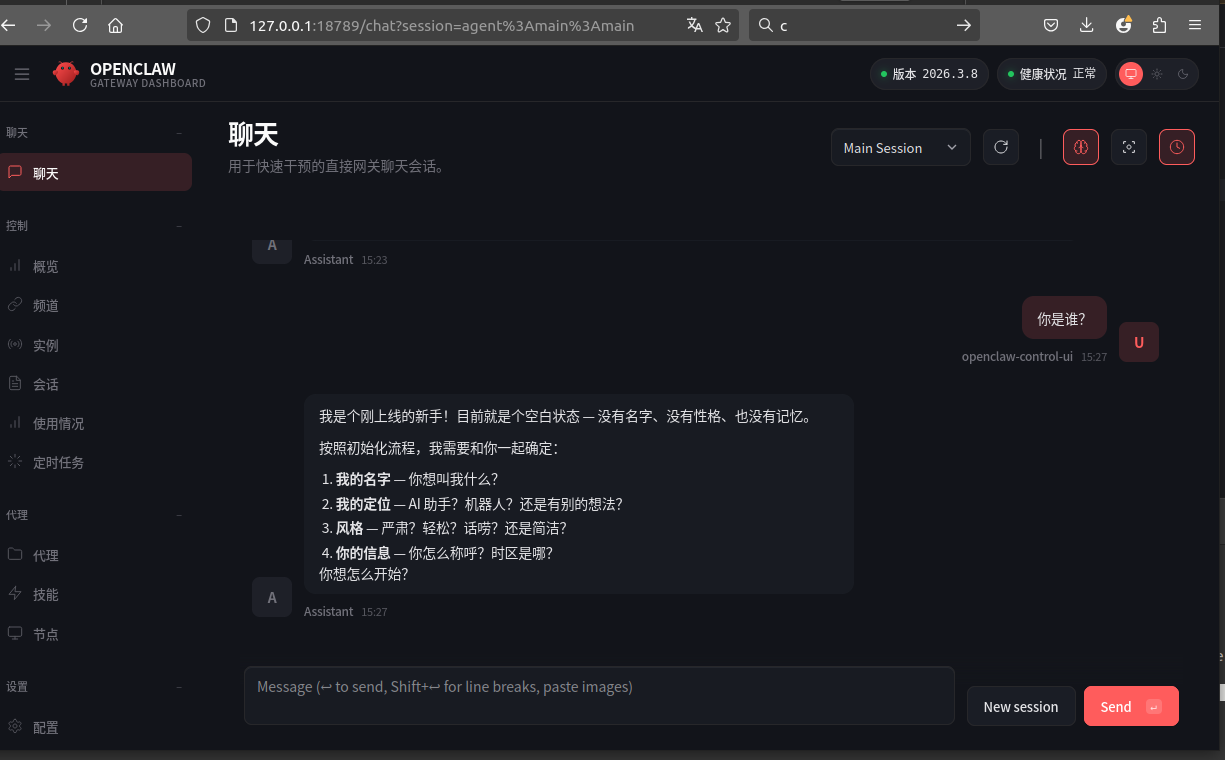
三 如果对话时报错
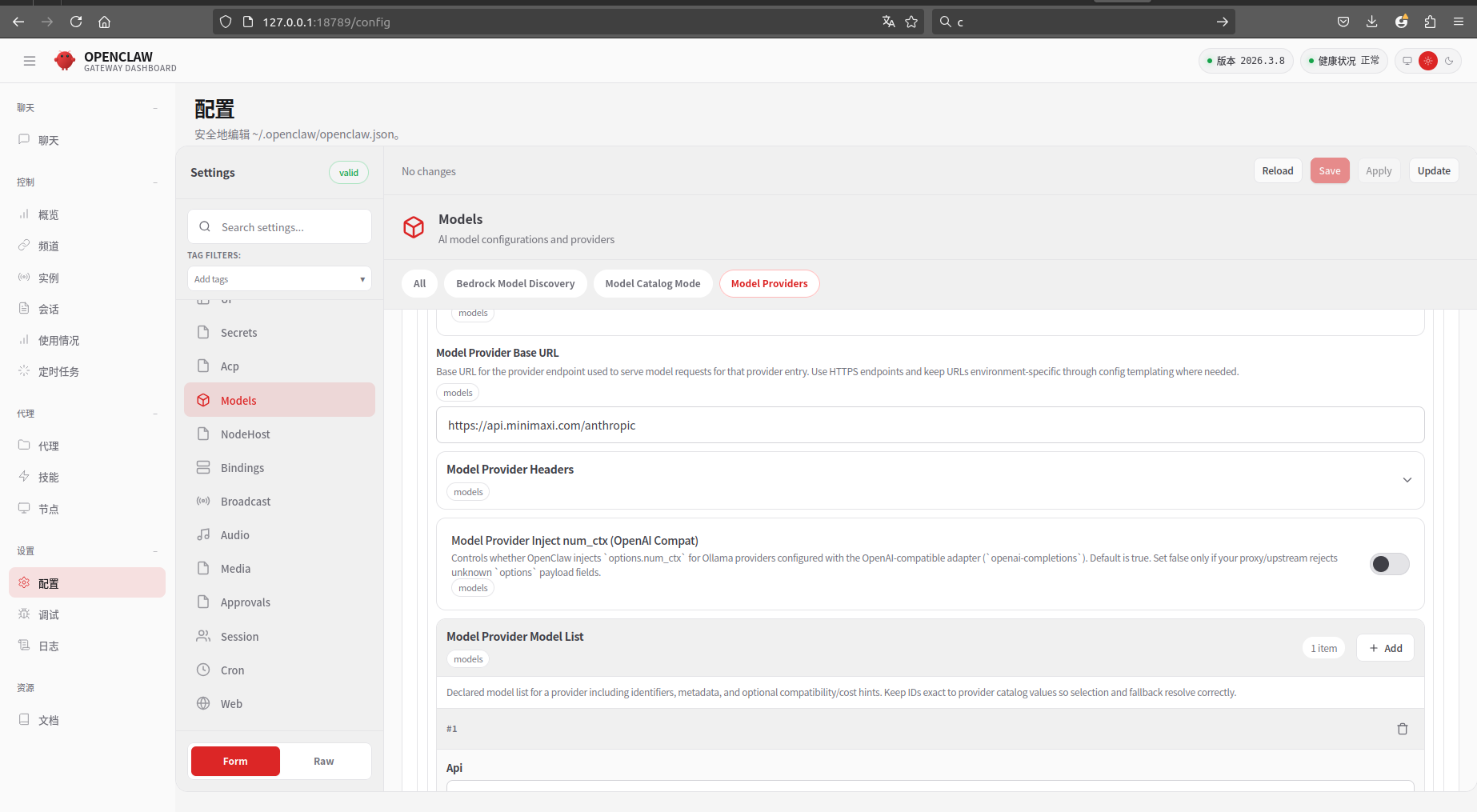
如果 配置 OpenClaw时报错,典型报错可能是"HTTP
minimax/MiniMax-M2.1 │ minimax:default (api_key) │ auth · 4.4s HTTP 401 authentication_error: invalid api key (request_id:xxxx)
如果自己的api key 没有复制错误,请修改base URL 为:https://api.minimaxi.com/anthropic
如下:
四 终端输入Openclaw命令没有反应
配置路径
export PATH="$HOME/.npm-global/bin:$PATH"

source ~/.bashrc
输入Openclaw命令检查
openclaw status