适用:微信小程序开发阶段,勾选了不校验域名的情况下,简易版沙箱支付
1.支付宝沙箱
沙箱平台:https://open.alipay.com/develop/sandbox/app
文档:https://opendocs.alipay.com/common/02kkv7
(这里的步骤可自行查看别的博文进行配置,不再赘述)
2.SpringBoot配置
yml配置:
alipay:
  sandbox:
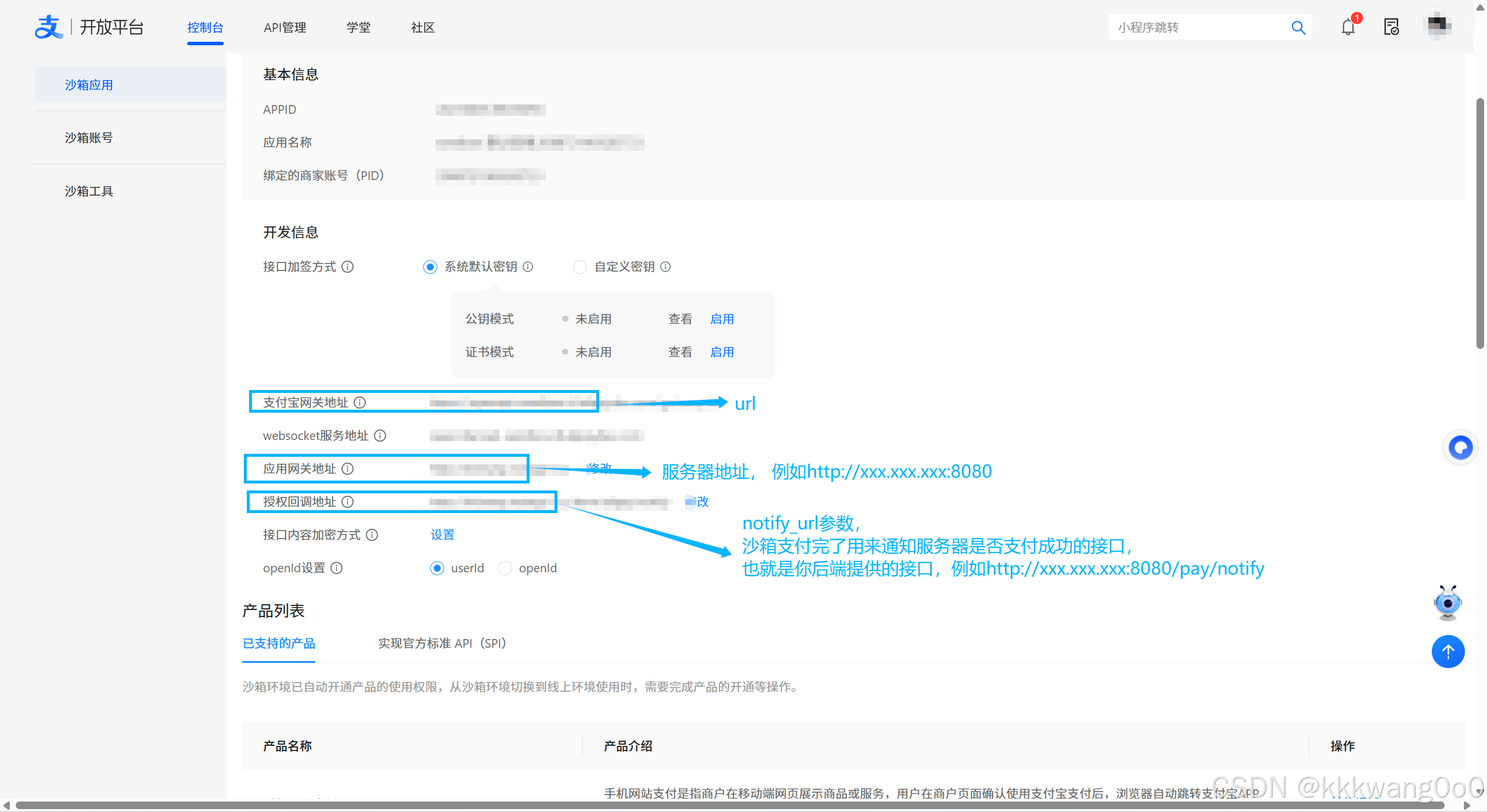
    url: 网关
    app_id: 小程序id
    app_private_id: 支付宝开放平台密钥工具生成的私钥
    format: json
    charset: UTF-8
    alipay_public_key: 支付宝公钥
    sign_type: RSA2
    notify_url: 支付宝回调地址
参数说明:
url参数及notify_url参数以及app_id对应的是图片上的APPID参数
支付宝公钥:
点击查看里面有支付宝公钥,复制填到对应的参数下即可

私钥:
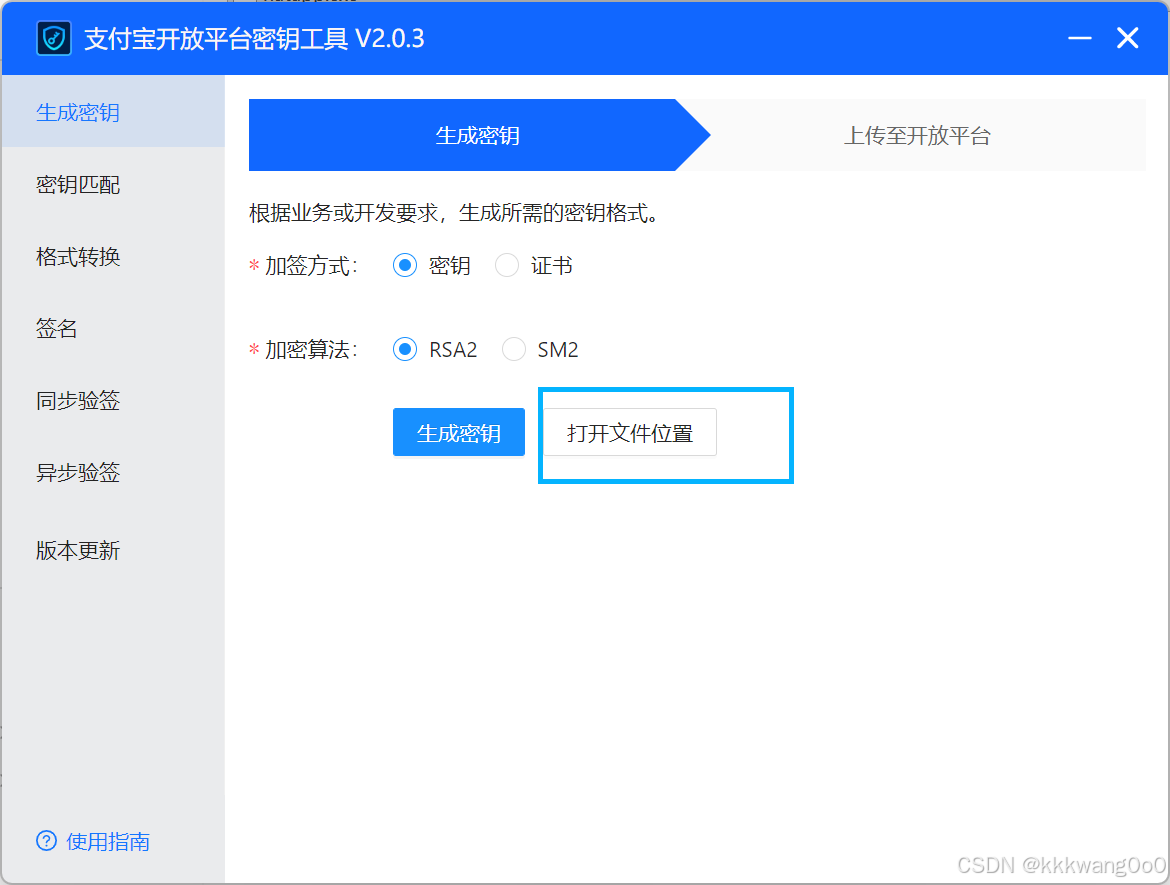
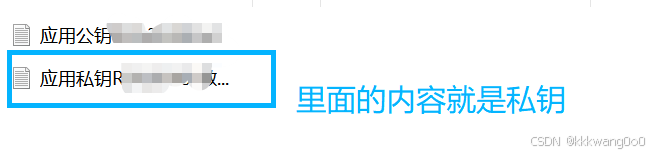
注意:这个沙箱平台上面的应用公钥要跟这个密钥工具生成的应用私钥要对应起来!!!
sdk:
XML
         <dependency>
            <groupId>com.alipay.sdk</groupId>
            <artifactId>alipay-sdk-java</artifactId>
            <version>4.16.2.ALL</version>
        </dependency>
对应配置的实体类:
java
import lombok.Data;
import org.springframework.boot.context.properties.ConfigurationProperties;
import org.springframework.stereotype.Component;

@Data
@Component
@ConfigurationProperties(prefix = "alipay.sandbox")
public class AlipayProperties {
    private String url;
    private String app_id;
    private String app_private_id;
    private String app_public_key;
    private String format;
    private String charset;
    private String alipay_public_key;
    private String sign_type;
    private String return_url;
    private String notify_url;
}
支付接口相关:
java
 /**
     * 支付宝支付请求接口
     */
    @ResponseBody
    @RequestMapping("/pay/alipay")
    public Result<AlipayVO> alipay(HttpSession session,
                                   @RequestParam("money") float money,
                                   @RequestParam("itemId") String itemId,
                                   @RequestParam("userId") String userId) {

        if (money <= 0) {
            return Result.fail(400, "error: 支付金额必须大于0");
        }
        if (itemId == null || itemId.trim().isEmpty()) {
            return Result.fail(400, "error: 商品ID不能为空");
        }
        if (userId == null || userId.trim().isEmpty()) {
            return Result.fail(400, "error: 用户ID不能为空");
        }


        String sessionKey = "PAY_ITEM_ID_" + userId; // 唯一标识用户的商品ID
        session.setAttribute(sessionKey, itemId);


        String time = new SimpleDateFormat("yyyyMMddHHmmssSSS").format(new Date());
        String randomStr = String.valueOf(RandomUtils.randomLong());
        String orderNum = "ORDER_" + userId + "_" + time + "_" + randomStr;


        BigDecimal totalAmount = new BigDecimal(String.valueOf(money)).setScale(2, BigDecimal.ROUND_HALF_UP);


        try {
            String subject = "商品" + itemId + "支付订单";
            //todo .........创建订单逻辑.......

            // 发送沙箱支付请求
            String url = sendRequestToAlipay(orderNum, totalAmount, subject);
            AlipayVO alipayVO = new AlipayVO(randomStr, url);
            return Result.success(alipayVO);
        } catch (AlipayApiException e) {
            e.printStackTrace();
            return Result.fail(500, "error: 支付请求失败," + e.getMessage());
        }
    }

    /**
     * 支付宝请求核心方法
     */
    private String sendRequestToAlipay(String outTradeNo, BigDecimal totalAmount, String subject) throws AlipayApiException {
        // 初始化支付宝客户端
        AlipayClient alipayClient = new DefaultAlipayClient(
                alipayProperties.getUrl(),
                alipayProperties.getApp_id(),
                alipayProperties.getApp_private_id(),
                alipayProperties.getFormat(),
                alipayProperties.getCharset(),
                alipayProperties.getApp_public_key(),
                alipayProperties.getSign_type()
        );

        // 设置请求参数
        AlipayTradePagePayRequest alipayRequest = new AlipayTradePagePayRequest();
        alipayRequest.setReturnUrl(alipayProperties.getReturn_url()); // 同步回调
        alipayRequest.setNotifyUrl(alipayProperties.getNotify_url()); // 异步回调


        String bizContent = "{\"out_trade_no\":\"" + outTradeNo + "\","
                + "\"total_amount\":\"" + totalAmount + "\"," // 使用BigDecimal的字符串值
                + "\"subject\":\"" + subject + "\","
                + "\"body\":\"用户" + outTradeNo.split("_")[1] + "购买商品支付\"," // 补充订单描述
                + "\"product_code\":\"FAST_INSTANT_TRADE_PAY\"}";

        alipayRequest.setBizContent(bizContent);

        // 执行请求并返回结果
        return alipayClient.pageExecute(alipayRequest).getBody();
    }

    /**
     * 支付宝异步回调接口
     */
    @PostMapping("/alipay/notify") // 必须指定POST,支付宝仅用POST回调
    public String alipayNotify(HttpServletRequest request) {
        log.warn("-------------【支付宝异步回调】开始----------");

        Map<String, String> params = new HashMap<>(16);
        Map<String, String[]> requestParams = request.getParameterMap();

        // 参数校验
        if (requestParams != null && !requestParams.isEmpty()) {
            for (String name : requestParams.keySet()) {
                String[] values = requestParams.get(name);
                if (values == null || values.length == 0) {
                    params.put(name, "");
                    continue;
                }

                StringBuilder valueStr = new StringBuilder();
                for (int i = 0; i < values.length; i++) {
                    valueStr.append(values[i]);
                    if (i != values.length - 1) {
                        valueStr.append(",");
                    }
                }

                String finalValue = valueStr.toString().trim();
                params.put(name, finalValue);
                log.info("回调参数 {} = {}", name, finalValue);
            }
        } else {
            log.error("支付宝回调参数为空!");
            return "failure";
        }

        try {
            // 3. 验签
            String alipayPublicKey = alipayProperties.getAlipay_public_key();
            String charset = alipayProperties.getCharset();
            String signType = alipayProperties.getSign_type();

            // 校验配置参数是否为空
            if (alipayPublicKey == null || alipayPublicKey.trim().isEmpty()) {
                log.error("支付宝公钥配置为空,验签失败!");
                return "failure";
            }
            if (charset == null || charset.trim().isEmpty()) {
                charset = "UTF-8";
            }
            if (signType == null || signType.trim().isEmpty()) {
                signType = "RSA2";
            }

            // 执行验签
            boolean signVerified = AlipaySignature.rsaCheckV1(
                    params,
                    alipayPublicKey,
                    charset,
                    signType
            );
            log.info("支付宝回调签名验证结果:{}", signVerified);

            // 4. 验签成功处理业务
            if (signVerified) {
                // 提取核心参数并校验非空
                String tradeStatus = params.get("trade_status");
                String outTradeNo = params.get("out_trade_no");
                String totalAmount = params.get("total_amount");
                String tradeNo = params.get("trade_no");
                String orderId = outTradeNo.split("_")[3];
                log.info("回调核心参数 - 商户订单号:{},支付宝交易号:{},交易状态:{},金额:{}",
                        outTradeNo, tradeNo, tradeStatus, totalAmount);

                // 参数非空校验
                if (outTradeNo == null || outTradeNo.trim().isEmpty()) {
                    log.error("商户订单号为空,处理失败!");
                    return "failure";
                }
                if (tradeStatus == null || tradeStatus.trim().isEmpty()) {
                    log.error("交易状态为空,处理失败!");
                    return "failure";
                }

                // 5. 处理不同交易状态
                if ("TRADE_SUCCESS".equals(tradeStatus) || "TRADE_FINISHED".equals(tradeStatus)) {
                    //todo ..........支付成功逻辑..........
                    return "success";
                } else if ("TRADE_CLOSED".equals(tradeStatus)) {
                    //todo ..........交易关闭逻辑......
                    return "success";
                } else {
                    log.warn("订单 {} 交易状态异常:{}", orderId, tradeStatus);
                    return "success";
                }
            } else {
                // 验签失败
                log.error("支付宝回调签名验证失败!参数:{}", params);
                return "failure";
            }
        } catch (AlipayApiException e) {
            // 验签相关异常
            log.error("支付宝回调验签异常", e);
            return "failure";
        } catch (Exception e) {
            log.error("支付宝回调处理异常", e);
            return "success";
        }
    }

    /**
     * 前端调用查询订单状态
     * @param orderNum
     * @param userId
     * @param itemId
     * @return
     */
    @GetMapping("/pay/checkStatus")
    public Result<PayStatusVO> checkStatus(
            @RequestParam("orderNum") String orderNum,
            @RequestParam(value = "userId", required = false) String userId,
            @RequestParam(value = "itemId", required = false) String itemId) {
         //todo 提供方法给前端查询当前的订单状态是否支付完成

    }
3.微信小程序端代码
确认支付按钮入口绑定方法(js方法):
javascript
    wx.request({
      url: `${server}/item/pay/alipay`,
      method: 'GET',
      header: {
        'Authorization': token,
        'content-type': 'application/json' // 补充默认请求头
      },
      data: {
        money: totalMoney,
        itemId: goods.itemId,
        userId: userInfo.userId
      },
      success: (res) => {
        wx.hideLoading();
        const result = res.data.data;
        console.log("获取的结果为:{}", result)
        if (res.data.code == 200) {
          // 保存到本地
          wx.setStorageSync('alipayForm', result.url);
          // 跳转到专门的支付页面(页面内放web-view组件)
          wx.navigateTo({
            url: `/pages/alipay/alipay?orderNum=${}&itemId=${}&orderMoney=${}`
          });
        } else {
          // 后端返回错误提示
          wx.showToast({
            title: res.data.data || '支付请求失败',
            icon: 'none',
            duration: 3000
          });
        }
      },
      fail: (err) => {
        wx.hideLoading();
        wx.showToast({
          title: '网络异常,请重试',
          icon: 'none',
          duration: 3000
        });
        console.error('支付宝支付请求失败:', err);
      }
    });
支付页面wxml:
javascript
<view class="container">
  <!-- web-view 加载支付宝支付页面,并监听加载错误事件 -->
  <web-view
    src="{{payUrl}}"
    binderror="onWebViewError"
  ></web-view>
</view>
支付页面js(轮询查询支付结果):
javascript
Page({
    data: {
      payUrl: '',
      orderNum: '',          // 订单号
      itemId: '',
      isPaymentDone: false,  // 标记支付流程是否已结束(成功/失败)
      server: wx.getStorageSync("server"),
      token: wx.getStorageSync("token"),
      userInfo: wx.getStorageSync("userInfo")
    },
    payTimer: null,          // 定时器实例
    maxRetry: 60,            // 最大轮询次数
    retryCount: 0,           // 当前轮询次数

    onLoad(options) {
      const orderNum = options.orderNum || '';
      const itemId = options.itemId || '';
      this.setData({ orderNum, itemId });

      if (!orderNum) {
        wx.showToast({ title: '订单号不能为空', icon: 'none' });
        setTimeout(() => wx.navigateBack(), 2000);
        return;
      }


      const alipayForm = wx.getStorageSync('alipayForm');
      if (!alipayForm) {
        wx.showToast({ title: '支付参数异常', icon: 'none' });
        setTimeout(() => wx.navigateBack(), 2000);
        return;
      }
      console.log("alipayForm:", alipayForm);


      this.setData({ payUrl: `data:text/html;charset=utf-8,${encodeURIComponent(alipayForm)}` });


      this.startPolling();


      wx.removeStorageSync('alipayForm');
    },


    startPolling() {
      if (this.payTimer) clearInterval(this.payTimer);
      this.retryCount = 0; // 重置计数
      this.payTimer = setInterval(() => {
        this.checkPayStatus();
      }, 5000); // 5秒轮询一次
    },

    // 停止轮询
    stopPolling() {
      if (this.payTimer) {
        clearInterval(this.payTimer);
        this.payTimer = null;
      }
    },

    // 查询支付状态
    checkPayStatus() {
      const { server, token, userInfo, orderNum, itemId } = this.data;


      if (this.retryCount >= this.maxRetry) {
        this.stopPolling();
        wx.showToast({ title: '支付确认超时,请稍后查看订单', icon: 'none' });
        return;
      }
      this.retryCount++;

      wx.request({
        url: `${server}/pay/checkStatus`,
        method: 'GET',
        header: {
          'Authorization': token,
          'content-type': 'application/json'
        },
        data: {
          orderNum: orderNum,
          userId: userInfo?.userId || '',
          itemId: itemId || ''
        },
        success: (res) => {
          console.log('订单状态查询结果:', res.data);


          const data = res.data?.data;
          if (!data) return;


          if (data.success === true) {
            console.log('支付成功,准备跳转');
            this.stopPolling();
            this.setData({ isPaymentDone: true });
            wx.showToast({ title: '支付成功', icon: 'success' });


            setTimeout(() => {

              wx.switchTab({
                url: '/pages/index/index',
                success: () => {
                  console.log('跳转成功');
                },
                fail: (err) => {
                  console.error('跳转失败:', err);
                  wx.showToast({ title: '跳转失败,请手动返回', icon: 'none' });
                }
              });
            }, 1500);
          } else {

            console.log('支付尚未完成,继续轮询...');
          }
        },
        fail: (err) => {
          console.error('支付状态查询请求失败:', err);

          wx.showToast({ title: '网络异常,正在重试...', icon: 'none' });
        }
      });
    },


    onWebViewError(e) {
      console.error('web-view 加载失败:', e.detail);
      wx.showToast({
        title: '支付已完成,请稍后手动返回查看',
        icon: 'none',
        duration: 3000
      });
    },

    onUnload() {
      this.stopPolling();
    },

    onHide() {
      this.stopPolling();
    },


    onShow() {
      if (this.data.orderNum && !this.payTimer && !this.data.isPaymentDone) {
        this.startPolling();
      }
    }
  });
注意:轮询很消耗资源,如果能使用return_url的还是使用这个吧,这个可能需要配置小程序域名改成支持https协议的(不太清楚)
最终的效果:
