1.环境(为节省资源ora2pg与pg放到一起)
| 源端 | 目标端 |
|---|---|
| oracle19C | pg14 |
| 192.168.47.4 | 192.168.75.131 |
2.pg 端需要安装Oracle客户端工具及ora2pg
bash
unzip instantclient-sqlplus-linux.x64-19.30.0.0.0dbru.zip -d /opt/oracle
unzip instantclient-basic-linux.x64-19.30.0.0.0dbru.zip -d /opt/oracle
unzip instantclient-sdk-linux.x64-19.30.0.0.0dbru.zip  -d /opt/oracle
export ORACLE_HOME=/opt/oracle/instantclient_19_30
export LD_LIBRARY_PATH=$ORACLE_HOME:$LD_LIBRARY_PATH

--DBD-Oracle安装
tar -zxvf DBD-Oracle-1.74.tar.gz
cd DBD-Oracle-1.74
 perl Makefile.PL -l
 make
 make install

--ora2pg
yum install -y perl perl-DBI perl-DBD-Pg perl-Time-HiRes perl-ExtUtils-MakeMaker
tar -zxvf ora2pg-24.3.tar.gz
cd  ora2pg-24.3
perl Makefile.PL
make && make install

--验证安装
[root@pghost01 ora2pg-24.3]# ora2pg --version
Ora2Pg v24.3
3.源端(oracle) 创建用户及授权
bash
ALTER SESSION SET CONTAINER=PDB3;
CREATE USER move IDENTIFIED BY move ;
GRANT CREATE SESSION TO move ;
BEGIN
   FOR t IN (SELECT table_name FROM all_tables WHERE owner = 'TEST') LOOP
      EXECUTE IMMEDIATE 'GRANT SELECT ON TEST.'||t.table_name||' TO  move';
   END LOOP;
END;
4.目标端创建(pg)
bash
CREATE USER move WITH PASSWORD 'move';
-- 创建目标数据库
CREATE DATABASE target_db OWNER  move;
-- 授予必要权限
GRANT ALL PRIVILEGES ON DATABASE target_db TO move
5.配置ora2pg文件
bash
vi /etc/ora2pg/ora2pg.conf

properties
# Oracle 数据库连接配置
ORACLE_DSN      dbi:Oracle://192.168.47.4:1521/pdb3
ORACLE_USER     move
ORACLE_PWD      move

# 要迁移的 Oracle schema
SCHEMA          test

# PostgreSQL 连接配置(可选,用于直接导入)
PG_DSN          dbi:Pg:dbname=target_db;host=192.168.75.131;port=5666
PG_USER         move
PG_PWD          move
PG_VERSION       14

# 导出配置
OUTPUT_DIR      /opt/ora2pg/ora2pg_output
OUTPUT          output.sql
TYPE            TABLE,VIEW,SEQUENCE,FUNCTION,PROCEDURE,TRIGGER,PACKAGE

# 数据导出格式(推荐使用 COPY,速度更快)
DATA_TYPE       COPY
BLOB_TO         BYTEA
LOB_LIMIT       0

# 类型映射优化
MODIFY_TYPE     NUMBER(*,0):integer
DATA_TYPE       VARCHAR2(4000):text
6.测试连接
bash
[root@pghost01 data]# ora2pg -t SHOW_VERSION -c /etc/ora2pg/ora2pg.conf
HINT: you should activate USER_GRANTS for a connection without DBA privilege. Continuing with USER privilege.
Oracle Database 19c Enterprise Edition Release 19.0.0.0.0
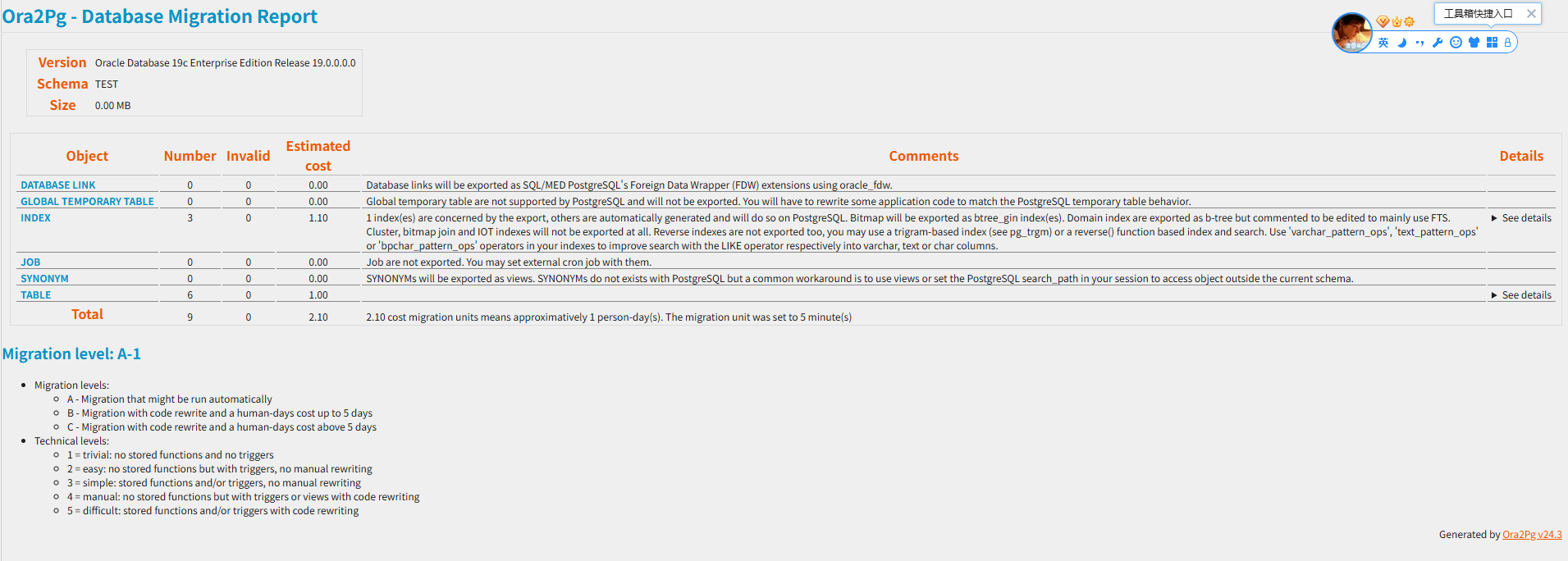
7.生成迁移评估报告
bash
mkdir -p /opt/ora2pg/reports
ora2pg -t SHOW_REPORT --estimate_cost --dump_as_html \
  -c /etc/ora2pg/ora2pg.conf = > /opt/ora2pg/reports/migration_report.html

--生成表和列分析
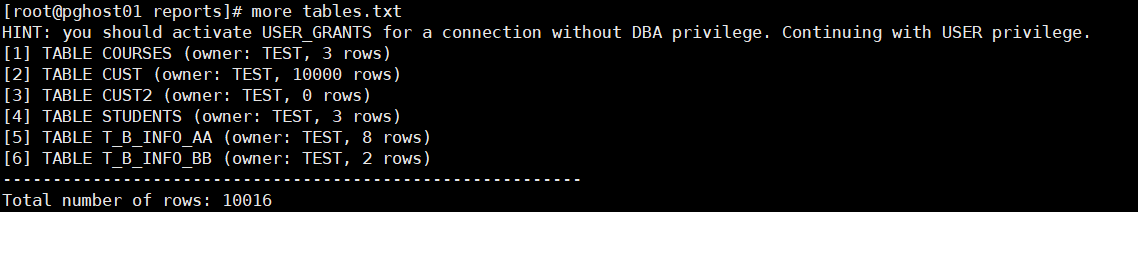
ora2pg -t SHOW_TABLE -c /etc/ora2pg/ora2pg.conf > /opt/ora2pg/reports/tables.txt
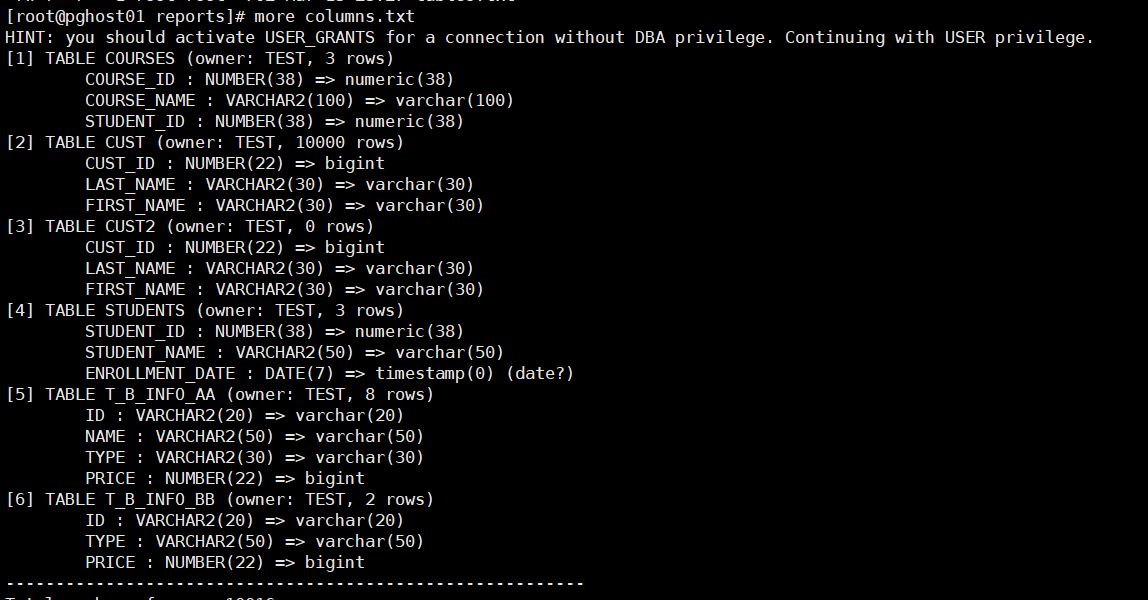
ora2pg -t SHOW_COLUMN -c /etc/ora2pg/ora2pg.conf > /opt/ora2pg/reports/columns.txt
migration_report.html
columns.txt
tables.txt
8.导出与转换
bash
--初始化项目结构
ora2pg --project_base /opt/ora2pg/reports --init_project my_oracle_test

--进入项目目录
cd  /opt/ora2pg/reports/my_oracle_test

--将之前配置的 ora2pg.conf 复制到项目 config 目录
cp /etc/ora2pg/ora2pg.conf ./config/
9.导出表结构
bash
ora2pg -t TABLE -o tables.sql -b ./schema/tables -c ./config/ora2pg.conf
[root@pghost01 my_oracle_test]# ora2pg -t TABLE -o tables.sql -b ./schema/tables -c ./config/ora2pg.conf
HINT: you should activate USER_GRANTS for a connection without DBA privilege. Continuing with USER privilege.
[2026-03-13 23:05:58] [========================>] 6/6 tables (100.0%) end of scanning.
[2026-03-13 23:05:58] [========================>] 6/6 tables (100.0%) end of table export.
导入表结构(可导入)
psql -h 192.168.75.131 -p 5666 -U move -d target_db -f ./schema/tables/tables.sql
查询
postgres=# \c target_db
You are now connected to database "target_db" as user "postgres".
target_db=# \dt
          List of relations
 Schema |    Name     | Type  | Owner
--------+-------------+-------+-------
 public | courses     | table | move
 public | cust        | table | move
 public | cust2       | table | move
 public | students    | table | move
 public | t_b_info_aa | table | move
 public | t_b_info_bb | table | move
(6 rows)
10.手动导出
bash
导出数据(使用 COPY 格式,速度更快)[citation:8]
ora2pg -t COPY -o data.sql -b ./data -c ./config/ora2pg.conf
报错如下
026-03-13 23:25:54] [=======================> ] 10006/10016 total rows (99.9%) - (1 sec., avg: 10006 recs/sec).
[2026-03-13 23:25:54] [=======================> ] 10006/10016 rows (99.9%) on total estimated data (1 sec., avg: 10006 recs/sec)
SET client_encoding TO 'UTF8';
SET synchronous_commit TO off;

FATAL: ERROR:  invalid input syntax for type bigint: "1.2"
CONTEXT:  COPY t_b_info_aa, line 7, column price: "1.2"
Aborting export...

t_b_info_aa表时,发现第7行数据的price字段值为"1.2",但该字段被定义为bigint类型,无法接受小数。
修改表结构
ALTER TABLE t_b_info_aa ALTER COLUMN price TYPE numeric(10,2);
注意:有些类型,主外键等报错需要人工进行干预迁移
11.常用
bash
# 导出序列
ora2pg -t SEQUENCE -o sequences.sql -b ./schema/sequences -c ./config/ora2pg.conf

# 导出函数和存储过程
ora2pg -t FUNCTION -o functions.sql -b ./schema/functions -c ./config/ora2pg.conf
ora2pg -t PROCEDURE -o procedures.sql -b ./schema/procedures -c ./config/ora2pg.conf

# 导出触发器
ora2pg -t TRIGGER -o triggers.sql -b ./schema/triggers -c ./config/ora2pg.conf

# 导出视图
ora2pg -t VIEW -o views.sql -b ./schema/views -c ./config/ora2pg.conf
12.查询结果
bash
源库(oracle)
表名		行数
----------- ----------
courses 	     3
cust		 10000
cust2		     0
students	     3
t_b_info_aa	     8
t_b_info_bb	     2

 目标库

 courses     |     3
 cust        | 10000
 cust2       |     0
 students    |     3
 t_b_info_aa |     8
 t_b_info_bb |     2