本文将深入介绍 Skills 的开发规范,以
project-health技能为实例,介绍Skills在Claude code的使用,详细解读其结构设计、配置参数和实现原理。
目录
project-health技能示例效果- [什么是 Skills?](#什么是 Skills? "#%E4%BB%80%E4%B9%88%E6%98%AF-skills")
- [Skill 文件结构](#Skill 文件结构 "#skill-%E6%96%87%E4%BB%B6%E7%BB%93%E6%9E%84")
- [Frontmatter 配置详解](#Frontmatter 配置详解 "#frontmatter-%E9%85%8D%E7%BD%AE%E8%AF%A6%E8%A7%A3")
- 核心机制解析
- [实战示例:project-health 源码解读](#实战示例:project-health 源码解读 "#%E5%AE%9E%E6%88%98%E7%A4%BA%E4%BE%8Bproject-health-%E6%BA%90%E7%A0%81%E8%A7%A3%E8%AF%BB")
- 使用方法
- 最佳实践
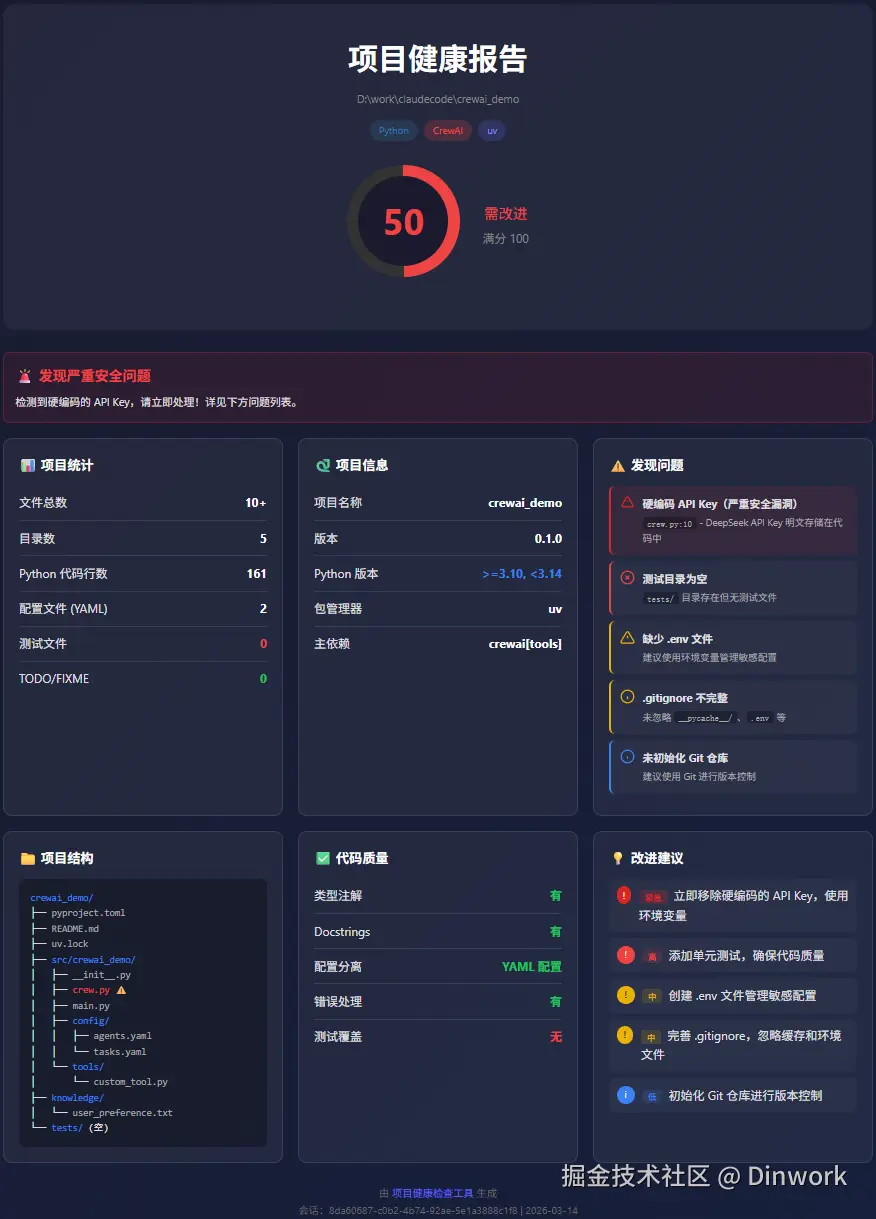
本文用到的project-health 示例 效果和源码
- 说明:这个示例是由Claude code 利用
skill-creator这个官方skill 自动生成。只作为本文档讲解skills开发的用途。 project-health生成的代码分析报告示例效果
什么是 Skills?
Skills(技能)是 Claude Code 的扩展机制,允许你为 Claude 添加专业领域能力。通过定义结构化的技能包,Claude 可以:
- 自动触发:当用户请求匹配描述时自动调用
- 手动调用 :用户通过
/skill-name斜杠命令直接使用 - 隔离执行:在独立上下文中运行,不影响主对话
简单来说,一个 Skill 就是一份"专业指南",告诉 Claude 如何完成特定任务。
Skill 文件结构
一个完整的 Skill 目录结构如下:
bash
project-health/
├── SKILL.md                    # 主配置文件(必需)
├── reference.md                # 详细参考文档
├── README.md                   # 技能说明(可选)
├── examples/
│   └── sample-output.md        # 示例输出
└── scripts/
    └── generate_report.py      # 可执行脚本
文件职责说明
| 文件/目录 | 必需性 | 职责 |
|---|---|---|
SKILL.md |
✅ 必需 | 主入口文件,包含 Frontmatter 配置和执行指南 |
reference.md |
推荐 | 详细的 API 参考、配置说明、排错指南 |
examples/ |
推荐 | 示例输出、使用场景展示 |
scripts/ |
可选 | 可执行脚本,被 SKILL.md 调用 |
设计意义
yaml
┌─────────────────────────────────────────────────────────┐
│  SKILL.md (入口)                                        │
│  ├── Frontmatter: 元数据配置                            │
│  └── Markdown: 执行指南                                 │
│       ├── 引用 reference.md 获取详细文档                 │
│       ├── 引用 examples/ 展示用例                       │
│       └── 调用 scripts/ 执行具体任务                    │
└─────────────────────────────────────────────────────────┘
这种分层设计使得:
- 职责分离:配置、文档、代码各司其职
- 易于维护:修改文档不影响配置,更新脚本不影响指南
- 可扩展性:可随时添加新的示例或脚本
Frontmatter 配置详解
SKILL.md 文件以 YAML Frontmatter 开头,定义技能的元数据和运行参数。
project-health 的 Frontmatter 示例
yaml
---
name: project-health
description: Analyze project health including code quality, dependencies, git status, and generate visual HTML report. Use when user asks to "check project health", "analyze codebase", "run diagnostics", or "generate project report".
argument-hint: [directory] [--fix] [--open]
disable-model-invocation: false
user-invocable: true
allowed-tools: Read, Grep, Glob, Bash(git *), Bash(npm *), Bash(pip *), Bash(python *)
model: sonnet
context: fork
agent: Explore
---
字段完整说明
| 字段 | 类型 | 说明 |
|---|---|---|
name |
string | 技能唯一标识符,同时作为 /斜杠命令 名称 |
description |
string | 技能描述,Claude 用于判断何时自动触发此技能 |
argument-hint |
string | 参数提示,在自动补全时显示 |
disable-model-invocation |
boolean | 是否禁止自动触发,false 表示允许 Claude 自动调用 |
user-invocable |
boolean | 是否在 / 命令菜单中显示,true 表示用户可手动调用 |
allowed-tools |
string | 预批准的工具列表,执行时无需用户确认 |
model |
string | 使用的模型:haiku、sonnet、opus |
context |
string | 执行上下文:fork(隔离子代理)或 main(主上下文) |
agent |
string | 子代理类型:Explore、Plan、general-purpose 等 |
关键字段详解
name - 技能标识
yaml
name: project-health- 命名规范:小写字母,连字符分隔
- 自动生成
/project-health命令
description - 触发描述
yaml
description: Analyze project health including code quality...Claude 使用此字段判断是否应该自动调用此技能。描述应包含:
- 技能功能概述
- 典型触发场景(用户可能说的话)
allowed-tools - 工具白名单
yaml
allowed-tools: Read, Grep, Glob, Bash(git *), Bash(npm *), Bash(pip *), Bash(python *)支持的格式:
- 单个工具:
Read、Write - 工具组:
Bash(git *)匹配所有 git 命令
安全考虑 :限制工具范围可防止误操作,例如只允许 Read 而禁止 Write。
context: fork - 隔离执行
yaml
context: fork
agent: Explore
fork 模式创建独立的子代理执行任务:
- 无权访问主对话历史
- 拥有全新的工作内存
- 结果摘要返回主对话
配合 agent: Explore 使用文件探索代理,提供优化的文件系统操作能力。
核心机制解析
1. 参数替换 (String Substitution)
SKILL.md 中可使用动态变量,Claude 会在执行时替换:
markdown
## Parameters

- **$0** (directory): Target directory to analyze
- **$1** (--fix): Apply automatic fixes
- **$2** (--open): Open report in browser

Running with: directory=`$ARGUMENTS[0]`, fix=`$ARGUMENTS[1]`
可用变量:
| 变量 | 示例输出 | 说明 |
|---|---|---|
$ARGUMENTS |
./src --fix --open |
所有参数 |
$ARGUMENTS[0] 或 $0 |
./src |
第一个参数 |
$ARGUMENTS[1] 或 $1 |
--fix |
第二个参数 |
${CLAUDE_SESSION_ID} |
abc123-def456 |
当前会话 ID |
${CLAUDE_SKILL_DIR} |
/home/user/.claude/skills/project-health |
技能目录路径 |
2. 动态上下文注入 (Dynamic Context Injection)
使用 ``!`command``` 语法在加载时执行命令:
markdown
### Git Status!git status --short 2>/dev/null || echo "Not a git repository"
执行流程:
- Skill 加载时立即执行命令
- 命令输出替换占位符
- Claude 看到的是实际结果,而非命令本身
这使得 Skill 可以获取实时上下文信息。
3. 脚本调用
在 SKILL.md 中调用 scripts 目录下的脚本:
markdown
### Step 4: Generate Visual Report

Run the bundled visualization script:

```bash
python "${CLAUDE_SKILL_DIR}/scripts/generate_report.py" "$0" --session="${CLAUDE_SESSION_ID}"
yaml
- `${CLAUDE_SKILL_DIR}` 定位脚本路径
- `$0` 传递用户参数
- `--session=` 传递会话信息用于报告追踪

---

## 实战示例:project-health 源码解读

### 整体架构
project-health 工作流程 │ ├── 1. 项目检测 (get_project_type) │ └── 识别 package.json, pyproject.toml 等配置文件 │ ├── 2. 文件扫描 (scan_files) │ └── 统计文件数、代码行数、测试覆盖率 │ ├── 3. Git 信息获取 (get_git_info) │ └── 分支、状态、最近提交 │ ├── 4. 依赖检查 (check_dependencies) │ └── 过期依赖、安全漏洞 │ ├── 5. 健康评分计算 (calculate_health_score) │ └── 综合评估,生成 0-100 分 │ └── 6. 报告生成 (generate_html) └── 输出可视化 HTML 报告
python
### 关键代码解析

#### 1. 项目类型检测

```python
def get_project_type(path: Path) -> dict:
    """Detect project type and framework."""
    indicators = {
        "package.json": ("Node.js", ["react", "vue", "angular", "next", "express"]),
        "pyproject.toml": ("Python", ["django", "flask", "fastapi", "pytest"]),
        "go.mod": ("Go", ["gin", "echo", "fiber"]),
        "Cargo.toml": ("Rust", ["actix", "tokio", "rocket"]),
        "pom.xml": ("Java", ["spring", "maven"]),
    }

    for file, (lang, frameworks) in indicators.items():
        if (path / file).exists():
            # 检测框架依赖
            detected_frameworks = []
            if file == "package.json":
                data = json.loads((path / file).read_text())
                deps = {**data.get("dependencies", {}), **data.get("devDependencies", {})}
                for fw in frameworks:
                    if fw in deps:
                        detected_frameworks.append(fw)
            return {"language": lang, "frameworks": detected_frameworks}

    return {"language": "Unknown", "frameworks": []}
设计亮点:
- 使用字典映射配置文件 → 语言类型
- 支持框架检测(如 React、FastAPI)
- 返回结构化信息便于后续处理
2. 健康评分算法
python
def calculate_health_score(stats: dict, deps: dict, git_info: dict) -> int:
    """Calculate overall health score (0-100)."""
    score = 100

    # 过期依赖扣分(最多 25 分)
    if deps["total"] > 0:
        outdated_ratio = len(deps["outdated"]) / deps["total"]
        score -= min(25, int(outdated_ratio * 50))

    # 缺少测试扣分(最多 15 分)
    if stats["test_files"] == 0:
        score -= 15
    elif stats["test_files"] < stats["files"] * 0.1:
        score -= 5

    # TODO 过多扣分(最多 10 分)
    if stats["todo_count"] > 20:
        score -= min(10, stats["todo_count"] // 10)

    # 未提交更改扣分(最多 10 分)
    if git_info["status"]:
        score -= min(10, len(git_info["status"].splitlines()))

    # 大文件扣分(最多 10 分)
    for _, size in stats["largest_files"]:
        if size > 5 * 1024 * 1024:  # 5MB
            score -= 5

    return max(0, min(100, score))
评分维度:
| 因素 | 权重 | 评分标准 |
|---|---|---|
| 依赖新鲜度 | 25% | 过期依赖比例 |
| 测试覆盖 | 15% | 是否有测试文件 |
| 代码整洁 | 10% | TODO/FIXME 数量 |
| Git 卫生 | 10% | 未提交更改数量 |
| 文件健康 | 10% | 是否存在大文件 |
3. 智能建议生成
python
def generate_recommendations(stats: dict, deps: dict, git_info: dict) -> list:
    """Generate actionable recommendations."""
    recommendations = []

    if deps["outdated"]:
        recommendations.append({
            "level": "warning",
            "message": f"更新 {len(deps['outdated'])} 个过期的依赖项以获取最新功能和安全修复"
        })

    if stats["test_files"] == 0:
        recommendations.append({
            "level": "error",
            "message": "未找到测试文件。添加测试以提高代码可靠性"
        })

    if git_info["status"]:
        recommendations.append({
            "level": "warning",
            "message": "检测到未提交的更改。建议提交或暂存"
        })

    if not recommendations:
        recommendations.append({
            "level": "success",
            "message": "项目状态良好!继续保持。"
        })

    return recommendations
建议分级:
error🔴:必须处理的问题warning🟡:建议改进的地方success🟢:状态良好
使用方法
基本用法
bash
# 分析当前目录
/project-health

# 分析指定目录
/project-health ./my-project

# 分析并自动修复
/project-health ./my-project --fix

# 分析后打开报告
/project-health ./my-project --open
参数说明
| 参数 | 说明 | 默认值 |
|---|---|---|
directory |
目标目录路径 | 当前目录 |
--fix |
自动修复发现的问题 | false |
--open |
在浏览器中打开报告 | true |
典型场景
1. 提交前检查
bash
/project-health . --quick在代码提交前快速检查,及早发现问题。
2. 依赖更新
bash
/project-health . --fix自动更新过期的依赖包。
3. 新项目评估
bash
/project-health ./unfamiliar-codebase --detailed快速了解陌生项目的整体状况。
4. 定期巡检
bash
/loop 1w /project-health . --open每周自动执行健康检查。
最佳实践
1. Skill 开发建议
yaml
# ✅ 好的实践:清晰的描述,包含触发关键词
description: Analyze project health including code quality, dependencies...
Use when user asks to "check project health", "analyze codebase"...

# ❌ 不好的实践:模糊的描述
description: Analyze stuff
2. 工具权限控制
yaml
# ✅ 最小权限原则
allowed-tools: Read, Grep, Glob, Bash(git status)

# ❌ 过度授权(可能危险)
allowed-tools: Bash(*)
3. 错误处理
在脚本中使用优雅的错误处理:
python
def run_command(cmd: list, default: str = "") -> str:
    """Run a shell command and return output."""
    try:
        result = subprocess.run(cmd, capture_output=True, text=True, timeout=30)
        return result.stdout.strip() if result.returncode == 0 else default
    except Exception:
        return default  # 返回默认值而非抛出异常
4. 文档分层
objectivec
SKILL.md        → 快速指南,执行步骤
reference.md    → 详细配置,API 参考
examples/       → 使用示例,输出样例
不同用户关注不同层次的信息。
总结
Skills 是一个强大且灵活的扩展机制。通过本文的 project-health 示例,我们了解了:
- 文件结构 :
SKILL.md为核心,reference.md和scripts/为支撑 - Frontmatter 配置:定义技能的元数据、权限和运行模式
- 核心机制:参数替换、动态上下文注入、脚本调用
- 实际应用:项目健康检查的完整实现
掌握这些,可以创建自己的 Skills,把自己的专业能力转化为skills!