参考资料
- https://open-sandbox.ai/zh/overview/home
- https://github.com/alibaba/OpenSandbox/blob/main/examples/google-adk/README.md
OpenSandbox 是 AgentScope-Runtime 更通用的版本。两者的区别在于,AgentScope-Runtime与 AgentScope 框架耦合较紧,而OpenSandbox引入了 协议优先 (Protocol-First) 的设计理念,把 execd 独立出来,定义了一套标准的 OpenAPI 规范,这意味着它不再只为 AgentScope 服务。
关于execd运行时守护进程
OpenSandbox execd运行时守护进程。execd 是一个基于 Go 语言 编写的 HTTP 守护进程(基于 Beego 框架)。它并不预先存在于用户的镜像中,而是在沙箱容器启动时,由 Runtime(如 Docker 或 Kubernetes)动态注入到容器内部运行的
总的来说,execd 是沙箱的代理,驻留在容器内部负责接收 SDK 的指令并将其转化为沙箱内的具体操作(写文件、跑代码、查内存),最后把结果实时传回。
execd 实现了 Sandbox Execution Spec(沙箱执行规范),主要负责处理以下四类操作:
- 代码执行 (Code Execution):它内部集成了 Jupyter Kernel 协议。支持多语言状态化执行(Python, Java, JS, Go 等),能够维持变量上下文。通过 WebSocket 与容器内的 Jupyter Server 通信。
- 命令执行 (Command Execution):负责在沙箱内运行 shell 命令。支持实时输出流 (Streaming),通过 Server-Sent Events (SSE) 将标准输出 (stdout) 和错误输出 (stderr) 实时返回给客户端。
- 文件系统操作 (File Operations):提供远程文件管理的 API,包括文件的上传、下载、读取、删除、权限修改(chmod)以及基于 glob 模式的文件搜索。
- 指标采集 (Metrics Collection):监控并报告沙箱内部的资源使用情况,如 CPU 和内存占用。
execd 的具备非侵入性。当创建一个沙箱时,Runtime 会从特定的镜像中提取 execd 二进制文件,并通过挂载(Volume Mount)的方式放入目标容器。Runtime 会修改容器的入口点(Entrypoint)。容器启动后,首先运行 execd。 execd 启动后,会先启动必要的辅助服务(如 Jupyter Server),然后再 fork 并启动用户原本定义的程序。
如果没有 execd,沙箱只是一个隔离的容器。有了 execd,它就变成了一个可交互的服务,无论你用的是 Ubuntu 还是 Python 镜像,SDK 调用的 API 都是统一的。允许 AI 或用户在同一个会话中多次执行代码并保留之前的变量。
之所以仍然需要用户入口点(User Entrypoint),是因为 execd 的定位是基础设施/管理工具,而用户入口点代表的是业务逻辑/容器灵魂。虽然 execd 可以作为守护进程运行,但很多场景下,用户希望容器的生命周期与特定任务绑定。这样,即使不通过 execd 发送任何指令,你的应用程序(如数据库、Web 后端、实验环境)也能正常跑起来。
此外,为了让 OpenSandbox 的功能(尤其是 Code Interpreter)正常跑起来,基础镜像(Base Image)必须预装好相关的执行环境。如果镜像里没有这些组件,execd 在尝试启动或执行代码时会报错(比如提示 jupyter command not found)
启动ADK代理并集成sandbox
opensandbox和agentscope-runtime启动沙盒的逻辑类似,即通过sandbox-server来实现后端不同运行时的集成。因此首先得启动opensandbox server,这样adk才能借助opensandbox sdk实现沙盒动作。使用如下命令初始化配置文件,选择docker作为server的运行时
shell
opensandbox-server init-config ~/.sandbox.toml --example docker默认的配置文件如下
toml
[server]
host = "127.0.0.1"
port = 8080
log_level = "INFO"

[runtime]
# Runtime selection (docker | kubernetes)
type = "docker"
execd_image = "opensandbox/execd:v1.0.6"

[egress]
image = "opensandbox/egress:v1.0.3"

[storage]
allowed_host_paths = []

[docker]
network_mode = "bridge"
drop_capabilities = ["AUDIT_WRITE", "MKNOD", "NET_ADMIN", "NET_RAW", "SYS_ADMIN", "SYS_MODULE", "SYS_PTRACE", "SYS_TIME", "SYS_TTY_CONFIG"]
no_new_privileges = true
apparmor_profile = ""
seccomp_profile = ""

[ingress]
mode = "direct"
之后启动 server,可见实际上启动的是一个fastapi server
shell
$ opensandbox-server
INFO:     2026-03-15 10:07:12+0000 [-] src.services.factory: Creating sandbox service with type: docker
INFO:     2026-03-15 10:07:12+0000 [-] src.services.docker: Docker service initialized from environment
INFO:     2026-03-15 10:07:12+0000 [-] uvicorn.error: Started server process [1232805]
INFO:     2026-03-15 10:07:12+0000 [-] uvicorn.error: Waiting for application startup.
INFO:     2026-03-15 10:07:12+0000 [-] src.main: Validating secure runtime for Docker backend
INFO:     2026-03-15 10:07:12+0000 [-] src.services.runtime_resolver: Secure runtime is not configured.
INFO:     2026-03-15 10:07:12+0000 [-] src.services.factory: Creating sandbox service with type: docker
INFO:     2026-03-15 10:07:12+0000 [-] src.services.docker: Docker service initialized from environment
INFO:     2026-03-15 10:07:12+0000 [-] uvicorn.error: Application startup complete.
INFO:     2026-03-15 10:07:12+0000 [-] uvicorn.error: Uvicorn running on http://127.0.0.1:8080 (Press CTRL+C to quit)
之后按照官方示例文件创建ADK调用opensandbox的agent代码如下。代码里没有 import litellm。但这里不需要显式引入ADK 内部支持 LiteLLM 作为模型后端(需要安装google-adk[extensions] 才能支持 litellm 后端),只要model 名用 litellm/模型名前缀(代码里设的是 litellm/qwen3-next),ADK 看到 litellm/ 前缀后会自动通过 LiteLLM 路由调用模型,不需要你在代码里手动 import。不过还需要配置 LiteLLM 的链接信息
- 在示例中ADK将sandbox的相关内容封装为了agent的tool
- 文件读写相关的tool使用封装好的opensandbox sdk执行
py
import asyncio
import os
from datetime import timedelta

from google.adk.agents import Agent
from google.adk.runners import Runner
from google.adk.sessions.in_memory_session_service import InMemorySessionService
from google.adk.utils._debug_output import print_event
from google.adk.utils.context_utils import Aclosing
from google.genai import types
from opensandbox import Sandbox
from opensandbox.config import ConnectionConfig


async def main() -> None:
    domain = os.getenv("SANDBOX_DOMAIN", "localhost:8080")
    image = os.getenv("SANDBOX_IMAGE", "sandbox-registry.cn-zhangjiakou.cr.aliyuncs.com/opensandbox/code-interpreter:latest")
    # ADK uses "openai/" prefix to route through LiteLLM to an OpenAI-compatible endpoint
    model_name = os.getenv("LITELLM_MODEL", "openai/qwen3-next")
    # These env vars are read by litellm internally
    os.environ.setdefault("OPENAI_API_BASE", os.getenv("LITELLM_API_BASE", "http://localhost:4000"))
    os.environ.setdefault("OPENAI_API_KEY", os.getenv("LITELLM_API_KEY", "sk-placeholder"))

    sandbox = await Sandbox.create(
        image,
        connection_config=ConnectionConfig(domain=domain, request_timeout=timedelta(seconds=120)),
    )
    print(f"Sandbox created: {sandbox.id}")

    async def run_in_sandbox(command: str) -> str:
        """Run a shell command in OpenSandbox and return the output."""
        execution = await sandbox.commands.run(command)
        stdout = "\n".join(m.text for m in execution.logs.stdout)
        stderr = "\n".join(m.text for m in execution.logs.stderr)
        if execution.error:
            stderr = "\n".join([stderr, f"[error] {execution.error.name}: {execution.error.value}"]).strip()
        output = stdout.strip()
        if stderr:
            output = "\n".join([output, f"[stderr]\n{stderr}"]).strip()
        return output or "(no output)"

    async def write_file(path: str, content: str) -> str:
        """Write a file inside the sandbox."""
        await sandbox.files.write_file(path, content)
        return f"wrote {len(content)} bytes to {path}"

    async def read_file(path: str) -> str:
        """Read a file from the sandbox."""
        return await sandbox.files.read_file(path)

    agent = Agent(
        name="opensandbox_litellm",
        model=model_name,
        instruction=(
            "You have access to OpenSandbox tools. Use write_file to create or "
            "update files, read_file to read files, and run_in_sandbox to run commands."
        ),
        tools=[run_in_sandbox, write_file, read_file],
    )

    session_service = InMemorySessionService()
    runner = Runner(agent=agent, app_name="opensandbox_litellm", session_service=session_service)
    session = await session_service.create_session(app_name="opensandbox_litellm", user_id="local-user")

    prompts = [
        "Use write_file to save /tmp/math.py that prints 137 * 42.",
        "Run the script using run_in_sandbox and report the result.",
        "Write /tmp/notes.txt with 'LiteLLM + OpenSandbox', then read it back.",
    ]

    try:
        for prompt in prompts:
            print(f"\n[User] {prompt}")
            content = types.Content(role="user", parts=[types.Part(text=prompt)])
            async with Aclosing(
                runner.run_async(user_id=session.user_id, session_id=session.id, new_message=content)
            ) as agen:
                async for event in agen:
                    print_event(event, verbose=True)
    finally:
        await sandbox.kill()
        await sandbox.close()
        print("\nSandbox cleaned up.")


if __name__ == "__main__":
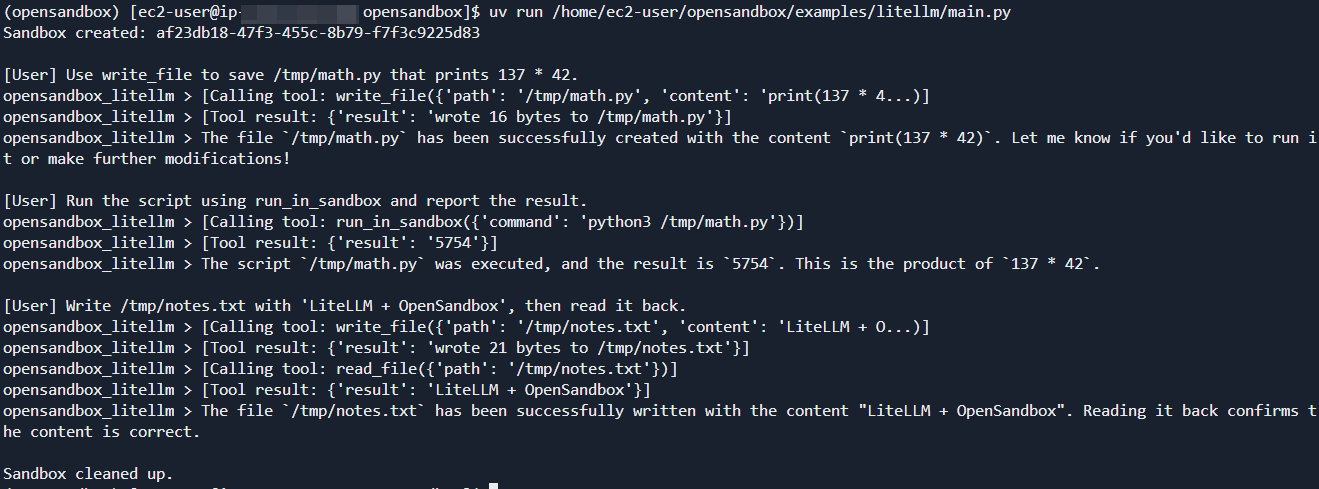
asyncio.run(main())运行后打印应用日志如下,期间会使用镜像sandbox-registry.cn-zhangjiakou.cr.aliyuncs.com/opensandbox/code-interpreter:latest启动sandbox
此外,opensandbox还实现了k8s控制器,通过自定义资源管理沙箱环境。它在 Kubernetes 集群中提供自动化沙箱生命周期管理 、资源池化以实现快速供应 、批处理沙箱创建 和可选的任务编排功能。和社区Agent-Sandbox规范相比,做了额外的能力扩展,尤其在批量创建sandbox有明显的吞吐量提升。具体的示例可以参考,https://github.com/alibaba/OpenSandbox/blob/main/kubernetes/README-ZH.md