核心代码
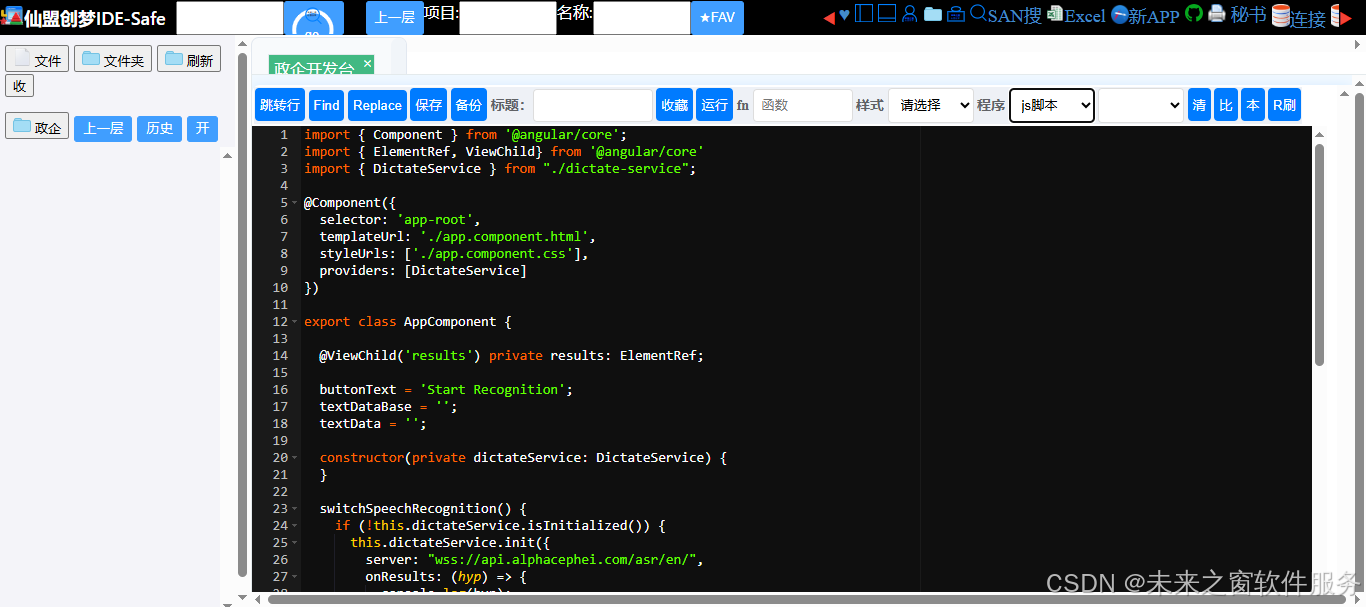
目录结构
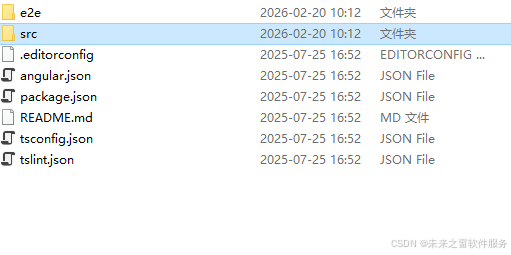
代码
import { Component } from '@angular/core';
import { ElementRef, ViewChild} from '@angular/core'
import { DictateService } from "./dictate-service";

@Component({
  selector: 'app-root',
  templateUrl: './app.component.html',
  styleUrls: ['./app.component.css'],
  providers: [DictateService]
})

export class AppComponent {

  @ViewChild('results') private results: ElementRef;

  buttonText = 'Start Recognition';
  textDataBase = '';
  textData = '';

  constructor(private dictateService: DictateService) {
  }

  switchSpeechRecognition() {
    if (!this.dictateService.isInitialized()) {
      this.dictateService.init({
        server: "wss://api.alphacephei.com/asr/en/",
        onResults: (hyp) => {
          console.log(hyp);

          this.textDataBase = this.textDataBase + hyp + '\n';
          this.textData = this.textDataBase;
          this.results.nativeElement.scrollTop = this.results.nativeElement.scrollHeight;
        },
        onPartialResults: (hyp) => {
          console.log(hyp);

          this.textData = this.textDataBase + hyp;
        },
        onError: (code, data) => {
          console.log(code, data);
        },
        onEvent: (code, data) => {
          console.log(code, data);
        }
      });
      this.buttonText = 'Stop Recognition';
    } else if (this.dictateService.isRunning()) {
      this.dictateService.resume();
      this.buttonText = 'Stop Recognition';
    } else {
      this.dictateService.pause();
      this.buttonText = 'Start Recognition';
    }
  }
}
配置文件
{
  "name": "speech-app",
  "version": "0.0.0",
  "scripts": {
    "ng": "ng",
    "start": "ng serve",
    "build": "ng build",
    "test": "ng test",
    "lint": "ng lint",
    "e2e": "ng e2e"
  },
  "private": true,
  "dependencies": {
    "@angular/animations": "~7.2.0",
    "@angular/cdk": "^7.3.7",
    "@angular/common": "~7.2.0",
    "@angular/compiler": "~7.2.0",
    "@angular/core": "~7.2.0",
    "@angular/flex-layout": "^7.0.0-beta.24",
    "@angular/forms": "~7.2.0",
    "@angular/material": "^7.3.7",
    "@angular/platform-browser": "~7.2.0",
    "@angular/platform-browser-dynamic": "~7.2.0",
    "@angular/router": "~7.2.0",
    "core-js": "^2.5.4",
    "rxjs": "~6.3.3",
    "rxjs-compat": "^6.5.2",
    "tar": "^4.4.2",
    "tslib": "^1.9.0",
    "zone.js": "~0.8.26"
  },
  "devDependencies": {
    "@angular-devkit/build-angular": "^0.900.3",
    "@angular/cli": "~7.3.9",
    "@angular/compiler-cli": "~7.2.0",
    "@angular/language-service": "~7.2.0",
    "@types/jasmine": "~2.8.8",
    "@types/jasminewd2": "~2.0.3",
    "@types/node": "~8.9.4",
    "codelyzer": "~4.5.0",
    "jasmine-core": "~2.99.1",
    "jasmine-spec-reporter": "~4.2.1",
    "karma": "~4.0.0",
    "karma-chrome-launcher": "~2.2.0",
    "karma-coverage-istanbul-reporter": "~2.0.1",
    "karma-jasmine": "~1.1.2",
    "karma-jasmine-html-reporter": "^0.2.2",
    "protractor": "~5.4.0",
    "ts-node": "~7.0.0",
    "tslint": "~5.11.0",
    "typescript": "~3.2.2"
  }
}
一、代码核心功能(结合「东方仙盟」比喻)
把这段代码想象成「东方仙盟」的语音传令系统:
- 仙盟总坛(AppComponent):你是盟主,负责统筹全局(页面交互、显示识别结果)。
- 传令司(DictateService):仙盟的专属传令官,专门对接外部的「语音识别仙府(Vosk 服务器)」。
- 传音玉简(ViewChild ('results')):用来显示传令官传回来的语音文字(识别结果)。
- 开关令牌(switchSpeechRecognition):盟主用来下令「开始 / 暂停 / 恢复」传令官工作的指令。
二、代码逐行解析(新手友好版)
typescript
运行
// 1. 引入Angular核心组件(仙盟基础功法)
import { Component } from '@angular/core';
import { ElementRef, ViewChild} from '@angular/core'
// 2. 引入自定义的语音识别服务(传令司的专属心法)
import { DictateService } from "./dictate-service";

// 3. 组件装饰器(仙盟总坛的身份标识)
@Component({
  selector: 'app-root', // 组件在HTML中的标签名(总坛的门牌)
  templateUrl: './app.component.html', // 页面模板(总坛的布局)
  styleUrls: ['./app.component.css'], // 样式文件(总坛的装修)
  providers: [DictateService] // 注入服务(给总坛配传令官)
})

// 4. 组件类(盟主的核心操作)
export class AppComponent {
  // 4.1 获取页面上的results元素(绑定传音玉简)
  @ViewChild('results') private results: ElementRef;

  // 4.2 按钮文字(令牌的显示文字)
  buttonText = 'Start Recognition';
  // 4.3 已确认的识别文本(传令官最终确认的情报)
  textDataBase = '';
  // 4.4 实时显示的文本(传令官临时传回的情报)
  textData = '';

  // 4.5 构造函数(盟主上任时,分配传令官)
  constructor(private dictateService: DictateService) {
  }

  // 4.6 核心方法:切换语音识别状态(盟主下达传令指令)
  switchSpeechRecognition() {
    // 场景1:传令官还未初始化(第一次召唤传令官)
    if (!this.dictateService.isInitialized()) {
      // 初始化传令官,对接Vosk服务器(给传令官指定对接的仙府)
      this.dictateService.init({
        server: "wss://api.alphacephei.com/asr/en/", // Vosk的英文识别服务器(仙府地址)
        // 识别结果确认时的回调(传令官确认情报后,上报盟主)
        onResults: (hyp) => {
          console.log(hyp); // 控制台打印识别结果(传令官先记个底)
          // 把确认的结果拼接到总情报里
          this.textDataBase = this.textDataBase + hyp + '\n';
          // 实时显示的文本同步为总情报
          this.textData = this.textDataBase;
          // 滚动到文本框底部(确保盟主能看到最新情报)
          this.results.nativeElement.scrollTop = this.results.nativeElement.scrollHeight;
        },
        // 临时识别结果的回调(传令官临时上报的情报)
        onPartialResults: (hyp) => {
          console.log(hyp);
          // 实时显示:已确认的情报 + 临时情报
          this.textData = this.textDataBase + hyp;
        },
        // 错误回调(传令官对接仙府出错时上报)
        onError: (code, data) => {
          console.log(code, data);
        },
        // 事件回调(传令官上报其他状态事件)
        onEvent: (code, data) => {
          console.log(code, data);
        }
      });
      // 按钮文字改为"停止识别"(令牌状态更新)
      this.buttonText = 'Stop Recognition';
    }
    // 场景2:传令官已初始化且处于暂停状态(恢复传令)
    else if (this.dictateService.isRunning()) { // 这里有个逻辑错误!应该是 !this.dictateService.isRunning()
      this.dictateService.resume(); // 恢复识别(让传令官继续工作)
      this.buttonText = 'Stop Recognition';
    }
    // 场景3:传令官正在工作(暂停传令)
    else {
      this.dictateService.pause(); // 暂停识别(让传令官歇一下)
      this.buttonText = 'Start Recognition';
    }
  }
}
三、关键问题修正(新手必看)
代码中有一个逻辑错误,会导致 "暂停 / 恢复" 功能失效:
typescript
运行
// 错误代码
else if (this.dictateService.isRunning()) {
  this.dictateService.resume();
}

// 正确代码(核心修改)
else if (!this.dictateService.isRunning()) { // 加个!,表示"未运行(暂停)"时恢复
  this.dictateService.resume();
}解释:isRunning() 返回 true 表示 "正在识别",此时应该执行 pause();返回 false 表示 "已暂停",此时才执行 resume()。
四、配套 HTML 示例(传音玉简的布局)
在 app.component.html 中添加以下内容,才能看到识别结果:
html
预览
<!-- 语音识别按钮(盟主的令牌) -->
<button (click)="switchSpeechRecognition()">
  {{ buttonText }}
</button>

<!-- 识别结果显示区域(传音玉简) -->
<div #results
     style="width: 400px; height: 300px; border: 1px solid #ccc;
            padding: 10px; overflow-y: auto; margin-top: 20px;">
  {{ textData }}
</div>
五、前置条件(让代码能运行)
-
安装 Vosk 相关依赖 :确保
DictateService已正确实现,或安装官方的 vosk-browser 包:bash
运行
npm install vosk-browser --save -
修改识别语言 :代码中用的是英文服务器(
en/),如果要识别中文,改为中文服务器:typescript
运行
server: "wss://api.alphacephei.com/asr/zh/", // 中文识别服务器 -
浏览器权限:语音识别需要麦克风权限,运行时会弹窗请求,需点击 "允许"。
总结
- 核心逻辑:Angular 组件通过
DictateService对接 Vosk 语音识别服务器,实现 "开始 / 暂停 / 恢复" 语音转文字,并实时显示结果。 - 关键修正:
switchSpeechRecognition方法中,恢复识别的条件应为!this.dictateService.isRunning()(暂停时恢复)。 - 运行前提:需配置麦克风权限、正确的 Vosk 服务器地址,且
DictateService需实现init/isInitialized/isRunning/pause/resume等方法。
如果需要 DictateService 的完整实现代码,可以告诉我,我会帮你补充(新手友好版)。
东方仙盟:拥抱知识开源,共筑数字新生态
在全球化与数字化浪潮中,东方仙盟始终秉持开放协作、知识共享的理念,积极拥抱开源技术与开放标准。我们相信,唯有打破技术壁垒、汇聚全球智慧,才能真正推动行业的可持续发展。
开源赋能中小商户:通过将前端异常检测、跨系统数据互联等核心能力开源化,东方仙盟为全球中小商户提供了低成本、高可靠的技术解决方案,让更多商家能够平等享受数字转型的红利。
共建行业标准:我们积极参与国际技术社区,与全球开发者、合作伙伴共同制定开放协议 与技术规范,推动跨境零售、文旅、餐饮等多业态的系统互联互通,构建更加公平、高效的数字生态。
知识普惠,共促发展:通过开源社区 、技术文档与培训体系,东方仙盟致力于将前沿技术转化为可落地的行业实践,赋能全球合作伙伴,共同培育创新人才,推动数字经济 的普惠式增长
阿雪技术观
在科技发展浪潮中,我们不妨积极投身技术共享。不满足于做受益者,更要主动担当贡献者。无论是分享代码、撰写技术博客,还是参与开源项目 维护改进,每一个微小举动都可能蕴含推动技术进步的巨大能量。东方仙盟是汇聚力量的天地,我们携手在此探索硅基 生命,为科技进步添砖加瓦。
Hey folks, in this wild tech - driven world, why not dive headfirst into the whole tech - sharing scene? Don't just be the one reaping all the benefits; step up and be a contributor too. Whether you're tossing out your code snippets , hammering out some tech blogs, or getting your hands dirty with maintaining and sprucing up open - source projects, every little thing you do might just end up being a massive force that pushes tech forward. And guess what? The Eastern FairyAlliance is this awesome place where we all come together. We're gonna team up and explore the whole silicon - based life thing, and in the process, we'll be fueling the growth of technology