VC++中使用GDI+自定义透明效果绘制信号灯
StatusIndicatorCtrl.h 头文件
C++
#pragma once
#include <afxwin.h>
#include <gdiplus.h>
#pragma comment(lib, "gdiplus.lib")

// 状态改变事件参数
class CStatusChangedEventArgs
{
public:
    BOOL m_bOldStatus;
    BOOL m_bNewStatus;

    CStatusChangedEventArgs(BOOL oldStatus, BOOL newStatus)
        : m_bOldStatus(oldStatus), m_bNewStatus(newStatus) {}
};

// 状态改变回调函数类型
typedef void (*STATUS_CHANGED_CALLBACK)(CWnd* pSender, CStatusChangedEventArgs& args);

class CStatusIndicatorCtrl : public CWnd
{
    DECLARE_DYNAMIC(CStatusIndicatorCtrl)

public:
    CStatusIndicatorCtrl();
    virtual ~CStatusIndicatorCtrl();

    // 创建控件
    BOOL Create(LPCTSTR lpszLabelText, DWORD dwStyle, const RECT& rect, CWnd* pParentWnd, UINT nID);

    // 属性设置
    void SetActive(BOOL bActive);
    BOOL IsActive() const { return m_bIsActive; }

    void SetLabelText(LPCTSTR lpszText);
    CString GetLabelText() const { return m_strLabelText; }

    void SetActiveColor(COLORREF color);
    COLORREF GetActiveColor() const { return m_clrActive; }

    void SetInactiveColor(COLORREF color);
    COLORREF GetInactiveColor() const { return m_clrInactive; }

    void SetIndicatorSize(int nSize);
    int GetIndicatorSize() const { return m_nIndicatorSize; }

    void SetLabelFont(const LOGFONT& lf);
    void GetLabelFont(LOGFONT& lf) const;

    // 事件回调设置
    void SetStatusChangedCallback(STATUS_CHANGED_CALLBACK pCallback) { m_pStatusChangedCallback = pCallback; }

protected:
    // 成员变量
    BOOL m_bIsActive;
    CString m_strLabelText;
    COLORREF m_clrActive;
    COLORREF m_clrInactive;
    int m_nIndicatorSize;
    CFont m_fontLabel;
    LOGFONT m_lfLabel;

    CRect m_rcIndicator;    // 指示灯区域
    CRect m_rcLabel;        // 标签区域

    BOOL m_bLabelHover;     // 鼠标是否在标签上
    HCURSOR m_hCursorHand;  // 手型光标

    STATUS_CHANGED_CALLBACK m_pStatusChangedCallback;

    // GDI+ 初始化
    static ULONG_PTR s_gdiplusToken;
    static BOOL InitializeGDIPlus();
    static void ShutdownGDIPlus();

    // 绘制函数
    void DrawIndicator(Gdiplus::Graphics& graphics);
    void DrawLabel(CDC& dc);

    // 颜色处理
    Gdiplus::Color LightenColor(COLORREF color, float factor);
    Gdiplus::Color DarkenColor(COLORREF color, float factor);
    Gdiplus::Color ColorRefToGdiColor(COLORREF color, BYTE alpha = 255);

    // 消息映射
    afx_msg void OnPaint();
    afx_msg void OnLButtonUp(UINT nFlags, CPoint point);
    afx_msg void OnMouseMove(UINT nFlags, CPoint point);
    afx_msg void OnMouseLeave();
    afx_msg BOOL OnSetCursor(CWnd* pWnd, UINT nHitTest, UINT message);
    afx_msg BOOL OnEraseBkgnd(CDC* pDC);
    afx_msg void OnSize(UINT nType, int cx, int cy);
    DECLARE_MESSAGE_MAP()

    // 辅助函数
    void UpdateLayout();
    void FireStatusChanged(BOOL bOldStatus, BOOL bNewStatus);
    void InvalidateIndicator();
};
C++
#include "pch.h"
#include "StatusIndicatorCtrl.h"

IMPLEMENT_DYNAMIC(CStatusIndicatorCtrl, CWnd)

ULONG_PTR CStatusIndicatorCtrl::s_gdiplusToken = 0;

BEGIN_MESSAGE_MAP(CStatusIndicatorCtrl, CWnd)
    ON_WM_PAINT()
    ON_WM_LBUTTONUP()
    ON_WM_MOUSEMOVE()
    ON_WM_MOUSELEAVE()
    ON_WM_SETCURSOR()
    ON_WM_ERASEBKGND()
    ON_WM_SIZE()
END_MESSAGE_MAP()

CStatusIndicatorCtrl::CStatusIndicatorCtrl()
    : m_bIsActive(FALSE)
    , m_strLabelText(_T("状态"))
    , m_clrActive(RGB(50, 205, 50))      // LimeGreen
    , m_clrInactive(RGB(255, 0, 0))       // Red
    , m_nIndicatorSize(30)
    , m_bLabelHover(FALSE)
    , m_pStatusChangedCallback(NULL)
{
    InitializeGDIPlus();

    // 初始化默认字体
    memset(&m_lfLabel, 0, sizeof(LOGFONT));
    _tcscpy_s(m_lfLabel.lfFaceName, _T("微软雅黑"));
    m_lfLabel.lfHeight = -14;  // 10pt
    m_lfLabel.lfWeight = FW_BOLD;
    m_fontLabel.CreateFontIndirect(&m_lfLabel);

    m_hCursorHand = ::LoadCursor(NULL, IDC_HAND);
}

CStatusIndicatorCtrl::~CStatusIndicatorCtrl()
{
    m_fontLabel.DeleteObject();
}

BOOL CStatusIndicatorCtrl::InitializeGDIPlus()
{
    if (s_gdiplusToken == 0)
    {
        Gdiplus::GdiplusStartupInput input;
        Gdiplus::GdiplusStartupOutput output;
        Gdiplus::GdiplusStartup(&s_gdiplusToken, &input, &output);
    }
    return TRUE;
}

void CStatusIndicatorCtrl::ShutdownGDIPlus()
{
    if (s_gdiplusToken != 0)
    {
        Gdiplus::GdiplusShutdown(s_gdiplusToken);
        s_gdiplusToken = 0;
    }
}

BOOL CStatusIndicatorCtrl::Create(LPCTSTR lpszLabelText, DWORD dwStyle,
    const RECT& rect, CWnd* pParentWnd, UINT nID)
{
    m_strLabelText = lpszLabelText;

    CString strClassName = AfxRegisterWndClass(
        CS_HREDRAW | CS_VREDRAW | CS_DBLCLKS,
        ::LoadCursor(NULL, IDC_ARROW),
        (HBRUSH)(COLOR_WINDOW + 1),
        NULL);

    return CWnd::Create(strClassName, _T(""), dwStyle | WS_CLIPCHILDREN,
        rect, pParentWnd, nID);
}

void CStatusIndicatorCtrl::UpdateLayout()
{
    CRect rcClient;
    GetClientRect(&rcClient);

    // 指示灯区域
    int nIndicatorTotal = m_nIndicatorSize + 10;
    m_rcIndicator.SetRect(5, 5, 5 + nIndicatorTotal, 5 + nIndicatorTotal);

    // 标签区域
    CSize szText;
    {
        CClientDC dc(this);
        CFont* pOldFont = dc.SelectObject(&m_fontLabel);
        szText = dc.GetTextExtent(m_strLabelText, m_strLabelText.GetLength());
        dc.SelectObject(pOldFont);
    }

    int nLabelX = m_rcIndicator.right + 10;
    int nLabelY = (rcClient.Height() - szText.cy) / 2;
    m_rcLabel.SetRect(nLabelX, nLabelY, nLabelX + szText.cx, nLabelY + szText.cy);

    // 设置控件最小大小
    int nMinWidth = m_rcLabel.right + 5;
    int nMinHeight = max(m_rcIndicator.Height(), m_rcLabel.Height()) + 10;

    if (rcClient.Width() < nMinWidth || rcClient.Height() < nMinHeight)
    {
        SetWindowPos(NULL, 0, 0, nMinWidth, nMinHeight,
            SWP_NOMOVE | SWP_NOZORDER | SWP_NOACTIVATE);
    }
}

void CStatusIndicatorCtrl::OnSize(UINT nType, int cx, int cy)
{
    CWnd::OnSize(nType, cx, cy);
    UpdateLayout();
}

void CStatusIndicatorCtrl::OnPaint()
{
    CPaintDC dc(this);

    // 使用双缓冲
    CRect rcClient;
    GetClientRect(&rcClient);

    CDC memDC;
    CBitmap memBmp;
    memDC.CreateCompatibleDC(&dc);
    memBmp.CreateCompatibleBitmap(&dc, rcClient.Width(), rcClient.Height());
    CBitmap* pOldBmp = memDC.SelectObject(&memBmp);

    // 填充背景
    memDC.FillSolidRect(&rcClient, GetSysColor(COLOR_WINDOW));

    // 使用 GDI+ 绘制指示灯
    {
        Gdiplus::Graphics graphics(memDC.GetSafeHdc());
        graphics.SetSmoothingMode(Gdiplus::SmoothingModeAntiAlias);
        DrawIndicator(graphics);
    }

    // 绘制标签
    DrawLabel(memDC);

    // 复制到屏幕
    dc.BitBlt(0, 0, rcClient.Width(), rcClient.Height(), &memDC, 0, 0, SRCCOPY);
    memDC.SelectObject(pOldBmp);
}

void CStatusIndicatorCtrl::DrawIndicator(Gdiplus::Graphics& graphics)
{
    int x = m_rcIndicator.left + 5;
    int y = m_rcIndicator.top + 5;
    int size = m_nIndicatorSize;

    COLORREF baseColorRef = m_bIsActive ? m_clrActive : m_clrInactive;
    Gdiplus::Color baseColor = ColorRefToGdiColor(baseColorRef);

    // 绘制外阴影
    {
        Gdiplus::GraphicsPath shadowPath;
        shadowPath.AddEllipse(x + 2, y + 2, size, size);

        Gdiplus::PathGradientBrush shadowBrush(&shadowPath);
        Gdiplus::Color colors[] = { Gdiplus::Color(100, 0, 0, 0), Gdiplus::Color(0, 0, 0, 0) };
        int count = 1;
        shadowBrush.SetCenterColor(colors[0]);
        shadowBrush.SetSurroundColors(&colors[1], &count);
        graphics.FillPath(&shadowBrush, &shadowPath);
    }

    // 绘制主体 - 渐变效果
    {
        Gdiplus::GraphicsPath mainPath;
        mainPath.AddEllipse(x, y, size, size);

        Gdiplus::RectF rect((Gdiplus::REAL)x, (Gdiplus::REAL)y,
            (Gdiplus::REAL)size, (Gdiplus::REAL)size);
        Gdiplus::LinearGradientBrush mainBrush(rect,
            LightenColor(baseColorRef, 0.3f),
            DarkenColor(baseColorRef, 0.2f),
            Gdiplus::LinearGradientModeForwardDiagonal);

        graphics.FillPath(&mainBrush, &mainPath);
    }

    // 绘制高光效果
    {
        int highlightSize = (int)(size * 0.4);
        int highlightX = x + (int)(size * 0.25);
        int highlightY = y + (int)(size * 0.15);

        Gdiplus::GraphicsPath highlightPath;
        highlightPath.AddEllipse(highlightX, highlightY, highlightSize, highlightSize);

        Gdiplus::PathGradientBrush highlightBrush(&highlightPath);
        Gdiplus::Color colors[] = { Gdiplus::Color(200, 255, 255, 255), Gdiplus::Color(0, 255, 255, 255) };
        int count = 1;
        highlightBrush.SetCenterColor(colors[0]);
        highlightBrush.SetSurroundColors(&colors[1], &count);
        graphics.FillPath(&highlightBrush, &highlightPath);
    }

    // 绘制边框
    {
        Gdiplus::Pen borderPen(DarkenColor(baseColorRef, 0.4f), 2.0f);
        graphics.DrawEllipse(&borderPen, x, y, size, size);
    }

    // 如果激活状态,添加发光效果
    if (m_bIsActive)
    {
        Gdiplus::GraphicsPath glowPath;
        glowPath.AddEllipse(x - 3, y - 3, size + 6, size + 6);

        Gdiplus::PathGradientBrush glowBrush(&glowPath);
        Gdiplus::Color colors[] = {
            Gdiplus::Color(100, baseColor.GetR(), baseColor.GetG(), baseColor.GetB()),
            Gdiplus::Color(0, baseColor.GetR(), baseColor.GetG(), baseColor.GetB())
        };
        int count = 1;
        glowBrush.SetCenterColor(colors[0]);
        glowBrush.SetSurroundColors(&colors[1], &count);
        graphics.FillPath(&glowBrush, &glowPath);
    }
}

void CStatusIndicatorCtrl::DrawLabel(CDC& dc)
{
    CFont* pOldFont = dc.SelectObject(&m_fontLabel);

    COLORREF clrText = m_bLabelHover ? RGB(0, 0, 255) : RGB(0, 0, 0);
    dc.SetTextColor(clrText);
    dc.SetBkMode(TRANSPARENT);

    dc.DrawText(m_strLabelText, m_strLabelText.GetLength(), &m_rcLabel,
        DT_LEFT | DT_VCENTER | DT_SINGLELINE);

    // 如果鼠标悬停,添加下划线效果
    if (m_bLabelHover)
    {
        CPen pen(PS_SOLID, 1, clrText);
        CPen* pOldPen = dc.SelectObject(&pen);
        dc.MoveTo(m_rcLabel.left, m_rcLabel.bottom - 1);
        dc.LineTo(m_rcLabel.right, m_rcLabel.bottom - 1);
        dc.SelectObject(pOldPen);
    }

    dc.SelectObject(pOldFont);
}

void CStatusIndicatorCtrl::OnLButtonUp(UINT nFlags, CPoint point)
{
    if (m_rcLabel.PtInRect(point))
    {
        BOOL bOldStatus = m_bIsActive;
        SetActive(!m_bIsActive);
    }
    CWnd::OnLButtonUp(nFlags, point);
}

void CStatusIndicatorCtrl::OnMouseMove(UINT nFlags, CPoint point)
{
    BOOL bWasHover = m_bLabelHover;
    m_bLabelHover = m_rcLabel.PtInRect(point);

    if (bWasHover != m_bLabelHover)
    {
        InvalidateRect(&m_rcLabel);

        if (m_bLabelHover)
        {
            TRACKMOUSEEVENT tme;
            tme.cbSize = sizeof(tme);
            tme.hwndTrack = GetSafeHwnd();
            tme.dwFlags = TME_LEAVE;
            tme.dwHoverTime = HOVER_DEFAULT;
            TrackMouseEvent(&tme);
        }
    }

    CWnd::OnMouseMove(nFlags, point);
}

void CStatusIndicatorCtrl::OnMouseLeave()
{
    if (m_bLabelHover)
    {
        m_bLabelHover = FALSE;
        InvalidateRect(&m_rcLabel);
    }
    CWnd::OnMouseLeave();
}

BOOL CStatusIndicatorCtrl::OnSetCursor(CWnd* pWnd, UINT nHitTest, UINT message)
{
    CPoint point;
    GetCursorPos(&point);
    ScreenToClient(&point);

    if (m_rcLabel.PtInRect(point))
    {
        ::SetCursor(m_hCursorHand);
        return TRUE;
    }

    return CWnd::OnSetCursor(pWnd, nHitTest, message);
}

BOOL CStatusIndicatorCtrl::OnEraseBkgnd(CDC* pDC)
{
    return TRUE; // 防止闪烁
}

// 属性设置实现
void CStatusIndicatorCtrl::SetActive(BOOL bActive)
{
    if (m_bIsActive != bActive)
    {
        BOOL bOldStatus = m_bIsActive;
        m_bIsActive = bActive;
        InvalidateIndicator();
        FireStatusChanged(bOldStatus, bActive);
    }
}

void CStatusIndicatorCtrl::SetLabelText(LPCTSTR lpszText)
{
    m_strLabelText = lpszText;
    UpdateLayout();
    InvalidateRect(&m_rcLabel);
}

void CStatusIndicatorCtrl::SetActiveColor(COLORREF color)
{
    m_clrActive = color;
    if (m_bIsActive)
        InvalidateIndicator();
}

void CStatusIndicatorCtrl::SetInactiveColor(COLORREF color)
{
    m_clrInactive = color;
    if (!m_bIsActive)
        InvalidateIndicator();
}

void CStatusIndicatorCtrl::SetIndicatorSize(int nSize)
{
    m_nIndicatorSize = max(20, min(100, nSize));
    UpdateLayout();
    Invalidate();
}

void CStatusIndicatorCtrl::SetLabelFont(const LOGFONT& lf)
{
    m_fontLabel.DeleteObject();
    memcpy(&m_lfLabel, &lf, sizeof(LOGFONT));
    m_fontLabel.CreateFontIndirect(&m_lfLabel);
    UpdateLayout();
    Invalidate();
}

void CStatusIndicatorCtrl::GetLabelFont(LOGFONT& lf) const
{
    memcpy(&lf, &m_lfLabel, sizeof(LOGFONT));
}

// 辅助函数
Gdiplus::Color CStatusIndicatorCtrl::ColorRefToGdiColor(COLORREF color, BYTE alpha)
{
    return Gdiplus::Color(alpha, GetRValue(color), GetGValue(color), GetBValue(color));
}

Gdiplus::Color CStatusIndicatorCtrl::LightenColor(COLORREF color, float factor)
{
    int r = min(255, (int)(GetRValue(color) + (255 - GetRValue(color)) * factor));
    int g = min(255, (int)(GetGValue(color) + (255 - GetGValue(color)) * factor));
    int b = min(255, (int)(GetBValue(color) + (255 - GetBValue(color)) * factor));
    return Gdiplus::Color(255, r, g, b);
}

Gdiplus::Color CStatusIndicatorCtrl::DarkenColor(COLORREF color, float factor)
{
    int r = (int)(GetRValue(color) * (1 - factor));
    int g = (int)(GetGValue(color) * (1 - factor));
    int b = (int)(GetBValue(color) * (1 - factor));
    return Gdiplus::Color(255, r, g, b);
}

void CStatusIndicatorCtrl::InvalidateIndicator()
{
    if (GetSafeHwnd())
    {
        InvalidateRect(&m_rcIndicator);
        UpdateWindow();
    }
}

void CStatusIndicatorCtrl::FireStatusChanged(BOOL bOldStatus, BOOL bNewStatus)
{
    CStatusChangedEventArgs args(bOldStatus, bNewStatus);

    if (m_pStatusChangedCallback)
    {
        m_pStatusChangedCallback(this, args);
    }

    // 发送 MFC 消息通知父窗口
    GetParent()->SendMessage(WM_USER + 100, (WPARAM)GetDlgCtrlID(), (LPARAM)&args);
}
测试效果:
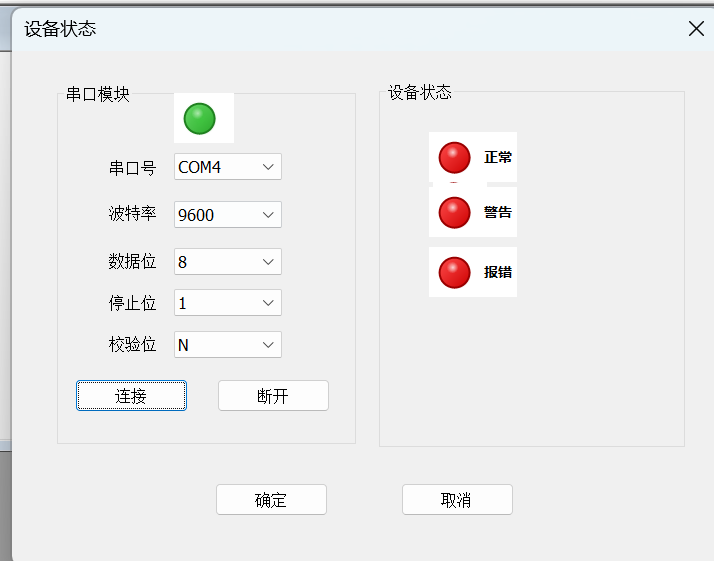
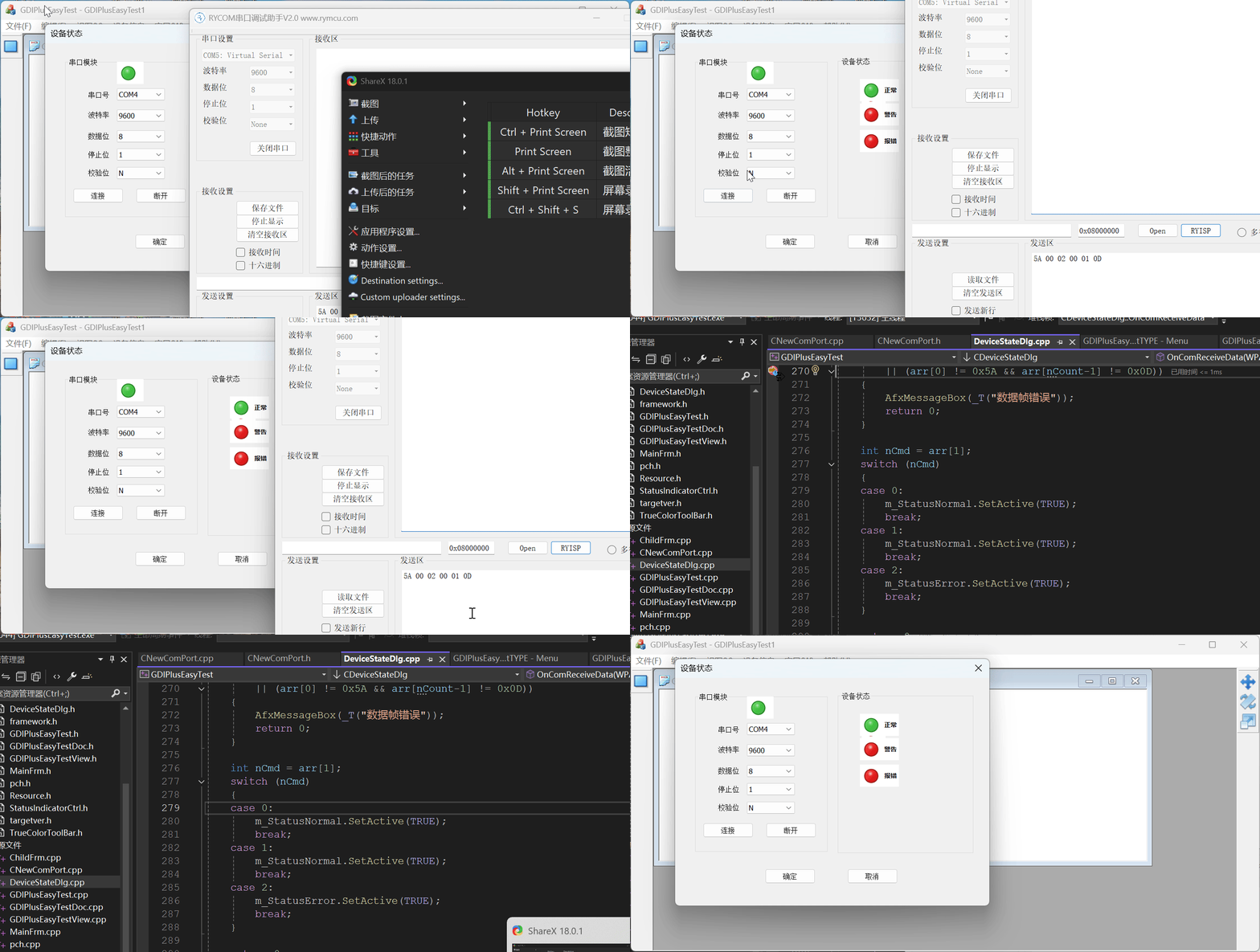
说明:我这里使用了信号灯来显示串口的连接状态,以及通过串口获取显示下位机的状态,使用信号灯来显示。
如下操作:
串口类源代码:
c++
#pragma once
#include<process.h>
#include<string>
#include<sstream>
#include<iomanip>
#include<algorithm>
#include<iterator>
#include<cctype>
#include<windows.h>
using namespace std;

// 声明最大接受字符数
#define MaxReceiveChar 100
#define HighReadSpeed 1

#ifndef  UM_COMM_MSG_BASE
#define UM_COMM_MSG_BASE  WM_USER + 617
#endif // ! UM_COMM_MSG_BASE

// 声明消息用于串口线程和主线程之间的的通信
#ifndef  UM_COMM_RXCHAR
#define UM_COMM_RXCHAR UM_COMM_MSG_BASE + 10
#endif // ! UM_COMM_MSG_BASE

typedef enum AxisType
{
	AXIS_XX = 0,
	AXIS_YY = 0,
	AXIS_ZZ = 0,
	AXIS_OO = 0
}AXIS_TYPE;

// 串口信息类
struct SerialPortInfo
{
	UINT nPortNr;
	DWORD dwByteRead;
};

// 串口类
class CComPort
{
public:
	CComPort();
	~CComPort();
	// 初始化串口使用波特率,串口号,奇偶校验位,数据位,停止位初始化串口
	bool InitPort(HWND hWnd,UINT nPort,UINT nBaud,char chParity,UINT nDataBit,UINT nStopBit,DWORD dwComEvent);
	// 使用DCB直接初始化串口
	bool InitPort(UINT nPort,LPDCB& lpDcb);
	// 开启串口监听线程
	bool OpenListenThread();
	// 关闭串口监听线程
	bool CloseListenThread();
	// 往串口写数据
	bool WriteData(unsigned char* pData,int nLen);
	// 从串口获取字节数
	UINT GetByteInCOM();
	// 从串口读取字节数
	bool ReadData(unsigned char& nRecd);

	void GetByteData(CByteArray& arr);

public:
	// 串口号
	UINT m_nPortNr;
	// 主窗口句柄
	HWND m_hOwnerWnd;

private:
	// 打开串口
	bool OpenPort(UINT nPort);
	// 关闭串口
	bool ClosePort();
	// 串口监听线程入口函数
	static UINT WINAPI ListenThread(void* lpParam);

private:
	// 串口句柄
	HANDLE m_hComm;
	// 串口监听线程是否退出
	static bool s_bExit;
	// 串口监听线程句柄
	HANDLE m_hListenThread;
	// 临界区,用于保护串口的读取和写入操作
	CRITICAL_SECTION m_csComminicationSync;

	CByteArray m_arrByte;
};
c++
#include "pch.h"
#include "CNewComPort.h"

bool CComPort::s_bExit = false;
const int SLEEP_TIME_VALUE = 5;

// 构造函数初始化
CComPort::CComPort()
{
	m_hComm = NULL;
	m_hListenThread = INVALID_HANDLE_VALUE;
	InitializeCriticalSection(&m_csComminicationSync);
}

CComPort::~CComPort()
{
	CloseListenThread();
	ClosePort();
	DeleteCriticalSection(&m_csComminicationSync);
}

// 初始化串口函数
bool CComPort::InitPort(HWND hWnd, UINT nPort, UINT nBaud, char chParity, UINT nDataBit, UINT nStopBit, DWORD dwComEvent)
{
	m_hOwnerWnd = hWnd;
	m_nPortNr = nPort;

	// 临时变量,将定制化参数转化为字符串形式,以构造DCB结构
	char szDCBData[50];
	sprintf_s(szDCBData,"Baud = %d,Parity = %c,DataBit = %d,StopBit = %d",nBaud, chParity, nDataBit, nStopBit);

	// 打开指定串口,该函数内部已有临界区保护,前面不加保护
	if (!OpenPort(nPort))
	{
		return false;
	}

	// 进入临界区
	EnterCriticalSection(&m_csComminicationSync);

	// 是否发生错误
	bool bSuccess = true;

	// 设置串口的超时时间,设置为0,表示没有超时限制
	COMMTIMEOUTS commtimeout;
	commtimeout.ReadIntervalTimeout = 0;
	commtimeout.ReadTotalTimeoutConstant = 0;
	commtimeout.ReadTotalTimeoutMultiplier = 0;
	commtimeout.WriteTotalTimeoutConstant = 0;
	commtimeout.WriteTotalTimeoutMultiplier = 0;

	if (bSuccess)
	{
		bSuccess = SetCommTimeouts(m_hComm,&commtimeout);
	}

	DCB dcb;
	if (bSuccess)
	{
		// 获取当前串口配置参数,并且构造DCB
		bSuccess = GetCommState(m_hComm,&dcb);
		if (bSuccess)
			bSuccess = BuildCommDCBA(szDCBData,&dcb);
		// 开启RTS flow控制
		dcb.fRtsControl = RTS_CONTROL_ENABLE;
	}

	if (bSuccess)
	{
		// 使用DCB配置串口状态
		bSuccess = SetCommState(m_hComm,&dcb);
	}
	// 清空缓冲区
	PurgeComm(m_hComm,PURGE_RXCLEAR|PURGE_TXCLEAR|PURGE_RXABORT|PURGE_TXABORT);

    // 离开临界区
	LeaveCriticalSection(&m_csComminicationSync);

	return bSuccess = true;
}


// 初始化串口函数
bool CComPort::InitPort(UINT nPort, LPDCB& lpDcb)
{
	m_nPortNr = nPort;

	// 打开指定串口,该函数内部已有临界区保护,前面不加保护
	if (!OpenPort(nPort))
	{
		return false;
	}

	// 进入临界区
	EnterCriticalSection(&m_csComminicationSync);

	// 配置串口参数
	if (!SetCommState(m_hComm, lpDcb))
	{
		return false;
	}
	// 清空串口缓冲区
	PurgeComm(m_hComm, PURGE_RXCLEAR | PURGE_TXCLEAR | PURGE_RXABORT | PURGE_TXABORT);

	// 离开临界区
	LeaveCriticalSection(&m_csComminicationSync);

	return true;

}
// 开启串口监听线程
bool CComPort::OpenListenThread()
{
	// 检测线程是否开启
	if (m_hListenThread != INVALID_HANDLE_VALUE)
	{
		return false;
	}

	s_bExit = false;
	// 线程ID
	UINT nThreadId;
	// 启动串口监听线程
	m_hListenThread = (HANDLE)_beginthreadex(NULL, 0, ListenThread, this, 0, &nThreadId);

	if (!m_hListenThread)
	{
		return false;
	}

	// 设置线程的优先级
	if (!SetThreadPriority(m_hListenThread, THREAD_PRIORITY_ABOVE_NORMAL))
	{
		return false;
	}

	return true;
}

// 关闭串口监听线程
bool CComPort::CloseListenThread()
{
	if (m_hListenThread != INVALID_HANDLE_VALUE)
	{
		// 通知线程退出
		s_bExit = true;
		// 等待线程退出
		Sleep(10);

		CloseHandle(m_hListenThread);
		m_hListenThread = INVALID_HANDLE_VALUE;
	}
	return true;
}

// 向串口写数据,将缓冲区中的数据写入到串口中
bool CComPort::WriteData(unsigned char* pData, int nLen)
{
	bool bResult = false;
	DWORD dwByteSend = 0;
	if (m_hComm == INVALID_HANDLE_VALUE)
	{
		return false;
	}
	// 进入临界区
	EnterCriticalSection(&m_csComminicationSync);
	// 向缓冲区写入指定量的数据
	bResult = WriteFile(m_hComm, pData,nLen,&dwByteSend,NULL);

	// 数据写入失败
	if (!bResult)
	{
		DWORD dwError = GetLastError();
		PurgeComm(m_hComm, PURGE_TXCLEAR| PURGE_TXABORT);
		LeaveCriticalSection(&m_csComminicationSync);
		return false;
	}
	// 离开临界区
	LeaveCriticalSection(&m_csComminicationSync);
	return false;
}


// 获取串口缓冲区中的字节数
UINT CComPort::GetByteInCOM()
{
	char RxBuffer[100];
	DWORD dwErrors, dwByteRead;
	COMSTAT comstat;
	UINT nByteInQue = 0;
	while(!s_bExit)
	{
		ClearCommError(m_hComm,&dwErrors,&comstat);
		if (comstat.cbInQue > 0)
		{
			Sleep(1);
			if (nByteInQue == comstat.cbInQue)  // 读取的字节数没有增加,说明这次接受读取完成
			{
				return nByteInQue;
			}
			nByteInQue = comstat.cbInQue;
		}
	}
	return nByteInQue;
}

// 读取串口接收缓冲区的一个字节
bool CComPort::ReadData(unsigned char& nRecd)
{
	bool bResult = true;
	DWORD dwByteRead = 0;
	if (m_hComm == INVALID_HANDLE_VALUE)
	{
		return false;
	}
	// 进入临界区
	EnterCriticalSection(&m_csComminicationSync);
	// 从缓冲区读取一个字节的数据
	bResult = ReadFile(m_hComm,&nRecd,1,&dwByteRead,NULL);
	// 读取错误
	if (!bResult)
	{
		DWORD dwError = GetLastError();
		// 清空缓冲区
		PurgeComm(m_hComm, PURGE_RXABORT|PURGE_RXCLEAR);
		LeaveCriticalSection(&m_csComminicationSync);
		return false;
	}
	// 离开临界区
	LeaveCriticalSection(&m_csComminicationSync);
	return true;

}

// 打开串口
bool CComPort::OpenPort(UINT nPort)
{
	// 初始化临界区
	InitializeCriticalSection(&m_csComminicationSync);
	// 进入临界区
	EnterCriticalSection(&m_csComminicationSync);
	// 判断串口是否已经打开,若打开就关闭
	if (m_hComm != NULL)
	{
		CloseHandle(m_hComm);
		m_hComm = NULL;
	}
	// 把串口的编号转化为设备名
	TCHAR szPort[50];

	swprintf_s(szPort,_T("COM%d"),nPort);

	// 打开指定的串口
	m_hComm = CreateFileW(szPort,             // 设备名COM1,COM2等
		GENERIC_READ | GENERIC_WRITE,         // 访问模式,可同时读写
		0,                                    // 共享模式0表示不共享
		NULL,                                 // 安全性设置,一般为NULL
		OPEN_EXISTING,                        // 该参数表示设备必须存在,否则创建失败
		FILE_ATTRIBUTE_NORMAL,
		NULL);
	// 如果创建失败,释放资源并且返回
	if (m_hComm == INVALID_HANDLE_VALUE)
	{
		LeaveCriticalSection(&m_csComminicationSync);
		return false;
	}
	// 创建成功并且退出
	LeaveCriticalSection(&m_csComminicationSync);
	return true;
}

// 关闭串口
bool CComPort::ClosePort()
{
	// 如果串口被打开,就关闭
	if (m_hComm != INVALID_HANDLE_VALUE)
	{
		CloseHandle(m_hComm);
		m_hComm = INVALID_HANDLE_VALUE;
	}
	return false;
}

// 串口监听线程入口函数
UINT WINAPI CComPort::ListenThread(void* lpParam)
{
	CComPort* pComPort = reinterpret_cast<CComPort*>(lpParam);

	// 线程循环,轮询方式读取串口数据
	while (!pComPort->s_bExit)
	{
		UINT nByteRead = pComPort->GetByteInCOM();
	    // 如果串口缓冲区中没有数据,则过一会查询
		if (nByteRead == 0)
		{
			Sleep(SLEEP_TIME_VALUE);
			continue;
		}


		// 读取输入缓冲区中的数据,并且显示
		unsigned char chReceiveChar[MaxReceiveChar] = {0};
		unsigned char chRecv = 0x00;
		int i = 0;
		int j = nByteRead;

		SerialPortInfo SerialInfo;
		SerialInfo.nPortNr = pComPort->m_nPortNr;
		SerialInfo.dwByteRead = nByteRead;
		do
		{
			chRecv = 0x00;
			if (pComPort->ReadData(chRecv) == true)
			{
				chReceiveChar[i++] = chRecv;
				continue;
			}
		} while (--j);

		pComPort->m_arrByte.RemoveAll();
		for (int i=0;i< nByteRead;i++)
		{
			pComPort->m_arrByte.Add(chReceiveChar[i]);
		}

		::SendMessage(pComPort->m_hOwnerWnd,UM_COMM_RXCHAR,(WPARAM)chReceiveChar,(LPARAM)&SerialInfo);
	}
	return 0;
}

void CComPort::GetByteData(CByteArray& arr)
{
	arr.Copy(m_arrByte);
}