答题卡识别评分代码完整讲解
1. 答题卡处理流程图
-
读取答题卡图像并进行灰度化、模糊处理和边缘检测;
-
定位答题卡区域并进行透视变换;
-
通过阈值处理和轮廓分析检测填涂的选项泡泡;
-
将检测结果与标准答案对比计算得分。系统支持自定义参数调整,包括泡泡最小尺寸、宽高比范围等,能够处理不同形态的答题卡。
-
最终输出评分结果并在图像上标记正确/错误选项。
2. Python 代码及详细讲解
导入库
import cv2
import numpy as np
import matplotlib.pyplot as plt
功能讲解:cv2: OpenCV图像处理库,用于图像处理
numpy: 数值计算,处理坐标和矩阵运算
matplotlib.pyplot: 可视化,用于绘制调试图像或流程图
参数设置
image_path = r"F:\project\pytorch_project\CV学习\image.png"
ANSWER_KEY = {0:1, 1:4, 2:0, 3:3, 4:1}
MIN_BUBBLE_W, MIN_BUBBLE_H = 10, 10
ASPECT_RATIO_MIN, ASPECT_RATIO_MAX = 0.5, 1.5
功能讲解:image_path: 答题卡图片路径
ANSWER_KEY: 正确答案索引字典
MIN_BUBBLE_W/H: 泡泡最小尺寸,过滤噪点
ASPECT_RATIO_MIN/MAX: 宽高比范围,过滤非圆形轮廓
辅助函数:显示图像
def cv_show(name, img):
cv2.imshow(name, img)
cv2.waitKey(0)
cv2.destroyAllWindows()
功能讲解:用于显示图像窗口,便于调试
辅助函数:轮廓排序
def sort_contours(cnts, method="left-to-right"):
根据指定方向排序轮廓并返回排序后的轮廓列表
...
功能讲解:method可选: 'left-to-right', 'top-to-bottom', 'right-to-left', 'bottom-to-top'
辅助函数:四点排序
def order_points(pts):
将四个角点按顺序排列为 top-left, top-right, bottom-right, bottom-left
...
功能讲解:用于透视变换前整理角点顺序
辅助函数:透视变换
def four_point_transform(image, pts):
rect = order_points(pts)
(tl, tr, br, bl) = rect
widthA = np.sqrt(((br0-bl0)**2)+((br1-bl1)**2))
widthB = np.sqrt(((tr0-tl0)**2)+((tr1-tl1)**2))
maxWidth = max(int(widthA), int(widthB))
heightA = np.sqrt(((tr0-br0)**2)+((tr1-br1)**2))
heightB = np.sqrt(((tl0-bl0)**2)+((tl1-bl1)**2))
maxHeight = max(int(heightA), int(heightB))
dst = np.array(\[0,0,maxWidth-1,0,maxWidth-1,maxHeight-1,0,maxHeight-1], dtype="float32")
M = cv2.getPerspectiveTransform(rect, dst)
warped = cv2.warpPerspective(image, M, (maxWidth, maxHeight))
return warped
功能讲解:将答题卡校正为俯视视角,保证泡泡排列规则
主流程:读取图像并预处理
img = cv2.imdecode(np.fromfile(image_path, dtype=np.uint8), cv2.IMREAD_COLOR)
gray = cv2.cvtColor(img, cv2.COLOR_BGR2GRAY)
blurred = cv2.GaussianBlur(gray, (5,5), 0)
edged = cv2.Canny(blurred, 75, 150)
功能讲解:读取图像,灰度化,高斯模糊去噪,Canny边缘检测
主流程:检测答题卡轮廓
cnts, hierarchy = cv2.findContours(edged.copy(), cv2.RETR_EXTERNAL, cv2.CHAIN_APPROX_SIMPLE)
cnts = sorted(cnts, key=cv2.contourArea, reverse=True)
docCnt = None
for c in cnts:
peri = cv2.arcLength(c, True)
approx = cv2.approxPolyDP(c, 0.02*peri, True)
if len(approx) == 4:
docCnt = approx
break
功能讲解:找到最大四边形轮廓,假设为答题卡
主流程:透视变换
warped = four_point_transform(gray, docCnt.reshape(4,2))
功能讲解:得到俯视图,泡泡排列规则
主流程:二值化
thresh = cv2.threshold(warped, 0, 255, cv2.THRESH_BINARY_INV | cv2.THRESH_OTSU)1
功能讲解:泡泡为白色,背景黑色
主流程:检测泡泡
cnts, hierarchy = cv2.findContours(thresh.copy(), cv2.RETR_TREE, cv2.CHAIN_APPROX_SIMPLE)
questionCnts = \[\]
for c in cnts:
(x, y, w, h) = cv2.boundingRect(c)
ar = w / float(h)
if w >= MIN_BUBBLE_W and h >= MIN_BUBBLE_H and ASPECT_RATIO_MIN <= ar <= ASPECT_RATIO_MAX:
questionCnts.append(c)
功能讲解:根据尺寸和宽高比过滤噪点,得到候选泡泡
主流程:排序泡泡
questionCnts, _ = sort_contours(questionCnts, method="top-to-bottom")
bubbles_per_row = 5
rows = \[\]
for i in range(0, len(questionCnts), bubbles_per_row):
row_cnts = questionCntsi:i+bubbles_per_row
row_cnts, _ = sort_contours(row_cnts, method="left-to-right")
rows.append(row_cnts)
功能讲解:先按行排序,再按列排序
主流程:评分
correct = 0
for q, row_cnts in enumerate(rows:len(ANSWER_KEY)):
bubbled = None
for j, c in enumerate(row_cnts):
mask = np.zeros(thresh.shape, dtype="uint8")
cv2.drawContours(mask, c, -1, 255, -1)
mask = cv2.bitwise_and(thresh, thresh, mask=mask)
total = cv2.countNonZero(mask)
if bubbled is None or total > bubbled0:
bubbled = (total, j)
k = ANSWER_KEYq
color = (0,0,255)
if bubbled and k == bubbled1:
color = (0,255,0)
correct += 1
cv2.drawContours(warped, row_cnts\[k], -1, color, 3)
功能讲解:每行找到涂黑最多泡泡,对比答案并标记正确/错误
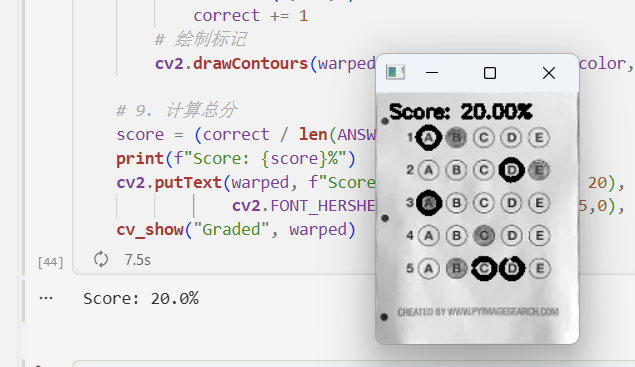
主流程:输出分数
score = (correct / len(ANSWER_KEY)) * 100
print(f"Score: {score}%")
cv2.putText(warped, f"Score: {score:.2f}%", (10, 20),
cv2.FONT_HERSHEY_SIMPLEX, 0.5, (0,255,0), 2)
功能讲解:计算总分,并在图像上显示
python
import cv2
import numpy as np
import matplotlib.pyplot as plt

# ================= 参数设置 =================
image_path = r"F:\project\pytorch_project\CV学习\image.png"

# 正确答案字典,每题的索引对应答案位置
ANSWER_KEY = {0:1, 1:4, 2:0, 3:3, 4:1}

# 自动适配泡泡的最小宽高和宽高比范围
MIN_BUBBLE_W, MIN_BUBBLE_H = 10, 10
ASPECT_RATIO_MIN, ASPECT_RATIO_MAX = 0.5, 1.5  # 支持略长或略扁的泡泡

# ================= 辅助函数 =================

def cv_show(name, img):
    """显示图像"""
    cv2.imshow(name, img)
    cv2.waitKey(0)
    cv2.destroyAllWindows()

def sort_contours(cnts, method="left-to-right"):
    """
    对轮廓进行排序
    method: 'left-to-right', 'top-to-bottom', 'right-to-left', 'bottom-to-top'
    """
    if len(cnts) == 0:
        return [], []

    reverse = False
    i = 0  # 0: x, 1: y
    if method in ["right-to-left", "bottom-to-top"]:
        reverse = True
    if method in ["top-to-bottom", "bottom-to-top"]:
        i = 1

    # 获取轮廓的边界矩形
    boundingBoxes = [cv2.boundingRect(c) for c in cnts]

    # 按指定方向排序
    (cnts, boundingBoxes) = zip(*sorted(zip(cnts, boundingBoxes),
                                        key=lambda b: b[1][i], reverse=reverse))
    return list(cnts), list(boundingBoxes)

def order_points(pts):
    """
    将四个点按顺序排列:
    [top-left, top-right, bottom-right, bottom-left]
    """
    rect = np.zeros((4,2), dtype="float32")
    s = pts.sum(axis=1)
    rect[0] = pts[np.argmin(s)]  # top-left
    rect[2] = pts[np.argmax(s)]  # bottom-right

    diff = np.diff(pts, axis=1)
    rect[1] = pts[np.argmin(diff)]  # top-right
    rect[3] = pts[np.argmax(diff)]  # bottom-left
    return rect

def four_point_transform(image, pts):
    """
    对答题卡进行透视变换,得到俯视图
    """
    rect = order_points(pts)
    (tl, tr, br, bl) = rect

    # 计算宽度
    widthA = np.sqrt(((br[0]-bl[0])**2)+((br[1]-bl[1])**2))
    widthB = np.sqrt(((tr[0]-tl[0])**2)+((tr[1]-tl[1])**2))
    maxWidth = max(int(widthA), int(widthB))

    # 计算高度
    heightA = np.sqrt(((tr[0]-br[0])**2)+((tr[1]-br[1])**2))
    heightB = np.sqrt(((tl[0]-bl[0])**2)+((tl[1]-bl[1])**2))
    maxHeight = max(int(heightA), int(heightB))

    # 目标透视坐标
    dst = np.array([[0,0],
                    [maxWidth-1,0],
                    [maxWidth-1,maxHeight-1],
                    [0,maxHeight-1]], dtype="float32")

    # 计算透视变换矩阵
    M = cv2.getPerspectiveTransform(rect, dst)
    warped = cv2.warpPerspective(image, M, (maxWidth, maxHeight))
    return warped

# ================= 主流程 =================

# 1. 读取原图
img = cv2.imdecode(np.fromfile(image_path, dtype=np.uint8), cv2.IMREAD_COLOR)
if img is None:
    raise FileNotFoundError(f"无法读取输入图像: {image_path}")
cv_show("Original", img)

# 2. 灰度化 + 高斯模糊 + 边缘检测
gray = cv2.cvtColor(img, cv2.COLOR_BGR2GRAY)
blurred = cv2.GaussianBlur(gray, (5,5), 0)  # 去噪
cv_show("Blurred", blurred)
edged = cv2.Canny(blurred, 75, 150)        # 边缘检测
cv_show("Edged", edged)

# 3. 找最大四边形轮廓作为答题卡,做透视变换
cnts, hierarchy = cv2.findContours(edged.copy(), cv2.RETR_EXTERNAL, cv2.CHAIN_APPROX_SIMPLE)
cnts = sorted(cnts, key=cv2.contourArea, reverse=True)
docCnt = None
for c in cnts:
    peri = cv2.arcLength(c, True)
    approx = cv2.approxPolyDP(c, 0.02*peri, True)
    if len(approx) == 4:
        docCnt = approx
        break
if docCnt is None:
    raise ValueError("未找到答题卡四边形轮廓!")

# 透视变换,得到俯视图
warped = four_point_transform(gray, docCnt.reshape(4,2))
cv_show("Warped", warped)

# 4. 二值化(反转+OTSU)
thresh = cv2.threshold(warped, 0, 255,
                       cv2.THRESH_BINARY_INV | cv2.THRESH_OTSU)[1]
cv_show("Threshold", thresh)

# 5. 找轮廓
cnts, hierarchy = cv2.findContours(thresh.copy(), cv2.RETR_TREE, cv2.CHAIN_APPROX_SIMPLE)

# 6. 筛选可能的泡泡轮廓
questionCnts = []
for c in cnts:
    (x, y, w, h) = cv2.boundingRect(c)
    ar = w / float(h)
    if w >= MIN_BUBBLE_W and h >= MIN_BUBBLE_H and ASPECT_RATIO_MIN <= ar <= ASPECT_RATIO_MAX:
        questionCnts.append(c)

# 7. 全局排序:先 top-to-bottom
questionCnts, _ = sort_contours(questionCnts, method="top-to-bottom")
if len(questionCnts) == 0:
    raise ValueError("未检测到有效 bubbles!请检查图像质量或阈值")

# 每行泡泡数量(可修改)
bubbles_per_row = 5
rows = []
for i in range(0, len(questionCnts), bubbles_per_row):
    row_cnts = questionCnts[i:i+bubbles_per_row]
    row_cnts, _ = sort_contours(row_cnts, method="left-to-right")
    rows.append(row_cnts)

# 8. 评分
correct = 0
for q, row_cnts in enumerate(rows[:len(ANSWER_KEY)]):
    bubbled = None
    for j, c in enumerate(row_cnts):
        # 生成泡泡掩膜
        mask = np.zeros(thresh.shape, dtype="uint8")
        cv2.drawContours(mask, [c], -1, 255, -1)
        # 与二值化图像结合
        mask = cv2.bitwise_and(thresh, thresh, mask=mask)
        total = cv2.countNonZero(mask)  # 统计白色像素数量
        if bubbled is None or total > bubbled[0]:
            bubbled = (total, j)
    # 对比答案
    k = ANSWER_KEY[q]
    color = (0,0,255)  # 红色默认错误
    if bubbled and k == bubbled[1]:
        color = (0,255,0)  # 绿色表示正确
        correct += 1
    # 绘制标记
    cv2.drawContours(warped, [row_cnts[k]], -1, color, 3)

# 9. 计算总分
score = (correct / len(ANSWER_KEY)) * 100
print(f"Score: {score}%")
cv2.putText(warped, f"Score: {score:.2f}%", (10, 20),
            cv2.FONT_HERSHEY_SIMPLEX, 0.5, (0,255,0), 2)
cv_show("Graded", warped)