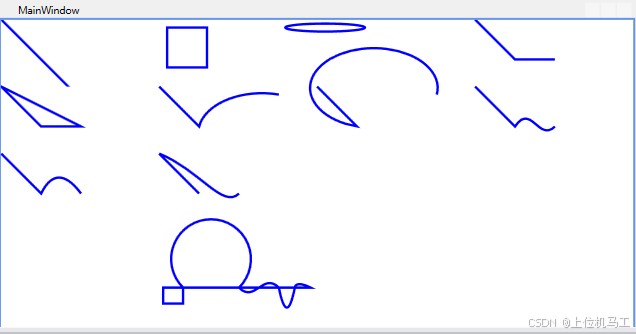
csharp
<Window x:Class="wpf之路径.MainWindow"
        xmlns="http://schemas.microsoft.com/winfx/2006/xaml/presentation"
        xmlns:x="http://schemas.microsoft.com/winfx/2006/xaml"
        xmlns:d="http://schemas.microsoft.com/expression/blend/2008"
        xmlns:mc="http://schemas.openxmlformats.org/markup-compatibility/2006"
        xmlns:local="clr-namespace:wpf之路径"
        mc:Ignorable="d"
        Title="MainWindow" Height="450" Width="800">
    <Grid>
        <Grid.ColumnDefinitions>
            <ColumnDefinition Width="1*"/>
            <ColumnDefinition Width="1*"/>
            <ColumnDefinition Width="1*"/>
            <ColumnDefinition Width="1*"/>
        </Grid.ColumnDefinitions>
        <Grid.RowDefinitions >
            <RowDefinition Height=" 1*"/>
            <RowDefinition Height=" 1*"/>
            <RowDefinition Height=" 1*"/>
            <RowDefinition Height=" 1*"/>
            <RowDefinition Height=" 1*"/>
        </Grid.RowDefinitions>
        <Path  Grid.Column=" 0" Grid.Row="0"  Stroke=" blue" StrokeThickness=" 3">
            <Path.Data>
                <LineGeometry  StartPoint="0,0" EndPoint="100,100"/>
            </Path.Data>
        </Path >
        <Path  Grid.Column=" 1" Grid.Row="0"   Stroke=" blue" StrokeThickness=" 3" >
            <Path.Data>
                <RectangleGeometry Rect="10,10,50,50"/>
            </Path.Data>
        </Path >
        <Path  Grid.Column=" 2" Grid.Row="0"   Stroke=" blue" StrokeThickness=" 3" >
            <Path.Data>
                <EllipseGeometry  Center="10,10" RadiusX=" 50" RadiusY=" 5"/>
            </Path.Data>
        </Path >
        <Path  Grid.Column=" 3" Grid.Row="0"  Stroke=" blue" StrokeThickness=" 3" >
            <Path.Data>
                <PathGeometry >
                    <PathFigure StartPoint="0,0" IsClosed="False"  >
                        <LineSegment Point=" 50,50" />
                        <LineSegment Point=" 100,50" />
                    </PathFigure >
                </PathGeometry >
            </Path.Data>
        </Path >
        <Path  Grid.Column=" 0" Grid.Row="1"   Stroke=" blue" StrokeThickness=" 3" >
            <Path.Data>
                <PathGeometry >
                    <PathFigure StartPoint="0,0" IsClosed="true"  >
                        <LineSegment Point=" 50,50" />
                        <LineSegment Point=" 100,50" />
                    </PathFigure >
                </PathGeometry >
            </Path.Data>
        </Path >
        <Path Grid.Column="1" Grid.Row=" 1"   Stroke=" blue" StrokeThickness=" 3" >
            <Path.Data >
                <PathGeometry>
                    <PathFigure  StartPoint="0,0" IsClosed="False" >
                        <LineSegment Point="50,50" />
                        <ArcSegment Point=" 150,10"  Size="80,50" SweepDirection="Clockwise" RotationAngle=" 0" IsLargeArc="False"         />
                    </PathFigure >
                </PathGeometry>
            </Path.Data >
        </Path >

        <Path Grid.Column="2" Grid.Row=" 1"   Stroke=" blue" StrokeThickness=" 3" >
            <Path.Data >
                <PathGeometry>
                    <PathFigure  StartPoint="0,0" IsClosed="False" >
                        <LineSegment Point="50,50" />
                        <ArcSegment Point=" 150,10"  Size="80,50" SweepDirection="Clockwise" RotationAngle=" 0" IsLargeArc="True"       />
                    </PathFigure >
                </PathGeometry>
            </Path.Data >
        </Path >


        <Path Grid.Column="3" Grid.Row=" 1"   Stroke=" blue" StrokeThickness=" 3" >
            <Path.Data >
                <PathGeometry>
                    <PathFigure  StartPoint="0,0" IsClosed="False" >
                        <LineSegment Point=" 50,50" />
                        <BezierSegment Point1 =" 70,20" Point2=" 80,70" Point3=" 100,50"    />
                    </PathFigure >
                </PathGeometry>
            </Path.Data >
        </Path >
        <Path Grid.Column="0" Grid.Row=" 2"   Stroke=" blue" StrokeThickness=" 3" >
            <Path.Data >
                <PathGeometry>
                    <PathFigure  StartPoint="0,0" IsClosed="False" >
                        <LineSegment Point=" 50,50" />
                        <QuadraticBezierSegment Point1 =" 70,10" Point2=" 100,50"    />
                    </PathFigure >
                </PathGeometry>
            </Path.Data >
        </Path >
        <Path Grid.Column="1" Grid.Row="2"   Stroke=" blue" StrokeThickness=" 3" >
            <Path.Data >
                <GeometryGroup>
                    <PathGeometry>
                        <PathFigure  StartPoint="0,0" IsClosed="False" >
                            <LineSegment Point=" 50,50" />
                        </PathFigure >
                    </PathGeometry>
                    <PathGeometry>
                        <PathFigure  StartPoint="0,0" IsClosed="False" >
                            <BezierSegment Point1 =" 50,20" Point2=" 80,70" Point3=" 100,50"    />
                        </PathFigure >
                    </PathGeometry>
                </GeometryGroup>
            </Path.Data >
        </Path >
        <Path Grid.Column="1" Grid.Row=" 4"   Stroke=" blue" StrokeThickness=" 3" Data=" M 5,0 V 20 H 30 L 30,0 A 50,50 0 1 1 ,100 ,0 C 120,20  130,-20 150,0 Q  160,50 170,0  S 170,-10 190,0  Z "  />
    </Grid>
</Window>
前言
路径Path可以绘制直线、矩形、椭圆等多种形状的曲线,Path最重要的属性是Data,Data的类型是Geometry,Geometry是抽象类,所以不能直接在xaml代码中直接使用抽象类作为标签,所以可以使用Geometry的子类,Geometry的子类有以下类型:
1)LineGeometry
表示一条直线,由起点和终点定义。
2)RectangleGeometry
表示一个矩形,可设置圆角半径。
3)EllipseGeometry
表示一个椭圆或圆,由中心点、X轴半径和Y轴半径定义。
4)PathGeometry
最灵活的几何类,由一系列线段、弧线和贝塞尔曲线组成。每个 PathGeometry 可以包含多个 PathFigure,每个 PathFigure 又由多个 PathSegment 构成。
5)StreamGeometry
轻量级的只读 PathGeometry 替代品,通过 StreamGeometryContext 快速构建,适合用于数据绑定或资源中,因为它的内存占用更低且无法修改。
6)CombinedGeometry
通过布尔运算(联合、交集、差集、异或)将两个几何图形合并成一个新几何图形。
7)GeometryGroup
将多个几何图形组合在一起,并可以设置组合后的填充规则(FillRule)。与 CombinedGeometry 不同,它允许任意数量的子几何,并且组合后的区域是子几何的并集(或按 FillRule 处理)。
8)TransformedGeometry
对另一个几何图形应用变换(如平移、旋转、缩放),但保持原始几何不变。
1、LineGeometry
csharp
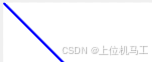
 <Path  Grid.Column=" 0" Grid.Row="0"  Stroke=" blue" StrokeThickness=" 3">
            <Path.Data>
                <LineGeometry  StartPoint="0,0" EndPoint="100,100"/>
            </Path.Data>
        </Path >
2、RectangleGeometry

csharp
<Path  Grid.Column=" 1" Grid.Row="0"   Stroke=" blue" StrokeThickness=" 3" >
            <Path.Data>
                <RectangleGeometry Rect="10,10,50,50"/>
            </Path.Data>
        </Path >
3、EllipseGeometry

csharp
 <Path  Grid.Column=" 2" Grid.Row="0"   Stroke=" blue" StrokeThickness=" 3" >
            <Path.Data>
                <EllipseGeometry  Center="10,10" RadiusX=" 50" RadiusY=" 5"/>
            </Path.Data>
        </Path >
4、PathGeometry
1)LineSegment
csharp
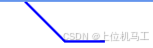
<Path  Grid.Column=" 3" Grid.Row="0"  Stroke=" blue" StrokeThickness=" 3" >
            <Path.Data>
                <PathGeometry >
                    <PathFigure StartPoint="0,0" IsClosed="False"  >
                        <LineSegment Point=" 50,50" />
                        <LineSegment Point=" 100,50" />
                    </PathFigure >
                </PathGeometry >
            </Path.Data>
        </Path >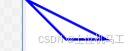
csharp
 <Path  Grid.Column=" 0" Grid.Row="1"   Stroke=" blue" StrokeThickness=" 3" >
            <Path.Data>
                <PathGeometry >
                    <PathFigure StartPoint="0,0" IsClosed="true"  >
                        <LineSegment Point=" 50,50" />
                        <LineSegment Point=" 100,50" />
                    </PathFigure >
                </PathGeometry >
            </Path.Data>
        </Path >
2)ArcSegment
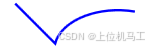
csharp
  <Path Grid.Column="1" Grid.Row=" 1"   Stroke=" blue" StrokeThickness=" 3" >
            <Path.Data >
                <PathGeometry>
                    <PathFigure  StartPoint="0,0" IsClosed="False" >
                        <LineSegment Point="50,50" />
                        <ArcSegment Point=" 150,10"  Size="80,50" SweepDirection="Clockwise" RotationAngle=" 0" IsLargeArc="False"         />
                    </PathFigure >
                </PathGeometry>
            </Path.Data >
        </Path >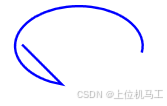
csharp
  <Path Grid.Column="2" Grid.Row=" 1"   Stroke=" blue" StrokeThickness=" 3" >
            <Path.Data >
                <PathGeometry>
                    <PathFigure  StartPoint="0,0" IsClosed="False" >
                        <LineSegment Point="50,50" />
                        <ArcSegment Point=" 150,10"  Size="80,50" SweepDirection="Clockwise" RotationAngle=" 0" IsLargeArc="True"       />
                    </PathFigure >
                </PathGeometry>
            </Path.Data >
        </Path >
3)BezierSegment
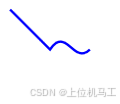
csharp
 <Path Grid.Column="3" Grid.Row=" 1"   Stroke=" blue" StrokeThickness=" 3" >
            <Path.Data >
                <PathGeometry>
                    <PathFigure  StartPoint="0,0" IsClosed="False" >
                        <LineSegment Point=" 50,50" />
                        <BezierSegment Point1 =" 70,20" Point2=" 80,70" Point3=" 100,50"    />
                    </PathFigure >
                </PathGeometry>
            </Path.Data >
        </Path >
4)QuadraticBezierSegment
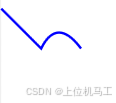
csharp
<Path Grid.Column="0" Grid.Row=" 2"   Stroke=" blue" StrokeThickness=" 3" >
            <Path.Data >
                <PathGeometry>
                    <PathFigure  StartPoint="0,0" IsClosed="False" >
                        <LineSegment Point=" 50,50" />
                        <QuadraticBezierSegment Point1 =" 70,10" Point2=" 100,50"    />
                    </PathFigure >
                </PathGeometry>
            </Path.Data >
        </Path >
5)
csharp
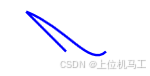
 <Path Grid.Column="1" Grid.Row="2"   Stroke=" blue" StrokeThickness=" 3" >
            <Path.Data >
                <GeometryGroup>
                    <PathGeometry>
                        <PathFigure  StartPoint="0,0" IsClosed="False" >
                            <LineSegment Point=" 50,50" />
                        </PathFigure >
                    </PathGeometry>
                    <PathGeometry>
                        <PathFigure  StartPoint="0,0" IsClosed="False" >
                            <BezierSegment Point1 =" 50,20" Point2=" 80,70" Point3=" 100,50"    />
                        </PathFigure >
                    </PathGeometry>
                </GeometryGroup>
            </Path.Data >
        </Path >
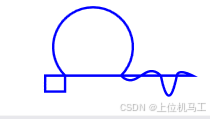
5、路径标记语法
csharp
<Path Grid.Column="1" Grid.Row=" 4" Stroke=" blue" StrokeThickness=" 3" Data=" M 5,0 V 20 H 30 L 30,0 A 50,50 0 1 1 ,100 ,0 C 120,20 130,-20 150,0 Q 160,50 170,0 S 170,-10 190,0 Z " />