在 Linux 上打开一个终端界面,我们会看到一个黑色窗口,这个黑色窗口上的画面是由 terminal emulator 直接维护的。terminal emulator 在被打开时往往会顺带打开一个子进程 bash 或者其他 shell,而黑色窗口上的内容就是 bash 的输出。terminal emulator 和 bash 直接使用 pts(伪终端) 设备通信。
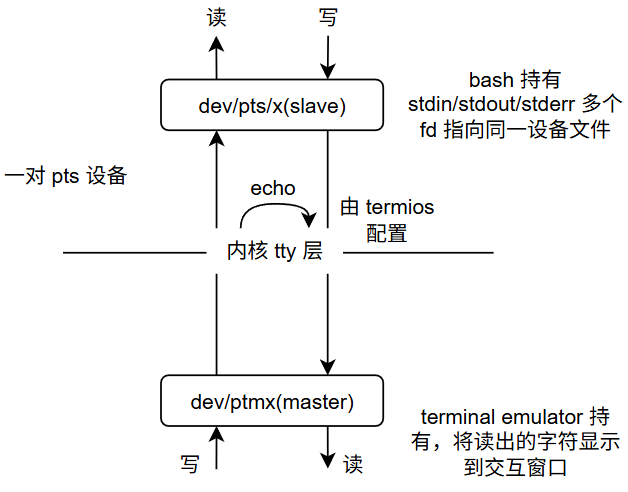
伪终端设备成对出现,分为 master 和 slave,在 linux 上分别称为 /dev/ptmx 和 /dev/pts/x。bash 的 stdin/stdout/stderr fd 均指向 /dev/pts/x slave 设备。bash 读 stdin 实际上读到的是 terminal emulator 向 /dev/ptmx 中写入的字符,bash 写 stdout 实际写入 /dev/pts/x,这些内容被 Linux tty 层传递到 /dev/ptmx 由 terminal emulator 读出并显示到交互窗口上。键盘输入会被 terminal emulator 接收并写入 /dev/ptmx,这些数据不仅会被传递到 /dev/pts/x 由 bash 作为输入,也会在内核 tty 层被 echo(echo 与否由 termios 配置决定),重新回到 /dev/ptmx 读端,使得键盘输入的内容也被显示到"黑色窗口"上。
上述内容可以被一些指令输出印证。
bash
man 7 pty查看当前进程的 fd
bash
harry@Harry:~$ ls -l /proc/$$/fd
total 0
lrwx------ 1 harry harry 64 Mar 17 17:11 0 -> /dev/pts/9
lrwx------ 1 harry harry 64 Mar 17 17:11 1 -> /dev/pts/9
lrwx------ 1 harry harry 64 Mar 17 17:11 2 -> /dev/pts/9
lrwx------ 1 harry harry 64 Mar 17 17:11 255 -> /dev/pts/9
lrwx------ 1 harry harry 64 Mar 17 17:11 7 -> /dev/ptmx
查看父进程的 fd
bash
harry@Harry:~$ sudo ls -l /proc/$PPID/fd
total 0
lrwx------ 1 root root 64 Mar 17 20:21 0 -> /dev/null
lrwx------ 1 root root 64 Mar 17 20:21 1 -> /dev/null
lrwx------ 1 root root 64 Mar 17 20:21 10 -> 'socket:[98106]'
lrwx------ 1 root root 64 Mar 17 20:21 11 -> 'socket:[99936]'
lr-x------ 1 root root 64 Mar 17 20:21 12 -> 'mnt:[4026532464]'
lrwx------ 1 root root 64 Mar 17 20:21 13 -> 'socket:[99931]'
lrwx------ 1 root root 64 Mar 17 20:21 14 -> 'socket:[99932]'
lrwx------ 1 root root 64 Mar 17 20:21 15 -> 'socket:[99933]'
lrwx------ 1 root root 64 Mar 17 20:21 16 -> 'socket:[99934]'
lrwx------ 1 root root 64 Mar 17 20:21 17 -> 'socket:[99935]'
lrwx------ 1 root root 64 Mar 17 20:21 18 -> /dev/ptmx # one of pty master
lrwx------ 1 root root 64 Mar 17 20:21 19 -> 'anon_inode:[signalfd]'
l-wx------ 1 root root 64 Mar 17 20:21 2 -> /dev/kmsg
lrwx------ 1 root root 64 Mar 17 20:21 20 -> /dev/ptmx
l-wx------ 1 root root 64 Mar 17 20:21 3 -> /dev/hvc1
lr-x------ 1 root root 64 Mar 17 20:21 4 -> 'mnt:[4026532219]'
lrwx------ 1 root root 64 Mar 17 20:21 5 -> 'socket:[101332]'
lrwx------ 1 root root 64 Mar 17 20:21 6 -> 'socket:[12298]'
lrwx------ 1 root root 64 Mar 17 20:21 7 -> /dev/ptmx
lrwx------ 1 root root 64 Mar 17 20:21 8 -> 'socket:[12304]'
lrwx------ 1 root root 64 Mar 17 20:21 9 -> 'socket:[12305]'