C++ 预处理器与预处理指令
C++ 中的 预处理器 是一种在代码被编译器编译之前对其进行处理的工具。它执行多种任务,例如包含头文件、条件编译、文本替换、删除注释等。预处理器还允许开发者选择哪些代码段应该被包含或排除。
经预处理器处理后的代码称为扩展代码 ,通常以 ".i" 作为文件扩展名保存。
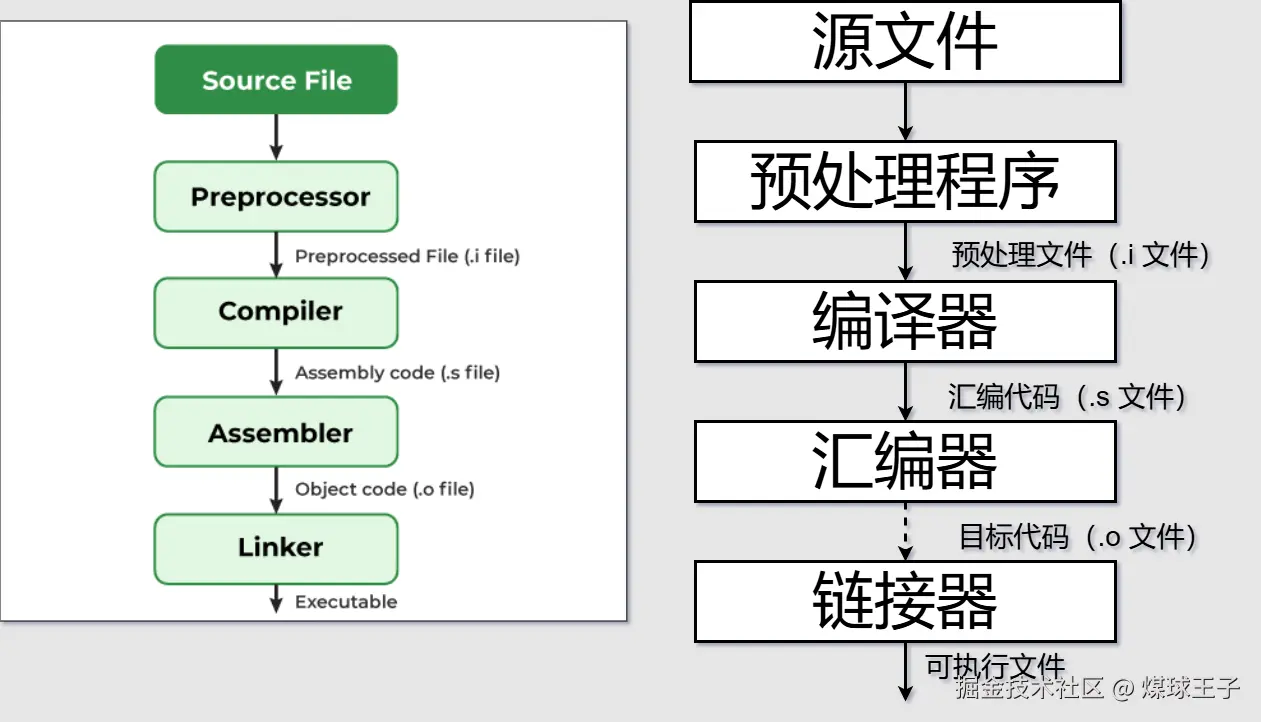
C++ 中的预处理指令
预处理指令 是给予预处理器的特殊指令,预处理器是编译过程的一部分,在实际代码编译之前运行。
这些指令以 # 符号开头,用于通过包含文件、定义常量或决定哪些代码段应该被编译来准备我们的代码。
它们不是常规的 C++ 语句,因此不以分号 (;) 结尾。
下表列出了常用的预处理指令:
| 指令 | 描述 |
|---|---|
#include |
在源代码中链接头文件 |
#define |
创建符号常量或宏常量 |
#undef |
删除已定义的宏 |
#if / #elif / #else / #endif |
基于某些表达式的条件编译 |
#ifdef / #ifndef |
根据宏的存在或不存在进行条件编译 |
#error |
停止编译过程并产生错误提示 |
#warning |
编译期间显示警告提示 |
#pragma |
向编译器提供特定指令 |
1. #include 指令
#include 预处理指令用于将一个文件的内容嵌入到当前文件中,使用时直接写 #include 即可。头文件通常通过该指令引入。
语法:
arduino
#include <文件名>   //引入 系统目录 中的文件
#include "文件名"   //引入 源文件当前所在目录 中的文件
示例:
arduino
// 引入标准输入输出流头文件
#include <iostream>
using namespace std;

int main() {
    cout << "GeeksforGeeks";
    return 0;
}
输出:
GeeksforGeeks2. #define 指令
#define 预处理指令用于定义宏。宏名称是符号化的,可以用来表示常量值或简短的代码片段。使用 #define 预处理器可以使我们的代码更具可读性且易于维护,因为我们可以用有意义的名称来替换数字和代码片段。
语法:
cpp
#define macro_name value示例:
cpp
#include <iostream>
using namespace std;

// 定义宏
#define PI 3.14159
#define findSquare(x) (x * x)

int main() {
    double radius = 5.0;

    // 宏名称 PI 和 findSquare 将被预处理器替换
    double area = PI * findSquare(radius);

    cout << area;
    return 0;
}
输出:
78.5397说明:
-
PI被替换为3.14159 -
findSquare(radius)被替换为(radius * radius) -
预处理器在编译前完成这些文本替换,编译器看到的实际代码是:
cppdouble area = 3.14159 * (5.0 * 5.0);
3. #undef 指令
#undef 预处理指令用于取消定义先前定义的宏(通过 #define 定义)。它主要用于当我们想要重新定义现有宏或从代码中消除与之关联的宏定义的情况。
语法:
cpp
#undef macro_name示例:
cpp
#include <iostream>
using namespace std;

// 定义一个宏
#define MAX_VALUE 100

int main() {
    cout << MAX_VALUE << endl;

    // 使用 undef 取消 MAX_VALUE 的定义
#undef MAX_VALUE
    // 重新定义 MAX_VALUE
#define MAX_VALUE 200

    cout << MAX_VALUE;
    return 0;
}
输出:
100
200
4. #if、#elif、#else 和 #endif 指令(条件指令)
#if、#elif、#else、#endif 和 #error 是条件预处理指令,用于条件编译。它们用于根据指定的某些条件来包含或排除代码。
语法:
cpp
#if constant_expr
    // 如果 constant_expression 为真,则执行此代码
#elif another_constant_expr
    // 如果 another_constant_expression 为真,则执行此代码
#else
    // 如果以上条件都不为真,则执行此代码
#endif
示例:
cpp
#include <iostream>
using namespace std;
#define PI 3.14159

int main() {

    // 条件编译
#if defined(PI)
    cout << "PI is defined";
#elif defined(SQUARE)
    cout << "PI is not defined";
#else
#error "Neither PI nor SQUARE is defined"
#endif

    return 0;
}
输出:
csharp
PI is defined解释:此代码使用预处理指令检查某些宏(PI 和 SQUARE)是否已定义。由于 PI 已定义,程序打印 "PI is defined",然后检查 SQUARE 是否已定义(未定义),因此不打印任何内容。
5. #ifdef 和 #ifndef 指令
#ifdef 和 #ifndef 是用于条件编译的预处理指令。#ifndef 用于验证宏未定义 ,#ifdef 用于验证宏已定义。
语法:
cpp
#ifdef macro_name
    // 如果 macro_name 已定义,则执行此代码
#endif

#ifndef macro_name
   // 如果 macro_name 未定义,则执行此代码
#endif
#ifdef 和 #ifndef 通常与 #endif 指令配合使用,根据某个宏是否已定义来包含或排除部分代码。
示例:
cpp
#include <iostream>
using namespace std;

// 定义两个宏
#define DEBUG
#define PI 3.14

int main() {

    // 检查 DEBUG 是否已定义
#ifdef DEBUG
    cout << "Debug mode is ON" << endl;
#else
    cout << "Debug mode is OFF" << endl;
#endif

    // 检查 PI 是否未定义
#ifndef PI
    cout << "PI is not defined" << endl;
#else
    cout << "PI is defined" << endl;
#endif

    return 0;
}
输出:
vbnet
Debug mode is ON
PI is defined
6. #error
#error 指令是一种预处理指令,用于为编译错误打印自定义错误消息。如果任何条件未满足或任何特定要求未达成,我们可以使用 #error 停止编译过程。
语法:
cpp
#error error_message其中,error_message 是当遇到 #error 时要打印的自定义错误消息。
示例:
cpp
#include <iostream>
using namespace std;

// 这里没有定义 PI
// #define PI 3.14159

int main() {

#if defined(PI)
    cout << "PI is defined" << endl;
#else
#error "Neither PI nor SQUARE is defined"
#endif

    return 0;
}
输出:
arduino
error: #error "Neither PI nor SQUARE is defined"7. #warning
#warning 预处理器指令用于在编译期间生成一条警告消息。我们可以编写自定义的警告消息,通常用于信息提示或调试目的。
语法:
arduino
#warning message在这里,消息是你想要作为警告打印的任何自定义信息。
示例:
cpp
#include <iostream>
using namespace std;

// 未定义它以触发警告
//#define PI 3.14

#ifndef PI
#warning "PI 未定义!"
#endif

int main() {
    cout << "嘿!极客";
    return 0;
}
输出:
arduino
main.cpp:8:2: 警告: #warning "PI 未定义!" [-Wcpp]
    8 | #warning "PI 未定义!"
      |  ^~~~~~~
嘿!极客
注意:在代码编译时,警告信息会被打印到编译器输出或控制台。这依赖于具体的编译器。因此,警告的显示方式取决于你使用的编译器。