欢迎加入开源鸿蒙跨平台社区 :https://openharmonycrossplatform.csdn.net
📋 前言
JSON 数据的可视化展示是一个常见需求。无论是 API 调试工具、配置管理界面,还是数据监控面板,都需要直观地展示复杂的 JSON 数据结构。react-native-json-tree 是一个功能强大的 JSON 数据可视化组件,支持树形结构展示、主题定制、节点折叠等特性,是开发调试工具和数据展示应用的理想选择。
🎯 库简介
基本信息
- 库名称 :
react-native-json-tree - 版本信息 :
1.3.0: 支持 RN 0.72 版本1.5.0: 支持 RN 0.77 版本
- 官方仓库: https://github.com/Dean177/react-native-json-tree
- 主要功能 :
- 🌳 树形结构展示 JSON 数据
- 🎨 支持主题样式定制
- 📂 节点折叠与展开控制
- 🔤 自定义标签和值的渲染
- 🔄 支持数据预处理
- 📱 跨平台一致性表现
为什么选择 JSONTree?
| 特性 | 自定义实现 | react-native-json-tree |
|---|---|---|
| 树形结构展示 | ⚠️ 需手动实现 | ✅ 内置支持 |
| 节点折叠展开 | ⚠️ 需额外开发 | ✅ 内置支持 |
| 主题定制 | ❌ 需完全自定义 | ✅ 丰富的主题支持 |
| 数据类型识别 | ⚠️ 需自行处理 | ✅ 自动识别类型 |
| 自定义渲染 | ✅ | ✅ |
| HarmonyOS支持 | ✅ | ✅ |
支持的属性
| 属性 | 说明 | HarmonyOS 支持 |
|---|---|---|
data |
要展示的 JSON 数据 | ✅ |
theme |
树状视图的主题样式 | ✅ |
shouldExpandNode |
控制节点是否展开的函数 | ✅ |
hideRoot |
是否隐藏树的根节点 | ✅ |
invertTheme |
是否反转主题颜色 | ✅ |
getItemString |
自定义节点显示文本 | ✅ |
labelRenderer |
自定义节点标签的渲染函数 | ✅ |
valueRenderer |
自定义节点值的渲染函数 | ✅ |
sortObjectKeys |
对 JSON 对象的键进行排序 | ✅ |
keyPath |
标识和定制特定路径的数据节点 | ✅ |
collectionLimit |
显示集合元素的最大数量 | ❌ |
postprocessValue |
值渲染前的自定义处理 | ✅ |
isCustomNode |
指定使用自定义渲染的节点 | ✅ |
兼容性验证
在以下环境验证通过:
- RNOH : 0.72.90; SDK : HarmonyOS 6.0.0 Release SDK; IDE : DevEco Studio 6.0.2; ROM: 6.0.0
📦 安装步骤
1. 安装依赖
本文基于 ReactNative0.72.90开发在项目根目录执行以下命令:
RN 0.72 版本
bash
# 使用 npm
npm install react-native-json-tree@1.3.0

# 或者使用 yarn
yarn add react-native-json-tree@1.3.0
2. 验证安装
安装完成后,检查 package.json 文件,应该能看到新增的依赖:
json
{
  "dependencies": {
    "react-native-json-tree": "1.3.0",
    // ... 其他依赖
  }
}
💡 提示 :
react-native-json-tree是纯 JS 组件,安装后无需额外配置原生代码,直接使用即可。这是因为该库完全基于 React Native 的基础组件实现,不依赖任何原生模块。
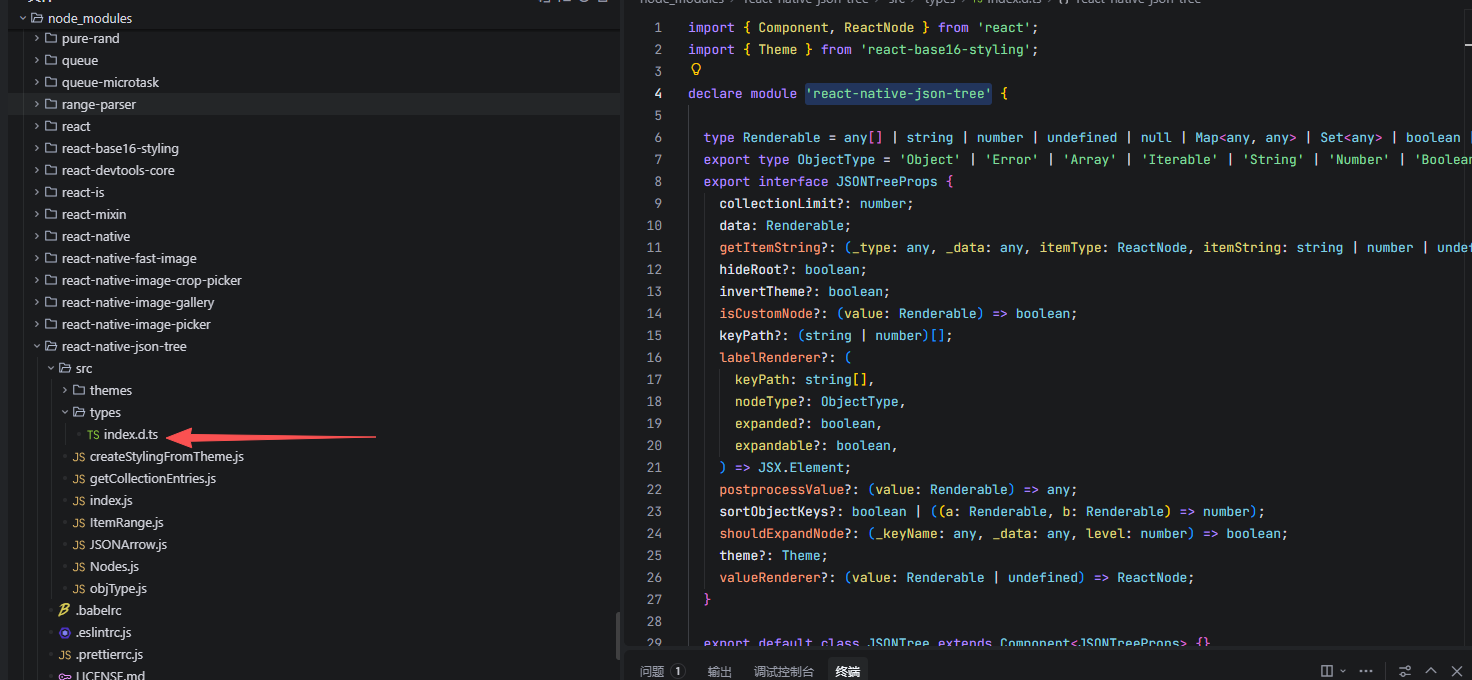
3. TypeScript 类型声明(可选)
官方已经导出了模块,有的js库不给导出。
📖 API 详解
🔷 data - JSON 数据对象 ⭐
data 是 JSONTree 组件的核心属性,用于传入需要展示的 JSON 数据。支持任意类型的 JavaScript 数据,包括对象、数组、基本类型等。
typescript
data: any;| 类型 | 说明 | 示例 |
|---|---|---|
Object |
JSON 对象 | { name: 'John', age: 30 } |
Array |
JSON 数组 | [1, 2, 3, 4, 5] |
string |
字符串 | 'Hello World' |
number |
数字 | 12345 |
boolean |
布尔值 | true |
null |
空值 | null |
应用场景:
typescript
import JSONTree from 'react-native-json-tree';

// 场景1:展示简单对象
const simpleData = {
  name: 'John Doe',
  age: 30,
  email: 'john@example.com',
};

<JSONTree data={simpleData} />

// 场景2:展示嵌套对象
const nestedData = {
  user: {
    name: 'Alice',
    profile: {
      avatar: 'https://example.com/avatar.jpg',
      bio: 'Software Developer',
    },
  },
  settings: {
    theme: 'dark',
    language: 'zh-CN',
  },
};

<JSONTree data={nestedData} />

// 场景3:展示数组数据
const arrayData = {
  users: [
    { id: 1, name: 'User 1' },
    { id: 2, name: 'User 2' },
    { id: 3, name: 'User 3' },
  ],
  tags: ['react', 'native', 'json'],
};

<JSONTree data={arrayData} />

// 场景4:展示混合类型数据
const mixedData = {
  string: 'Hello',
  number: 123,
  boolean: true,
  null: null,
  array: [1, 2, 3],
  object: { a: 1, b: 2 },
  date: new Date(),
};

<JSONTree data={mixedData} />
🔷 theme - 主题样式 🎨
theme 用于定制 JSON 树状视图的视觉样式。支持基于 base16 配色方案的主题配置。
typescript
theme: JSONTreeTheme;主题属性说明:
| 属性 | 说明 | 用途 |
|---|---|---|
base00 |
默认背景色 | 树的背景 |
base01 |
次级背景色 | 交替背景 |
base02 |
边框色 | 分隔线 |
base03 |
注释色 | 注释文本 |
base04 |
高亮色 | 高亮元素 |
base05 |
默认文本色 | 普通文本 |
base06 |
浅文本色 | 次要文本 |
base07 |
最浅文本色 | 最浅元素 |
base08 |
变量色 | 变量名 |
base09 |
整数色 | 整数 |
base0A |
类名色 | 类名 |
base0B |
字符串色 | 字符串值 |
base0C |
支持色 | 特殊元素 |
base0D |
键名色 | 对象键名 |
base0E |
关键字色 | 关键字 |
base0F |
布尔值色 | 布尔值 |
常用主题示例:
typescript
// Monokai 主题(深色背景)
const monokaiTheme = {
  scheme: 'monokai',
  author: 'wimer hazenberg (http://www.monokai.nl)',
  base00: '#272822',
  base01: '#383830',
  base02: '#49483e',
  base03: '#75715e',
  base04: '#a59f85',
  base05: '#f8f8f2',
  base06: '#f5f4f1',
  base07: '#f9f8f5',
  base08: '#f92672',
  base09: '#fd971f',
  base0A: '#f4bf75',
  base0B: '#a6e22e',
  base0C: '#a1efe4',
  base0D: '#66d9ef',
  base0E: '#ae81ff',
  base0F: '#cc6633',
};

// GitHub 主题(浅色背景)
const githubTheme = {
  scheme: 'github',
  author: 'Defman21',
  base00: '#ffffff',
  base01: '#f5f5f5',
  base02: '#c8e1ff',
  base03: '#969896',
  base04: '#e8e8e8',
  base05: '#333333',
  base06: '#ffffff',
  base07: '#ffffff',
  base08: '#ed6a43',
  base09: '#0086b3',
  base0A: '#795da3',
  base0B: '#183691',
  base0C: '#183691',
  base0D: '#795da3',
  base0E: '#a71d5d',
  base0F: '#333333',
};

// Oceanic Next 主题
const oceanicTheme = {
  scheme: 'oceanicnext',
  author: 'https://github.com/voronianski/oceanic-next-color-scheme',
  base00: '#1B2B34',
  base01: '#343D46',
  base02: '#4F5B66',
  base03: '#65737E',
  base04: '#A7ADBA',
  base05: '#C0C5CE',
  base06: '#CDD3DE',
  base07: '#D8DEE9',
  base08: '#EC5f67',
  base09: '#F99157',
  base0A: '#FAC863',
  base0B: '#99C794',
  base0C: '#5FB3B3',
  base0D: '#6699CC',
  base0E: '#C594C5',
  base0F: '#AB7967',
};

// 应用主题
<JSONTree data={data} theme={monokaiTheme} />
🔷 invertTheme - 反转主题颜色
invertTheme 用于反转主题的前景和背景颜色,可以实现深色/浅色模式的快速切换。
typescript
invertTheme: boolean;| 值 | 说明 |
|---|---|
true |
反转主题颜色(适合深色主题显示在浅色背景上) |
false |
使用原始主题颜色 |
应用场景:
typescript
// 场景:根据应用主题动态调整
const isDarkMode = true;

<JSONTree
  data={data}
  theme={monokaiTheme}
  invertTheme={!isDarkMode}  // 深色模式不反转
/>

// 对比展示
<View>
  <Text>原始主题:</Text>
  <JSONTree data={data} theme={monokaiTheme} invertTheme={false} />

  <Text>反转主题:</Text>
  <JSONTree data={data} theme={monokaiTheme} invertTheme={true} />
</View>
🔷 hideRoot - 隐藏根节点
hideRoot 控制是否隐藏 JSON 树的根节点。当数据结构较深时,隐藏根节点可以让界面更加简洁。
typescript
hideRoot: boolean;| 值 | 说明 |
|---|---|
true |
隐藏根节点,直接显示子节点 |
false |
显示根节点(默认) |
应用场景:
typescript
const data = {
  name: 'Bob',
  age: 35,
  info: {
    height: 180,
    weight: 120,
  },
};

// 显示根节点(默认)
<JSONTree data={data} hideRoot={false} />

// 隐藏根节点 - 更简洁的展示
<JSONTree data={data} hideRoot={true} />
🔷 shouldExpandNode - 节点展开控制 📂
shouldExpandNode 是一个函数,用于控制哪些节点默认展开。可以实现自定义的展开逻辑,如展开特定层级、包含特定 key 的节点等。
typescript
shouldExpandNode: (keyName: any, data: any, level: number) => boolean;参数说明:
| 参数 | 类型 | 说明 |
|---|---|---|
keyName |
any |
从根节点到当前节点的路径 |
data |
any |
当前节点的数据 |
level |
number |
当前节点的层级(从 0 开始) |
返回值 :boolean - true 表示展开,false 表示折叠
应用场景:
typescript
// 场景1:展开特定层级的节点
const expandByLevel = (keyName: any, data: any, level: number) => {
  return level < 2;  // 只展开前两层
};

<JSONTree data={data} shouldExpandNode={expandByLevel} />

// 场景2:展开包含特定 key 的节点
const expandByKey = (keyName: any) => {
  // keyName 是节点路径数组
  const shouldExpand = keyName.some((item: any) => {
    return item === 'address' || item === 'info';
  });
  return shouldExpand;
};

<JSONTree data={data} shouldExpandNode={expandByKey} />

// 场景3:展开数组长度小于 5 的节点
const expandSmallArrays = (keyName: any, data: any) => {
  if (Array.isArray(data)) {
    return data.length < 5;
  }
  return false;
};

<JSONTree data={data} shouldExpandNode={expandSmallArrays} />

// 场景4:默认全部展开
const expandAll = () => true;

<JSONTree data={data} shouldExpandNode={expandAll} />

// 场景5:默认全部折叠
const collapseAll = () => false;

<JSONTree data={data} shouldExpandNode={collapseAll} />

// 实际数据示例
const data2 = {
  name: 'Bob',
  age: 35,
  info: {
    height: 180,
    weight: 120,
  },
  address: {
    street: '123 Elm St',
    city: 'Springfield',
  },
};

// 只展开 address 节点
const shouldExpandNode = (keyPath: any) => {
  const shouldExpandNodeKey = keyPath.some((item: any) => {
    return item === 'address';
  });
  return shouldExpandNodeKey;
};

<JSONTree data={data2} shouldExpandNode={shouldExpandNode} />
🔷 labelRenderer - 自定义标签渲染 🏷️
labelRenderer 允许自定义节点键名的渲染方式,可以添加图标、样式等。
typescript
labelRenderer: (keyPath: string[], nodeType?: ObjectType, expanded?: boolean, expandable?: boolean) => JSX.Element;参数说明:
| 参数 | 类型 | 说明 |
|---|---|---|
keyPath |
`(string | number)[]` |
nodeType |
string |
节点类型(Object, Array, String 等) |
expanded |
boolean |
节点是否展开 |
expandable |
boolean |
节点是否可展开 |
应用场景:
typescript
import { Text, StyleSheet } from 'react-native';

// 场景1:添加粗体样式
<JSONTree
  data={data}
  labelRenderer={(raw: any) => (
    <Text style={{ fontWeight: 'bold', color: '#66d9ef' }}>
      {raw}
    </Text>
  )}
/>

// 场景2:根据类型显示不同图标
<JSONTree
  data={data}
  labelRenderer={(keyPath, nodeType) => {
    const key = keyPath[keyPath.length - 1];
    let icon = '📌';

    const type = nodeType || '';
    if (type.includes('Object')) icon = '📦';
    else if (type.includes('Array')) icon = '📋';
    else if (type.includes('String')) icon = '📝';
    else if (type.includes('Number')) icon = '🔢';

    return (
      <Text style={{ fontWeight: 'bold' }}>
        {icon} {String(key)}
      </Text>
    );
  }}
/>

// 场景3:显示完整路径
<JSONTree
  data={data}
  labelRenderer={(keyPath) => {
    return (
      <Text style={{ color: '#66d9ef' }}>
        {keyPath.join(' → ')}
      </Text>
    );
  }}
/>
🔷 valueRenderer - 自定义值渲染
valueRenderer 允许自定义节点值的渲染方式。
typescript
valueRenderer: (value: Renderable | undefined) => ReactNode;参数说明:
| 参数 | 类型 | 说明 |
|---|---|---|
value |
`Renderable | undefined` |
应用场景:
typescript
import { Text, Linking, TouchableOpacity } from 'react-native';

// 场景1:斜体样式
<JSONTree
  data={data}
  valueRenderer={(value: any) => (
    <Text style={{ fontStyle: 'italic', color: '#a6e22e' }}>
      {String(value)}
    </Text>
  )}
/>

// 场景2:URL 可点击
<JSONTree
  data={data}
  valueRenderer={(value: any) => {
    if (typeof value === 'string' && value.startsWith('http')) {
      return (
        <TouchableOpacity onPress={() => Linking.openURL(value)}>
          <Text style={{ color: '#66d9ef', textDecorationLine: 'underline' }}>
            {value}
          </Text>
        </TouchableOpacity>
      );
    }
    return <Text>{String(value)}</Text>;
  }}
/>

// 场景3:布尔值高亮
<JSONTree
  data={data}
  valueRenderer={(value: any) => {
    if (value === true) {
      return <Text style={{ color: '#a6e22e', fontWeight: 'bold' }}>✓ true</Text>;
    }
    if (value === false) {
      return <Text style={{ color: '#f92672', fontWeight: 'bold' }}>✗ false</Text>;
    }
    return <Text>{String(value)}</Text>;
  }}
/>

// 场景4:数字格式化
<JSONTree
  data={data}
  valueRenderer={(value: any) => {
    if (typeof value === 'number') {
      return <Text style={{ color: '#ae81ff' }}>{value.toLocaleString()}</Text>;
    }
    return <Text>{String(value)}</Text>;
  }}
/>
🔷 getItemString - 自定义节点摘要
getItemString 用于自定义对象和数组节点的摘要显示文本。
typescript
getItemString: (type: string, data: any, itemType: string, itemString: string) => ReactNode;参数说明:
| 参数 | 类型 | 说明 |
|---|---|---|
type |
string |
节点类型(Object, Array) |
data |
any |
节点数据 |
itemType |
string |
数据类型描述 |
itemString |
string |
默认摘要文本 |
应用场景:
typescript
import { Text } from 'react-native';

// 场景1:自定义显示格式
<JSONTree
  data={data}
  getItemString={(type, data, itemType, itemString) => {
    return (
      <Text style={{ color: '#75715e' }}>
        {type === 'Object' ? '📦' : '📋'} {itemType} ({Object.keys(data).length} 项)
      </Text>
    );
  }}
/>

// 场景2:显示数组长度
<JSONTree
  data={data}
  getItemString={(type, data, itemType, itemString) => {
    if (type === 'Array') {
      return <Text style={{ color: '#66d9ef' }}>[{data.length} items]</Text>;
    }
    return <Text style={{ color: '#75715e' }}>{itemString}</Text>;
  }}
/>

// 场景3:简化显示
<JSONTree
  data={data}
  getItemString={(type, data, itemType, itemString) => (
    <Text>
      {itemType} // {itemString}
    </Text>
  )}
/>

// 场景4:隐藏摘要
<JSONTree
  data={data}
  getItemString={() => null}
/>
🔷 sortObjectKeys - 键排序 🔤
sortObjectKeys 用于对对象的键进行排序显示。
typescript
sortObjectKeys: boolean | ((a: Renderable, b: Renderable) => number);| 值类型 | 说明 |
|---|---|
boolean |
⚠️ 注意:设为 true 实际上不会生效,必须使用函数 |
function |
自定义排序函数,接收两个键名参数,返回比较结果 |
⚠️ 重要提示 :根据库的源码实现,只有当
sortObjectKeys是函数类型 时才会执行排序,传入true不会生效。如果需要按字母排序,请使用:
typescriptsortObjectKeys={(a: any, b: any) => String(a).localeCompare(String(b))}
应用场景:
typescript
const data = {
  name: 'Wx',
  task: {
    weekday: 'go to work',
    weekend: 'play',
  },
  beliked: 'xiao mei',
  age: 18,
};

// 场景1:按字母顺序排序(必须使用函数,true 不生效)
<JSONTree
  data={data}
  sortObjectKeys={(a: any, b: any) => String(a).localeCompare(String(b))}
/>

// 场景2:将特定键放在前面
<JSONTree
  data={data}
  sortObjectKeys={(a: any, b: any) => {
    const aStr = String(a);
    const bStr = String(b);
    // 将 id 放在最前面
    if (aStr === 'id') return -1;
    if (bStr === 'id') return 1;
    // 其他按字母排序
    return aStr.localeCompare(bStr);
  }}
/>
🔷 keyPath - 自定义根路径
keyPath 用于设置 JSON 树的根路径标识,可以自定义显示的起始路径。
typescript
keyPath: string[];应用场景:
typescript
const data = {
  user: {
    name: 'Alice',
    age: 25,
    address: {
      street: '123 Main St',
      city: 'Somewhere',
      country: 'Wonderland',
    },
  },
};

// 默认显示根路径为 root
<JSONTree data={data} />

// 自定义根路径名称
<JSONTree data={data} keyPath={['information']} />

// 多层路径
<JSONTree data={data} keyPath={['api', 'response', 'data']} />
🔷 postprocessValue - 值预处理
postprocessValue 用于在值渲染之前对其进行自定义处理,如格式化日期、数字等。
typescript
postprocessValue: (value: any) => any;应用场景:
typescript
// 场景1:格式化日期
const data = {
  date: new Date(),
  number: 123456.789,
  name: 'moon',
};

const formatDate = (date: any) => {
  if (!(date instanceof Date)) return date;
  const year = date.getFullYear();
  const month = String(date.getMonth() + 1).padStart(2, '0');
  const day = String(date.getDate()).padStart(2, '0');
  const hours = String(date.getHours()).padStart(2, '0');
  const minutes = String(date.getMinutes()).padStart(2, '0');
  return `${year}-${month}-${day} ${hours}:${minutes}`;
};

<JSONTree
  data={data}
  postprocessValue={(value) => {
    if (value instanceof Date) {
      return formatDate(value);
    }
    return value;
  }}
/>

// 场景2:格式化数字
<JSONTree
  data={data}
  postprocessValue={(value) => {
    if (typeof value === 'number') {
      return value.toFixed(2);
    }
    return value;
  }}
/>

// 场景3:综合处理
<JSONTree
  data={data}
  postprocessValue={(value) => {
    // 格式化日期
    if (value instanceof Date) {
      return formatDate(value);
    }
    // 格式化数字
    if (typeof value === 'number') {
      return value.toLocaleString('zh-CN');
    }
    // 处理长字符串
    if (typeof value === 'string' && value.length > 50) {
      return value.substring(0, 50) + '...';
    }
    return value;
  }}
/>
🔷 isCustomNode - 自定义节点判断
isCustomNode 用于指定哪些节点应该使用自定义渲染方式。
typescript
isCustomNode: (value: any) => boolean;返回值 :true 表示该节点使用自定义渲染,false 使用默认渲染
应用场景:
typescript
import { Text, View, StyleSheet } from 'react-native';

const data = {
  name: 'John Doe',
  age: 30,
  job: 'Developer',
  salary: 100000,
};

// 场景:数字类型使用特殊渲染
<JSONTree
  data={data}
  theme={monokaiTheme}
  isCustomNode={(value) => {
    // 如果节点值是数字,则使用自定义渲染
    return typeof value === 'number';
  }}
  valueRenderer={(value) => {
    if (typeof value === 'number') {
      return (
        <View style={styles.customValue}>
          <Text style={styles.customValueText}>💰 {value.toLocaleString()}</Text>
        </View>
      );
    }
    return <Text>{String(value)}</Text>;
  }}
/>

const styles = StyleSheet.create({
  customValue: {
    backgroundColor: 'rgba(102, 217, 239, 0.2)',
    paddingHorizontal: 6,
    paddingVertical: 2,
    borderRadius: 4,
  },
  customValueText: {
    color: '#66d9ef',
    fontWeight: 'bold',
  },
});
🔷 collectionLimit - 集合元素限制 ⚠️
collectionLimit 用于控制在 JSON 树中显示的集合(数组/对象)的最大元素数量。
typescript
collectionLimit: number;⚠️ 注意 : 此属性在 HarmonyOS 上不支持,与 iOS 表现一致。相关 Issue: issue#163
iOS/Android 使用示例:
typescript
const data = {
  users: Array.from({ length: 100 }, (_, i) => ({
    id: i,
    name: `User ${i}`,
  })),
};

// 限制只显示 5 个元素
<JSONTree data={data} collectionLimit={5} />
💻 完整代码示例
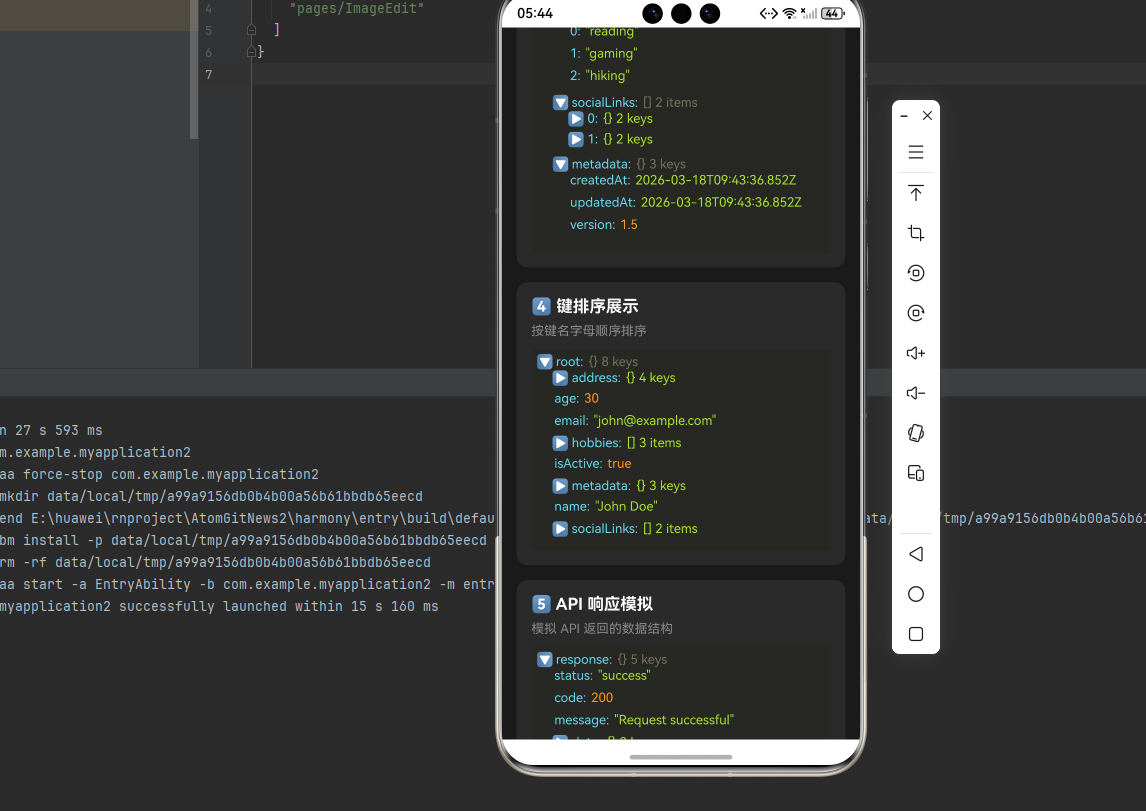
下面是一个完整的示例,展示了 react-native-json-tree 的各种功能应用:
typescript
import React, { useState, useCallback } from 'react';
import {
  View,
  Text,
  StyleSheet,
  ScrollView,
  SafeAreaView,
  TouchableOpacity,
  Switch,
  Alert,
} from 'react-native';
import JSONTree from 'react-native-json-tree';

function JsonTreeDemo() {
  const [hideRoot, setHideRoot] = useState(false);
  const [invertTheme, setInvertTheme] = useState(false);
  const [currentTheme, setCurrentTheme] = useState('monokai');

  // 示例数据
  const sampleData = {
    name: 'John Doe',
    age: 30,
    email: 'john@example.com',
    isActive: true,
    address: {
      street: '123 Main St',
      city: 'New York',
      country: 'USA',
      coordinates: {
        lat: 40.7128,
        lng: -74.0060,
      },
    },
    hobbies: ['reading', 'gaming', 'hiking'],
    socialLinks: [
      { platform: 'GitHub', url: 'https://github.com/johndoe' },
      { platform: 'Twitter', url: 'https://twitter.com/johndoe' },
    ],
    metadata: {
      createdAt: new Date(),
      updatedAt: new Date(),
      version: 1.5,
    },
  };

  // 主题配置
  const themes = {
    monokai: {
      scheme: 'monokai',
      author: 'wimer hazenberg',
      base00: '#272822',
      base01: '#383830',
      base02: '#49483e',
      base03: '#75715e',
      base04: '#a59f85',
      base05: '#f8f8f2',
      base06: '#f5f4f1',
      base07: '#f9f8f5',
      base08: '#f92672',
      base09: '#fd971f',
      base0A: '#f4bf75',
      base0B: '#a6e22e',
      base0C: '#a1efe4',
      base0D: '#66d9ef',
      base0E: '#ae81ff',
      base0F: '#cc6633',
    },
    github: {
      scheme: 'github',
      author: 'Defman21',
      base00: '#ffffff',
      base01: '#f5f5f5',
      base02: '#c8e1ff',
      base03: '#969896',
      base04: '#e8e8e8',
      base05: '#333333',
      base06: '#ffffff',
      base07: '#ffffff',
      base08: '#ed6a43',
      base09: '#0086b3',
      base0A: '#795da3',
      base0B: '#183691',
      base0C: '#183691',
      base0D: '#795da3',
      base0E: '#a71d5d',
      base0F: '#333333',
    },
    oceanic: {
      scheme: 'oceanicnext',
      author: 'voronianski',
      base00: '#1B2B34',
      base01: '#343D46',
      base02: '#4F5B66',
      base03: '#65737E',
      base04: '#A7ADBA',
      base05: '#C0C5CE',
      base06: '#CDD3DE',
      base07: '#D8DEE9',
      base08: '#EC5f67',
      base09: '#F99157',
      base0A: '#FAC863',
      base0B: '#99C794',
      base0C: '#5FB3B3',
      base0D: '#6699CC',
      base0E: '#C594C5',
      base0F: '#AB7967',
    },
  };

  // 格式化日期
  const formatDate = useCallback((date: any) => {
    if (!(date instanceof Date)) return date;
    const year = date.getFullYear();
    const month = String(date.getMonth() + 1).padStart(2, '0');
    const day = String(date.getDate()).padStart(2, '0');
    return `${year}-${month}-${day}`;
  }, []);

  // 节点展开控制
  const shouldExpandNode = useCallback((keyName: any, data: any, level: number) => {
    // 展开前两层
    if (level < 2) return true;
    // 展开 address 相关节点
    if (keyName.includes && keyName.includes('address')) return true;
    return false;
  }, []);

  // 自定义标签渲染
  const labelRenderer = useCallback((keyPath: string[], nodeType?: string) => {
    const key = keyPath[keyPath.length - 1];
    let icon = '';

    const type = nodeType || '';
    if (type.includes('Object')) {
      icon = '📦 ';
    } else if (type.includes('Array')) {
      icon = '📋 ';
    } else if (type.includes('String')) {
      icon = '📝 ';
    } else if (type.includes('Number')) {
      icon = '🔢 ';
    } else if (type.includes('Boolean')) {
      icon = '✓ ';
    }

    return (
      <Text style={styles.labelText}>
        {icon}{String(key)}
      </Text>
    );
  }, []);

  // 自定义值渲染
  // 注意:valueRenderer 只接收一个参数 value(渲染后的值)
  const valueRenderer = useCallback((value: any) => {
    // URL 可点击
    if (typeof value === 'string' && value.startsWith('http')) {
      return (
        <Text style={styles.urlText}>
          🔗 {value}
        </Text>
      );
    }

    // 布尔值特殊显示
    if (typeof value === 'boolean') {
      return (
        <Text style={value ? styles.trueText : styles.falseText}>
          {value ? '✓ true' : '✗ false'}
        </Text>
      );
    }

    // 数字格式化
    if (typeof value === 'number') {
      return (
        <Text style={styles.numberText}>
          {String(value)}
        </Text>
      );
    }

    return <Text style={styles.valueText}>{String(value)}</Text>;
  }, []);

  // 值预处理
  const postprocessValue = useCallback((value: any) => {
    if (value instanceof Date) {
      return formatDate(value);
    }
    if (typeof value === 'number') {
      return value.toFixed(4);
    }
    return value;
  }, [formatDate]);

  // 切换主题
  const cycleTheme = () => {
    const themeKeys = Object.keys(themes);
    const currentIndex = themeKeys.indexOf(currentTheme);
    const nextIndex = (currentIndex + 1) % themeKeys.length;
    setCurrentTheme(themeKeys[nextIndex]);
  };

  return (
    <SafeAreaView style={styles.container}>
      <ScrollView style={styles.scrollView} contentContainerStyle={styles.scrollContent}>
        <Text style={styles.title}>🌳 JSON Tree 数据展示演示</Text>

        {/* 控制面板 */}
        <View style={styles.controlPanel}>
          <Text style={styles.panelTitle}>⚙️ 控制面板</Text>

          <View style={styles.controlRow}>
            <Text style={styles.controlLabel}>隐藏根节点</Text>
            <Switch value={hideRoot} onValueChange={setHideRoot} />
          </View>

          <View style={styles.controlRow}>
            <Text style={styles.controlLabel}>反转主题</Text>
            <Switch value={invertTheme} onValueChange={setInvertTheme} />
          </View>

          <TouchableOpacity style={styles.themeButton} onPress={cycleTheme}>
            <Text style={styles.themeButtonText}>
              切换主题 ({currentTheme})
            </Text>
          </TouchableOpacity>
        </View>

        {/* 基础展示 */}
        <View style={styles.section}>
          <Text style={styles.sectionTitle}>1️⃣ 基础数据展示</Text>
          <Text style={styles.description}>展示用户信息 JSON 数据</Text>
          <JSONTree
            data={sampleData}
            theme={themes[currentTheme as keyof typeof themes]}
            invertTheme={invertTheme}
            hideRoot={hideRoot}
          />
        </View>

        {/* 自定义渲染 */}
        <View style={styles.section}>
          <Text style={styles.sectionTitle}>2️⃣ 自定义渲染</Text>
          <Text style={styles.description}>使用自定义标签和值渲染器</Text>
          <JSONTree
            data={sampleData}
            theme={themes[currentTheme as keyof typeof themes]}
            invertTheme={invertTheme}
            hideRoot={hideRoot}
            labelRenderer={labelRenderer}
            valueRenderer={valueRenderer}
            postprocessValue={postprocessValue}
          />
        </View>

        {/* 节点展开控制 */}
        <View style={styles.section}>
          <Text style={styles.sectionTitle}>3️⃣ 节点展开控制</Text>
          <Text style={styles.description}>只展开前两层和 address 节点</Text>
          <JSONTree
            data={sampleData}
            theme={themes[currentTheme as keyof typeof themes]}
            invertTheme={invertTheme}
            shouldExpandNode={shouldExpandNode}
          />
        </View>

        {/* 键排序 */}
        <View style={styles.section}>
          <Text style={styles.sectionTitle}>4️⃣ 键排序展示</Text>
          <Text style={styles.description}>按键名字母顺序排序</Text>
          <JSONTree
            data={sampleData}
            theme={themes[currentTheme as keyof typeof themes]}
            invertTheme={invertTheme}
            sortObjectKeys={(a: any, b: any) => String(a).localeCompare(String(b))}
          />
        </View>

        {/* API 响应数据 */}
        <View style={styles.section}>
          <Text style={styles.sectionTitle}>5️⃣ API 响应模拟</Text>
          <Text style={styles.description}>模拟 API 返回的数据结构</Text>
          <JSONTree
            data={{
              status: 'success',
              code: 200,
              message: 'Request successful',
              data: {
                users: [
                  { id: 1, name: 'Alice', role: 'admin' },
                  { id: 2, name: 'Bob', role: 'user' },
                  { id: 3, name: 'Charlie', role: 'user' },
                ],
                pagination: {
                  page: 1,
                  limit: 10,
                  total: 100,
                  totalPages: 10,
                },
              },
              timestamp: new Date().toISOString(),
            }}
            theme={themes[currentTheme as keyof typeof themes]}
            invertTheme={invertTheme}
            keyPath={['response']}
          />
        </View>

        {/* 错误响应数据 */}
        <View style={styles.section}>
          <Text style={styles.sectionTitle}>6️⃣ 错误响应模拟</Text>
          <Text style={styles.description}>模拟 API 错误返回</Text>
          <JSONTree
            data={{
              status: 'error',
              code: 400,
              message: 'Validation failed',
              errors: [
                { field: 'email', message: 'Invalid email format' },
                { field: 'password', message: 'Password too short' },
              ],
            }}
            theme={themes[currentTheme as keyof typeof themes]}
            invertTheme={invertTheme}
          />
        </View>
      </ScrollView>
    </SafeAreaView>
  );
}

const styles = StyleSheet.create({
  container: {
    flex: 1,
    backgroundColor: '#1a1a1a',
  },
  scrollView: {
    flex: 1,
  },
  scrollContent: {
    padding: 16,
  },
  title: {
    fontSize: 24,
    fontWeight: 'bold',
    color: '#fff',
    textAlign: 'center',
    marginBottom: 20,
  },
  controlPanel: {
    backgroundColor: '#2a2a2a',
    borderRadius: 12,
    padding: 16,
    marginBottom: 16,
  },
  panelTitle: {
    fontSize: 16,
    fontWeight: 'bold',
    color: '#fff',
    marginBottom: 12,
  },
  controlRow: {
    flexDirection: 'row',
    justifyContent: 'space-between',
    alignItems: 'center',
    paddingVertical: 8,
  },
  controlLabel: {
    fontSize: 14,
    color: '#ccc',
  },
  themeButton: {
    backgroundColor: '#66d9ef',
    paddingVertical: 12,
    paddingHorizontal: 20,
    borderRadius: 8,
    marginTop: 12,
    alignItems: 'center',
  },
  themeButtonText: {
    color: '#272822',
    fontWeight: 'bold',
    fontSize: 14,
  },
  section: {
    backgroundColor: '#2a2a2a',
    borderRadius: 12,
    padding: 16,
    marginBottom: 16,
  },
  sectionTitle: {
    fontSize: 18,
    fontWeight: 'bold',
    color: '#fff',
    marginBottom: 8,
  },
  description: {
    fontSize: 14,
    color: '#888',
    marginBottom: 12,
  },
  labelText: {
    fontWeight: 'bold',
    color: '#66d9ef',
  },
  valueText: {
    color: '#a6e22e',
  },
  urlText: {
    color: '#66d9ef',
    textDecorationLine: 'underline',
  },
  trueText: {
    color: '#a6e22e',
    fontWeight: 'bold',
  },
  falseText: {
    color: '#f92672',
    fontWeight: 'bold',
  },
  numberText: {
    color: '#ae81ff',
  },
});

export default JsonTreeDemo;
⚠️ 注意事项与最佳实践
1. 性能优化
typescript
// ✅ 推荐:使用 useCallback 缓存回调函数
const shouldExpandNode = useCallback((keyName: any, data: any, level: number) => {
  return level < 2;
}, []);

const labelRenderer = useCallback((keyPath: string[], nodeType?: string) => {
  return <Text>{keyPath[keyPath.length - 1]}</Text>;
}, []);

<JSONTree
  data={data}
  shouldExpandNode={shouldExpandNode}
  labelRenderer={labelRenderer}
/>

// ⚠️ 避免:内联函数(每次渲染都会重新创建)
<JSONTree
  data={data}
  shouldExpandNode={(keyName, data, level) => level < 2}
/>
2. 大数据量处理
typescript
// ✅ 推荐:控制展开层级,减少渲染节点
<JSONTree
  data={largeData}
  shouldExpandNode={(keyName: any, data: any, level: number) => level < 1}
/>

// ✅ 推荐:数据预处理,精简展示内容
const processedData = {
  ...originalData,
  largeArray: originalData.largeArray.slice(0, 10),
};
<JSONTree data={processedData} />
3. 主题适配
typescript
// ✅ 推荐:根据应用主题动态切换
const isDarkMode = useColorScheme() === 'dark';

const theme = isDarkMode ? darkTheme : lightTheme;

<JSONTree
  data={data}
  theme={theme}
  invertTheme={!isDarkMode}
/>
4. 敏感数据处理
typescript
// ✅ 推荐:过滤或脱敏敏感数据
const sanitizeData = (data: any) => {
  const sanitized = { ...data };
  delete sanitized.password;
  delete sanitized.token;
  if (sanitized.creditCard) {
    sanitized.creditCard = '**** **** **** ' + sanitized.creditCard.slice(-4);
  }
  return sanitized;
};

<JSONTree data={sanitizeData(userData)} />
⚠️ 已知问题
1. sortObjectKeys=true 不生效
根据库的源码实现(getCollectionEntries.js),只有当 sortObjectKeys 是函数类型时才会执行排序:
javascript
// 源码中的判断逻辑
if (typeof sortObjectKeys === 'function') {
  keys.sort(sortObjectKeys);
}
解决方案 :使用排序函数代替 true
typescript
// ❌ 不生效
<JSONTree data={data} sortObjectKeys={true} />

// ✅ 正确用法
<JSONTree
  data={data}
  sortObjectKeys={(a: any, b: any) => String(a).localeCompare(String(b))}
/>
2. collectionLimit 属性不生效
collectionLimit 属性在 HarmonyOS 上不生效,这与 iOS 表现一致。
Issue : issue#163
替代方案:在传入数据前预处理,限制数组长度
typescript
// 预处理数据,限制数组长度
const limitArrayLength = (data: any, maxLength: number = 10): any => {
  if (Array.isArray(data)) {
    return data.slice(0, maxLength).map(item => limitArrayLength(item, maxLength));
  }
  if (typeof data === 'object' && data !== null) {
    const result: any = {};
    for (const key in data) {
      result[key] = limitArrayLength(data[key], maxLength);
    }
    return result;
  }
  return data;
};

<JSONTree data={limitArrayLength(originalData, 5)} />
🧪 测试验证
1. 测试要点
- 基础展示: 确认 JSON 数据能正常显示为树形结构
- 节点展开折叠: 验证点击节点可以展开/折叠
- 主题切换: 测试不同主题的显示效果
- 自定义渲染: 验证 labelRenderer 和 valueRenderer 效果
- 数据类型识别: 确认不同数据类型显示正确的颜色
2. 常见问题排查
问题 1: 树形结构不显示
- 检查
data属性是否正确传入 - 确认数据格式是否为有效 JSON
问题 2: 样式显示异常
- 检查
theme配置是否正确 - 确认
invertTheme设置是否合理
问题 3: 自定义渲染不生效
- 确认回调函数是否正确返回 ReactNode
- 检查是否使用了正确的参数
问题 4: 性能问题
- 减少数据量或控制展开层级
- 使用
useCallback缓存回调函数
📊 API 支持情况总览
| 属性 | 说明 | HarmonyOS 支持 |
|---|---|---|
data |
要展示的 JSON 数据 | ✅ |
theme |
树状视图的主题样式 | ✅ |
shouldExpandNode |
控制节点是否展开的函数 | ✅ |
hideRoot |
是否隐藏树的根节点 | ✅ |
invertTheme |
是否反转主题颜色 | ✅ |
getItemString |
自定义节点显示文本 | ✅ |
labelRenderer |
自定义节点标签的渲染函数 | ✅ |
valueRenderer |
自定义节点值的渲染函数 | ✅ |
sortObjectKeys |
对 JSON 对象的键进行排序 | ✅ |
keyPath |
标识和定制特定路径的数据节点 | ✅ |
collectionLimit |
显示集合元素的最大数量 | ❌ |
postprocessValue |
值渲染前的自定义处理 | ✅ |
isCustomNode |
指定使用自定义渲染的节点 | ✅ |
📝 总结
通过集成 react-native-json-tree,我们为项目添加了强大的 JSON 数据可视化能力。该库提供了丰富的主题定制选项和灵活的渲染控制,特别适合开发调试工具、API 监控面板、配置管理界面等场景。