文章目录
概要
部门需求,要求检索可以实现,自选检索字段、检索条件、参数。并且在页面不要冗余显示。
整体流程
1.前端效果

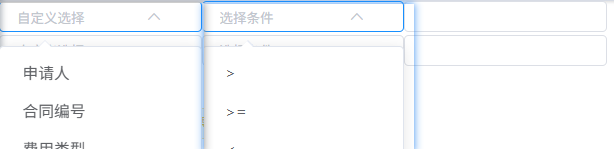
前端部分通过组件实现,下拉选项 由字典提供。
2.后端
这一部分由mybatis拼接后,进行sql查询
技术细节
2.1检索条件的映射
java
    <!-- 字段映射片段  -->
    <sql id="searchCondition">
        <choose>
            <when test="${searchKey} == 'code'"> //此处就是对应的字段
                <include refid="buildCondition">
                    <property name="column" value="code"/>
                    <property name="searchType" value="${searchType}"/>//选择的参数
                    <property name="inputA" value="${inputA}"/>//检索的数值
                    <property name="inputB" value="${inputB}"/>//检索的数值多选
                </include>
            </when>
        </choose>
    </sql>
2.2 可复用的条件构建片段
java
<!-- 可复用的条件构建片段 -->
<sql id="buildCondition">
<choose>
<when test="${searchType} == 'dayu'">
and ${column} > #{${inputA}}
</when>
<when test="${searchType} == 'dayudengyu'">
and ${column} >= #{${inputA}}
</when>
<when test="${searchType} == 'isnull'">
and ${column} is null
</when>
<when test="${searchType} == 'isnotnull'">
and ${column} is not null
</when>
</choose>
</sql>2.3检索语句的使用
java
  <select id="selectList" parameterType="listParameter" resultMap="listParameterResult">
  select * from
   <where>
                   <include refid="searchCondition"> //有多个就对应创建多个
                    <property name="searchKey" value="params.searchKey1"/>//我是用数字区分
                    <property name="searchType" value="params.searchType1"/>
                    <property name="inputA" value="params.searchInputA1"/>
                    <property name="inputB" value="params.searchInputB1"/>
                </include>
                 </where>
                    </select>