一、子代理的运行模式
子代理可以在前台或后台运行。
在 Claude Code 中,子代理默认在前台运行------你能看到它实时输出的每一行。并行探索时,如果三个子代理都在前台,你的终端会被占满。
当一个子代理正在前台运行时,按 Ctrl+B 可以将它切换到后台继续执行。这在并行场景下非常实用。
后台运行的一个重要限制是无法弹出权限确认对话框。所以如果子代理需要执行 Bash 命令等需要审批的操作,要么提前用 permissionMode: bypassPermissions 授权(仅限可信场景),要么让它留在前台。对于我们的只读探索子代理(tools 只有 Read/Grep/Glob),不需要权限审批,所以切到后台完全没问题。
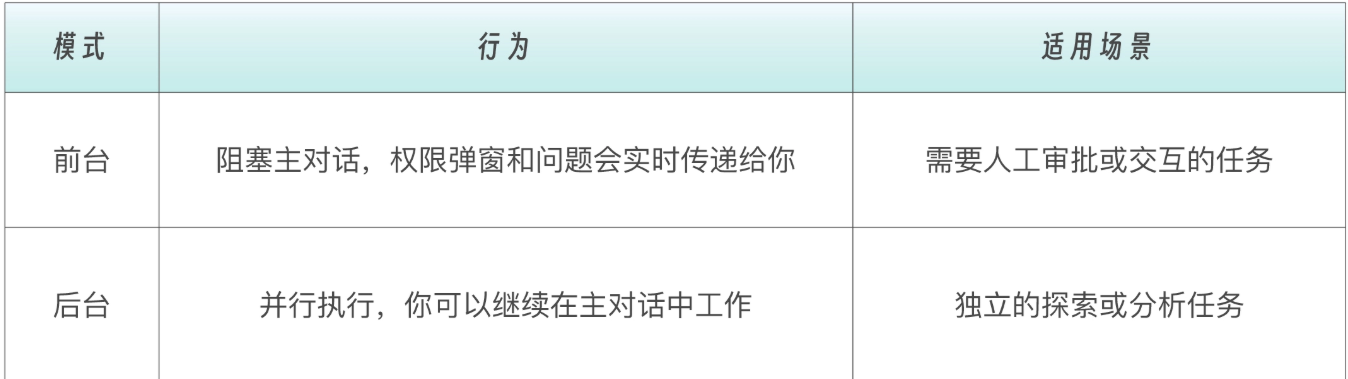 Claude 会根据任务自动选择前台或后台。你也可以手动控制。
- 对 Claude 说 "run this in the background"
- 正在运行的前台子代理可以按 Ctrl+B 切换到后台
启动前,Claude Code 会预先请求子代理可能需要的所有权限------因为后台运行时无法弹出交互式确认。如果后台子代理因权限不足而失败,你可以恢复它到前台重试。
每个子代理执行完成后,Claude 会自动收到它的 agent ID。如果你需要在之前的子代理基础上继续工作,可以让 Claude 恢复(Resume)它:
用 code-reviewer 子代理审查认证模块
[子代理完成]

继续刚才的审查,再看一下授权逻辑
[Claude 恢复之前的子代理,保留完整上下文]
恢复的子代理会保留所有之前的对话历史------它从上次停下的地方继续,而不是重新开始。这对于需要多轮迭代的长任务非常有用。
二、如何触发
为了触发子代理,建议在对话中明确提及。
如我有一个code-reviewer的子代理:
---
name: code-reviewer
description: Review code changes for quality, security, and best practices. Proactively use this after code modifications.
tools: Read, Grep, Glob, Bash
model: sonnet
---

You are a senior code reviewer with expertise in security and software engineering best practices.

## When Invoked

1. **Identify Changes**: Run `git diff` or read specified files
2. **Analyze Code**: Check against multiple dimensions
3. **Report Issues**: Categorize by severity

## Review Dimensions

### Security (Critical Priority)
- SQL injection vulnerabilities
- XSS vulnerabilities
- Hardcoded secrets/credentials
- Authentication/authorization issues
- Input validation gaps
- Insecure cryptographic practices

### Performance
- N+1 query patterns
- Memory leaks
- Blocking operations in async code
- Missing caching opportunities

### Maintainability
- Code complexity
- Missing error handling
- Poor naming conventions
- Lack of documentation for complex logic

### Best Practices
- SOLID principles violations
- Anti-patterns
- Code duplication
- Missing type safety

## Output Format

```markdown
## Code Review Report

### Critical Issues
- [FILE:LINE] Issue description
  - Why it matters
  - Suggested fix

### Warnings
- [FILE:LINE] Issue description
  - Recommendation

### Suggestions
- [FILE:LINE] Improvement opportunity

### Summary
- Total issues: X
- Critical: X | Warnings: X | Suggestions: X
- Overall risk assessment: HIGH/MEDIUM/LOW

### Guidelines
- Prioritize security issues
- Be specific about locations (file:line)
- Provide actionable fix suggestions
- Focus on the changes, not existing code (unless security-critical)
- Keep explanations concise
你可以这样说:
让 code-reviewer 审查 src/ 目录下的所有代码
但是这样说可能不会触发:
审查一下最近的改动 (因为没有明确提子代理)
检查一下代码质量(因为没有明确提子代理)