@TOC(Android jetpack LiveData (一) 使用篇)
引言
上一期我们学习了Lifecycle的相关使用和原理(有需要可以移步Lifecycle使用篇、Lifecycle原理篇),本期我们将继续学习jetpack的相关架构组件LiveData的使用。
LiveData概述
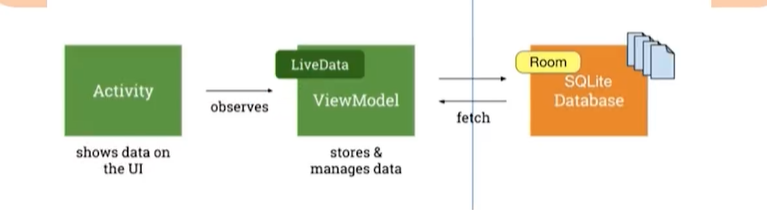
LiveData是一种可观察的数据存储器类。但与常规的观察类不同,它还具有生命周期感知能力。遵循其他组件(Activity\fragment\service)的生命周期。也就是说,LiveData 只会将更新通知给活跃(生命周期处于 STARTED 或 RESUMED 状态 )的观察者。
它是基于观察者的消息订阅/分发组件,具有宿主(Activity/Fragment)生命周期感知能力。
LiveData优势
- 无需自己手动更新UI界面 (由数据驱动更新)
LiveData 遵循观察者模式。当底层数据发生变化时,LiveData 会通知 Observer 对象。您可以整合代码以在这些 Observer 对象中更新界面。这样一来,您无需在每次应用数据发生变化时更新界面,因为观察者会替您完成更新。 - 不会有内存泄漏
观察者会绑定到 Lifecycle 对象,并在其关联的生命周期遭到销毁后进行自我清理。 - 不会因为Activity停止而导致崩溃
如果观察者的生命周期处于非活跃状态(如返回堆栈中的 activity),它便不会接收任何 LiveData 事件。 - 无需手动处理生命周期
界面组件只是观察相关数据,不会停止或恢复观察。LiveData 将自动管理所有这些操作,因为它在观察时可以感知相关的生命周期状态变化。 - 数据始终保持最新状态
如果生命周期变为非活跃状态,它会在再次变为活跃状态时接收最新的数据。例如,曾经在后台的 Activity 会在返回前台后立即接收最新的数据。 - 资源共享
您可以使用单例模式扩展 LiveData 对象以封装系统服务,以便在应用中共享它们。LiveData 对象连接到系统服务一次,然后需要相应资源的任何观察者只需观察 LiveData 对象。
LiveData的使用
1、创建LiveData对象
LiveData 对象通常存储在 ViewModel 对象中,并可通过 getter 方法进行访问。
LiveData是一个抽象类,不能直接被使用,通常使用的是其子类MutableLiveData
kotlin
class BlankViewModel : ViewModel() {

    private var progress: MutableLiveData<Int> = MutableLiveData()

    fun getProgress(): LiveData<Int> {

        return progress
    }

    fun setProgress(value: Int) {
        progress.value = value
    }

    override fun onCleared() {
        super.onCleared()
        progress.value = 0
    }
}
2、设置数据变化(事件触发,或者接口回调获取的数据变化)
kotlin
progressLD.setOnSeekBarChangeListener(object : SeekBar.OnSeekBarChangeListener{
            override fun onProgressChanged(
                p0: SeekBar?,
                p1: Int,
                p2: Boolean
            ) {
                // setValue在主线程中。
                progressbarLiveData.value = p1
                // postValue在子线程
                thread {
                    progressbarLiveData.postValue(p1)
                }
            }

            override fun onStartTrackingTouch(p0: SeekBar?) {
            }

            override fun onStopTrackingTouch(p0: SeekBar?) {
            }
        })
3、观察liveData对象的变化,更新UI(Fragment、Activity中)
使用LifecycleOwner的observe() 方法将观察者对象附加到LiveData对象
kotlin
 viewModel = ViewModelProvider(this).get(BlankViewModel::class.java)
 progressbarLiveData = viewModel.getProgress() as MutableLiveData<Int>
 progressbarLiveData.observe(viewLifecycleOwner, Observer<Int> {
            progressLD.progress = it
            progressLDTV.text = "当前进度为:$it"
        })
4、xml
kotlin
	<FrameLayout
        android:id="@+id/fl_one"
        android:layout_width="match_parent"
        android:layout_height="wrap_content"
        android:layout_weight="1"
        app:layout_constraintTop_toBottomOf="parent"
        android:background="#72EF89"
        >
        <SeekBar
            android:id="@+id/progressbar_ld"
            style="?android:attr/progressBarStyleHorizontal"
            android:layout_width="match_parent"
            android:layout_height="wrap_content"
            android:layout_marginTop="50dp"
            android:layout_marginHorizontal="30dp"
            app:layout_constraintTop_toTopOf="parent"
            android:progress="20"
            />
        <TextView
            android:id="@+id/progressbar_tv"
            android:layout_width="match_parent"
            android:layout_height="wrap_content"
            android:textSize="22sp"
            android:layout_gravity="center"
            app:layout_constraintTop_toBottomOf="@id/progressbar_ld"
            android:layout_marginTop="20dp"
            />
    </FrameLayout>
这样当手动移动seekbar的进度条时,下面的文字会跟着更新UI,显示目前的进度。
数据黏性
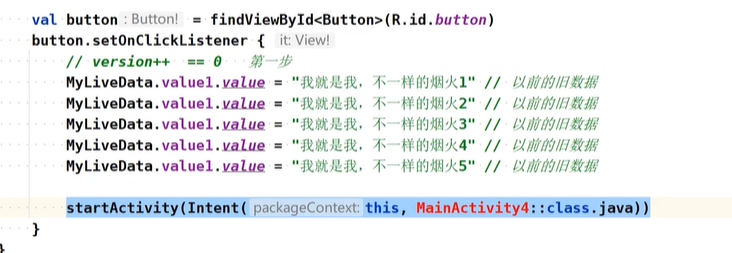
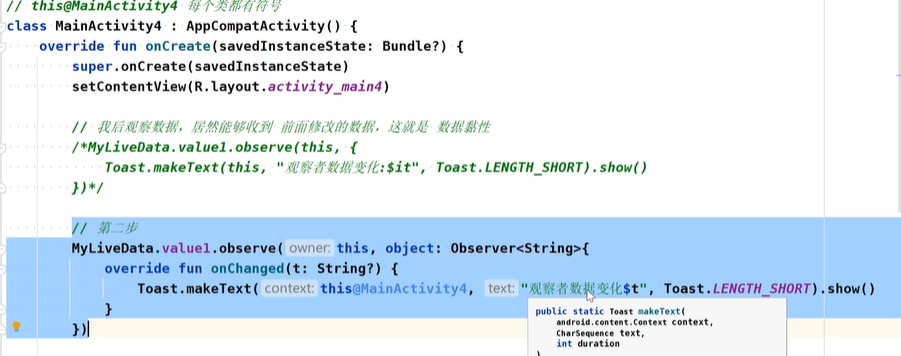
先发布后订阅,但是可以接收到原来的数据。
发送数据,然后跳转页面
在第二个页面接收
正常思维逻辑
先订阅,再触发。可以接收数据
数据黏性思维
先触发,再订阅,仍然可以接收到订阅之前的旧数据。