目录
[1.装饰器模式(上)](#1.装饰器模式(上))
[1. 装饰器模式的核心定义](#1. 装饰器模式的核心定义)
[2. 核心应用场景:按钮功能迭代的问题与解决](#2. 核心应用场景:按钮功能迭代的问题与解决)
[3. 案例练习:日志打印装饰器](#3. 案例练习:日志打印装饰器)
[TS 优越性总结](#TS 优越性总结)
[1. 前置知识:ES7 装饰器基础](#1. 前置知识:ES7 装饰器基础)
[1.1 两种核心装饰器语法](#1.1 两种核心装饰器语法)
[1.2 环境配置(Babel 转码)](#1.2 环境配置(Babel 转码))
[2. 装饰器语法糖的核心逻辑](#2. 装饰器语法糖的核心逻辑)
[2.1 装饰器的参数含义](#2.1 装饰器的参数含义)
[2.2 装饰器的执行时机](#2.2 装饰器的执行时机)
[2.3 属性描述对象(descriptor)](#2.3 属性描述对象(descriptor))
[3. 装饰器模式的生产实践](#3. 装饰器模式的生产实践)
[4. 案例练习:函数性能监控装饰器](#4. 案例练习:函数性能监控装饰器)
[TS 实现的核心优越性](#TS 实现的核心优越性)
1.装饰器模式(上)
1. 装饰器模式的核心定义
装饰器模式(又名装饰者模式)的核心是:在不修改原对象/函数逻辑的前提下,通过"包装拓展"为其新增功能 。
它严格遵循两大设计原则:
- 开放-封闭原则:对功能拓展开放,对原有逻辑修改封闭;
- 单一职责原则:将原有逻辑与新增逻辑分离,各自只负责单一功能。
2. 核心应用场景:按钮功能迭代的问题与解决
初始需求与迭代痛点
- 初始需求:页面按钮点击后弹出"您还未登录哦"的弹窗;
- 迭代需求:弹窗弹出后,需额外实现"按钮文案改为'快去登录'+按钮置灰(不可点击)";
- 直接修改的痛点 :若直接修改按钮点击事件的原逻辑(如在
addEventListener回调中加代码),需改动所有业务中的同类按钮(如"点我开始""点击购买"),且违背"开放-封闭"和"单一职责"原则。
装饰器模式的解决方案
核心思路:分离"原有逻辑"和"新增逻辑",用"装饰器"包裹原逻辑并注入新功能,步骤如下:
-
抽离原有逻辑(弹窗功能)为独立函数,避免直接修改;
-
编写新增逻辑(改文案、置灰)为独立函数,再整合为"装饰逻辑";
-
组合执行原有逻辑和装饰逻辑,实现功能拓展。
// 1. 原有逻辑:弹窗功能(抽离为独立函数)
function openModal() {
const modal = new Modal(); // 文章中定义的单例弹窗(确保只创建一次)
modal.style.display = 'block';
}// 2. 新增逻辑:按钮状态修改(拆分后整合,符合单一职责)
function changeButtonText() {
const btn = document.getElementById('open');
btn.innerText = '快去登录';
}
function disableButton() {
const btn = document.getElementById('open');
btn.disabled = true;
}
// 装饰逻辑:整合新增功能
function changeButtonStatus() {
changeButtonText();
disableButton();
}// 3. 组合执行:不修改原函数,仅新增装饰逻辑
document.getElementById('open').addEventListener('click', () => {
openModal(); // 原有逻辑
changeButtonStatus(); // 装饰逻辑
});// 1. 原有对象:按钮类(含弹窗逻辑)
class OpenButton {
onClick() {
const modal = new Modal();
modal.style.display = 'block';
}
}// 2. 装饰器类:持有原按钮实例,拓展功能
class ButtonDecorator {
constructor(openButton) {
this.openButton = openButton; // 保存原对象引用,避免修改原对象
}// 装饰后的核心方法:先执行原逻辑,再执行新增逻辑
onClick() {
this.openButton.onClick(); // 原有逻辑
this.changeButtonStatus(); // 新增逻辑
}// 新增逻辑拆分(单一职责)
changeButtonStatus() {
this.changeButtonText();
this.disableButton();
}
changeButtonText() { /* 逻辑同上 / }
disableButton() { / 逻辑同上 */ }
}// 3. 使用装饰器
const openButton = new OpenButton();
const decoratedButton = new ButtonDecorator(openButton);
document.getElementById('open').addEventListener('click', () => {
decoratedButton.onClick(); // 执行装饰后的逻辑
});
关键原则:单一职责的平衡
- 拆分的意义 :将"改文案"和"置灰"拆分为独立函数,便于单独复用(如其他场景只需"置灰"时,可直接调用
disableButton),且修改一个逻辑不会影响另一个; - 不盲目拆分:若逻辑极简单(如仅1-2行代码),过度拆分会导致代码碎片化,需根据实际复杂度判断(文章示例拆分是为了强化"单一职责"意识)。
3. 案例练习:日志打印装饰器
需求描述
现有两个计算函数(加法add、乘法multiply),需在不修改原函数的前提下,为其新增"日志打印"功能:
-
函数执行前,打印"输入参数:参数1, 参数2";
-
函数执行后,打印"执行结果:结果"。
// 1. 原计算函数(不修改任何逻辑)
function add(a, b) {
return a + b;
}
function multiply(a, b) {
return a * b;
}// 2. 日志装饰器:接收原函数,返回装饰后的函数
function logDecorator(fn) {
// 返回新函数,用...args保留原函数所有参数,apply保持this指向
return function(...args) {
// 装饰逻辑:打印输入参数
console.log(输入参数:${args.join(', ')});
// 执行原函数,获取结果
const result = fn.apply(this, args);
// 装饰逻辑:打印执行结果
console.log(执行结果:${result});
// 返回原函数结果,不改变原函数的返回值
return result;
};
}// 3. 使用装饰器
const decoratedAdd = logDecorator(add);
const decoratedMultiply = logDecorator(multiply);// 测试
decoratedAdd(2, 3); // 输出:输入参数:2, 3 → 执行结果:5 → 返回5
decoratedMultiply(4, 5); // 输出:输入参数:4, 5 → 执行结果:20 → 返回20
TS 的核心优势是类型安全:通过泛型和类型约束,确保装饰器仅作用于符合预期的函数(如"接收两个数字、返回数字"),避免运行时错误。
// 1. 定义函数类型:约束"接收两个number参数,返回number"的函数
type BinaryNumberFn = (a: number, b: number) => number;

// 2. 原计算函数(带类型标注,确保输入输出类型正确)
const add: BinaryNumberFn = (a, b) => a + b;
const multiply: BinaryNumberFn = (a, b) => a * b;

// 3. 日志装饰器:用泛型约束输入函数类型为BinaryNumberFn
function logDecorator(fn: BinaryNumberFn): BinaryNumberFn {
  // 返回的新函数与原函数类型完全一致(TS自动推断)
  return function(a: number, b: number): number {
    // 装饰逻辑:参数类型明确,不会出现非数字
    console.log(`输入参数:${a}, ${b}`);
    // 执行原函数:fn类型被约束,可安全调用
    const result = fn(a, b);
    // 装饰逻辑:result类型为number,无需担心类型错误
    console.log(`执行结果:${result}`);
    return result;
  };
}

// 4. 使用装饰器(装饰后函数仍为BinaryNumberFn类型,类型安全)
const decoratedAdd = logDecorator(add);
const decoratedMultiply = logDecorator(multiply);

// 测试:TS编译时检查类型
decoratedAdd(2, 3); // 正确:输出日志,返回5
// decoratedAdd('2', 3); // 错误:TS编译报错,参数"2"应为number类型
decoratedMultiply(4, 5); // 正确:输出日志,返回20
TS 优越性总结
- 类型约束 :通过
BinaryNumberFn限制装饰器仅能处理"两个数字参数、返回数字"的函数,避免传入字符串、对象等错误类型; - 编译时报错 :调用装饰后的函数时,若参数类型错误(如
'2'),TS 会在编译阶段报错,而非运行时崩溃; - 开发提示 :IDE 会根据类型标注提供参数提示(如
a: number),降低开发错误率。
2.装饰器模式(下)
1. 前置知识:ES7 装饰器基础
装饰器模式的核心是「不修改原对象/函数逻辑,通过外层包装拓展功能」,ES7 提供 @ 语法糖简化实现,需先掌握基础用法与环境配置。
1.1 两种核心装饰器语法
|-------|-----------------------------------|--------------|
| 装饰类型 | 语法示例 | 核心作用 |
| 类装饰器 | 装饰器函数接收「类本身」作为参数,给类添加静态属性/方法 | 增强类的静态能力 |
| 方法装饰器 | 装饰器函数接收「类原型、方法名、属性描述对象」,修改方法的执行逻辑 | 增强类实例方法的动态能力 |
// 1. 类装饰器示例
function classDecorator(target) {
  target.version = "1.0.0"; // 给类添加静态属性
  return target;
}
@classDecorator
  class User {}
console.log(User.version); // 1.0.0

// 2. 方法装饰器示例
function logDecorator(target, methodName, descriptor) {
  const original = descriptor.value;
  // 重写方法:执行前打印日志
  descriptor.value = function (...args) {
    console.log(`调用 ${methodName},参数:${args}`);
    return original.apply(this, args);
  };
  return descriptor;
}
class User {
  @logDecorator
  getName(name) {
    return `Hello ${name}`;
  }
}
new User().getName("张三"); // 打印:调用 getName,参数:张三 → 返回 Hello 张三
1.2 环境配置(Babel 转码)
浏览器/Node 暂不原生支持装饰器语法,需通过 Babel 转码:
-
安装依赖:
npm install babel-preset-env babel-plugin-transform-decorators-legacy --save-dev{ "presets": ["env"], "plugins": ["transform-decorators-legacy"] }
-
转码命令:
babel 源文件.js --out-file 目标文件.js
2. 装饰器语法糖的核心逻辑
@装饰器****本质是语法糖 ,底层仍基于 JS 原生能力(如 Object.defineProperty),关键需理解 3 个核心点:
2.1 装饰器的参数含义
|-------|---------------|----------|--------|
| 装饰类型 | target(第一个参数) | 第二个参数 | 第三个参数 |
| 类装饰器 | 被装饰的「类本身」 | 无 | 无 |
| 方法装饰器 | 被装饰方法所属的「类原型」 | 方法名(字符串) | 属性描述对象 |
关键区别:方法装饰器的 target 是「类原型」而非实例,因为装饰器执行时实例尚未创建,只能通过原型修改方法。
2.2 装饰器的执行时机
- 执行阶段:编译阶段(Babel 转码时),而非运行时。
- 核心原因:装饰器需在「类/方法定义完成后、实例创建前」完成增强,确保所有实例都能复用装饰后的逻辑。
2.3 属性描述对象(descriptor)
方法装饰器的第三个参数 descriptor 与 Object.defineProperty 的 descriptor 完全一致,是控制方法逻辑的核心:
-
核心属性:
value(方法的函数体)、writable(是否可修改)、enumerable(是否可枚举)。 -
装饰器的本质:通过修改
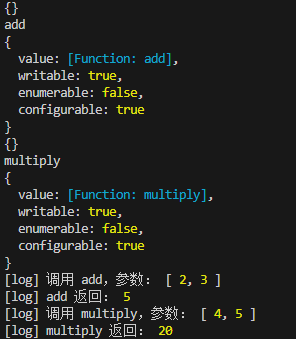
descriptor.value,在原方法前后插入新逻辑(如日志、权限校验)。// ========== 新增:装饰器小案例(类装饰器 + 方法装饰器) ==========
// 注意:运行需在 tsconfig.json 中启用 "experimentalDecorators": true,
// 或使用你项目中的 run-ts.js(已注册 ts-node)。// 类装饰器:封印类(示例用)
function sealed(constructor: Function) {
Object.seal(constructor);
Object.seal(constructor.prototype);
}// 方法装饰器:在执行前后打印日志
function log(
target: any,
propertyKey: string,
descriptor: PropertyDescriptor
) {
console.log(target);
console.log(propertyKey);
console.log(descriptor);
const original = descriptor.value;
descriptor.value = function (...args: any[]) {
console.log([log] 调用 ${propertyKey},参数:, args);
const result = original.apply(this, args);
console.log([log] ${propertyKey} 返回:, result);
return result;
};
return descriptor;
}// 使用装饰器
@sealed
class Calculator {
@log
add(a: number, b: number) {
return a + b;
}@log multiply(a: number, b: number) { return a * b; }}
// 测试
const calc = new Calculator();
calc.add(2, 3); // 控制台会先输出调用参数,再输出结果
calc.multiply(4, 5);
3. 装饰器模式的生产实践
装饰器在前端框架中应用广泛,核心价值是「逻辑复用、解耦增强」,常见场景如下:
HOC 是装饰器模式在 React 中的体现:接收一个组件,返回一个增强后的新组件。
// 增强组件:添加红色边框
const withRedBorder = (WrappedComponent) => () => (
  <div style={{ border: "1px solid red", padding: "10px" }}>
    <WrappedComponent />
  </div>
);

// 用装饰器语法使用 HOC
@withRedBorder
  function UserCard() {
    return <div>用户名:张三</div>;
  }
原生 Redux connect 需嵌套调用,用装饰器可简化代码结构:
// 1. 单独定义 connect 配置
import { connect } from "react-redux";
const mapState = (state) => ({ count: state.count });
const mapDispatch = (dispatch) => ({ add: () => dispatch({ type: "ADD" }) });
export const withStore = connect(mapState, mapDispatch);

// 2. 用装饰器绑定组件与 Redux
import { withStore } from "./store";
@withStore
  class Counter extends React.Component {
    render() {
      return <button onClick={this.props.add}>{this.props.count}</button>;
    }
  }
社区封装了常用装饰器(如 @readonly、@deprecate),直接复用无需重复编码:
import { readonly, deprecate } from "core-decorators";

class User {
  @readonly // 禁止修改属性
  role = "guest";

  @deprecate("请使用 newMethod 替代") // 提示方法已废弃
  oldMethod() {}
}
4. 案例练习:函数性能监控装饰器
场景需求
给任意业务函数添加「性能监控」功能:记录函数的「调用时间、参数、返回值、执行耗时」,且不修改原函数逻辑。
/**
 * 性能监控装饰器
 * @param {Function} func - 被装饰的函数
 * @returns {Function} 增强后的函数
 */
function performanceDecorator(func) {
  // 返回新函数,保留原函数的 this 指向和参数
  return function (...args) {
    // 1. 记录调用时间
    const startTime = Date.now();
    // 2. 执行原函数,获取返回值
    const result = func.apply(this, args);
    // 3. 计算耗时并打印日志
    const costTime = Date.now() - startTime;
    console.log(`[性能监控] ${func.name}:`);
    console.log(`- 参数:${JSON.stringify(args)}`);
    console.log(`- 返回值:${JSON.stringify(result)}`);
    console.log(`- 耗时:${costTime}ms`);
    // 4. 返回原函数结果
    return result;
  };
}

// 测试:装饰一个「计算数组总和」的函数
function calculateSum(arr) {
  return arr.reduce((total, cur) => total + cur, 0);
}

// 用装饰器增强函数
const enhancedCalculateSum = performanceDecorator(calculateSum);

// 调用增强后的函数
enhancedCalculateSum([1, 2, 3, 4]);
// 输出:
// [性能监控] calculateSum:
// - 参数:[1,2,3,4]
// - 返回值:10
// - 耗时:0ms(视环境略有差异)
TS 可通过「类型约束、泛型、自动类型推断」解决 JS 的类型模糊问题,确保装饰器的复用性和安全性:
/**
 * 性能监控装饰器(TS 版)
 * @template T - 泛型:约束被装饰函数的类型(参数数组 + 返回值)
 * @param {T} func - 被装饰的函数,类型由泛型 T 自动推断
 * @returns {T} 增强后的函数,类型与原函数完全一致
 */
function performanceDecorator<T extends (...args: any[]) => any>(func: T): T {
  // 用类型断言确保返回值类型与原函数一致
  return function (...args: Parameters<T>): ReturnType<T> {
    const startTime = Date.now();
    // 原函数的 this 指向和参数类型由 TS 自动校验
    const result = func.apply(this, args);
    const costTime = Date.now() - startTime;

    console.log(`[性能监控] ${func.name}:`);
    console.log(`- 参数:${JSON.stringify(args)}`);
    console.log(`- 返回值:${JSON.stringify(result)}`);
    console.log(`- 耗时:${costTime}ms`);

    return result;
  } as T;
}

// 测试 1:装饰「计算数组总和」的函数(TS 自动推断参数为 number[],返回值为 number)
function calculateSum(arr: number[]): number {
  return arr.reduce((total, cur) => total + cur, 0);
}
const enhancedCalculateSum = performanceDecorator(calculateSum);
// ✅ 正确调用:参数为 number[]
enhancedCalculateSum([1, 2, 3, 4]);
// ❌ 错误调用:TS 编译报错(参数应为 number[],而非 string[])
// enhancedCalculateSum(["1", "2"]);

// 测试 2:装饰「格式化时间」的函数(TS 自动适配不同函数类型)
function formatTime(date: Date): string {
  return date.toLocaleString();
}
const enhancedFormatTime = performanceDecorator(formatTime);
// ✅ 正确调用:参数为 Date
enhancedFormatTime(new Date());
// ❌ 错误调用:TS 编译报错(参数应为 Date,而非 string)
// enhancedFormatTime("2024-05-01");
TS 实现的核心优越性
- 类型安全 :自动校验被装饰函数的参数类型和返回值类型,避免传错参数(如给
calculateSum传字符串数组)。 - 泛型复用 :装饰器可适配任意函数类型(如
(number[])=>number、(Date)=>string),无需为不同函数写多个装饰器。 - 类型推断:无需手动指定类型,TS 自动推断原函数的参数和返回值类型,确保增强后的函数与原函数类型完全一致。