如果说 Interface 是"把一个函数包装成 Web UI",那 Blocks 更像"用 Python 搭一个可交互的小应用"。
在 Blocks 中,你不再只盯着输入和输出,而是可以把页面拆成多个区域,用按钮、文本框、图片、标签页、状态对象把业务逻辑组织起来。官方文档也提到,Blocks 支持更灵活的数据流,输入可以触发输出,而输出还可以继续触发下一层交互,并且可以通过 Tab 等布局元素将多个相关功能组织在同一个应用里。
对开发者来说,Blocks 的价值主要体现在三点:
- 布局自由:页面不再是固定的单列结构。
- 交互自由:一个组件可以绑定多个事件,一个函数也能服务多个组件。
- 应用化思维:不仅能演示模型,还能做真正可用的小型 AI 工具。
Blocks 的基本结构
"""
 Blocks基本结构
"""
import gradio as gr

def greet(name):
    return f"你好,{name}!"

with gr.Blocks() as demo:
    gr.Markdown("# 我的第一个 Blocks 应用")
    name = gr.Textbox(label="请输入名字")
    output = gr.Textbox(label="输出结果")
    btn = gr.Button("提交")

    btn.click(fn=greet, inputs=name, outputs=output)

demo.launch()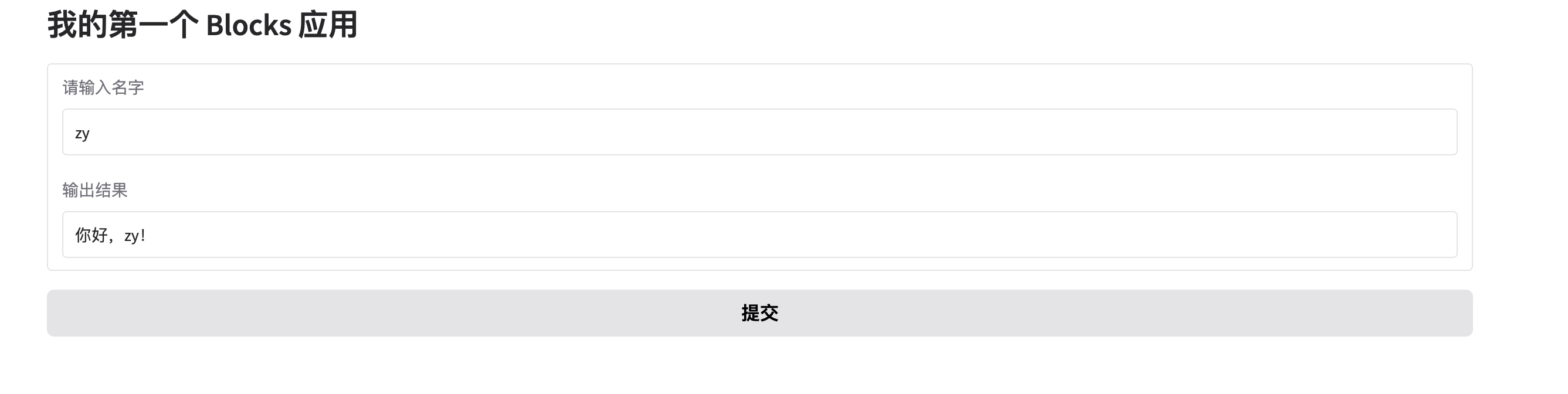
- 先声明容器:
with gr.Blocks() as demo - 在容器内部放文本输入框组件
- 通过事件监听器把组件和函数绑定起来
用 Row 和 Column 组织页面
在实际项目里,页面往往不是一列排到底。Gradio 提供了 Row、Column、Group、Tab 等布局元素来组织组件。
其中 Row 用于横向排列组件,Column 用于纵向分组,文档还提到在 Row 中可以通过 scale 和 min_width 控制不同组件占据的宽度比例。
比如我们可以把"输入区"和"结果区"分成左右两栏:
用 Tab 管理多功能页面
当一个应用同时包含多个子功能,比如"文本摘要""情感分析""翻译",最适合的方式通常是放在不同的 Tab 里。 Tab 是 Blocks 中用于组织相关演示或功能模块的布局元素之一。
import gradio as gr

def to_upper(text):
    return text.upper()

def count_chars(text):
    return f"一共 {len(text)} 个字符"

with gr.Blocks() as demo:
    gr.Markdown("# Tab 示例")

    with gr.Tab("大写转换"):
        input_text1 = gr.Textbox(label="输入文本")
        output_text1 = gr.Textbox(label="结果")
        btn1 = gr.Button("转换")
        btn1.click(to_upper, inputs=input_text1, outputs=output_text1)

    with gr.Tab("字符统计"):
        input_text2 = gr.Textbox(label="输入文本")
        output_text2 = gr.Textbox(label="统计结果")
        btn2 = gr.Button("统计")
        btn2.click(count_chars, inputs=input_text2, outputs=output_text2)

demo.launch()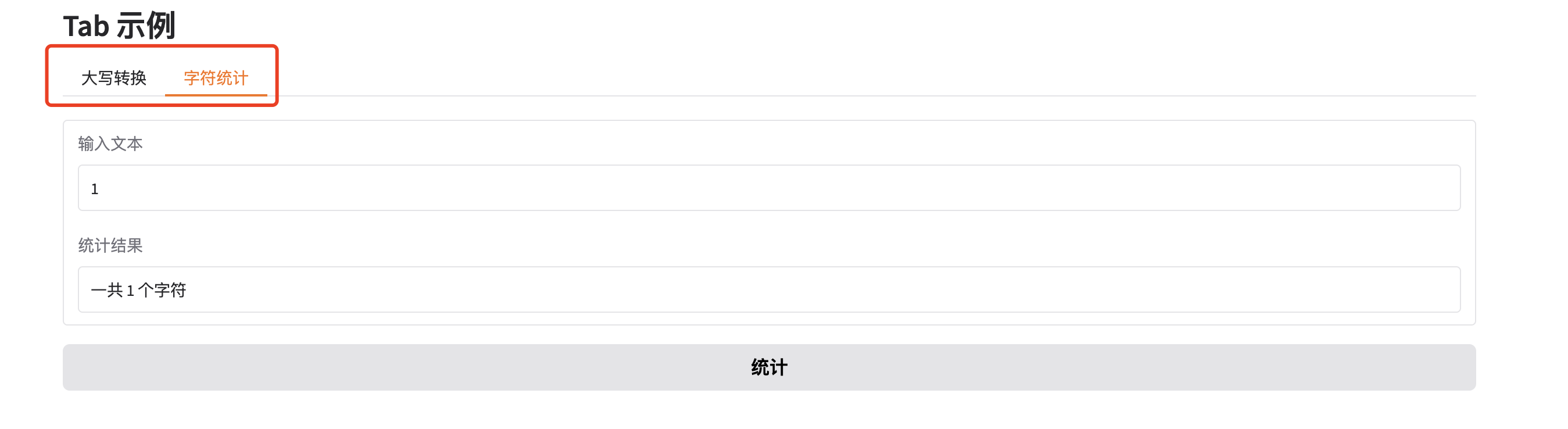
- 第一个
Tab("大写转换"):输入一句话,点按钮后变成大写 - 第二个
Tab("字符统计"):输入一句话,点按钮后显示字符数 - 两个功能都在同一个网页里,但被分到了两个标签页中
Blocks综合示例
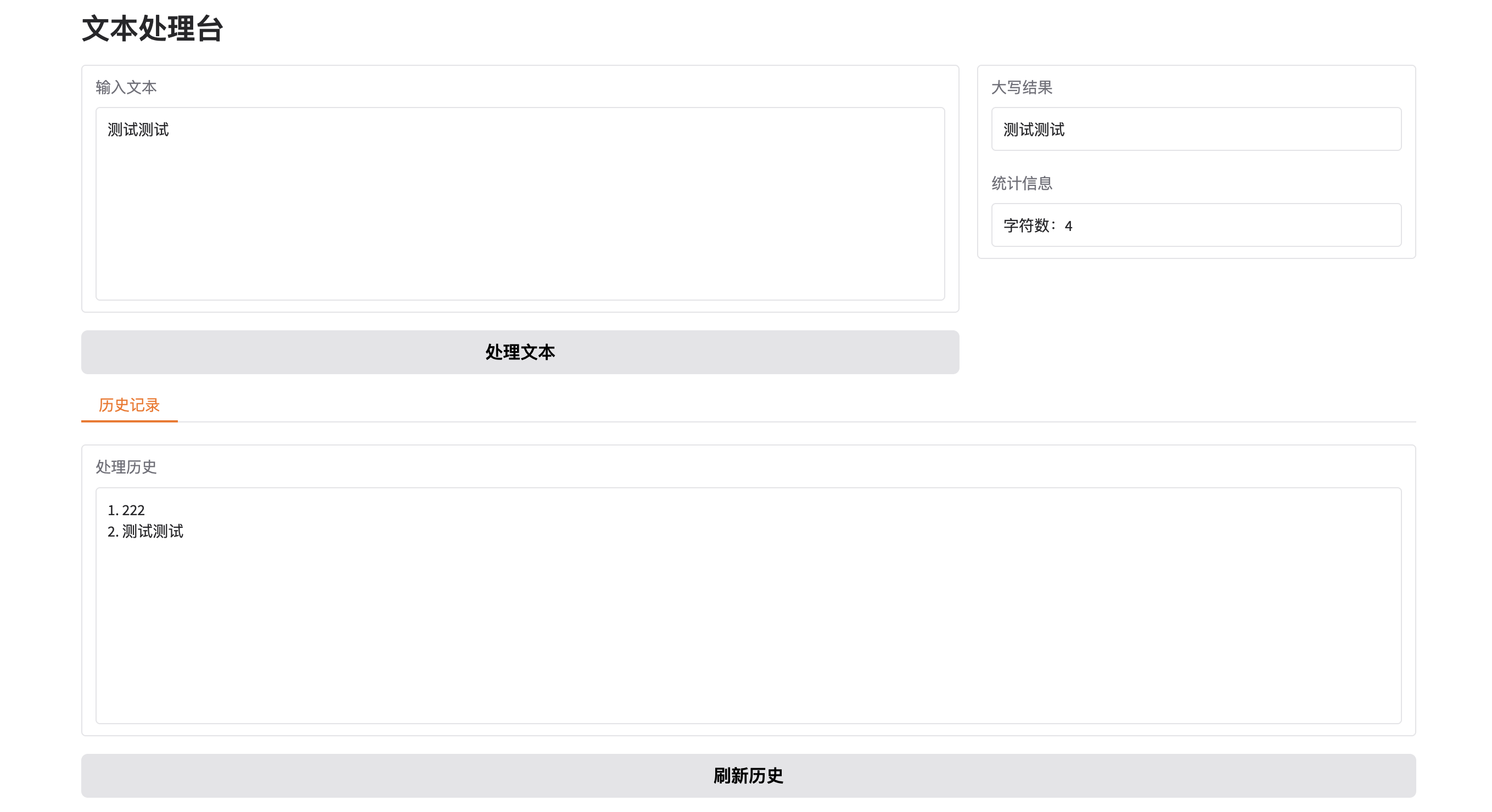
下面是一个稍完整的例子:做一个"文本处理台",集成大小写转换、字数统计和历史记录。
import gradio as gr

def process_text(text, history):
    if not text.strip():
        return gr.skip(), gr.skip(), history

    result = text.upper()
    count = len(text)
    history = history + [text]
    return result, f"字符数:{count}", history

def show_history(history):
    return "\n".join(f"{i+1}. {item}" for i, item in enumerate(history))

with gr.Blocks() as demo:
    gr.Markdown("# 文本处理台")
    history_state = gr.State([])

    with gr.Row():
        with gr.Column(scale=2):
            text_input = gr.Textbox(lines=8, label="输入文本")
            run_btn = gr.Button("处理文本")

        with gr.Column(scale=1):
            upper_output = gr.Textbox(label="大写结果")
            count_output = gr.Textbox(label="统计信息")

    with gr.Tab("历史记录"):
        history_output = gr.Textbox(lines=10, label="处理历史")
        refresh_btn = gr.Button("刷新历史")

    run_btn.click(
        process_text,
        inputs=[text_input, history_state],
        outputs=[upper_output, count_output, history_state]
    )

    refresh_btn.click(
        show_history,
        inputs=history_state,
        outputs=history_output
    )

demo.launch()这个例子里,Blocks 的几个核心能力都用上了:
Row/Column控制页面布局Button.click()处理交互State保存会话历史Tab组织附加功能gr.skip()在空输入时避免无意义更新