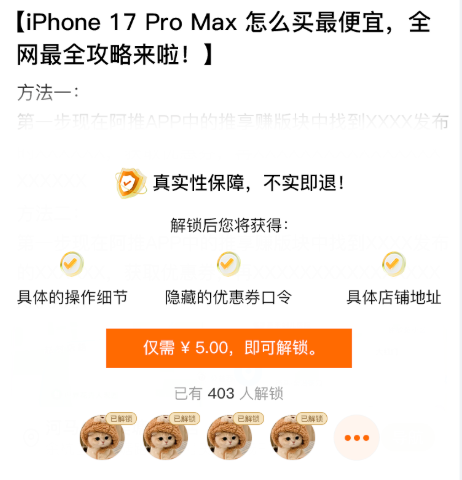
dart
import 'package:configs/PathConfig.dart';
import 'package:utils/JadeColors.dart';
import 'package:utils/Utils.dart';
import 'package:flutter/material.dart';
import 'package:flutter_screenutil/flutter_screenutil.dart';

class ContentMask extends StatelessWidget{
  final String text;//文本字符串
  final double percent;//显示的百分比
  const ContentMask({super.key,required this.text,this.percent = 1.0});

  @override
  Widget build(BuildContext context) {
    // TODO: implement build
    return Column(
      children: [
        Text(getFirstPercentStr()),
        Container(
          padding: EdgeInsets.only(top: 60.w,bottom: 40.w),
          decoration: BoxDecoration(
            color: Colors.white,
            boxShadow: [
              BoxShadow(
                color: JadeColors.white.withValues(alpha: 0.9), // 阴影颜色(半透明)
                offset: const Offset(0, -5), // 向上偏移5px(y轴负数)
                blurRadius: 10, // 模糊半径(阴影扩散范围)
                spreadRadius: 10, // 扩散半径,这个参数可以让阴影扩散到上面的Text文本上(阴影基础大小)
                blurStyle: BlurStyle.normal, // 模糊样式
              ),
            ],
          ),
          child: Column(
            mainAxisSize: MainAxisSize.min,
            children: [
              Row(
                mainAxisSize: MainAxisSize.min,
                children: [
                  Image.asset(PathConfig.iconShieldGold,width: 52.w),
                  Text('真实性保障,不实即退!',style: TextStyle(fontSize: 30.sp,fontWeight: FontWeight.bold))
                ],
              ),
              Text('解锁后您将获得:',style: TextStyle(fontSize: 26.sp,height: 3)),
              Row(
                mainAxisAlignment: MainAxisAlignment.spaceAround,
                children: [
                  Column(
                    children: [
                      Image.asset(PathConfig.iconSelectedGold,width: 40.w),
                      Text('具体的操作细节',style: TextStyle(fontSize: 26.sp,height: 2))
                    ],
                  ),
                  Column(
                    children: [
                      Image.asset(PathConfig.iconSelectedGold,width: 40.w),
                      Text('隐藏的优惠券口令',style: TextStyle(fontSize: 26.sp,height: 2))
                    ],
                  ),
                  Column(
                    children: [
                      Image.asset(PathConfig.iconSelectedGold,width: 40.w),
                      Text('具体店铺地址',style: TextStyle(fontSize: 26.sp,height: 2))
                    ],
                  )
                ],
              ),
              GestureDetector(
                onTap: (){},
                child: Container(
                  color: JadeColors.orange_14,
                  padding: EdgeInsets.symmetric(horizontal: 50.w,vertical: 20.w),
                  margin: EdgeInsets.only(top: 40.w,bottom: 40.w),
                  child: Text('仅需 ¥ 5.00,即可解锁。',style: TextStyle(color: Colors.white,fontSize: 26.sp),),
                ),
              ),
              Text.rich(
                  TextSpan(
                      text: '已有',
                      style: TextStyle(color: JadeColors.grey,fontSize: 24.sp),
                      children: [
                        TextSpan(
                          text: '485',
                          style: TextStyle(color: JadeColors.grey_2,fontSize: 24.sp),
                        ),
                        TextSpan(
                          text: '人解锁',
                          style: TextStyle(color: JadeColors.grey,fontSize: 24.sp),
                        )
                      ]
                  )
              ),
              Container(
                margin: EdgeInsets.only(top: 30.w),
                height: 80.w,
                child: ListView.builder(
                    itemCount: 6,
                    shrinkWrap: true,
                    scrollDirection: Axis.horizontal,
                    itemBuilder: (_,index){
                      return index == 5
                          ? Image.asset(PathConfig.iconThreeDotOrange,width: 75.w)
                          : Container(
                        color: Colors.transparent,
                        margin: EdgeInsets.only(right: 10.w),
                        child: Stack(
                          alignment: Alignment.topRight,
                          children: [
                            Padding(padding: EdgeInsets.only(right: 16.w,top: 4.w),
                                child: Utils().roundedImage(PathConfig.testImageUrl[3], 60,width: 75.w,height: 75.w)),
                            Container(
                              padding: EdgeInsets.symmetric(horizontal: 6.w,vertical: 2.w),
                              decoration: BoxDecoration(
                                  color: JadeColors.gold_11,
                                  border: Border.all(color: JadeColors.gold_12,width: 1),
                                  borderRadius: BorderRadius.circular(10)
                              ),
                              child: Text('已解锁',style: TextStyle(color: JadeColors.gold_12,fontSize: 12.sp)),
                            )
                          ],
                        ),
                      );
                    }),
              )
            ],
          ),
        )
      ],
    );
  }

  String getFirstPercentStr() {
    final chars = text.characters;
    int endIndex = (chars.length * percent).floor().clamp(1, chars.length);
    return chars.take(endIndex).toString();
  }
}
使用
dart
bool _isFree = false; //是否免费
  //内容
  _contentView(){
    return _isFree ? Column(
      children: [
        Container(
          padding: EdgeInsets.only(top: 20.w,left: 20.w,right: 20.w),
          child: Text(_testContext, style: TextStyle(fontSize: 30.sp),),
        ),
        _addressView(),
      ],
    ):ContentMask(text: _testContext,percent: 0.4);

  }