一、什么是 RAG?
RAG(Retrieval-Augmented Generation,检索增强生成) 是一种结合了信息检索 和大语言模型生成 的技术架构。简单来说,就是让 LLM 在回答问题时,先从知识库中检索相关信息,再基于这些信息生成答案。
1.1 为什么需要 RAG?(LLM 的缺陷)
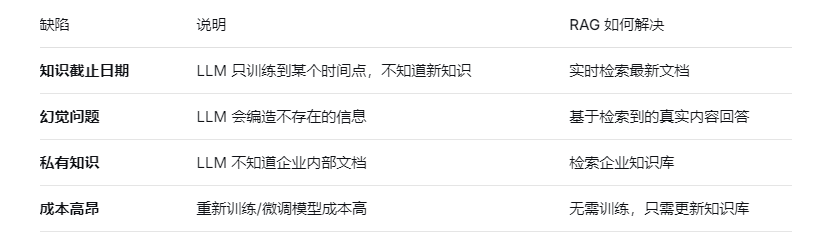
1.2 RAG 的核心价值
一句话总结:RAG = 检索 + 生成 = 让 LLM 带着参考书回答问题
二、RAG 的两大阶段
2.1 阶段一:索引(Indexing)- 离线准备
原始文档
    ↓
【文档切分】- 将长文档切分成小段落(Chunk)
    ↓
【文本向量化】- 调用 Embedding 模型将文本转为向量
    ↓
【向量存储】- 存入向量数据库(如 Redis Stack)关键步骤:
-
文档加载:从 PDF、Word、网页等来源读取文档
-
文本分割:将长文档切分成 500-1000 字符的块
-
向量化:调用 Embedding 模型生成向量
-
存储:存入向量数据库,同时保存原始文本
2.2 检索与生成(Retrieval & Generation)- 在线推理
用户问题
    ↓
【问题向量化】- 用相同模型将问题转为向量
    ↓
【向量检索】- 在向量数据库中搜索相似文档
    ↓
【上下文构建】- 将检索到的文档 + 用户问题组合成 Prompt
    ↓
【LLM 生成】- 大模型基于上下文生成答案
三、RAG 完整流程图
┌─────────────────────────────────────────────────────────────────┐
│                        索引阶段(离线)                          │
├─────────────────────────────────────────────────────────────────┤
│  知识库文档  →  文档切分  →  向量化  →  存入向量数据库           │
│  (PDF/Word)    (Chunks)   (Embedding)   (Redis/Milvus)          │
└─────────────────────────────────────────────────────────────────┘
                                    ↓
┌─────────────────────────────────────────────────────────────────┐
│                     检索与生成阶段(在线)                        │
├─────────────────────────────────────────────────────────────────┤
│  用户问题  →  问题向量化  →  向量检索  →  构建 Prompt  →  LLM   │
│  (Query)     (Embedding)   (相似搜索)   (上下文增强)   (生成)    │
└─────────────────────────────────────────────────────────────────┘
                                    ↓
                              最终答案
四、demo示例
4.1 需求
AI智能运维助手,通过提供的错误编码,给出异常解释辅助运维人员更好的定位问题和维护系统。
4.2 配置文件
server:
  port: 8007
  servlet:
    encoding:
      enabled: true
      force: true
      charset: utf-8

spring:
  application:
    name: demo7
  # ====ollama Config=============
  ai:
    dashscope:
      api-key: ${aliQwen-api}
      chat:
        options:
          model: qwen-plus
      embedding:
        options:
          model: text-embedding-v3
    vectorstore:
      redis:
        initialize-schema: true
        index-name: custom-index
        prefix: custom-prefix
  # Redis配置
  data:
    redis:
      host: 192.168.10.160
      port: 6379
      password:  # 如果有密码,在这里填写
      database: 0
      timeout: 2000ms
      lettuce:
        pool:
          max-active: 8
          max-idle: 8
          min-idle: 0
4.3 配置类
package com.wx.config;

import cn.hutool.crypto.SecureUtil;
import jakarta.annotation.PostConstruct;
import org.springframework.ai.document.Document;
import org.springframework.ai.reader.TextReader;
import org.springframework.ai.transformer.splitter.TokenTextSplitter;
import org.springframework.ai.vectorstore.VectorStore;
import org.springframework.beans.factory.annotation.Autowired;
import org.springframework.beans.factory.annotation.Value;
import org.springframework.context.annotation.Configuration;
import org.springframework.core.io.Resource;
import org.springframework.data.redis.core.RedisTemplate;

import java.nio.charset.Charset;
import java.util.List;

/**
 * @Description
 * @author: wangxin
 * @date: 2026/3/21 12:21
 */
@Configuration
public class LLMConfig {

    @Autowired
    private VectorStore vectorStore;
    @Autowired
    private RedisTemplate<String,String> redisTemplate;

    @Value("classpath:ops.txt")
    private Resource opsFile;

    @PostConstruct
    public void init()
    {
        //1 读取文件
        TextReader textReader = new TextReader(opsFile);
        textReader.setCharset(Charset.defaultCharset());

        //2 文件转换为向量(开启分词)
        List<Document> list = new TokenTextSplitter().transform(textReader.read());


        String sourceMetadata = (String)textReader.getCustomMetadata().get("source");

        String textHash = SecureUtil.md5(sourceMetadata);
        String redisKey = "vector-xxx:" + textHash;

        // 判断是否存入过,redisKey如果可以成功插入表示以前没有过,可以假如向量数据
        Boolean retFlag = redisTemplate.opsForValue().setIfAbsent(redisKey, "1");

        System.out.println("****retFlag : "+retFlag);

        if(Boolean.TRUE.equals(retFlag))
        {
            //键不存在,首次插入,可以保存进向量数据库
            vectorStore.add(list);
        }else {
            //键已存在,跳过或者报错
            //throw new RuntimeException("---重复操作");
            System.out.println("------向量初始化数据已经加载过,请不要重复操作");
        }
    }

}

package com.wx.config;

import lombok.extern.slf4j.Slf4j;
import org.springframework.context.annotation.Bean;
import org.springframework.context.annotation.Configuration;
import org.springframework.data.redis.connection.RedisConnectionFactory;
import org.springframework.data.redis.core.RedisTemplate;
import org.springframework.data.redis.serializer.GenericJackson2JsonRedisSerializer;
import org.springframework.data.redis.serializer.StringRedisSerializer;

/**
 * @Description
 * @author: wangxin
 * @date: 2026/3/21 12:21
 */
@Slf4j
@Configuration
public class RedisConfig {

    @Bean
    public RedisTemplate<String, Object> redisTemplate(RedisConnectionFactory redisConnectionFactor)
    {
        RedisTemplate<String,Object> redisTemplate = new RedisTemplate<>();

        redisTemplate.setConnectionFactory(redisConnectionFactor);
        //设置key序列化方式string
        redisTemplate.setKeySerializer(new StringRedisSerializer());
        //设置value的序列化方式json,使用GenericJackson2JsonRedisSerializer替换默认序列化
        redisTemplate.setValueSerializer(new GenericJackson2JsonRedisSerializer());

        redisTemplate.setHashKeySerializer(new StringRedisSerializer());
        redisTemplate.setHashValueSerializer(new GenericJackson2JsonRedisSerializer());

        redisTemplate.afterPropertiesSet();

        return redisTemplate;
    }

}
4.4 加入文件,测试
-
资源目录下加入文件
00000 系统OK正确执行后的返回
A0001 用户端错误一级宏观错误码
A0100 用户注册错误二级宏观错误码
B1111 支付接口超时
C2222 Kafka消息解压严重 -
测试业务类
package com.wx.controller;
import com.alibaba.cloud.ai.dashscope.embedding.DashScopeEmbeddingOptions;
import jakarta.annotation.Resource;
import org.springframework.ai.chat.client.ChatClient;
import org.springframework.ai.document.Document;
import org.springframework.ai.embedding.EmbeddingModel;
import org.springframework.ai.embedding.EmbeddingRequest;
import org.springframework.ai.embedding.EmbeddingResponse;
import org.springframework.ai.rag.advisor.RetrievalAugmentationAdvisor;
import org.springframework.ai.rag.retrieval.search.VectorStoreDocumentRetriever;
import org.springframework.ai.vectorstore.SearchRequest;
import org.springframework.ai.vectorstore.VectorStore;
import org.springframework.web.bind.annotation.GetMapping;
import org.springframework.web.bind.annotation.RequestParam;
import org.springframework.web.bind.annotation.RestController;
import reactor.core.publisher.Flux;import java.util.Arrays;
import java.util.List;/**
-
@Description
-
@author: wangxin
-
@date: 2026/3/7 20:42
*/
@RestController
public class RagController {@Resource(name = "qwenChatClient")
private ChatClient chatClient;
@Resource
private VectorStore vectorStore;/**
-
@param msg
-
@return
*/
@GetMapping("/rag4aiops")
public Fluxrag(String msg)
{
String systemInfo = """
你是一个运维工程师,按照给出的编码给出对应故障解释,否则回复找不到信息。
""";RetrievalAugmentationAdvisor advisor = RetrievalAugmentationAdvisor.builder()
.documentRetriever(
VectorStoreDocumentRetriever.builder()
.vectorStore(vectorStore)
.build()
)
.build();return chatClient.prompt()
.system(systemInfo)
.user(msg)
.advisors(advisor) // RAG功能,向量数据库查询
.stream()
.content();
}
}
-
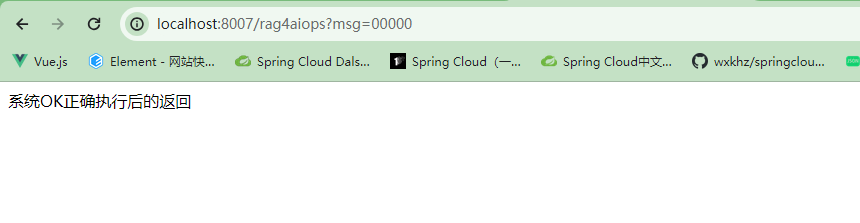
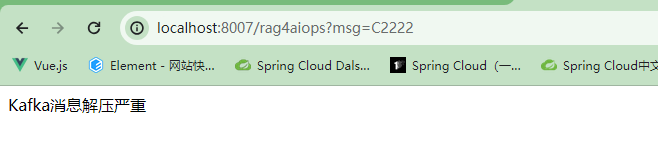
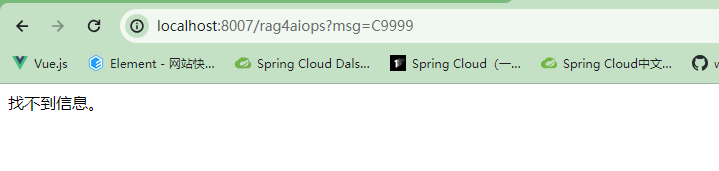
在文件中检索的信息可以正确返回,没有的信息返回找不到信息。