对象存储简介
对象存储(Object Storage)是一种以对象形式存储数据的存储架构,适用于:
- 海量非结构化数据 :图片、视频、文档等
- 高可扩展性 :支持 PB 级数据存储
- 低成本 :比传统存储更经济
- 易于访问 :通过 HTTP/HTTPS 访问
对象存储的作用
- 知文内容 :用户发布的 Markdown 文档、图片、视频
- 用户头像 :用户个人资料的头像图片
- 文件直传 :前端直接上传到 OSS,减少服务器压力
- CDN 加速 :配合 CDN 提高内容访问速度
OssProperties.java - OSS 配置管理
java
@Data
@Component
@ConfigurationProperties(prefix = "oss")
public class OssProperties {
    private String endpoint;          // OSS 服务端点
    private String accessKeyId;       // 访问密钥 ID
    private String accessKeySecret;   // 访问密钥 Secret
    private String bucket;            // 存储桶名称
    private String publicDomain;      // 自定义 CDN 域名
    private String folder = "avatars"; // 默认上传目录
}
OssStorageService.java - 对象存储服务
java
@Service
@RequiredArgsConstructor
public class OssStorageService {

    private final OssProperties props;

    public String uploadAvatar(long userId, MultipartFile file) {
        ensureConfigured();

        String original = file.getOriginalFilename();
        String ext = "";
        if (original != null && original.contains(".")) {
            ext = original.substring(original.lastIndexOf('.'));
        }
        String objectKey = props.getFolder() + "/" + userId + "-" + Instant.now().toEpochMilli() + ext;

        OSS client = new OSSClientBuilder().build(props.getEndpoint(), props.getAccessKeyId(), props.getAccessKeySecret());

        try {
            PutObjectRequest request = new PutObjectRequest(props.getBucket(), objectKey, file.getInputStream());
            client.putObject(request);
        } catch (IOException e) {
            throw new BusinessException(ErrorCode.BAD_REQUEST, "头像文件读取失败");
        } finally {
            client.shutdown();
        }

        return publicUrl(objectKey);
    }

    private String publicUrl(String objectKey) {
        if (props.getPublicDomain() != null && !props.getPublicDomain().isBlank()) {
            return props.getPublicDomain().replaceAll("/$", "") + "/" + objectKey;
        }
        return "https://" + props.getBucket() + "." + props.getEndpoint() + "/" + objectKey;
    }

    /**
     * 生成用于直传的 PUT 预签名 URL。
     * 客户端必须在上传时设置与签名一致的 Content-Type。
     *
     * @param objectKey 目标对象键
     * @param contentType 上传内容类型(如 text/markdown, image/png)
     * @param expiresInSeconds 有效期秒数(建议 300-900)
     * @return 可直接用于 PUT 上传的预签名 URL
     */
    public String generatePresignedPutUrl(String objectKey, String contentType, int expiresInSeconds) {
        ensureConfigured();
        OSS client = new OSSClientBuilder().build(props.getEndpoint(), props.getAccessKeyId(), props.getAccessKeySecret());
        try {
            Date expiration = new Date(System.currentTimeMillis() + expiresInSeconds * 1000L);
            GeneratePresignedUrlRequest request = new GeneratePresignedUrlRequest(props.getBucket(), objectKey, HttpMethod.PUT);
            request.setExpiration(expiration);
            if (contentType != null && !contentType.isBlank()) {
                request.setContentType(contentType);
            }
            URL url = client.generatePresignedUrl(request);
            return url.toString();
        } finally {
            client.shutdown();
        }
    }

    private void ensureConfigured() {
        if (props.getEndpoint() == null || props.getAccessKeyId() == null || props.getAccessKeySecret() == null || props.getBucket() == null) {
            throw new BusinessException(ErrorCode.BAD_REQUEST, "对象存储未配置");
        }
    }
}
核心业务功能
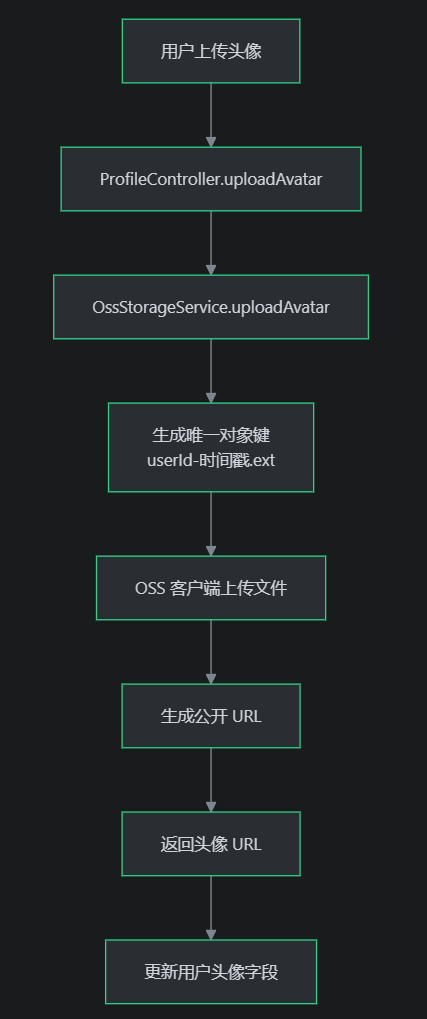
1.用户头像上传功能
功能描述 :
- 接收用户上传的头像文件
- 生成唯一的对象键(避免文件覆盖)
- 上传到阿里云 OSS 存储桶
- 返回可公开访问的 URL
java
// 1. 提取文件扩展名
String ext = original.substring(original.lastIndexOf('.'));

// 2. 生成唯一对象键:avatars/用户ID-时间戳.扩展名
String objectKey = props.getFolder() + "/" + userId + "-" + Instant.now().toEpochMilli() + ext;

// 3. 上传到 OSS
client.putObject(new PutObjectRequest(props.getBucket(), objectKey, file.getInputStream()));

// 4. 返回公开 URL
return publicUrl(objectKey);
2. 预签名 URL 生成功能
功能描述 :
- 生成用于前端直传的 PUT 预签名 URL
- 设置 URL 有效期(建议 300-900 秒)
- 可以指定上传文件的 Content-Type
java
// 1. 设置过期时间
Date expiration = new Date(System.currentTimeMillis() + expiresInSeconds * 1000L);

// 2. 生成预签名 PUT 请求
GeneratePresignedUrlRequest request = new GeneratePresignedUrlRequest(
    props.getBucket(),
    objectKey,
    HttpMethod.PUT
);
request.setExpiration(expiration);

// 3. 可选:设置 Content-Type(防止恶意文件上传)
if (contentType != null && !contentType.isBlank()) {
    request.setContentType(contentType);
}

// 4. 生成预签名 URL
URL url = client.generatePresignedUrl(request);
return url.toString();
3. 公开 URL 生成功能
功能描述 :
- 根据对象键生成可公开访问的 URL
- 支持自定义 CDN 域名
- 默认使用 OSS 域名
java
// 1. 优先使用自定义 CDN 域名
if (props.getPublicDomain() != null && !props.getPublicDomain().isBlank()) {
    return props.getPublicDomain().replaceAll("/$", "") + "/" + objectKey;
}

// 2. 默认使用 OSS 域名
return "https://" + props.getBucket() + "." + props.getEndpoint() + "/" + objectKey;
4. 配置验证功能
功能描述 :
- 在执行 OSS 操作前验证配置是否完整
- 确保必要的配置项(endpoint、accessKeyId、accessKeySecret、bucket)都已设置
java
if (props.getEndpoint() == null ||
    props.getAccessKeyId() == null ||
    props.getAccessKeySecret() == null ||
    props.getBucket() == null) {
    throw new BusinessException(ErrorCode.BAD_REQUEST, "对象存储未配置");
}
业务场景应用
用户头像上传:
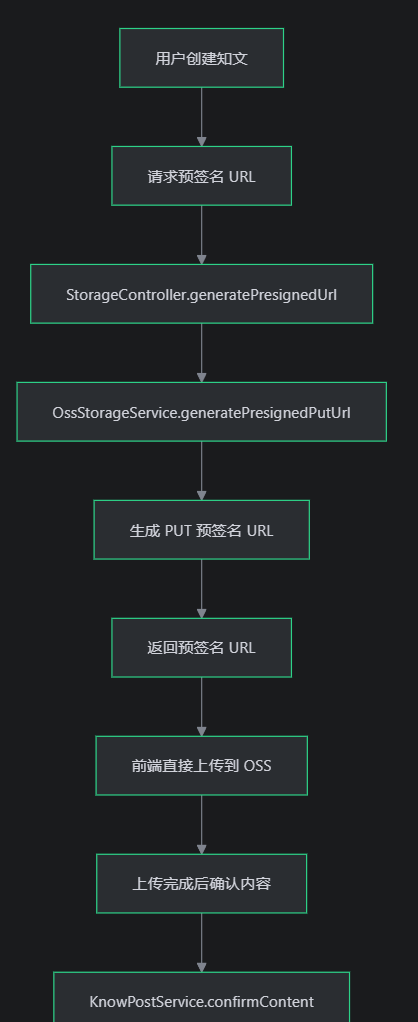
知文内容上传(前端直传)
StoragePresignRequest - 预签名请求 DTO
功能描述 :
封装前端请求预签名 URL 时所需的参数,用于知文内容或图片的前端直传。
java
package com.tongji.storage.api.dto;

import java.util.Map;

/**
 * 预签名直传响应。
 */
public record StoragePresignResponse(
        String objectKey,
        String putUrl,
        Map<String, String> headers,
        int expiresIn
) {}
StoragePresignResponse - 预签名响应 DTO
功能描述 :
封装后端返回给前端的预签名 URL 及相关信息,前端使用该信息进行直传。
java
package com.tongji.storage.api.dto;

import java.util.Map;

/**
 * 预签名直传响应。
 */
public record StoragePresignResponse(
        String objectKey,
        String putUrl,
        Map<String, String> headers,
        int expiresIn
) {}
StorageController 存储控制器业务功能
核心业务功能
预签名 URL 生成接口
功能描述 :
为前端生成用于直传的 PUT 预签名 URL,支持知文内容和图片上传。
java
@RestController
@RequestMapping("/api/v1/storage")
@Validated
@RequiredArgsConstructor
public class StorageController {

    private final OssStorageService ossStorageService;
    private final JwtService jwtService;
    private final KnowPostMapper knowPostMapper;

    /**
     * 获取用于直传的 PUT 预签名 URL。
     */
    @PostMapping("/presign")
    public StoragePresignResponse presign(@Valid @RequestBody StoragePresignRequest request,
                                          @AuthenticationPrincipal Jwt jwt) {
        long userId = jwtService.extractUserId(jwt);

        long postId;
        try {
            postId = Long.parseLong(request.postId());
        } catch (NumberFormatException e) {
            throw new BusinessException(ErrorCode.BAD_REQUEST, "postId 非法");
        }

        // 权限校验:postId 必须属于当前用户
        KnowPost post = knowPostMapper.findById(postId);
        if (post == null || post.getCreatorId() == null || post.getCreatorId() != userId) {
            throw new BusinessException(ErrorCode.BAD_REQUEST, "草稿不存在或无权限");
        }

        String scene = request.scene();
        String objectKey;
        String ext = normalizeExt(request.ext(), request.contentType(), scene);

        if ("knowpost_content".equals(scene)) {
            objectKey = "posts/" + postId + "/content" + ext;
        } else if ("knowpost_image".equals(scene)) {
            String date = DateTimeFormatter.ofPattern("yyyyMMdd").withZone(ZoneId.of("UTC")).format(Instant.now());
            String rand = UUID.randomUUID().toString().replaceAll("-", "").substring(0, 8);
            objectKey = "posts/" + postId + "/images/" + date + "/" + rand + ext;
        } else {
            throw new BusinessException(ErrorCode.BAD_REQUEST, "不支持的上传场景");
        }

        int expiresIn = 600; // 10 分钟
        String putUrl = ossStorageService.generatePresignedPutUrl(objectKey, request.contentType(), expiresIn);
        Map<String, String> headers = Map.of("Content-Type", request.contentType());
        return new StoragePresignResponse(objectKey, putUrl, headers, expiresIn);
    }

    private String normalizeExt(String ext, String contentType, String scene) {
        if (ext != null && !ext.isBlank()) {
            return ext.startsWith(".") ? ext : "." + ext;
        }
        if ("knowpost_content".equals(scene)) {
            return switch (contentType) {
                case "text/markdown" -> ".md";
                case "text/html" -> ".html";
                case "text/plain" -> ".txt";
                case "application/json" -> ".json";
                default -> ".bin";
            };
        } else {
            return switch (contentType) {
                case "image/jpeg" -> ".jpg";
                case "image/png" -> ".png";
                case "image/webp" -> ".webp";
                default -> ".img";
            };
        }
    }
}
完整业务流程
1. 用户身份验证
java
@AuthenticationPrincipal Jwt jwt
long userId = jwtService.extractUserId(jwt);- 使用 Spring Security 的 @AuthenticationPrincipal 自动注入 JWT
- 从 JWT 中提取用户 ID,确保只有登录用户可以请求预签名 URL
2. 参数解析与验证
java
long postId;
try {
    postId = Long.parseLong(request.postId());
} catch (NumberFormatException e) {
    throw new BusinessException(ErrorCode.BAD_REQUEST, "postId 非法");
}- 将字符串 postId 转换为 Long 类型
- 验证 postId 格式是否合法
3. 权限校验
java
KnowPost post = knowPostMapper.findById(postId);
if (post == null || post.getCreatorId() == null || post.getCreatorId() != userId) {
    throw new BusinessException(ErrorCode.BAD_REQUEST, "草稿不存在或无权限");
}- 查询知文是否存在
- 验证当前用户是否为知文的创建者
- 防止用户上传到其他用户的知文
4. 生成对象键
java
String objectKey;
if ("knowpost_content".equals(scene)) {
    // 知文内容:posts/{postId}/content.md
    objectKey = "posts/" + postId + "/content" + ext;
} else if ("knowpost_image".equals(scene)) {
    // 知文图片:posts/{postId}/images/{date}/{random}.jpg
    String date = DateTimeFormatter.ofPattern("yyyyMMdd").format(Instant.now());
    String rand = UUID.randomUUID().toString().substring(0, 8);
    objectKey = "posts/" + postId + "/images/" + date + "/" + rand + ext;
}
5. 扩展名处理
java
private String normalizeExt(String ext, String contentType, String scene) {
    // 如果前端提供了扩展名,直接使用
    if (ext != null && !ext.isBlank()) {
        return ext.startsWith(".") ? ext : "." + ext;
    }
    // 否则根据 contentType 推断
    if ("knowpost_content".equals(scene)) {
        return switch (contentType) {
            case "text/markdown" -> ".md";
            case "text/html" -> ".html";
            case "text/plain" -> ".txt";
            case "application/json" -> ".json";
            default -> ".bin";
        };
    } else {
        return switch (contentType) {
            case "image/jpeg" -> ".jpg";
            case "image/png" -> ".png";
            case "image/webp" -> ".webp";
            default -> ".img";
        };
    }
}
6. 生成预签名 URL
java
int expiresIn = 600; // 10 分钟
String putUrl = ossStorageService.generatePresignedPutUrl(objectKey, request.contentType(), expiresIn);
Map<String, String> headers = Map.of("Content-Type", request.contentType());
return new StoragePresignResponse(objectKey, putUrl, headers, expiresIn);- 调用 OssStorageService 生成预签名 URL
- 设置 10 分钟有效期
- 返回预签名 URL、对象键、请求头、有效期等信息
ProfileController:个人资料接口
具体实现业务
- 个人资料更新 :支持局部更新,使用 PATCH 方法,符合 RESTful 规范
- 头像上传 :集成 OSS 存储,自动更新用户头像 URL
java
/**
 * 个人资料接口。
 *
 * <p>负责当前登录用户的资料更新与头像上传。</p>
 * <p>鉴权:依赖 Spring Security Resource Server 注入 {@link Jwt},并从中解析用户 ID。</p>
 */
@RestController
@RequestMapping("/api/v1/profile")
@Validated
@RequiredArgsConstructor
public class ProfileController {

    private final ProfileService profileService;
    private final JwtService jwtService;
    private final OssStorageService ossStorageService;

    /**
     * 更新个人资料(部分字段 PATCH)。
     *
     * <p>请求体使用 {@link ProfilePatchRequest},配合 {@link Valid} 做参数校验。</p>
     * <p>用户身份从 {@link Jwt} 中解析,避免前端传入 userId 造成越权。</p>
     *
     * @param jwt 当前请求的 JWT(由认证框架注入)
     * @param request 待更新字段集合(允许部分字段为空)
     * @return 更新后的个人资料快照
     */
    @PatchMapping
    public ProfileResponse patch(@AuthenticationPrincipal Jwt jwt,
                                 @Valid @RequestBody ProfilePatchRequest request) {
        long userId = jwtService.extractUserId(jwt);

        return profileService.updateProfile(userId, request);
    }

    /**
     * 上传头像并更新用户头像地址。
     *
     * <p>文件先上传到对象存储,由对象存储返回可访问 URL;再将 URL 写回用户资料。</p>
     *
     * @param jwt 当前请求的 JWT(由认证框架注入)
     * @param file 头像文件(multipart/form-data)
     * @return 更新后的个人资料快照(包含新头像 URL)
     */
    @PostMapping("/avatar")
    public ProfileResponse uploadAvatar(@AuthenticationPrincipal Jwt jwt,
                                        @RequestPart("file") MultipartFile file) {
        long userId = jwtService.extractUserId(jwt);
        String url = ossStorageService.uploadAvatar(userId, file);

        return profileService.updateAvatar(userId, url);
    }
}
ProfileServiceImpl
java
/**
 * 个人资料服务实现。
 *
 * <p>职责:</p>
 * <ul>
 *   <li>读取用户资料</li>
 *   <li>校验并更新用户基础信息(昵称/简介/性别/生日/学校/标签等)</li>
 *   <li>更新头像 URL</li>
 * </ul>
 *
 * <p>错误处理:通过抛出 {@link BusinessException} 携带 {@link ErrorCode},由全局异常处理器统一返回 HTTP 400。</p>
 */
@Service
@RequiredArgsConstructor
public class ProfileServiceImpl implements ProfileService {

    private final UserMapper userMapper;

    /**
     * 按用户 ID 查询用户实体。
     *
     * <p>只读事务用于减少不必要的写锁与脏检查。</p>
     *
     * @param userId 用户 ID
     * @return 用户实体(不存在则为 {@link Optional#empty()})
     */
    @Override
    @Transactional(readOnly = true)
    public Optional<User> getById(long userId) {
        return Optional.ofNullable(userMapper.findById(userId));
    }

    /**
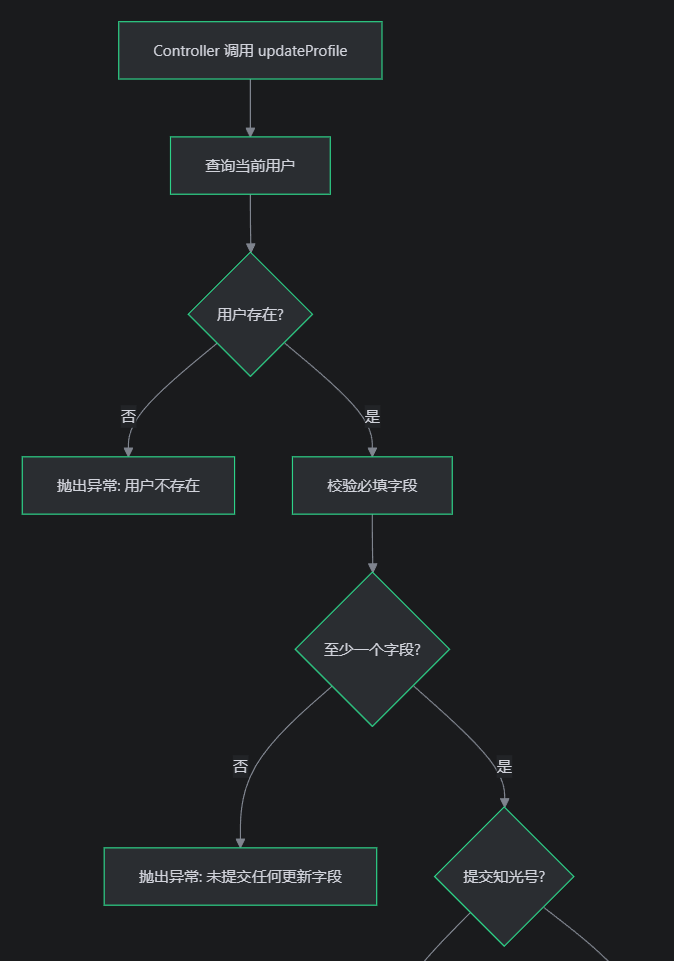
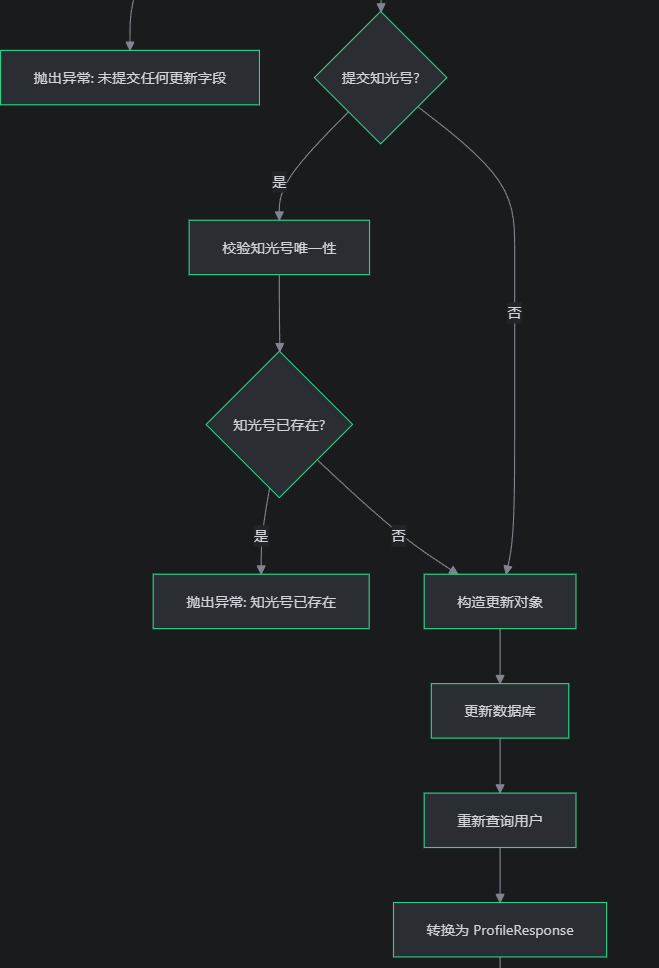
     * 更新个人资料(支持部分字段更新)。
     *
     * <p>更新流程:</p>
     * <ul>
     *   <li>校验用户存在</li>
     *   <li>校验至少提供一个待更新字段</li>
     *   <li>若提交知光号(zgId),校验唯一性</li>
     *   <li>构造 patch 对象并执行更新</li>
     *   <li>重新查询并返回更新后的快照</li>
     * </ul>
     *
     * @param userId 当前登录用户 ID
     * @param req patch 请求(字段可空,非空字段会被更新)
     * @return 更新后的个人资料响应
     */
    @Override
    @Transactional
    public ProfileResponse updateProfile(long userId, ProfilePatchRequest req) {
        // 读取当前用户,作为更新与唯一性校验的基准
        User current = userMapper.findById(userId);

        if (current == null) {
            throw new BusinessException(ErrorCode.IDENTIFIER_NOT_FOUND, "用户不存在");
        }

        // 至少要提交一个字段,否则属于无效请求
        boolean hasAnyField = req.nickname() != null || req.bio() != null || req.gender() != null
                || req.birthday() != null || req.zgId() != null || req.school() != null
                || req.tagJson() != null;

        if (!hasAnyField) {
            throw new BusinessException(ErrorCode.BAD_REQUEST, "未提交任何更新字段");
        }

        // 知光号唯一性校验:仅在提交且非空时检查(排除自己)
        if (req.zgId() != null && !req.zgId().isBlank()) {
            boolean exists = userMapper.existsByZgIdExceptId(req.zgId(), current.getId());

            if (exists) {
                throw new BusinessException(ErrorCode.ZGID_EXISTS);
            }
        }

        // 仅写入非空字段,避免把未提交字段覆盖成 null
        User patch = getUser(req, current);
        userMapper.updateProfile(patch);

        // 更新后回读,保证返回数据为最新快照
        User updated = userMapper.findById(userId);

        return toResponse(updated);
    }

    /**
     * 将 patch 请求转换为用户更新对象。
     *
     * <p>仅对非空字段进行 set,且对字符串做 trim/归一化处理。</p>
     */
    private static User getUser(ProfilePatchRequest req, User current) {
        User patch = new User();
        patch.setId(current.getId());
        if (req.nickname() != null) {
            patch.setNickname(req.nickname().trim());
        }
        if (req.bio() != null) {
            patch.setBio(req.bio().trim());
        }
        if (req.gender() != null) {
            patch.setGender(req.gender().trim().toUpperCase());
        }
        if (req.birthday() != null) {
            patch.setBirthday(req.birthday());
        }
        if (req.zgId() != null) {
            patch.setZgId(req.zgId().trim());
        }
        if (req.school() != null) {
            patch.setSchool(req.school().trim());
        }
        if (req.tagJson() != null) {
            patch.setTagsJson(req.tagJson());
        }
        return patch;
    }

    /**
     * 更新用户头像 URL。
     *
     * <p>头像文件上传由上层完成,此处只负责将 URL 写入用户资料。</p>
     *
     * @param userId 当前登录用户 ID
     * @param avatarUrl 头像 URL(通常来自对象存储上传返回)
     * @return 更新后的个人资料响应
     */
    @Override
    @Transactional
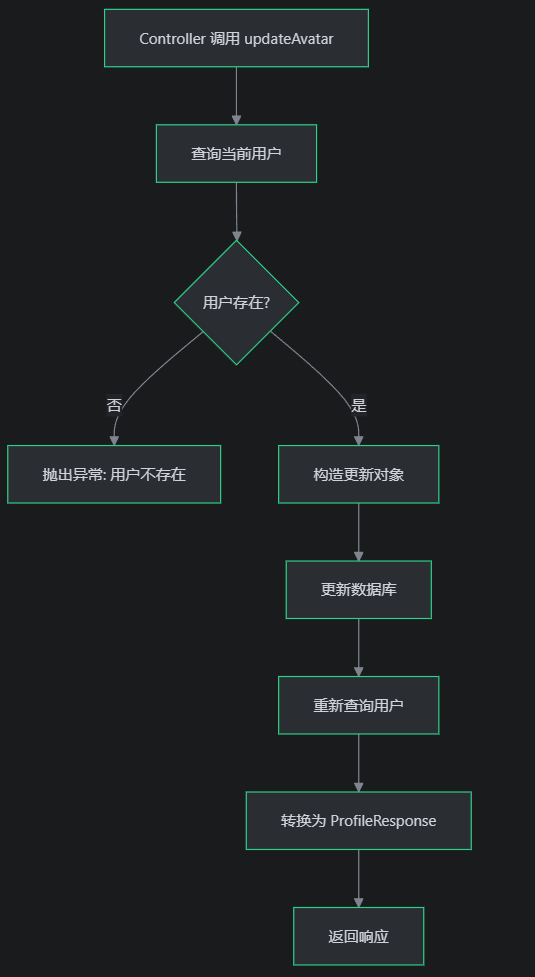
    public ProfileResponse updateAvatar(long userId, String avatarUrl) {
        User current = userMapper.findById(userId);
        if (current == null) {
            throw new BusinessException(ErrorCode.IDENTIFIER_NOT_FOUND, "用户不存在");
        }

        // 仅更新头像字段
        User patch = new User();
        patch.setId(userId);
        patch.setAvatar(avatarUrl);
        userMapper.updateProfile(patch);

        // 更新后回读,保证返回最新头像地址
        User updated = userMapper.findById(userId);
        return toResponse(updated);
    }

    /**
     * 将用户实体映射为对外响应 DTO。
     */
    private ProfileResponse toResponse(User user) {
        return new ProfileResponse(
                user.getId(),
                user.getNickname(),
                user.getAvatar(),
                user.getBio(),
                user.getZgId(),
                user.getGender(),
                user.getBirthday(),
                user.getSchool(),
                user.getPhone(),
                user.getEmail(),
                user.getTagsJson()
        );
    }
}
更新个人资料流程图
更新头像流程
总结
对象存储模块主要处理的是关于:知文内容,文件传输,头像上传功能的实现
用户资料模块主要处理的是关于:用户个人资料的更新