3.5 高级调度
3.5.1 CronJob
CronJob = 定时规则(什么时间做) + 任务模板(要做什么) + 执行策略(怎样控制)
3.5.1.1 Cron 表达式
┌───────────── 分钟 (0 - 59)
│ ┌───────────── 小时 (0 - 23)
│ │ ┌───────────── 日 (1 - 31)
│ │ │ ┌───────────── 月 (1 - 12 或 JAN-DEC)
│ │ │ │ ┌───────────── 星期几 (0 - 6 或 SUN-SAT)
│ │ │ │ │
│ │ │ │ │
* * * * *

# 每分钟执行一次
"* * * * *"     # 每分钟的每一秒都检查

# 每小时的第30分钟执行
"30 * * * *"    # 1:30, 2:30, 3:30...

# 每天凌晨2点执行
"0 2 * * *"     # 每天2:00 AM

# 每周一上午8点执行
"0 8 * * 1"     # 每周一8:00 AM

# 每月1号凌晨3点执行
"0 3 1 * *"     # 每月1号3:00 AM

# 每5分钟执行一次
"*/5 * * * *"   # 0分, 5分, 10分, 15分...

# 工作日上午10点执行
"0 10 * * 1-5"  # 周一到周五10:00 AM
3.5.1.2 配置cronjob
schedule: "0 2 * * *" # 调度配置,每天凌晨2点
concurrencyPolicy: Forbid # 并发策略 : Allow(允许) Forbid(禁止) Replace(替换执行)
successfulJobsHistoryLimit: 3 # 保留最近3个成功的Job记录 failedJobsHistoryLimit: 1 # 保留最近1个失败的Job记录
# 查看历史Job: kubectl get jobs --watch
startingDeadlineSeconds: 300 # 启动截止时间
suspend: true # 暂停CronJob,不再触发新任务
# 动态暂停/恢复:
kubectl patch cronjob my-cronjob -p '{"spec":{"suspend":true}}'  # 暂停
kubectl patch cronjob my-cronjob -p '{"spec":{"suspend":false}}' # 恢复
3.5.2 initContainer 初始化容器
-
没有InitContainer时:
- Pod启动 → 主容器立即运行 → 需要配置文件 → 文件不存在 → ❌ 崩溃!
-
有InitContainer时:
- Pod启动 → InitContainer运行 → 下载配置文件 → ✅ 完成 → 主容器启动 → ✅ 成功!
-
在主容器启动前运行的容器
-
可以有一个或多个,按顺序执行
-
所有InitContainer必须成功完成,主容器才能启动
-
如果InitContainer失败,Pod会重启(重新执行InitContainer)
apiVersion: v1
kind: Pod
metadata:
name: webapp-with-db-check
spec:
initContainers:
# InitContainer 1: 等待MySQL数据库就绪
- name: wait-for-db
image: busybox:1.28
command: ['sh', '-c']
args:
- |
echo "Waiting for MySQL to be ready..."
# 不断尝试连接MySQL,直到成功
until nc -z mysql-service 3306; do
echo "MySQL is not ready yet - sleeping"
sleep 2
done
echo "MySQL is ready! Proceeding..."# InitContainer 2: 初始化数据库表 - name: init-database image: mysql:8.0 command: ['sh', '-c'] args: - | echo "Initializing database tables..." mysql -h mysql-service -u root -p$MYSQL_ROOT_PASSWORD mydb < /sql/init.sql echo "Database initialized!" env: - name: MYSQL_ROOT_PASSWORD valueFrom: secretKeyRef: name: mysql-secret key: password volumeMounts: - name: init-sql mountPath: /sql # 主容器:运行Web应用 containers: - name: webapp image: my-webapp:latest ports: - containerPort: 8080 env: - name: DB_HOST value: "mysql-service" volumes: - name: init-sql configMap: name: db-init-scripts
3.5.3 污点 / 容忍度
污点(Taint):贴在节点(Node)上的"标签",说:我有这些特性/限制
容忍(Toleration):Pod的"能力",说:我能忍受这些特性/限制
| 概念 | 作用对象 | 目的 | 类比 |
|---|---|---|---|
| 污点(Taint) | 节点(Node) | 排斥某些Pod | 宿舍的"准入条件" |
| 容忍(Toleration) | Pod | 忍受某些污点 | 学生的"资格证明" |
| 节点亲和性 | Pod | 吸引到某些节点 | 学生"想住"某宿舍 |
| 节点选择器 | Pod | 选择某些节点 | 学生"要求"住某宿舍 |
3.5.3.1 污点
标注在节点上,如果节点上有污点 Pod 需要容忍所有污点才能调度到这个节点上.
污点的组成
	key = value : effect
键 = 值 : 效果- effect 的三种效果
-
NoSchedule : 不准新来的入住
-
PreferNoSchedule : 最好别来,实在没有地方再来
-
NoExecute : 不准来,已经住的也要搬走(驱逐)
kubectl taint node <节点名称> key = value : effect # 为节点打上污点
kubectl taint node <节点名称> key = value : effect- # 为节点移除污点
kubectl describe node <节点名称> | grep taont # 查看节点的污点常见污点示例:
Taints: gpu=true:NoSchedule # GPU节点
disk=ssd:NoSchedule # SSD存储节点
dedicated=db:NoSchedule # 数据库专用节点
maintenance:NoExecute # 正在维护的节点
node.kubernetes.io/not-ready:NoExecute # 节点未就绪
-
3.5.3.2 容忍
基本使用
tolerations:
- key: "污点的键"
  operator: "Equal 或 Exists"
  value: "污点的值"  # operator=Equal时需要
  effect: "污点的效果"  # 可选,不写表示容忍所有效果
tolerationSeconds: 3600 # 仅对NoExecute有效,容忍时间(秒),即使可以容忍也有一定时间.-
Equals表示精确匹配(key value 都必须相同)
-
Exists表示模糊匹配 (key 相同)
  # 节点污点:gpu=true:NoSchedule
  tolerations:
  - key: "gpu"          # 键必须相同
    operator: "Equal"   # 操作符:等于
    value: "true"       # 值必须相同
    effect: "NoSchedule" # 效果必须相同

  # 容忍所有gpu相关的污点,不管值是什么
  tolerations:
  - key: "gpu"          # 键必须存在
    operator: "Exists"  # 操作符:存在
    # 不需要value字段
    effect: "NoSchedule" # 效果必须匹配
特殊容忍
# 容忍所有污点
tolerations:
- operator: "Exists"  # 不指定key,表示容忍所有key

# 容忍特定效果的所有污点
tolerations:
- operator: "Exists"  # 不指定key
  effect: "NoExecute" # 但指定效果,只容忍NoExecute的污点

# 带容忍时间的NoExecute
tolerations:
- key: "maintenance"
  operator: "Equal"
  value: "true"
  effect: "NoExecute"
  tolerationSeconds: 3600  # 容忍3600秒(1小时),然后被驱逐

污点和容忍的常用命令

# 1. 查看节点污点
kubectl describe node <node-name> | grep -i taint
kubectl get node <node-name> -o jsonpath='{.spec.taints}'

# 2. 添加污点
kubectl taint node <node-name> <key>=<value>:<effect>
# 示例:
kubectl taint node worker1 gpu=true:NoSchedule
kubectl taint node worker2 dedicated=db:NoSchedule

# 3. 删除污点
kubectl taint node <node-name> <key>[:<effect>]-
# 示例:
kubectl taint node worker1 gpu:NoSchedule-  # 删除特定effect
kubectl taint node worker1 gpu-             # 删除所有gpu污点

# 4. 修改污点(先删后加)
kubectl taint node worker1 gpu:NoSchedule-
kubectl taint node worker1 gpu=true:NoExecute


# 查看Pod调度到哪个节点
kubectl get pod <pod-name> -o wide

# 查看节点上的Pod
kubectl get pods -o wide --all-namespaces | grep <node-name>

# 查看Pod的容忍配置
kubectl get pod <pod-name> -o yaml | grep -A 10 tolerations
3.5.4 亲和力
三种亲和性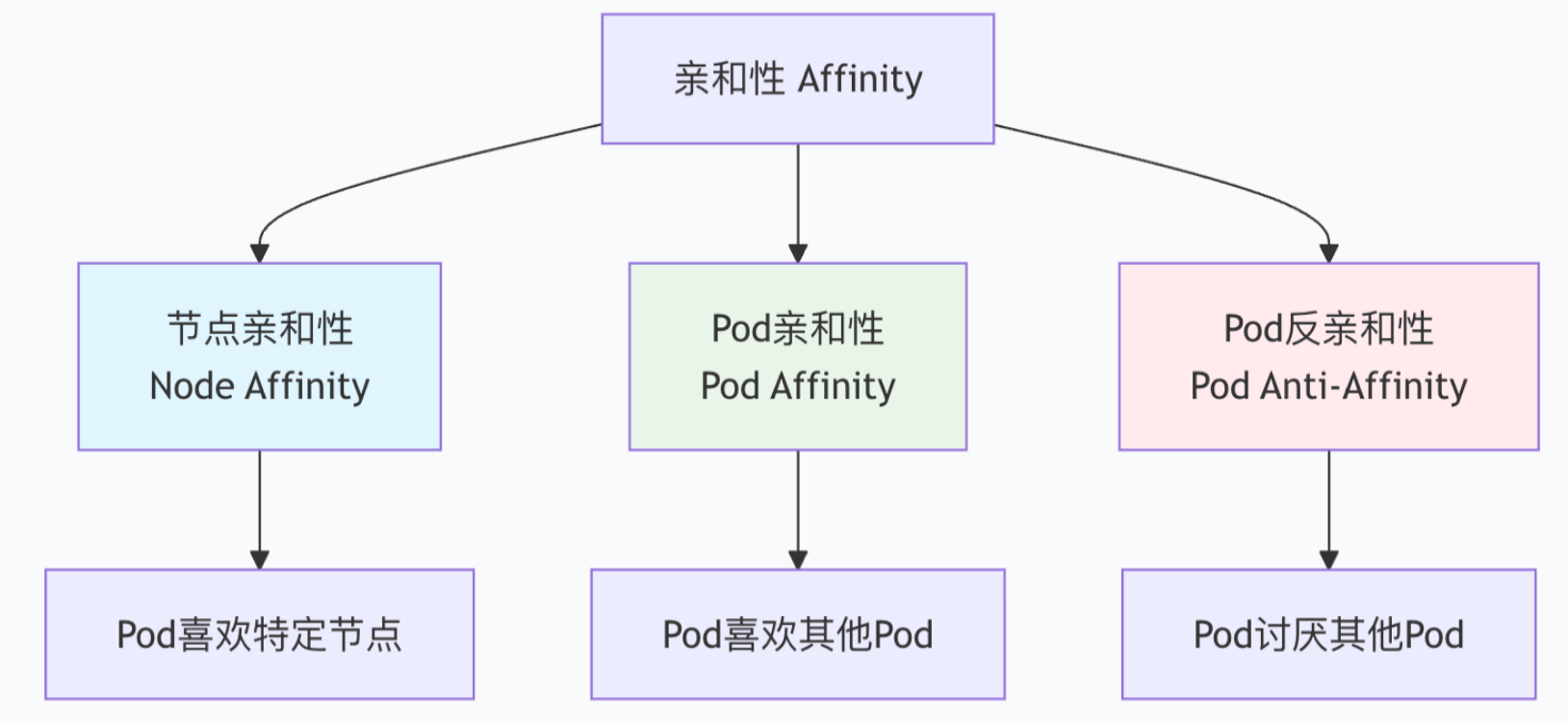
3.5.4.1 NodeAffinity : 节点亲和性
RequiredDuringSchedulinglgnoredDuringExecution : 硬亲和力,要么部署在,要么不在(必须满足,负责不调度)

	affinity:
	  nodeAffinity:
	    requiredDuringSchedulingIgnoredDuringExecution:
	      nodeSelectorTerms:
	      - matchExpressions:
	        - key: disktype
	          operator: In
	          values:
	          - ssd
	          - nvme
	# 翻译:必须调度到 disktype=ssd 或 disktype=nvme 的节点

PreferredDuringSchedulinglgnoredDuringExecution : 软亲和力,尽量部署在满足条件的节点上,或尽量不要部署在被匹配的节点上.(尽量满足)

	affinity:
	  nodeAffinity:
	    preferredDuringSchedulingIgnoredDuringExecution:
	    - weight: 80  # 权重:1-100,越大越优先
	      preference:
	        matchExpressions:
	        - key: zone
	          operator: In
	          values:
- us-east-1a- 匹配类型
- IN : 标签值在裂列表中(有一个就行)
- Notln : 标签值不在列表中 (反亲和性)
- Exists : 标签存在 (存在就满足)
- DoesNotExist : 标签不存在 (不存在就满足)
- Gt : 值大于(数值比较)
- Lt : 值小于(数值比较)
3.5.4.2 Pod 亲和性 与 反亲和性
亲和性 ( podAffinity ) : 将 与指定 Pod 亲和力相匹配的 Pod 部署在同一节点.让Pod亲近其他Pod
- 基于其他Pod的标签 进行选择
- 比如:Web服务想跟缓存服务部署在同一个节点
翻亲和性() : 将指定的 Pod亲和力相匹配的 Pod 尽量不要部署在一起,让Pod远离其他Pod
- 基于其他Pod的标签进行回避
- 比如:数据库副本不要部署在同一个节点(提高可用性)
什么是"同一个位置"呢,这就涉及到了K8s的另一个重要的概念 - 拓扑域
-
topologyKey: kubernetes.io/hostname = 同一个节点
-
topologyKey: failure-domain.beta.kubernetes.io/zone = 同一个可用区
-
topologyKey: failure-domain.beta.kubernetes.io/region = 同一个区域
亲和
apiVersion: apps/v1
kind: Deployment
metadata:
name: webapp
spec:
replicas: 3
selector:
matchLabels:
app: webapp
template:
metadata:
labels:
app: webapp
tier: frontend
spec:
affinity:
podAffinity:
# 硬性要求:必须跟缓存服务在同一个节点
requiredDuringSchedulingIgnoredDuringExecution:
- labelSelector:
matchExpressions:
- key: app
operator: In
values:
- redis-cache
topologyKey: kubernetes.io/hostname # 同一个节点# 软性偏好:尽量跟数据库在同一个可用区 preferredDuringSchedulingIgnoredDuringExecution: - weight: 100 podAffinityTerm: labelSelector: matchExpressions: - key: app operator: In values: - mysql-db topologyKey: failure-domain.beta.kubernetes.io/zone containers: - name: webapp image: nginx:alpine反亲和
apiVersion: apps/v1
kind: Deployment
metadata:
name: mysql-ha
spec:
replicas: 3
selector:
matchLabels:
app: mysql
component: database
template:
metadata:
labels:
app: mysql
component: database
spec:
affinity:
podAntiAffinity:
# 硬性要求:同一个应用的Pod不能在同一节点
requiredDuringSchedulingIgnoredDuringExecution:
- labelSelector:
matchExpressions:
- key: app
operator: In
values:
- mysql
topologyKey: kubernetes.io/hostname # 不能在同一节点# 软性偏好:尽量不在同一个可用区 preferredDuringSchedulingIgnoredDuringExecution: - weight: 100 podAffinityTerm: labelSelector: matchExpressions: - key: app operator: In values: - mysql topologyKey: failure-domain.beta.kubernetes.io/zone containers: - name: mysql image: mysql:8.0