API (全称 Application Programming Interface: 应用程序编程接口):就是别人写好的一些程序,给咱们程序员直接拿去调用即可解决问题的。
1. String
1、创建字符串对象
2、封装字符串数据
3、调用字符串方法
创建对象、封装数据方法:
public class StringDemo1 {
    public static void main(String[] args) {
        // 1、直接=内容就可以得到字符串对象 【推荐】
        String name = "小黑";

        // 2、通过调用构造器初始化字符串对象
        String s1 = new String();
        System.out.println(s1);

        String s2 = new String("sssss");
        System.out.println(s2);

        char[] chars = {'a', 'b', 'c', '中', '国'};
        String s3 = new String(chars);
        System.out.println(s3);

        byte[] bytes = {97, 98, 99, 65, 67};
        String s4 = new String(bytes);
        System.out.println(s4);
    }
}
常用方法:
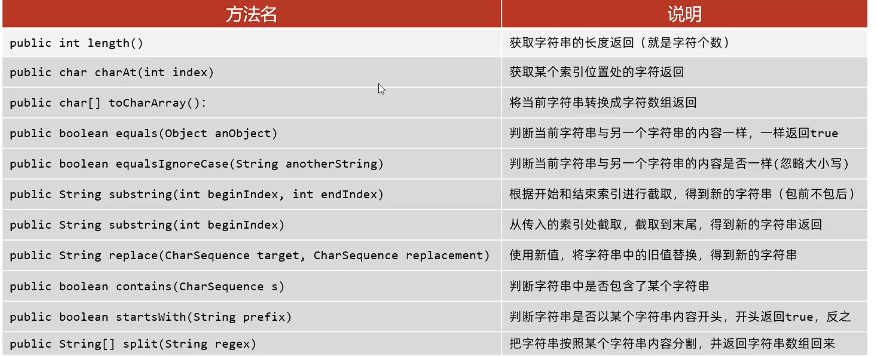
注意事项:
1、String 的对象是不可变字符串对象
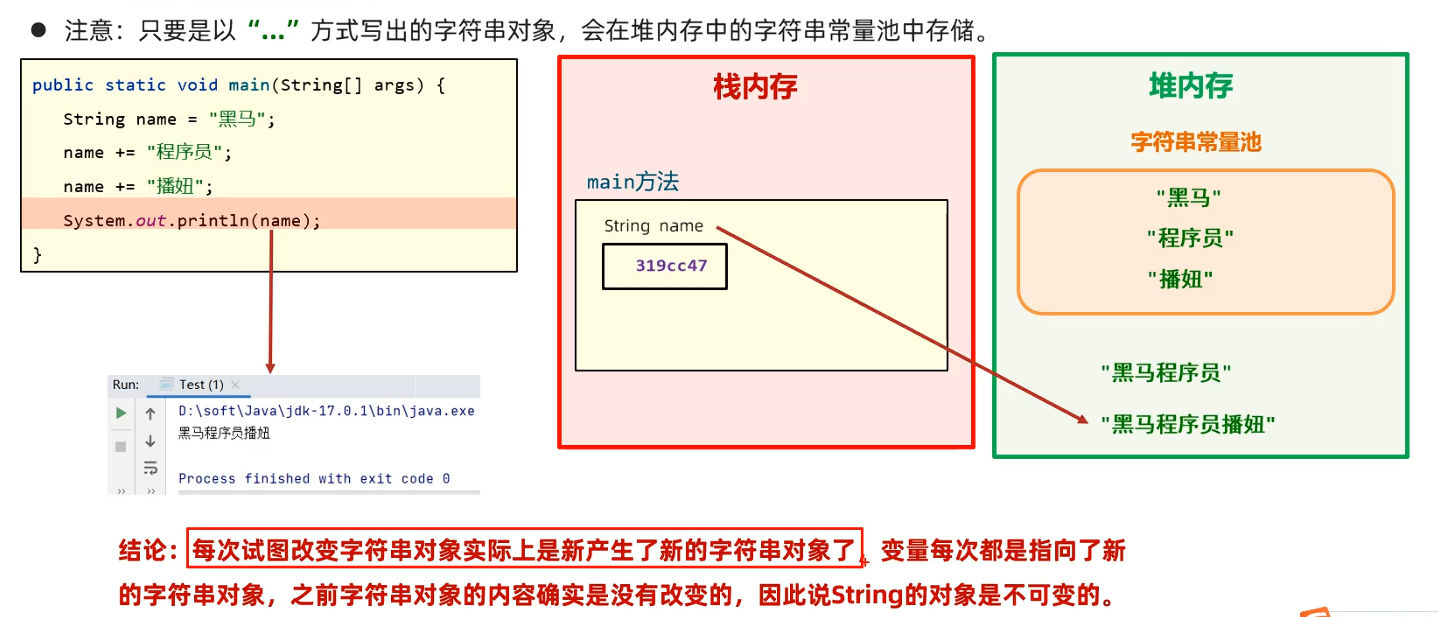
2、只要是以"..."方式写出的字符串对象,会存储到字符串常量池,且相同内容的字符串只存储一份;但通过new方式创建字符串对象,每new一次都会产生一个新的对象放在堆内存中。
例子:开发验证码【简单例子】
import java.util.Random;

public class StrignDemo2 {
    public static void main(String[] args) {
        System.out.println(create(5));
        System.out.println(create(8));
    }

    public static String create(int n) {
        String code = "";  // 记住验证码
        String data = "ABCDEFGHIJKLMNOPQRSTUVWXYZ0123456789";

        // 1、循环控制获取多少位字符,然后拼接
        Random r = new Random();
        for (int i = 0; i < n; i++) {
            // 2、随机产生一个索引
            int index = r.nextInt(data.length());
            // 3、提取对应索引位置的字符
            char c = data.charAt(index);
            // 4、拼接
            code += c;
        }
        return code;
    }
}
2. ArrayList
是一种集合。集合是一种容器,用来装数据的,类似于数组。
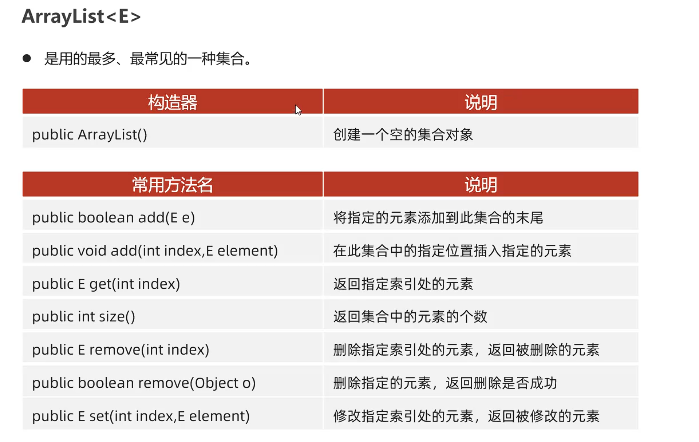
import java.util.ArrayList;

public class ArrayListDemo {
    public static void main(String[] args) {
        // 1、使用构造器创建一个空的 ArrayList对象
        // ArrayList list = new ArrayList();
        ArrayList<String> list = new ArrayList<String>();

        System.out.println("初始列表: " + list);
        System.out.println("初始大小: " + list.size());

        // 2、添加元素到末尾
        list.add("苹果");
        list.add("香蕉");
        list.add("橙子");
        System.out.println("添加三个水果后: " + list);

        // 3、在指定位置插入元素 索引从0开始
        // 在索引1处插入一个元素
        list.add(1, "黄瓜");
        System.out.println("在索引1处插入元素后: " + list);

        // 4、获取指定索引处的元素
        String fruitAtIndex2 = list.get(2);
        System.out.println("索引2处的元素是: " + fruitAtIndex2);

        // 5、修改指定索引处的元素
        // 修改索引2处的元素为芒果,旧元素保存在oldElement中
        String oldElement = list.set(2, "芒果");
        System.out.println("修改索引2处的元素: " + list);
        System.out.println("被删除的元素是: " + oldElement);

        // 6、删除指定索引处的元素
        // 删除索引1处的元素,返回被删除的元素
        String removedElement = list.remove(1);
        System.out.println("删除索引1处的元素: " + removedElement);

        // 7、删除指定对象(返回是否成功)
        System.out.println("现在的元素有: " + list);
        boolean removedObject = list.remove("芒果");
        System.out.println("尝试删除芒果: " + (removedObject ? "成功" : "失败"));
        System.out.println("当前列表: " + list);

        // 8、获取集合中元素的个数
        int size = list.size();
        System.out.println("列表中元素个数: " + size);
    }
}
3. StringBuilder
StringBuilder 代表可变字符串对象,相当于是一个容器,它里面装的字符串是可以改变的,就是用来操作字符串的。
StringBuilder比String更适合做字符串的修改操作,效率更高,代码更简洁
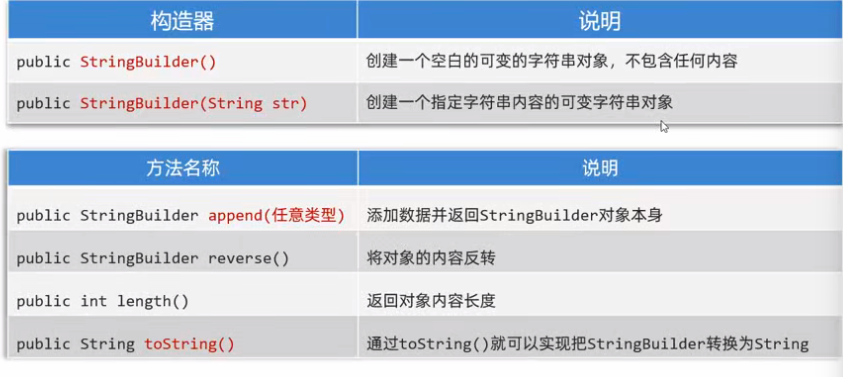
Q: 为什么操作字符串使用该 API,而不是用 String?
A: 快!快得多的多!所以一般 toString()方法使用的很多。因为大多数方法的参数还是 String 类型
- 对于字符串相关的操作,如频繁的拼接、修改等,建议用StringBuidler,效率更高
- 注意:如果操作字符串较少,或者不需要操作,以及定义字符串变量,还是建议用String。
Q:StringBuffer 与 StringBuilder
A:
-
StringBuffer 的用法与 StringBuilder 是一模一样的
-
但 StringBuilder是线程不安全的;SpringBuffer是线程安全的
public class StringBuilderDemo1 {
public static void main(String[] args) {
// 学习StringBuilder
// 1、创建对象
StringBuilder sb = new StringBuilder(); // sb = "
StringBuilder sb2 = new StringBuilder("hello");
System.out.println(sb);
System.out.println(sb2);// 2、拼接内容 sb.append("黑马").append("Java").append(666).append(true); System.out.println(sb); // 3、反转内容 sb.reverse(); System.out.println(sb); // 4、长度 System.out.println(sb.length()); // 5、把StringBuilder对象转换成String对象 // StringBuilder 是拼接字符串的手段 // String才是开发中的目的 String result = sb.toString(); System.out.println(result); }}
public class StringBuilderDemo2 {
public static void main(String[] args) {
// 使用StringBuilder完成对字符串的拼接操作
int[] arr = {11, 33, 66, 44};
System.out.println(getArrayData(arr));
}public static String getArrayData(int[] arr) { if (arr == null) { return null; } // 1、创建StringBuilder对象 StringBuilder sb = new StringBuilder(); sb.append("["); // 2、遍历数组中的内容 for (int i = 0; i < arr.length; i++) { int data = arr[i]; sb.append(data).append(i == arr.length - 1 ? "" : ","); } sb.append("]"); return sb.toString(); }}
4. StringJoiner
JDK8 开始才有的,跟 StringBuilder 一样,也是用来操作字符串的,也可以看成是一个容器,创建之后里面的内容是可变的。
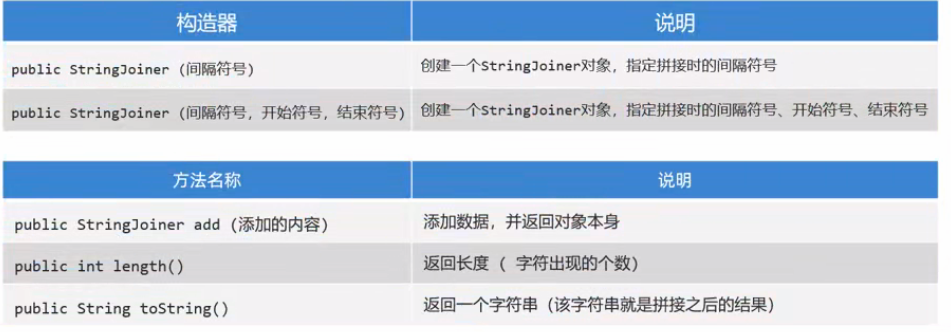
使用它拼接字符串的时候,不仅高效,而且代码的编写更加的方便。
import java.util.StringJoiner;

public class StringJoinerDemo1 {
    public static void main(String[] args) {
        // 使用StringJoiner完成对字符串的拼接操作
        int arr[] = {11, 33, 66, 44};
        System.out.println(getArrayData(arr));
    }

    public static String getArrayData(int[] arr) {
        if (arr == null) {
            return null;
        }

        // 1、创建StringJoiner对象
        StringJoiner sb = new StringJoiner(",", "[", "]");
        for (int i = 0; i < arr.length; i++) {
            int data = arr[i];
            sb.add(Integer.toString(data));
        }
        return sb.toString();
    }
}
5. Math、Runtime、
5.1. Math
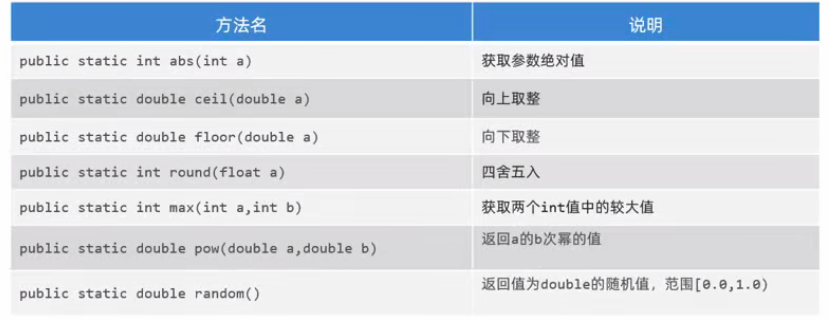
代表数学,是一个工具类,里面提供的都是对数据进行操作的一些静态方法。
5.2. Runtime
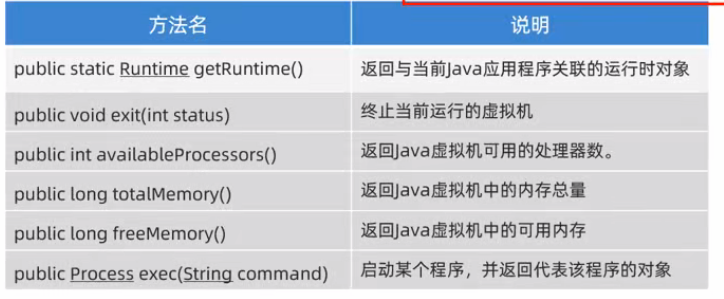
- 代表程序所在的运行环境。
- Runtime是一个单例类。
import java.io.IOException;

public class RuntimeDemo {
    public static void main(String[] args) throws IOException {
        // 返回当前Java应用程序关联的运行时对象
        Runtime jre = Runtime.getRuntime();

        // 获取虚拟机能够使用的处理器数
        System.out.println("处理器数量: " + jre.availableProcessors());

        // 返回Java虚拟机中的内存总量、字节数
        System.out.println("Java虚拟机中的内存总量: " + jre.totalMemory()/1024.0/1024.0 + "MB");

        // 返回Java虚拟机中的可用内存量
        System.out.println("Java虚拟机中的可用内存量: " + jre.freeMemory()/1024.0/1024.0 + "MB");

        // 执行命令、启动程序
        // 用这个需要加 throws IOException:运行时异常
        // 因为exec()方法可能会抛出IOException
        jre.exec("calc"); // 启动计算器
    }
}
5.3. System
System 代表程序所在的系统,也是一个工具类。

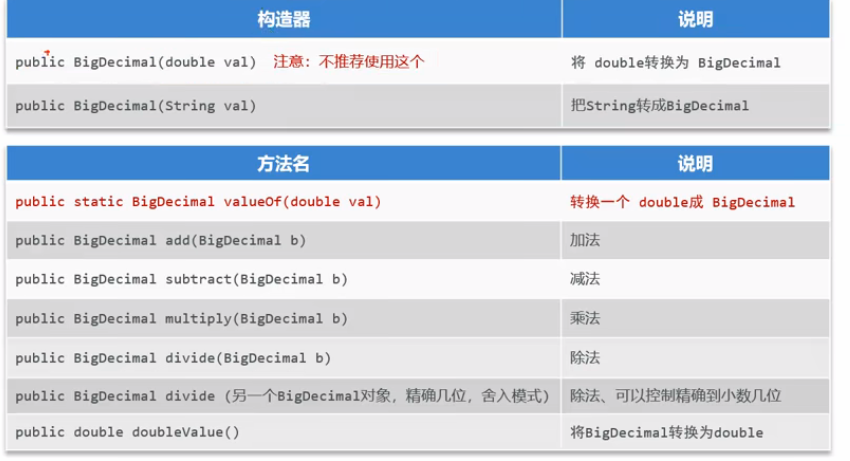
6. BigDecimal
用于解决浮点型运算时,出现结果失真的问题。
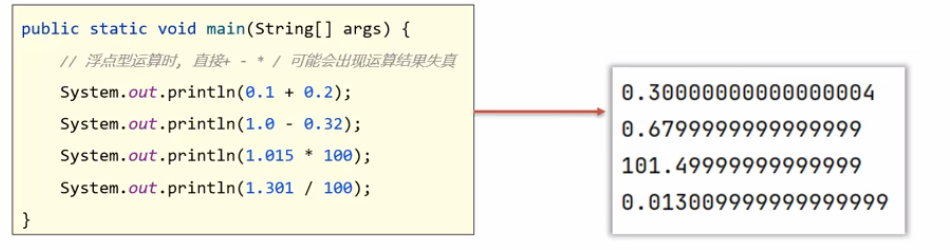
常见构造器和方法
import java.math.BigDecimal;

public class BigDecimalDemo1 {
    public static void main(String[] args) {
        double a = 0.1;
        double b = 0.2;
        System.out.println(a + b);  // 0.30000000000000004

        // 把两个数据包装成BigDecimal对象
        BigDecimal a1 = new BigDecimal(Double.toString(a));
        BigDecimal b1 = new BigDecimal(Double.toString(b));
        System.out.println(a1.add(b1));  // 0.3

        // 推荐下面这种写法,本质和上面是一样的
        BigDecimal a11 = BigDecimal.valueOf(a);
        BigDecimal b11 = BigDecimal.valueOf(b);
        System.out.println(a11.add(b11));

        // 调用方法进行精度运算
        // BigDecimal c1 = a11.add(b11);
        // BigDecimal c1 = a11.subtract(b11);
        // BigDecimal c1 = a11.multiply(b11);
        // 参数:1.除数 2.精度 3.舍入模式
        BigDecimal c1 = a11.divide(b11, 2, BigDecimal.ROUND_HALF_UP);

        // BigDecimal 是处理精度问题的手段,结果必须还是基本类型
        double result = c1.doubleValue();
        System.out.println(result);
    }
}
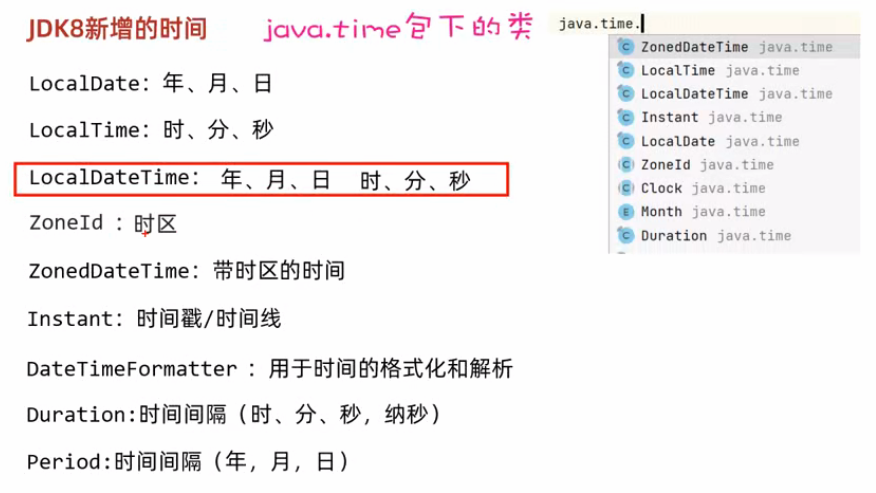
7. 时间
import java.time.*;
import java.time.format.DateTimeFormatter;

public class TimeDemo1 {
    public static void main(String[] args) {
        LocalDate date = LocalDate.now();
        System.out.println(date);  // 2026-03-19

        LocalDate custom = LocalDate.of(2026, 5, 20);
        System.out.println(custom);  // 2026-05-20

        // LocalTime的使用
        LocalTime time = LocalTime.now();
        System.out.println(time);
        // 这个也可以设置  使用 of()方法

        // LocalDateTime
        LocalDateTime now = LocalDateTime.now();
        System.out.println(now);  // 2026-03-19T10:42:51.523490
        // 这个也可以设置  使用 of()方法

        // ZoneId  时区
        ZoneId zone = ZoneId.systemDefault();
        System.out.println(zone);  // Asia/Shanghai

        // ZonedDateTime  带时区时间
        ZonedDateTime zonedDateTime = ZonedDateTime.now();
        System.out.println(zonedDateTime);

        // Instant  时间戳
        Instant instant = Instant.now();
        System.out.println(instant);

        long millis = instant.toEpochMilli();
        System.out.println(millis); // 时间戳(毫秒) 1773888411583

        // DateTimeFormatter 格式化
        LocalDateTime now1 = LocalDateTime.now();
        System.out.println(now1);

        DateTimeFormatter fomatter = DateTimeFormatter.ofPattern("yyyy-MM-dd HH:mm:ss");
        String str_now1 = now1.format(fomatter);
        System.out.println(str_now1);  // 2026-03-19 10:48:14

        LocalDateTime parse = LocalDateTime.parse(str_now1, fomatter);
        System.out.println(parse);  // 2026-03-19T10:48:53  又回去

        // Duration 时间间隔
        LocalTime t1 = LocalTime.of(10, 30);
        LocalTime t2 = LocalTime.of(11, 20);
        Duration duration = Duration.between(t1, t2);
        // toHours() : 返回小时数
        System.out.println(duration.toHours());  // 0
        // toMinutes() : 返回分钟数
        System.out.println(duration.toMinutes());  // 60
    }
}
8. 集合进阶
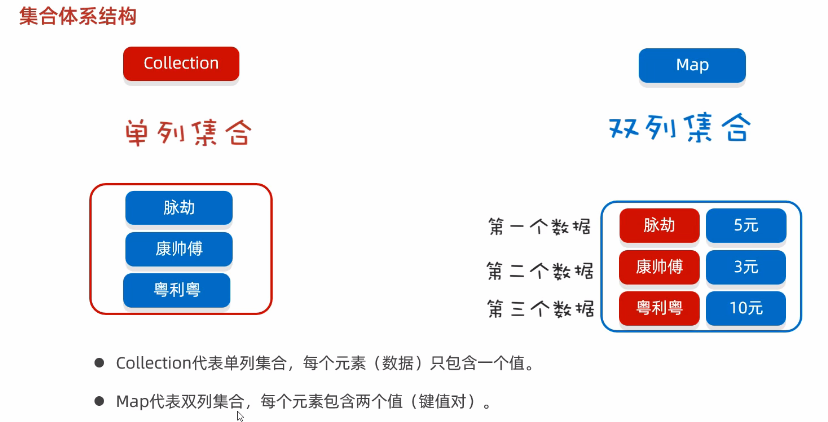
8.1. 集合体系结构
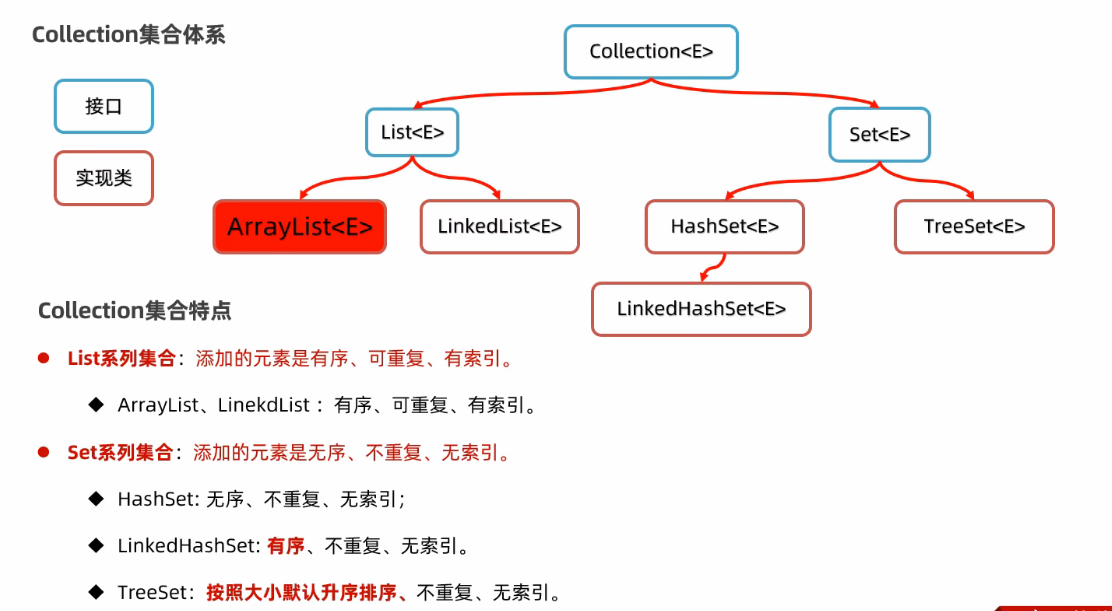
8.2. Collection 集合体系
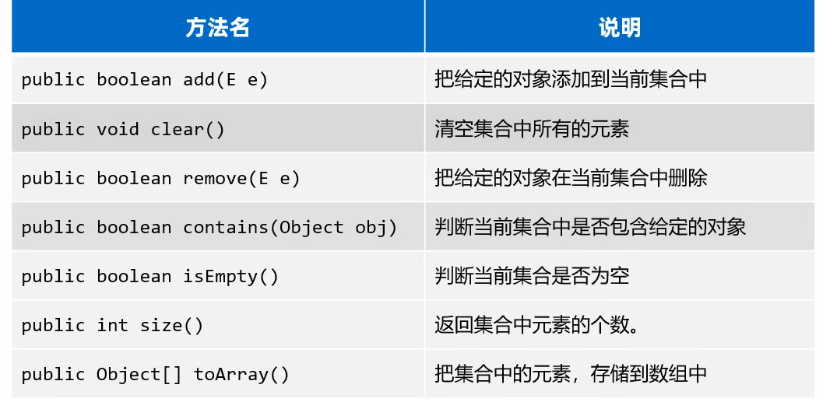
8.3. Collection 的常用方法
Q: 为啥要先学Collection的常用方法?
A:Collection是单列集合的祖宗,它规定的方法(功能)是全部单列集合都会继承的。
import java.util.ArrayList;
import java.util.Collection;

public class CollectionExample {
    public static void main(String[] args) {
        // 创建集合
        // Collection<String> 接口类型,表示一个可以存储字符串(String)对象的集合
        // new ArrayList<>() 通过 new 关键字创建了一个 ArrayList 类的实例
        // ArrayList 是 Collection 接口的一个常用实现类,底层基于数组实现,支持动态扩容。
        // 多态的核心:允许使用父类(或接口)的引用来指向其任何子类的对象。
        Collection<String> list = new ArrayList<>();

        // 添加元素
        list.add("Apple");
        list.add("Banana");
        list.add("Orange");
        System.out.println("添加三个水果后: " + list);

        // size() 方法返回集合中的元素数量
        System.out.println("集合中元素数量: " + list.size());

        // contains(Object obj) 判断集合中是否包含指定的对象
        boolean ifContains = list.contains("Apple");
        System.out.println("集合中是否包含Apple: " + ifContains);

        // isEmpty() 方法判断集合是否为空
        boolean ifEmpty = list.isEmpty();
        System.out.println("集合是否为空: " + ifEmpty);

        // remove(E e) 删除元素
        list.remove("Apple");
        System.out.println("删除Apple后: " + list);

        // toArray() 转换为数组
        Object[] array = list.toArray();
        System.out.println("转换为数组: ");
        for (Object obj : array) {
            System.out.println(obj);
        }

        // clear() 方法清空集合
        list.clear();
        System.out.println("清空集合后: " + list);
    }
}
8.4. Collection 的遍历方式
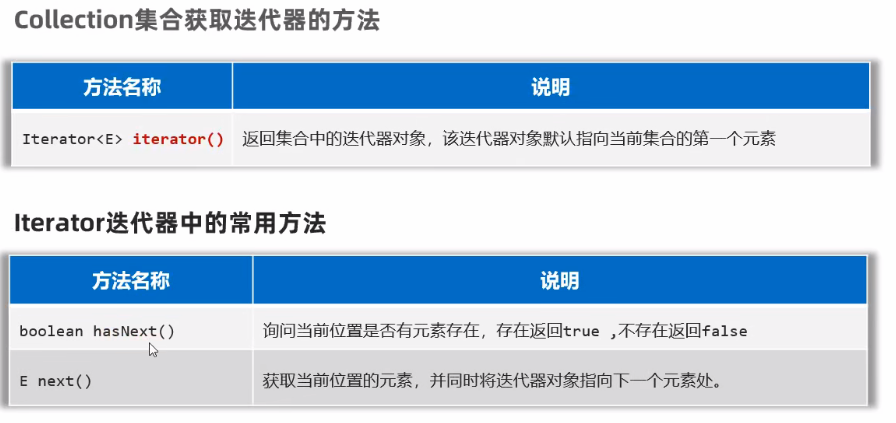
1、迭代器
迭代器是用来遍历集合的专用方式(数组没有迭代器),在 Java 中迭代器的代表是Iterator
import java.util.ArrayList;
import java.util.Collection;
import java.util.Iterator;

public class IteratorExample {
    public static void main(String[] args) {
        // 创建集合并添加元素
        Collection<String> list = new ArrayList<>();

        list.add("Apple");
        list.add("Banana");
        list.add("Orange");

        // 获取迭代器
        Iterator<String> iterator = list.iterator();

        // 使用迭代器遍历
        while (iterator.hasNext()) {
            String element = iterator.next();
            System.out.println(element);
        }
    }
}
不能在遍历的时候使用 list.remove(),会报错: ConcurrentModificationException
必须谁用迭代器自己的方法:iterator.remove()
// 使用迭代器遍历
while (iterator.hasNext()) {
    String element = iterator.next();
    if (element.equals("Banana")) {
        iterator.remove();
    }
}
2、增强 for
增强for可以用来遍历集合或者数组。
增强for遍历集合,本质就是迭代器遍历集合的简化写法。
import java.util.ArrayList;
import java.util.Collection;

public class ForEachExample {
    public static void main(String[] args) {
        Collection<String> list = new ArrayList<>();
        list.add("Apple");
        list.add("Banana");
        list.add("Orange");

        // 增强for遍历
        for (String element : list) {
            System.out.println(element);
        }
    }
}- 底层其实也是 Iterator
- 适合只读遍历
3、lambda 表达式
forEach 方法
方法引用写法
public class ForEachExample {
    public static void main(String[] args) {
        Collection<String> list = new ArrayList<>();
        list.add("Apple");
        list.add("Banana");
        list.add("Orange");

        // lambda表达式
        list.forEach(ele -> System.out.println(ele));

        // 方法引用
        list.forEach(System.out::println);
    }
}