长文预警,这个是一个手把手,step by step 教程,适合新手
原文有代码折叠和 diff,排版风味更佳
喝完免费的奶茶🧋,是时候整点干货了。
你有没有好奇过,和 AI 聊天过程中,给他说一句话,商品就发过来了,这是如何实现的?
有小伙伴说,"用 iframe"。显然,iframe 难以实现抽屉弹窗效果。
下面,我将用 5 分钟时间,300 行代码,从 0 开始,教你古法手写实现这个效果,见视频:

机器人页面
首先,我们先用 vite 搭一个机器人聊天页面。pnpm,启动!
控制台:执行
bash
pnpm create vite qwen-free-tea --template react-ts --immediate --no-interactivepackage.json 中,加入依赖项 antd、antd-icons、antd-x。 antd 是最常见的 B 端后台牛马,大家很熟了。antd-x 是同体系下,用于 AI 业务的组件。
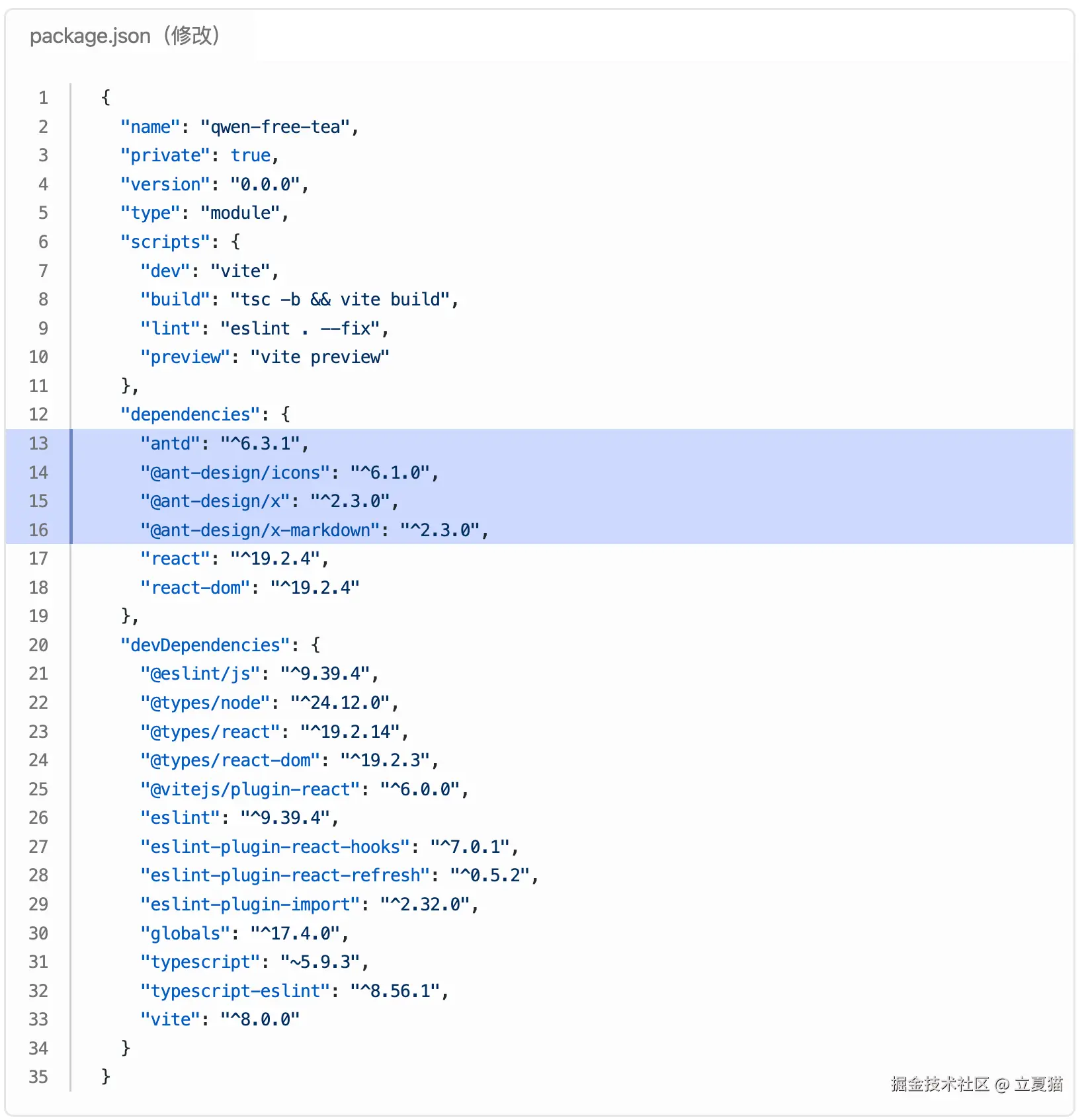
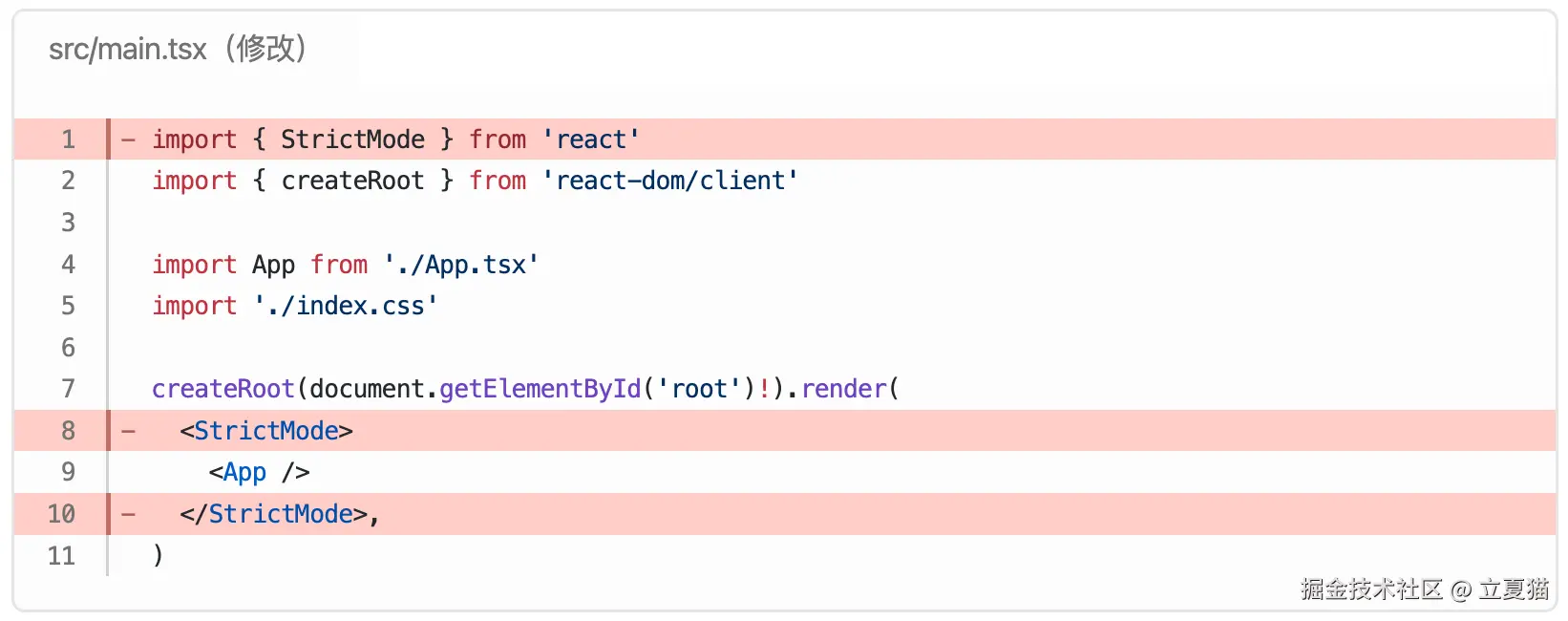
React render 函数去掉严格模式。这是一个糟糕的模式,弃之不用:
替换全局基础样式:
src/index.css(修改)
css
* {
  box-sizing: border-box;
  padding: 0;
  margin: 0;
}

html,
body,
#root {
  height: 100%;
  font-family: 'PingFang SC', 'Hiragino Sans GB', 'Microsoft YaHei', sans-serif;
}

/* 整个滚动条 */
::-webkit-scrollbar {
  width: 8px;
  /* 竖向滚动条宽度 */
  height: 8px;
  /* 横向滚动条高度 */
}

/* 滚动条轨道背景 */
::-webkit-scrollbar-track {
  background: #e5ebf7;
}

/* 滚动条滑块 */
::-webkit-scrollbar-thumb {
  background: #888;
  border-radius: 4px;
}

/* hover 状态 */
::-webkit-scrollbar-thumb:hover {
  background: #555;
}
项目架子搭好了。下面开始布局,替换页面结构,上面是消息列表,下面是输入框,让他看起来像这样:

src/App.tsx(修改)
tsx
import * as React from 'react'

import './App.css'

function App() {
  return (
    <div className="app">
      <div className="chat-list">消息列表</div>
      <div className="chat-sender">输入框</div>
    </div>
  )
}

export default App
src/App.css(修改)
css
.app {
  display: flex;
  flex-direction: column;
  height: 100vh;
  background: #e5ebf7;
}

.chat-list {
  display: flex;
  flex: 1;
  flex-direction: column;
  gap: 16px;
  padding: 8px;
  overflow: auto;
}

.chat-sender {
  display: flex;
  flex-shrink: 0;
  padding: 8px;
}
消息列表
消息列表加入两条消息 <Bubble>,分别代表模型(立夏猫)和人类(铲屎官):

src/App.tsx(修改)
tsx
import { GithubOutlined, SmileOutlined } from '@ant-design/icons'
import { Bubble } from '@ant-design/x'
import { XMarkdown } from '@ant-design/x-markdown'
import { Avatar } from 'antd'
import * as React from 'react'

import './App.css'

function App() {
  return (
    <div className="app">
      <div className="chat-list">
        <Bubble
          content={'你是谁'}
          header={<h5>铲屎官</h5>}
          avatar={<Avatar icon={<SmileOutlined style={{ fontSize: 26 }} />} />}
          // 人类消息,靠右布局
          placement={'end'}
        />
        <Bubble
          content={<XMarkdown content={`你好👋,我是***立夏猫***`} />}
          header={<h5>立夏猫</h5>}
          avatar={<Avatar icon={<GithubOutlined style={{ fontSize: 26 }} />} />}
          // 模型消息,靠左布局
          placement={'start'}
        />
      </div>
      <div className="chat-sender">输入框</div>
    </div>
  )
}

export default App
<Bubble> 组件渲染的都是「历史消息」,用 TypeScript 把他定义为 Message 对象:
src/type.ts (新建文件)
tsx
/** 历史消息 */
export interface Message {
  /** 消息唯一 id */
  id: string
  /**
   * role 是 openai 定义的,表明消息的类型。
   * 不同的 role, <Bubble /> 的 header、avatar、placement 应该渲染不同的内容
   */
  role: 'system' | 'user' | 'assistant' | 'tool' | 'developer'
  /** 消息的内容。由 <Bubble /> 的 content 渲染 */
  content: string
}
UI 的变化是由 React.useState 驱动的。因此,要把「历史消息」列表重构成一个 state。把刚才写死的数据,装到类型为 Message 的 state 里,调用 map 渲染。 state 头部加入了系统提示词,渲染时隐藏:
src/App.tsx(修改)
tsx
import { GithubOutlined, SmileOutlined } from '@ant-design/icons'
import { Bubble } from '@ant-design/x'
import { XMarkdown } from '@ant-design/x-markdown'
import { Avatar } from 'antd'
import * as React from 'react'

import type { Message } from './type'

import './App.css'

function App() {
  const [history, setHistory] = React.useState<Message[]>([
    {
      id: '0',
      /** 系统提示词 */
      role: 'system',
      content:
        '模型是立夏猫,自称"本喵"。模型要以猫的身份,服侍主子,性格可爱,回复简洁',
    },
    {
      id: '1',
      /** 人类的消息 */
      role: 'user',
      content: '你是谁',
    },
    {
      id: '2',
      /** 模型的消息 */
      role: 'assistant',
      content: `你好👋,我是***立夏猫***`,
    },
  ])

  return (
    <div className="app">
      <div className="chat-list">
        {history.map((message) => {
          const key = `${message.id}`
          const content = message.content
          /** 没有内容,不渲染 */
          if (!content) return null
          switch (message.role) {
            /** 系统提示词,不在 UI 上显示,渲染时隐藏 */
            case 'system': {
              return null
            }
            /** 用户的消息 */
            case 'user': {
              return (
                <Bubble
                  key={key}
                  content={<XMarkdown content={content} />}
                  header={<h5>铲屎官</h5>}
                  avatar={
                    <Avatar icon={<SmileOutlined style={{ fontSize: 26 }} />} />
                  }
                  // 人类消息,靠右布局
                  placement={'end'}
                />
              )
            }
            /** 模型的消息 */
            case 'assistant': {
              return (
                <Bubble
                  key={key}
                  content={<XMarkdown content={content} />}
                  header={<h5>立夏猫</h5>}
                  avatar={
                    <Avatar
                      icon={<GithubOutlined style={{ fontSize: 26 }} />}
                    />
                  }
                  // 模型消息,靠左布局
                  placement={'start'}
                />
              )
            }
          }
          return null
        })}
      </div>
      <div className="chat-sender">输入框</div>
    </div>
  )
}

export default App
至此,「历史消息」列表就准备好了。
输入框
导入 <Sender> 组件,使用 useState 实现输入框的数据双向绑定。点击发送按钮后,把输入框里的数据加入到「历史消息」列表末尾,效果见视频:

src/App.tsx(修改)
tsx
import { GithubOutlined, SmileOutlined } from '@ant-design/icons'
import { Bubble, Sender } from '@ant-design/x'
import { XMarkdown } from '@ant-design/x-markdown'
import { Avatar } from 'antd'
import * as React from 'react'

import type { Message } from './type'

import './App.css'

function App() {
  const [input, setInput] = React.useState('')
  const [history, setHistory] = React.useState<Message[]>([
    {
      id: '0',
      /** 系统提示词 */
      role: 'system',
      content:
        '模型是立夏猫,自称"本喵"。模型要以猫的身份,服侍主子,性格可爱,回复简洁',
    },
    {
      id: '1',
      /** 人类的消息 */
      role: 'user',
      content: '你是谁',
    },
    {
      id: '2',
      /** 模型的消息 */
      role: 'assistant',
      content: `你好👋,我是***立夏猫***`,
    },
  ])

  const onSubmit = () => {
    /** 新建一个消息 */
    const message: Message = {
      id: `${history.length}`,
      role: 'user',
      content: input,
    }
    /** 把消息加入列表末尾 */
    setHistory([...history, message])
    /** 清空输入框 */
    setInput('')
  }

  return (
    <div className="app">
      <div className="chat-list">
        {history.map((message) => {
          const key = `${message.id}`
          const content = message.content
          /** 没有内容,不渲染 */
          if (!content) return null
          switch (message.role) {
            /** 系统提示词,不在 UI 上显示,渲染时隐藏 */
            case 'system': {
              return null
            }
            /** 用户的消息 */
            case 'user': {
              return (
                <Bubble
                  key={key}
                  content={<XMarkdown content={content} />}
                  header={<h5>铲屎官</h5>}
                  avatar={
                    <Avatar icon={<SmileOutlined style={{ fontSize: 26 }} />} />
                  }
                  // 人类消息,靠右布局
                  placement={'end'}
                />
              )
            }
            /** 模型的消息 */
            case 'assistant': {
              return (
                <Bubble
                  key={key}
                  content={<XMarkdown content={content} />}
                  header={<h5>立夏猫</h5>}
                  avatar={
                    <Avatar
                      icon={<GithubOutlined style={{ fontSize: 26 }} />}
                    />
                  }
                  // 模型消息,靠左布局
                  placement={'start'}
                />
              )
            }
          }
          return null
        })}
      </div>
      <div className="chat-sender">
        <Sender
          /** 输入框,数据双向绑定 */
          value={input}
          onChange={(input) => {
            setInput(input)
          }}
          styles={{
            root: { background: 'white' },
          }}
          /** 点击发送按钮 */
          onSubmit={onSubmit}
        />
      </div>
    </div>
  )
}

export default App
模型调用
目前的机器人页面还都只是本地的模拟数据。下面我们来调用模型接口,实现真正人机互动。
对话补全
安装 openai sdk:
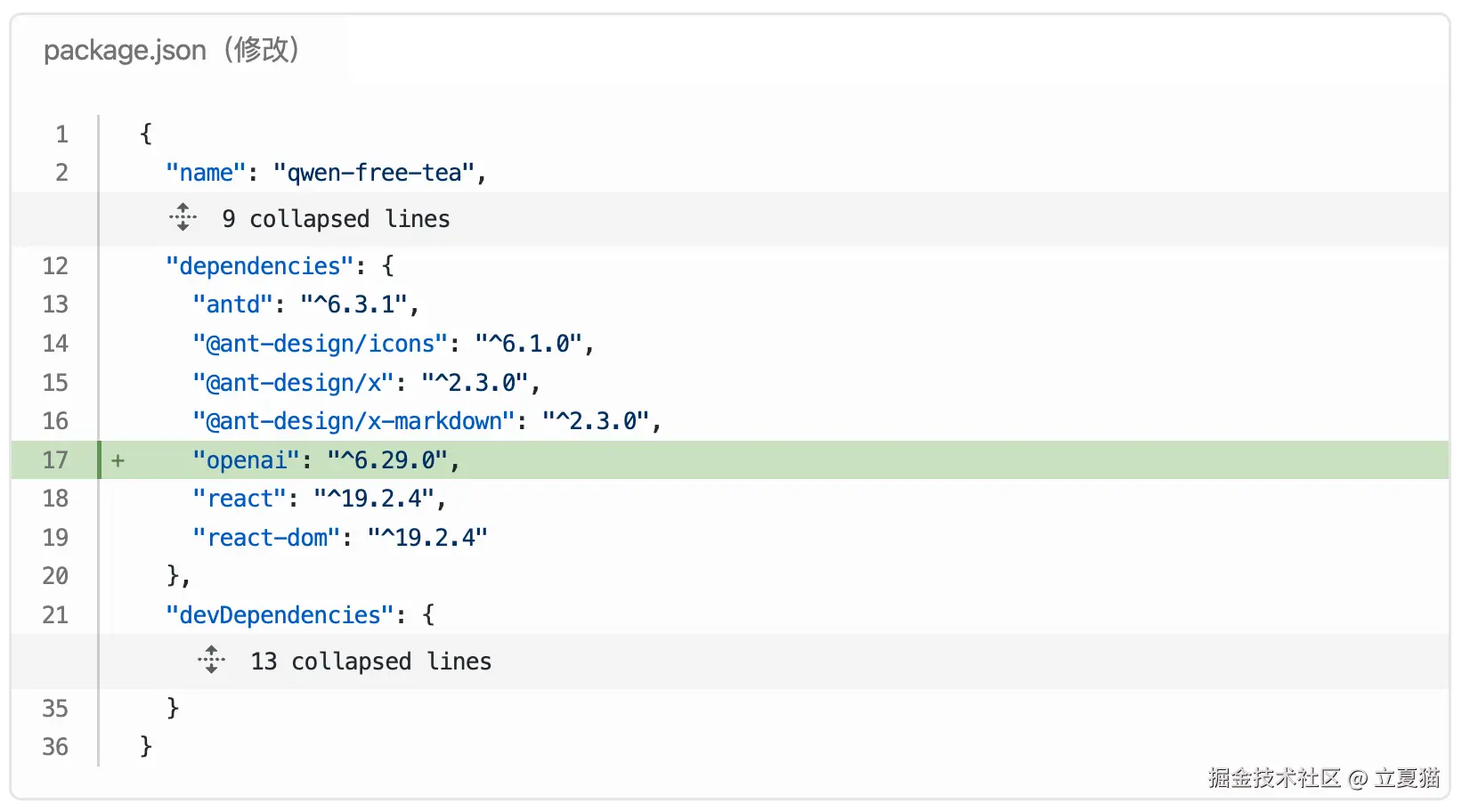
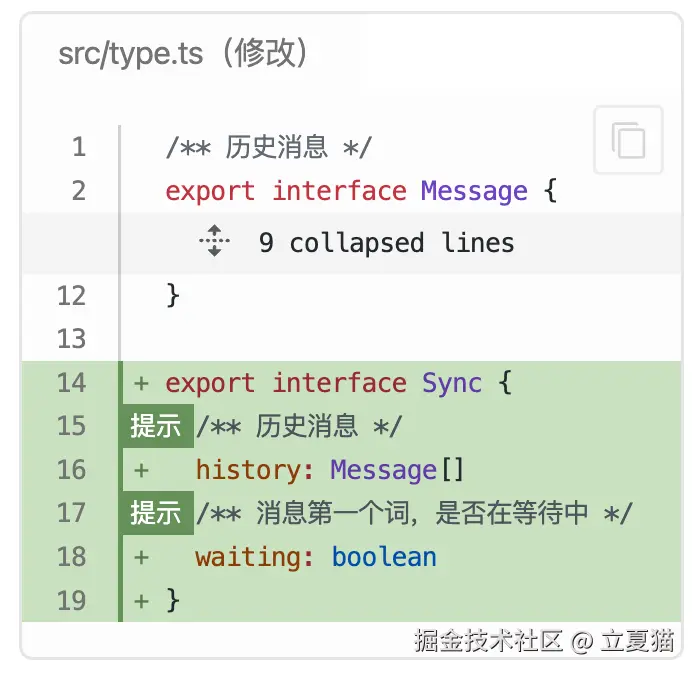
type.ts 中,新增一个 Sync 类型,用来模拟 UI 层数据结构。
新建一个 chat.ts,「历史消息」里,复制系统提示词,随后插入一个提问"你是谁",最后调用 chatCompletion 函数补全对话。chatCompletion 函数稍后实现:
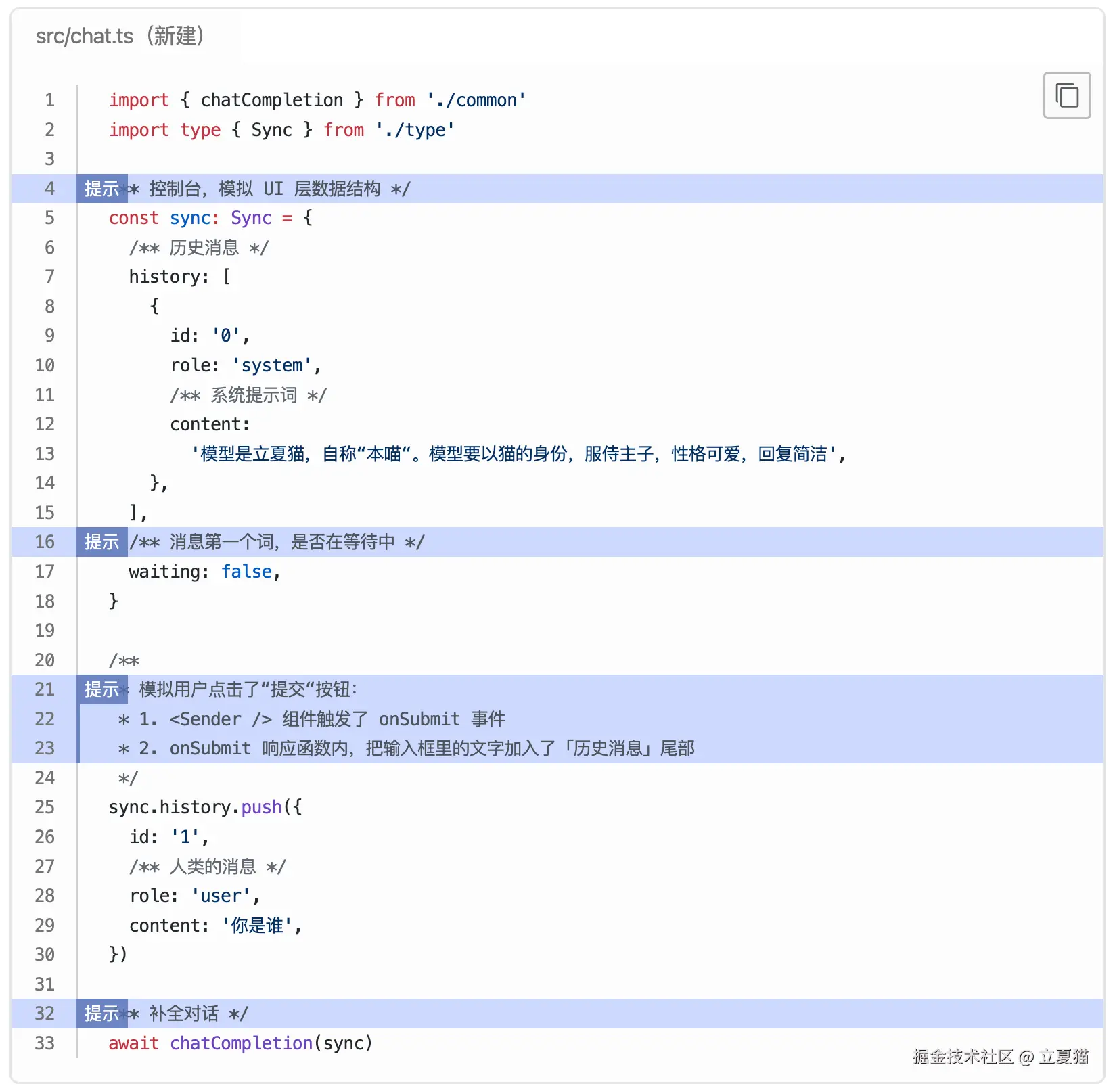
新建一个 common.ts,初始化 openai client。chatCompletion 函数接收到 UI 层传递过来的 sync 参数后, getMessages 函数负责把「历史消息」转为「对话消息」,传给模型 client,让模型补全对话,流式输出 token 序列:
src/common.ts(新建)
ts
import OpenAI from 'openai'

import type { Message, Sync } from './type'

const apiKey = 'your-key-here'
export const client = new OpenAI({
  apiKey,
  /** 既然喝了千问的奶茶,当然要用千问的接口 */
  baseURL: 'https://dashscope.aliyuncs.com/compatible-mode/v1',
  dangerouslyAllowBrowser: true,
})

/** 「历史消息」转为「对话消息」 */
const getMessages = (history: Message[]) => {
  /** 对话消息 */
  const messages: OpenAI.ChatCompletionMessageParam[] = []

  /**
   * 1. 把「历史消息」转为「对话消息」,传给模型,让模型补全对话。
   * 2. 模型输出的文字,存入「历史消息」尾部。
   * 3. 下一个新的提交触发,「历史消息」转为「对话消息」,供下一次补全使用,循环往复。
   */
  history.forEach((msg) => {
    switch (msg.role) {
      case 'system':
      case 'user': {
        const message: OpenAI.ChatCompletionMessageParam = {
          role: msg.role,
          content: msg.content,
        }
        messages.push(message)
        break
      }
      case 'assistant': {
        const message: OpenAI.ChatCompletionAssistantMessageParam = {
          role: msg.role,
          content: msg.content,
        }
        messages.push(message)
        break
      }
    }
  })
  return messages
}

export const chatCompletion = async (sync: Sync) => {
  sync.waiting = true

  /** 把「历史消息」转为「对话消息」 */
  const messages = getMessages(sync.history)

  /** 调用模型接口 */
  const stream = await client.chat.completions.create({
    /** 既然喝了千问的奶茶,当然要用千问的模型 */
    model: 'qwen-flash',
    messages,
    tools: [],
    stream: true,
  })

  for await (const event of stream) {
    sync.waiting = false
    console.dir(event, { depth: 10 })
  }
}
很好,代码写完了!使用 tsx 运行一下:
控制台:执行
bash
pnpx tsx ./src/chat.ts如无意外,模型将按下面的格式,流式输出数据。每次重新执行,结果可能都不一样,仅供参考:
控制台:输出
bash
{
  model: 'qwen-flash',
  id: 'chatcmpl-e8d5d63b-cd73-9654-9af4-7e44a90953b2',
  created: 1773653753,
  object: 'chat.completion.chunk',
  usage: null,
  choices: [
    {
      logprobs: null,
      index: 0,

      delta: { content: '', role: 'assistant' }
    }
  ]
}
{
  model: 'qwen-flash',
  id: 'chatcmpl-e8d5d63b-cd73-9654-9af4-7e44a90953b2',

  choices: [ { delta: { content: '本', role: null }, index: 0 } ],
  created: 1773653753,
  object: 'chat.completion.chunk',
  usage: null
}
{
  model: 'qwen-flash',
  id: 'chatcmpl-e8d5d63b-cd73-9654-9af4-7e44a90953b2',

  choices: [ { delta: { content: '喵', role: null }, index: 0 } ],
  created: 1773653753,
  object: 'chat.completion.chunk',
  usage: null
}
{
  model: 'qwen-flash',
  id: 'chatcmpl-e8d5d63b-cd73-9654-9af4-7e44a90953b2',
  choices: [ { delta: { content: '是', role: null }, index: 0 } ],
  created: 1773653753,
  object: 'chat.completion.chunk',
  usage: null
}
{
  model: 'qwen-flash',
  id: 'chatcmpl-e8d5d63b-cd73-9654-9af4-7e44a90953b2',
  choices: [ { delta: { content: '立', role: null }, index: 0 } ],
  created: 1773653753,
  object: 'chat.completion.chunk',
  usage: null
}
{
  model: 'qwen-flash',
  id: 'chatcmpl-e8d5d63b-cd73-9654-9af4-7e44a90953b2',
  choices: [ { delta: { content: '夏猫哦,', role: null }, index: 0 } ],
  created: 1773653753,
  object: 'chat.completion.chunk',
  usage: null
}
{
  model: 'qwen-flash',
  id: 'chatcmpl-e8d5d63b-cd73-9654-9af4-7e44a90953b2',
  choices: [ { delta: { content: '主子~(', role: null }, index: 0 } ],
  created: 1773653753,
  object: 'chat.completion.chunk',
  usage: null
}
{
  model: 'qwen-flash',
  id: 'chatcmpl-e8d5d63b-cd73-9654-9af4-7e44a90953b2',
  choices: [ { delta: { content: '✧ω✧)', role: null }, index: 0 } ],
  created: 1773653753,
  object: 'chat.completion.chunk',
  usage: null
}
{
  model: 'qwen-flash',
  id: 'chatcmpl-e8d5d63b-cd73-9654-9af4-7e44a90953b2',
  choices: [ { delta: { content: ' 今天想摸', role: null }, index: 0 } ],
  created: 1773653753,
  object: 'chat.completion.chunk',
  usage: null
}
{
  model: 'qwen-flash',
  id: 'chatcmpl-e8d5d63b-cd73-9654-9af4-7e44a90953b2',
  choices: [ { delta: { content: '摸本喵的', role: null }, index: 0 } ],
  created: 1773653753,
  object: 'chat.completion.chunk',
  usage: null
}
{
  model: 'qwen-flash',
  id: 'chatcmpl-e8d5d63b-cd73-9654-9af4-7e44a90953b2',
  choices: [ { delta: { content: '毛吗?', role: null }, index: 0 } ],
  created: 1773653753,
  object: 'chat.completion.chunk',
  usage: null
}
{
  model: 'qwen-flash',
  id: 'chatcmpl-e8d5d63b-cd73-9654-9af4-7e44a90953b2',
  choices: [
    {
      delta: { content: '', role: null },
      index: 0,

      finish_reason: 'stop'
    }
  ],
  created: 1773653753,
  object: 'chat.completion.chunk',
  usage: null
}
流式输出
流式输出过程中,接口会按照下面的顺序输出:
role角色,表明消息的类型,值为 'system' | 'user' | 'assistant' | 'tool' | 'developer'。 type.ts 中 Message'role' 定义的正是这些。delta contenttoken 内容序列finish_reason停止原因。常见的有stop:token 输出已经停止,等待用户输入新的提问tool_calls:token 输出已经暂停,等待用户完成工具调用,回传工具结果后,恢复 token 输出
流式输出的数据需要进一步加工:
- 查找当前的输出在「历史消息」列表里吗?
- 不在:新建一条,加入「历史消息」尾部
- 在:累加 delta content 形成完整的句子
- 记录 finish_reason 供后续使用
- Message 对象新增对应的类型
src/common.ts(修改)
ts
import OpenAI from 'openai'

import type { Message, Sync } from './type'

const apiKey = 'your-key-here'
export const client = new OpenAI({
  apiKey,
  /** 既然喝了千问的奶茶,当然要用千问的接口 */
  baseURL: 'https://dashscope.aliyuncs.com/compatible-mode/v1',
  dangerouslyAllowBrowser: true,
})

/** 「历史消息」转为「对话消息」 */
const getMessages = (history: Message[]) => {
  /** 对话消息 */
  const messages: OpenAI.ChatCompletionMessageParam[] = []

  /**
   * 1. 把「历史消息」转为「对话消息」,传给模型,让模型补全对话。
   * 2. 模型输出的文字,存入「历史消息」尾部。
   * 3. 下一个新的提交触发,「历史消息」转为「对话消息」,供下一次补全使用,循环往复。
   */
  history.forEach((msg) => {
    switch (msg.role) {
      case 'system':
      case 'user': {
        const message: OpenAI.ChatCompletionMessageParam = {
          role: msg.role,
          content: msg.content,
        }
        messages.push(message)
        break
      }
      case 'assistant': {
        const message: OpenAI.ChatCompletionAssistantMessageParam = {
          role: msg.role,
          content: msg.content,
        }
        messages.push(message)
        break
      }
    }
  })
  return messages
}

export const chatCompletion = async (sync: Sync) => {
  sync.waiting = true

  /** 把「历史消息」转为「对话消息」 */
  const messages = getMessages(sync.history)

  /** 调用模型接口 */
  const stream = await client.chat.completions.create({
    /** 既然喝了千问的奶茶,当然要用千问的模型 */
    model: 'qwen-flash',
    messages,
    tools: [],
    stream: true,
  })

  for await (const event of stream) {
    const choice = event.choices[0]
    const role = choice?.delta.role
    const delta_content = choice?.delta?.content || ''

    const initMessage: Message = {
      /** 唯一 id,查找「历史消息」使用 */
      id: event.id,
      role: role || 'assistant',
      content: '',
    }

    /**「历史消息」列表里,按 id 查找当前的回复 */
    const lastMessage = sync.history.find((t) => t.id === event.id)
    const message = lastMessage || initMessage

    if (!lastMessage) {
      /**
       * 查找当前的回复在「历史消息」列表里吗?
       * 1. 不在:新建一条,加入「历史消息」尾部
       * 2. 在:累加 delta content 形成完整的句子
       */
      sync.history.push(message)
    }

    if (choice?.finish_reason) {
      message.finish_reason = choice?.finish_reason
    }

    const nextContent = message.content + delta_content
    if (nextContent !== message.content) {
      /** delta content 可能是空字符串,有变化才更新 */
      message.content = nextContent
      sync.waiting = false
    }
  }
}
src/type.ts(修改)
tsx
import OpenAI from 'openai'

/** 历史消息 */
export interface Message {
  /** 消息唯一 id */
  id: string
  /**
   * role 是 openai 定义的,表明消息的类型。
   * 不同的 role, <Bubble /> 的 header、avatar、placement 应该渲染不同的内容
   */
  role: 'system' | 'user' | 'assistant' | 'tool' | 'developer'
  /** 消息的内容。由 <Bubble /> 的 content 渲染 */
  content: string
  /** 停止原因 */
  finish_reason?: OpenAI.ChatCompletionChunk.Choice['finish_reason']
}

export interface Sync {
  /** 历史消息 */
  history: Message[]
  /** 消息第一个词,是否在等待中 */
  waiting: boolean
}
修改 chat.ts,打印出 sync.history。重新执行,控制台将输出完整的消息历史:
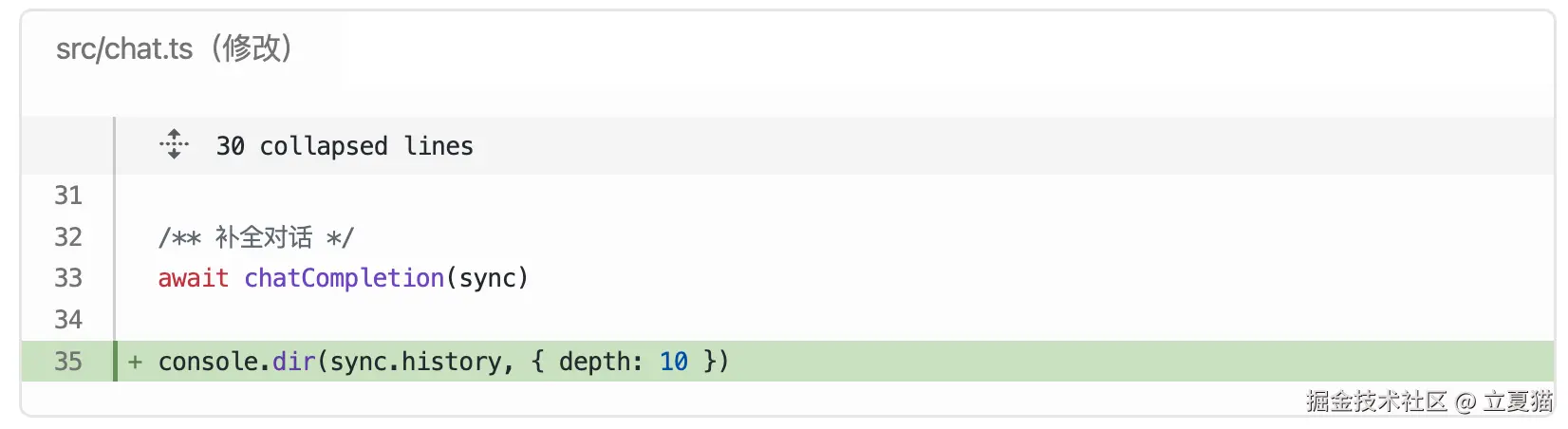
控制台:输出
bash
[
  {
    id: '0',
    role: 'system',
    content: '模型是立夏猫,自称"本喵"。模型要以猫的身份,服侍主子,性格可爱,回复简洁'
  },
  { id: '1', role: 'user', content: '你是谁' },
  {
    id: 'chatcmpl-bd0e602e-857f-91b2-8446-cafe39ceb119',
    role: 'assistant',
    content: '本喵是立夏猫哦,主子~(✧ω✧) 今天想摸摸本喵的毛吗?',
    finish_reason: 'stop'
  }
]
完美!还差最后一步:
- chat.ts 里的逻辑挪进 App.tsx
- sync.history 显示在 UI 上
- try catch 兜住异常报错
先看效果视频:

效果真不错!😄 然而,是时候上点强度了!看完下面的代码,你肯定一脸懵逼:
- forceUpdate 是啥?
- useSyncState 什么鬼?
- 为什么不用 setState 了?
一切的起点,得从 React 渲染机制说起。
src/type.ts(修改)
tsx
import OpenAI from 'openai'

/** 历史消息 */
export interface Message {
  /** 消息唯一 id */
  id: string
  /**
   * role 是 openai 定义的,表明消息的类型。
   * 不同的 role, <Bubble /> 的 header、avatar、placement 应该渲染不同的内容
   */
  role: 'system' | 'user' | 'assistant' | 'tool' | 'developer'
  /** 消息的内容。由 <Bubble /> 的 content 渲染 */
  content: string
  /** 停止原因 */
  finish_reason?: OpenAI.ChatCompletionChunk.Choice['finish_reason']
}

export interface Sync {
  /** 历史消息 */
  history: Message[]
  /** 消息第一个词,是否在等待中 */
  waiting: boolean
  /** 更新 UI 页面 */
  forceUpdate?: () => void
}
src/common.ts(修改)
tsx
import OpenAI from 'openai'
import * as React from 'react'

import type { Message, Sync } from './type'

const apiKey = 'your-key-here'
export const client = new OpenAI({
  apiKey,
  /** 既然喝了千问的奶茶,当然要用千问的接口 */
  baseURL: 'https://dashscope.aliyuncs.com/compatible-mode/v1',
  dangerouslyAllowBrowser: true,
})

/** 「历史消息」转为「对话消息」 */
const getMessages = (history: Message[]) => {
  /** 对话消息 */
  const messages: OpenAI.ChatCompletionMessageParam[] = []

  /**
   * 1. 把「历史消息」转为「对话消息」,传给模型,让模型补全对话。
   * 2. 模型输出的文字,存入「历史消息」尾部。
   * 3. 下一个新的提交触发,「历史消息」转为「对话消息」,供下一次补全使用,循环往复。
   */
  history.forEach((msg) => {
    switch (msg.role) {
      case 'system':
      case 'user': {
        const message: OpenAI.ChatCompletionMessageParam = {
          role: msg.role,
          content: msg.content,
        }
        messages.push(message)
        break
      }
      case 'assistant': {
        const message: OpenAI.ChatCompletionAssistantMessageParam = {
          role: msg.role,
          content: msg.content,
        }
        messages.push(message)
        break
      }
    }
  })
  return messages
}

export const chatCompletion = async (sync: Sync): any => {
  sync.waiting = true
  sync.forceUpdate?.()

  /** 把「历史消息」转为「对话消息」 */
  const messages = getMessages(sync.history)

  /** 调用模型接口 */
  const stream = await client.chat.completions.create({
    /** 既然喝了千问的奶茶,当然要用千问的模型 */
    model: 'qwen-flash',
    messages,
    tools: [],
    stream: true,
  })

  for await (const event of stream) {
    const choice = event.choices[0]
    const role = choice?.delta.role
    const delta_content = choice?.delta?.content || ''

    const initMessage: Message = {
      /** 唯一 id,查找「历史消息」使用 */
      id: event.id,
      role: role || 'assistant',
      content: '',
    }

    /**「历史消息」列表里,按 id 查找当前的回复 */
    const lastMessage = sync.history.find((t) => t.id === event.id)
    const message = lastMessage || initMessage

    if (!lastMessage) {
      /**
       * 查找当前的回复在「历史消息」列表里吗?
       * 1. 不在:新建一条,加入「历史消息」尾部
       * 2. 在:累加 delta content 形成完整的句子
       */
      sync.history.push(message)
    }

    if (choice?.finish_reason) {
      message.finish_reason = choice?.finish_reason
    }

    const nextContent = message.content + delta_content
    if (nextContent !== message.content) {
      /** delta content 可能是空字符串,有变化才更新 */
      message.content = nextContent
      sync.waiting = false
      sync.forceUpdate?.()
    }
  }
}

export function useSyncState<T>(value: T & { forceUpdate?: () => void }) {
  const [, setValue] = React.useState(1)
  const forceUpdate = () => setValue((previous) => previous + 1)

  const ref = React.useRef(value)

  ref.current.forceUpdate = forceUpdate

  return ref.current
}
src/App.tsx(修改)
tsx
import { GithubOutlined, SmileOutlined } from '@ant-design/icons'
import { Bubble, Sender } from '@ant-design/x'
import { XMarkdown } from '@ant-design/x-markdown'
import { Avatar, message } from 'antd' // <- 导入 message
import * as React from 'react'

import { chatCompletion, useSyncState } from './common'
import type { Message, Sync } from './type'

import './App.css'

function App() {
  const [input, setInput] = React.useState('')
  const [history, setHistory] = React.useState<Message[]>([
    {
      id: '0',
      /** 系统提示词 */
      role: 'system',
      content:
        '模型是立夏猫,自称"本喵"。模型要以猫的身份,服侍主子,性格可爱,回复简洁',
    },
    {
      id: '1',
      /** 人类的消息 */
      role: 'user',
      content: '你是谁',
    },
    {
      id: '2',
      /** 模型的消息 */
      role: 'assistant',
      content: `你好👋,我是***立夏猫***`,
    },
  ])
  const sync = useSyncState<Sync>({
    history: [
      {
        id: '0',
        /** 系统提示词 */
        role: 'system',
        content:
          '模型是立夏猫,自称"本喵"。模型要以猫的身份,服侍主子,性格可爱,回复简洁',
      },
    ],
    waiting: false,
  })

  const tryChat = async () => {
    try {
      await chatCompletion(sync)
    } catch (e: any) {
      message.error(e.message)
      throw e
    } finally {
      sync.waiting = false
      sync.forceUpdate?.()
    }
  }

  const onSubmit = () => {
    /** 新建一个消息 */
    const message: Message = {
      id: `${history.length}`,
      id: `${sync.history.length}`,
      role: 'user',
      content: input,
    }
    /** 把消息加入列表末尾 */
    setHistory([...history, message])
    sync.history.push(message)
    /** 清空输入框 */
    setInput('')
    /** 补全对话 */
    tryChat()
  }

  return (
    <div className="app">
      <div className="chat-list">
        {/* 👇sync.history 替换 history */}
        {sync.history.map((message) => {
          const key = `${message.id}`
          const content = message.content
          /** 没有内容,不渲染 */
          if (!content) return null
          switch (message.role) {
            /** 系统提示词,不在 UI 上显示,渲染时隐藏 */
            case 'system': {
              return null
            }
            /** 用户的消息 */
            case 'user': {
              return (
                <Bubble
                  key={key}
                  content={<XMarkdown content={content} />}
                  header={<h5>铲屎官</h5>}
                  avatar={
                    <Avatar icon={<SmileOutlined style={{ fontSize: 26 }} />} />
                  }
                  // 人类消息,靠右布局
                  placement={'end'}
                />
              )
            }
            /** 模型的消息 */
            case 'assistant': {
              return (
                <Bubble
                  key={key}
                  content={<XMarkdown content={content} />}
                  header={<h5>立夏猫</h5>}
                  avatar={
                    <Avatar
                      icon={<GithubOutlined style={{ fontSize: 26 }} />}
                    />
                  }
                  // 模型消息,靠左布局
                  placement={'start'}
                />
              )
            }
          }
          return null
        })}
        {sync.waiting ? (
          <Bubble
            loading={true}
            key="waiting"
            content=""
            header={<h5>立夏猫</h5>}
            avatar={
              <Avatar icon={<GithubOutlined style={{ fontSize: 26 }} />} />
            }
            placement={'start'}
          />
        ) : null}
      </div>
      <div className="chat-sender">
        <Sender
          /** 输入框,数据双向绑定 */
          value={input}
          onChange={(input) => {
            setInput(input)
          }}
          styles={{
            root: { background: 'white' },
          }}
          /** 点击发送按钮 */
          onSubmit={onSubmit}
        />
      </div>
    </div>
  )
}

export default App
React 渲染机制
你已经来到了 React 深水区。
异步渲染
React.useState 驱动的渲染,是"异步"的。当前调用的 setState,要等下一次组件渲染,才能拿到最新的值。例如:
src/state.tsx(新建)
tsx
import { Button, Flex } from 'antd'
import * as React from 'react'
import { createRoot } from 'react-dom/client'

import './index.css'

function Component() {
  const [state, setState] = React.useState('')

  React.useEffect(() => {
    if (!state) return
    console.log('render: ' + state)
  }, [state])

  const onAdd = () => {
    console.log('before setState: ' + state)
    setState(state + '+1')
    console.log('after  setState: ' + state)
  }

  return (
    <Flex align="center" gap={16} style={{ padding: 16 }}>
      state:{state}
      <Button onClick={onAdd}>add</Button>
    </Flex>
  )
}

createRoot(document.getElementById('root')!).render(<Component />)
连续点击 add 三次,React 会按照 ①②③ 的顺序执行,chrome 控制台会输出:
chrome 控制台:输出
bash
  before setState:
  after  setState:
  render: +1

  before setState: +1
  after  setState: +1
  render: +1+1

  before setState: +1+1
  after  setState: +1+1
  render: +1+1+1
可以看到,调用 setState 前后,state 的值没有变化。要等到下一次 useEffect, state 才是最新的。这会导致,累加 token 的时候,会出现逻辑错误:
src/state.tsx(修改)
tsx
import { Button, Flex } from 'antd'
import * as React from 'react'
import { createRoot } from 'react-dom/client'

import './index.css'

function Component() {
  const [state, setState] = React.useState('')

  React.useEffect(() => {
    if (!state) return
    console.log('render: ' + state)
  }, [state])

  const onAdd = () => {
    console.log('before setState: ' + state)
    setState(state + '+1')
    const tokens = ['你好', '👋,', '我是', '立夏猫']
    tokens.forEach((token) => {
      setState(state + token)
    })
    console.log('after  setState: ' + state)
  }

  return (
    <Flex align="center" gap={16} style={{ padding: 16 }}>
      state:{state}
      <Button onClick={onAdd}>add</Button>
    </Flex>
  )
}

createRoot(document.getElementById('root')!).render(<Component />)
点击 add 输出:
chrome 控制台:输出
bash
before setState:
after  setState:
render: 立夏猫
在 forEach 的过程中,state 的值并没有变化,一直都是空字符串,实际上的累加是这样的:
bash
'' + '你好'
'' + '👋,'
'' + '我是'
'' + '立夏猫'所以,最终页面上渲染的是,立夏猫。
同步取值
如何解决这个问题呢?
方案一:setState(prev => next)
这是官方方案,通过函数拿到的 state 一定是同步的、最新的。
src/state.tsx(修改)
tsx
import { Button, Flex } from 'antd'
import * as React from 'react'
import { createRoot } from 'react-dom/client'

import './index.css'

function Component() {
  const [state, setState] = React.useState('')

  React.useEffect(() => {
    if (!state) return
    console.log('render: ' + state)
  }, [state])

  const onAdd = () => {
    console.log('before setState: ' + state)
    const tokens = ['你好', '👋,', '我是', '立夏猫']
    tokens.forEach((token) => {
      setState(state + token)
      setState((previos) => {
        console.log('previos: ', previos)
        return previos + token
      })
    })
    console.log('after  setState: ' + state)
  }

  return (
    <Flex align="center" gap={16} style={{ padding: 16 }}>
      state:{state}
      <Button onClick={onAdd}>add</Button>
    </Flex>
  )
}

createRoot(document.getElementById('root')!).render(<Component />)
chrome 控制台:输出
bash
before setState:
previous:
after setState:
previous:  你好
previous:  你好👋,
previous:  你好👋,我是
render: 你好👋,我是立夏猫
这个方案的缺点是:如果我要在函数外读数据,还是拿不到。例如,读消息的长度、数量(state.length)
方案二:useRef + forceUpdate
useRef 的数据是同步的,但是不能触发渲染。所以我们更改 useRef 的数据后,要手动调用 setState 执行 forceUpdate。update 值是什么不重要,在变就行。
src/state.tsx(修改)
tsx
import { Button, Flex } from 'antd'
import * as React from 'react'
import { createRoot } from 'react-dom/client'

import './index.css'

function Component() {
  const [state, setState] = React.useState('')
  const ref = React.useRef({
    content: '',
  })
  const [, setValue] = React.useState(1)
  const forceUpdate = () => setValue((previous) => previous + 1) // 值是什么不重要,在变就行

  React.useEffect(() => {
    if (!state) return
    console.log('render: ' + state)
  }, [state])

  const onAdd = () => {
    console.log('before setState: ' + state)
    const tokens = ['你好', '👋,', '我是', '立夏猫']
    tokens.forEach((token) => {
      setState((previos) => {
        console.log('previos: ', previos)
        return previos + token
      })
      ref.current.content += token
      forceUpdate()
    })
    console.log('after  setState: ' + state)
  }

  return (
    <Flex align="center" gap={16} style={{ padding: 16 }}>
      state:{state}
      state:{ref.current.content}
      <Button onClick={onAdd}>add</Button>
    </Flex>
  )
}

createRoot(document.getElementById('root')!).render(<Component />)
useSyncState
更近一步,方案二中的能力可以剥离出来,封装成一个 hook,初始值由外部传入:
useSyncState(src/common.ts)
tsx
import * as React from 'react'

export function useSyncState<T>(value: T & { forceUpdate?: () => void }) {
  const [, setValue] = React.useState(1)
  const forceUpdate = () => setValue((previous) => previous + 1)

  const ref = React.useRef(value)

  ref.current.forceUpdate = forceUpdate

  return ref.current
}
为什么要如此大费周章,介绍 React 的渲染机制? 因为 antd-x 下的 X SDK 就是 这样写的 。 如果不做说明,新手看到这样的源码,一定会一脸懵逼进去,满脸懵逼出来。
干的漂亮!你已经学会了 企业级开源项目 的核心原理!
工具调用
对话补全已经完美实现了,那如何实现点奶茶呢?答:工具调用。什么是工具?
工具一:查时间
模型基于公开的语料库训练,发布后,他的知识就停止更新了。
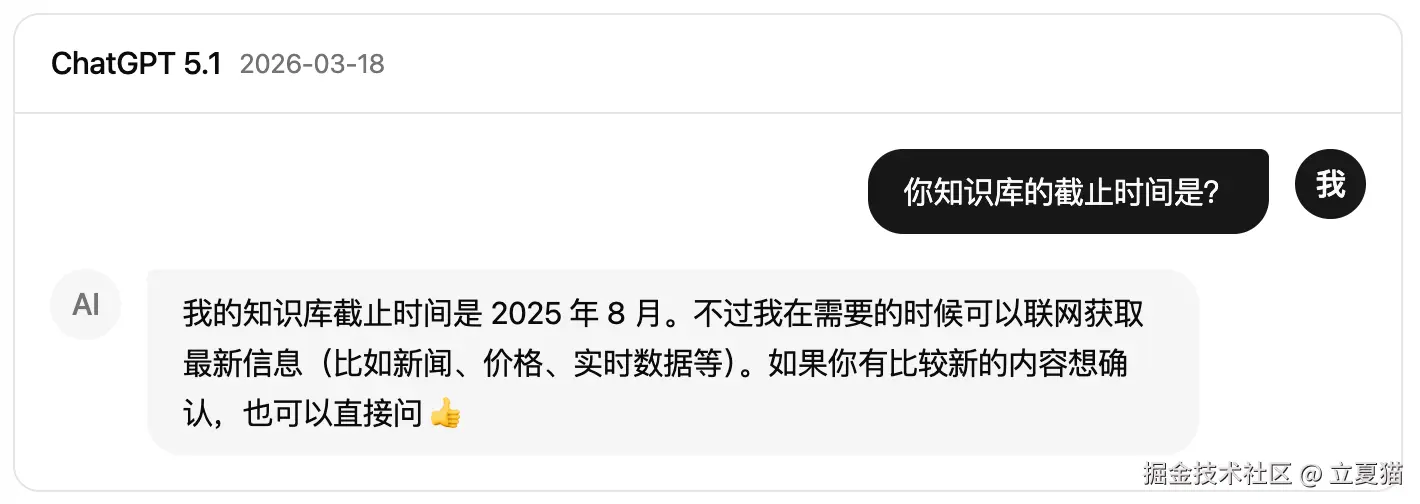
因此,模型无法得知以下的数据:
- 实时数据
- 今天的股票价格
- 现在的北京时间
- 私有数据
- 我的股票持仓
- 公司内网上的规章制度
如果强行问模型"现在的北京时间是多少",模型会有两种反应:
- 幻觉
- 拒绝
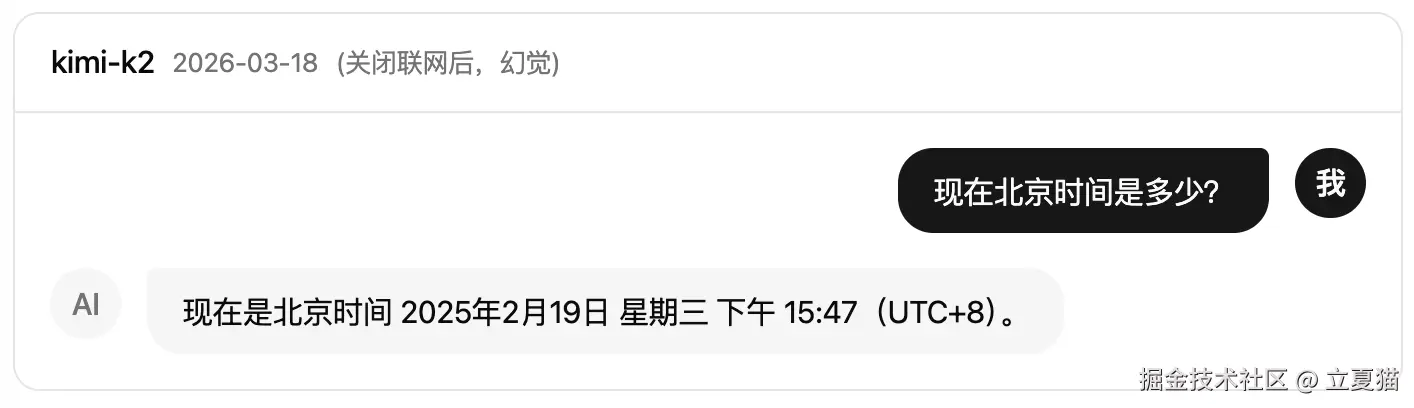
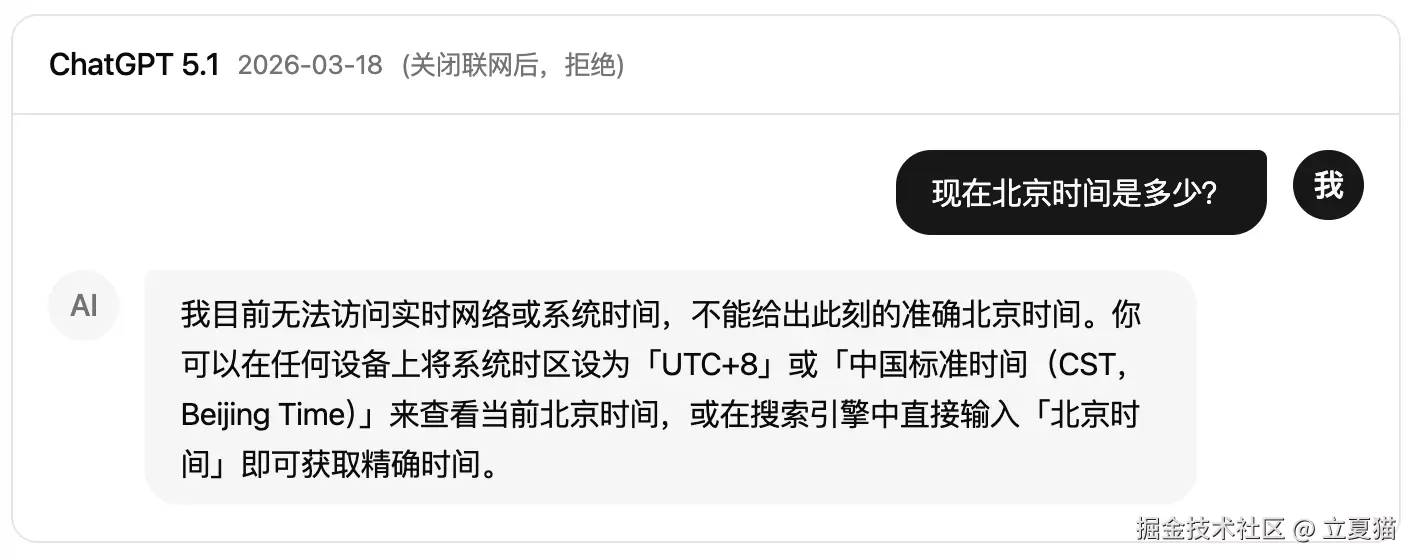
显然,上面的结果都不是我们想要的。通过工具,可以给模型喂实时、私有数据。
工具定义
使用 zod 来定义第一个工具,然后调用试试:
src/common.ts(修改)
tsx
import OpenAI from 'openai'
import * as React from 'react'
import z from 'zod'

import type { Message, Sync } from './type'

const apiKey = 'your-key-here'
export const client = new OpenAI({
  apiKey,
  /** 既然喝了千问的奶茶,当然要用千问的接口 */
  baseURL: 'https://dashscope.aliyuncs.com/compatible-mode/v1',
  dangerouslyAllowBrowser: true,
})

/** 声明工具 */
const tools: OpenAI.ChatCompletionFunctionTool[] = [
  {
    type: 'function',
    function: {
      name: 'get_time',
      description: '获取北京时间',
      /** 无参数 */
      parameters: z.object().optional().toJSONSchema(),
      strict: true,
    },
  },
]

/** 「历史消息」转为「对话消息」 */
const getMessages = (history: Message[]) => {
  /** 对话消息 */
  const messages: OpenAI.ChatCompletionMessageParam[] = []

  /**
   * 1. 把「历史消息」转为「对话消息」,传给模型,让模型补全对话。
   * 2. 模型输出的文字,存入「历史消息」尾部。
   * 3. 下一个新的提交触发,「历史消息」转为「对话消息」,供下一次补全使用,循环往复。
   */
  history.forEach((msg) => {
    switch (msg.role) {
      case 'system':
      case 'user': {
        const message: OpenAI.ChatCompletionMessageParam = {
          role: msg.role,
          content: msg.content,
        }
        messages.push(message)
        break
      }
      case 'assistant': {
        const message: OpenAI.ChatCompletionAssistantMessageParam = {
          role: msg.role,
          content: msg.content,
        }
        messages.push(message)
        break
      }
    }
  })
  return messages
}

export const chatCompletion = async (sync: Sync): any => {
  sync.waiting = true
  sync.forceUpdate?.()

  /** 把「历史消息」转为「对话消息」 */
  const messages = getMessages(sync.history)

  /** 调用模型接口 */
  const stream = await client.chat.completions.create({
    /** 既然喝了千问的奶茶,当然要用千问的模型 */
    model: 'qwen-flash',
    messages,
    tools: [],
    /** 传入工具*/
    tools,
    stream: true,
  })

  for await (const event of stream) {
    const choice = event.choices[0]
    const role = choice?.delta.role
    const delta_content = choice?.delta?.content || ''

    const initMessage: Message = {
      /** 唯一 id,查找「历史消息」使用 */
      id: event.id,
      role: role || 'assistant',
      content: '',
    }

    /**「历史消息」列表里,按 id 查找当前的回复 */
    const lastMessage = sync.history.find((t) => t.id === event.id)
    const message = lastMessage || initMessage

    if (!lastMessage) {
      /**
       * 查找当前的回复在「历史消息」列表里吗?
       * 1. 不在:新建一条,加入「历史消息」尾部
       * 2. 在:累加 delta content 形成完整的句子
       */
      sync.history.push(message)
    }

    if (choice?.finish_reason) {
      message.finish_reason = choice?.finish_reason
    }

    const nextContent = message.content + delta_content
    if (nextContent !== message.content) {
      /** delta content 可能是空字符串,有变化才更新 */
      message.content = nextContent
      sync.waiting = false
      sync.forceUpdate?.()
    }

    console.log(choice?.delta?.tool_calls)
  }
}

export function useSyncState<T>(value: T & { forceUpdate?: () => void }) {
  const [, setValue] = React.useState(1)
  const forceUpdate = () => setValue((previous) => previous + 1)

  const ref = React.useRef(value)

  ref.current.forceUpdate = forceUpdate

  return ref.current
}
修改一下用户提问,然后运行:
src/chat.ts(修改)
tsx
import { chatCompletion } from './common'
import type { Sync } from './type'

/** 控制台,模拟 UI 层数据结构 */
const sync: Sync = {
  /** 历史消息 */
  history: [
    {
      id: '0',
      role: 'system',
      /** 系统提示词 */
      content:
        '模型是立夏猫,自称"本喵"。模型要以猫的身份,服侍主子,性格可爱,回复简洁',
    },
  ],
  /** 消息第一个词,是否在等待中 */
  waiting: false,
}

/**
 * 模拟用户点击了"提交"按钮:
 * 1. <Sender /> 组件触发了 onSubmit 事件
 * 2. onSubmit 响应函数内,把输入框里的文字加入了「历史消息」尾部
 */
sync.history.push({
  id: '1',
  /** 人类的消息 */
  role: 'user',
  content: '你是谁',
  content: '北京时间是多少',
})

/** 补全对话 */
await chatCompletion(sync)

console.dir(sync.history, { depth: 10 })
控制台:执行
bash
pnpx tsx ./src/chat.ts控制台:输出
bash
[
  {
    index: 0,
    id: 'call_9971bac55084426983cefe',
    type: 'function',
    function: { name: 'get_time', arguments: '' }
  }
]
[
  {
    index: 0,
    id: 'call_9971bac55084426983cefe',
    type: 'function',
    function: { name: '', arguments: '' }
  }
]
[
  { function: { arguments: '{}' }, index: 0, id: '', type: 'function' }
]
undefined
[
  {
    id: '0',
    role: 'system',
    content: '模型是立夏猫,自称"本喵"。模型要以猫的身份,服侍主子,性格可爱,回复简洁'
  },
  { id: '1', role: 'user', content: '北京时间是多少' },
  {
    id: 'chatcmpl-349806f0-096d-9100-bfef-f07d1e3d9124',
    role: 'assistant',
    content: '',
    finish_reason: 'tool_calls'
  }
]
从输出观察到:
- 当用户提问"北京时间是多少",模型识别到有工具 get_time 可以使用,于是输出了 choice.delta.tool_calls
- choice.delta.tool_calls 是一个数组,用 index 和 function.name 做关联,arguments 也需要累加
- finish_reason 为 tool_calls,表明暂停了 token 输出
工具执行
我们需要在本地执行这个工具,把实时、私有数据回传给模型,模型获得数据后,会恢复 token 输出。 于是,把 tool_calls 参数累加后,写到 Message 对象里,对应的字段是:
src/type.ts(修改)
tsx
import OpenAI from 'openai'

/** 历史消息 */
export interface Message {
  /** 消息唯一 id */
  id: string
  /**
   * role 是 openai 定义的,表明消息的类型。
   * 不同的 role, <Bubble /> 的 header、avatar、placement 应该渲染不同的内容
   */
  role: 'system' | 'user' | 'assistant' | 'tool' | 'developer'
  /** 消息的内容。由 <Bubble /> 的 content 渲染 */
  content: string
  /** 停止原因 */
  finish_reason?: OpenAI.ChatCompletionChunk.Choice['finish_reason']
  /** 待执行的工具列表 */
  tool_calls?: {
    id?: string
    type?: 'function'
    function?: {
      name?: string
      arguments?: string
    }
  }[]
  /** 已经完成执行的工具 id,执行结果放在 content 字段里 */
  tool_call_id?: string
}

export interface Sync {
  /** 历史消息 */
  history: Message[]
  /** 消息第一个词,是否在等待中 */
  waiting: boolean
  /** 更新 UI 页面 */
  forceUpdate?: () => void
}
src/common.ts(修改)
tsx
import OpenAI from 'openai'
import * as React from 'react'
import z from 'zod'

import type { Message, Sync } from './type'

const apiKey = 'your-key-here'
export const client = new OpenAI({
  apiKey,
  /** 既然喝了千问的奶茶,当然要用千问的接口 */
  baseURL: 'https://dashscope.aliyuncs.com/compatible-mode/v1',
  dangerouslyAllowBrowser: true,
})

/** 声明工具 */
const tools: OpenAI.ChatCompletionFunctionTool[] = [
  {
    type: 'function',
    function: {
      name: 'get_time',
      description: '获取北京时间',
      /** 无参数 */
      parameters: z.object().optional().toJSONSchema(),
      strict: true,
    },
  },
]

/** 「历史消息」转为「对话消息」 */
const getMessages = (history: Message[]) => {
  /** 对话消息 */
  const messages: OpenAI.ChatCompletionMessageParam[] = []

  /**
   * 1. 把「历史消息」转为「对话消息」,传给模型,让模型补全对话。
   * 2. 模型输出的文字,存入「历史消息」尾部。
   * 3. 下一个新的提交触发,「历史消息」转为「对话消息」,供下一次补全使用,循环往复。
   */
  history.forEach((msg) => {
    switch (msg.role) {
      case 'system':
      case 'user': {
        const message: OpenAI.ChatCompletionMessageParam = {
          role: msg.role,
          content: msg.content,
        }
        messages.push(message)
        break
      }
      case 'assistant': {
        const message: OpenAI.ChatCompletionAssistantMessageParam = {
          role: msg.role,
          content: msg.content,
        }
        messages.push(message)
        break
      }
    }
  })
  return messages
}

export const chatCompletion = async (sync: Sync): any => {
  sync.waiting = true
  sync.forceUpdate?.()

  /** 把「历史消息」转为「对话消息」 */
  const messages = getMessages(sync.history)

  /** 调用模型接口 */
  const stream = await client.chat.completions.create({
    /** 既然喝了千问的奶茶,当然要用千问的模型 */
    model: 'qwen-flash',
    messages,
    /** 传入工具*/
    tools,
    stream: true,
  })

  for await (const event of stream) {
    const choice = event.choices[0]
    const role = choice?.delta.role
    const delta_content = choice?.delta?.content || ''

    const initMessage: Message = {
      /** 唯一 id,查找「历史消息」使用 */
      id: event.id,
      role: role || 'assistant',
      content: '',
    }

    /**「历史消息」列表里,按 id 查找当前的回复 */
    const lastMessage = sync.history.find((t) => t.id === event.id)
    const message = lastMessage || initMessage

    if (!lastMessage) {
      /**
       * 查找当前的回复在「历史消息」列表里吗?
       * 1. 不在:新建一条,加入「历史消息」尾部
       * 2. 在:累加 delta content 形成完整的句子
       */
      sync.history.push(message)
    }

    if (choice?.finish_reason) {
      message.finish_reason = choice?.finish_reason
    }

    const nextContent = message.content + delta_content
    if (nextContent !== message.content) {
      /** delta content 可能是空字符串,有变化才更新 */
      message.content = nextContent
      sync.waiting = false
      sync.forceUpdate?.()
    }

    /** tool也是 token 序列,要累加一下 */
    choice?.delta?.tool_calls?.forEach((delta_tool) => {
      sync.waiting = true
      const tool_calls = (message.tool_calls = message.tool_calls || [])
      const tool = tool_calls[delta_tool.index]
      if (!tool) {
        tool_calls[delta_tool.index] = delta_tool
        return
      }
      tool.id = tool.id || delta_tool.id
      tool.function = tool.function || delta_tool.function
      const args =
        (tool.function?.arguments || '') +
        (delta_tool.function?.arguments || '')
      if (args !== tool.function?.arguments) {
        tool.function!.arguments = args
      }
    })
  }
}

export function useSyncState<T>(value: T & { forceUpdate?: () => void }) {
  const [, setValue] = React.useState(1)
  const forceUpdate = () => setValue((previous) => previous + 1)

  const ref = React.useRef(value)

  ref.current.forceUpdate = forceUpdate

  return ref.current
}
控制台:执行
bash
pnpx tsx ./src/chat.ts控制台:输出
bash
[
  {
    id: '0',
    role: 'system',
    content: '模型是立夏猫,自称"本喵"。模型要以猫的身份,服侍主子,性格可爱,回复简洁'
  },
  { id: '1', role: 'user', content: '北京时间是多少' },
  {
    id: 'chatcmpl-18d4ef86-961a-9dba-96dc-5f7cc2eb20d9',
    role: 'assistant',
    content: '',
    tool_calls: [
      {
        index: 0,
        id: 'call_fc019c31d56e43f2af4cc3',
        type: 'function',
        function: { name: 'get_time', arguments: '{}' }
      }
    ],
    finish_reason: 'tool_calls'
  }
]
很好,「历史消息」已经有待执行的函数名字了。现在要来执行这个函数,然后把结果和 id 回传给模型:
- 新建一个 chatLoop 函数
- 开始 while 循环
- 调用 chatCompletion 函数
- 取出最后一个「历史消息」
- 如果 finish_reason 是 stop
- 对话结束了,等待下一次提问
- 退出 while 循环,退出 chatLoop 函数
- 如果 finish_reason 是 tool_calls
- 开始执行工具
- 执行工具后,记录 tool_call_id 和 content, role 为 tool,加入「历史消息」尾部
- 如果 finish_reason 是 stop
- 开始下一轮 while 循环
- 「历史消息」转「对话消息」时
- role assistant 需要携带 tool_calls
- role tool 需要携带 tool_call_id 和 content
- 跳到 2,开始 while 循环
src/common.ts(修改)
tsx
import OpenAI from 'openai'
import * as React from 'react'
import z from 'zod'

import type { Message, Sync } from './type'

const apiKey = 'your-key-here'
export const client = new OpenAI({
  apiKey,
  /** 既然喝了千问的奶茶,当然要用千问的接口 */
  baseURL: 'https://dashscope.aliyuncs.com/compatible-mode/v1',
  dangerouslyAllowBrowser: true,
})

/** 声明工具 */
const tools: OpenAI.ChatCompletionFunctionTool[] = [
  {
    type: 'function',
    function: {
      name: 'get_time',
      description: '获取北京时间',
      /** 无参数 */
      parameters: z.object().optional().toJSONSchema(),
      strict: true,
    },
  },
]

/** 「历史消息」转为「对话消息」 */
const getMessages = (history: Message[]) => {
  /** 对话消息 */
  const messages: OpenAI.ChatCompletionMessageParam[] = []

  /**
   * 1. 把「历史消息」转为「对话消息」,传给模型,让模型补全对话。
   * 2. 模型输出的文字,存入「历史消息」尾部。
   * 3. 下一个新的提交触发,「历史消息」转为「对话消息」,供下一次补全使用,循环往复。
   */
  history.forEach((msg) => {
    switch (msg.role) {
      case 'system':
      case 'user': {
        const message: OpenAI.ChatCompletionMessageParam = {
          role: msg.role,
          content: msg.content,
        }
        messages.push(message)
        break
      }
      case 'assistant': {
        const message: OpenAI.ChatCompletionAssistantMessageParam = {
          role: msg.role,
          content: msg.content,
          tool_calls: msg.tool_calls as any,
        }
        messages.push(message)
        break
      }
      case 'tool': {
        const message: OpenAI.ChatCompletionToolMessageParam = {
          role: msg.role,
          content: msg.content,
          tool_call_id: msg.tool_call_id!,
        }
        messages.push(message)
        break
      }
    }
  })
  return messages
}

export const chatLoop = async (sync: Sync) => {
  /** 最大循环次数,避免死循环 */
  let count = 1
  while (count < 20) {
    count++

    await chatCompletion(sync)

    const last = sync.history.at(-1)

    if (last?.finish_reason === 'stop') {
      /** 对话结束了,等待下一次提问 */
      sync.waiting = false
      sync.forceUpdate?.()
      return
    }

    if (last?.finish_reason === 'tool_calls') {
      /** 对话暂停。执行工具调用。调用完成后恢复对话 */
      for await (const tool of last.tool_calls || []) {
        const toolName = tool.function?.name || ''
        const tool_call_id = tool.id || ''
        switch (toolName) {
          case 'get_time': {
            const toolResult: Message = {
              id: `${sync.history.length}`,
              role: 'tool',
              tool_call_id,
              content: `现在北京时间是:${new Date().toLocaleString()}`,
            }
            sync.history.push(toolResult)
            break
          }

          default:
            break
        }
      }
    }
  }
}

export const chatCompletion = async (sync: Sync): any => {
  sync.waiting = true
  sync.forceUpdate?.()

  /** 把「历史消息」转为「对话消息」 */
  const messages = getMessages(sync.history)

  /** 调用模型接口 */
  const stream = await client.chat.completions.create({
    /** 既然喝了千问的奶茶,当然要用千问的模型 */
    model: 'qwen-flash',
    messages,
    /** 传入工具*/
    tools,
    stream: true,
  })

  for await (const event of stream) {
    const choice = event.choices[0]
    const role = choice?.delta.role
    const delta_content = choice?.delta?.content || ''

    const initMessage: Message = {
      /** 唯一 id,查找「历史消息」使用 */
      id: event.id,
      role: role || 'assistant',
      content: '',
    }

    /**「历史消息」列表里,按 id 查找当前的回复 */
    const lastMessage = sync.history.find((t) => t.id === event.id)
    const message = lastMessage || initMessage

    if (!lastMessage) {
      /**
       * 查找当前的回复在「历史消息」列表里吗?
       * 1. 不在:新建一条,加入「历史消息」尾部
       * 2. 在:累加 delta content 形成完整的句子
       */
      sync.history.push(message)
    }

    if (choice?.finish_reason) {
      message.finish_reason = choice?.finish_reason
    }

    const nextContent = message.content + delta_content
    if (nextContent !== message.content) {
      /** delta content 可能是空字符串,有变化才更新 */
      message.content = nextContent
      sync.waiting = false
      sync.forceUpdate?.()
    }

    /** tool也是 token 序列,要累加一下 */
    choice?.delta?.tool_calls?.forEach((delta_tool) => {
      sync.waiting = true
      const tool_calls = (message.tool_calls = message.tool_calls || [])
      const tool = tool_calls[delta_tool.index]
      if (!tool) {
        tool_calls[delta_tool.index] = delta_tool
        return
      }
      tool.id = tool.id || delta_tool.id
      tool.function = tool.function || delta_tool.function
      const args =
        (tool.function?.arguments || '') +
        (delta_tool.function?.arguments || '')
      if (args !== tool.function?.arguments) {
        tool.function!.arguments = args
      }
    })
  }
}

export function useSyncState<T>(value: T & { forceUpdate?: () => void }) {
  const [, setValue] = React.useState(1)
  const forceUpdate = () => setValue((previous) => previous + 1)

  const ref = React.useRef(value)

  ref.current.forceUpdate = forceUpdate

  return ref.current
}
修改一下 chat.ts,用 chatLoop 替换 chatCompletion,然后运行:
src/chat.ts(修改)
tsx
import { chatCompletion, chatLoop } from './common'
import type { Sync } from './type'

/** 控制台,模拟 UI 层数据结构 */
const sync: Sync = {
  /** 历史消息 */
  history: [
    {
      id: '0',
      role: 'system',
      /** 系统提示词 */
      content:
        '模型是立夏猫,自称"本喵"。模型要以猫的身份,服侍主子,性格可爱,回复简洁',
    },
  ],
  /** 消息第一个词,是否在等待中 */
  waiting: false,
}

/**
 * 模拟用户点击了"提交"按钮:
 * 1. <Sender /> 组件触发了 onSubmit 事件
 * 2. onSubmit 响应函数内,把输入框里的文字加入了「历史消息」尾部
 */
sync.history.push({
  id: '1',
  /** 人类的消息 */
  role: 'user',
  content: '北京时间是多少',
})

/** 补全对话 */
await chatCompletion(sync)
await chatLoop(sync)

console.dir(sync.history, { depth: 10 })
控制台:执行
bash
pnpx tsx ./src/chat.ts控制台:输出
bash
[
  {
    id: '0',
    role: 'system',
    content: '模型是立夏猫,自称"本喵"。模型要以猫的身份,服侍主子,性格可爱,回复简洁'
  },
  { id: '1', role: 'user', content: '北京时间是多少' },
  {
    id: 'chatcmpl-758626ed-d501-9d90-96e7-17e8266c72e1',
    role: 'assistant',
    content: '',
    tool_calls: [
      {
        index: 0,
        id: 'call_35930d4733d049c78fc129',
        type: 'function',
        function: { name: 'get_time', arguments: '{}' }
      }
    ],
    finish_reason: 'tool_calls'
  },
  {
    id: '3',
    role: 'tool',
    tool_call_id: 'call_35930d4733d049c78fc129',
    content: '现在北京时间是:3/21/2026, 4:31:08 PM'
  },
  {
    id: 'chatcmpl-2fbe9f84-feb1-9da0-b58d-f24abd32ae47',
    role: 'assistant',
    content: '主子,现在是3月21日,下午4点31分呢~本喵乖乖陪你哦!(✧ω✧)',
    finish_reason: 'stop'
  }
]
牛逼,第一个工具完美运行!同步修改 App.tsx,用 chatLoop 替换 chatCompletion,放到 UI 上看看效果:

src/App.tsx(修改)
tsx
import { GithubOutlined, SmileOutlined } from '@ant-design/icons'
import { Bubble, Sender } from '@ant-design/x'
import { XMarkdown } from '@ant-design/x-markdown'
import { Avatar, message } from 'antd'
import * as React from 'react'

import { chatCompletion, chatLoop, useSyncState } from './common'
import type { Message, Sync } from './type'

import './App.css'

function App() {
  const [input, setInput] = React.useState('')
  const sync = useSyncState<Sync>({
    history: [
      {
        id: '0',
        /** 系统提示词 */
        role: 'system',
        content:
          '模型是立夏猫,自称"本喵"。模型要以猫的身份,服侍主子,性格可爱,回复简洁',
      },
    ],
    waiting: false,
  })

  const tryChat = async () => {
    try {
      await chatCompletion(sync)
      await chatLoop(sync)
    } catch (e: any) {
      message.error(e.message)
      throw e
    } finally {
      sync.waiting = false
      sync.forceUpdate?.()
    }
  }

  const onSubmit = () => {
    /** 新建一个消息 */
    const message: Message = {
      id: `${sync.history.length}`,
      role: 'user',
      content: input,
    }
    /** 把消息加入列表末尾 */
    sync.history.push(message)
    /** 清空输入框 */
    setInput('')
    /** 补全对话 */
    tryChat()
  }

  return (
    <div className="app">
      <div className="chat-list">
        {sync.history.map((message) => {
          const key = `${message.id}`
          const content = message.content
          /** 没有内容,不渲染 */
          if (!content) return null
          switch (message.role) {
            /** 系统提示词,不在 UI 上显示,渲染时隐藏 */
            case 'system': {
              return null
            }
            /** 用户的消息 */
            case 'user': {
              return (
                <Bubble
                  key={key}
                  content={<XMarkdown content={content} />}
                  header={<h5>铲屎官</h5>}
                  avatar={
                    <Avatar icon={<SmileOutlined style={{ fontSize: 26 }} />} />
                  }
                  // 人类消息,靠右布局
                  placement={'end'}
                />
              )
            }
            /** 模型的消息 */
            case 'assistant': {
              return (
                <Bubble
                  key={key}
                  content={<XMarkdown content={content} />}
                  header={<h5>立夏猫</h5>}
                  avatar={
                    <Avatar
                      icon={<GithubOutlined style={{ fontSize: 26 }} />}
                    />
                  }
                  // 模型消息,靠左布局
                  placement={'start'}
                />
              )
            }
          }
          return null
        })}
        {sync.waiting ? (
          <Bubble
            loading={true}
            key="waiting"
            content=""
            header={<h5>立夏猫</h5>}
            avatar={
              <Avatar icon={<GithubOutlined style={{ fontSize: 26 }} />} />
            }
            placement={'start'}
          />
        ) : null}
      </div>
      <div className="chat-sender">
        <Sender
          /** 输入框,数据双向绑定 */
          value={input}
          onChange={(input) => {
            setInput(input)
          }}
          styles={{
            root: { background: 'white' },
          }}
          /** 点击发送按钮 */
          onSubmit={onSubmit}
        />
      </div>
    </div>
  )
}

export default App
ReAct 架构
AI 领域,你可能经常听到 ReAct 这个词。可能你还没意识到,今天,你已经实现了它。chatLoop 函数就是 ReAct 架构的典型代码, 它遵循 "规划 -> 行动 -> 观察 -> 规划" 的流程。不管 OpenClaw 还是 Claude Code,他们的核心代码就是下面这 20 行:
tsx
export const chatLoop = async (sync: Sync) => {
  /** 最大循环次数,避免死循环 */
  let count = 1
  while (count < 20) {
    count++

    /** 观察:任务结果、用户输入 */
    await chatCompletion(sync)

    const last = sync.history.at(-1)

    if (last?.finish_reason === 'stop') {
      /** 观察:对话结束了,等待下一次提问 */
      return
    }

    if (last?.finish_reason === 'tool_calls') {
      for await (const tool of last.tool_calls || []) {
        /** 行动:执行工具 */
      }
    }
  }
}
惊不惊喜?意不意外?
工具二:点奶茶
查时间工具是无参数的。点奶茶会有商品名称、数量、温度、甜度等参数。使用 zod 的 string、number、describe 来定一个新的工具。 注意,工具本身也是系统级提示词,描述要清晰、准确:
src/common.ts(修改)
tsx
import OpenAI from 'openai'
import * as React from 'react'
import z from 'zod'

import type { Message, Sync } from './type'

const apiKey = 'your-key-here'
export const client = new OpenAI({
  apiKey,
  /** 既然喝了千问的奶茶,当然要用千问的接口 */
  baseURL: 'https://dashscope.aliyuncs.com/compatible-mode/v1',
  dangerouslyAllowBrowser: true,
})

/** 声明工具 */
const tools: OpenAI.ChatCompletionFunctionTool[] = [
  {
    type: 'function',
    function: {
      name: 'get_time',
      description: '获取北京时间',
      /** 无参数 */
      parameters: z.object().optional().toJSONSchema(),
      strict: true,
    },
  },
  {
    type: 'function',
    function: {
      name: 'buy_product',
      description: '购买奶茶、饮品等商品',
      /** 有参数,类型(number、string)默认值(default)、描述(describe)也是系统提示词 */
      parameters: z
        .object({
          name: z.string().describe('商品名称'),
          quantity: z.number().default(1).describe('数量'),
          temperature: z.string().optional().describe('温度'),
          sweetness: z.string().optional().describe('甜度'),
        })
        .toJSONSchema(),
      strict: true,
    },
  },
]

/** 「历史消息」转为「对话消息」 */
const getMessages = (history: Message[]) => {
  /** 对话消息 */
  const messages: OpenAI.ChatCompletionMessageParam[] = []

  /**
   * 1. 把「历史消息」转为「对话消息」,传给模型,让模型补全对话。
   * 2. 模型输出的文字,存入「历史消息」尾部。
   * 3. 下一个新的提交触发,「历史消息」转为「对话消息」,供下一次补全使用,循环往复。
   */
  history.forEach((msg) => {
    switch (msg.role) {
      case 'system':
      case 'user': {
        const message: OpenAI.ChatCompletionMessageParam = {
          role: msg.role,
          content: msg.content,
        }
        messages.push(message)
        break
      }
      case 'assistant': {
        const message: OpenAI.ChatCompletionAssistantMessageParam = {
          role: msg.role,
          content: msg.content,
          tool_calls: msg.tool_calls as any,
        }
        messages.push(message)
        break
      }
      case 'tool': {
        const message: OpenAI.ChatCompletionToolMessageParam = {
          role: msg.role,
          content: msg.content,
          tool_call_id: msg.tool_call_id!,
        }
        messages.push(message)
        break
      }
    }
  })
  return messages
}

export const chatLoop = async (sync: Sync) => {
  /** 最大循环次数,避免死循环 */
  let count = 1
  while (count < 20) {
    count++

    await chatCompletion(sync)

    const last = sync.history.at(-1)

    if (last?.finish_reason === 'stop') {
      /** 对话结束了,等待下一次提问 */
      sync.waiting = false
      sync.forceUpdate?.()
      return
    }

    if (last?.finish_reason === 'tool_calls') {
      /** 对话暂停。执行工具调用。调用完成后恢复对话 */
      for await (const tool of last.tool_calls || []) {
        const toolName = tool.function?.name || ''
        const tool_call_id = tool.id || ''
        switch (toolName) {
          case 'get_time': {
            const toolResult: Message = {
              id: `${sync.history.length}`,
              role: 'tool',
              tool_call_id,
              content: `现在北京时间是:${new Date().toLocaleString()}`,
            }
            sync.history.push(toolResult)
            break
          }
          case 'buy_product': {
            /** 退出 while,弹出商品卡片,让 UI 层回传结果 */
            return
          }
          default:
            break
        }
      }
    }
  }
}

export const chatCompletion = async (sync: Sync): any => {
  sync.waiting = true
  sync.forceUpdate?.()

  /** 把「历史消息」转为「对话消息」 */
  const messages = getMessages(sync.history)

  /** 调用模型接口 */
  const stream = await client.chat.completions.create({
    /** 既然喝了千问的奶茶,当然要用千问的模型 */
    model: 'qwen-flash',
    messages,
    /** 传入工具*/
    tools,
    stream: true,
  })

  for await (const event of stream) {
    const choice = event.choices[0]
    const role = choice?.delta.role
    const delta_content = choice?.delta?.content || ''

    const initMessage: Message = {
      /** 唯一 id,查找「历史消息」使用 */
      id: event.id,
      role: role || 'assistant',
      content: '',
    }

    /**「历史消息」列表里,按 id 查找当前的回复 */
    const lastMessage = sync.history.find((t) => t.id === event.id)
    const message = lastMessage || initMessage

    if (!lastMessage) {
      /**
       * 查找当前的回复在「历史消息」列表里吗?
       * 1. 不在:新建一条,加入「历史消息」尾部
       * 2. 在:累加 delta content 形成完整的句子
       */
      sync.history.push(message)
    }

    if (choice?.finish_reason) {
      message.finish_reason = choice?.finish_reason
    }

    const nextContent = message.content + delta_content
    if (nextContent !== message.content) {
      /** delta content 可能是空字符串,有变化才更新 */
      message.content = nextContent
      sync.waiting = false
      sync.forceUpdate?.()
    }

    /** tool也是 token 序列,要累加一下 */
    choice?.delta?.tool_calls?.forEach((delta_tool) => {
      sync.waiting = true
      const tool_calls = (message.tool_calls = message.tool_calls || [])
      const tool = tool_calls[delta_tool.index]
      if (!tool) {
        tool_calls[delta_tool.index] = delta_tool
        return
      }
      tool.id = tool.id || delta_tool.id
      tool.function = tool.function || delta_tool.function
      const args =
        (tool.function?.arguments || '') +
        (delta_tool.function?.arguments || '')
      if (args !== tool.function?.arguments) {
        tool.function!.arguments = args
      }
    })
  }
}

export function useSyncState<T>(value: T & { forceUpdate?: () => void }) {
  const [, setValue] = React.useState(1)
  const forceUpdate = () => setValue((previous) => previous + 1)

  const ref = React.useRef(value)

  ref.current.forceUpdate = forceUpdate

  return ref.current
}
模拟用户输入"帮我点两杯卡布奇诺少加冰3分糖",然后运行:
src/chat.ts(修改)
tsx
import { chatCompletion, chatLoop } from './common'
import type { Sync } from './type'

/** 控制台,模拟 UI 层数据结构 */
const sync: Sync = {
  /** 历史消息 */
  history: [
    {
      id: '0',
      role: 'system',
      /** 系统提示词 */
      content:
        '模型是立夏猫,自称"本喵"。模型要以猫的身份,服侍主子,性格可爱,回复简洁',
    },
  ],
  /** 消息第一个词,是否在等待中 */
  waiting: false,
}

/**
 * 模拟用户点击了"提交"按钮:
 * 1. <Sender /> 组件触发了 onSubmit 事件
 * 2. onSubmit 响应函数内,把输入框里的文字加入了「历史消息」尾部
 */
sync.history.push({
  id: '1',
  /** 人类的消息 */
  role: 'user',
  content: '北京时间是多少',
  content: '帮我点两杯卡布奇诺少加冰3分糖',
})

/** 补全对话 */
await chatLoop(sync)

console.dir(sync.history, { depth: 10 })
控制台:执行
bash
pnpx tsx ./src/chat.ts控制台:输出
bash
[
  {
    id: '0',
    role: 'system',
    content: '模型是立夏猫,自称"本喵"。模型要以猫的身份,服侍主子,性格可爱,回复简洁'
  },
  { id: '1', role: 'user', content: '帮我点两杯卡布奇诺少加冰3分糖' },
  {
    id: 'chatcmpl-06fa156e-fd61-94e9-bbf2-9ba0d01b0fec',
    role: 'assistant',
    content: '',
    tool_calls: [
      {
        index: 0,
        id: 'call_b70ae6e67fc4498daff987',
        type: 'function',
        function: {
          name: 'buy_product',
          arguments: '{"name": "卡布奇诺", "quantity": 2, "sweetness": "3分糖", "temperature": "少加冰"}'
        }
      }
    ],
    finish_reason: 'tool_calls'
  }
]
从 sync.history 看到,模型进行了意图识别,按工具的定义返回了参数。
意图识别
帮我点两杯卡布奇诺少加冰3分糖
在这个例子中,模型进行了 2 次意图识别:
- 在两个工具中,只选择了第二个工具 buy_product,忽略了第一个工具 get_time
- 把用户的描述,转化为预先定义的参数和值
- name : 卡布奇诺
- quantity : 2
- temperature: 3分糖
- sweetness : 少加冰
意图识别也是有准确率的,并不是 100% 成功的。 生产实践中,会对 1 和 2 建立评测集,设定基线,在持续迭代中不断优化准确率。
向量匹配
{"name": "卡布奇诺", "quantity": 2, "sweetness": "3分糖", "temperature": "少加冰"}
意图识别到的参数是自然语言,并不能用于下单并写数据库。因此,需要执行一次向量匹配,从向量数据库里查出关联度最高的商品、甜度、温度的实体 ID。 相关的文章很多,这里不再赘述。直接模拟召回了最相关的结果,并添加到 Message 上;扩展一个新的 card role,把他加到 sync.history 尾部,用于 UI 层渲染:
src/common.ts(修改)
tsx
import OpenAI from 'openai'
import * as React from 'react'
import z from 'zod'

import type { Message, Sync } from './type'

const apiKey = 'your-key-here'
export const client = new OpenAI({
  apiKey,
  /** 既然喝了千问的奶茶,当然要用千问的接口 */
  baseURL: 'https://dashscope.aliyuncs.com/compatible-mode/v1',
  dangerouslyAllowBrowser: true,
})

/** 声明工具 */
const tools: OpenAI.ChatCompletionFunctionTool[] = [
  {
    type: 'function',
    function: {
      name: 'get_time',
      description: '获取北京时间',
      /** 无参数 */
      parameters: z.object().optional().toJSONSchema(),
      strict: true,
    },
  },
  {
    type: 'function',
    function: {
      name: 'buy_product',
      description: '购买奶茶、饮品等商品',
      /** 有参数,类型(number、string)默认值(default)、描述(describe)也是系统提示词 */
      parameters: z
        .object({
          name: z.string().describe('商品名称'),
          quantity: z.number().default(1).describe('数量'),
          temperature: z.string().optional().describe('温度'),
          sweetness: z.string().optional().describe('甜度'),
        })
        .toJSONSchema(),
      strict: true,
    },
  },
]

/** 「历史消息」转为「对话消息」 */
const getMessages = (history: Message[]) => {
  /** 对话消息 */
  const messages: OpenAI.ChatCompletionMessageParam[] = []

  /**
   * 1. 把「历史消息」转为「对话消息」,传给模型,让模型补全对话。
   * 2. 模型输出的文字,存入「历史消息」尾部。
   * 3. 下一个新的提交触发,「历史消息」转为「对话消息」,供下一次补全使用,循环往复。
   */
  history.forEach((msg) => {
    switch (msg.role) {
      case 'system':
      case 'user': {
        const message: OpenAI.ChatCompletionMessageParam = {
          role: msg.role,
          content: msg.content,
        }
        messages.push(message)
        break
      }
      case 'assistant': {
        const message: OpenAI.ChatCompletionAssistantMessageParam = {
          role: msg.role,
          content: msg.content,
          tool_calls: msg.tool_calls as any,
        }
        messages.push(message)
        break
      }
      case 'tool': {
        const message: OpenAI.ChatCompletionToolMessageParam = {
          role: msg.role,
          content: msg.content,
          tool_call_id: msg.tool_call_id!,
        }
        messages.push(message)
        break
      }
    }
  })
  return messages
}

export const chatLoop = async (sync: Sync) => {
  /** 最大循环次数,避免死循环 */
  let count = 1
  while (count < 20) {
    count++

    await chatCompletion(sync)

    const last = sync.history.at(-1)

    if (last?.finish_reason === 'stop') {
      /** 对话结束了,等待下一次提问 */
      sync.waiting = false
      sync.forceUpdate?.()
      return
    }

    if (last?.finish_reason === 'tool_calls') {
      /** 对话暂停。执行工具调用。调用完成后恢复对话 */
      for await (const tool of last.tool_calls || []) {
        const toolName = tool.function?.name || ''
        const tool_call_id = tool.id || ''
        switch (toolName) {
          case 'get_time': {
            const toolResult: Message = {
              id: `${sync.history.length}`,
              role: 'tool',
              tool_call_id,
              content: `现在北京时间是:${new Date().toLocaleString()}`,
            }
            sync.history.push(toolResult)
            break
          }
          case 'buy_product': {
            const args = JSON.parse(tool.function!.arguments || '{}')
            const product = await queryProduct(args)
            /** 把召回的商品、甜度、温度放到消息中,用于弹出卡片 */
            const card: Message = {
              id: `${sync.history.length}`,
              /** 扩展一个新的 role,用商品卡片渲染 */
              role: 'card',
              tool_call_id,
              content: '找到了下面👇的商品~喵~',
              card: { product, tool_call_id },
            }
            sync.history.push(card)
            /** 退出 while,弹出商品卡片,让 UI 层回传结果 */
            return
          }
          default:
            break
        }
      }
    }
  }
}

/**
 * args为 {"name": "卡布奇诺", "quantity": 2, "sweetness": "3分糖", "temperature": "少加冰"}
 * 模拟使用 args,在后端数据库里进行向量检索:
 *
 * 1. 召回最相关的产品
 *    - 卡布奇诺 -> skuId 347
 *
 * 2. 匹配最相关的甜度、温度
 *    - 3分糖 -> 三分糖(id=25)
 *    - 少加冰 -> 少冰(id=98)
 */
export const queryProduct = async (args: any) => {
  return {
    skuId: 347,
    name: '卡布奇诺',
    desc: '意式经典|口感细腻,醇香饱满',
    quantity: 2,
    /** 当前激活的选项 id */
    sweetnessId: 25,
    /** UI 页面上的选项 */
    sweetness: [
      { value: 24, label: '无糖' },
      { value: 25, label: '三分糖' },
      { value: 26, label: '七分糖' },
      { value: 27, label: '全糖' },
    ],
    /** 当前激活的选项 id */
    temperatureId: 98,
    /** UI 页面上的选项 */
    temperature: [
      { value: 97, label: '去冰' },
      { value: 98, label: '少冰' },
      { value: 99, label: '常温' },
      { value: 100, label: '热' },
    ],
  }
}

export const chatCompletion = async (sync: Sync): any => {
  sync.waiting = true
  sync.forceUpdate?.()

  /** 把「历史消息」转为「对话消息」 */
  const messages = getMessages(sync.history)

  /** 调用模型接口 */
  const stream = await client.chat.completions.create({
    /** 既然喝了千问的奶茶,当然要用千问的模型 */
    model: 'qwen-flash',
    messages,
    /** 传入工具*/
    tools,
    stream: true,
  })

  for await (const event of stream) {
    const choice = event.choices[0]
    const role = choice?.delta.role
    const delta_content = choice?.delta?.content || ''

    const initMessage: Message = {
      /** 唯一 id,查找「历史消息」使用 */
      id: event.id,
      role: role || 'assistant',
      content: '',
    }

    /**「历史消息」列表里,按 id 查找当前的回复 */
    const lastMessage = sync.history.find((t) => t.id === event.id)
    const message = lastMessage || initMessage

    if (!lastMessage) {
      /**
       * 查找当前的回复在「历史消息」列表里吗?
       * 1. 不在:新建一条,加入「历史消息」尾部
       * 2. 在:累加 delta content 形成完整的句子
       */
      sync.history.push(message)
    }

    if (choice?.finish_reason) {
      message.finish_reason = choice?.finish_reason
    }

    const nextContent = message.content + delta_content
    if (nextContent !== message.content) {
      /** delta content 可能是空字符串,有变化才更新 */
      message.content = nextContent
      sync.waiting = false
      sync.forceUpdate?.()
    }

    /** tool也是 token 序列,要累加一下 */
    choice?.delta?.tool_calls?.forEach((delta_tool) => {
      sync.waiting = true
      const tool_calls = (message.tool_calls = message.tool_calls || [])
      const tool = tool_calls[delta_tool.index]
      if (!tool) {
        tool_calls[delta_tool.index] = delta_tool
        return
      }
      tool.id = tool.id || delta_tool.id
      tool.function = tool.function || delta_tool.function
      const args =
        (tool.function?.arguments || '') +
        (delta_tool.function?.arguments || '')
      if (args !== tool.function?.arguments) {
        tool.function!.arguments = args
      }
    })
  }
}

export function useSyncState<T>(value: T & { forceUpdate?: () => void }) {
  const [, setValue] = React.useState(1)
  const forceUpdate = () => setValue((previous) => previous + 1)

  const ref = React.useRef(value)

  ref.current.forceUpdate = forceUpdate

  return ref.current
}
src/type.ts(修改)
tsx
import OpenAI from 'openai'

/** 历史消息 */
export interface Message {
  /** 消息唯一 id */
  id: string
  /**
   * role 是 openai 定义的,表明消息的类型。
   * 不同的 role, <Bubble /> 的 header、avatar、placement 应该渲染不同的内容
   */
  role: 'system' | 'user' | 'assistant' | 'tool' | 'developer' | 'card'
  /** 消息的内容。由 <Bubble /> 的 content 渲染 */
  content: string
  /** 停止原因 */
  finish_reason?: OpenAI.ChatCompletionChunk.Choice['finish_reason']
  /** 待执行的工具列表 */
  tool_calls?: {
    id?: string
    type?: 'function'
    function?: {
      name?: string
      arguments?: string
    }
  }[]
  /** 已经完成执行的工具 id,执行结果放在 content 字段里 */
  tool_call_id?: string
  /** 在后端数据库里进行向量检索后,召回的商品、甜度、温度的实体 ID */
  card?: {
    tool_call_id: string
    product: {
      name?: string
      desc?: string
      quantity?: number
      /** 当前激活的选项 id */
      sweetnessId?: number
      /** UI 页面上的选项 */
      sweetness?: { value: number; label: string }[]
      /** 当前激活的选项 id */
      temperatureId?: number
      /** UI 页面上的选项 */
      temperature?: { value: number; label: string }[]
    }
    disabled?: boolean
  }
}

export interface Sync {
  /** 历史消息 */
  history: Message[]
  /** 消息第一个词,是否在等待中 */
  waiting: boolean
  /** 更新 UI 页面 */
  forceUpdate?: () => void
}
控制台:执行
bash
pnpx tsx ./src/chat.ts控制台:输出
bash
[
  {
    id: '0',
    role: 'system',
    content: '模型是立夏猫,自称"本喵"。模型要以猫的身份,服侍主子,性格可爱,回复简洁'
  },
  { id: '1', role: 'user', content: '帮我点两杯卡布奇诺少加冰3分糖' },
  {
    id: 'chatcmpl-62aabc9c-ea4f-9c7b-8e43-b1f1129f7f9a',
    role: 'assistant',
    content: '',
    tool_calls: [
      {
        index: 0,
        id: 'call_1b3b837696e042b88fc998',
        type: 'function',
        function: {
          name: 'buy_product',
          arguments: '{"name": "卡布奇诺", "quantity": 2, "sweetness": "3分糖", "temperature": "少加冰"}'
        }
      }
    ],
    finish_reason: 'tool_calls'
  },
  {
    id: '3',
    role: 'card',
    tool_call_id: 'call_1b3b837696e042b88fc998',
    content: '找到了下面👇的商品~喵~',
    card: {
      product: {
        skuId: 347,
        name: '卡布奇诺',
        desc: '意式经典|口感细腻,醇香饱满',
        quantity: 2,
        sweetnessId: 25,
        sweetness: [
          { value: 24, label: '无糖' },
          { value: 25, label: '三分糖' },
          { value: 26, label: '七分糖' },
          { value: 27, label: '全糖' }
        ],
        temperatureId: 98,
        temperature: [
          { value: 97, label: '去冰' },
          { value: 98, label: '少冰' },
          { value: 99, label: '常温' },
          { value: 100, label: '热' }
        ]
      },
      tool_call_id: 'call_1b3b837696e042b88fc998'
    }
  }
]
意图识别和向量匹配后,成功拿到了商品数据!最后,实现 UI 层,弹出商品卡片,回传以下结果之一:
- 购买成功
- 购买失败
- 取消购买
商品卡片
准备一个商品卡片组件 <Product>,点击可以打开弹窗,效果像这样:

src/Product.tsx(新建)
tsx
import { Button, Drawer, InputNumber, Radio } from 'antd'
import * as React from 'react'

import './Product.css'

export function Product(props: {
  name?: string
  desc?: string
  quantity?: number
  sweetnessId?: number
  sweetness?: { value: number; label: string }[]
  temperatureId?: number
  temperature?: { value: number; label: string }[]
  onComfirm?: () => any
  disabled?: boolean
}) {
  const [open, setOpen] = React.useState(false)

  const onOpen = () => {
    setOpen(true)
  }

  const onClose = () => {
    setOpen(false)
  }

  const onComfirm = () => {
    props.onComfirm?.()
    onClose()
  }

  return (
    <div className="product-card">
      <div className="store-header">
        <div className="store-info">
          <div className="store-logo" /> <span>咖啡</span>
        </div>
        <div className="store-meta">
          4.8分 <span>·</span> 15分钟 <span>·</span>0.1km
        </div>
      </div>

      <h1 className="product-title">
        {props.name}{' '}
        <span style={{ fontSize: 12 }}>
          {props.quantity ? `X ${props.quantity}` : ''}
        </span>
      </h1>

      <p style={{ color: '#b4b4b4' }}>{props.desc}</p>

      <div className="product-image"></div>

      <Button type="primary" onClick={onOpen} disabled={props.disabled}>
        选这个
      </Button>

      <Drawer
        classNames={{ body: 'product-drawer' }}
        styles={{
          header: { display: 'none' },
          section: { borderRadius: '16px 16px 0 0' },
        }}
        placement="bottom"
        size="auto"
        open={open}
        onClose={onClose}
        footer={
          <Button block type="primary" onClick={onComfirm}>
            选好了
          </Button>
        }
      >
        <div className="product-drawer-img"></div>
        <div>
          <h3>数量</h3>
          <InputNumber
            mode="spinner"
            defaultValue={props.quantity}
            style={{ width: 120 }}
          />
        </div>

        <div>
          <h3>温度</h3>
          <Radio.Group
            block
            options={props.temperature}
            defaultValue={props.temperatureId}
            optionType="button"
          />
        </div>

        <div>
          <h3>甜度</h3>
          <Radio.Group
            block
            options={props.sweetness}
            defaultValue={props.sweetnessId}
            optionType="button"
          />
        </div>
      </Drawer>
    </div>
  )
}
src/Product.css(新建)
css
.product-card {
  display: flex;
  flex-direction: column;
  gap: 8px;
  width: 68vw;
  padding: 16px;
  font-size: 14px;
  line-height: 1.325;
  color: rgba(0, 0, 0, 0.88);
  background: white;
  border-radius: 12px;
}

.store-header {
  display: flex;
  align-items: center;
  justify-content: space-between;
}

.store-info {
  display: flex;
  gap: 8px;
  align-items: center;
}

.store-logo {
  width: 24px;
  height: 24px;
  background-image: url('/logo.jpeg');
  background-repeat: no-repeat;
  background-position: center;
  background-size: cover;
  border-radius: 50%;
}

.store-meta {
  display: flex;
  gap: 2px;
  align-items: center;
  font-size: 12px;
  color: #b4b4b4;
}

.product-title {
  font-size: 16px;
}

.product-image {
  width: 100%;
  height: 145px;
  background-image: url('/coffee.jpeg');
  background-repeat: no-repeat;
  background-position: center;
  background-size: cover;
  border-radius: 8px;
}

.product-drawer {
  position: relative;
  display: flex;
  flex-direction: column;
  gap: 16px;
}

.product-drawer-img {
  z-index: 1;
  height: 200px;
  margin: -24px -24px 0;
  background-image: url('/coffee.jpeg');
  background-repeat: no-repeat;
  background-position: center;
  background-size: cover;
}

.product-drawer .ant-radio-group {
  gap: 16px;
}

.product-drawer .ant-radio-button-wrapper {
  background: #f6f2f2 !important;
  border: 1px solid #f6f2f2 !important;
  border-radius: 8px;
  --ant-radio-button-padding-inline: 6px;
}

.product-drawer .ant-radio-button-wrapper-checked {
  background: #e6e7fe !important;
  border: 1px solid #0012fe !important;
}

.product-drawer .ant-radio-button-wrapper-checked .ant-radio-button-label {
  color: #0012fe !important;
}

.product-drawer h3 {
  margin-bottom: 12px;
}
刚才我们在 Message 上扩展了一个新的 card role,现在用 <Product> 组件渲染出来:
src/App.tsx(修改)
tsx
import { GithubOutlined, SmileOutlined } from '@ant-design/icons'
import { Bubble, Sender } from '@ant-design/x'
import { XMarkdown } from '@ant-design/x-markdown'
import { Avatar, message } from 'antd'
import * as React from 'react'

import { Product } from './Product'
import { chatCompletion, chatLoop, useSyncState } from './common'
import type { Message, Sync } from './type'

import './App.css'

function App() {
  const [input, setInput] = React.useState('')
  const sync = useSyncState<Sync>({
    history: [
      {
        id: '0',
        /** 系统提示词 */
        role: 'system',
        content:
          '模型是立夏猫,自称"本喵"。模型要以猫的身份,服侍主子,性格可爱,回复简洁',
      },
    ],
    waiting: false,
  })

  const tryChat = async () => {
    try {
      await chatLoop(sync)
    } catch (e: any) {
      message.error(e.message)
      throw e
    } finally {
      sync.waiting = false
      sync.forceUpdate?.()
    }
  }

  const onSubmit = () => {
    /** 新建一个消息 */
    const message: Message = {
      id: `${sync.history.length}`,
      role: 'user',
      content: input,
    }
    /** 把消息加入列表末尾 */
    sync.history.push(message)
    /** 清空输入框 */
    setInput('')
    /** 补全对话 */
    tryChat()
  }

  return (
    <div className="app">
      <div className="chat-list">
        {sync.history.map((message) => {
          const key = `${message.id}`
          const content = message.content
          /** 没有内容,不渲染 */
          if (!content) return null
          switch (message.role) {
            /** 系统提示词,不在 UI 上显示,渲染时隐藏 */
            case 'system': {
              return null
            }
            /** 用户的消息 */
            case 'user': {
              return (
                <Bubble
                  key={key}
                  content={<XMarkdown content={content} />}
                  header={<h5>铲屎官</h5>}
                  avatar={
                    <Avatar icon={<SmileOutlined style={{ fontSize: 26 }} />} />
                  }
                  // 人类消息,靠右布局
                  placement={'end'}
                />
              )
            }
            /** 模型的消息 */
            case 'assistant': {
              return (
                <Bubble
                  key={key}
                  content={<XMarkdown content={content} />}
                  header={<h5>立夏猫</h5>}
                  avatar={
                    <Avatar
                      icon={<GithubOutlined style={{ fontSize: 26 }} />}
                    />
                  }
                  // 模型消息,靠左布局
                  placement={'start'}
                />
              )
            }
            /** 商品卡片 */
            case 'card': {
              const card = message.card!

              /** 模拟:请求订单系统接口,保存结果 */
              const buyProduct = async (product: any) => {
                /** 也可以返回:"购买失败" */
                return `购买成功。订单号:123456。商品 skuId: ${product.skuId}。商品描述:${product.desc}`
              }

              const onComfirm = async () => {
                const content = await buyProduct(card.product)
                /** 保存结果 */
                const toolResult: Message = {
                  id: `${sync.history.length}`,
                  role: 'tool',
                  tool_call_id: card.tool_call_id,
                  content,
                }
                card.disabled = true
                sync.history.push(toolResult)
                /** UI 层回传结果给模型:成功/失败 */
                tryChat()
              }
              return (
                <Bubble
                  key={`${message.id}`}
                  content={content}
                  header={<h5>立夏猫</h5>}
                  footer={
                    <Product
                      {...card.product}
                      key={`${card.disabled}`}
                      onComfirm={onComfirm}
                      disabled={card.disabled}
                    />
                  }
                  avatar={
                    <Avatar
                      icon={<GithubOutlined style={{ fontSize: 26 }} />}
                    />
                  }
                  placement={'start'}
                  styles={{
                    content: {
                      padding: 0,
                      minHeight: 'unset',
                      background: 'unset',
                    },
                    footer: { marginTop: 8 },
                  }}
                />
              )
            }
          }
          return null
        })}
        {sync.waiting ? (
          <Bubble
            loading={true}
            key="waiting"
            content=""
            header={<h5>立夏猫</h5>}
            avatar={
              <Avatar icon={<GithubOutlined style={{ fontSize: 26 }} />} />
            }
            placement={'start'}
          />
        ) : null}
      </div>
      <div className="chat-sender">
        <Sender
          /** 输入框,数据双向绑定 */
          value={input}
          onChange={(input) => {
            setInput(input)
          }}
          styles={{
            root: { background: 'white' },
          }}
          /** 点击发送按钮 */
          onSubmit={onSubmit}
        />
      </div>
    </div>
  )
}

export default App
激动人心的时刻到了!赶紧来试试效果: 购买成功,返回订单号:
购买失败,给出提示:

大功告成!
兴奋之余,别急,还有一个场景没有处理:取消购买。什么时候会发生这种情况呢?
商品卡片出现的时候,下面的输入框还是可以输入的。 如果用户这时候提交了另外一个对话,没有确认"选这个",那么必须提前插入一个"取消购买",把待处理的任务消耗掉,对话才能继续:

src/App.tsx(修改)
tsx
import { GithubOutlined, SmileOutlined } from '@ant-design/icons'
import { Bubble, Sender } from '@ant-design/x'
import { XMarkdown } from '@ant-design/x-markdown'
import { Avatar, message } from 'antd'
import * as React from 'react'

import { Product } from './Product'
import { chatCompletion, chatLoop, useSyncState } from './common'
import type { Message, Sync } from './type'

import './App.css'

function App() {
  const [input, setInput] = React.useState('')
  const sync = useSyncState<Sync>({
    history: [
      {
        id: '0',
        /** 系统提示词 */
        role: 'system',
        content:
          '模型是立夏猫,自称"本喵"。模型要以猫的身份,服侍主子,性格可爱,回复简洁',
      },
    ],
    waiting: false,
  })

  const tryChat = async () => {
    try {
      await chatLoop(sync)
    } catch (e: any) {
      message.error(e.message)
      throw e
    } finally {
      sync.waiting = false
      sync.forceUpdate?.()
    }
  }

  const onSubmit = () => {
    const card = sync.history.at(-1)?.card
    if (card) {
      /** 如果商品卡片没有确认购买,又发出了新的对话,应该补一条取消购买消息 */
      const toolResult: Message = {
        id: `${sync.history.length}`,
        role: 'tool',
        tool_call_id: card.tool_call_id,
        content: '取消购买',
      }
      card.disabled = true
      sync.history.push(toolResult)
    }

    /** 新建一个消息 */
    const message: Message = {
      id: `${sync.history.length}`,
      role: 'user',
      content: input,
    }
    /** 把消息加入列表末尾 */
    sync.history.push(message)
    /** 清空输入框 */
    setInput('')
    /** 补全对话 */
    tryChat()
  }

  return (
    <div className="app">
      <div className="chat-list">
        {sync.history.map((message) => {
          const key = `${message.id}`
          const content = message.content
          /** 没有内容,不渲染 */
          if (!content) return null
          switch (message.role) {
            /** 系统提示词,不在 UI 上显示,渲染时隐藏 */
            case 'system': {
              return null
            }
            /** 用户的消息 */
            case 'user': {
              return (
                <Bubble
                  key={key}
                  content={<XMarkdown content={content} />}
                  header={<h5>铲屎官</h5>}
                  avatar={
                    <Avatar icon={<SmileOutlined style={{ fontSize: 26 }} />} />
                  }
                  // 人类消息,靠右布局
                  placement={'end'}
                />
              )
            }
            /** 模型的消息 */
            case 'assistant': {
              return (
                <Bubble
                  key={key}
                  content={<XMarkdown content={content} />}
                  header={<h5>立夏猫</h5>}
                  avatar={
                    <Avatar
                      icon={<GithubOutlined style={{ fontSize: 26 }} />}
                    />
                  }
                  // 模型消息,靠左布局
                  placement={'start'}
                />
              )
            }
            /** 商品卡片 */
            case 'card': {
              const card = message.card!

              /** 模拟:请求订单系统接口,保存结果 */
              const buyProduct = async (product: any) => {
                /** 也可以返回:"购买失败" */
                return `购买成功。订单号:123456。商品 skuId: ${product.skuId}。商品描述:${product.desc}`
              }

              const onComfirm = async () => {
                const content = await buyProduct(card.product)
                /** 保存结果 */
                const toolResult: Message = {
                  id: `${sync.history.length}`,
                  role: 'tool',
                  tool_call_id: card.tool_call_id,
                  content,
                }
                card.disabled = true
                sync.history.push(toolResult)
                /** UI 层回传结果给模型:成功/失败 */
                tryChat()
              }
              return (
                <Bubble
                  key={`${message.id}`}
                  content={content}
                  header={<h5>立夏猫</h5>}
                  footer={
                    <Product
                      {...card.product}
                      key={`${card.disabled}`}
                      onComfirm={onComfirm}
                      disabled={card.disabled}
                    />
                  }
                  avatar={
                    <Avatar
                      icon={<GithubOutlined style={{ fontSize: 26 }} />}
                    />
                  }
                  placement={'start'}
                  styles={{
                    content: {
                      padding: 0,
                      minHeight: 'unset',
                      background: 'unset',
                    },
                    footer: { marginTop: 8 },
                  }}
                />
              )
            }
          }
          return null
        })}
        {sync.waiting ? (
          <Bubble
            loading={true}
            key="waiting"
            content=""
            header={<h5>立夏猫</h5>}
            avatar={
              <Avatar icon={<GithubOutlined style={{ fontSize: 26 }} />} />
            }
            placement={'start'}
          />
        ) : null}
      </div>
      <div className="chat-sender">
        <Sender
          /** 输入框,数据双向绑定 */
          value={input}
          onChange={(input) => {
            setInput(input)
          }}
          styles={{
            root: { background: 'white' },
          }}
          /** 点击发送按钮 */
          onSubmit={onSubmit}
        />
      </div>
    </div>
  )
}

export default App
恭喜你 🎉,你已经会开发价值 30 亿的千问点奶茶了!
最后的最后,需要提醒的是,本文在浏览器里使用私钥调用了模型接口,仅用于原型演示目的,生产环境请把私钥放在服务端,通过后端转发模型接口。
今天拷贝我的代码发到线上,明天就要去人力那填表了!