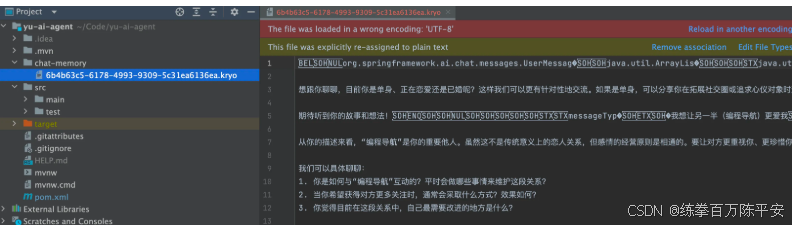
一:当前现状
对话记忆持久化背景提取
之前使用的是基于内存的对话记忆来保存对话上下文,但这种方式存在缺陷:
- 服务器重启后,内存中的对话记录会全部丢失。
因此,实际业务中可能需要将对话记忆持久化,把数据保存到:
- 文件
- 数据库
- Redis
- 其他对象存储
核心问题:如何实现对话记忆的持久化存储与恢复。
二:利用现有依赖实现
Spring AI 对话记忆持久化支持提取
Spring AI 官方提供了第三方数据库整合的对话记忆实现,可将对话保存到不同数据源:
- InMemoryChatMemory:基于内存的临时存储(默认实现,重启丢失)
- CassandraChatMemory:在 Cassandra 中实现带过期时间的持久化存储
- Neo4jChatMemory:在 Neo4j 中实现无过期时间限制的持久化存储
- JdbcChatMemory:在 JDBC 兼容数据库中实现无过期时间限制的持久化存储
关于 JdbcChatMemory 的使用提示
若需将对话持久化到传统关系型数据库,理论上可使用 JdbcChatMemory,但不推荐:
- 依赖
spring-ai-starter-model-chat-memory-jdbc版本稀少 - 官方文档 / 介绍匮乏
- Maven 中央仓库无法检索到该依赖
- 生产环境稳定性与兼容性存疑
三:自定义ChatMemory
1. 核心设计思想
Spring AI 的对话记忆实现解耦了「存储」和「记忆算法」:
- 可以独立修改
ChatMemory的存储层(比如从内存换成数据库 / Redis) - 无需改动上层保存对话记忆的业务流程
2. 自定义实现方式
官方文档未提供自定义 ChatMemory 示例,但可以参考默认实现类 InMemoryChatMemory 的源码进行仿写。
InMemoryChatMemory 源码如下:
3. ChatMemory 接口核心职责
接口方法较少,核心是实现对话消息的 增、查、删 操作:
- 新增:添加新的对话消息到记忆中
- 查询:根据会话 ID 获取历史消息
- 删除:清除指定会话的记忆或过期消息
四:自定义文件持久化
1:引入依赖
<dependency>
    <groupId>com.esotericsoftware</groupId>
    <artifactId>kryo</artifactId>
    <version>5.6.2</version>
</dependency>
2:编写代码
/**
 * 基于文件持久化的对话记忆
 */
public class FileBasedChatMemory implements ChatMemory {

    private final String BASE_DIR;
    private static final Kryo kryo = new Kryo();

    static {
        kryo.setRegistrationRequired(false);
        // 设置实例化策略
        kryo.setInstantiatorStrategy(new StdInstantiatorStrategy());
    }

    // 构造对象时,指定文件保存目录
    public FileBasedChatMemory(String dir) {
        this.BASE_DIR = dir;
        File baseDir = new File(dir);
        if (!baseDir.exists()) {
            baseDir.mkdirs();
        }
    }

    @Override
    public void add(String conversationId, List<Message> messages) {
        List<Message> conversationMessages = getOrCreateConversation(conversationId);
        conversationMessages.addAll(messages);
        saveConversation(conversationId, conversationMessages);
    }

    @Override
    public List<Message> get(String conversationId, int lastN) {
        List<Message> allMessages = getOrCreateConversation(conversationId);
        return allMessages.stream()
                .skip(Math.max(0, allMessages.size() - lastN))
                .toList();
    }

    @Override
    public void clear(String conversationId) {
        File file = getConversationFile(conversationId);
        if (file.exists()) {
            file.delete();
        }
    }

    private List<Message> getOrCreateConversation(String conversationId) {
        File file = getConversationFile(conversationId);
        List<Message> messages = new ArrayList<>();
        if (file.exists()) {
            try (Input input = new Input(new FileInputStream(file))) {
                messages = kryo.readObject(input, ArrayList.class);
            } catch (IOException e) {
                e.printStackTrace();
            }
        }
        return messages;
    }

    private void saveConversation(String conversationId, List<Message> messages) {
        File file = getConversationFile(conversationId);
        try (Output output = new Output(new FileOutputStream(file))) {
            kryo.writeObject(output, messages);
        } catch (IOException e) {
            e.printStackTrace();
        }
    }

    private File getConversationFile(String conversationId) {
        return new File(BASE_DIR, conversationId + ".kryo");
    }
}
3:修改MessageChatMemoryAdvisor对象的上下文存储类
public LoveApp(ChatModel dashscopeChatModel) {
    // 初始化基于文件的对话记忆
    String fileDir = System.getProperty("user.dir") + "/chat-memory";
    ChatMemory chatMemory = new FileBasedChatMemory(fileDir);
    chatClient = ChatClient.builder(dashscopeChatModel)
            .defaultSystem(SYSTEM_PROMPT)
            .defaultAdvisors(
                    new MessageChatMemoryAdvisor(chatMemory)
            )
            .build();
}
4:测试效果