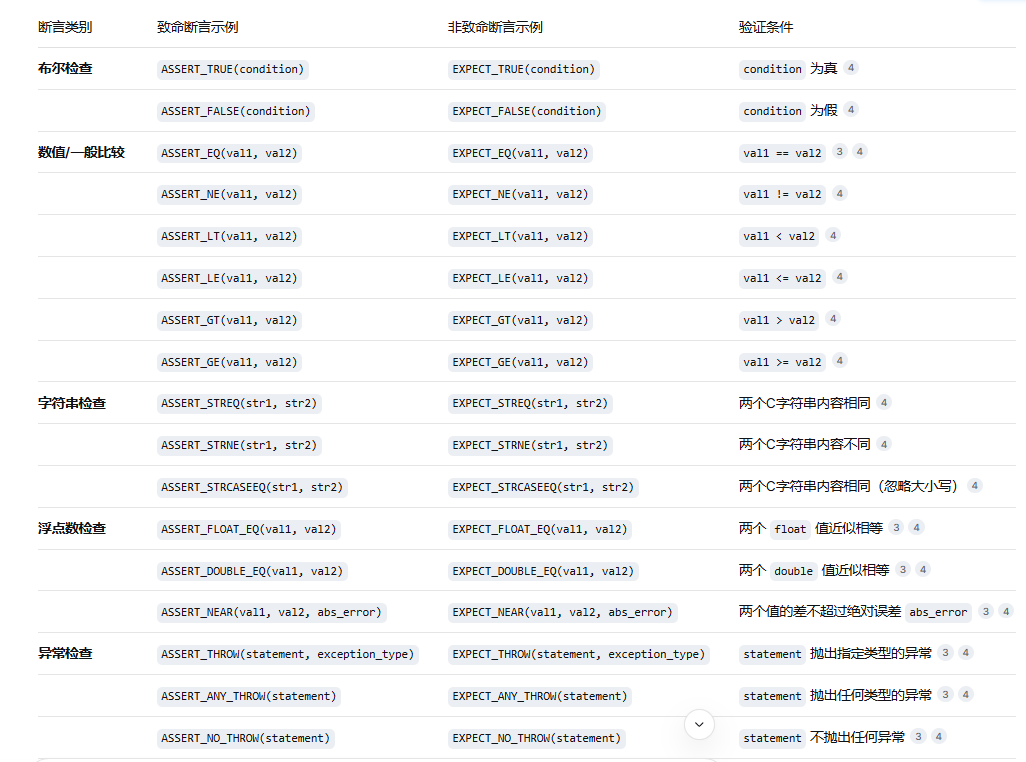
对C++代码不是很熟悉,编写xts标准系统的代码需要c++,主体就是ai生成的c++代码,然后对各种情况进行断言判断,之后运行出一个结果。
鸿蒙xts测试环境准备_openharmony 编译xts测试版本-CSDN博客
环境搭建:
采用的是鸿蒙6.0代码,这个测试环境就是拉取鸿蒙6.0代码,然后切换到鸿蒙代码里面的test目录下进行编译acts,当前的接口都是api接口,不需要其他的,acts就可以满足。
//全量运行
./build.sh product_name=rk3568 system_size=standard
//运行该子系统之中的
./build.sh product_name=rk3568 system_size=standard target_subsystem=distributeddatamgr
编写acts测试用例后,就可以在板子上进行运行了。
首先就是将out目录下的rk3568之中的suits目录之中的acts下载到windows环境之中,然后将切换到acts之中的acts,找到./run.bat文件,执行后,找到测试用例放在哪里,然后执行该测试套件。
// 全量测试acts的测试
run -l ActsFileShareBleClientTest
// 测试acts之中的部分测试
run -l ActsFileShareBleClientTest --gtest_list_tests
全量
## 安装git客户端和git-lfs等基础软件
sudo apt-get update
sudo apt-get install git git-lfs curl python3-pip net-tools ssh ninja-build

修改sh默认为bash
sudo dpkg-reconfigure dash  选择No
ls -al /bin/sh 显示bash表示成功

## python环境
sudo apt install python3-pip

#安装pip3
sudo pip3 install kconfiglib

#安装GUI menuconfig工具
sudo ln -s /usr/bin/python3  /usr/bin/python

#设置python3软连接

## 配置用户信息
git config --global user.name "user.name"
git config --global user.email "user.email"
git config --global credential.helper store
ssh-keygen -t rsa -C user.email
回车到底
cat ~/.ssh/id_rsa.pub
ssh -T git@gitee.com

码云gitee添加公钥
检查gitee配置执行
ssh -T git@gitee.com
Hi USERNAME! You've successfully authenticated, but GITEE.COM does not provide shell access.

## 安装码云repo工具
sudo mkdir /usr/bin
sudo curl https://gitee.com/oschina/repo/raw/fork_flow/repo-py3 -o /usr/bin/repo
sudo chmod a+x /usr/bin/repo
sudo pip3 install -i https://repo.huaweicloud.com/repository/pypi/simple requests

## 切换源

## 源码下载
sudo ln -s /usr/bin/python3 /usr/bin/python
repo init -u https://gitcode.com/openharmony/manifest -b OpenHarmony-6.0-Release --no-repo-verify
repo sync -c
repo forall -c 'git lfs pull'

## 安装库和工具集   不要安装gcc-arm-linux-gnueabi
bash build/build_scripts/env_setup.sh
source ~/.bashrc

## 编译
bash build/prebuilts_download.sh
首次编译  bash build.sh --product-name rk3568 --ccache
--fast-rebuild  build.gn等配置不变的时候可用


```
sudo apt-get update
sudo apt-get install -y bison flex libssl-dev libreadline-dev \
    libncurses5-dev autoconf automake libtool pkg-config
```


./build.sh product_name=rk3568 system_size=standard
./build.sh product_name=rk3568 system_size=standard target_subsystem=distributeddatamgr


run -l ActsFileShareBleClientTest
run -l ActsFileShareBleClientTest --gtest_list_tests


run -l ActsFileShareBlediscoverTest