还在为 NestJS 项目接入达梦数据库发愁?想用 TypeORM 优雅操作国产数据库,却不知道如何配置?今天这篇教程,全程围绕 NestJS 与达梦数据库的集成展开,从原生驱动连接到 TypeORM 整合,详细解释每一步流程和核心代码,并以 DMHR.CITY 表为例进行完整演示。
1. 先搞懂:为什么需要两种方式连接达梦?
达梦数据库是国内主流的国产关系型数据库,但在 Node.js 生态中,官方驱动 dmdb 是 C++ 插件,TypeScript 类型支持不完善。NestJS 作为企业级框架,追求代码规范与类型安全,这就产生了两种常见方案:
| 方案 | 适用场景 | 优点 | 缺点 |
|---|---|---|---|
| 原生驱动方案 | 简单查询、快速原型 | 轻量、直接、无额外依赖 | 类型不安全,需手动管理连接 |
| TypeORM 方案 | 复杂业务、团队协作 | ORM 映射、类型安全、迁移方便 | 需配置 typeorm-dm 扩展 |
2. 准备工作:达梦数据库环境搭建
2.1 安装达梦数据库
从达梦官网下载对应操作系统的 DM8 安装包,完成安装。本地测试可使用 Docker:
bash
docker run -d -p 5236:5236 \
  -e DM_USER=SYSDBA \
  -e DM_PASSWORD=Aa123456 \
  --name dm8 \
  dm8:latest
2.2 确认表结构
达梦数据库自带示例模式 DMHR,包含 CITY 表和 REGION 表:
REGION 表(地区表):
sql
CREATE TABLE DMHR.REGION (
    REGION_ID INT PRIMARY KEY,
    REGION_NAME VARCHAR(50)
);

INSERT INTO DMHR.REGION VALUES (1, '华北地区');
INSERT INTO DMHR.REGION VALUES (2, '华东地区');
INSERT INTO DMHR.REGION VALUES (3, '华南地区');
CITY 表(城市表,REGION_ID 为外键):
2.3 安装依赖
bash
npm install dmdb typeorm @nestjs/typeorm reflect-metadata typeorm-dm注意 :
dmdb是 C++ 插件,需要 Node.js 编译环境(Python、Visual Studio Build Tools 或 g++)。
3. 方案一:原生驱动连接(详细流程)
3.1 核心代码解析
javascript
const dmdb = require('dmdb');

class NativeDbService {
  constructor() {
    this.logger = new Logger('NativeDbService');
    this.pool = null;
  }

  async onModuleInit() {
    try {
      // 【关键点1】解决 OpenSSL 兼容性问题
      process.env.NODE_OPTIONS = '--openssl-legacy-provider';

      // 【关键点2】创建连接池
      this.pool = await dmdb.createPool({
        connectionString: 'dm://SYSDBA:Aa123456@localhost:5236/DAMENG?schema=DMHR',
        poolMax: 10,        // 最大连接数
        poolMin: 1,         // 最小连接数
        poolTimeout: 60,    // 连接超时时间(秒)
      });

      // 【关键点3】测试连接
      let testConn;
      try {
        testConn = await this.pool.getConnection();
        this.logger.log('✅ 原生驱动连接成功(DMHR 模式)');
      } finally {
        if (testConn) testConn.release();  // 必须释放连接
      }
    } catch (error) {
      this.logger.error('❌ 原生驱动连接失败:', error);
      throw error;
    }
  }

  // 【关键点4】获取连接
  async getConnection() {
    return await this.pool.getConnection();
  }

  // 【关键点5】执行 SQL 查询(自动释放连接)
  async query(sql, params = []) {
    const conn = await this.getConnection();
    try {
      if (params && params.length > 0) {
        const result = await conn.execute(sql, params);
        return result;
      } else {
        const result = await conn.execute(sql);
        return result;
      }
    } finally {
      conn.release();  // 无论成功失败都要释放连接
    }
  }

  // 【关键点6】解析查询结果
  async getAllCities() {
    const sql = 'SELECT * FROM DMHR.CITY ORDER BY CITY_ID';
    const result = await this.query(sql);

    // 达梦驱动返回的结果格式:{ metaData: [...], rows: [...] }
    if (result && result.rows) {
      const cities = result.rows.map(row => {
        const city = {};
        result.metaData.forEach((col, index) => {
          city[col.name] = row[index];
        });
        return city;
      });
      return cities;
    }
    return result;
  }

  async onModuleDestroy() {
    if (this.pool) await this.pool.close();  // 关闭连接池
  }
}
3.2 流程详解
步骤1:导入驱动
-
使用
require('dmdb')而非import,因为dmdb没有 TypeScript 类型定义 -
这样可以完全避开 TypeScript 的类型检查
步骤2:创建连接池
-
createPool是异步方法,返回连接池实例 -
connectionString格式:dm://用户名:密码@主机:端口/数据库?schema=模式名 -
连接池参数:
-
poolMax:最大连接数,根据业务并发量设置 -
poolMin:最小连接数,保持一定数量的活跃连接 -
poolTimeout:获取连接的超时时间
-
步骤3:测试连接
-
从连接池获取一个连接
-
执行简单查询验证连接有效性
-
重要 :使用
try/finally确保连接被释放
步骤4:执行查询
-
从连接池获取连接
-
执行 SQL 语句
-
必须释放连接,否则连接池会耗尽
步骤5:结果解析
-
达梦驱动返回
{ metaData, rows }格式 -
metaData:字段信息数组,每个元素有name属性 -
rows:数据行数组,每行是字段值的数组 -
需要手动转换为对象数组
4. 方案二:TypeORM 整合(详细流程)
4.1 核心代码解析
javascript
const { DmdbDataSource } = require('typeorm-dm');
const { EntitySchema } = require('typeorm');
require('reflect-metadata');

// 【关键点1】定义实体(使用 EntitySchema)
const CitySchema = new EntitySchema({
  name: 'City',                    // 实体名称
  tableName: 'CITY',              // 数据库表名
  schema: 'DMHR',                 // 数据库模式名
  columns: {
    CITY_ID: {
      primary: true,              // 主键
      type: 'varchar',           // 字段类型
      length: 3,                 // 长度限制
      name: 'CITY_ID'            // 数据库字段名
    },
    CITY_NAME: {
      type: 'varchar',
      length: 50,
      name: 'CITY_NAME'
    },
    REGION_ID: {
      type: 'int',
      name: 'REGION_ID'
    }
  }
});

// 【关键点2】配置数据源
const typeormConfig = {
  type: "oracle",                // 达梦兼容 Oracle 协议
  innerType: "dmdb",             // 指定为达梦驱动
  host: "localhost",
  port: 5236,
  username: "SYSDBA",
  password: "Aa123456",
  schema: "DMHR",                // 默认模式
  entities: [CitySchema, RegionSchema],
  synchronize: false,            // 生产环境必须为 false
  logging: true,                 // 打印 SQL 日志
  extra: {
    connectTimeout: 30000,
  }
};

// 【关键点3】创建数据源实例
const AppDataSource = new DmdbDataSource(typeormConfig);

class TypeormDbService {
  constructor() {
    this.logger = new Logger('TypeormDbService');
    this.dataSource = null;
  }

  async onModuleInit() {
    try {
      // 【关键点4】初始化数据源
      await AppDataSource.initialize();
      this.dataSource = AppDataSource;
      this.logger.log('✅ TypeORM 连接成功');

      // 测试连接
      const cityRepo = this.dataSource.getRepository('City');
      const cityCount = await cityRepo.count();
      this.logger.log(`CITY 表中共有 ${cityCount} 条记录`);
    } catch (error) {
      this.logger.error('❌ TypeORM 连接失败:', error);
      throw error;
    }
  }

  // 【关键点5】使用 Repository 进行 CRUD
  async getAllCities() {
    const cityRepo = this.dataSource.getRepository('City');
    return await cityRepo.find({
      order: { CITY_ID: 'ASC' }
    });
  }

  async createCity(cityData) {
    const cityRepo = this.dataSource.getRepository('City');
    const newCity = cityRepo.create(cityData);
    return await cityRepo.save(newCity);
  }

  async onModuleDestroy() {
    if (this.dataSource) await this.dataSource.destroy();
  }
}
4.2 流程详解
步骤1:定义实体(EntitySchema 方式)
-
name:实体名称,用于getRepository('City')获取 -
tableName:数据库实际表名(注意大小写) -
schema:数据库模式名(达梦区分模式) -
columns:字段映射,指定数据库字段名与实体属性的对应关系
步骤2:配置数据源
-
type: "oracle":达梦兼容 Oracle 协议 -
innerType: "dmdb":指定使用达梦驱动 -
synchronize: false:生产环境必须关闭,避免误操作表结构 -
logging: true:开启后控制台打印执行的 SQL 语句,便于调试
步骤3:初始化数据源
-
initialize()是异步方法,会建立数据库连接 -
只有初始化成功后才能进行后续操作
步骤4:获取 Repository
-
getRepository('City'):根据实体名称获取操作对象 -
Repository 提供
find、findOne、save、update、delete等方法
步骤5:CRUD 操作
-
create():创建实体实例(不保存到数据库) -
save():保存实体(插入或更新) -
find():查询多条记录 -
findOne():查询单条记录 -
update():更新记录 -
delete():删除记录
5. 完整代码运行
/**
 * NestJS 连接达梦数据库的两种方式(单文件实现)
 * 操作表:DMHR.CITY(实际表结构:CITY_ID CHAR(3), CITY_NAME VARCHAR(50), REGION_ID INT)
 * 注意:REGION_ID 是外键,必须存在于 DMHR.REGION 表中
 */

const { Injectable, Logger } = require('@nestjs/common');

// ==================== 方式一:原生驱动连接 ====================
const dmdb = require('dmdb');

class NativeDbService {
  constructor() {
    this.logger = new Logger('NativeDbService');
    this.pool = null;
  }

  async onModuleInit() {
    try {
      process.env.NODE_OPTIONS = '--openssl-legacy-provider';

      this.pool = await dmdb.createPool({
        connectionString: 'dm://SYSDBA:Aa123456@localhost:5236/DAMENG?schema=DMHR',
        poolMax: 10,
        poolMin: 1,
        poolTimeout: 60,
      });

      let testConn;
      try {
        testConn = await this.pool.getConnection();
        this.logger.log('✅ 原生驱动连接成功(DMHR 模式)');
      } finally {
        if (testConn) testConn.release();
      }
    } catch (error) {
      this.logger.error('❌ 原生驱动连接失败:', error);
      throw error;
    }
  }

  async getConnection() {
    return await this.pool.getConnection();
  }

  async onModuleDestroy() {
    if (this.pool) await this.pool.close();
  }

  async query(sql, params = []) {
    const conn = await this.getConnection();
    try {
      if (params && params.length > 0) {
        const result = await conn.execute(sql, params);
        return result;
      } else {
        const result = await conn.execute(sql);
        return result;
      }
    } finally {
      conn.release();
    }
  }

  // ========== 查询 REGION 表(获取有效的 REGION_ID)==========
  async getAllRegions() {
    const sql = 'SELECT * FROM DMHR.REGION ORDER BY REGION_ID';
    const result = await this.query(sql);

    if (result && result.rows) {
      const regions = result.rows.map(row => {
        const region = {};
        result.metaData.forEach((col, index) => {
          region[col.name] = row[index];
        });
        return region;
      });
      return regions;
    }
    return [];
  }

  // ========== CITY 表专用方法 ==========

  async getAllCities() {
    const sql = 'SELECT * FROM DMHR.CITY ORDER BY CITY_ID';
    const result = await this.query(sql);

    if (result && result.rows) {
      const cities = result.rows.map(row => {
        const city = {};
        result.metaData.forEach((col, index) => {
          city[col.name] = row[index];
        });
        return city;
      });
      return cities;
    }
    return result;
  }

  async getCityById(cityId) {
    const sql = `SELECT * FROM DMHR.CITY WHERE CITY_ID = '${cityId}'`;
    const result = await this.query(sql);

    if (result && result.rows && result.rows.length > 0) {
      const city = {};
      result.metaData.forEach((col, index) => {
        city[col.name] = result.rows[0][index];
      });
      return city;
    }
    return null;
  }

  async getCitiesByRegion(regionId) {
    const sql = `SELECT * FROM DMHR.CITY WHERE REGION_ID = ${regionId} ORDER BY CITY_ID`;
    const result = await this.query(sql);

    if (result && result.rows) {
      const cities = result.rows.map(row => {
        const city = {};
        result.metaData.forEach((col, index) => {
          city[col.name] = row[index];
        });
        return city;
      });
      return cities;
    }
    return [];
  }

  async createCity(cityData) {
    if (cityData.CITY_ID.length > 3) {
      throw new Error(`CITY_ID 长度不能超过 3 个字符,当前: ${cityData.CITY_ID}`);
    }
    const sql = `INSERT INTO DMHR.CITY (CITY_ID, CITY_NAME, REGION_ID)
                 VALUES ('${cityData.CITY_ID}', '${cityData.CITY_NAME}', ${cityData.REGION_ID})`;
    const result = await this.query(sql);
    return result;
  }

  async updateCity(cityId, cityData) {
    const sql = `UPDATE DMHR.CITY
                 SET CITY_NAME = '${cityData.CITY_NAME}', REGION_ID = ${cityData.REGION_ID}
                 WHERE CITY_ID = '${cityId}'`;
    const result = await this.query(sql);
    return result;
  }

  async deleteCity(cityId) {
    const sql = `DELETE FROM DMHR.CITY WHERE CITY_ID = '${cityId}'`;
    const result = await this.query(sql);
    return result;
  }
}

// ==================== 方式二:TypeORM 整合 ====================
const { DmdbDataSource } = require('typeorm-dm');
const { EntitySchema } = require('typeorm');
require('reflect-metadata');

// 使用 EntitySchema 定义 City 实体
const CitySchema = new EntitySchema({
  name: 'City',
  tableName: 'CITY',
  schema: 'DMHR',
  columns: {
    CITY_ID: {
      primary: true,
      type: 'varchar',
      length: 3,
      name: 'CITY_ID'
    },
    CITY_NAME: {
      type: 'varchar',
      length: 50,
      name: 'CITY_NAME'
    },
    REGION_ID: {
      type: 'int',
      name: 'REGION_ID'
    }
  }
});

// Region 实体(用于查询有效的外键值)
const RegionSchema = new EntitySchema({
  name: 'Region',
  tableName: 'REGION',
  schema: 'DMHR',
  columns: {
    REGION_ID: {
      primary: true,
      type: 'int',
      name: 'REGION_ID'
    },
    REGION_NAME: {
      type: 'varchar',
      length: 50,
      name: 'REGION_NAME'
    }
  }
});

// TypeORM 数据源配置
const typeormConfig = {
  type: "oracle",
  innerType: "dmdb",
  host: "localhost",
  port: 5236,
  username: "SYSDBA",
  password: "Aa123456",
  schema: "DMHR",
  entities: [CitySchema, RegionSchema],
  synchronize: false,
  logging: true,
  extra: {
    connectTimeout: 30000,
  }
};

// 创建 TypeORM 数据源实例
const AppDataSource = new DmdbDataSource(typeormConfig);

// TypeORM 服务封装
class TypeormDbService {
  constructor() {
    this.logger = new Logger('TypeormDbService');
    this.dataSource = null;
  }

  async onModuleInit() {
    try {
      await AppDataSource.initialize();
      this.dataSource = AppDataSource;
      this.logger.log('✅ TypeORM 连接成功(DMHR 模式)');

      const regionRepo = this.dataSource.getRepository('Region');
      const regionCount = await regionRepo.count();
      this.logger.log(`REGION 表中共有 ${regionCount} 条记录`);

      const cityRepo = this.dataSource.getRepository('City');
      const cityCount = await cityRepo.count();
      this.logger.log(`CITY 表中共有 ${cityCount} 条记录`);
    } catch (error) {
      this.logger.error('❌ TypeORM 连接失败:', error);
      throw error;
    }
  }

  async onModuleDestroy() {
    if (this.dataSource) await this.dataSource.destroy();
  }

  // ========== CITY 表专用方法 ==========

  async getAllCities() {
    const cityRepo = this.dataSource.getRepository('City');
    return await cityRepo.find({
      order: {
        CITY_ID: 'ASC'
      }
    });
  }

  async getCityById(cityId) {
    const cityRepo = this.dataSource.getRepository('City');
    return await cityRepo.findOne({
      where: { CITY_ID: cityId }
    });
  }

  async getCitiesByRegion(regionId) {
    const cityRepo = this.dataSource.getRepository('City');
    return await cityRepo.find({
      where: { REGION_ID: regionId },
      order: { CITY_ID: 'ASC' }
    });
  }

  async createCity(cityData) {
    if (cityData.CITY_ID.length > 3) {
      throw new Error(`CITY_ID 长度不能超过 3 个字符,当前: ${cityData.CITY_ID}`);
    }
    const cityRepo = this.dataSource.getRepository('City');
    const newCity = cityRepo.create(cityData);
    return await cityRepo.save(newCity);
  }

  async updateCity(cityId, cityData) {
    const cityRepo = this.dataSource.getRepository('City');
    await cityRepo.update(cityId, cityData);
    return await this.getCityById(cityId);
  }

  async deleteCity(cityId) {
    const cityRepo = this.dataSource.getRepository('City');
    const result = await cityRepo.delete(cityId);
    return result.affected > 0;
  }

  // ========== REGION 表专用方法 ==========

  async getAllRegions() {
    const regionRepo = this.dataSource.getRepository('Region');
    return await regionRepo.find({
      order: {
        REGION_ID: 'ASC'
      }
    });
  }

  async getRegionById(regionId) {
    const regionRepo = this.dataSource.getRepository('Region');
    return await regionRepo.findOne({
      where: { REGION_ID: regionId }
    });
  }
}

// ==================== 业务服务 ====================

class CityService {
  constructor(nativeDbService, typeormDbService) {
    this.nativeDbService = nativeDbService;
    this.typeormDbService = typeormDbService;
    this.logger = new Logger('CityService');
  }

  async queryCitiesWithNative() {
    try {
      this.logger.log('使用原生驱动查询所有城市...');
      const cities = await this.nativeDbService.getAllCities();
      this.logger.log(`原生驱动查询到 ${cities.length} 个城市`);
      return cities;
    } catch (error) {
      this.logger.error('原生驱动查询失败:', error);
      throw error;
    }
  }

  async queryCitiesWithTypeorm() {
    try {
      this.logger.log('使用 TypeORM 查询所有城市...');
      const cities = await this.typeormDbService.getAllCities();
      this.logger.log(`TypeORM 查询到 ${cities.length} 个城市`);
      return cities;
    } catch (error) {
      this.logger.error('TypeORM 查询失败:', error);
      throw error;
    }
  }

  async getValidRegions() {
    try {
      this.logger.log('查询有效的地区列表...');
      const regions = await this.typeormDbService.getAllRegions();
      return regions;
    } catch (error) {
      this.logger.error('查询地区失败:', error);
      throw error;
    }
  }

  async createCityWithTypeorm(cityData) {
    try {
      this.logger.log(`使用 TypeORM 创建城市:${cityData.CITY_NAME}`);
      const newCity = await this.typeormDbService.createCity(cityData);
      this.logger.log(`创建成功,ID:${newCity.CITY_ID}`);
      return newCity;
    } catch (error) {
      this.logger.error('TypeORM 创建城市失败:', error);
      throw error;
    }
  }

  async deleteCityWithTypeorm(cityId) {
    try {
      this.logger.log(`使用 TypeORM 删除城市 ID: ${cityId}`);
      const success = await this.typeormDbService.deleteCity(cityId);
      this.logger.log(success ? '删除成功' : '删除失败(可能不存在)');
      return success;
    } catch (error) {
      this.logger.error('TypeORM 删除城市失败:', error);
      throw error;
    }
  }
}

// ==================== 测试函数 ====================

async function testNativeDriver() {
  console.log('\n========== 测试方式一:原生驱动(DMHR.CITY) ==========');

  const nativeService = new NativeDbService();

  try {
    await nativeService.onModuleInit();

    // 0. 先查询有效的 REGION_ID
    console.log('\n--- 0. 查询有效的地区列表 ---');
    const regions = await nativeService.getAllRegions();
    console.log('有效地区:', regions);

    // 使用第一个有效的 REGION_ID
    const validRegionId = regions.length > 0 ? regions[0].REGION_ID : 1;
    console.log(`使用地区 ID: ${validRegionId}`);

    // 1. 查询所有城市
    console.log('\n--- 1. 查询所有城市 ---');
    const allCities = await nativeService.getAllCities();
    console.log('所有城市:', allCities);

    // 2. 根据 ID 查询城市
    console.log('\n--- 2. 根据 ID 查询城市 ---');
    const city = await nativeService.getCityById('BJ');
    console.log('ID=BJ 的城市:', city);

    // 3. 根据地区查询城市
    console.log('\n--- 3. 根据地区查询城市 ---');
    const regionCities = await nativeService.getCitiesByRegion(validRegionId);
    console.log(`地区 ID=${validRegionId} 的城市:`, regionCities);

    // 4. 新增测试城市(使用有效的 REGION_ID)
    console.log('\n--- 4. 新增测试城市 ---');
    const testCityId = 'T1';
    await nativeService.createCity({
      CITY_ID: testCityId,
      CITY_NAME: '测试城市',
      REGION_ID: validRegionId
    });
    console.log(`新增城市成功,ID: ${testCityId}`);

    // 5. 查询验证新增
    console.log('\n--- 5. 验证新增 ---');
    const testCity = await nativeService.getCityById(testCityId);
    console.log('新增的城市:', testCity);

    // 6. 删除城市
    console.log('\n--- 6. 删除城市 ---');
    await nativeService.deleteCity(testCityId);
    console.log('删除成功');

    // 7. 验证删除
    console.log('\n--- 7. 验证删除 ---');
    const deletedCity = await nativeService.getCityById(testCityId);
    console.log('删除后的查询结果:', deletedCity);

  } catch (error) {
    console.error('原生驱动测试失败:', error);
  } finally {
    await nativeService.onModuleDestroy();
  }
}

async function testTypeorm() {
  console.log('\n========== 测试方式二:TypeORM(DMHR.CITY) ==========');

  const typeormService = new TypeormDbService();

  try {
    await typeormService.onModuleInit();

    // 0. 获取有效的地区列表
    console.log('\n--- 0. 查询有效的地区列表 ---');
    const regions = await typeormService.getAllRegions();
    console.log('有效地区:', regions);

    const validRegionId = regions.length > 0 ? regions[0].REGION_ID : 1;
    console.log(`使用地区 ID: ${validRegionId}`);

    // 1. 查询所有城市
    console.log('\n--- 1. 查询所有城市 ---');
    const allCities = await typeormService.getAllCities();
    console.log('所有城市:', allCities);

    // 2. 根据 ID 查询城市
    console.log('\n--- 2. 根据 ID 查询城市 ---');
    const city = await typeormService.getCityById('BJ');
    console.log('ID=BJ 的城市:', city);

    // 3. 根据地区查询城市
    console.log('\n--- 3. 根据地区查询城市 ---');
    const regionCities = await typeormService.getCitiesByRegion(validRegionId);
    console.log(`地区 ID=${validRegionId} 的城市:`, regionCities);

    // 4. 新增测试城市(使用有效的 REGION_ID)
    console.log('\n--- 4. 新增测试城市 ---');
    const testCityId = 'T2';
    const newCity = await typeormService.createCity({
      CITY_ID: testCityId,
      CITY_NAME: 'TypeORM测试城市',
      REGION_ID: validRegionId
    });
    console.log('新增城市:', newCity);

    // 5. 删除城市
    console.log('\n--- 5. 删除城市 ---');
    const deleted = await typeormService.deleteCity(testCityId);
    console.log(deleted ? '删除成功' : '删除失败');

    // 6. 验证删除
    console.log('\n--- 6. 验证删除 ---');
    const finalCity = await typeormService.getCityById(testCityId);
    console.log('删除后的查询结果:', finalCity);

  } catch (error) {
    console.error('TypeORM 测试失败:', error);
  } finally {
    await typeormService.onModuleDestroy();
  }
}

async function testMixedUsage() {
  console.log('\n========== 测试混合使用(DMHR.CITY) ==========');

  const nativeService = new NativeDbService();
  const typeormService = new TypeormDbService();
  const cityService = new CityService(nativeService, typeormService);

  try {
    await Promise.all([
      nativeService.onModuleInit(),
      typeormService.onModuleInit()
    ]);

    // 0. 获取有效的地区列表
    console.log('\n--- 0. 查询有效的地区列表 ---');
    const regions = await cityService.getValidRegions();
    console.log('有效地区:', regions);

    const validRegionId = regions.length > 0 ? regions[0].REGION_ID : 1;
    console.log(`使用地区 ID: ${validRegionId}`);

    // 1. 使用 TypeORM 新增城市(使用有效的 REGION_ID)
    console.log('\n--- 1. 使用 TypeORM 新增城市 ---');
    const testCityId = 'M1';
    await cityService.createCityWithTypeorm({
      CITY_ID: testCityId,
      CITY_NAME: '混合测试城市',
      REGION_ID: validRegionId
    });

    // 2. 使用原生驱动查询所有城市
    console.log('\n--- 2. 使用原生驱动查询所有城市 ---');
    const nativeCities = await cityService.queryCitiesWithNative();
    console.log(`原生驱动查询到 ${nativeCities.length} 个城市`);

    // 3. 使用 TypeORM 查询所有城市
    console.log('\n--- 3. 使用 TypeORM 查询所有城市 ---');
    const typeormCities = await cityService.queryCitiesWithTypeorm();
    console.log(`TypeORM 查询到 ${typeormCities.length} 个城市`);

    // 4. 使用 TypeORM 删除城市
    console.log('\n--- 4. 使用 TypeORM 删除城市 ---');
    await cityService.deleteCityWithTypeorm(testCityId);

    // 5. 验证删除
    console.log('\n--- 5. 验证删除 ---');
    const finalCities = await cityService.queryCitiesWithTypeorm();
    console.log(`最终城市数量:${finalCities.length}`);

  } catch (error) {
    console.error('混合使用测试失败:', error);
  } finally {
    await Promise.all([
      nativeService.onModuleDestroy(),
      typeormService.onModuleDestroy()
    ]);
  }
}

async function main() {
  console.log('🚀 达梦数据库连接测试启动');
  console.log('数据库配置:localhost:5236, 用户:SYSDBA, 密码:Aa123456, 模式:DMHR');
  console.log('操作表:DMHR.CITY(外键约束:REGION_ID 必须存在于 DMHR.REGION 表)');

  const testMode = process.argv[2] || 'all';

  switch (testMode) {
    case 'native':
      await testNativeDriver();
      break;
    case 'typeorm':
      await testTypeorm();
      break;
    case 'mixed':
      await testMixedUsage();
      break;
    case 'all':
    default:
      await testNativeDriver();
      await testTypeorm();
      await testMixedUsage();
      break;
  }

  console.log('\n✨ 所有测试完成');
}

if (require.main === module) {
  main().catch(console.error);
}

module.exports = {
  NativeDbService,
  TypeormDbService,
  CityService,
  typeormConfig,
  AppDataSource
};
将完整代码保存为 dm-database.js,运行测试:
bash
# 运行所有测试
node dm-database.js

# 只测试原生驱动
node dm-database.js native

# 只测试 TypeORM
node dm-database.js typeorm

# 测试混合使用
node dm-database.js mixed
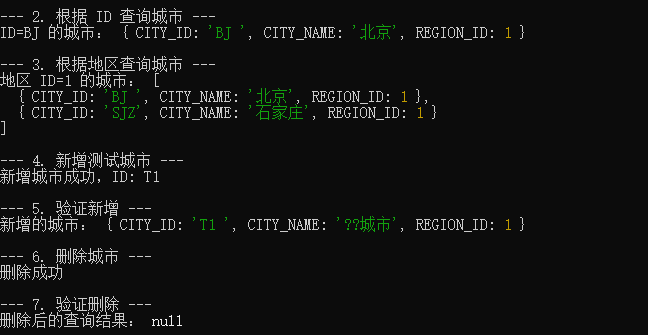
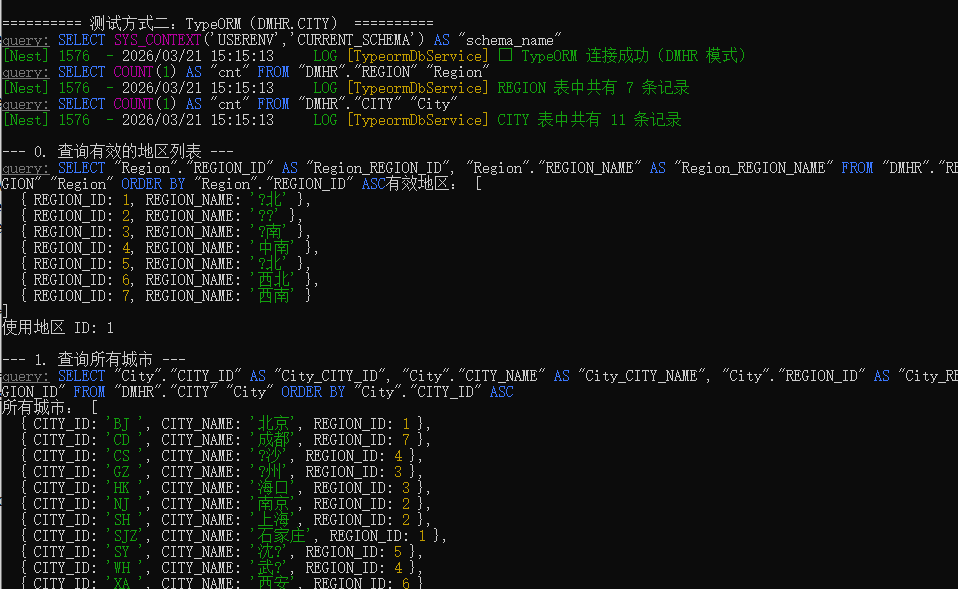
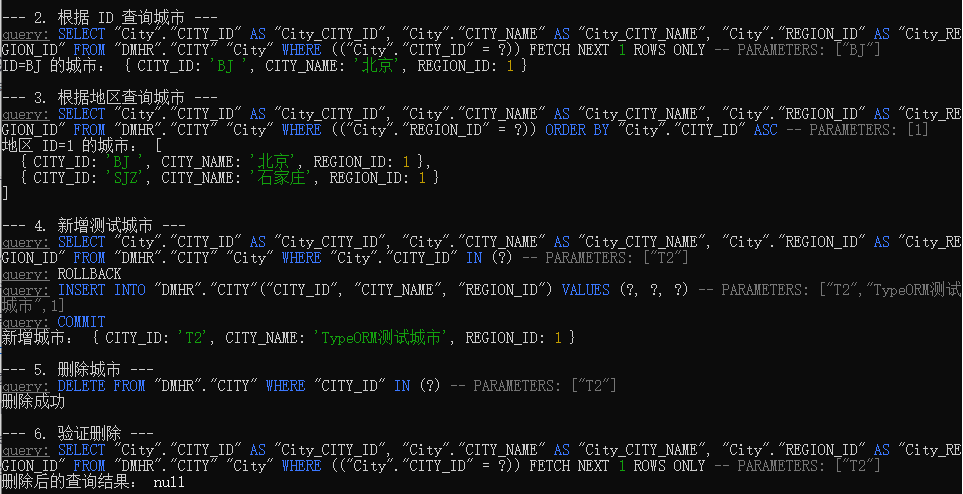
预期输出
text
原生方式
orm方式
6. 常见问题与避坑指南
6.1 dmdb 安装失败?
错误 :node-gyp 编译失败
解决:
bash
# Windows
npm install -g windows-build-tools

# Ubuntu
sudo apt-get install build-essential
6.2 Node.js 版本兼容问题
错误 :ERR_OSSL_EVP_UNSUPPORTED
解决:在代码开头设置环境变量
javascript
process.env.NODE_OPTIONS = '--openssl-legacy-provider';6.3 外键约束问题
错误 :违反引用约束[CITY_REG_FK]
原因:插入的 REGION_ID 在 REGION 表中不存在
解决:先查询有效的 REGION_ID
javascript
const regions = await nativeService.getAllRegions();
const validRegionId = regions[0].REGION_ID;
6.4 表名大小写问题
达梦数据库对表名大小写敏感,SQL 语句中使用大写:
sql
SELECT * FROM DMHR.CITY  -- 正确
SELECT * FROM dmhr.city  -- 可能出错
6.5 连接池耗尽
原因:获取连接后没有释放
解决 :使用 try/finally 确保释放
javascript
const conn = await pool.getConnection();
try {
  await conn.execute(sql);
} finally {
  conn.release();  // 必须执行
}
6.6 TypeORM 实体找不到
错误 :No metadata for "City" was found
解决:
-
确保实体正确注册到
entities数组 -
使用
EntitySchema方式定义实体 -
确保
name与getRepository参数一致
7. 核心总结
| 方案 | 优点 | 缺点 | 推荐场景 |
|---|---|---|---|
| 原生驱动 | 性能好、轻量 | 类型不安全、手动管理 | 高性能、简单查询 |
| TypeORM | 类型安全、开发快 | 性能略低、内存占用高 | 复杂业务、团队协作 |
接入三要素:
-
正确安装
dmdb驱动 -
配置正确的连接字符串(注意 schema 参数)
-
处理好外键约束和表名大小写
运行命令:
bash
# 安装依赖
npm install dmdb typeorm @nestjs/typeorm reflect-metadata typeorm-dm

# 运行测试
node dm-database.js
附录:完整代码文件
完整的 dm-database.js 文件已在上文提供,可直接复制保存运行。代码包含:
-
原生驱动连接实现(NativeDbService 类)
-
TypeORM 整合实现(TypeormDbService 类)
-
业务服务封装(CityService 类)
-
完整的测试函数(三种测试模式)
-
导出供其他模块使用的接口