📌 一、前言
实现👇效果:
🔥 动态生成"椭圆覆盖区域",并实时展示在地图上
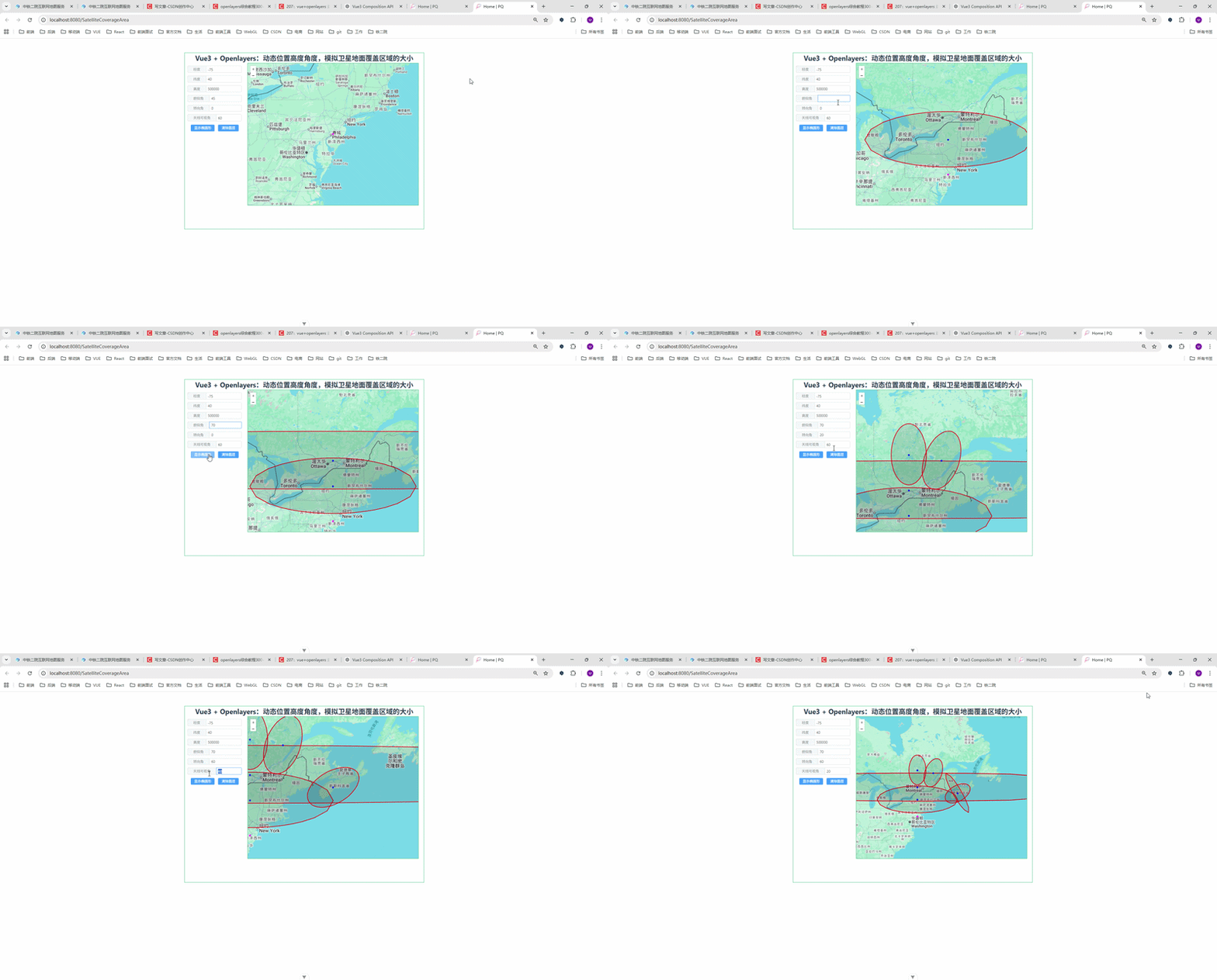
在做无人机巡检系统 / 卫星可视化系统时,经常会遇到这样一个需求:
👉 根据设备的位置、高度、俯仰角、方位角,动态计算地面覆盖范围
比如:
- 卫星观测区域
- 无人机摄像头可视范围
- 雷达扫描范围
本文将带你用:
- Vue3(Composition API)
- OpenLayers
- Turf.js
👉 输入参数:
- 经度 / 纬度
- 高度(alt)
- 俯仰角(pitch)
- 方位角(azimuth)
- 视场角(angle)
👉 点击按钮:
✅ 自动计算
✅ 地图中心移动
✅ 绘制椭圆覆盖区域
🧠 三、核心原理(重点)
这个效果的本质其实是👇
1️⃣ 覆盖中心点计算
通过:
- 高度(alt)
- 俯仰角(pitch)
- 方位角(azimuth)
计算投影到地面的点:
javascript
pp = tan(pitch) * alt再拆成:
javascript
x = sin(azimuth) * pp
y = cos(azimuth) * pp
👉 得到 地面偏移量
2️⃣ 椭圆长短轴计算
javascript
b = tan(angle/2) * alt // 短轴
a = (tan(pitch+angle/2) - tan(pitch-angle/2)) * alt / 2 // 长轴
👉 解释:
- angle = 摄像头视场角
- pitch = 倾斜角
所以:
📌 覆盖区域 ≠ 圆形,而是椭圆!
3️⃣ 使用 Turf 生成椭圆
javascript
turf.ellipse(center, a, b, { angle })🏗 四、完整代码实现
javascript
<!--
 * @Author: 彭麒
 * @Date: 2026/3/23
 * @Email: 1062470959@qq.com
 * @Description: 此源码版权归吉檀迦俐所有,可供学习和借鉴或商用。
 -->
<template>
  <div class="container">
    <div class="w-full flex justify-center flex-wrap">
      <div class="font-bold text-[24px]">
        Vue3 + Openlayers:动态位置高度角度,模拟卫星地面覆盖区域的大小
      </div>
    </div>
    <div class="nav">
      <el-input v-model="lon" size="small"><template #prepend>经度</template></el-input>
      <el-input v-model="lat" size="small"><template #prepend>纬度</template></el-input>
      <el-input v-model="alt" size="small"><template #prepend>高度</template></el-input>
      <el-input v-model="pitch" size="small"><template #prepend>俯仰角</template></el-input>
      <el-input v-model="azimuth" size="small"><template #prepend>转向角</template></el-input>
      <el-input v-model="angle" size="small"><template #prepend>天线可视角</template></el-input>
      <el-button type="primary" size="small" @click="ellipse">显示椭圆形</el-button>
      <el-button type="primary" size="small" @click="clearLayer">清除图层</el-button>
    </div>
    <div id="vue-openlayers"></div>
  </div>
</template>

<script setup>
import { ref, onMounted } from 'vue'

import 'ol/ol.css'
import Map from 'ol/Map'
import View from 'ol/View'
import TileLayer from 'ol/layer/Tile'
import VectorSource from 'ol/source/Vector'
import VectorLayer from 'ol/layer/Vector'
import XYZ from 'ol/source/XYZ'
import { fromLonLat, toLonLat } from 'ol/proj'
import * as turf from '@turf/turf'
import GeoJSON from 'ol/format/GeoJSON'
import Feature from 'ol/Feature'
import { Fill, Stroke, Style, Circle } from 'ol/style'
import { Point } from 'ol/geom'

// ===== 响应式数据 =====
const map = ref(null)

const turfSource = new VectorSource({ wrapX: false })
const pointSource = new VectorSource({ wrapX: false })

const lon = ref(-75)
const lat = ref(40)
const alt = ref(500000)
const pitch = ref(45)
const angle = ref(60)
const azimuth = ref(0)

// ===== 样式 =====
const featureStyle = () =>
    new Style({
      fill: new Fill({ color: 'rgba(0,0,0,0.1)' }),
      stroke: new Stroke({ width: 2, color: '#f00' }),
      image: new Circle({
        radius: 3,
        fill: new Fill({ color: '#0000ff' }),
      }),
    })

const featureStyle2 = () =>
    new Style({
      fill: new Fill({ color: 'rgba(0,0,0,0.1)' }),
      stroke: new Stroke({ width: 2, color: '#f00' }),
      image: new Circle({
        radius: 3,
        fill: new Fill({ color: '#ff00ff' }),
      }),
    })

// ===== 方法 =====
const show = (geojsonData) => {
  const features = new GeoJSON().readFeatures(geojsonData, {
    dataProjection: 'EPSG:4326',
    featureProjection: 'EPSG:3857',
  })
  turfSource.addFeatures(features)
}

const clearLayer = () => {
  turfSource.clear()
}

const getcoord = (lonVal, latVal, altVal, pitchVal, azimuthVal, angleVal) => {
  const pp = Math.tan((pitchVal * Math.PI) / 180) * altVal
  const ww = Math.sin((azimuthVal * Math.PI) / 180) * pp
  const hh = Math.cos((azimuthVal * Math.PI) / 180) * pp

  const c0c = fromLonLat([lonVal, latVal])
  const clon = c0c[0] + ww
  const clat = c0c[1] + hh

  const b = Math.tan(((angleVal / 2) * Math.PI) / 180) * altVal
  const aa = Math.tan(((pitchVal + angleVal / 2) * Math.PI) / 180) * altVal
  const ab = Math.tan(((pitchVal - angleVal / 2) * Math.PI) / 180) * altVal
  const a = (aa - ab) / 2

  const cc = toLonLat([clon, clat])

  // 中心点
  const pointFeature = new Feature({
    geometry: new Point([clon, clat]),
  })
  turfSource.addFeature(pointFeature)

  map.value.getView().setCenter([clon, clat])

  return [cc, a, b]
}

const originPoint = () => {
  const pointFeature = new Feature({
    geometry: new Point(fromLonLat([-75, 40])),
  })
  pointSource.addFeature(pointFeature)
}

const ellipse = () => {
  const [center, a, b] = getcoord(
      lon.value,
      lat.value,
      alt.value,
      pitch.value,
      azimuth.value,
      angle.value
  )

  const ellipseGeo = turf.ellipse(center, a / 1000, b / 1000, {
    angle: Number(azimuth.value),
  })

  show(ellipseGeo)
}

const initMap = () => {
  const baseLayer = new TileLayer({
    source: new XYZ({
      url: 'https://www.google.com/maps/vt?lyrs=m&gl=en&x={x}&y={y}&z={z}',
      crossOrigin: 'anonymous',
    }),
  })

  const turfLayer = new VectorLayer({
    source: turfSource,
    style: featureStyle(),
  })

  const pointLayer = new VectorLayer({
    source: pointSource,
    style: featureStyle2(),
  })

  map.value = new Map({
    target: 'vue-openlayers',
    layers: [baseLayer, turfLayer, pointLayer],
    view: new View({
      projection: 'EPSG:3857',
      center: fromLonLat([-75, 40]),
      zoom: 6,
    }),
  })
}

// ===== 生命周期 =====
onMounted(() => {
  initMap()
  originPoint()
})
</script>

<style scoped>
.container {
  width: 840px;
  height: 620px;
  margin: 50px auto;
  border: 1px solid #42B983;
}
#vue-openlayers {
  width: 600px;
  height: 500px;
  border: 1px solid #42B983;
  float: left;
}
.nav {
  float: left;
  width: 210px;
  height: 500px;
  margin-right: 10px;
  padding-top: 10px;
}
.nav >>> .el-input-group {
  width: 200px;
  padding: 0 5px;
  margin-bottom: 10px;
}
</style>
⚠️ 五、容易踩坑点(非常关键)
❌ 1. 坐标系问题
必须注意:
javascript
EPSG:4326 → EPSG:3857👉 否则图层会错位!
❌ 2. 单位问题
javascript
turf.ellipse(center, a / 1000, b / 1000)👉 Turf 默认单位是 公里
❌ 3. pitch 边界
javascript
pitch → 接近 90° 会爆炸(tan无穷)👉 建议限制:
javascript
0° < pitch < 85°🚀 六、进阶优化(建议收藏)
✅ 1. 实时响应(推荐)
不用按钮,直接自动更新:
javascript
watch([lon, lat, alt, pitch, azimuth, angle], ellipse)✅ 2. 图层分离(工程必备)
建议拆:
- 覆盖区 layer
- 设备 layer
- 轨迹 layer
✅ 3. 封装成 composable
useEllipse.js
👉 方便复用到:
- 无人机
- 卫星
- 雷达
✅ 4. 动画效果(高级)
可以做:
- 扫描动画
- 动态覆盖变化
- 飞行轨迹联动
💡 七、应用场景
这个方案可以直接用于:
- 🛰 卫星覆盖分析
- 🚁 无人机巡检系统
- 📡 雷达扫描模拟
- 🎥 摄像头视野分析
🏁 八、总结
一句话总结:
👉 通过"空间几何 + 三角函数 + Turf + OpenLayers",可以优雅实现动态覆盖区域模拟
🎁 九、如果你想进阶
如果你在做👇项目:
- 无人机巡检系统
- 数字孪生
- GIS可视化平台
我可以帮你继续升级:
✅ 多机协同覆盖
✅ 扇形扫描
✅ 3D(Cesium版本)
✅ 性能优化(10w+要素)