在Android开发中,布局资源决定了应用界面的结构与样式。掌握常用的布局类型,是构建美观、适配性强应用的基础。本文通过四个完整项目,详细介绍 线性布局(LinearLayout) 、帧布局(FrameLayout) 、相对布局(RelativeLayout) 和 表格布局(TableLayout) 的使用方法与典型场景。
一、线性布局(LinearLayout)
线性布局将子视图按水平或垂直方向依次排列,是最基础、使用最广泛的布局之一。
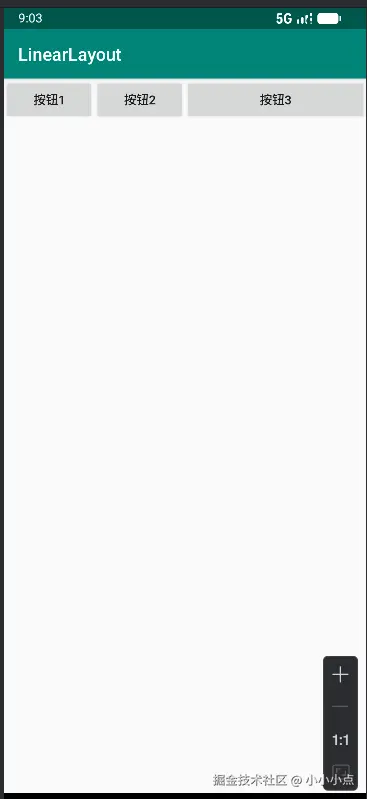
- 主界面:三个水平排列、权重不同的按钮
🧩 核心代码:
xml
<LinearLayout xmlns:android="http://schemas.android.com/apk/res/android"
    android:layout_width="match_parent"
    android:layout_height="match_parent"
    android:orientation="horizontal">

    <Button
        android:layout_width="0dp"
        android:layout_height="wrap_content"
        android:layout_weight="1"
        android:text="按钮1"/>

    <Button
        android:layout_width="0dp"
        android:layout_height="wrap_content"
        android:layout_weight="1"
        android:text="按钮2"/>

    <Button
        android:layout_width="0dp"
        android:layout_height="wrap_content"
        android:layout_weight="2"
        android:text="按钮3"/>
</LinearLayout>
📱 运行结果
三个按钮按权重比 1:1:2 水平排列,按钮3占用更多空间。
💡 关键点
orientation决定方向(horizontal / vertical)layout_weight按比例分配剩余空间,需配合layout_width="0dp"使用
二、帧布局(FrameLayout)
帧布局将子视图堆叠在左上角,后添加的视图会覆盖之前的视图。常用于实现层叠效果或单视图容器。
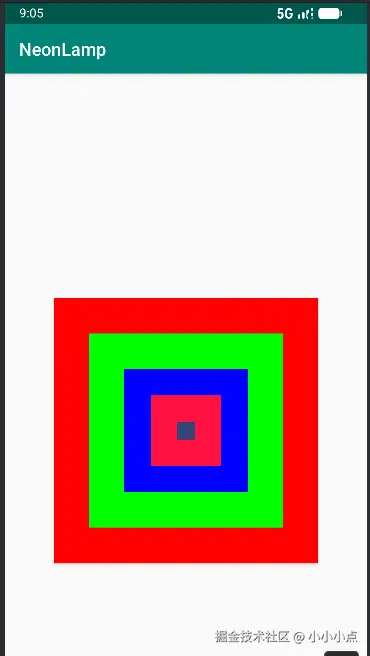
- 主界面:五个从大到小、颜色不同的按钮,居中堆叠,模拟"霓虹灯"效果
🧩 核心代码:
xml
<FrameLayout xmlns:android="http://schemas.android.com/apk/res/android"
    android:layout_width="match_parent"
    android:layout_height="match_parent">

    <Button
        android:id="@+id/btn_one"
        android:layout_width="300dp"
        android:layout_height="300dp"
        android:layout_gravity="center"
        android:background="#ff0000"/>

    <Button
        android:id="@+id/btn_two"
        android:layout_width="220dp"
        android:layout_height="220dp"
        android:layout_gravity="center"
        android:background="#00ff00"/>

    <Button
        android:id="@+id/btn_three"
        android:layout_width="140dp"
        android:layout_height="140dp"
        android:layout_gravity="center"
        android:background="#0000ff"/>

    <Button
        android:id="@+id/btn_four"
        android:layout_width="80dp"
        android:layout_height="80dp"
        android:layout_gravity="center"
        android:background="#ff1243"/>

    <Button
        android:id="@+id/btn_five"
        android:layout_width="20dp"
        android:layout_height="20dp"
        android:layout_gravity="center"
        android:background="#324678"/>
</FrameLayout>
📱 运行结果
五个按钮居中叠加,形成从大到小的同心圆效果。
💡 关键点
layout_gravity控制子视图在布局内的对齐方式- 后添加的视图会覆盖在前者之上,适合做浮层或装饰
三、相对布局(RelativeLayout)
相对布局通过定义视图之间的相对位置(如左对齐、位于某视图下方)来灵活排列控件。
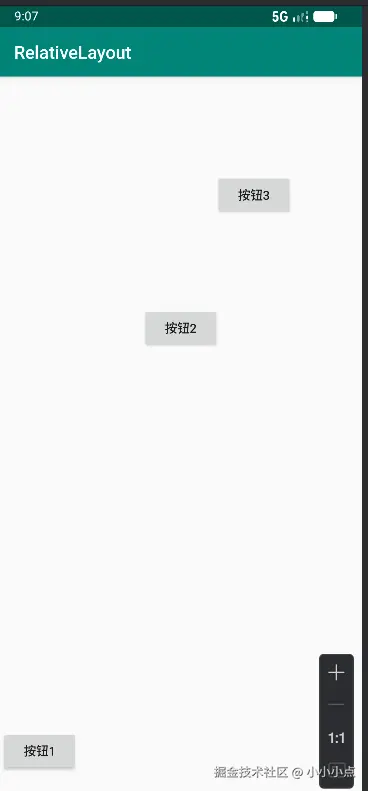
- 主界面:三个按钮分别位于底部、水平居中、右侧对齐等位置
🧩 核心代码:
xml
<RelativeLayout xmlns:android="http://schemas.android.com/apk/res/android"
    android:layout_width="match_parent"
    android:layout_height="match_parent"
    android:padding="10dp">

    <Button
        android:id="@+id/btn_one"
        android:layout_width="wrap_content"
        android:layout_height="wrap_content"
        android:text="按钮1"
        android:layout_alignParentBottom="true"
        android:layout_marginBottom="20dp"/>

    <Button
        android:id="@+id/btn_two"
        android:layout_width="wrap_content"
        android:layout_height="wrap_content"
        android:text="按钮2"
        android:layout_centerHorizontal="true"
        android:layout_marginTop="260dp"/>

    <Button
        android:id="@+id/btn_three"
        android:layout_width="wrap_content"
        android:layout_height="wrap_content"
        android:text="按钮3"
        android:layout_alignBottom="@id/btn_two"
        android:layout_toRightOf="@id/btn_two"
        android:layout_marginLeft="-5dp"
        android:layout_marginBottom="151dp"/>
</RelativeLayout>
📱 运行结果
按钮1贴底部,按钮2水平居中,按钮3位于按钮2右侧并底部对齐,形成特殊排列。
💡 关键点
- 常用属性:
layout_alignParentBottom、layout_centerHorizontal、layout_toRightOf - 适合复杂界面,减少布局嵌套,提升性能
四、表格布局(TableLayout)
表格布局以行(TableRow)为单位组织视图,类似HTML的<table>,适合表单类或规则网格界面。
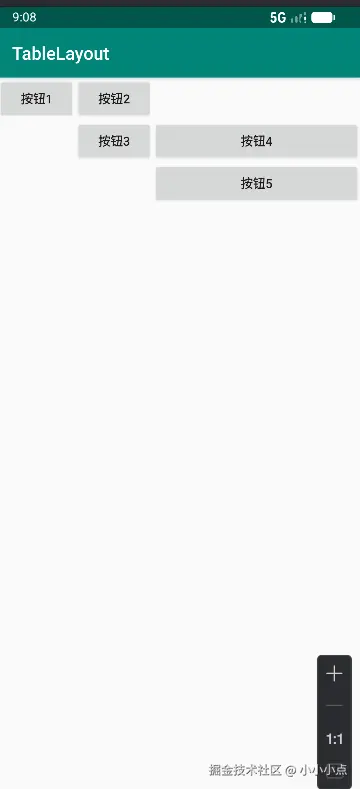
- 主界面:五行两列式按钮布局
🧩 核心代码:
xml
<TableLayout xmlns:android="http://schemas.android.com/apk/res/android"
    android:layout_width="wrap_content"
    android:layout_height="wrap_content"
    android:stretchColumns="2">

    <TableRow>
        <Button android:layout_column="0" android:text="按钮1"/>
        <Button android:layout_column="1" android:text="按钮2"/>
    </TableRow>

    <TableRow>
        <Button android:layout_column="1" android:text="按钮3"/>
        <Button android:layout_column="2" android:text="按钮4"/>
    </TableRow>

    <TableRow>
        <Button android:layout_column="2" android:text="按钮5"/>
    </TableRow>
</TableLayout>
📱 运行结果
按钮按指定列位置排布,形成错落有致的表格结构。
💡 关键点
stretchColumns指定可拉伸列layout_column设置按钮所在列索引- 支持合并、隐藏单元格,适合数据展示
总结对比
| 布局类型 | 特点 | 适用场景 |
|---|---|---|
| 线性布局 | 简单顺序排列,支持权重 | 列表、表单、工具栏 |
| 帧布局 | 单层堆叠,后层覆盖前层 | 启动页、浮层、图层效果 |
| 相对布局 | 灵活定位,减少嵌套 | 复杂界面、自适应布局 |
| 表格布局 | 按行列组织,结构规整 | 设置页、数据网格 |
以上四个项目完整演示了Android中四种常用布局的核心用法。在实际开发中,应根据界面复杂度、适配要求和性能需要合理选择布局类型,必要时可混合使用,达到最佳效果。