目录
读写锁
读写锁是一种并发控制机制,通过区分读操作和写操作,允许更高的并发性。
核心特点:
读锁(共享):可被多个读线程同时持有,前提是无写线程。
写锁(独占):同一时刻只能被一个写线程持有。
关键保证:
成功获取读锁的线程,能够看到之前写锁释放时所做的所有更新(内存可见性)。
适用场景:
理想情况:数据初始化后,读操作频繁、写操作极少(如目录服务、缓存)。
不适合情况:写操作频繁、读操作过短,或单处理器环境(开销可能大于收益)。
使用实例:
java
package com.qcby.readWriteLock;

import java.util.HashMap;
import java.util.Map;
import java.util.concurrent.locks.ReadWriteLock;
import java.util.concurrent.locks.ReentrantReadWriteLock;

public class Test {
    public static void main(String[] args) {
        MyCache myCache = new MyCache();
        for (int i = 0; i < 5; i++) {
            final int j = i;
            new Thread(() -> {
                myCache.put(j + "", j);
                myCache.get(j + "");
            }, String.valueOf(i)).start();
        }
// ---------------------------- 加锁的版本 ------------------------------------
//        MyCacheLock myCacheLock = new MyCacheLock();
//        for (int i = 0; i < 5; i++) {
//            final int j = i;
//            new Thread(() -> {
//                myCacheLock.put(j + "", j);
//                myCacheLock.get(j + "");
//            }, String.valueOf(i)).start();
//        }
    }

}

/**
 * 一个缓存类
 * 我们希望线程读的时候可以多线程读,写的时候只能一个线程写,此时没加锁会有问题
 */
class MyCache{

    private volatile Map<String, Object> map = new HashMap<>();

    //写入缓存操作
    public void put(String key, Object value){
        System.out.println(Thread.currentThread().getName() + "写入..........");
        map.put(key, value);
        System.out.println(Thread.currentThread().getName() + "写入已经完成....");
    }

    //读取缓存操作
    public void get(String key){
        System.out.println(Thread.currentThread().getName() + "读取..........");
        map.get(key);
        System.out.println(Thread.currentThread().getName() + "读取已经完成....");
    }
}

/**
 * 加锁的类
 */
class MyCacheLock{
    private volatile Map<String, Object> map = new HashMap<>();

    private final ReadWriteLock readWriteLock = new ReentrantReadWriteLock();

    //写入缓存操作
    public void put(String key, Object value){

        readWriteLock.writeLock().lock(); // 加写锁
        try {
            System.out.println(Thread.currentThread().getName() + "写入..........");
            map.put(key, value);
            System.out.println(Thread.currentThread().getName() + "写入已经完成....");
        } catch (Exception e) {
            throw new RuntimeException(e);
        } finally {
            readWriteLock.writeLock().unlock(); // 解写锁
        }
    }

    //读取缓存操作
    public void get(String key){

        readWriteLock.readLock().lock(); // 加读锁
        try {
            System.out.println(Thread.currentThread().getName() + "读取..........");
            map.get(key);
            System.out.println(Thread.currentThread().getName() + "读取已经完成....");
        } catch (Exception e) {
            throw new RuntimeException(e);
        } finally {
            readWriteLock.readLock().unlock(); // 解读锁
        }
    }
}
在我们加锁之前很明显在某个线程写数据的时候,其他线程也可以同时写入数据,操作并不是原子性的。
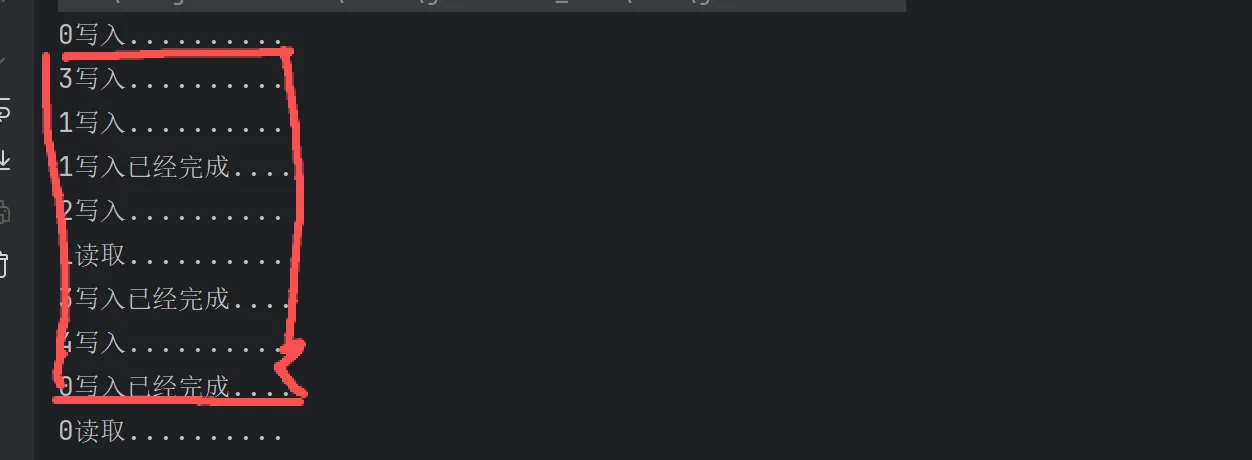
在0写入完成之前,有其他线程执行了其他操作。
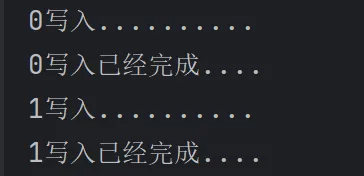
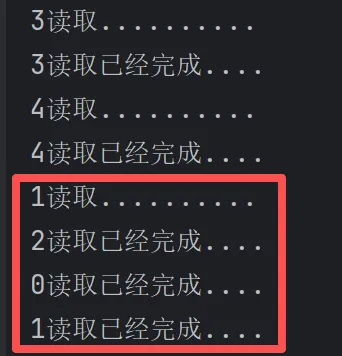
加上读写锁的时候可以实现更细粒度的并发控制,读的时候可以多线程读,写的时候只能一个线程写:
阻塞队列
|--------|-----------|------------|----------|----------------------------|
| 方法 | 抛出异常 | 不抛出异常,有返回值 | 阻塞等待 | 限时等待 |
| 插入 | add(val) | offer(val) | put(val) | offer(val, time, TimeUnit) |
| 删除 | remove() | poll() | take() | poll(time, TimeUnit) |
| 判断首个元素 | element() | peek() | - | - |
java
    /**
     * 使用了ArrayBlockingQueue add和remove
     * add超过了队列大小会添加元素抛出异常  Queue full
     * remove在队列为空时移除元素抛出异常  java.util.NoSuchElementException
     * element在队列为空时查看队首元素抛出异常 java.util.NoSuchElementException
     */
    public static void willException(){

        ArrayBlockingQueue<String> arrayBlockingQueue = new ArrayBlockingQueue<>(3);
        System.out.println(arrayBlockingQueue.add("0"));
        System.out.println(arrayBlockingQueue.add("1"));
        System.out.println(arrayBlockingQueue.add("2"));
        // 超过了队列大小会抛出异常  Queue full
        // arrayBlockingQueue.add("1");
        System.out.println(arrayBlockingQueue.remove());
        System.out.println(arrayBlockingQueue.remove());
        System.out.println(arrayBlockingQueue.remove());
        // 队列里为空会抛出异常 java.util.NoSuchElementException
//        System.out.println(arrayBlockingQueue.remove());

        // 查看队首元素 在队列为空时查看队首元素抛出异常 java.util.NoSuchElementException
//        System.out.println(arrayBlockingQueue.element());
    }
java
    /**
     * 使用了使用了ArrayBlockingQueue offer 和 poll
     * offer 在队伍满时添加元素不抛出异常,会返回false
     * poll 在队列空时移除元素不抛出异常,会返回null
     * peek 队列为空时不会抛出异常 返回null
     */
    public static void noException(){
        ArrayBlockingQueue<String> arrayBlockingQueue = new ArrayBlockingQueue<>(3);
        System.out.println(arrayBlockingQueue.offer("0"));
        System.out.println(arrayBlockingQueue.offer("1"));
        System.out.println(arrayBlockingQueue.offer("2"));
        // 超过了队列大小不会抛出异常 返回false
//        System.out.println(arrayBlockingQueue.offer("1"));
        System.out.println(arrayBlockingQueue.poll());
        System.out.println(arrayBlockingQueue.poll());
        System.out.println(arrayBlockingQueue.poll());
        // 队列里为空不会抛出异常 返回null
//        System.out.println(arrayBlockingQueue.poll());

        // 查看队首元素 队列为空时返回null
        System.out.println(arrayBlockingQueue.peek());
    }
java
    /**
     * 阻塞等待,等一段时间
     * offer(val, time, TimeUnit) 如果队列满了再放置元素,会等待 参数 时间,如果还是慢的就返回false
     * poll(time, TimeUnit) 如果队列空再取出元素, 会等待 参数 时间, 如果还是空的就返回null
     */
    public static void blockingWaitingWithTime() throws InterruptedException {
        ArrayBlockingQueue<String> arrayBlockingQueue = new ArrayBlockingQueue<>(3);

        arrayBlockingQueue.offer("1");
        arrayBlockingQueue.offer("2");
        arrayBlockingQueue.offer("3");
        //此时队列满了,它等一秒钟就不等了,返回false,不抛出异常
        System.out.println(arrayBlockingQueue.offer("4", 1, TimeUnit.SECONDS));
        System.out.println(arrayBlockingQueue.poll());
        System.out.println(arrayBlockingQueue.poll());
        System.out.println(arrayBlockingQueue.poll());
        // 此时队列没元素了,等一秒钟就不等了,返回null,不抛出异常
        System.out.println(arrayBlockingQueue.poll(1, TimeUnit.SECONDS));
    }
java
    /**
     * 阻塞等待,等一段时间
     * offer(val, time, TimeUnit) 如果队列满了再放置元素,会等待 参数 时间,如果还是慢的就返回false
     * poll(time, TimeUnit) 如果队列空再取出元素, 会等待 参数 时间, 如果还是空的就返回null
     */
    public static void blockingWaitingWithTime() throws InterruptedException {
        ArrayBlockingQueue<String> arrayBlockingQueue = new ArrayBlockingQueue<>(3);

        arrayBlockingQueue.offer("1");
        arrayBlockingQueue.offer("2");
        arrayBlockingQueue.offer("3");
        //此时队列满了,它等一秒钟就不等了,返回false,不抛出异常
        System.out.println(arrayBlockingQueue.offer("4", 1, TimeUnit.SECONDS));
        System.out.println(arrayBlockingQueue.poll());
        System.out.println(arrayBlockingQueue.poll());
        System.out.println(arrayBlockingQueue.poll());
        // 此时队列没元素了,等一秒钟就不等了,返回null,不抛出异常
        System.out.println(arrayBlockingQueue.poll(1, TimeUnit.SECONDS));
    }