文章目录
- [1. 前言](#1. 前言)
- [2. 基础用法](#2. 基础用法)
-
- [2.1 创建文本模板](#2.1 创建文本模板)
- [2.2 创建模板对象](#2.2 创建模板对象)
- [2.3 模板对象方法](#2.3 模板对象方法)
- [2.4 模板引擎](#2.4 模板引擎)
- [3. AI 写作助手](#3. AI 写作助手)
-
- [3.1 豆包「帮我写作」](#3.1 豆包「帮我写作」)
- [3.2 Spring AI「帮我写作」功能演示](#3.2 Spring AI「帮我写作」功能演示)
- [3.3 功能实现](#3.3 功能实现)
-
- [3.3.1 模板管理](#3.3.1 模板管理)
- [3.3.2 大模型交互](#3.3.2 大模型交互)
1. 前言
PromptTemplate(提示词模板) 是指预定义了固定文本结构和核心逻辑,同时预留动态占位符的提示词文本。你可以将不同的动态参数填充到占位符中,快速生成符合业务需求的个性化提示词,无需重复编写固定的提示词话术。
2. 基础用法
2.1 创建文本模板
模板默认采用 {xx} 的占位符,支持单行 / 多行文本模板,多行模板推荐使用 Java 三重引号(""")保留格式(换行、缩进等)。
示例 1 ,创建简单模板:
java
// 单行模板
String simpleTemplate = "请介绍{city}的特色美食,要求不超过{limit}句话";
// 多行模板
String multiLineTemplate = """
        你是一名专业的{role},请按照以下要求回答问题:
        1. 语言风格:{style}
        2. 回答长度:不超过{limit}个字
        3. 核心问题:{question}
        """;
2.2 创建模板对象
可以通过 PromptTemplate 的构造方法进行创建,支持以下类型的参数:
String:提示词模板文本。Resource:模板渲染器。Map<String, Object>:模板变量映射。

示例,通过文本、模板文件资源创建:
java
  // 1. 通过【字符串形式的简单模板文本】创建PromptTemplate实例
    PromptTemplate promptTemplate = new PromptTemplate(simpleTemplate);
    // 2. 加载【类路径下】的模板文件资源(Spring资源加载方式)
    ClassPathResource resource = new ClassPathResource("templates/system-test.st");
    PromptTemplate promptTemplate2 = new PromptTemplate(resource);
也支持通过 builder 方式进行构建:
java
PromptTemplate promptTemplate1 = PromptTemplate.builder().template(multiLineTemplate).build();
ClassPathResource resource = new ClassPathResource("templates/system-test.st");
PromptTemplate promptTemplate2 = PromptTemplate.builder().resource(resource).build();
2.3 模板对象方法
PromptTemplate 的所有方法:
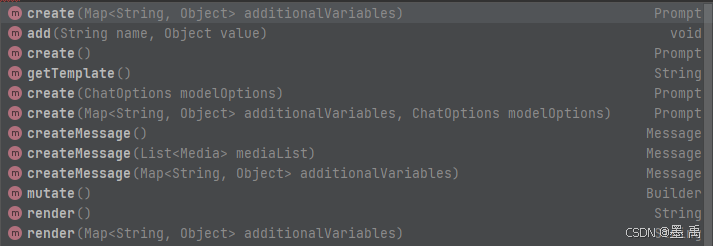
提供了多个生成 Prompt 对象方法:
Prompt create():无参创建,直接使用模板中默认变量生成 Prompt。Prompt create(Map<String, Object> additionalVariables):传入额外变量,与模板默认变量合并后生成Prompt。PromptPrompt create(ChatOptions modelOptions):传入模型配置(如温度、最大Token、采样策略),生成带模型参数的Prompt。Prompt create(Map<String, Object> additionalVariables, ChatOptions modelOptions):
同时传入额外变量和模型配置,生成完整的Prompt。
提供了多个生成 Message 对象方法:
Message createMessage():用模板和默认变量生成Message。Message createMessage(List<Media> mediaList):传入媒体列表(图片、视频等),生成多模态Message。Message createMessage(Map<String, Object> additionalVariables):传入额外变量,生成带变量替换的Message。
render() 用于将「模板文本 + 变量」替换为最终的提示词字符串:
String render():用模板和默认变量渲染,返回提示词字符串。String render(Map<String, Object> additionalVariables):传入额外变量,合并后渲染,返回提示词字符串。
其他方法:
add(String name, Object value):快速添加变量并生成Prompt。getTemplate():获取模板文本。mutate():返回Builder对象,用于构建新的PromptTemplate实例。
示例 1,根据模板创建用户提示词:
java
// 单行模板
String simpleTemplate = "请介绍{city}的特色美食,要求不超过{limit}句话";
// 创建提示词模板对象
PromptTemplate promptTemplate = PromptTemplate.builder()
        .template(simpleTemplate)
        .variables(Map.of("city", "长沙", "limit", "5"))
        .build();
// 生成用户提示词
Prompt prompt = promptTemplate.create();
// 模型调用
String content = zhiPuAiChatClient
        .prompt(prompt)
        .call()
        .content();
System.out.println(content);
PromptTemplate 构造方法默认创建的是用户消息,还可以通过子类实现创建不同角色的提示词。

示例 2 ,使用系统提示词模板:
java
// ===================== 1. 定义系统提示词(核心:设定模型角色、规则、输出要求) =====================
String systemTemplate = """
        你是一名专业的城市美食推荐助手,需严格遵守以下规则:
        1. 回答必须基于{city}本地特色,拒绝推荐连锁品牌;
        2. 输出格式为「美食名称:核心特色」,每行一个;
        3. 数量严格控制在{limit}个以内,语言简洁,无冗余描述;
        4. 优先推荐非网红、本地人常吃的特色美食。
        """;

// ===================== 2. 构建系统提示词模板(绑定系统角色+变量) =====================
SystemPromptTemplate systemPromptTemplate = SystemPromptTemplate.builder()
        .template(systemTemplate)
        .variables(Map.of("city", "长沙", "limit", 5)) // 系统提示词中的变量(也可动态传入)
        .build();

// ===================== 3. 定义用户提示词(具体问题,可无变量/带变量) =====================
String userTemplate = "请推荐{city}的本地特色美食";
PromptTemplate userPromptTemplate = PromptTemplate.builder()
        .template(userTemplate)
        .variables(Map.of("city", "长沙"))
        .build();

// ===================== 4. 组合系统提示词+用户提示词,生成完整Prompt =====================
Prompt prompt = Prompt.builder()
        .messages(systemPromptTemplate.createMessage(),userPromptTemplate.createMessage()) // 系统消息(优先级最高,设定规则) 用户消息(具体问题)
        .build();

// ===================== 5. 调用智谱AI模型 =====================
String content = zhiPuAiChatClient
        .prompt(prompt)
        .call()
        .content();

// ===================== 6. 输出结果 =====================
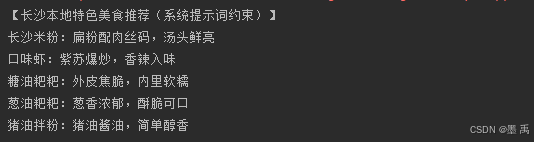
System.out.println("【长沙本地特色美食推荐(系统提示词约束)】\n" + content);
模型输出:
2.4 模板引擎
TemplateRenderer 将「提示词模板文本 + 变量映射」渲染为最终字符串,Spring AI 默认使用 StTemplateRenderer ,共有三个实现:
NoOpTemplateRenderer:纯占位 / 调试用的渲染器,完全不处理模板变量,直接返回原始模板文本。StTemplateRenderer:专为.st后缀模板文件设计的轻量渲染器,仅支持{变量名}单变量替换SaaStTemplateRenderer:基础变量替换能力上,新增多租户隔离、模板缓存、权限控制、动态加载等SaaS核心特性。
StTemplateRenderer 核心代码:
java
public class StTemplateRenderer implements TemplateRenderer {
    private static final Logger logger = LoggerFactory.getLogger(StTemplateRenderer.class);
    private static final String VALIDATION_MESSAGE = "Not all variables were replaced in the template. Missing variable names are: %s.";
    private static final char DEFAULT_START_DELIMITER_TOKEN = '{';
    private static final char DEFAULT_END_DELIMITER_TOKEN = '}';
    private static final ValidationMode DEFAULT_VALIDATION_MODE;
    private static final boolean DEFAULT_VALIDATE_ST_FUNCTIONS = false;
    private final char startDelimiterToken;
    private final char endDelimiterToken;
    private final ValidationMode validationMode;
    private final boolean validateStFunctions;
核心属性:
startDelimiterToken:起始分隔符。endDelimiterToken:结束分隔符。validationMode:校验模式。validateStFunctions:校验开关。
示例 1 ,自定义分隔符:
java
StTemplateRenderer stTemplateRenderer = StTemplateRenderer.builder()
        .startDelimiterToken('<')
        .endDelimiterToken('>').build();
String customTemplate = "推荐<city>的<limit>个特色美食";

Map<String, Object> customVars = new HashMap<>();
customVars.put("city", "成都");
customVars.put("limit", 3);

PromptTemplate promptTemplate = PromptTemplate.builder()
        .template(customTemplate)
        .renderer(stTemplateRenderer)
        .variables(customVars)
        .build();

System.out.println(promptTemplate.render());
默认情况下,变量缺失会抛异常,可以设置其他校验模式,比如 ValidationMode.WARN :
java
   StTemplateRenderer stTemplateRenderer = StTemplateRenderer.builder()
            .startDelimiterToken('<')
            .validationMode(ValidationMode.WARN)
            .endDelimiterToken('>').build();
注意 :StTemplateRenderer 本身原生不支持在模板内直接写默认值,也没有参数校验,需要我们自己进行前置处理,或自定义实现。
3. AI 写作助手
3.1 豆包「帮我写作」
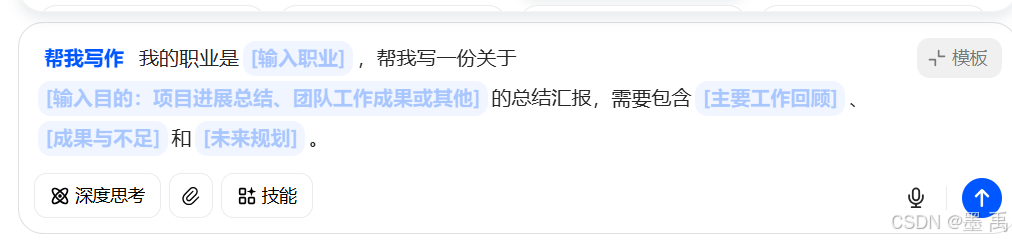
豆包「帮我写作」是一站式智能写作助手,覆盖文案创作、内容润色、格式改写、思路扩展等全场景写作需求,一键生成高质量内容。
打开豆包,选择帮我写作:
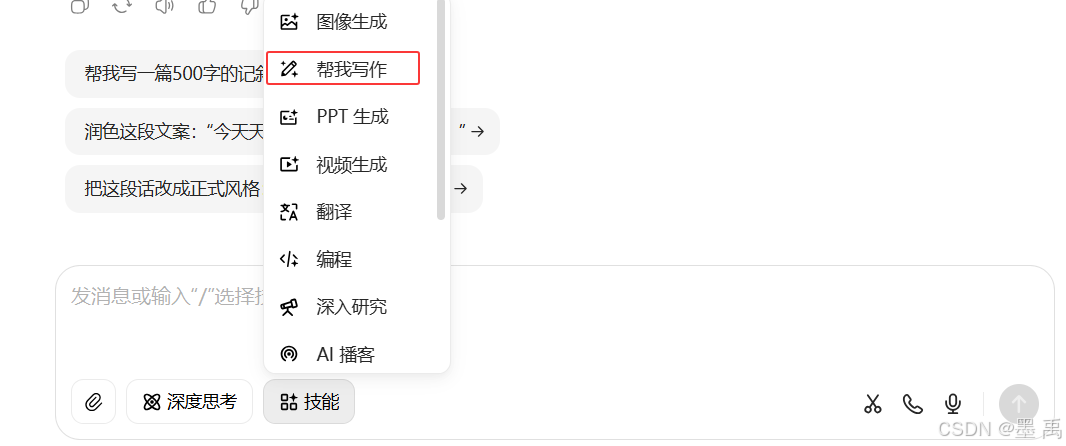
点击模板,可以看到很多写作模板:
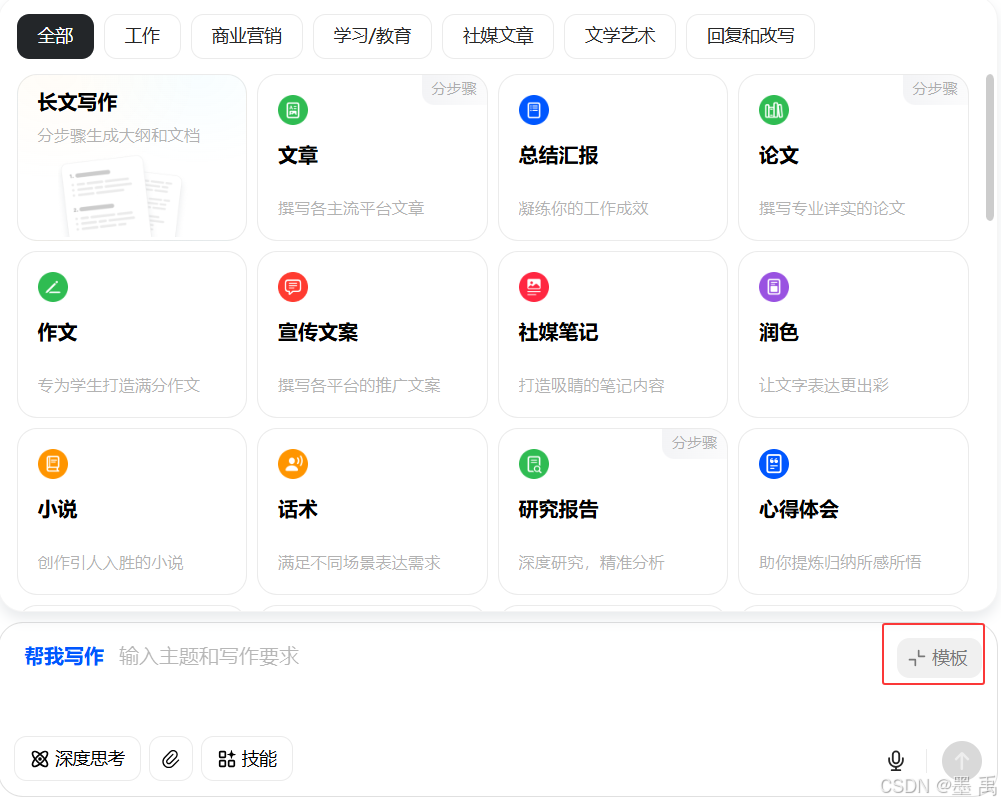
只需要填少量信息,就能自动生成完整、规范、不出错的文本:
3.2 Spring AI「帮我写作」功能演示
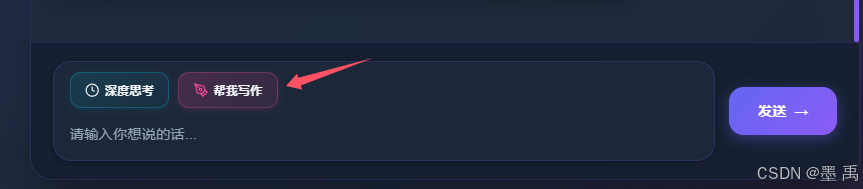
点击帮我写作:
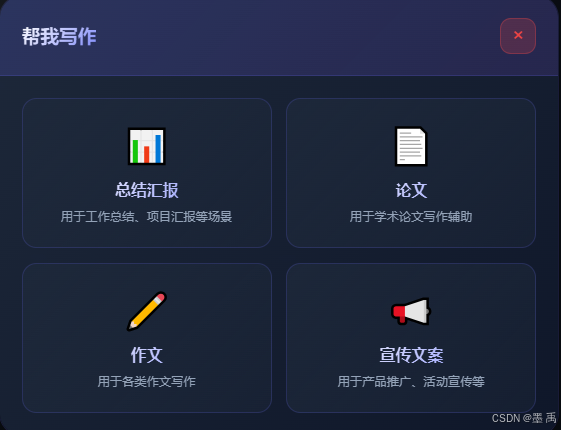
弹出模板选择:
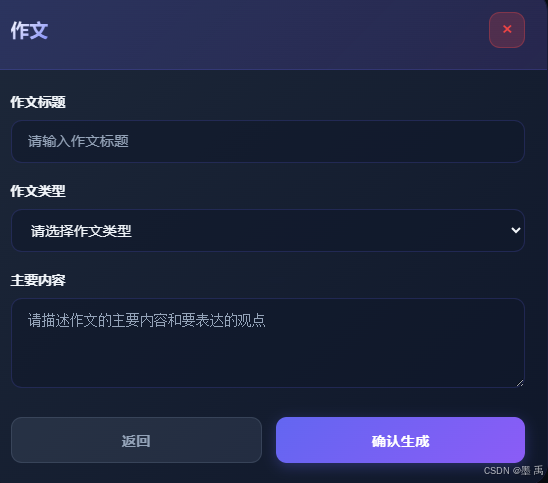
填写模板信息:
生成对应内容:
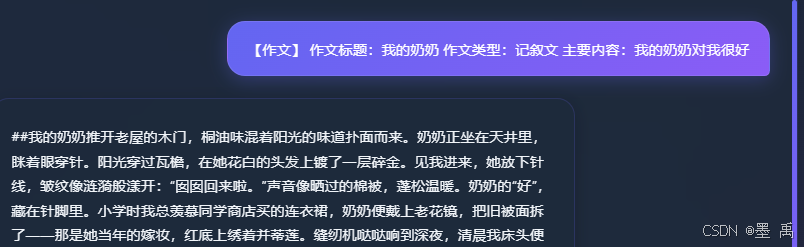
3.3 功能实现
提示:本案例不包含入门集成、前端代码,请参阅之前的实现文档。
核心逻辑:
- 创建模板:创建并保存模板,获取唯一模板
ID。 - 获取模板:通过
API和模板ID拉取模板内容。 - 生成
Prompt:将业务数据填入模板变量,生成最终的Prompt。 - 使用模板:将生成好的
Prompt发送给目标模型以获取结果。
3.3.1 模板管理
管理写作模板,比如「工作总结模板」「请假条模板」,每个模板包含:模板 ID、模板名称、适用场景、prompt 模板(带参数占位符)、默认风格等。
因为是案例演示,所以这里直接将模板信息写到本地文件中,实际开发中应该放在数据库,并添加增删改查等功能:
json
{
  "templates": [
    {
      "id": "summary",
      "name": "总结汇报",
      "description": "用于工作总结、项目汇报等场景",
      "fields": [
        {"id": "title", "label": "标题", "type": "text", "placeholder": "请输入汇报标题"},
        {"id": "period", "label": "时间段", "type": "text", "placeholder": "如:2024年上半年"},
        {"id": "content", "label": "主要内容", "type": "textarea", "placeholder": "请简述主要工作内容和成果"}
      ],
      "systemPrompt": "你是一位专业的写作助手,擅长帮助用户撰写各类文档。你的任务是根据用户提供的信息,生成高质量、结构清晰、内容充实的文本。\n\n写作要求:\n- 内容要条理清晰、重点突出\n- 语言要专业、正式,适合对应场景\n- 结构要完整,符合文体规范\n- 避免空泛的表述,给出具体、有价值的内容",
      "userPrompt": "请帮我写一份总结汇报。\n\n标题:{title}\n时间段:{period}\n主要内容:{content}\n\n请按照总结汇报的标准格式撰写,包括工作概述、主要成果、存在问题、下一步计划等部分。"
    },
    {
      "id": "paper",
      "name": "论文",
      "description": "用于学术论文写作辅助",
      "fields": [
        {"id": "title", "label": "论文标题", "type": "text", "placeholder": "请输入论文标题"},
        {"id": "subject", "label": "学科领域", "type": "text", "placeholder": "如:计算机科学、经济学等"},
        {"id": "keyPoints", "label": "研究要点", "type": "textarea", "placeholder": "请简述研究背景、目的和主要内容"}
      ],
      "systemPrompt": "你是一位专业的学术写作助手,擅长帮助用户撰写学术论文。你的任务是根据用户提供的研究信息,生成结构完整、内容专业的学术文本。\n\n写作要求:\n- 符合学术论文规范格式\n- 语言学术化、严谨\n- 逻辑清晰、论证有力\n- 包含必要的学术元素",
      "userPrompt": "请帮我撰写一篇学术论文。\n\n论文标题:{title}\n学科领域:{subject}\n研究要点:{keyPoints}\n\n请按照学术论文的标准格式撰写,包括摘要、引言、正文和结论部分。"
    },
    {
      "id": "composition",
      "name": "作文",
      "description": "用于各类作文写作",
      "fields": [
        {"id": "title", "label": "作文标题", "type": "text", "placeholder": "请输入作文标题"},
        {"id": "type", "label": "作文类型", "type": "select", "options": ["记叙文", "议论文", "说明文", "散文"], "placeholder": "请选择作文类型"},
        {"id": "content", "label": "主要内容", "type": "textarea", "placeholder": "请描述作文的主要内容和要表达的观点"}
      ],
      "systemPrompt": "你是一位专业的作文写作助手,擅长帮助用户撰写各类作文。你的任务是根据用户提供的信息,生成内容充实、立意明确的作文。\n\n写作要求:\n- 语言通顺流畅\n- 结构完整清晰\n- 内容充实有感染力\n- 符合作文类型特点",
      "userPrompt": "请帮我写一篇作文。\n\n作文标题:{title}\n作文类型:{type}\n主要内容:{content}\n\n请按照该类型作文的标准结构撰写,语言通顺、内容充实、立意明确。"
    },
    {
      "id": "advertisement",
      "name": "宣传文案",
      "description": "用于产品推广、活动宣传等",
      "fields": [
        {"id": "name", "label": "产品/活动名称", "type": "text", "placeholder": "请输入产品或活动名称"},
        {"id": "highlights", "label": "核心卖点", "type": "textarea", "placeholder": "请列举主要特色和卖点"},
        {"id": "audience", "label": "目标受众", "type": "text", "placeholder": "请描述目标用户群体"}
      ],
      "systemPrompt": "你是一位专业的营销文案撰写专家,擅长创作吸引人、有说服力的宣传文案。你的任务是根据用户提供的产品或活动信息,生成能够有效打动目标受众的文案。\n\n写作要求:\n- 文案要吸引眼球、有感染力\n- 突出产品/活动的核心卖点\n- 语言风格适合目标受众\n- 能够激发读者的兴趣和行动欲望",
      "userPrompt": "请帮我撰写一篇宣传文案。\n\n产品/活动名称:{name}\n核心卖点:{highlights}\n目标受众:{audience}\n\n请创作吸引人、有说服力的文案。"
    }
  ]
}
添加模板写作实体类:
java
public class WritingTemplates {

    private List<Template> templates;

    public List<Template> getTemplates() {
        return templates;
    }

    public void setTemplates(List<Template> templates) {
        this.templates = templates;
    }

    public static class Template {
        private String id;
        private String name;
        private String description;
        private List<TemplateField> fields;
        private String systemPrompt;
        private String userPrompt;

        public String getId() {
            return id;
        }

        public void setId(String id) {
            this.id = id;
        }

        public String getName() {
            return name;
        }

        public void setName(String name) {
            this.name = name;
        }

        public String getDescription() {
            return description;
        }

        public void setDescription(String description) {
            this.description = description;
        }

        public List<TemplateField> getFields() {
            return fields;
        }

        public void setFields(List<TemplateField> fields) {
            this.fields = fields;
        }

        public String getSystemPrompt() {
            return systemPrompt;
        }

        public void setSystemPrompt(String systemPrompt) {
            this.systemPrompt = systemPrompt;
        }

        public String getUserPrompt() {
            return userPrompt;
        }

        public void setUserPrompt(String userPrompt) {
            this.userPrompt = userPrompt;
        }
    }

    public static class TemplateField {
        private String id;
        private String label;
        private String type;
        private String placeholder;
        private List<String> options;

        public String getId() {
            return id;
        }

        public void setId(String id) {
            this.id = id;
        }

        public String getLabel() {
            return label;
        }

        public void setLabel(String label) {
            this.label = label;
        }

        public String getType() {
            return type;
        }

        public void setType(String type) {
            this.type = type;
        }

        public String getPlaceholder() {
            return placeholder;
        }

        public void setPlaceholder(String placeholder) {
            this.placeholder = placeholder;
        }

        public List<String> getOptions() {
            return options;
        }

        public void setOptions(List<String> options) {
            this.options = options;
        }
    }
}
编写模板服务类,编写获取所有模板列表、根据ID获取模板接口:
java
@Service
public class WritingTemplateService {

    private final ObjectMapper objectMapper = new ObjectMapper();
    private final Map<String, WritingTemplates.Template> templateMap = new HashMap<>();
    private WritingTemplates writingTemplates;

    @PostConstruct
    public void init() throws IOException {
        ClassPathResource resource = new ClassPathResource("templates/writing-templates.json");
        writingTemplates = objectMapper.readValue(resource.getInputStream(), WritingTemplates.class);
        for (WritingTemplates.Template template : writingTemplates.getTemplates()) {
            templateMap.put(template.getId(), template);
        }
    }

    /**
     * 获取所有模板列表
     */
    public List<WritingTemplates.Template> getAllTemplates() {
        return writingTemplates.getTemplates();
    }

    /**
     * 根据ID获取模板
     */
    public WritingTemplates.Template getTemplateById(String id) {
        return templateMap.get(id);
    }
}
添加模板访问接口:
java
@RestController
@RequestMapping("/api/writing")
public class WritingController {

    private final WritingTemplateService templateService;

    @Autowired
    public WritingController(WritingTemplateService templateService, AiWritingService aiWritingService) {
        this.templateService = templateService;
    }

    /**
     * 获取所有写作模板类型列表
     */
    @GetMapping("/templates")
    public ResponseEntity<List<WritingTemplates.Template>> getTemplates() {
        return ResponseEntity.ok(templateService.getAllTemplates());
    }

    /**
     * 根据模板ID获取模板详情
     */
    @GetMapping("/templates/{templateId}")
    public ResponseEntity<WritingTemplates.Template> getTemplateById(@PathVariable String templateId) {
        WritingTemplates.Template template = templateService.getTemplateById(templateId);
        if (template == null) {
            return ResponseEntity.notFound().build();
        }
        return ResponseEntity.ok(template);
    }
}
3.3.2 大模型交互
添加 AI 写作服务类,负责调用大模型生成写作内容:
java
@Service
public class AiWritingService {

    private final WritingTemplateService templateService;
    private final ChatClient deepSeekChatClient;
    private final ChatClient zhiPuAiChatClient;

    @Autowired
    public AiWritingService(
            WritingTemplateService templateService,
            @Qualifier("deepSeekChatClient") ChatClient deepSeekChatClient,
            @Qualifier("zhiPuAiChatClient") ChatClient zhiPuAiChatClient) {
        this.templateService = templateService;
        this.deepSeekChatClient = deepSeekChatClient;
        this.zhiPuAiChatClient = zhiPuAiChatClient;
    }

    /**
     * 根据模板ID和用户输入流式生成写作内容
     *
     * @param templateId 模板ID
     * @param userInput 用户输入参数
     * @param model 模型名称 (deepseek/zhipu)
     * @return 流式生成的写作内容
     */
    public Flux<String> generateContentStream(String templateId, Map<String, String> userInput, String model) {
        WritingTemplates.Template template = templateService.getTemplateById(templateId);
        if (template == null) {
            return Flux.just("错误: 模板不存在 - " + templateId);
        }

        // 构建消息
        List<Message> messages = buildMessages(template, userInput);

        // 流式调用大模型
        return getChatClientByModel(model)
                .prompt()
                .messages(messages)
                .stream()
                .content()
                .onErrorResume(e -> Flux.just("错误: " + e.getMessage()));
    }

    /**
     * 构建消息列表
     */
    private List<Message> buildMessages(WritingTemplates.Template template, Map<String, String> userInput) {
        Message systemMessage = buildSystemMessage(template);
        Message userMessage = buildUserMessage(template, userInput);
        return List.of(systemMessage, userMessage);
    }

    /**
     * 构建系统消息
     */
    private Message buildSystemMessage(WritingTemplates.Template template) {
        return new SystemMessage(template.getSystemPrompt());
    }

    /**
     * 构建用户消息,使用 Spring AI PromptTemplate 模板引擎
     */
    private Message buildUserMessage(WritingTemplates.Template template, Map<String, String> params) {
        PromptTemplate promptTemplate = PromptTemplate.builder()
                .template(template.getUserPrompt())
                .build();
        // 将 Map<String, String> 转换为 Map<String, Object>
        Map<String, Object> templateParams = params != null ? new HashMap<>(params) : new HashMap<>();
        return new UserMessage(promptTemplate.render(templateParams));
    }

    /**
     * 根据模型名称获取对应的 ChatClient
     */
    private ChatClient getChatClientByModel(String model) {
        return switch (model.toLowerCase()) {
            case "deepseek" -> deepSeekChatClient;
            case "zhipu", "glm" -> zhiPuAiChatClient;
            default -> deepSeekChatClient;
        };
    }
}
添加访问接口:
java
@RestController
@RequestMapping("/api/writing")
public class WritingController {

    private final WritingTemplateService templateService;
    private final AiWritingService aiWritingService;

    @Autowired
    public WritingController(WritingTemplateService templateService, AiWritingService aiWritingService) {
        this.templateService = templateService;
        this.aiWritingService = aiWritingService;
    }

    /**
     * 生成写作内容(流式)
     */
    @PostMapping(value = "/generate/stream", produces = MediaType.TEXT_EVENT_STREAM_VALUE)
    public Flux<String> generateContentStream(
            @RequestParam String templateId,
            @RequestParam(defaultValue = "deepseek") String model,
            @RequestBody Map<String, String> userInput) {
        return aiWritingService.generateContentStream(templateId, userInput, model);
    }
}