在Python Web开发领域,传统的同步框架如Flask、Django广为人知,但随着互联网应用对并发性能要求的不断提高,异步编程逐渐成为主流。aiohttp作为Python异步Web框架的佼佼者,凭借其出色的性能和简洁的API,正在获得越来越多开发者的青睐。
一、aiohttp简介
aiohttp是一个基于Python异步IO(asyncio)的HTTP客户端/服务器框架。其充分利用Python的异步特性,能够在单个线程中处理大量并发连接,避免了传统多线程模型的高内存开销和上下文切换成本。
核心特点:
- 全异步设计,支持异步/等待语法
- 同时提供服务端和客户端功能
- 支持WebSocket协议
- 高性能、低资源占用
- 支持中间件和插件扩展
1. 同步 vs 异步
传统同步框架处理请求时,每个请求会占用一个线程,当请求涉及IO操作(如数据库查询、HTTP调用)时,线程会处于阻塞状态,导致资源浪费。
python
# 同步模式:线程在等待时被阻塞
def handle_request():
    result = database.query()  # 线程阻塞,等待数据库返回
    return result
异步模式则允许在等待IO操作时切换到其他任务,充分利用CPU资源:
python
# 异步模式:等待时不阻塞
async def handle_request():
    result = await database.query()  # 让出控制权,处理其他任务
    return result
2. 安装
首先确保已安装Python(建议版本3.8+),然后通过pip安装aiohttp依赖:
bash
# 安装 Flask
pip install aiohttp
# 如果系统中有多个 Python 版本,可能需要使用 pip3
pip3 install aiohttp
3. 验证安装
安装完成后,创建一个简单的应用来验证 aiohttp 是否正确安装并正常工作:
python
# main.py
from aiohttp import web

async def hello(request):
    return web.Response(text="Hello, World!")

app = web.Application()
app.router.add_get('/', hello)

if __name__ == '__main__':
    web.run_app(app, host='127.0.0.1', port=8080)
运行上述代码后访问 http://127.0.0.1:8080,看到"Hello, World!"即表示安装正确。
二、基础HTTP接口实现
掌握 aiohttp 基础安装后,将学习如何实现常用的 HTTP 接口。涵盖 GET 和 POST 两种最常用的 HTTP 方法。
1. GET 接口
GET 请求用于从服务器获取数据,是最常用的 HTTP 方法。
1.1 不带参数的 GET 接口
以下举例,演示了最基本的路由定义,不接收任何参数,返回固定的 JSON 数据:
python
# main.py
from aiohttp import web
import json

# 创建aiohttp应用实例
app = web.Application()

# GET /api/hello
async def hello_world(request):
    """
    最简单的GET接口示例:不接收任何参数,返回固定的欢迎消息。常用于接口连通性测试。
    """
    # 返回JSON格式的响应
    return web.json_response({
        'message': 'Hello, World!',  # 主要消息内容
        'method': 'GET',  # 请求方法,方便客户端识别
        'status': 'success'  # 操作状态,常见值:success/error
    })

# 添加路由
app.router.add_get('/api/hello', hello_world)

if __name__ == '__main__':
    # 参数说明:
    # port=8080: 指定服务运行的端口号
    # access_log=None: 关闭访问日志(可选)
    # 注意:aiohttp没有内置的debug模式自动重载功能
    # 如需自动重载,可以使用aiohttp-devtools或手动重启
    web.run_app(app, host='127.0.0.1', port=8080)
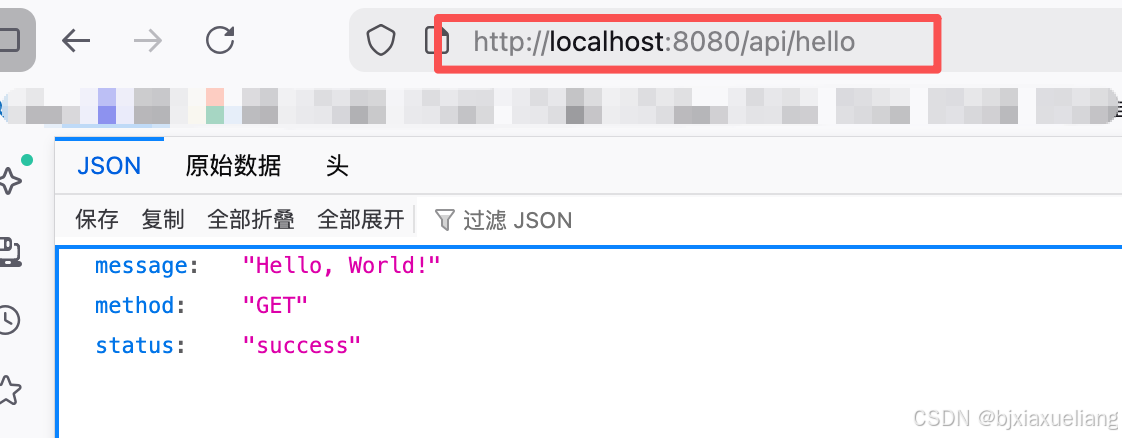
使用示例:
- 访问
http://127.0.0.1:8080/api/hello
1.2 带路径和查询参数的 GET 接口
实际开发中,GET 请求常需要接收参数。支持两种主要的参数传递方式:路径参数和查询参数。
python
from aiohttp import web
import json

# 创建aiohttp应用实例
app = web.Application()

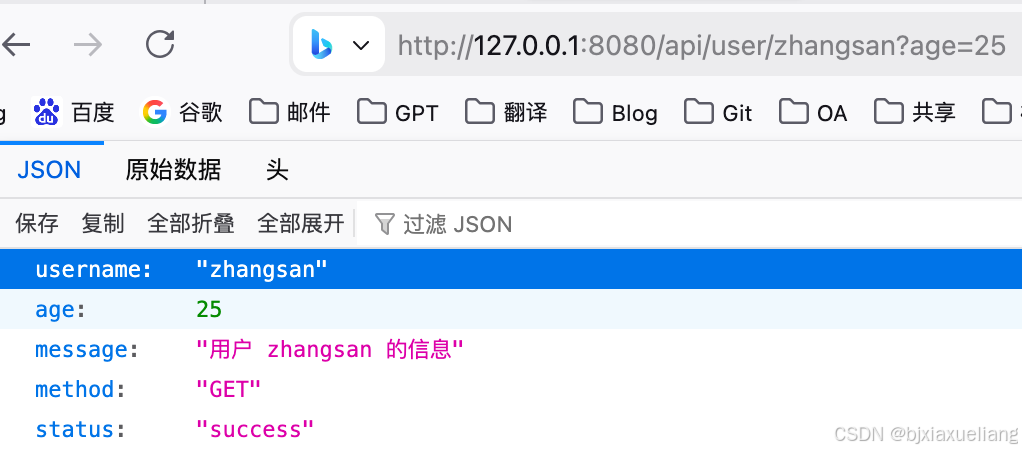
# GET /api/user/zhangsan?age=25
async def get_user(request):
    """
    1. 路径参数:username来自URL路径本身
    2. 查询参数:age来自URL问号后的查询字符串
    """
    # 从路径中获取username参数
    username = request.match_info.get('username')

    # 从查询字符串中获取'age'参数
    # request.query 是一个MultiDict,包含所有查询参数
    # get() 方法:第一个参数'age'是要获取的参数名,第二个参数是默认值
    age = request.query.get('age', 18)

    # 尝试转换为整数,如果转换失败则使用默认值
    try:
        age = int(age)
    except (ValueError, TypeError):
        age = 18

    # 返回JSON格式的响应,包含用户信息
    return web.json_response({
        'username': username,  # 从路径获取的用户名
        'age': age,  # 从查询参数获取的年龄
        'message': f'用户 {username} 的信息',  # 包含用户名的描述信息
        'method': 'GET',  # 请求方法,方便客户端识别
        'status': 'success'  # 操作状态,常见值:success/error
    })

# 添加路由
app.router.add_get('/api/user/{username}', get_user)

if __name__ == '__main__':
    # 参数说明:
    # port=8080: 指定服务运行的端口号
    # access_log=None: 关闭访问日志(可选)
    # 注意:aiohttp没有内置的debug模式自动重载功能
    # 如需自动重载,可以使用aiohttp-devtools或手动重启
web.run_app(app, host='127.0.0.1', port=8080)- 访问
http://127.0.0.1:8080/api/user/zhangsan?age=25
2. POST接口
POST 请求用于向服务器提交数据,通常用于创建新资源。
2.1 POST 接口处理 JSON 数据
以下举例展示如何处理 JSON 格式的 POST 请求。
python
from aiohttp import web
import json

# 创建aiohttp应用实例
app = web.Application()

# POST http://127.0.0.1:8080/api/user
# Headers:Content-Type: application/json
# Body:{"username": "李四", "email": "lisi@example.com"}
async def create_user(request):
    """
    POST请求特点:
    1. 请求参数在请求体中,不在URL中显示
    2. 通常用于创建、修改资源
    3. 可以传输JSON、表单、文件等多种格式数据
    """
    try:
        # 获取JSON格式的请求数据
        # request.json() 方法:
        # 1. 解析请求体中的JSON数据
        # 2. 自动转换为Python字典/列表
        # 3. 如果请求头中Content-Type不是application/json,会抛出异常
        data = await request.json()
    except json.JSONDecodeError:
        # 返回错误响应
        # 200: 成功
        # 201: 创建成功
        # 400: 客户端请求错误
        # 404: 资源不存在
        # 415: 不支持的媒体类型
        # 500: 服务器内部错误
        return web.json_response({'error': '无效的JSON数据'}, status=400)
    except Exception:
        return web.json_response({'error': '没有提供数据'}, status=400)

    # 从解析后的JSON数据中获取特定字段
    username = data.get('username')  # 获取用户名
    email = data.get('email')  # 获取邮箱

    if not username or not email:
        # 字段验证失败,返回400错误
        return web.json_response({'error': '用户名和邮箱是必填项'}, status=400)

    # 创建用户数据(模拟数据库操作)
    # 在实际应用中,这里应该:
    # 1. 连接数据库
    # 2. 检查用户名/邮箱是否已存在
    # 3. 将数据插入数据库
    # 4. 获取数据库生成的自增ID
    user_data = {
        'id': 1,  # 模拟数据库自增ID,实际应从数据库获取
        'username': username,  # 用户输入的用户名
        'email': email,  # 用户输入的邮箱
        'created_at': '2024-01-01'  # 创建时间,实际应从数据库获取或使用当前时间
    }

    # 返回成功响应
    # HTTP状态码 201: Created,表示资源创建成功
    # 与200的区别:201明确表示创建了新的资源
    return web.json_response({
        'message': '用户创建成功',  # 操作成功消息
        'user': user_data,  # 创建的完整用户信息
        'method': 'POST',  # 请求方法,便于客户端识别
        'status': 'success'  # 操作状态
    }, status=201)

# 添加路由
app.router.add_post('/api/user', create_user)

if __name__ == '__main__':
    # 参数说明:
    # port=8080: 指定服务运行的端口号
    # access_log=None: 关闭访问日志(可选)
    # 注意:aiohttp没有内置的debug模式自动重载功能
    # 如需自动重载,可以使用aiohttp-devtools或手动重启
    web.run_app(app, host='127.0.0.1', port=8080)
使用 Postman 测试:
bash
POST http://127.0.0.1:5000/api/user
Headers:Content-Type: application/json
Body:{"username": "李四", "email": "lisi@example.com"}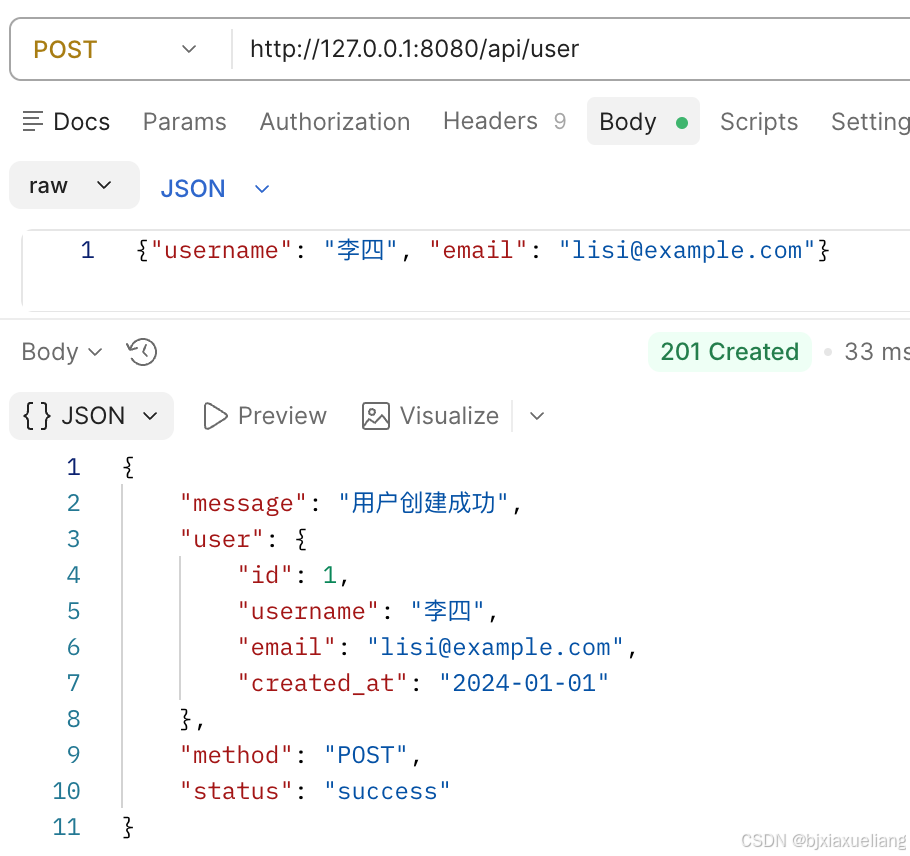
2.2 POST 接口处理表单请求
除了 JSON 格式,表单提交是另一种常见的 POST 请求方式,常用于文本表单提交和文件上传。
python
from aiohttp import web
import json

# 创建aiohttp应用实例
app = web.Application()

# 提交纯文本表单:
# POST /api/form/user HTTP/1.1
# Content-Type: application/x-www-form-urlencoded
# username=lisi&email=lisi@example.com
async def create_user_form(request):
    """
    通用表单处理接口,支持两种格式
    """
    # 获取Content-Type
    content_type = request.headers.get('Content-Type', '').lower()

    # 检查是否支持的表单格式
    is_form_urlencoded = 'application/x-www-form-urlencoded' in content_type
    is_form_data = 'multipart/form-data' in content_type

    if not (is_form_urlencoded or is_form_data):
        return web.json_response({
            'error': '不支持的Content-Type',
            'supported_types': [
                'application/x-www-form-urlencoded',
                'multipart/form-data'
            ]
        }, status=415)

    """
    POST表单请求特点:
    1. 数据通过表单字段(form data)传递,而不是JSON
    2. Content-Type通常为application/x-www-form-urlencoded或multipart/form-data
    3. 适合HTML表单提交、文件上传等场景
    4. 数据在请求体中,格式为key1=value1&key2=value2
    """
    # 处理表单数据
    if is_form_urlencoded:
        # application/x-www-form-urlencoded 格式
        form_data = await request.post()
        username = form_data.get('username')
        email = form_data.get('email')
        uploaded_files = {}
    else:
        # multipart/form-data 格式(支持文件上传)
        reader = await request.multipart()
        form_data = {}
        uploaded_files = {}

        while True:
            part = await reader.next()
            if part is None:
                break

            if part.name == 'username':
                username = await part.text()
            elif part.name == 'email':
                email = await part.text()
            elif part.filename:  # 文件上传
                # 读取文件内容
                file_content = await part.read()
                content_type = part.headers.get('Content-Type', 'application/octet-stream')
                uploaded_files[part.name] = {
                    'filename': part.filename,
                    'content_type':content_type,
                    'size': len(file_content)
                }
                # 这里可以保存文件到磁盘
                with open(f'uploads/{part.filename}', 'wb') as f:
                    f.write(file_content)

    # 验证必填字段
    if not username or username.strip() == '':
        return web.json_response({'error': '用户名是必填项'}, status=400)
    if not email or email.strip() == '':
        return web.json_response({'error': '邮箱是必填项'}, status=400)

    # 创建用户数据(模拟数据库操作)
    user_data = {
        'id': 1,
        'username': username.strip(),
        'email': email.strip(),
        'created_at': '2026-01-01',
        'format': 'form-data' if is_form_data else 'x-www-form-urlencoded',
        'uploaded_files': uploaded_files
    }

    # 返回成功响应:201 Created状态码
    return web.json_response({
        'message': '用户创建成功',
        'user': user_data,
        'method': 'POST',
        'status': 'success'
    }, status=201)


# 添加路由
app.router.add_post('/api/form/user', create_user_form)

if __name__ == '__main__':
    # 参数说明:
    # port=8080: 指定服务运行的端口号
    # access_log=None: 关闭访问日志(可选)
    # 注意:aiohttp没有内置的debug模式自动重载功能
    # 如需自动重载,可以使用aiohttp-devtools或手动重启
    web.run_app(app, host='127.0.0.1', port=8080)
使用 Postman 测试:
bash
POST http://127.0.0.1:8080/api/form/user
Headers:Content-Type: application/x-www-form-urlencoded
Body:username=lisi&email=lisi@example.com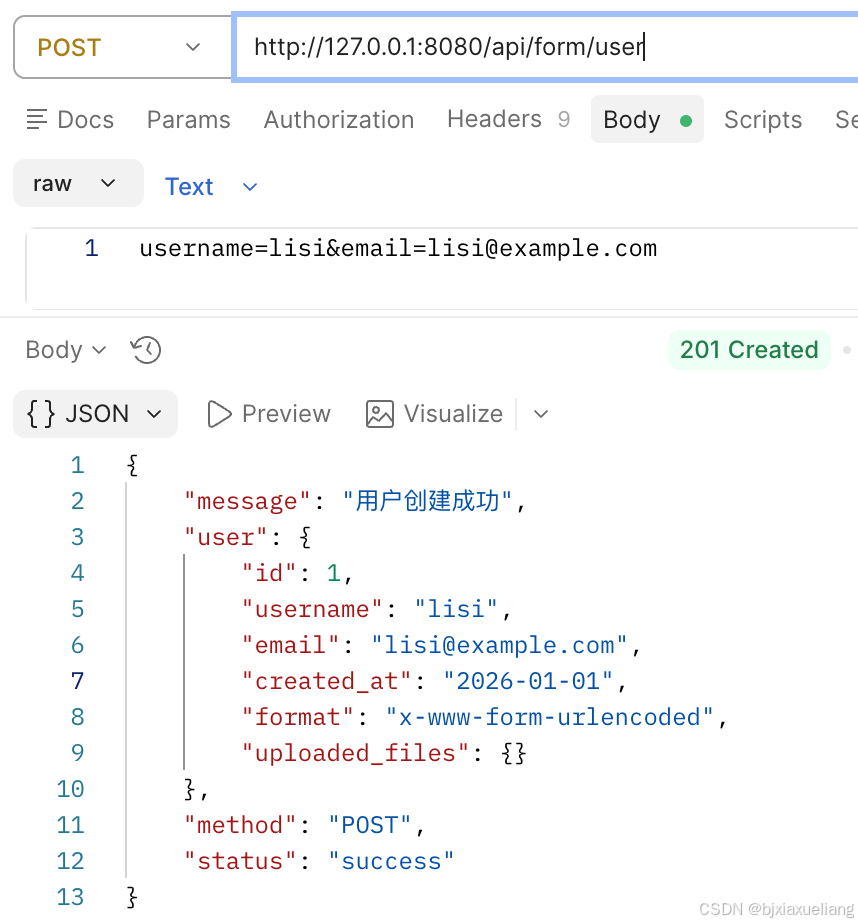
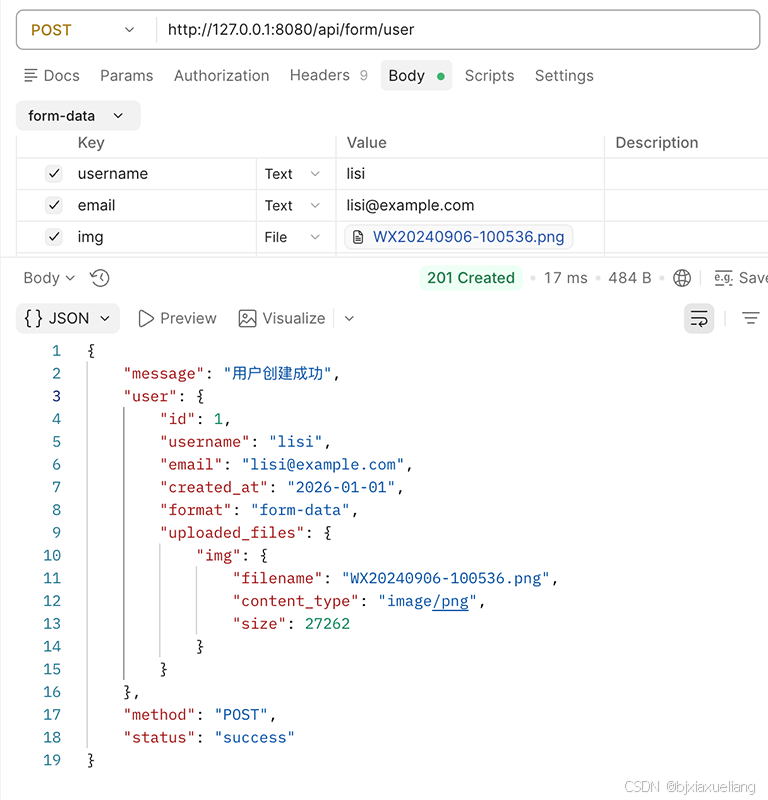
使用 Postman 测试:
bash
POST http://127.0.0.1:8080/api/form/user
Content-Type: multipart/form-data; boundary=4235013262151947840

----4235013262151947840
Content-Disposition: form-data; name="username"
lisi
----4235013262151947840
Content-Disposition: form-data; name="email"
lisi@example.com
----4235013262151947840
Content-Disposition: form-data; name=""; filename="WX20240906-100536.png"
Content-Type: image/png

WX20240906-100536.png字节流数据
----4235013262151947840