1.http访问百度
2.pc1访问运营商,pc2不允许
3.学校内部静态路由,r1,r2浮动静态路由
4.运营商动态路由
5。ar2可以被telnet
ensp
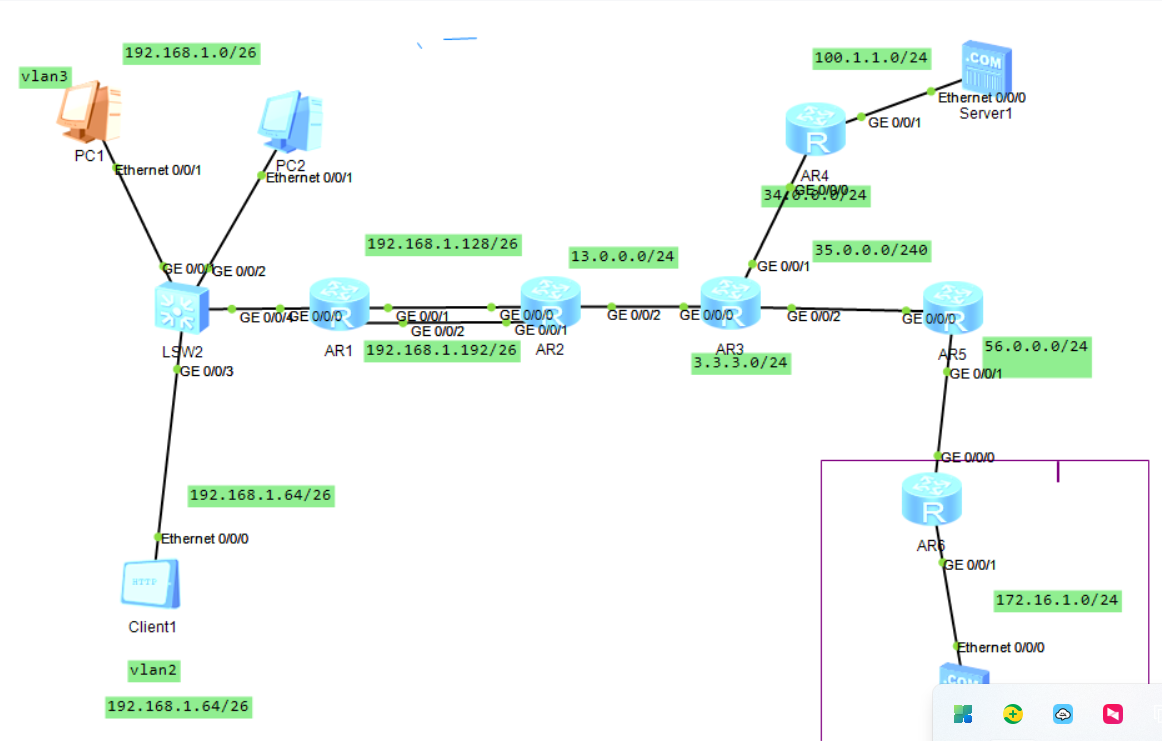
sw1
[sw1]vlan batch 2
Mar 25 2026 18:14:21-08:00 sw1 DS/4/DATASYNC_CFGCHANGE:OID 1.3.6.1.4.1.2011.5.25
.191.3.1 configurations have been changed. The current change number is 4, the c
hange loop count is 0, and the maximum number of records is 4095.3
Info: This operation may take a few seconds. Please wait for a moment...done.
[sw1]
Mar 25 2026 18:14:31-08:00 sw1 DS/4/DATASYNC_CFGCHANGE:OID 1.3.6.1.4.1.2011.5.25
.191.3.1 configurations have been changed. The current change number is 5, the c
hange loop count is 0, and the maximum number of records is 4095.
[sw1]int g 0/0/1
[sw1-GigabitEthernet0/0/1]port l
[sw1-GigabitEthernet0/0/1]port link-t
[sw1-GigabitEthernet0/0/1]port link-type a
[sw1-GigabitEthernet0/0/1]port link-type access
[sw1-GigabitEthernet0/0/1]p
[sw1-GigabitEthernet0/0/1]port d
[sw1-GigabitEthernet0/0/1]port de
[sw1-GigabitEthernet0/0/1]port default
Mar 25 2026 18:15:01-08:00 sw1 DS/4/DATASYNC_CFGCHANGE:OID 1.3.6.1.4.1.2011.5.25
.191.3.1 configurations have been changed. The current change number is 6, the c
hange loop count is 0, and the maximum number of records is 4095.vlan 3
[sw1-GigabitEthernet0/0/1]
Mar 25 2026 18:15:11-08:00 sw1 DS/4/DATASYNC_CFGCHANGE:OID 1.3.6.1.4.1.2011.5.25
.191.3.1 configurations have been changed. The current change number is 7, the c
hange loop count is 0, and the maximum number of records is 4095.
[sw1-GigabitEthernet0/0/1]p
[sw1-GigabitEthernet0/0/1]port li
[sw1-GigabitEthernet0/0/1]port link-t
[sw1-GigabitEthernet0/0/1]int g 0/0/2
[sw1-GigabitEthernet0/0/2]p
[sw1-GigabitEthernet0/0/2]port li
[sw1-GigabitEthernet0/0/2]port link-t
[sw1-GigabitEthernet0/0/2]port link-type a
[sw1-GigabitEthernet0/0/2]port link-type access
[sw1-GigabitEthernet0/0/2]p
[sw1-GigabitEthernet0/0/2]portde
[sw1-GigabitEthernet0/0/2]port de
[sw1-GigabitEthernet0/0/2]port default
Mar 25 2026 18:15:51-08:00 sw1 DS/4/DATASYNC_CFGCHANGE:OID 1.3.6.1.4.1.2011.5.25
.191.3.1 configurations have been changed. The current change number is 8, the c
hange loop count is 0, and the maximum number of records is 4095.vlan 3
[sw1-GigabitEthernet0/0/2]
Mar 25 2026 18:16:01-08:00 sw1 DS/4/DATASYNC_CFGCHANGE:OID 1.3.6.1.4.1.2011.5.25
.191.3.1 configurations have been changed. The current change number is 9, the c
hange loop count is 0, and the maximum number of records is 4095.
[sw1-GigabitEthernet0/0/2]int g 0/0/3
[sw1-GigabitEthernet0/0/3]p
[sw1-GigabitEthernet0/0/3]portl
[sw1-GigabitEthernet0/0/3]port l
[sw1-GigabitEthernet0/0/3]port link-t
[sw1-GigabitEthernet0/0/3]port link-type a
[sw1-GigabitEthernet0/0/3]port link-type access
[sw1-GigabitEthernet0/0/3]p
[sw1-GigabitEthernet0/0/3]port d
[sw1-GigabitEthernet0/0/3]port d
Mar 25 2026 18:16:31-08:00 sw1 DS/4/DATASYNC_CFGCHANGE:OID 1.3.6.1.4.1.2011.5.25
.191.3.1 configurations have been changed. The current change number is 10, the
change loop count is 0, and the maximum number of records is 4095.e
[sw1-GigabitEthernet0/0/3]port default vlan 2
[sw1-GigabitEthernet0/0/3]int g 0/0/4
[sw1-GigabitEthernet0/0/4]p
Mar 25 2026 18:16:51-08:00 sw1 DS/4/DATASYNC_CFGCHANGE:OID 1.3.6.1.4.1.2011.5.25
.191.3.1 configurations have been changed. The current change number is 11, the
change loop count is 0, and the maximum number of records is 4095.
[sw1-GigabitEthernet0/0/4]port li
[sw1-GigabitEthernet0/0/4]port link-t
[sw1-GigabitEthernet0/0/4]port link-type t
[sw1-GigabitEthernet0/0/4]port link-type trunk
[sw1-GigabitEthernet0/0/4]
Mar 25 2026 18:17:01-08:00 sw1 DS/4/DATASYNC_CFGCHANGE:OID 1.3.6.1.4.1.2011.5.25
.191.3.1 configurations have been changed. The current change number is 12, the
change loop count is 0, and the maximum number of records is 4095.
[sw1-GigabitEthernet0/0/4]port trunk allow-pass vlan 2 to 3
[sw1-GigabitEthernet0/0/4]q
[sw1]
Mar 25 2026 18:17:31-08:00 sw1 DS/4/DATASYNC_CFGCHANGE:OID 1.3.6.1.4.1.2011.5.25
.191.3.1 configurations have been changed. The current change number is 13, the
change loop count is 0, and the maximum number of records is 4095. User interface con0 is available
r1
[Huawei]sys r1
[r1]int g 0/0/0.1
[r1-GigabitEthernet0/0/0.1]ip a 192.168.1.1 26
[r1-GigabitEthernet0/0/0.1]int g 0/0/0.2
[r1-GigabitEthernet0/0/0.2]ip a 192.168.1.65 26
[r1-GigabitEthernet0/0/0.2]dot1q ter
[r1-GigabitEthernet0/0/0.2]dot1q termination vid 2
Mar 25 2026 18:20:52-08:00 r1 %%01IFNET/4/LINK_STATE(l)[5]:The line protocol IP
on the interface GigabitEthernet0/0/0.2 has entered the UP state.
[r1-GigabitEthernet0/0/0.2]int g 0/0/0.1
[r1-GigabitEthernet0/0/0.1]dot1q t
[r1-GigabitEthernet0/0/0.1]dot1q termination vid 3
Mar 25 2026 18:21:07-08:00 r1 %%01IFNET/4/LINK_STATE(l)[6]:The line protocol IP
on the interface GigabitEthernet0/0/0.1 has entered the UP state.
[r1-GigabitEthernet0/0/0.1]q
[r1]disp
[r1]display ip rou
[r1]display ip routing-table
Route Flags: R - relay, D - download to fib
------------------------------------------------------------------------------
Routing Tables: Public
         Destinations : 10       Routes : 10

Destination/Mask    Proto   Pre  Cost      Flags NextHop         Interface

      127.0.0.0/8   Direct  0    0           D   127.0.0.1       InLoopBack0
      127.0.0.1/32  Direct  0    0           D   127.0.0.1       InLoopBack0
127.255.255.255/32  Direct  0    0           D   127.0.0.1       InLoopBack0
    192.168.1.0/26  Direct  0    0           D   192.168.1.1     GigabitEthernet
0/0/0.1
    192.168.1.1/32  Direct  0    0           D   127.0.0.1       GigabitEthernet
0/0/0.1
   192.168.1.63/32  Direct  0    0           D   127.0.0.1       GigabitEthernet
0/0/0.1
   192.168.1.64/26  Direct  0    0           D   192.168.1.65    GigabitEthernet
0/0/0.2
   192.168.1.65/32  Direct  0    0           D   127.0.0.1       GigabitEthernet
0/0/0.2
  192.168.1.127/32  Direct  0    0           D   127.0.0.1       GigabitEthernet
0/0/0.2
255.255.255.255/32  Direct  0    0           D   127.0.0.1       InLoopBack0

[r1]int g 0/0/0.1
[r1-GigabitEthernet0/0/0.1]arp br
[r1-GigabitEthernet0/0/0.1]arp broadcast enable
[r1-GigabitEthernet0/0/0.1]int g 0/0/0.3
[r1-GigabitEthernet0/0/0.3]int g 0/0/0.2
[r1-GigabitEthernet0/0/0.2]arp br
[r1-GigabitEthernet0/0/0.2]arp broadcast en
[r1-GigabitEthernet0/0/0.2]arp broadcast enable
[r1-GigabitEthernet0/0/0.2]q
[r1]int g 0/0/1
[r1-GigabitEthernet0/0/1]ip a 192.168.1.130 26
[r1-GigabitEthernet0/0/1]
Mar 25 2026 18:23:35-08:00 r1 %%01IFNET/4/LINK_STATE(l)[7]:The line protocol IP
on the interface GigabitEthernet0/0/1 has entered the UP state.
[r1-GigabitEthernet0/0/1]int g 0/0/2
[r1-GigabitEthernet0/0/2]ip a 192.168.1.194 26
Mar 25 2026 18:23:56-08:00 r1 %%01IFNET/4/LINK_STATE(l)[8]:The line protocol IP
on the interface GigabitEthernet0/0/2 has entered the UP state.
[r1-GigabitEthernet0/0/2]q
[r1]dhcp enable
Info: The operation may take a few seconds. Please wait for a moment.done.
[r1]ip pool i
Info: It's successful to create an IP address pool.
[r1-ip-pool-i]network 192.168.1.0 mask 26
[r1-ip-pool-i]gateway-list 192.168.1.1
[r1-ip-pool-i]dns-list 100.1.1.0
[r1-ip-pool-i]exclued-ip-address 192.168.1.2
              ^
Error: Unrecognized command found at '^' position.
[r1-ip-pool-i]excluded-
[r1-ip-pool-i]excluded-ip-address 192.168.1.2
[r1-ip-pool-i]int g 0/0/0
[r1-GigabitEthernet0/0/0]dhcp se
[r1-GigabitEthernet0/0/0]dhcp select g
[r1-GigabitEthernet0/0/0]int g 0/0/0.1
[r1-GigabitEthernet0/0/0.1]dhcp se
[r1-GigabitEthernet0/0/0.1]dhcp select g
[r1-GigabitEthernet0/0/0.1]dhcp select global
[r1-GigabitEthernet0/0/0.1]q
[r1]ip r
[r1]ip route
[r1]ip route-static 0.0.0.0 0 192.168.1.129
[r1]ip route-
[r1]ip route-static 0.0.0.0 0 192.168.1.193 preference 70
r2
[Huawei]sys r2
[r2]int g 0/0/0
[r2-GigabitEthernet0/0/0]ip a 192.168.1.129 26
Mar 25 2026 18:29:33-08:00 r2 %%01IFNET/4/LINK_STATE(l)[0]:The line protocol IP
on the interface GigabitEthernet0/0/0 has entered the UP state.
[r2-GigabitEthernet0/0/0]int g 0/0/1
[r2-GigabitEthernet0/0/1]ip a 192.168.1.193 26
Mar 25 2026 18:30:02-08:00 r2 %%01IFNET/4/LINK_STATE(l)[1]:The line protocol IP
on the interface GigabitEthernet0/0/1 has entered the UP state.
[r2-GigabitEthernet0/0/1]q
[r2]ip rou
[r2]ip route-
[r2]ip route-static 192.168.1.0 25 192.168.1.130
[r2]ip route-
[r2]ip route-static 192.168.1.0 25 192.168.1.194 pre
[r2]ip route-static 192.168.1.0 25 192.168.1.194 preference 70
[r2]int g 0/0/2
[r2-GigabitEthernet0/0/2]ip a 13.0.0.1 24
Mar 25 2026 18:32:17-08:00 r2 %%01IFNET/4/LINK_STATE(l)[2]:The line protocol IP
on the interface GigabitEthernet0/0/2 has entered the UP state.
[r2-GigabitEthernet0/0/2]q
[r2]ip rou
[r2]ip route-
[r2]ip route-static 0.0.0.0 0 13.0.0.3
[r2]acl 2000
[r2-acl-basic-2000]rule permit source 192.168.1.0 0.0.0.255
[r2-acl-basic-2000]q
[r2]int g 0/0/2
[r2-GigabitEthernet0/0/2]nat outbound 2000
[r2-GigabitEthernet0/0/2]acl 2000
[r2-acl-basic-2000]rule 5 deny source 192.168.1.62 0.0.0.0
[r2-acl-basic-2000]1
                   ^
Error: Unrecognized command found at '^' position.
[r2-acl-basic-2000]int g 0/0/2
[r2-GigabitEthernet0/0/2]traff
[r2-GigabitEthernet0/0/2]traffic-filterpu
[r2-GigabitEthernet0/0/2]traffic-filter ou
[r2-GigabitEthernet0/0/2]traffic-filter outbound acl 2000
[r2-GigabitEthernet0/0/2]q
[r2]telnet serve enable
 Error: TELNET server has been enabled
[r2]user-interface vty 0 4
[r2-ui-vty0-4]au
[r2-ui-vty0-4]authentication-mode aaa
[r2-ui-vty0-4]q
[r2]aaa
[r2-aaa]local-user test pa
[r2-aaa]local-user test password ci
[r2-aaa]local-user test password cipher 123456
Info: Add a new user.
[r2-aaa]loc
[r2-aaa]local-user test ser
[r2-aaa]local-user test service-type t
[r2-aaa]local-user test service-type telnet
[r2-aaa]loc
            ^
Error:Incomplete command found at '^' position.
[r2-aaa]loc
[r2-aaa]local-user t
[r2-aaa]local-user test pr
[r2-aaa]local-user test privilege level 15
[r2-aaa]q
[r2]

  Please check whether system data has been changed, and save data in time

  Configuration console time out, please press any key to log on

<r2>
<r2>
<r2>sys
Enter system view, return user view with Ctrl+Z.
[r2]ip rou
[r2]ip route-
[r2]ip route-static 192.168.1.0 26 192.168.1.130
[r2]ip route-static 192.168.1.0 26 192.168.1.194
r3
[Huawei]sys r3
[r3] int g 0/0/0
[r3-GigabitEthernet0/0/0]ip a 13.0.0.3 34
                                       ^
Error: Wrong parameter found at '^' position.
[r3-GigabitEthernet0/0/0]ip a 13.0.0.3 24
Mar 25 2026 18:40:07-08:00 r3 %%01IFNET/4/LINK_STATE(l)[0]:The line protocol IP
on the interface GigabitEthernet0/0/0 has entered the UP state.
[r3-GigabitEthernet0/0/0]int g 0/0/1
[r3-GigabitEthernet0/0/1]ip a 34.0.0.3 24
Mar 25 2026 18:41:35-08:00 r3 %%01IFNET/4/LINK_STATE(l)[1]:The line protocol IP
on the interface GigabitEthernet0/0/1 has entered the UP state.
[r3-GigabitEthernet0/0/1]int g 0/0/2
[r3-GigabitEthernet0/0/2]ip a 35.0.0.3
                                       ^
Error:Incomplete command found at '^' position.
[r3-GigabitEthernet0/0/2]ip a 35.0.0.3
                                       ^
Error:Incomplete command found at '^' position.
[r3-GigabitEthernet0/0/2]
[r3-GigabitEthernet0/0/2]ip a 35.0.0.3 24
[r3-GigabitEthernet0/0/2]
Mar 25 2026 18:42:32-08:00 r3 %%01IFNET/4/LINK_STATE(l)[2]:The line protocol IP
on the interface GigabitEthernet0/0/2 has entered the UP state.
[r3-GigabitEthernet0/0/2]q
[r3]int
[r3]interface L
[r3]interface LoopBack 0
[r3-LoopBack0]ip a 3.3.3.3 24
[r3-LoopBack0]q
[r3]ospf 1 rou
[r3]ospf 1 router-id 3.3.3.3
[r3-ospf-1]area 0
[r3-ospf-1-area-0.0.0.0]net
[r3-ospf-1-area-0.0.0.0]network 13.0.0.3 0.0.0.0
[r3-ospf-1-area-0.0.0.0]n
[r3-ospf-1-area-0.0.0.0]network43.0.0.3 0.0.0.0
                        ^
Error: Unrecognized command found at '^' position.
[r3-ospf-1-area-0.0.0.0]n
[r3-ospf-1-area-0.0.0.0]ne
[r3-ospf-1-area-0.0.0.0]network 43.0.0.3 0.0.0.0
[r3-ospf-1-area-0.0.0.0]ne
[r3-ospf-1-area-0.0.0.0]network 35.0.0.3 0.0.0.0
[r3-ospf-1-area-0.0.0.0]network 3.3.3.3 0.0.0.0
[r3-ospf-1-area-0.0.0.0]
Mar 25 2026 18:46:17-08:00 r3 ARP/4/ARP_IPCONFLICT_TRAP:OID 16777216.50331648.10
0663296.16777216.67108864.16777216.3674669056.83886080.419430400.2063597568.3355
4432.100663296 ARP detects IP conflict. (IP address=3.0.0.34, Local interface=Gi
gabitEthernet0/0/1, Local MAC=00e0-fc30-2a83, Local vlan=0, Local CE vlan=0, Rec
eive interface=GigabitEthernet0/0/1, Receive MAC=00e0-fc88-8089, Receive vlan=0,
 Receive CE vlan=0, IP conflict type=Local IP conflict).
[r3-ospf-1-area-0.0.0.0]
Mar 25 2026 18:46:17-08:00 r3 %%01ARP/4/ARP_DUPLICATE_IPADDR(l)[3]:Received an A
RP packet with a duplicate IP address from the interface. (IpAddress=3.0.0.34, I
nterfaceName=GigabitEthernet0/0/1, MacAddress=00e0-fc88-8089)
[r3-ospf-1-area-0.0.0.0]

  Please check whether system data has been changed, and save data in time

  Configuration console time out, please press any key to log on

<r3>sys
Enter system view, return user view with Ctrl+Z.
[r3]int g 0/0/2
[r3-GigabitEthernet0/0/2]ip z 13.0.0.3 24
                            ^
Error: Unrecognized command found at '^' position.
[r3-GigabitEthernet0/0/2]
Mar 25 2026 18:53:51-08:00 r3 %%01IFPDT/4/IF_STATE(l)[0]:Interface GigabitEthern
et0/0/2 has turned into UP state.
[r3-GigabitEthernet0/0/2]
Mar 25 2026 18:53:51-08:00 r3 %%01IFNET/4/LINK_STATE(l)[1]:The line protocol IP
on the interface GigabitEthernet0/0/2 has entered the UP state.
[r3-GigabitEthernet0/0/2]ip a 13.0.0.3 24
Error: The specified address conflicts with another address.
r4
[r4]int g 0/0/0
[r4-GigabitEthernet0/0/0]ip a 34.0.0.3 24
[r4-GigabitEthernet0/0/0]
Mar 25 2026 18:46:16-08:00 r4 %%01IFNET/4/LINK_STATE(l)[0]:The line protocol IP
on the interface GigabitEthernet0/0/0 has entered the UP state.
[r4-GigabitEthernet0/0/0]
Mar 25 2026 18:46:17-08:00 r4 ARP/4/ARP_IPCONFLICT_TRAP:OID 16777216.50331648.10
0663296.16777216.67108864.16777216.3674669056.83886080.419430400.2063597568.3355
4432.100663296 ARP detects IP conflict. (IP address=3.0.0.34, Local interface=Gi
gabitEthernet0/0/0, Local MAC=00e0-fc88-8089, Local vlan=0, Local CE vlan=0, Rec
eive interface=GigabitEthernet0/0/0, Receive MAC=00e0-fc30-2a83, Receive vlan=0,
 Receive CE vlan=0, IP conflict type=Local IP conflict).
[r4-GigabitEthernet0/0/0]
Mar 25 2026 18:46:17-08:00 r4 %%01ARP/4/ARP_DUPLICATE_IPADDR(l)[1]:Received an A
RP packet with a duplicate IP address from the interface. (IpAddress=3.0.0.34, I
nterfaceName=GigabitEthernet0/0/0, MacAddress=00e0-fc30-2a83)
[r4-GigabitEthernet0/0/0]int g 0/0/1
[r4-GigabitEthernet0/0/1]ip a 100.1.1.254 24
[r4-GigabitEthernet0/0/1]
Mar 25 2026 18:46:47-08:00 r4 %%01IFNET/4/LINK_STATE(l)[2]:The line protocol IP
on the interface GigabitEthernet0/0/1 has entered the UP state.
[r4-GigabitEthernet0/0/1]ospf 1 ro
[r4-GigabitEthernet0/0/1]q
[r4]ospf 1 r
[r4]ospf 1 router-id 4.4.4.4
[r4-ospf-1]area 0
[r4-ospf-1-area-0.0.0.0]network 34.0.0.4 0.0.0.0
[r4-ospf-1-area-0.0.0.0]net
[r4-ospf-1-area-0.0.0.0]network 100.1.1.254 0.0.0.0
[r4-ospf-1-area-0.0.0.0]
[r4-ospf-1-area-0.0.0.0]
r5
[r5]int g 0/0/0
[r5-GigabitEthernet0/0/0]ip a 35.0.05 24
                                      ^
Error: Unrecognized command found at '^' position.
[r5-GigabitEthernet0/0/0]ip a 35.0.05 24
                                      ^
Error: Unrecognized command found at '^' position.
[r5-GigabitEthernet0/0/0]
[r5-GigabitEthernet0/0/0]ip a 35.0.0.5 24
[r5-GigabitEthernet0/0/0]
Mar 25 2026 18:55:54-08:00 r5 %%01IFNET/4/LINK_STATE(l)[0]:The line protocol IP
on the interface GigabitEthernet0/0/0 has entered the UP state.
[r5-GigabitEthernet0/0/0]int g 0/0/1
[r5-GigabitEthernet0/0/1]ip a 56.0.0.5 24
Mar 25 2026 18:56:16-08:00 r5 %%01IFNET/4/LINK_STATE(l)[1]:The line protocol IP
on the interface GigabitEthernet0/0/1 has entered the UP state.
[r5-GigabitEthernet0/0/1]int g 0/0/2
[r5-GigabitEthernet0/0/2]ip a 35.0.0.5 24
Error: The specified address conflicts with another address.
[r5-GigabitEthernet0/0/2]
[r5-GigabitEthernet0/0/2]undo ip a 35.0.0.5 24
Error: The specified primary address does not exist.
[r5-GigabitEthernet0/0/2]
[r5-GigabitEthernet0/0/2]q
[r5]ospf 1 r
[r5]ospf 1 router-id 5.5.5.5
[r5-ospf-1]area 0
[r5-ospf-1-area-0.0.0.0]net
[r5-ospf-1-area-0.0.0.0]network  35.0.0.5 0.0.0.0
[r5-ospf-1-area-0.0.0.0]network
Mar 25 2026 18:59:04-08:00 r5 %%01OSPF/4/NBR_CHANGE_E(l)[2]:Neighbor changes eve
nt: neighbor status changed. (ProcessId=256, NeighborAddress=3.0.0.35, NeighborE
vent=HelloReceived, NeighborPreviousState=Down, NeighborCurrentState=Init)
[r5-ospf-1-area-0.0.0.0]network
Mar 25 2026 18:59:04-08:00 r5 %%01OSPF/4/NBR_CHANGE_E(l)[3]:Neighbor changes eve
nt: neighbor status changed. (ProcessId=256, NeighborAddress=3.0.0.35, NeighborE
vent=2WayReceived, NeighborPreviousState=Init, NeighborCurrentState=2Way)
[r5-ospf-1-area-0.0.0.0]network
Mar 25 2026 18:59:04-08:00 r5 %%01OSPF/4/NBR_CHANGE_E(l)[4]:Neighbor changes eve
nt: neighbor status changed. (ProcessId=256, NeighborAddress=3.0.0.35, NeighborE
vent=AdjOk?, NeighborPreviousState=2Way, NeighborCurrentState=ExStart)
[r5-ospf-1-area-0.0.0.0]network
Mar 25 2026 18:59:04-08:00 r5 %%01OSPF/4/NBR_CHANGE_E(l)[5]:Neighbor changes eve
nt: neighbor status changed. (ProcessId=256, NeighborAddress=3.0.0.35, NeighborE
vent=NegotiationDone, NeighborPreviousState=ExStart, NeighborCurrentState=Exchan
ge)
[r5-ospf-1-area-0.0.0.0]network
Mar 25 2026 18:59:04-08:00 r5 %%01OSPF/4/NBR_CHANGE_E(l)[6]:Neighbor changes eve
nt: neighbor status changed. (ProcessId=256, NeighborAddress=3.0.0.35, NeighborE
vent=ExchangeDone, NeighborPreviousState=Exchange, NeighborCurrentState=Loading)

[Huawei]sys r6
[r6]int g 0/0/0
[r6-GigabitEthernet0/0/0]ip a 56.0.06 24
                                      ^
Error: Unrecognized command found at '^' position.
[r6-GigabitEthernet0/0/0]]ip a 56.0.0.6 24
                         ^
Error: Unrecognized command found at '^' position.
[r6-GigabitEthernet0/0/0]ip a 56.0.0.6 24
Mar 25 2026 19:00:42-08:00 r6 %%01IFNET/4/LINK_STATE(l)[0]:The line protocol IP
on the interface GigabitEthernet0/0/0 has entered the UP state.
[r6-GigabitEthernet0/0/0]
[r6-GigabitEthernet0/0/0]int g 0/0/1
[r6-GigabitEthernet0/0/1]ip a 172.168.1.254 24
Mar 25 2026 19:01:14-08:00 r6 %%01IFNET/4/LINK_STATE(l)[1]:The line protocol IP
on the interface GigabitEthernet0/0/1 has entered the UP state.
[r6-GigabitEthernet0/0/1]q
[r6]ip rou
[r6]ip route-
[r6]ip route-static 0.0.0.0 0 56.0.0.5
[r6]acl 2000
[r6-acl-basic-2000]q
[r6]int g 0/0/1
[r6-GigabitEthernet0/0/1]undo ip a 172.168.1.254 24
Mar 25 2026 19:02:50-08:00 r6 %%01IFNET/4/LINK_STATE(l)[2]:The line protocol IP
on the interface GigabitEthernet0/0/1 has entered the DOWN state.
[r6-GigabitEthernet0/0/1]
[r6-GigabitEthernet0/0/1]ip a 172.16.1.254 24
Mar 25 2026 19:03:04-08:00 r6 %%01IFNET/4/LINK_STATE(l)[3]:The line protocol IP
on the interface GigabitEthernet0/0/1 has entered the UP state.
[r6-GigabitEthernet0/0/1]q
[r6]acl 2000
[r6-acl-basic-2000]
[r6-acl-basic-2000]rule perm
[r6-acl-basic-2000]rule permit sou
[r6-acl-basic-2000]rule permit source 172.16.1.0 0.0.0.255
[r6-acl-basic-2000]q
[r6]int g 0/0/0
[r6-GigabitEthernet0/0/0]nat outbound 2000
[r6-GigabitEthernet0/0/0]nat serve protocal tcp global current-interface 80 insi
de 172.16.1.1 www
                                   ^
Error: Unrecognized command found at '^' position.
[r6-GigabitEthernet0/0/0]nat serve protocol tcp global current-interface 80 insi

 ^
Error:Incomplete command found at '^' position.
[r6-GigabitEthernet0/0/0]
[r6-GigabitEthernet0/0/0]de 172.16.1.1 www
[r6-GigabitEthernet0/0/0]
[r6-GigabitEthernet0/0/0]nat serve protocol tcp global current-interface 80 insi
de 172.16.1.1 www
Warning:The port 80 is well-known port. If you continue it may cause function fa
ilure.
Are you sure to continue?[Y/N]:y
[r6-GigabitEthernet0/0/0]dis th
[V200R003C00]
#
interface GigabitEthernet0/0/0
 description 172.16.1.1 www
 ip address 56.0.0.6 255.255.255.0
 nat server protocol tcp global current-interface www inside 172.16.1.1 www
 nat outbound 2000
#
return
[r6-GigabitEthernet0/0/0]