paddlex本来是为了简化ai模型使用应运而生的,但是很长一段时间,都感觉它反而更难用。这回静下心来尝试一下
手册看这里:PaddleX 文档
repo:
PaddlePaddle/PaddleX: All-in-One Development Tool based on PaddlePaddle
先在星河社区进行实践。
安装
pip install "paddlex[base]"果然,上来就碰到了问题
我在星河社区的项目里(是通过AI助手进来的项目,不是以前自己创立的项目),直接安装了paddlex之后,执行报错:
/bin/bash: paddlex: command not found执行
到系统里,发现paddlex的执行文件在这个目录:
/home/aistudio/external-libraries/bin ,到这个目录去执行:./paddlex --pipeline OCR \
--input https://paddle-model-ecology.bj.bcebos.com/paddlex/imgs/demo_image/general_ocr_002.png \
--use_doc_orientation_classify False \
--use_doc_unwarping False \
--use_textline_orientation False \
--save_path ./output \
--device gpu:0发现卡住了
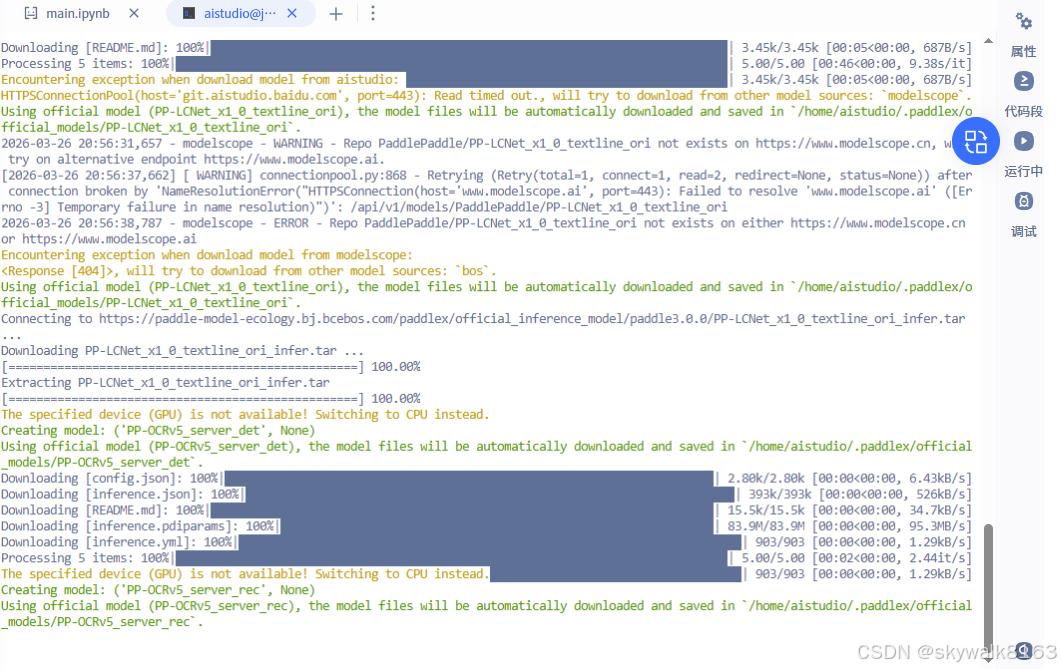
再执行一次,报错:
Pipeline prediction failed
Traceback (most recent call last):
File "/home/aistudio/external-libraries/lib/python3.10/site-packages/paddlex/paddlex_cli.py", line 637, in main
pipeline_predict(
File "/home/aistudio/external-libraries/lib/python3.10/site-packages/paddlex/paddlex_cli.py", line 485, in pipeline_predict
for res in result:
File "/home/aistudio/external-libraries/lib/python3.10/site-packages/paddlex/inference/pipelines/_parallel.py", line 139, in predict
yield from self._pipeline.predict(
File "/home/aistudio/external-libraries/lib/python3.10/site-packages/paddlex/inference/pipelines/ocr/pipeline.py", line 357, in predict
det_results = list(
File "/home/aistudio/external-libraries/lib/python3.10/site-packages/paddlex/inference/models/base/predictor/base_predictor.py", line 281, in call
yield from self.apply(input, **kwargs)
File "/home/aistudio/external-libraries/lib/python3.10/site-packages/paddlex/inference/models/base/predictor/base_predictor.py", line 338, in apply
prediction = self.process(batch_data, **kwargs)
File "/home/aistudio/external-libraries/lib/python3.10/site-packages/paddlex/inference/models/text_detection/predictor.py", line 133, in process
batch_preds = self.infer(x=x)
File "/home/aistudio/external-libraries/lib/python3.10/site-packages/paddlex/inference/models/common/static_infer.py", line 298, in call
pred = self.infer(x)
File "/home/aistudio/external-libraries/lib/python3.10/site-packages/paddlex/inference/models/common/static_infer.py", line 261, in call
self.predictor.run()
NotImplementedError: (Unimplemented) ConvertPirAttribute2RuntimeAttribute not support pir::ArrayAttribute\
据说是框架不兼容导致的,临时解决方案是设置FLAGS_use_onednn=0
可以这样设置
import os
os.environ['FLAGS_use_onednn'] = '0'
对我们这个,这样设置
FLAGS_use_onednn=0 ./paddlex --pipeline OCR \
        --input https://paddle-model-ecology.bj.bcebos.com/paddlex/imgs/demo_image/general_ocr_002.png \
        --use_doc_orientation_classify False \
        --use_doc_unwarping False \
        --use_textline_orientation False \
        --save_path ./output \
        --device cpu
还是同样的报错
飞桨版本是3.3
pip show paddlepaddle
Name: paddlepaddle
Version: 3.3.0
在windows下安装测试
python -m pip install paddlex
python -m pip install paddlepaddle==3.3.0 -i https://www.paddlepaddle.org.cn/packages/stable/cpu/
然后执行
paddlex --pipeline OCR --input https://paddle-model-ecology.bj.bcebos.com/paddlex/imgs/demo_image/general_ocr_002.png --use_doc_orientation_classify False --use_doc_unwarping False --use_textline_orientation False --save_path ./output --device cpu报错,说没有paddle,得,python3.14下好像还装不了飞桨...
第二天可以执行paddlex了
paddlex
Checking connectivity to the model hosters, this may take a while. To bypass this check, set `PADDLE_PDX_DISABLE_MODEL_SOURCE_CHECK` to `True`.
E:\Programs\Python\Python314\Lib\site-packages\langchain_core\_api\deprecation.py:27: UserWarning: Core Pydantic V1 functionality isn't compatible with Python 3.14 or greater.
  from pydantic.v1.fields import FieldInfo as FieldInfoV1
No arguments provided. Displaying help information:
usage: Command-line interface for PaddleX. Use the options below to install plugins, run pipeline predictions, or start the serving application.
       [-h] [--install [PLUGIN ...]] [--no_deps] [--platform {github.com,gitee.com}] [-y] [--use_local_repos]
       [--deps_to_replace DEPS_TO_REPLACE [DEPS_TO_REPLACE ...]] [--pipeline PIPELINE] [--input INPUT]
       [--save_path SAVE_PATH] [--device DEVICE] [--use_hpip] [--hpi_config HPI_CONFIG]
       [--get_pipeline_config GET_PIPELINE_CONFIG] [--serve] [--host HOST] [--port PORT] [--paddle2onnx]
       [--paddle_model_dir PADDLE_MODEL_DIR] [--onnx_model_dir ONNX_MODEL_DIR] [--opset_version OPSET_VERSION]

options:
  -h, --help            show this help message and exit

Install PaddleX Options:
  --install [PLUGIN ...]
                        Install specified PaddleX plugins.
  --no_deps             Install custom development plugins without their dependencies.
  --platform {github.com,gitee.com}
                        Platform to use for installation (default: github.com).
  -y, --yes             Automatically confirm prompts and update repositories.
  --use_local_repos     Use local repositories if they exist.
  --deps_to_replace DEPS_TO_REPLACE [DEPS_TO_REPLACE ...]
                        Replace dependency version when installing from repositories.

Pipeline Predict Options:
  --pipeline PIPELINE   Name of the pipeline to execute for prediction.
  --input INPUT         Input data or path for the pipeline, supports specific file and directory.
  --save_path SAVE_PATH
                        Path to save the prediction results.
  --device DEVICE       Device to run the pipeline on (e.g., 'cpu', 'gpu:0').
  --use_hpip            Use high-performance inference plugin.
  --hpi_config HPI_CONFIG
                        High-performance inference configuration.
  --get_pipeline_config GET_PIPELINE_CONFIG
                        Retrieve the configuration for a specified pipeline.

Serving Options:
  --serve               Start the serving application to handle requests.
  --host HOST           Host address to serve on (default: 0.0.0.0).
  --port PORT           Port number to serve on (default: 8080).

Paddle2ONNX Options:
  --paddle2onnx         Convert PaddlePaddle model to ONNX format.
  --paddle_model_dir PADDLE_MODEL_DIR
                        Directory containing the PaddlePaddle model.
  --onnx_model_dir ONNX_MODEL_DIR
                        Output directory for the ONNX model.
  --opset_version OPSET_VERSION
                        Version of the ONNX opset to use.
调试
paddlex说没有paddle
Pipeline prediction failed
Traceback (most recent call last):
File "E:\Programs\Python\Python314\Lib\site-packages\paddlex\paddlex_cli.py", line 637, in main
pipeline_predict(
~~~~~~~~~~~~~~~~^
args.pipeline,
^^^^^^^^^^^^^^
...<5 lines>...
**pipeline_args_dict,
^^^^^^^^^^^^^^^^^^^^^
)
^
File "E:\Programs\Python\Python314\Lib\site-packages\paddlex\paddlex_cli.py", line 481, in pipeline_predict
pipeline = create_pipeline(
pipeline, device=device, use_hpip=use_hpip, hpi_config=hpi_config
)
File "E:\Programs\Python\Python314\Lib\site-packages\paddlex\inference\pipelines\init.py", line 168, in create_pipeline
pipeline = BasePipeline.get(pipeline_name)(
config=config,
...<5 lines>...
**kwargs,
)
File "E:\Programs\Python\Python314\Lib\site-packages\paddlex\utils\deps.py", line 208, in _wrapper
return old_init_func(self, *args, **kwargs)
File "E:\Programs\Python\Python314\Lib\site-packages\paddlex\inference\pipelines\_parallel.py", line 113, in init
self._pipeline = self._create_internal_pipeline(config, self.device)
~~~~~~~~~~~~~~~~~~~~~~~~~~~~~~^^^^^^^^^^^^^^^^^^^^^
File "E:\Programs\Python\Python314\Lib\site-packages\paddlex\inference\pipelines\_parallel.py", line 168, in _create_internal_pipeline
return self._pipeline_cls(
~~~~~~~~~~~~~~~~~~^
config,
^^^^^^^
...<5 lines>...
**self._init_kwargs,
^^^^^^^^^^^^^^^^^^^^
)
^
File "E:\Programs\Python\Python314\Lib\site-packages\paddlex\inference\pipelines\ocr\pipeline.py", line 76, in init
self.doc_preprocessor_pipeline = self.create_pipeline(
~~~~~~~~~~~~~~~~~~~~^
doc_preprocessor_config
^^^^^^^^^^^^^^^^^^^^^^^
)
^
File "E:\Programs\Python\Python314\Lib\site-packages\paddlex\inference\pipelines\base.py", line 140, in create_pipeline
pipeline = create_pipeline(
config=config,
...<5 lines>...
hpi_config=hpi_config,
)
File "E:\Programs\Python\Python314\Lib\site-packages\paddlex\inference\pipelines\init.py", line 168, in create_pipeline
pipeline = BasePipeline.get(pipeline_name)(
config=config,
...<5 lines>...
**kwargs,
)
File "E:\Programs\Python\Python314\Lib\site-packages\paddlex\utils\deps.py", line 208, in _wrapper
return old_init_func(self, *args, **kwargs)
File "E:\Programs\Python\Python314\Lib\site-packages\paddlex\inference\pipelines\_parallel.py", line 113, in init
self._pipeline = self._create_internal_pipeline(config, self.device)
~~~~~~~~~~~~~~~~~~~~~~~~~~~~~~^^^^^^^^^^^^^^^^^^^^^
File "E:\Programs\Python\Python314\Lib\site-packages\paddlex\inference\pipelines\_parallel.py", line 168, in _create_internal_pipeline
return self._pipeline_cls(
~~~~~~~~~~~~~~~~~~^
config,
^^^^^^^
...<5 lines>...
**self._init_kwargs,
^^^^^^^^^^^^^^^^^^^^
)
^
File "E:\Programs\Python\Python314\Lib\site-packages\paddlex\inference\pipelines\doc_preprocessor\pipeline.py", line 69, in init
self.doc_ori_classify_model = self.create_model(doc_ori_classify_config)
~~~~~~~~~~~~~~~~~^^^^^^^^^^^^^^^^^^^^^^^^^
File "E:\Programs\Python\Python314\Lib\site-packages\paddlex\inference\pipelines\base.py", line 106, in create_model
model = create_predictor(
model_name=config"model_name",
...<7 lines>...
**kwargs,
)
File "E:\Programs\Python\Python314\Lib\site-packages\paddlex\inference\models\init.py", line 83, in create_predictor
return BasePredictor.get(model_name)(
~~~~~~~~~~~~~~~~~~~~~~~~~~~~~^
model_dir=model_dir,
^^^^^^^^^^^^^^^^^^^^
...<8 lines>...
**kwargs,
^^^^^^^^^
)
^
File "E:\Programs\Python\Python314\Lib\site-packages\paddlex\inference\models\image_classification\predictor.py", line 48, in init
super().init(*args, **kwargs)
~~~~~~~~~~~~~~~~^^^^^^^^^^^^^^^^^
File "E:\Programs\Python\Python314\Lib\site-packages\paddlex\inference\models\base\predictor\base_predictor.py", line 169, in init
self._pp_option = self._prepare_pp_option(pp_option, device)
~~~~~~~~~~~~~~~~~~~~~~~^^^^^^^^^^^^^^^^^^^
File "E:\Programs\Python\Python314\Lib\site-packages\paddlex\inference\models\base\predictor\base_predictor.py", line 415, in _prepare_pp_option
pp_option.device_type = device_info0
^^^^^^^^^^^^^^^^^^^^^
File "E:\Programs\Python\Python314\Lib\site-packages\paddlex\inference\utils\pp_option.py", line 186, in device_type
set_env_for_device_type(device_type)
~~~~~~~~~~~~~~~~~~~~~~~^^^^^^^^^^^^^
File "E:\Programs\Python\Python314\Lib\site-packages\paddlex\utils\device.py", line 101, in set_env_for_device_type
import paddle
ModuleNotFoundError: No module named 'paddle'
可能是飞桨不支持python3.14吧。换到python3.12环境下安装只用paddlex
提示WARNING: The script openai.exe is installed in 'E:\py312\Scripts' which is not on PATH.
11/15 openai WARNING: The script openai.exe is installed in 'E:\py312\Scripts' which is not on PATH.
Consider adding this directory to PATH or, if you prefer to suppress this warning, use --no-warn-script-location.
两个python环境有点串啊
用这个方法
python -m paddlex --pipeline OCR --input https://paddle-model-ecology.bj.bcebos.com/paddlex/imgs/demo_image/general_ocr_002.png --use_doc_orientation_classify False --use_doc_unwarping False --use_textline_orientation False --save_path ./output --device cpu有新的报错:
报错OSError: cannot load library 'libsndfile.dll': error 0x7e
from .readers import (
File "C:\Users\Admin\AppData\Roaming\Python\Python312\site-packages\paddlex\inference\utils\io\readers.py", line 33, in <module>
import soundfile
File "E:\py312\Lib\site-packages\soundfile.py", line 212, in <module>
_snd = _ffi.dlopen(_explicit_libname)
^^^^^^^^^^^^^^^^^^^^^^^^^^^^^^
OSError: cannot load library 'libsndfile.dll': error 0x7e
重新安装paddlepaddle==3.0.0
python -m pip install paddlepaddle==3.0.0 -i https://www.paddlepaddle.org.cn/packages/stable/cpu/有新的报错:
OSError: sndfile library not found using ctypes.util.find_library

During handling of the above exception, another exception occurred:

Traceback (most recent call last):
  File "<frozen runpy>", line 189, in _run_module_as_main
  File "<frozen runpy>", line 148, in _get_module_details
  File "<frozen runpy>", line 112, in _get_module_details
  File "C:\Users\Admin\AppData\Roaming\Python\Python312\site-packages\paddlex\__init__.py", line 49, in <module>
    from .inference import create_pipeline, create_predictor
  File "C:\Users\Admin\AppData\Roaming\Python\Python312\site-packages\paddlex\inference\__init__.py", line 16, in <module>
    from .models import create_predictor
  File "C:\Users\Admin\AppData\Roaming\Python\Python312\site-packages\paddlex\inference\models\__init__.py", line 23, in <module>
    from .anomaly_detection import UadPredictor
  File "C:\Users\Admin\AppData\Roaming\Python\Python312\site-packages\paddlex\inference\models\anomaly_detection\__init__.py", line 15, in <module>
    from .predictor import UadPredictor
  File "C:\Users\Admin\AppData\Roaming\Python\Python312\site-packages\paddlex\inference\models\anomaly_detection\predictor.py", line 21, in <module>
    from ...common.batch_sampler import ImageBatchSampler
  File "C:\Users\Admin\AppData\Roaming\Python\Python312\site-packages\paddlex\inference\common\batch_sampler\__init__.py", line 19, in <module>
    from .image_batch_sampler import ImageBatchSampler
  File "C:\Users\Admin\AppData\Roaming\Python\Python312\site-packages\paddlex\inference\common\batch_sampler\image_batch_sampler.py", line 23, in <module>
    from ...utils.io import PDFReader
  File "C:\Users\Admin\AppData\Roaming\Python\Python312\site-packages\paddlex\inference\utils\io\__init__.py", line 16, in <module>
    from .readers import (
  File "C:\Users\Admin\AppData\Roaming\Python\Python312\site-packages\paddlex\inference\utils\io\readers.py", line 33, in <module>
    import soundfile
  File "E:\py312\Lib\site-packages\soundfile.py", line 212, in <module>
    _snd = _ffi.dlopen(_explicit_libname)
           ^^^^^^^^^^^^^^^^^^^^^^^^^^^^^^
OSError: cannot load library 'libsndfile.dll': error 0x7e