LangChain通用提示词模板:
from langchain_core.prompts import PromptTemplate
from langchain_community.llms import Tongyi

prompt_template = PromptTemplate.from_template(
    "我的邻居姓{lastname},刚生了{gender}"
)

prompt_template.format(lastname = "张",gender = "男")

model = Tongyi(model = "qwen-max")

res = model.invoke(input = prompt_template)

print(res)
链式写法:
from langchain_core.prompts import PromptTemplate
from langchain_community.llms import Tongyi

prompt_template = PromptTemplate.from_template(
    "我的邻居姓{lastname},刚生了{gender}"
)

model = Tongyi(models = "qwen-max")

chain = prompt_template | model
res=chain.invoke(input={"lastname":"张","gender":"男"})
print(res)
FewShot提示词模板
from langchain_core.prompts import PromptTemplate,FewShotPromptTemplate
from langchain_community.llms.tongyi import  Tongyi

example_template = PromptTemplate.from_template(
    "单词:{word},反义词:{antonym}"
)

example_data = [
    {"word":"大","antonym":"小"},
    {"word":"上","antonym":"下"}
]

few_shot_template = FewShotPromptTemplate(
    example_prompt=example_template,      #示例数据模板
    examples = example_data,              #示例的数据
    prefix = "告知我单词的反义词,我提供如下的示例",           #示例之前的提示词
    suffix = "基于前面的示例告诉我,{input_word}的反义词是?",       #示例之后的提示词
    input_variables = ['input_word']          #声明在前缀或后缀中所需注入的变量名
)

prompt_text = few_shot_template.invoke(input={"input_word":"左"}).to_string()
print(prompt_text)
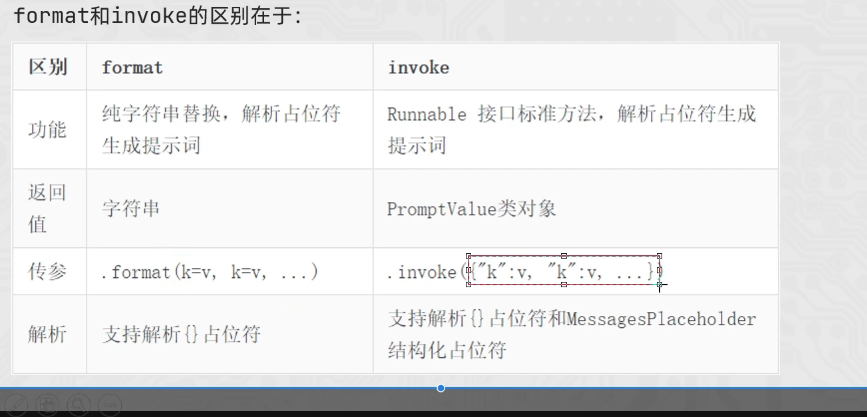
在PromptTemplate(通用提示词模板)和FewShotPromptTemplate(FewShot提示词模板)的使用,我们使用了如下:模板对象的format方法,模板对象的invoke方法
PromptTemplate,FewShotPromptTemplate,ChatPromptTemplate(后续学习)都拥有format和invoke这2类方法
format和invoke的区别在于:
ChatPromptTemplate:
通过from_messages方法,从列表中获取多轮次会话作为聊天的基础模板
前面PromptTemplate类用的from_template仅能接入一条消息,而from_messages可以接入一个list消息
from langchain_core.prompts import ChatPromptTemplate,MessagesPlaceholder
from langchain_community.chat_models.tongyi import ChatTongyi

chat_prompt_template = ChatPromptTemplate.from_messages(
    [
        ("system","你是一个边塞诗人"),
        MessagesPlaceholder("history"),
        ("human","请再来一首")
    ]
)

history_data =[
    ("human","你来写一个唐诗"),
    ("ai","川黔")
]

prompt_text = chat_prompt_template.invoke({"history":history_data}).to_string()
链
LangChain中链是一种将各个组件串联在一起,按顺序执行,前一个组件的输出作为下一组件的输入
可以通过"|"符号来让各个组件形成链
成链的各个组件,需是Runnable接口的子类
形成的链式RunnableSerializable对象(Runnabl接口子类)
可通过链调用invoke或stream触发整个链条的执行


错误的主要原因是:
chain = prompt | model | model
错误的主要原因是:
prompt的结果是PromptValue类型,输入给了model
model 的输出结果是: AIMessage
模型(ChatTongyi)源码中关于invoke方法明确指定了input的类型:

StrOutputParser也是Runnable接口的子类
StrOutputParser字符串输出解析器是LangChain内置的简单字符串解析器
parser = StrOutputParser()
chain = prompt | model |parser | model
parser将上一个模型AIMessage结果解析为简单字符串,然后就能继续下去了

提示词模板要求的是字典类型
所以我们需要完成:
将模型输出的AIMessage - >转为词典->注入第二个提示词模板中,形成新的提示词
StrOutputParser不满足(AIMessage->Str)
更换JsonOutputParser(AIMseaage->Dict)
模型输入: PromptValue或字符串或序列(BaseMessage,list,tuple,str,dict)
模型输出: AIMessage
提示词模板输入: 要求是字典
提示词模板输出: PromptValue对象
StrOutputParser: AIMsaage输入,str输出
JsonOutputParser: AIMessage输入,dict输出
自定义类型转换器
除了JsonOutputParser这类固定功能的解析器外,我们也可以自己编写Lambda匿名函数来完成自定义逻辑的数据转换,想怎么换就怎吗换,可以基于RunnableLambda类实现
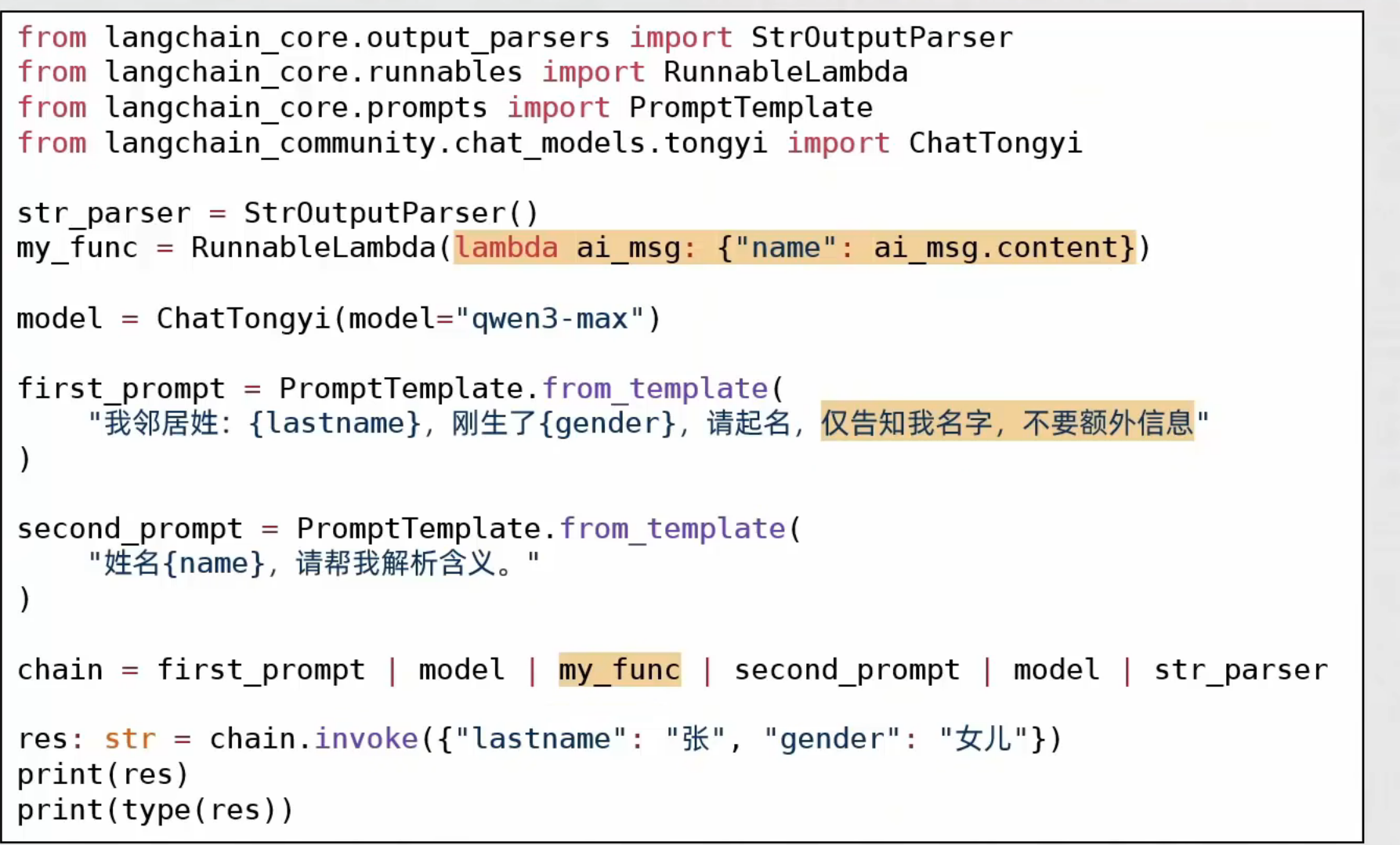
另外,|符号是支持函数直接加入链的,支持Callable接口实例(函数就是Callable接口实例)
