Model Context Protocol (MCP) 是一个标准化协议,使 AI 模型能够以结构化的方式与外部工具和资源交互。 可以将其视为 AI 模型与现实世界之间的桥梁------允许它们通过一致的接口访问数据库、API、文件系统和其他外部服务。 它支持多种传输机制,以在不同环境中提供灵活性。
MCP Java SDK 提供了 Model Context Protocol 的 Java 实现,通过同步和异步通信模式实现与 AI 模型和工具的标准化交互。
Spring AI 通过专用的 Boot Starters 和 MCP Java Annotations 全面支持 MCP,使构建能够无缝连接到外部系统的复杂 AI 驱动应用程序变得前所未有的简单。 这意味着 Spring 开发者可以参与 MCP 生态系统的两个方面------构建消费 MCP 服务器的 AI 应用程序,以及创建将基于 Spring 的服务暴露给更广泛 AI 社区的 MCP 服务器。 使用 Spring Initializer 引导支持 MCP 的 AI 应用程序。
SpringAIAlibaba官方文档:https://java2ai.com/integration/mcps/mcp-overview
这篇文章我们将利用 Spring AI Alibaba 强大的生态能力,手把手教你构建一个 MCP 服务器,为 AI 赋予实时查询天气和空气质量的能力。
- MCP Server (工具提供者):一个独立的 Spring Boot 应用,暴露 HTTP 接口,内部封装具体的业务逻辑(如调用第三方天气 API)。
- MCP Client (AI 应用):集成了 Spring AI 的主应用,它通过 MCP 客户端连接到 Server,将用户的问题转化为对工具的调用。
MCPServer
在 pom.xml 中,我们需要引入 Spring AI 的 WebMvc MCP Starter,这将帮我们自动处理 MCP 的协议握手和序列化。
xml
	<dependencies>
        <dependency>
            <groupId>org.springframework.boot</groupId>
            <artifactId>spring-boot-starter-web</artifactId>
        </dependency>

        <dependency>
            <groupId>org.springframework.ai</groupId>
            <artifactId>spring-ai-starter-mcp-server-webmvc</artifactId>
            <version>1.1.2</version>
        </dependency>

        <dependency>
            <groupId>com.alibaba.cloud.ai</groupId>
            <artifactId>spring-ai-alibaba-starter-mcp-gateway</artifactId>
            <version>1.1.2.2</version>
        </dependency>

        <dependency>
            <groupId>com.alibaba.cloud.ai</groupId>
            <artifactId>spring-ai-alibaba-starter-dashscope</artifactId>
            <version>1.1.2.2</version>
        </dependency>
    </dependencies>
我们配置服务运行在 8082 端口,并声明这是一个支持 Tools 和 Resources 的 MCP 服务器。
yaml
server:
  port: 8082

spring:
  main:
    banner-mode: off
  ai:
    dashscope:
      api-key: "sk-473e1******cd3"
    mcp:
      server:
        protocol: sse
        name: mcp-server
        version: 1.0.0
        type: sync
        instructions: "此服务器提供天气信息工具和资源"
        sse-message-endpoint: /mcp/message
        capabilities:
          tool: true
          resource: true
          prompt: true
          completion: true
        request-timeout: 30s
接下来利用 @Tool 和 @ToolParam 注解,将普通的 Java 方法转化为 AI 可理解的工具。
java
/**
* 利用OpenMeteo的免费天气API提供天气服务
* 该API无需API密钥,可以直接使用
*/
@Service
public class OpenMeteoService {
// OpenMeteo免费天气API基础URL
private static final String BASE_URL = "https://api.open-meteo.com/v1";
private static final Logger log = LoggerFactory.getLogger(OpenMeteoService.class);
private final RestClient restClient;
public OpenMeteoService() {
this.restClient = RestClient.builder()
.baseUrl(BASE_URL)
.defaultHeader("Accept", "application/json")
.defaultHeader("User-Agent", "OpenMeteoClient/1.0")
.build();
}
// OpenMeteo天气数据模型
@JsonIgnoreProperties(ignoreUnknown = true)
public record WeatherData(
@JsonProperty("latitude") Double latitude,
@JsonProperty("longitude") Double longitude,
@JsonProperty("timezone") String timezone,
@JsonProperty("current") CurrentWeather current,
@JsonProperty("daily") DailyForecast daily,
@JsonProperty("current_units") CurrentUnits currentUnits) {
@JsonIgnoreProperties(ignoreUnknown = true)
public record CurrentWeather(
@JsonProperty("time") String time,
@JsonProperty("temperature_2m") Double temperature,
@JsonProperty("apparent_temperature") Double feelsLike,
@JsonProperty("relative_humidity_2m") Integer humidity,
@JsonProperty("precipitation") Double precipitation,
@JsonProperty("weather_code") Integer weatherCode,
@JsonProperty("wind_speed_10m") Double windSpeed,
@JsonProperty("wind_direction_10m") Integer windDirection) {
}
@JsonIgnoreProperties(ignoreUnknown = true)
public record CurrentUnits(
@JsonProperty("time") String timeUnit,
@JsonProperty("temperature_2m") String temperatureUnit,
@JsonProperty("relative_humidity_2m") String humidityUnit,
@JsonProperty("wind_speed_10m") String windSpeedUnit) {
}
@JsonIgnoreProperties(ignoreUnknown = true)
public record DailyForecast(
@JsonProperty("time") List<String> time,
@JsonProperty("temperature_2m_max") List<Double> tempMax,
@JsonProperty("temperature_2m_min") List<Double> tempMin,
@JsonProperty("precipitation_sum") List<Double> precipitationSum,
@JsonProperty("weather_code") List<Integer> weatherCode,
@JsonProperty("wind_speed_10m_max") List<Double> windSpeedMax,
@JsonProperty("wind_direction_10m_dominant") List<Integer> windDirection) {
}
}
/**
* 获取天气代码对应的描述
*/
private String getWeatherDescription(int code) {
return switch (code) {
case 0 -> "晴朗";
case 1, 2, 3 -> "多云";
case 45, 48 -> "雾";
case 51, 53, 55 -> "毛毛雨";
case 56, 57 -> "冻雨";
case 61, 63, 65 -> "雨";
case 66, 67 -> "冻雨";
case 71, 73, 75 -> "雪";
case 77 -> "雪粒";
case 80, 81, 82 -> "阵雨";
case 85, 86 -> "阵雪";
case 95 -> "雷暴";
case 96, 99 -> "雷暴伴有冰雹";
default -> "未知天气";
};
}
/**
* 获取风向描述
*/
private String getWindDirection(int degrees) {
if (degrees >= 337.5 || degrees < 22.5)
return "北风";
if (degrees >= 22.5 && degrees < 67.5)
return "东北风";
if (degrees >= 67.5 && degrees < 112.5)
return "东风";
if (degrees >= 112.5 && degrees < 157.5)
return "东南风";
if (degrees >= 157.5 && degrees < 202.5)
return "南风";
if (degrees >= 202.5 && degrees < 247.5)
return "西南风";
if (degrees >= 247.5 && degrees < 292.5)
return "西风";
return "西北风";
}
/**
* 获取指定经纬度的天气预报
*
* @param latitude 纬度
* @param longitude 经度
* @return 指定位置的天气预报
* @throws RestClientException 如果请求失败
*/
@Tool(description = "获取指定经纬度的天气预报")
public String getWeatherForecastByLocation(@ToolParam(description = "纬度") double latitude,
@ToolParam(description = "经度") double longitude) {
log.info("Getting weather forecast for location (latitude: {}, longitude: {})", latitude, longitude);
// 获取天气数据(当前和未来7天)
var weatherData = restClient.get()
.uri("/forecast?latitude={latitude}&longitude={longitude}¤t=temperature_2m,apparent_temperature,relative_humidity_2m,precipitation,weather_code,wind_speed_10m,wind_direction_10m&daily=temperature_2m_max,temperature_2m_min,precipitation_sum,weather_code,wind_speed_10m_max,wind_direction_10m_dominant&timezone=auto&forecast_days=7",
latitude, longitude)
.retrieve()
.body(WeatherData.class);
// 拼接天气信息
StringBuilder weatherInfo = new StringBuilder();
// 添加当前天气信息
WeatherData.CurrentWeather current = weatherData.current();
String temperatureUnit = weatherData.currentUnits() != null ? weatherData.currentUnits().temperatureUnit()
: "°C";
String windSpeedUnit = weatherData.currentUnits() != null ? weatherData.currentUnits().windSpeedUnit() : "km/h";
String humidityUnit = weatherData.currentUnits() != null ? weatherData.currentUnits().humidityUnit() : "%";
weatherInfo.append(String.format("""
当前天气:
温度: %.1f%s (体感温度: %.1f%s)
天气: %s
风向: %s (%.1f %s)
湿度: %d%s
降水量: %.1f 毫米
""",
current.temperature(),
temperatureUnit,
current.feelsLike(),
temperatureUnit,
getWeatherDescription(current.weatherCode()),
getWindDirection(current.windDirection()),
current.windSpeed(),
windSpeedUnit,
current.humidity(),
humidityUnit,
current.precipitation()));
// 添加未来天气预报
weatherInfo.append("未来天气预报:\n");
WeatherData.DailyForecast daily = weatherData.daily();
for (int i = 0; i < daily.time().size(); i++) {
String date = daily.time().get(i);
double tempMin = daily.tempMin().get(i);
double tempMax = daily.tempMax().get(i);
int weatherCode = daily.weatherCode().get(i);
double windSpeed = daily.windSpeedMax().get(i);
int windDir = daily.windDirection().get(i);
double precip = daily.precipitationSum().get(i);
// 格式化日期
LocalDate localDate = LocalDate.parse(date);
String formattedDate = localDate.format(DateTimeFormatter.ofPattern("yyyy-MM-dd (EEE)"));
weatherInfo.append(String.format("""
%s:
温度: %.1f%s ~ %.1f%s
天气: %s
风向: %s (%.1f %s)
降水量: %.1f 毫米
""",
formattedDate,
tempMin, temperatureUnit,
tempMax, temperatureUnit,
getWeatherDescription(weatherCode),
getWindDirection(windDir),
windSpeed, windSpeedUnit,
precip));
}
return weatherInfo.toString();
}
/**
* 获取指定位置的空气质量信息 (使用备用模拟数据)
* 注意:由于OpenMeteo的空气质量API可能需要额外配置或不可用,这里提供备用数据
*
* @param latitude 纬度
* @param longitude 经度
* @return 空气质量信息
*/
@Tool(description = "获取指定位置的空气质量信息(模拟数据)")
public String getAirQuality(@ToolParam(description = "纬度") double latitude,
@ToolParam(description = "经度") double longitude) {
log.info("Getting air quality for location (latitude: {}, longitude: {})", latitude, longitude);
try {
// 从天气数据中获取基本信息
var weatherData = restClient.get()
.uri("/forecast?latitude={latitude}&longitude={longitude}¤t=temperature_2m&timezone=auto",
latitude, longitude)
.retrieve()
.body(WeatherData.class);
// 模拟空气质量数据 - 实际情况下应该从真实API获取
// 根据经纬度生成一些随机但相对合理的数据
int europeanAqi = (int) (Math.random() * 100) + 1;
int usAqi = (int) (europeanAqi * 1.5);
double pm10 = Math.random() * 50 + 5;
double pm25 = Math.random() * 25 + 2;
double co = Math.random() * 500 + 100;
double no2 = Math.random() * 40 + 5;
double so2 = Math.random() * 20 + 1;
double o3 = Math.random() * 80 + 20;
String aqiLevel = getAqiLevel(europeanAqi);
String usAqiLevel = getUsAqiLevel(usAqi);
// 构建空气质量信息字符串
String aqiInfo = String.format("""
空气质量信息 (纬度: %.4f, 经度: %.4f, 时区: %s):
欧洲空气质量指数 (EAQI): %d (%s)
美国空气质量指数 (US AQI): %d (%s)
详细污染物信息:
PM10: %.1f μg/m³
PM2.5: %.1f μg/m³
一氧化碳 (CO): %.1f μg/m³
二氧化氮 (NO2): %.1f μg/m³
二氧化硫 (SO2): %.1f μg/m³
臭氧 (O3): %.1f μg/m³
注意:以上是模拟数据,仅供示例。
""",
latitude, longitude, weatherData.timezone(),
europeanAqi, aqiLevel,
usAqi, usAqiLevel,
pm10, pm25, co, no2, so2, o3);
return aqiInfo;
} catch (Exception e) {
return "无法获取空气质量信息: " + e.getMessage();
}
}
/**
* 获取欧洲AQI等级描述
*/
private String getAqiLevel(Integer aqi) {
if (aqi <= 20) {
return "优 (0-20): 空气质量非常好";
} else if (aqi <= 40) {
return "良 (20-40): 空气质量良好";
} else if (aqi <= 60) {
return "中等 (40-60): 对敏感人群可能有影响";
} else if (aqi <= 80) {
return "较差 (60-80): 对所有人群健康有影响";
} else if (aqi <= 100) {
return "差 (80-100): 可能对所有人群健康造成损害";
} else {
return "非常差 (>100): 对所有人群健康有严重影响";
}
}
/**
* 获取美国AQI等级描述
*/
private String getUsAqiLevel(Integer aqi) {
if (aqi <= 50) {
return "优 (0-50): 空气质量令人满意,污染风险很低";
} else if (aqi <= 100) {
return "良 (51-100): 空气质量尚可,对极少数敏感人群可能有影响";
} else if (aqi <= 150) {
return "对敏感人群不健康 (101-150): 敏感人群可能会经历健康影响";
} else if (aqi <= 200) {
return "不健康 (151-200): 所有人可能开始经历健康影响";
} else if (aqi <= 300) {
return "非常不健康 (201-300): 健康警告,所有人可能经历更严重的健康影响";
} else {
return "危险 (>300): 健康警报,所有人更可能受到影响";
}
}
}配置上 MCPServer 供 MCPClient 调用的工具:
java
@Configuration
public class ToolConfig {

    @Autowired
    private OpenMeteoService openMeteoService;

    @Bean
    public ToolCallbackProvider toolCallbackProvider() {
        return MethodToolCallbackProvider.builder().toolObjects(openMeteoService).build();
    }
}
启动后出现如下日志表示 MCPServer 启动成功:
bash
2026-03-27T10:44:54.934+08:00 INFO 16840 --- [mcp-nacos-register-extensions-example] [ main] o.s.a.m.s.c.a.McpServerAutoConfiguration : Registered tools: 2MCPClient
和 MCPServer 依赖差不多,需要引入额外的 Client 依赖:
xml
		<dependency>
            <groupId>org.springframework.ai</groupId>
            <artifactId>spring-ai-starter-mcp-client</artifactId>
            <version>1.1.3</version>
        </dependency>
配置Client
yaml
server:
  port: 8083

spring:
  application:
    name: mcp-client
  main:
    web-application-type: none
  ai:
    dashscope:
      api-key: "sk-473e******9cd3"
    mcp:
      client:
        enabled: true
        name: my-mcp-client
        version: 1.0.0
        request-timeout: 30s
        type: sync
        sse:
          connections:
            server1:
              url: http://localhost:8082/
启动类
java
@SpringBootApplication
public class McpClientApplication {
    public static void main(String[] args) {
        SpringApplication.run(McpClientApplication.class, args);
    }

    @Bean
    public CommandLineRunner predefinedQuestions(ChatClient.Builder chatClientBuilder,
                                                 ToolCallbackProvider tools,
                                                 ConfigurableApplicationContext context) {

        ToolCallback[] toolCallbacks = tools.getToolCallbacks();
        System.out.println("Available tools:");
        for (ToolCallback toolCallback : toolCallbacks) {
            System.out.println(">>> " + toolCallback.getToolDefinition().name());
        }

        return args -> {
            var chatClient = chatClientBuilder.defaultToolCallbacks(tools.getToolCallbacks()).build();

            Scanner scanner = new Scanner(System.in);
            while (true) {
                System.out.print("\n>>> QUESTION: ");
                String userInput = scanner.nextLine();
                if (userInput.equalsIgnoreCase("exit")) {
                    break;
                }
                System.out.println("\n>>> ASSISTANT: " + chatClient.prompt(userInput).call().content());
            }
            scanner.close();
            context.close();
        };
    }
}
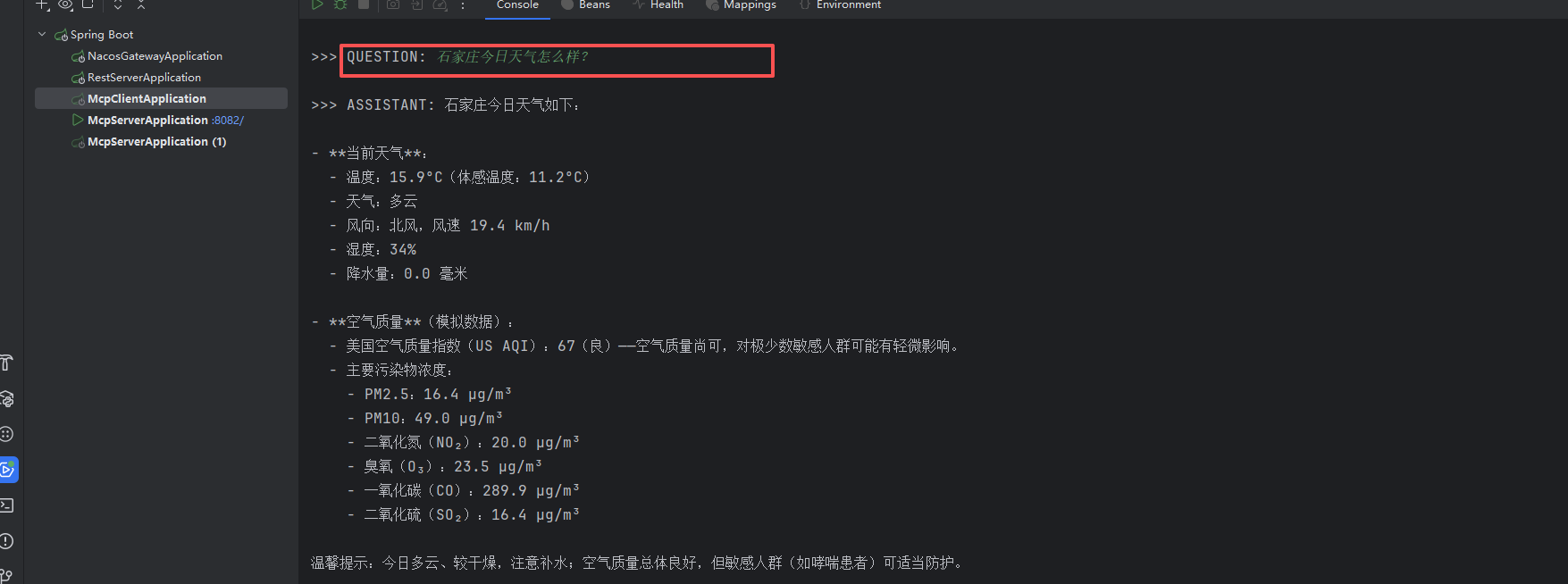
测试
ReactAgent集成
https://github.com/alibaba/spring-ai-alibaba/issues/4100
参考文档:https://java2ai.com/integration/mcps/mcp-client-boot-starter-docs