目录
[os.getcwd() 获取当前工作目录](#os.getcwd() 获取当前工作目录)
[os.chdir(path) 修改当前工作目录为path](#os.chdir(path) 修改当前工作目录为path)
[os.makedir(path) 创建新文件夹](#os.makedir(path) 创建新文件夹)
[os.path.abspath(path) 相对路径转换为绝对路径](#os.path.abspath(path) 相对路径转换为绝对路径)
[os.path.isabs(path) 判断path是否为绝对路径](#os.path.isabs(path) 判断path是否为绝对路径)
[os.path.relpath(path, start) 获取相对路径的字符串。](#os.path.relpath(path, start) 获取相对路径的字符串。)
[os.path.dirname(path) 获取目录名称](#os.path.dirname(path) 获取目录名称)
[os.path.basename(path) 获取基本名称](#os.path.basename(path) 获取基本名称)
[os.path.split(path) 同时获取路径的目录名称和基本名](#os.path.split(path) 同时获取路径的目录名称和基本名)
[os.path.getsize(path) 获取path中文件的字节数](#os.path.getsize(path) 获取path中文件的字节数)
[os.listdir(path) 获取path中所有文件的集合list](#os.listdir(path) 获取path中所有文件的集合list)
[o.path.join(path, filename) 连接文件夹名称和文件名](#o.path.join(path, filename) 连接文件夹名称和文件名)
[os.path.exists(path) 判断path是否存在](#os.path.exists(path) 判断path是否存在)
[os.path.isfile(path) 判断path是否存在且是一个文件](#os.path.isfile(path) 判断path是否存在且是一个文件)
[os.path.isdir(path) 判断path是否存在且是一个文件夹](#os.path.isdir(path) 判断path是否存在且是一个文件夹)
[open() 打开一个文件](#open() 打开一个文件)
[write() 写入内容](#write() 写入内容)
[编辑close() 关闭文件](#编辑close() 关闭文件)
[read() 读取文件内容](#read() 读取文件内容)
[readlines() 按行读取内容](#readlines() 按行读取内容)
[shelve.open() 打开一个持久化字典](#shelve.open() 打开一个持久化字典)
[close() 关闭](#close() 关闭)
文件和文件路径
os.getcwd() 获取当前工作目录
print(os.getcwd())
os.chdir(path) 修改当前工作目录为path
如果要更改的当前工作目录不存在,Python 会显示错误。
new_path = "D:\\python programming\\python_programming_basic_extra\\file1"
os.chdir(new_path)
print(os.getcwd())
如果new_path不存在,抛出FileNotFoundError错误

os.makedir(path) 创建新文件夹
如果要创建的文件夹已存在,Python会显示错误
new_path = "D:\\python programming\\python_programming_basic_extra\\file1"
os.makedirs(new_path)
如果new_path已存在,抛出FileExistsError错误

绝对路径和相对路径
"绝对路径",总是从根文件夹开始。 "D:\"
"相对路径",它相对于程序的当前工作目录。 . 表示当前工作目录 .. 表示上一级目录
经过上面的chadir()修改当前工作目录后,当前的工作目录是
D:\python programming\python_programming_basic_extra\file1
file1 的绝对路径就是 D:\python programming\python_programming_basic_extra\file1
file1 的相对路径是 "." ,单个的句点("点")用作文件夹目名称时,表示"这个目录"
python_programming_basic_extra的绝对路径就是
D:\python programming\python_programming_basic_extra
python_programming_basic_extra 的相对路径为 "..",
两个句点("点点")意思是父文件夹。即当前目录的上一级目录
os.path.abspath(path) 相对路径转换为绝对路径
返回参数的绝对路径的字符串。
定义当前工作目录的相对路径
relative_path = "."
相对路径转为绝对路径
absolute_path = os.path.abspath(".")
print(absolute_path) # D:\python programming\python_programming_basic_extra\file1
os.path.isabs(path) 判断path是否为绝对路径
是绝对路径返回True,是相对路径,就返回False。
是否为绝对路径
print(os.path.isabs(".")) # False
print(os.path.isabs(os.path.abspath("."))) # True
os.path.relpath(path, start) 获取相对路径的字符串。
获取从start 路径到path 的,如果没有提供start,就使用当前工作目录作为开始路径。
当前工作目录 D:\python programming\python_programming_basic_extra\file1
获取从 当前目录 到 D:\\Documents 的相对路径
print(os.path.relpath("D:\\Documents")) # ..\..\..\Documents
获取从 D:\\Books 到 D:\\Documents 的相对路径
print(os.path.relpath("D:\\Documents", "D:\\Books")) # ..\Documents
os.path.dirname(path) 获取目录名称
目录名称,path中最后一个斜杠之前的所有内容
file_path = "D:\\Books\\python\\Learning.Python.5th.Edition.pdf"
获取目录名称
print(os.path.dirname(file_path)) # D:\Books\python
os.path.basename(path) 获取基本名称
基本名称,path中最后一个斜杠之后的所有内容。
获取基本名称
print(os.path.basename(file_path)) # Learning.Python.5th.Edition.pdf
os.path.split(path) 同时获取路径的目录名称和基本名
返回一个元组
print(os.path.split(file_path)) # ('D:\\Books\\python', 'Learning.Python.5th.Edition.pdf')
如果想返回每个文件夹的字符串的列表list,可以用字符串的split方法,将os.path.sep 变量设置为正确的文件夹分割斜杠
返回每个文件夹的字符串的列表
使用字符串的split方法,将os.path.sep 变量设置为正确的文件夹分割斜杠。
print(file_path.split(os.path.sep)) # 'D:', 'Books', 'python','Learning.Python.5th.Edition.pdf'
os.path.getsize(path) 获取path中文件的字节数
获取文件的字节数
print(os.path.getsize(file_path)) #15165082
os.listdir(path) 获取path中所有文件的集合list
base_path = "D:\\Books\\python"
获取文件内容
print(os.listdir(base_path))
'Fluent.Python.2nd.Edition.(z-lib.org).pdf', 'Learning.Python.5th.Edition.pdf', 'Programming.Python.4th.Edition.pdf'
o.path.join(path, filename) 连接文件夹名称和文件名
若想获取path下所有文件的字节总数,
- os.listdir()获取所有文件名集合,
- 循环使用os.path.getsize()获取每个文件的大小,再相加。
但是os.listdir()获取的只是文件名,不可直接作为os.path.getsize()参数,可以使用os.path.join()将文件地址和文件名拼接,得到完整的文件路径后传入getsize()方法
获取base_path目录下所有文件的字节总数
total_size = 0
for filename in os.listdir(base_path) :
os.path.join() 连接文件夹名称和当前的文件名,得到每个文件完整的路径
total_size += os.path.getsize(os.path.join(base_path, filename))
print(total_size) # 338824166
os.path.exists(path) 判断path是否存在
存在返回True,否则False
#os.path.exists(path) 判断path是否存在
print(os.path.exists(base_path)) # True
print(os.path.exists("D:\\book")) # False
os.path.isfile(path) 判断path是否存在且是一个文件
存在且是文件返回True,否则返回False。
#os.path.isfile(path) 判断path是否存在且是一个文件
print(os.path.isfile(file_path)) # True
print(os.path.isfile(base_path)) # False
os.path.isdir(path) 判断path是否存在且是一个文件夹
存在且是文件夹返回True,否则返回False。
print(os.path.isdir(file_path)) # False
print(os.path.isdir(base_path)) # True
python
# 文件夹操作

import os


# • "绝对路径",总是从根文件夹开始。			"D:\"
# • "相对路径",它相对于程序的当前工作目录。 	. 表示当前工作目录 .. 表示上一级目录

# os.path 模块包含了许多与文件名和文件路径相关的有用函数。
# 这个模块还挺有用的,因为在真正的项目开发中,所有文件不可能全部在一个文件夹中,
# 比如图片声音等资源文件在一个文件夹,代码在另一个文件夹,需要再代码中引用这些资源时就需要用到os.path模块
'''
os.getcwd()						获取当前工作目录
os.chdr(path)					修改当前工作目录为path
os.makedir(path)				创建新文件夹
os.path.abspath(path) 			相对路径转换为绝对路径,返回参数的绝对路径的字符串。
os.path.isabs(path) 			判断path是否为绝对路径,是绝对路径返回True,是相对路径,就返回False。
os.path.relpath(path, start) 	获取从start 路径到path 的相对路径的字符串。如果没有提供start,就使用当前工作目录作为开始路径。
os.path.dirname(path)  			获取path中最后一个斜杠之前的所有内容,即目录名称。
os.path.basename(path) 			获取path中最后一个斜杠之后的所有内容,即基本名称。
os.path.split(path)				同时获取路径的目录名称和基本名
os.path.getsize(path)  			获取path中文件的字节数
os.listdir(path)				获取path中所有文件的集合list
o.path.join(path, filename)		连接文件夹名称和文件名
os.path.exists(path)			判断path是否存在,存在返回True,否则False
os.path.isfile(path)			判断path是否存在且是一个文件,存在切实文件返回True,否则返回False。
os.path.isdir(path)				判断path是否存在且是一个文件夹, 存在且是文件夹返回True,否则返回False。
'''

# 获取当前工作目录 getcwd()
print(os.getcwd())

# 修改当前工作路径chdir(),如果要更改的当前工作目录不存在,Python 会显示错误。
new_path = "D:\\python programming\\python_programming_basic_extra\\file1"
os.chdir(new_path)
print(os.getcwd())

# 创建新文件夹 makedirs()
if os.path.exists(new_path) == False :
	os.makedirs(new_path)

# 定义当前工作目录的相对路径
relative_path = "."
# 相对路径转为绝对路径
absolute_path = os.path.abspath(".")
print(absolute_path)	#  D:\python programming\python_programming_basic_extra\file1

# 是否为绝对路径
print(os.path.isabs("."))  					# False
print(os.path.isabs(os.path.abspath(".")))  # True

# 获取从 当前目录 到 D:\\Documents 的相对路径
print(os.path.relpath("D:\\Documents")) # ..\..\..\Documents
# 获取从 D:\\Books 到 D:\\Documents 的相对路径
print(os.path.relpath("D:\\Documents", "D:\\Books")) # ..\Documents

file_path = "D:\\Books\\python\\Learning.Python.5th.Edition.pdf"
# 获取目录名称
print(os.path.dirname(file_path))	# D:\Books\python
# 获取基本名称
print(os.path.basename(file_path))	# Learning.Python.5th.Edition.pdf
# 同时获取路径的目录名称和基本名
print(os.path.split(file_path))		# ('D:\\Books\\python', 'Learning.Python.5th.Edition.pdf')

# 返回每个文件夹的字符串的列表
# 使用字符串的split方法,将os.path.sep 变量设置为正确的文件夹分割斜杠。
print(file_path.split(os.path.sep))	# ['D:', 'Books', 'python', 'Learning.Python.5th.Edition.pdf']

# 获取文件的字节数
print(os.path.getsize(file_path))	#15165082

base_path = "D:\\Books\\python"
# 获取文件内容
print(os.listdir(base_path)) # [ 'Fluent.Python.2nd.Edition.(z-lib.org).pdf', 'Learning.Python.5th.Edition.pdf', 'Programming.Python.4th.Edition.pdf']

# 获取base_path目录下所有文件的字节总数
total_size = 0
for filename in os.listdir(base_path) :
	# os.path.join() 连接文件夹名称和当前的文件名,得到每个文件完整的路径
	total_size += os.path.getsize(os.path.join(base_path, filename))
print(total_size)	# 338824166

#os.path.exists(path)	判断path是否存在
print(os.path.exists(base_path)) # True
print(os.path.exists("D:\\book")) # False
#os.path.isfile(path)	判断path是否存在且是一个文件
print(os.path.isfile(file_path)) # True
print(os.path.isfile(base_path)) # False
#os.path.isdir(path)	判断path是否存在且是一个文件夹
print(os.path.isdir(file_path)) # False
print(os.path.isdir(base_path)) # True
读写文件
在 Python 中,读写文件有3 个步骤:
1.调用open()函数,返回一个File 对象。
2.调用File 对象的read()或write()方法。
3.调用File 对象的close()方法,关闭该文件。
open() 打开一个文件
返回File对象,两个参数:文件路径,打开模式 【r 读模式(默认模式),w写模式,a添加模式。】
写模式将从头开始覆写原有的文件,添加模式在已有文件的末尾添加文本
r 模式下如果文件不存在会抛出FileNotFoundError错误,w 和 a模式下如果文件不存在,会创建一个新的文件
以写模式打开文件
greetFile = open("D:\\python programming\\python_programming_basic_extra\\file\\greet.txt", "w")
write() 写入内容
返回写入的字符个数, 参数:需要写入文件的字符串
向文件内写入内容
greetFile.write("Hello, Mr. Brown. What do you do?")
 close() 关闭文件
在读取或写入文件后,调用close()方法,才能再次打开该文件。
关闭文件
greetFile.close()
"w" 写模式打开文件写入内容时,从头开始写入,会覆盖原有文本
再次以写模式打开文件并写入内容
greetFile = open("D:\\python programming\\python_programming_basic_extra\\file\\greet.txt", "w")
greetFile.write("What a beautiful day today!")
greetFile.close()
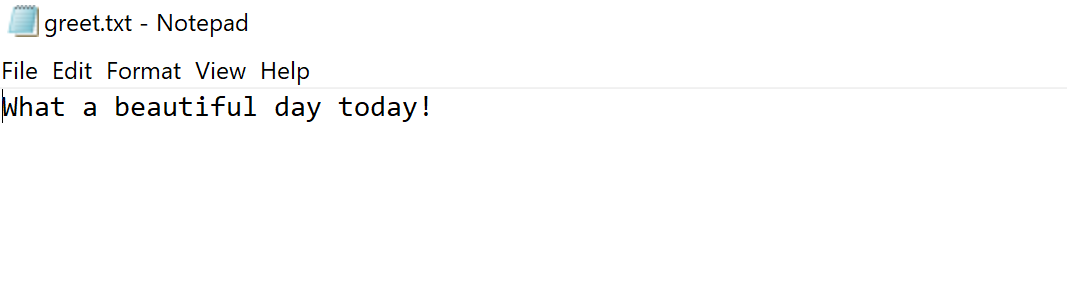
"a" 添加模式 打开文件写入内容时,会在已有文件的末尾添加文本
以 "a" 添加模式打开文件,并写入内容
greetFile = open("D:\\python programming\\python_programming_basic_extra\\file\\greet.txt", "a")
greetFile.write("\nWhere are you going today? Do you have any plans?")
greetFile.close()

read() 读取文件内容
返回一个字符串,为文本内容
以读模式打开
greetFile = open ("D:\\python programming\\python_programming_basic_extra\\file\\greet.txt","r" )
read(),返回一个字符串返回,为文本内容
readlines(),返回一个字符串列表,元素为每一行内容
greet_context = greetFile.read()
print(greet_context)
greetFile.close()
打印结果: What a beautiful day today!
Where are you going today? Do you have any plans?
readlines() 按行读取内容
返回一个字符串列表,元素为每一行内容
使用read()读取完后,如果不关闭文件直接使用readlines()再次读取,读取到的是\[\]空集合
以读模式打开
greetFile = open("D:\\python programming\\python_programming_basic_extra\\file\\greet.txt", "r")
greet_context_list = greetFile.readlines()
print(greet_context_list)
greetFile.close()
打印结果:'What a beautiful day today!\\n', 'Where are you going today? Do you have any plans?'
Shelve持久化数据
这里仅简单使用这个模块,后续会整理pickle、shelve、dbm等持久化的内容。
"Shelf" 是一种持久化的类似字典的对象。基于 pickle 模块实现数据的序列化和反序列化
Shelve 模块,可以将Python 程序中的变量保存到二进制的shelf 文件中。程序就可以从硬盘中恢复变量的数据。
创建文件时,如果你需要在Notepad 或TextEdit 这样的文本编辑器中读取它们,上面的纯文本就非常有用。但是,如果想要保存Python 程序中的数据,就需要使用shelve 模块。
使用shelve需要先导入Shelve模块
导入Shelve模块
import shelve
shelve.open() 打开一个持久化字典
open(filename, flag='c', protocol=None, writeback=False),打开持久化字典。
adb = shelve.open("dbs\\animal")
print("adb's type is : ", type(adb)) # adb's type is : <class 'shelve.DbfilenameShelf'>
调用shelve.open()之后,会在给定的路径中(dbs)创建几个名为animal的文件
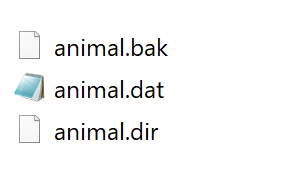
四个参数简单介绍:
filename下层数据库的基准文件名。会为 filename 添加一个扩展名并且可能创建更多的文件。 默认情况下,下层数据库会以读写模式打开。
flag一个可选形参
'r'(default): Open existing database for reading only.
- (默认模式)以只读方式打开现有数据库。
'w': Open existing database for reading and writing.
- 以读写方式打开现有数据库。
'c': Open database for reading and writing, creating it if it doesn't exist.
- 以读写方式打开数据库,如果数据库不存在则创建。
'n': Always create a new, empty database, open for reading and writing.
- 始终创建一个新的空数据库,并以读写方式打开
protocol 一个Integer, 默认情况下会以pickle.DEFAULT_PROTOCOL 创建的 pickle 来序列化值。
writeback,可选形参(True or False),
由于 Python 语义的限制,Shelf 对象无法确定一个可变的持久化字典条目在什么时间被修改。默认情况下 只有 在被修改对象再赋值给 shelf 时才会写入该对象 。
如果writeback 设为 True,那所有被访问的条目都会被缓存在内存中,然后在 sync() 和 close() 时被写入;这样方便于修改持久化字典中可变条目,但是如果访问的条目很多,就会消耗大量内存作为缓存,也会使得关闭操作变得非常缓慢,因为所有被访问的条目都需要写回到字典(无法确定被访问的条目中哪个是可变的,也无法确定哪个被实际修改了)。
Shelf 对象支持字典 所支持的大多数方法和运算(除了拷贝、构造器以及 | 和 |= 运算符)。所以可以向操作字典那样来操作Shelf对象
添加数据
定义cats集合
cats = "Zophie", "Pooka", "Simon"
将cats数据持久化到adb
adb"cats" = cats
根据key获取对应的value
根据key获取值
temp= adb"cats"
print(temp) # 'Zophie', 'Pooka', 'Simon'
在writeback为默认值False时,向cats集合中追加数据
根据key获取值
temp= adb"cats"
向temp中添加一个"blacky"
temp.append("blacky")
print(adb"cats") # 'Zophie', 'Pooka', 'Simon'
可以看到在writeback为False时,在append之后,adb中cats对应的value中并没有blacky这个值。
如果将writeback设置为True后,append之后,blacky出现在adb的cats对应的value中
adb = shelve.open("dbs\\animal", writeback=True)
temp= adb"cats"
temp.append("blacky")
print(adb"cats") #'Zophie', 'Pooka', 'Simon', 'blacky'
keys(),获取所有key
获取所有key
keys = list(adb.keys()) # 将获取到的key格式化为list
print(keys) # 'cats'
values(),获取所有value
获取所有值
values = list(adb.values())
print(values) # \['Zophie', 'Pooka', 'Simon', 'blacky']
close() 关闭
adb.close()
python
# Shelve 持久化数据
import shelve

# adb = shelve.open("dbs\\animal", writeback=True)
adb = shelve.open("dbs\\animal")
print("adb's type is : ", type(adb))

# 定义cats集合
cats = ["Zophie", "Pooka", "Simon"]
# 定义dogs集合
dogs = ["Snoopy", "Jerry", "Dody"]

# 将cats数据持久化到adb
adb["cats"] = cats
# 将dogs持久化到adb
adb["dogs"] = dogs


# 根据key获取值
temp= adb["cats"]
print(temp)
# 向cats中添加一个"blacky"
temp.append("blacky")
print(adb["cats"])

# 获取所有key
keys = list(adb.keys())
print(keys)

# 获取所有值
values = list(adb.values())
print(values)